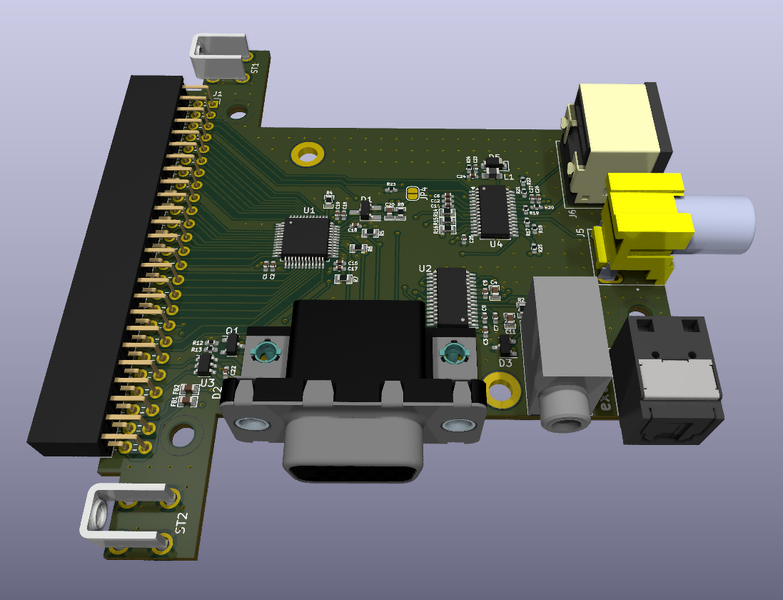
OSSC Pro

The place for all discussion on gaming hardware
Post Reply
User avatar
Zacabeb
Posts: 39
Joined: Sun Apr 21, 2024 8:53 pm

Re: OSSC Pro

Post by Zacabeb »

WobblingPixels wrote: Fri Nov 28, 2025 5:54 pm Took me a while but it's finally finished :)

OSSC Pro NTSC & PAL Profiles 2025-11-28 for over 14 systems
Includes CRT profiles. Almost every profile has two sets of settings (Scaler and Linemultiplier Adaptive mode).
For more info and additional optimization check the video tutorial and spreadsheet guide.

1. Update firmware to 0.81 or newer (MUST!):
https://github.com/marqs85/ossc_pro/releases

2. Profiles download:
https://drive.google.com/file/d/1qJSigg ... 117lMtKHhP

3. Video + Installation tutorial:
https://www.youtube.com/watch?v=kJUMBzgd-84

4. Spreadsheet guide:
https://docs.google.com/spreadsheets/d/ ... id=0#gid=0
Amazing work! :)

When it comes to the original Xbox, the pixel clock and internal scaling vary with the video encoder used. With the Xcalibur, I've derived that games rendered at 720x480 pixels are output with a 13.5 MHz (480i)/27 MHz (480p) pixel clock and games rendered at 640x480 are output with a 12.27 MHz/24.55 MHz pixel clock. With the Focus Enhancements encoder, timings derived by Classic Console Upscaler Wiki contributor Sestain have a fractional clock, suggesting that it scales 640 pixels to 720 in order to output that too at 13.5 MHz/27 MHz.

https://junkerhq.net/xrgb/index.php?tit ... c_settings

So there might need to be two or even three different optimized profile sets for the original Xbox to cover the different video encoders.
Sapoor
Posts: 3
Joined: Sat Jun 07, 2025 12:04 pm

Re: OSSC Pro

Post by Sapoor »

WobblingPixels wrote: Fri Nov 28, 2025 5:54 pm Took me a while but it's finally finished :)
Thanks! Makes using the OSSC a lot easier. I like the CRT profiles as well. Shadowmasks look great and pixels are nicely rounded. I'm finding the actual scanlines a bit too pronounced for my taste, but it's not that difficult to adjust them. Great work!
User avatar
WobblingPixels
Posts: 58
Joined: Fri Aug 20, 2021 8:23 pm

Re: OSSC Pro

Post by WobblingPixels »

@All thanks!
Zacabeb wrote: Tue Dec 02, 2025 8:16 pm
Amazing work! :)

When it comes to the original Xbox, the pixel clock and internal scaling vary with the video encoder used. With the Xcalibur, I've derived that games rendered at 720x480 pixels are output with a 13.5 MHz (480i)/27 MHz (480p) pixel clock and games rendered at 640x480 are output with a 12.27 MHz/24.55 MHz pixel clock. With the Focus Enhancements encoder, timings derived by Classic Console Upscaler Wiki contributor Sestain have a fractional clock, suggesting that it scales 640 pixels to 720 in order to output that too at 13.5 MHz/27 MHz.

https://junkerhq.net/xrgb/index.php?tit ... c_settings

So there might need to be two or even three different optimized profile sets for the original Xbox to cover the different video encoders.
I thought about to add 640 profiles but It's a bit complicated. The LM-A and scaler mode don't have any 640 xbox presets. So the only option left is the LM pure mode linedoubled to 960p/1920x1440p and 1152 (PAL) which would result in low(er) TV compatiblity. That is something I would like to avoid with my profiles.

So to my understanding XBOX revisions with the Xcalibur decoder output at 640x480? Have you tried to set 858 with 640x480 games and dial in?
User avatar
Zacabeb
Posts: 39
Joined: Sun Apr 21, 2024 8:53 pm

Re: OSSC Pro

Post by Zacabeb »

WobblingPixels wrote: Wed Dec 03, 2025 4:19 pm So to my understanding XBOX revisions with the Xcalibur decoder output at 640x480? Have you tried to set 858 with 640x480 games and dial in?
I have, which is how I came across it. :)

858 samples/line doesn't give correct pixel sampling with 640x480 games through the Xcalibur while the square pixel standard 780 samples/line does. Because of the different sample rates, the picture is also a bit narrower with 640x480 games than with 720x480 games, but not as narrow as it would be at a 13.5 MHz/27 MHz rate.
User avatar
marqs
Posts: 1139
Joined: Sat Dec 15, 2012 12:11 pm
Location: Finland

Re: OSSC Pro

Post by marqs »

XtraSmiley wrote: Sun Nov 30, 2025 3:11 pm Hey Marqs, it's been a long time, is the rotation feature still on the "to do" list and if so, do you have an ETA for it? It's still my must have feature for any scaler!
It's still on TODO list, but with a hobby projects like Pro everything is just best effort. Trying to define and meet ETAs is basically same as imposing deadlines with associated stress and most people have already enough of that in their day jobs. I was planning to start framebuffer related work (mainly rotation & lower scaler latency) earlier this year but RF support for Legacy AV and OSSC Classic fw restructuring took most of my bandwidth. Both of those are complete now but there's still constant flow of smaller feature requests for Pro with several bugs needing deeper debug which make it harder to start something that needs full attention for longer period of time.
XtraSmiley
Posts: 711
Joined: Fri Apr 20, 2018 9:22 am
Location: Washigton DC

Re: OSSC Pro

Post by XtraSmiley »

marqs wrote: Thu Dec 11, 2025 10:58 pm
XtraSmiley wrote: Sun Nov 30, 2025 3:11 pm Hey Marqs, it's been a long time, is the rotation feature still on the "to do" list and if so, do you have an ETA for it? It's still my must have feature for any scaler!
It's still on TODO list, but with a hobby projects like Pro everything is just best effort. Trying to define and meet ETAs is basically same as imposing deadlines with associated stress and most people have already enough of that in their day jobs. I was planning to start framebuffer related work (mainly rotation & lower scaler latency) earlier this year but RF support for Legacy AV and OSSC Classic fw restructuring took most of my bandwidth. Both of those are complete now but there's still constant flow of smaller feature requests for Pro with several bugs needing deeper debug which make it harder to start something that needs full attention for longer period of time.
No problem and I fully understand, thank you for the reply and of course for all you do. No pressure please, it's just good to know what and how you are thinking!
User avatar
Zacabeb
Posts: 39
Joined: Sun Apr 21, 2024 8:53 pm

Re: OSSC Pro

Post by Zacabeb »

Legacy AV In boards with RF are now available for purchase at VideoGamePerfection.

https://videogameperfection.com/product ... -for-ossc/

The RF input supports PAL B/G, PAL I, and NTSC M.

Note that as discussed before in the thread, to reduce interference a well shielded cable is recommended; preferably one listed as following the RG6 specification, being triple shielded, and/or suited to SAT use. Also note that the RF input on the board has an F terminal, so for consoles with an RCA output for RF an adapter from male RCA to female F is needed.
User avatar
marqs
Posts: 1139
Joined: Sat Dec 15, 2012 12:11 pm
Location: Finland

Re: OSSC Pro

Post by marqs »

There is also ongoing evaluation for a couple new & old ideas regarding expansion cards, and next firmware release is planned towards end of the month. It includes support for display EDID dumping, NES .pal loading (for Lumacode), UI improvements (customizable remote keys, OLED contrast/timeout control) and some A-LM/SCL improvements/fixes.
2mg
Posts: 74
Joined: Wed Jun 26, 2019 5:37 am

Re: OSSC Pro

Post by 2mg »

Zacabeb wrote: Wed Feb 11, 2026 7:37 pm Legacy AV In boards with RF are now available for purchase at VideoGamePerfection.

https://videogameperfection.com/product ... -for-ossc/

The RF input supports PAL B/G, PAL I, and NTSC M.

Note that as discussed before in the thread, to reduce interference a well shielded cable is recommended; preferably one listed as following the RG6 specification, being triple shielded, and/or suited to SAT use. Also note that the RF input on the board has an F terminal, so for consoles with an RCA output for RF an adapter from male RCA to female F is needed.
Mother of god, RF lives?!

For Belling-Lee you'd just need a "PAL TV RF" > F terminal RF converter, or a little DIY to your RF coax cable?
User avatar
Zacabeb
Posts: 39
Joined: Sun Apr 21, 2024 8:53 pm

Re: OSSC Pro

Post by Zacabeb »

2mg wrote: Sun Feb 22, 2026 12:11 am Mother of god, RF lives?!

For Belling-Lee you'd just need a "PAL TV RF" > F terminal RF converter, or a little DIY to your RF coax cable?
A mod to an existing good quality cable would work, but the connector too needs to be good quality and attach properly to maintain shielding and correct impedance.
User avatar
SGGG2
Posts: 826
Joined: Thu Dec 31, 2009 1:03 am
Location: East Coast, US

Re: OSSC Pro

Post by SGGG2 »

marqs wrote: Wed Aug 20, 2025 3:38 pm
SGGG2 wrote: Sun Aug 17, 2025 6:30 pm Any word on the lag tester module?
I'm willing to port/develop required firmware if someone is willing to design the sensor module. The things I miss from currently available lag testers are capability to measure pure display latency (without scanout delay from top) and strobe length (impulse / roling scan / BFI displays). These were already present in the original OSSC Latency tester but that remained DIY-only.
If it's reasonably feasable to port Mister Laggy to the OSSC Pro, we'd have a cheap, readily availible lag tester (provided it's able to connect to the USB port.)

https://github.com/MiSTer-devel/MiSTerLaggy_MiSTer
https://www.tindie.com/products/pbretro/mister-laggy/
2mg
Posts: 74
Joined: Wed Jun 26, 2019 5:37 am

Re: OSSC Pro

Post by 2mg »

Zacabeb wrote: Sun Feb 22, 2026 12:52 pm
2mg wrote: Sun Feb 22, 2026 12:11 am Mother of god, RF lives?!

For Belling-Lee you'd just need a "PAL TV RF" > F terminal RF converter, or a little DIY to your RF coax cable?
A mod to an existing good quality cable would work, but the connector too needs to be good quality and attach properly to maintain shielding and correct impedance.
Any particular in mind?
If there are some, that could be mentioned in the shop too.
User avatar
BuckoA51
Posts: 3424
Joined: Sat Oct 02, 2010 10:08 am
Location: Ireland
Contact:

Re: OSSC Pro

Post by BuckoA51 »

SGGG2 wrote: Mon Feb 23, 2026 4:07 pm
marqs wrote: Wed Aug 20, 2025 3:38 pm
SGGG2 wrote: Sun Aug 17, 2025 6:30 pm Any word on the lag tester module?
I'm willing to port/develop required firmware if someone is willing to design the sensor module. The things I miss from currently available lag testers are capability to measure pure display latency (without scanout delay from top) and strobe length (impulse / roling scan / BFI displays). These were already present in the original OSSC Latency tester but that remained DIY-only.
If it's reasonably feasable to port Mister Laggy to the OSSC Pro, we'd have a cheap, readily availible lag tester (provided it's able to connect to the USB port.)

https://github.com/MiSTer-devel/MiSTerLaggy_MiSTer
https://www.tindie.com/products/pbretro/mister-laggy/
I recall talking to Dan about adding this to Morph and I think the conclusion was it's not that simple as you need very low latency on the USB. The expansion connector could definitely do it though.
OSSC Forums - http://www.videogameperfection.com/forums
Please check the Wiki before posting about Morph, OSSC, XRGB Mini or XRGB3 - http://junkerhq.net/xrgb/index.php/Main_Page
User avatar
SGGG2
Posts: 826
Joined: Thu Dec 31, 2009 1:03 am
Location: East Coast, US

Re: OSSC Pro

Post by SGGG2 »

Can the expansion port support USB protcols? If so, get to it! :P'

I wonder if game ID is doable, either with expansion port or a USB network adapter...
User avatar
BuckoA51
Posts: 3424
Joined: Sat Oct 02, 2010 10:08 am
Location: Ireland
Contact:

Re: OSSC Pro

Post by BuckoA51 »

Mods that send the gameID as HDMI packets I believe that could be supported. Having a big text file on the SD card to look up the name is one way, but even if you didn't do that and just used the hex code that could be enough for the OSSC Pro to tell one game for another and therefore choose the appropriate profile.

I don't know if that's on the roadmap currently though or how challenging it would be to implement.
OSSC Forums - http://www.videogameperfection.com/forums
Please check the Wiki before posting about Morph, OSSC, XRGB Mini or XRGB3 - http://junkerhq.net/xrgb/index.php/Main_Page
User avatar
marqs
Posts: 1139
Joined: Sat Dec 15, 2012 12:11 pm
Location: Finland

Re: OSSC Pro

Post by marqs »

BuckoA51 wrote: Wed Feb 25, 2026 9:56 am
SGGG2 wrote: Mon Feb 23, 2026 4:07 pm
marqs wrote: Wed Aug 20, 2025 3:38 pm I'm willing to port/develop required firmware if someone is willing to design the sensor module. The things I miss from currently available lag testers are capability to measure pure display latency (without scanout delay from top) and strobe length (impulse / roling scan / BFI displays). These were already present in the original OSSC Latency tester but that remained DIY-only.
If it's reasonably feasable to port Mister Laggy to the OSSC Pro, we'd have a cheap, readily availible lag tester (provided it's able to connect to the USB port.)

https://github.com/MiSTer-devel/MiSTerLaggy_MiSTer
https://www.tindie.com/products/pbretro/mister-laggy/
I recall talking to Dan about adding this to Morph and I think the conclusion was it's not that simple as you need very low latency on the USB. The expansion connector could definitely do it though.
USB D+/D- are directly connected to FPGA on Pro so it'd be possible to directly drive & read the sensor without any overhead/latency associated with USB protocol. On the other hand that would require bypassing USB Phy/Host logic and make the design a bit more messy.
User avatar
SGGG2
Posts: 826
Joined: Thu Dec 31, 2009 1:03 am
Location: East Coast, US

Re: OSSC Pro

Post by SGGG2 »

If you can't wait for a dedicated lag tester, I built a Tang Nano Time Sleuth for about $37 (without case). It supports resolutions up to 1080i, however, 1080i can be output as lagless 1080p using "non-interlace restore" (pure or adaptive mode), and the USB port on the OSSC Pro even provides power with a simple USB-C to A cable. All in all, this is ideal for a low cost, non-native solution. :)

https://www.youtube.com/watch?v=UXOC4lAyS5Q&pp
GameGuru
Posts: 7
Joined: Sat Oct 05, 2024 2:24 am

Re: OSSC Pro

Post by GameGuru »

Hey everyone, has there been any development with scanline alignment in scaler mode? Using Integer scaling seems to be the only algorithm that doesn't break the feature. Scaling away the garbage borders on Genesis games for example will always result in scanlines falling between pixels and looking ugly. It also prevents accurate aspect ratio adjustments to be done to correct for non square pixels.

Thanks.
User avatar
Zacabeb
Posts: 39
Joined: Sun Apr 21, 2024 8:53 pm

Re: OSSC Pro

Post by Zacabeb »

GameGuru wrote: Sun Mar 22, 2026 4:44 pm Hey everyone, has there been any development with scanline alignment in scaler mode? Using Integer scaling seems to be the only algorithm that doesn't break the feature. Scaling away the garbage borders on Genesis games for example will always result in scanlines falling between pixels and looking ugly. It also prevents accurate aspect ratio adjustments to be done to correct for non square pixels.

Thanks.
It would require inserting the scanlines before scaling, requiring an intermediate linedoubling step. But until such a feature is implemented, it's possible to use custom MiSTer scaling filters that have scanlines already baked into the filter coefficients to achieve a similar effect. You basically combine whichever scaling algorithm you prefer for horizontal scaling with a custom filter for vertical scaling.

A selection of MiSTer scaling filters with integrated scanlines can be found here:
https://github.com/MiSTer-devel/Filters ... 20Standard (standard brightness)
https://github.com/MiSTer-devel/Filters ... 20Brighter (boosted brightness)

Download any of those and put them into a folder named scl_alg on an SD card. I personally recommend Scan_Br_105_75.txt and Scan_Br_105_90.txt from the 105 pct Brightness set as those don't appear too dark.

You must also create a config file to tell the OSSC Pro which algorithms to combine for the custom scaling filter. That needs to be a plain text file with a .cfg file extension and is also put into the scl_alg folder. It has two lines, the first stating which algorithm you want to use for horizontal scaling, and the second stating the one for vertical. Each algorithm can be either a default one (nearest, lanczos3, lanczos3_13, lanczos4, gs_sharp, gs_medium, gs_soft) or custom one (a MiSTer scaling algorithm file with the name ending in .txt.)

For example, if you want to use Lanczos3 for horizontal scaling and the aforementioned Scan_Br_105_75.txt for vertical scaling, put the following in a text file named e.g. Scanlines75.cfg:

Code: Select all

lanczos3
Scan_Br_105_75.txt
Once you've copied your .cfg file(s) and any .txt files they use into the scl_alg folder, they will be listed on the OSSC Pro in the Custom SCL alg menu.

Hoping I managed to make sense of how it works. :)
GameGuru
Posts: 7
Joined: Sat Oct 05, 2024 2:24 am

Re: OSSC Pro

Post by GameGuru »

Hi Zacabeb, that does exactly what I wanted thank you! I did have a question though. If I understand correctly you have to specify a scaling algorithm for both vertical and horizontal right? If that's the case how is the vertical being adjusted? Is it just using a nearest neighbor type scale or is it something else? Im not familiar with how the MiSTer filters work and I'd love an explanation if possible. Thanks!
User avatar
Zacabeb
Posts: 39
Joined: Sun Apr 21, 2024 8:53 pm

Re: OSSC Pro

Post by Zacabeb »

GameGuru wrote: Sun Apr 05, 2026 2:40 am Hi Zacabeb, that does exactly what I wanted thank you! I did have a question though. If I understand correctly you have to specify a scaling algorithm for both vertical and horizontal right? If that's the case how is the vertical being adjusted? Is it just using a nearest neighbor type scale or is it something else? Im not familiar with how the MiSTer filters work and I'd love an explanation if possible. Thanks!
A MiSTer scaling filter is just a list of coefficients describing how to combine the four source pixels nearest the target pixel, each row of coefficients representing the target pixel being a different distance between source pixels. With four coefficients it's possible to implement various scaling algorithms, including nearest neighbor, bilinear, bicubic, and narrow windowed sinc algorithms like Lanczos3. The default scaling filters in the OSSC Pro's scaler mode already work the same way.

In the MiSTer filters that have embedded scanlines, they are implemented simply by scaling down the coefficients near the center of the list to produce a darker color or black. They look to simply be a bilinear kernel multiplied by a cosine.

Being part of the scaler coefficients, the scanlines end up spontaneously aligning with no manual alignment necessary. Intensity on the other hand can only be adjusted by creating multiple cfg files referencing txt files in which the scanlines already have different intensity. :)
GameGuru
Posts: 7
Joined: Sat Oct 05, 2024 2:24 am

Re: OSSC Pro

Post by GameGuru »

Zacabeb wrote: Sun Apr 05, 2026 8:45 pm
GameGuru wrote: Sun Apr 05, 2026 2:40 am Hi Zacabeb, that does exactly what I wanted thank you! I did have a question though. If I understand correctly you have to specify a scaling algorithm for both vertical and horizontal right? If that's the case how is the vertical being adjusted? Is it just using a nearest neighbor type scale or is it something else? Im not familiar with how the MiSTer filters work and I'd love an explanation if possible. Thanks!
A MiSTer scaling filter is just a list of coefficients describing how to combine the four source pixels nearest the target pixel, each row of coefficients representing the target pixel being a different distance between source pixels. With four coefficients it's possible to implement various scaling algorithms, including nearest neighbor, bilinear, bicubic, and narrow windowed sinc algorithms like Lanczos3. The default scaling filters in the OSSC Pro's scaler mode already work the same way.

In the MiSTer filters that have embedded scanlines, they are implemented simply by scaling down the coefficients near the center of the list to produce a darker color or black. They look to simply be a bilinear kernel multiplied by a cosine.

Being part of the scaler coefficients, the scanlines end up spontaneously aligning with no manual alignment necessary. Intensity on the other hand can only be adjusted by creating multiple cfg files referencing txt files in which the scanlines already have different intensity. :)
Awesome thank you so much! I've been playing around with multiple sources and they're all looking so great with these filters plus the aperture grille shader mask. It really looks like a CRT but with the clarity of an RGB connection. I think there's a filter to simulate the composite smear for Genesis I still need to try. That's the only console I'd argue doesn't benefit from RGB considering most games designed their graphics around dithering and composite video.
User avatar
marqs
Posts: 1139
Joined: Sat Dec 15, 2012 12:11 pm
Location: Finland

Re: OSSC Pro

Post by marqs »

It's been a while since last update but there are several small things which have been added or are under construction after 0.81 fw release. A new batch of boards is currently in manufacturing and should be available in a few weeks. Next firmware will also be released before that which includes UI improvements (char OLED contrast & timeout, improved profile cross-compatibility, custom remote keys, display EDID extract), Lumacode finalization, new/updated LM mode presets, SCL aspect ratio adjustment for optimized sampling presets and support for revised extra_av_output expansion. The new extra_av_output card (when assembled with optional parts) provides CVBS+S-Video outputs for niche of the niche. It supports 240p, 288p, 480i and 576i outputs using PAL/PAL60/NTSC standards and production version will be usable simultaneously with RGBS VGA output (in same output mode). More details on pricing and availability will be provided in near future.

Image
charlizardon
Posts: 23
Joined: Wed Mar 04, 2020 12:05 pm

Re: OSSC Pro

Post by charlizardon »

That is incredible. Not needing any additional peripherals when using composite and S-video in a downscaling/encoding scenario is a big deal.

I don't even need composite or S-video output but will try to pick one up anyway

Two questions:

1) Any chance that CVBS and Y/C can also be used as inputs software/hardware wise?

2) Will you release updated .stl files on a modified case?
User avatar
Gunstar
Posts: 655
Joined: Wed Apr 09, 2014 10:29 am
Location: UK

Re: OSSC Pro

Post by Gunstar »

S-Video/CVBS input over the SCART connector isn't possible, is it? Would love to do something like S-Video in> OSSC PRO feature (e.g. hypothetical/future composite blend filter)> S-Video out over this new Extra AV module.
User avatar
marqs
Posts: 1139
Joined: Sat Dec 15, 2012 12:11 pm
Location: Finland

Re: OSSC Pro

Post by marqs »

The 0.82 firmware is now released:

* UI improvements
** character OLED contrast & timeout options
** improved profile cross-compatibility
** custom remote keys
** display EDID extract
* Preset updates
** New 288p A-LM sampling presets
** Improved GBI Line3x Generic P-LM preset
** Added alternative 1080p100 presets
* Lumacode support finalized
* Support for updated Extra AV out expansion
* Added Mono audio ADC option
* Fixed BFI for interlaced sources
* Improved XNOR csync combiner
* SCL aspect adjustment added for optimized sampling presets
Gunstar wrote: Mon May 11, 2026 4:16 pm S-Video/CVBS input over the SCART connector isn't possible, is it? Would love to do something like S-Video in> OSSC PRO feature (e.g. hypothetical/future composite blend filter)> S-Video out over this new Extra AV module.
charlizardon wrote: Mon May 11, 2026 6:29 am 1) Any chance that CVBS and Y/C can also be used as inputs software/hardware wise?
2) Will you release updated .stl files on a modified case?
It's not possible to feed CVBS or Y/C directly into Pro or Extra AV out card. I'll need to get in touch with original designer and request update to both Legacy and Extra AV cards
Sapoor
Posts: 3
Joined: Sat Jun 07, 2025 12:04 pm

Re: OSSC Pro

Post by Sapoor »

Thanks for your continuous work, marqs!
User avatar
Gunstar
Posts: 655
Joined: Wed Apr 09, 2014 10:29 am
Location: UK

Re: OSSC Pro

Post by Gunstar »

marqs wrote: Thu May 21, 2026 8:28 pm It's not possible to feed CVBS or Y/C directly into Pro or Extra AV out card. I'll need to get in touch with original designer and request update to both Legacy and Extra AV cards
That would be great if such a card could be made. Thank you, marqs.
charlizardon
Posts: 23
Joined: Wed Mar 04, 2020 12:05 pm

Re: OSSC Pro

Post by charlizardon »

Gunstar wrote: Fri May 22, 2026 10:18 am
marqs wrote: Thu May 21, 2026 8:28 pm It's not possible to feed CVBS or Y/C directly into Pro or Extra AV out card. I'll need to get in touch with original designer and request update to both Legacy and Extra AV cards
That would be great if such a card could be made. Thank you, marqs.
I think he meant to get in touch with the original designer of the .stl case files. Two different answers.
User avatar
BuckoA51
Posts: 3424
Joined: Sat Oct 02, 2010 10:08 am
Location: Ireland
Contact:

Re: OSSC Pro

Post by BuckoA51 »

Gunstar wrote: Fri May 22, 2026 10:18 am
marqs wrote: Thu May 21, 2026 8:28 pm It's not possible to feed CVBS or Y/C directly into Pro or Extra AV out card. I'll need to get in touch with original designer and request update to both Legacy and Extra AV cards
That would be great if such a card could be made. Thank you, marqs.
You could always just buy two OSSC Pros :mrgreen:
OSSC Forums - http://www.videogameperfection.com/forums
Please check the Wiki before posting about Morph, OSSC, XRGB Mini or XRGB3 - http://junkerhq.net/xrgb/index.php/Main_Page
Post Reply