JVC TM-H and DT-V thread

The place for all discussion on gaming hardware
Namingway_PL
Posts: 120
Joined: Fri Jul 01, 2016 9:14 am
Location: Poland

Re: JVC TM-H and DT-V thread

Post by Namingway_PL »

mimylovesjapan wrote: Sat Jan 04, 2025 1:46 pm Found that my XPC-4 does a fantastic work in passing OSSC 240p through to the DT-V1710.
The XPC-4 You say? I need to try to get one of those. You seem to have the same goal as I had some time ago ;)
As for the most perfect image on the DT-V, I got best resoults form the MiSTer FPGA direct video output. Basically zero wobble but some cores or certain games may exhibit flagging. ( I got some slight flagging on the SF Zero 3 on the Saturn core but other Saturn Games I played were fine).

As for the Extron RGB Interface devices. They usually work fine, but are problematic to use, need to be connected to power etc. Also at this point they are quite old. I would Also recommend getting a Sync Strike device. it's much easier to use, can be powered from the Scart cable and it will preety much give the same resoults as the Extron. Also it can be used in tandem with the Extron Interface.

For connecting HDMI devices to the DT-V. Most cheap DAC's that are none powered will have black crush and the image will have the screen cut at the left side. (they pretty much all are crapp tbh). The best You can get for this for the DT-V is the HDfury 3. it has some great features like full range RGB output, the "left cut" isse is resolved, and no black crush. Do not buy older HDfury devices like the Hdfury nano GX or HDfury 2 as they also will have the image cut at the left side in 720p / 1080i.

HD SDI is fine, but you are limited 720p/1080i (no 480p) and the color space is 4:2:2, and HDCP can be problematic so a HDfury 3 is a much better choice.
User avatar
mimylovesjapan
Posts: 177
Joined: Wed Oct 14, 2015 1:29 pm
Location: Japan, Osaka

Re: JVC TM-H and DT-V thread

Post by mimylovesjapan »

Namingway_PL wrote: Thu Feb 20, 2025 9:01 am
Thanks for the advices !
For now, I have the perfect combination with
OSSC + XPC-4 (passthrough mode) + Extron for : Saturn/PSX/PS2/Dreamcast/PCengine
OSSC + XPC-4 (RGB 480x640 mode) + Extron for my PC-98
XPC-4 (passthrough mode) + Extron for HDMI sources 480p to 1080i (PS3, gamecube)
RGB2VGA only for Megadrive/SNES
Everything y perfect !
To connect everything I use some VGA/DVI/SCART switchers !
User avatar
kitty666cats
Posts: 1355
Joined: Tue Nov 05, 2019 2:03 am
Location: Massachusetts, USA

Re: JVC TM-H and DT-V thread

Post by kitty666cats »

Don’t listen to the person above about getting a Sync Strike or spending too much $ on a HDFury 3; there’s zero reason to get a Sync Strike if you have that SCART2VGA. A HDFury 3 is potentially worth it, but there’s plenty of HDMI to VGAs that support full range RGB/the image shift with the Extron *should* help with everything. 1080i is just naturally finicky with a lot of devices.

Also I’ve never heard of someone using a XPC-4 on passthrough mode to help get a stable sync signal, but tbh that’s a really clever idea you thought of right there
Namingway_PL
Posts: 120
Joined: Fri Jul 01, 2016 9:14 am
Location: Poland

Re: JVC TM-H and DT-V thread

Post by Namingway_PL »

kitty666cats wrote: Tue Feb 25, 2025 2:41 am Don’t listen to the person above about getting a Sync Strike or spending too much $ on a HDFury 3; there’s zero reason to get a Sync Strike if you have that SCART2VGA. A HDFury 3 is potentially worth it, but there’s plenty of HDMI to VGAs that support full range RGB/the image shift with the Extron *should* help with everything. 1080i is just naturally finicky with a lot of devices.
Why not listen to my suggestins? What's wrong with the Sync Strike? It's a great and simple device for the DT-V and easy to use. I didn't say its mandatory or anything like that. The HDfury is a bit hard to find these days and a bit expensive but still it's pretty much the best DAC that You can get for the DT-V. But if You know about some alternatives please share. I would get one for myself incase my HDfury 3 dies someday.

As for the image cut on the left side, the Extron won't help with that, as its not a matter of shifting the screen. If Your DAC does that there is nothing You can do about it. Your only option would be get a better DAC.

Also what's that about 1080i being finicky? Inever had any issues with 1080i on the DT-V ever. Could You explain what do You mean by that?
User avatar
mimylovesjapan
Posts: 177
Joined: Wed Oct 14, 2015 1:29 pm
Location: Japan, Osaka

Re: JVC TM-H and DT-V thread

Post by mimylovesjapan »

Yes, it may depends on what you have at home. Using HDfury or Syncstrike may have good results, but as I already have a XPC-4, OSSC and SCART2VGA, and the combination I published before was doing great job, it should not be necessary to use HDfury or Syncstrike. I think that's what kitty666 wanted to say !
charlizardon
Posts: 23
Joined: Wed Mar 04, 2020 12:05 pm

Re: JVC TM-H and DT-V thread

Post by charlizardon »

Namingway_PL wrote: Sat Mar 01, 2025 12:42 pm
The HDfury is a bit hard to find these days and a bit expensive but still it's pretty much the best DAC that You can get for the DT-V.

As for the image cut on the left side, the Extron won't help with that, as its not a matter of shifting the screen. If Your DAC does that there is nothing You can do about it. Your only option would be get a better DAC.
I highly appreciate your input. I'm partial to grabbing one second-hand if it ever pops up for a good deal.

I'll stick with the OSSC Pro for now since the advanced timings allow for the needed adjustments. Once those are saved within a profile, any 720p and 1080i signal in need of those adjustments can be recalled on a whim. It also allows for lag free line dropping of 1080p. That way there's no real need to send a 1080i signal directly (unless that would be preferable for any unthinkable reason).

It's true what you say about the cutoff. There's no point in shifting since the horizontal blanking eats into the overscan. From my own testing this is only a problem with 720p and 1080i sources. SD resolutions are unaffected which makes the problem fairly unnoticeable.
Buffi
Posts: 202
Joined: Sat Jul 22, 2006 5:17 pm
Location: Sweden

Re: JVC TM-H and DT-V thread

Post by Buffi »

SamIAm wrote: Sat Mar 10, 2018 2:24 am Stupid question time: Will DT-V monitors display a 24khz signal?
I didn't see anyone conclusively answer this, so I guess I'll do it.
Yes it will display a 24khz signal.

I connected a Epson 386VR pc9801 clone to it through a Extron 203rxi, and the 24khz signal will sync and display.
Geometry needs to be adjusted with the service menu, but then it works great.
fernan1234
Posts: 2275
Joined: Mon Aug 14, 2017 8:34 pm

Re: JVC TM-H and DT-V thread

Post by fernan1234 »

It had been noted earlier. I've used mine with 24khz from PC-88, PC-98, F77AV40, etc.

The monitor uses the geometry settings for 1080i, so you'll need to trade those off or adjust back and forth (I never use mine for HD stuff so it's not an issue for me).
shardsy
Posts: 1
Joined: Fri Mar 07, 2025 7:56 pm

Re: JVC TM-H and DT-V thread

Post by shardsy »

Alright DT-V Experts...

Is anyone familiar with the menu control circuitry? I am having an issue on one of my DT-V1710CG's where I am unable to open the menu or change the volume.

When I select the menu button it will flash the menu for about half a second but it will never stay open. The buttons respond to commands (i.e. I get a display response for volume up/down, menu open, service menu open, reset, etc.) but nothing ever remains open or changes a value. I swapped the front control pwb out with one from another monitor and it exhibits the same behavior so I am assuming it is likely an issue with a component on the signal pwb.

I believe to have ruled out a corrupt memory IC, I swapped the memory IC into my other 1710 and I was able to access the configuration and make changes, when I put the memory IC back into the original monitor those changes are reflected as they should be.

I thought I would see if anyone has run into this or a similar issue before I continue troubleshooting the signal pwb.

Thanks in advance!
serbusfish
Posts: 9
Joined: Tue Oct 17, 2017 10:45 pm

Re: JVC TM-H and DT-V thread

Post by serbusfish »

Can anyone tell me if the '00' versions of the DT-V such as 1700 and 1900 models have problems with syncing to certain devices? I've heard that you cannot manually select the sync with these versions of the monitors and the monitor itself decides what sync to use? I really want to pick up a 19" DT-V which seem super rare compared to the 17" models, i'm wondering if a 1900 model pops up it will be worth going for?
Namingway_PL
Posts: 120
Joined: Fri Jul 01, 2016 9:14 am
Location: Poland

Re: JVC TM-H and DT-V thread

Post by Namingway_PL »

serbusfish wrote: Sat Mar 15, 2025 9:54 am I really want to pick up a 19" DT-V which seem super rare compared to the 17" models, i'm wondering if a 1900 model pops up it will be worth going for?
Ofcourse it would be worth it. As 17" DT-Vs are quite common, the 19'' units are somewhat rare. I have both the DT-V1910CG as well as the 1710CG and last Year I also had a DT-V1900CG too. In terms of performance There's not much of a difference between the two. Also both the 00 and 10 can exhibit some sync issues with certain systems so I wouldn't worry too much about that.
shano
Posts: 8
Joined: Sun Oct 06, 2019 11:17 am

Re: JVC TM-H and DT-V thread

Post by shano »

famiac wrote: Wed Aug 16, 2023 9:49 pm I have a parts DT-V1710CG with the signal pwb. It arrived with tube damage so i'm parting it out. Let me know if you're interested
Hey mate wondering if you still have this spare signal board? Would love to buy it. :D
User avatar
amontre
Posts: 28
Joined: Sun May 29, 2016 11:37 am
Location: Malaysia

Re: JVC TM-H and DT-V thread

Post by amontre »

Is there any instructions on how to remove the front bezel for TM-150cg ? I found a donor/non functional set and want to take out its bezel to replace my broken set.
nauseous
Posts: 1
Joined: Tue Jul 01, 2025 9:16 pm

Re: JVC TM-H and DT-V thread

Post by nauseous »

I have a JVC DT-V9L3D which was given to me in a non operational state.

Upon opening it, an inductor on the 9v rail had been pulled and was missing. Replacing this choke the monitor now starts and briefly shows "No Signal" before shutting down again. The SDI light then flashes... According to the manual this is the CRT going into protection mode.

Where I am stumped, it shuts down following the same repeatable sequence after starting.. I have not recapped the board, the few capacitors i did check all seemed to be within spec.

I can communicate with the TV when it is in this faulted stated via RS232 so the cpu is still running. I can issue a startup command via terminal but it just shuts down following the above described sequence. Wondering if anyone has experienced this before.

My next step; the CPU has 3 IRQ lines, I was going to scope these and see if I could find one that was triggering a hi logic level to the CPU.

Thanks All
Namingway_PL
Posts: 120
Joined: Fri Jul 01, 2016 9:14 am
Location: Poland

Re: JVC TM-H and DT-V thread

Post by Namingway_PL »

nauseous wrote: Tue Jul 01, 2025 9:52 pm I
According to the manual this is the CRT going into protection mode.
CRT? That monitor is an LCD.
Anonygoose
Posts: 59
Joined: Thu May 08, 2014 7:55 pm
Location: UAE

Re: JVC TM-H and DT-V thread

Post by Anonygoose »

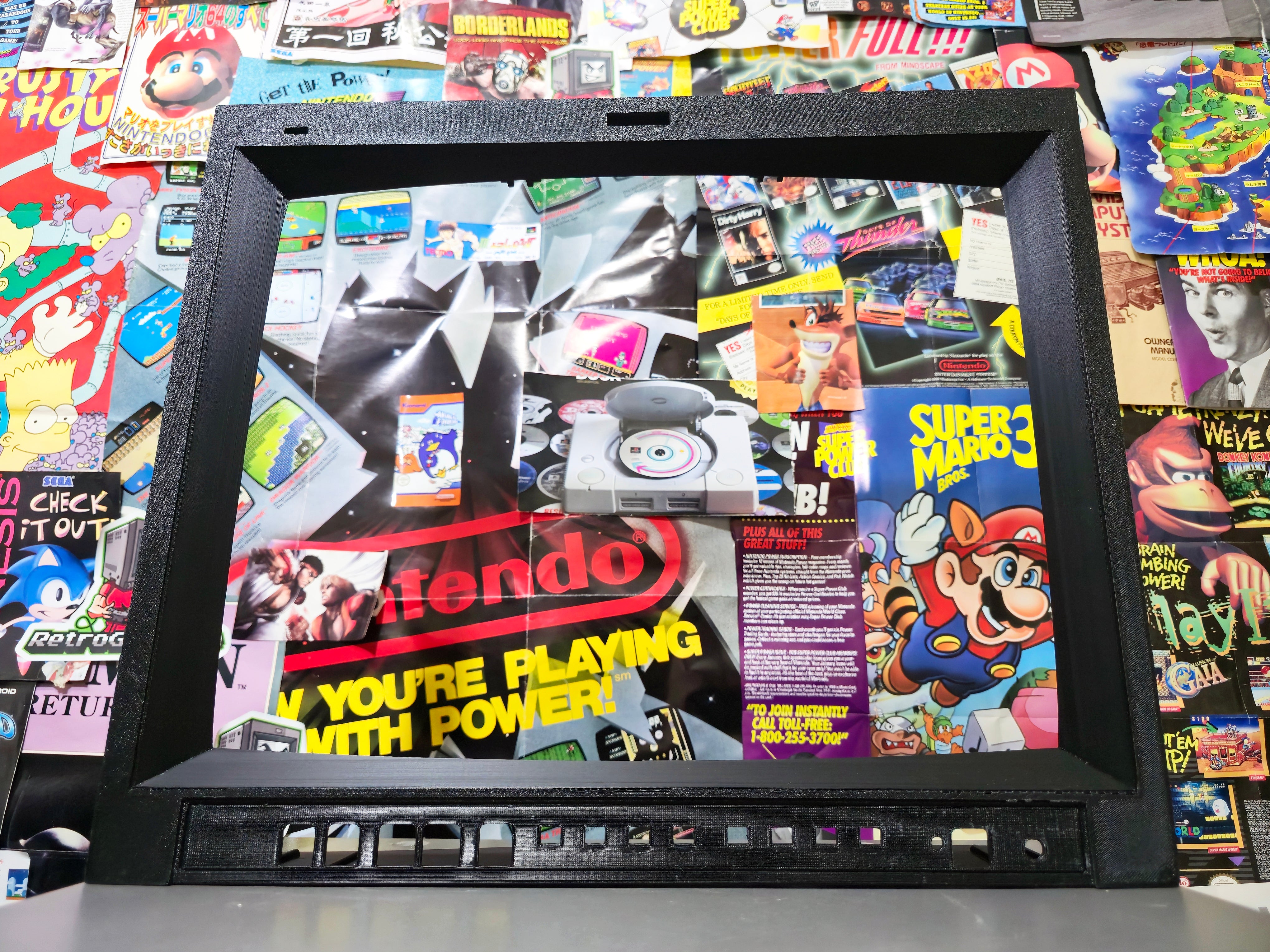
I made replacement 3d printed bezels for the JVC TM-H1950CG and 1900G

https://vsgravity.com/products/jvc-tm-h ... ment-bezel

Image
astato
Posts: 1
Joined: Sun Sep 14, 2025 3:20 pm

Re: JVC TM-H and DT-V thread

Post by astato »

Hi ! My name is Raul from Spain. I recently bought a JVC dt v 1700 cg and it’s a pain with the sync.

I’m trying to connect my rgb pi to my new monitor. The only way I found to do it is using this
https://www.arcadexpress.com/es/353-594 ... g1NTExNTEy

And connect to vga to this clone card https://ebay.us/m/lYOoOL turning LM1881, I have on the top sync issue but I saw in another places also the same problem with this monitor. I bought an Extron 201rxi, and I can’t solve the problem because is always the display in black. I tried with the Extron output in rgbhv rgbs, ddsp on or off, and always the same problem. I was thinking about buying a vga666 for the Rgb and then use a sync slayer 2 on the output of the Extron. What do you think about it ?

I’m almost really close to sell my JVC jaja

Thanks in advance
coderkind
Posts: 120
Joined: Tue May 16, 2017 12:30 pm
Location: London, England

Re: JVC TM-H and DT-V thread

Post by coderkind »

Hi all. Has anyone managed to output video from an iPhone via Apple's Apple USB-C VGA Multiport Adapter to a JVC DT-V? I've recently bought a RetroTINK HD15 to 5BNC + RCA Audio cable and attempted to hook it up via a JVC IF-C01COMG compatible clone card in the back of the monitor, but all I seem to get is a subtle flickering of a rendering line.

My understanding is that you can't set the output resolution of an iPhone via the VGA adapter; iOS automatically negotiates the resolution with the connected display via EDID (Extended Display Identification Data). According to Apple's description, "It supports display resolutions up to 1080p (1920 x 1080) at 60 Hz". Wondering how much work the "...up to" is doing here and whether it might be trying to output 1080p (which I know the JVC can't support)?

Has anyone tried potentially similar 720p/1080i RGBHV going into these displays?

For what it's worth, my Nintendo Wii outputting 480p over component works fine with the monitor.
fernan1234
Posts: 2275
Joined: Mon Aug 14, 2017 8:34 pm

Re: JVC TM-H and DT-V thread

Post by fernan1234 »

coderkind wrote: Sun Sep 28, 2025 9:17 pm Has anyone tried potentially similar 720p/1080i RGBHV going into these displays?
720p/1080i RGBHV would work, but it is very unlikely that your iPhone is outputting either. In fact, impossible for it to output 1080i. Most likely it is defaulting to 1080p.
User avatar
kitty666cats
Posts: 1355
Joined: Tue Nov 05, 2019 2:03 am
Location: Massachusetts, USA

Re: JVC TM-H and DT-V thread

Post by kitty666cats »

astato wrote: Sun Sep 14, 2025 3:26 pm Hi ! My name is Raul from Spain. I recently bought a JVC dt v 1700 cg and it’s a pain with the sync.

I’m trying to connect my rgb pi to my new monitor. The only way I found to do it is using this
https://www.arcadexpress.com/es/353-594 ... g1NTExNTEy

And connect to vga to this clone card https://ebay.us/m/lYOoOL turning LM1881, I have on the top sync issue but I saw in another places also the same problem with this monitor. I bought an Extron 201rxi, and I can’t solve the problem because is always the display in black. I tried with the Extron output in rgbhv rgbs, ddsp on or off, and always the same problem. I was thinking about buying a vga666 for the Rgb and then use a sync slayer 2 on the output of the Extron. What do you think about it ?

I’m almost really close to sell my JVC jaja

Thanks in advance

You want to use the “SERR” dipswitch on the Extron. If the 201 doesn’t have one then, well, that’s yet another reason I think the 201 and 203 are highly overrated lol.

SyncSlayer will probably never be available again, that guy disappeared.

So, if your Extron does not have the “SERR” dipswitch, sell your 201 for a good profit and buy a far more affordable one like a 109xi
Listai
Posts: 59
Joined: Mon Oct 22, 2018 8:51 pm

Re: JVC TM-H and DT-V thread

Post by Listai »

Hi everyone - I had a working 1710cg 18 months ago.

I tried to power it up today and it seems to go into protection mode (A and B input lights flashing.

Here’s a video of the problem (not mine):

https://www.youtube.com/watch?v=Y_wTEg5wNZw

Has anyone encountered this before? Service manual seems to indicate any number of circuits are malfunctioning. I’m handy with a soldering iron but otherwise have no idea how to diagnose something like this.

Would greatly appreciate any advice anyone can provide
fernan1234
Posts: 2275
Joined: Mon Aug 14, 2017 8:34 pm

Re: JVC TM-H and DT-V thread

Post by fernan1234 »

Man, it sucks that these beautiful monitors can have these problems. Seems like some of the chips on the many boards it uses are prone to failure. The good news is it's usually possible to diagnose and repair them, bad news is it's hard. You'll need the service manual, tools (oscilloscope) and pcb trouble-shooting experience.
Listai
Posts: 59
Joined: Mon Oct 22, 2018 8:51 pm

Re: JVC TM-H and DT-V thread

Post by Listai »

Thanks mate - sadly that’s what I figured.

It’s depressing as the tube is immaculate otherwise. I guess I’ll put it away and hope at some point someone more clever than me comes up with a solution.
User avatar
Sgt.Wafer
Posts: 36
Joined: Fri Mar 27, 2015 8:23 pm

Re: JVC TM-H and DT-V thread

Post by Sgt.Wafer »

I had the same issue with my DT-V long ago. It happened when I stopped using it for about a year. It started working again after I tried turning it on once every couple of hours in the span of 2-3 days. It never happened again since, even after similarly long periods without use.

Below are my posts from when it happened:
viewtopic.php?p=1345634#p1345634
Listai
Posts: 59
Joined: Mon Oct 22, 2018 8:51 pm

Re: JVC TM-H and DT-V thread

Post by Listai »

Sgt.Wafer wrote: Sat Nov 15, 2025 11:12 pm I had the same issue with my DT-V long ago. It happened when I stopped using it for about a year. It started working again after I tried turning it on once every couple of hours in the span of 2-3 days. It never happened again since, even after similarly long periods without use.

Below are my posts from when it happened:
viewtopic.php?p=1345634#p1345634
Thank you so much for this!

Its been off for 18+ months so heres hoping its the same issue you had. Ill plug in back in and try every few hours!
Listai
Posts: 59
Joined: Mon Oct 22, 2018 8:51 pm

Re: JVC TM-H and DT-V thread

Post by Listai »

Sgt.Wafer wrote: Sat Nov 15, 2025 11:12 pm I had the same issue with my DT-V long ago. It happened when I stopped using it for about a year. It started working again after I tried turning it on once every couple of hours in the span of 2-3 days. It never happened again since, even after similarly long periods without use.

Below are my posts from when it happened:
viewtopic.php?p=1345634#p1345634
Thank you!

I took your advice and hooked it back up and it turned on immediately! - I've since power cycled it countless times and it is running perfectly. I'm guessing after being powered down for so long all of the caps have bled out so some of the boards aren't responding quickly enough to the microcomputer so it's entering a protection mode.

Such a relief as I love this monitor!
User avatar
Sgt.Wafer
Posts: 36
Joined: Fri Mar 27, 2015 8:23 pm

Re: JVC TM-H and DT-V thread

Post by Sgt.Wafer »

I am glad that your monitor is back in working order. I hope you get to enjoy it for a long time to come.
User avatar
Xan
Posts: 863
Joined: Mon Sep 23, 2013 12:04 pm

Re: JVC TM-H and DT-V thread

Post by Xan »

I have one of these JVCs packed away in storage, don't even remember the model number but it did have RGB unlike some of the models discussed here. The issue on mine was an extremely dark and crushed image even with contrast maxed out, eventually I found out how to get into the service menu and improve it (I recall the service manual was hard to find some 10+ years ago), not 100% sure what I did but probably just boosted RGB bias. I'm not sure if I even bothered saving that setting because ramping everything to the max hardly feels like a proper fix.

Thinking of attempting a recap on it instead of just pulling it from storage and trying to use it again as it is, but from my notes it also suffered heavily from streaking on dark backgrounds so the tube itself may have been very worn out. Mine has a Philips tube and maybe these aren't quite up to par compared to Trinitrons.
User avatar
amontre
Posts: 28
Joined: Sun May 29, 2016 11:37 am
Location: Malaysia

Re: JVC TM-H and DT-V thread

Post by amontre »

I’m using PAL Amiga 1200 rgb scart output to JVC TM-H15CG. Playing PAL games via whdload most of the games will load with 3/4 screen but when selecting from NTSC games it will get full screen.

1. Is there a way for PAL games to be full screen ? Is it on amiga setting or the JVC monitor service menu ?

2. I also notice that NTSC games will have micro jittery/shaky visual playing from 1200 but not on other NTSC consoles. Any ideas?

Image
4BT
Posts: 1
Joined: Mon Apr 27, 2026 8:04 pm

Re: JVC TM-H and DT-V thread

Post by 4BT »

Hi everyone,
I’m looking for a 3D printable STL file for the front bezel of the JVC TM-H1950CG. Mine is cracked and I’d love to print a replacement rather than pay the high shipping costs from the US.
I’ve seen VSGravity sells a printed version, but I’m based in Europe and shipping makes it impractical. I’m happy to pay a small fee for the file, or if anyone in Europe has already printed one and would be willing to ship it, I’d be very interested.
Thanks in advance!
Post Reply