But why RGsB? First, allow me to introduce the AV Multi input.

This only exists on certain Japanese Sony TVs built from the late 90s to the mid-2000s, and it is an RGB input. In fact, it is exactly the same as the AV-out port on a Playstation console, and the only cable ever released for it has the same male head on both ends. This input can even alternate between RGB and YUV - clearly to accommodate the forced YUV DVD playback of a PS2.
The cool thing is, with a hacked cable, it's perfectly possible to use it as a general console RGB port. I've been doing just that for years.
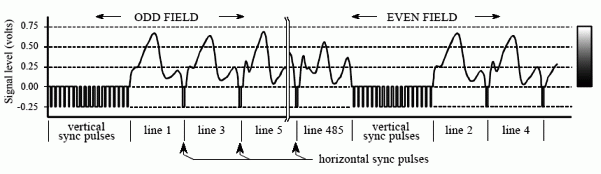
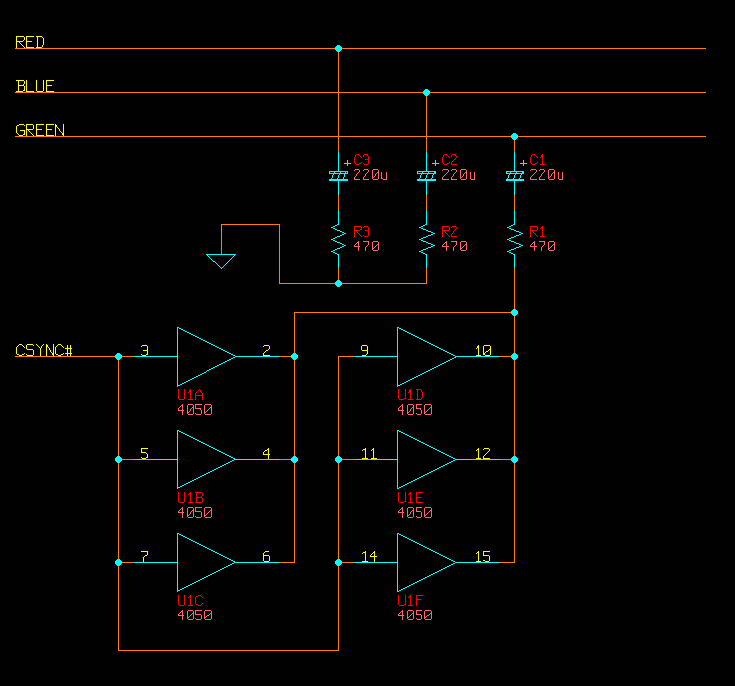
Now, as you may know, the PS2 outputs RGsB whenever it goes above 240p/480i, and the AV Multi input goes right along with that. While it's happy to accept either c-sync or composite sync through its composite line for any 240p/480i source I've thrown at it, it will not accept it for 480p and above. It has to be RGsB.
Right off the bat, I can tell you that I've connected all the lines and gotten a stable picture from 640x480 VGA coming from my laptop. It should be possible to make this work. The only problem is that there is a low-end green tint across the whole screen. Interestingly, white is still white, but black and anything that would have a low green value is tinted. I would like to fix this.
I've done three main things in my attempt to mix VGA sync signals with green.
1. Mix the signals as-is into green (with resistors)
This wasn't what I tried first, but surprisingly, it works. With potentiometers, I have seen how dialing up the resistance on the sync lines causes the amount of green tint to lessen. However, by the time I get to the point that black becomes black, the picture destabilizes.
2. Use the circuit on this page to get "c-sync"
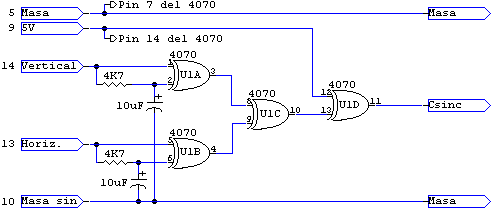
The 4070 is a simple XOR gate IC package.
This works, too, but with the same green tint problem.
I could be wrong, but I think the problem with this sync conversion is that it doesn't actually make the positive VGA pulses negative; it makes them inverted positive. On another forum, a guy posted some interesting oscilloscope shots from this very circuit that illustrate this.
Straight VGA H-sync:
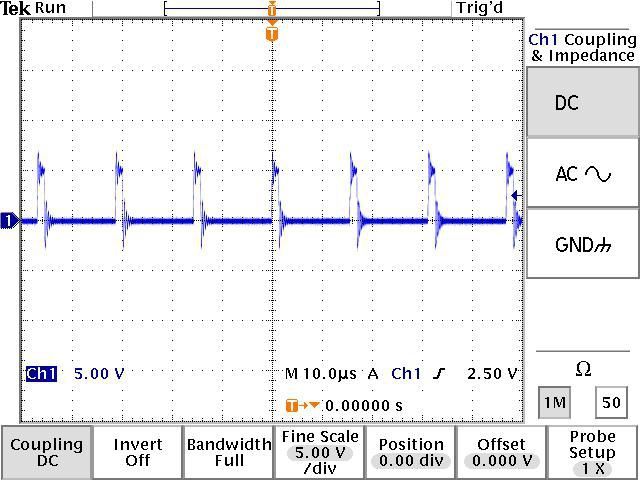
VGA H-sync put through the 4070 as shown above:
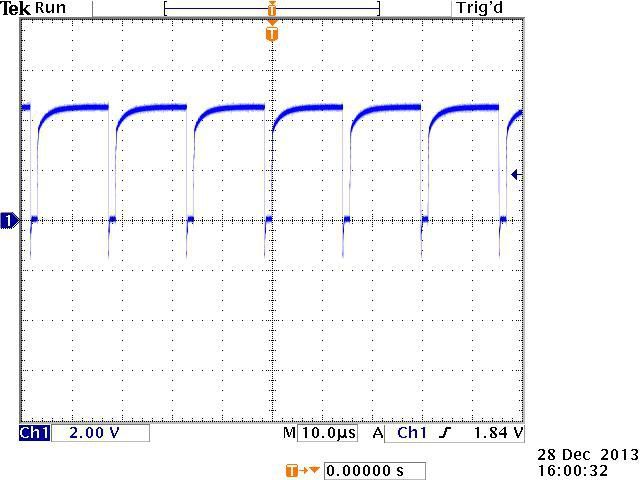
Assuming that PS2 RGsB uses true negative pulses for sync (I wish I had an oscilloscope!), it's easy to see why this wouldn't be what I want.
Why it is that both straight VGA positive sync and this inverted sync cause a similar green tint, I would love to know.
By the way, I also tried putting this into an RGB-YUV converter with the sync on its own line going in, but that simply produced an overall grey tint.
Makes sense.
3. Put VGA sync into an op-amp to generate truly negative pulses.
This did not work at all.
However, I am not an experienced electronics designer, and I might have done something stupid.
What I tried was pretty simple. I connected -5V power to a 741 op-amp, grounded the positive power input and the non-inverting input, and connected the combined VGA sync to the inverting input. Theoretically, that should have resulted in any level of positive pulse on the sync lines producing a -5V negative pulse through the output. I attenuated this with a resistor going into the green signal, which should have also kept the green color information from leaking out.
Again, without an oscilloscope, I can't see what is really happening. With a multimeter, I could verify that putting a constant positive charge on the op-amp's inverting input did result in a negative charge on the output, but that's all.
Interestingly, when I dialed down the resistance going into green, I could see that the entire (scrambled) picture on the screen would tint purple. This would suggest that either the op-amp is very leaky, or that it's constantly outputting negative voltage and actively sucking up the green. It could be that what this needs is a different configuration to make it so it only trips the negative voltage when it should.
4. Tried this circuit from a Japanese website
It's basically #2 but with a transistor in the mix. The green tint remained, and the picture became slightly less stable.
On that page, you can see that that guy there actually had a problem with a purple tint. I have no idea why we are having different results, but it probably has to do with our sources.
Could my laptop be the problem? I've tried two laptops actually, with identical results. Hmm...
So, gents, what do you think? "Buy an Extron", you might say, but where is the adventure in that? I just know I'm a couple of cheap parts away from converting this sync like it needs to be, and if I can pull it off, it would be super-triumphant. Not to mention, I'm in Japan, and that complicates things when trying to get a proper professional converter.
Any ideas? Comments? Thoughts?