Superplay capture solutions

The place for all discussion on gaming hardware
User avatar
Dave_K.
Posts: 4571
Joined: Wed Jan 26, 2005 5:43 am
Location: SF Bay Area
Contact:

Superplay capture solutions

Post by Dave_K. »

Originally split from the Ketsui high score thread:
Valgar wrote:What do you use?

I am going to get the sweetspot (is that the name?) RGB capture card. zakk uses it.
Neverland wrote:PHILIPS DVDR3305

http://compraonline.mediaworld.it/webap ... ry_rn=1671

i have test all...and this dvd recording ALL pcb on Dvd+- Dvdr-+

im luky to find at 169€....now cost 199....dont know the reason...

:wink:

others guy sorry for OT :!:
Neverland, I've seen other European DVD recorders which have SCART (RGB) input, so what makes this one the best for capturing PCB play?
User avatar
Neverland
Posts: 148
Joined: Tue Jun 28, 2005 8:20 am
Location: Milano italy
Contact:

Post by Neverland »

for many reason is the best for me.... in input accept all type of signal... and is rgb direct in one plug scart is very important this thing... overall is realy interesting and can choice between many options for recorder..... you can start e stop many many times and in any case a dvd display exactly time remaning for recorder your play...

i test this with all (ps2, neogeo, supergun, saturn) and with seibu pcb ( viper phase 1 and rf2) and ALL is ok....in seibu pcb appears in the right of the screen a multicolor line (segnal crypting i suppose) but dont disturb a rest of the video...

is must for recording videogame :)
zakk
Posts: 1410
Joined: Wed Jan 26, 2005 6:04 am
Location: New York, NY
Contact:

Post by zakk »

I use the PMS sweetspot http://www.pluggedin.tv/sweetspot/

It'll take RGB, Component, Svideo and composite. No progressive capture.
I think there's a US distributor, but I dunno who it is. It's a bit pricey, but it's been well worth it for me.

I'm not a fan of the DVD recorder approach because 1) There's limited space on the DVD. With a big hard drive and the proper capture settings I can just set the thing to record for hours while I play. Later I can just chop out the bits I want. Big help when your consistency sucks like mine! 2) To do all the encoding I do I'd have to rip the dvd to my PC anyways; so I see no need to insert the extra step.

I will admit my video setup is a bit mental. It involves a 8x4 RGBS matrix switch, a 4x2 component matrix switch, component->rgb converters and entirely too much cable. I can display any of my consoles on my main TV, or display them on either of the two cabs in the back of the room. I can display the output of any PCB to either cab, a dreamcast or two to any cab, and a PC (mame etc) to any cab. I also have a video downscaler for dropping 480p to 480i so I can capture it. Although I'm looking at selling that one to get another one that'll properly handle 720p/1080i so I can do captures of HD games from the xbox.

Yes, I'm crazy.
User avatar
GaijinPunch
Posts: 15952
Joined: Mon Jan 31, 2005 11:22 pm
Location: San Fransicso

Post by GaijinPunch »

Does the Sweetspot actually capture? I see no audio input for that thing.
RegalSin wrote:New PowerPuff Girls. They all have evil pornstart eyelashes.
zakk
Posts: 1410
Joined: Wed Jan 26, 2005 6:04 am
Location: New York, NY
Contact:

Post by zakk »

GaijinPunch wrote:Does the Sweetspot actually capture? I see no audio input for that thing.

It only does video. You'll need to handle audio yourself. That's easy enough with a soundcard/onboard audio.
User avatar
GaijinPunch
Posts: 15952
Joined: Mon Jan 31, 2005 11:22 pm
Location: San Fransicso

Post by GaijinPunch »

I would like a nice way to easily capture, but it seems my supergun won't output RGB and S-Video simultaneously (or even composite for that matter). My monitor doesn't output anything either, so I'd be stuck having to split the RGB connection somehow, then converting it to something my card can handle. :(
RegalSin wrote:New PowerPuff Girls. They all have evil pornstart eyelashes.
User avatar
Dave_K.
Posts: 4571
Joined: Wed Jan 26, 2005 5:43 am
Location: SF Bay Area
Contact:

Post by Dave_K. »

Thanks Neverland. I think I'm sold on getting a scart DVD recorder, as there is no setup needed (like you'd have to do on a PC to boot up and get it ready to capture), and its ultraportable (don't have to teather a pc/monitor near my cabs).

Couple questions though, does the model you have support US voltage? Also, can you capture 480P (640x480 - 31khz video for Naomi and the like)?
User avatar
it290
Posts: 2847
Joined: Thu Mar 17, 2005 1:00 am
Location: polar malortex, illinois

Post by it290 »

This looks like a nice piece of kit if you're playing on a cab:

http://www.arcadeshock.com/browse_item_ ... tem_ID/459

Pretty pricy, though.
Image
We here shall not rest until we have made a drawing-room of your shaft, and if you do not all finally go down to your doom in patent-leather shoes, then you shall not go at all.
User avatar
Dave_K.
Posts: 4571
Joined: Wed Jan 26, 2005 5:43 am
Location: SF Bay Area
Contact:

Post by Dave_K. »

it290 wrote:This looks like a nice piece of kit if you're playing on a cab:

http://www.arcadeshock.com/browse_item_ ... tem_ID/459

Pretty pricy, though.
Looks similar to the j-rok (http://www.jrok.com/hardware/RGB.html) but more expensive. But you still need something to "capture" the play.

Personally I'd just hack the jamma harness myself to extract the RGB/Sync, and use a capture board or dvd recorder.
User avatar
it290
Posts: 2847
Joined: Thu Mar 17, 2005 1:00 am
Location: polar malortex, illinois

Post by it290 »

Yeah, but the advantage to this I guess is that you can plug it in 'on location' or swap it between different cabs easily. I'm sure it's not too tough to rig up something, similar, though, especially if your capture device can take raw RGB input.
Image
We here shall not rest until we have made a drawing-room of your shaft, and if you do not all finally go down to your doom in patent-leather shoes, then you shall not go at all.
User avatar
Neverland
Posts: 148
Joined: Tue Jun 28, 2005 8:20 am
Location: Milano italy
Contact:

Post by Neverland »

Dave_K. wrote:Thanks Neverland. I think I'm sold on getting a scart DVD recorder, as there is no setup needed (like you'd have to do on a PC to boot up and get it ready to capture), and its ultraportable (don't have to teather a pc/monitor near my cabs).

Couple questions though, does the model you have support US voltage? Also, can you capture 480P (640x480 - 31khz video for Naomi and the like)?
i hope in little time to answer or your question.... in a near future i receive my new cab with a 31khz video and test with ikaruga's friend....i hope to find a system to connect a cab with dvd and this last test is OK! stay tuned for this...i reply very soon (i hope )

for voltage if you search PHILIPS DVDR3305 in a shop of your city i suppose you will find a model with a voltage request for your county...in any case i think if you use a good converter voltage you resolve a problem
zakk
Posts: 1410
Joined: Wed Jan 26, 2005 6:04 am
Location: New York, NY
Contact:

Post by zakk »

Dave_K. wrote:Thanks Neverland. I think I'm sold on getting a scart DVD recorder, as there is no setup needed (like you'd have to do on a PC to boot up and get it ready to capture), and its ultraportable (don't have to teather a pc/monitor near my cabs).

Couple questions though, does the model you have support US voltage? Also, can you capture 480P (640x480 - 31khz video for Naomi and the like)?
I would be surprised if it handles 31khz correctly. It would have to downconvert it anyways; remember, it's writing to normal DVD, which is interlaced. If it captures anything it'll probably be a horizontally doubled image with garbage in the middle and crappy sync.
User avatar
Dave_K.
Posts: 4571
Joined: Wed Jan 26, 2005 5:43 am
Location: SF Bay Area
Contact:

Post by Dave_K. »

zakk wrote: remember, it's writing to normal DVD, which is interlaced.
There are DVDs which play at 480p non-interlaced hires (640x480) via component cables. So why can't it record at this rate?
zakk
Posts: 1410
Joined: Wed Jan 26, 2005 6:04 am
Location: New York, NY
Contact:

Post by zakk »

Dave_K. wrote:
zakk wrote: remember, it's writing to normal DVD, which is interlaced.
There are DVDs which play at 480p non-interlaced hires (640x480) via component cables. So why can't it record at this rate?
The 480p playing is a function of the player, not the data on the disk. Well, it's sorta a function of the disk data, as there's the whole telcine/3:2 thing, but the data is not a progressive mpeg-2. The 'progressive' aspect of the display is created by the player at decode time.
User avatar
Dave_K.
Posts: 4571
Joined: Wed Jan 26, 2005 5:43 am
Location: SF Bay Area
Contact:

Post by Dave_K. »

LUNardei wrote:
Neverland wrote:
Dave_K. wrote: How did you capture this video? Just curious of the setup, as it seems darker (more green/blue) than Zakk's capture replays.
you find in http://www.arcade-extreme.com/ast/home.htm
[you find it in the first news or in the scoreboard]
click [LINK] in the news and in the right of Ketsui ~ Kizuna Jigokutachi Scoreboard find a link to Download a video
Wrong answer NEV! The right one is:
with Nev's DVD recorder. We were talking about it some times ago here or somewhere (IIRC there was a thread split).
Oh, thats interesting if this is NEV's DVD recorder setup, then the color balance looks off. I'm sure this could be corrected in post recording software, but now wonder if Zakk's SweetSpot capture board is indeed better quality?
zakk
Posts: 1410
Joined: Wed Jan 26, 2005 6:04 am
Location: New York, NY
Contact:

Post by zakk »

I haven't watched that video yet, but..


It could be an issue of RGB levels. I actually have to drop the levels down with resistors before the signals go into my capture card. Although I do it right at the exit point of hte video in the cab, since I have my monitors hooked up via the 'vga' connectors, so they expect lower levels too.

If I don't do this the color is all saturated and pretty unfixable even in post-processing. I don't know if that's what's going on here, however.
User avatar
SAM
Posts: 1788
Joined: Fri Jun 03, 2005 5:27 am
Location: A tiny nameless island in South China Sea

Post by SAM »

Well, I got another idea.

If you hook up the PCB via the following method...
http://shmups.system11.org/viewtopic.php?t=7854

You actually got a spare Com Video RCA jack that you could connect to any recarding device.

Com Video got some color bleed, but it definately better that shooting filam at the screen while playing.
*Meow* I am as serious as a cat could possible be. *Meow*
zakk
Posts: 1410
Joined: Wed Jan 26, 2005 6:04 am
Location: New York, NY
Contact:

Post by zakk »

Bringing this thread back to life for a state of the technology update:

The capture product landscape is changing quite a bit; the bad news is capturing PCB is still just as annoying. However, capturing current-gen consoles is getting less annoying.

Some products to be aware of:


http://www.myhava.com
The HavaHD line: these take component (or svideo/composite) in, and encode to MPEG-2. It's an external box, and you connect to it via their 'recorder/viewing' application. Takes all the way up to 1080i; outputs 720x480 "interlaced" MPEG-2 (basically the exact same type of MPEG file you would need for DVD)

Pro: It's an external, ethernet connected box (some models are wireless). Real easy to use.

Cons:
1) Some PCBs will confuse it; example: it cannot sync properly with my Dangun board. I haven't even dared to brave RFJ.

2) If you feed it a 720p image, the output is ugly. I think their internal scaler isn't quite up to snuff for 720p. I actually have an RGB->HDTV scaler, so I just do some conversion on my 720p XBox stuff and then make my scaler output 1080i to the Hava. Looks great, but a bit complicated.

Related to this, they've announced a new version of the HavaHD that will OUTPUT HD MPEGs; so you can take input all the way up to 1080i, and output a high bitrate MPEG-2 with a resolution of your choice. This will be great for getting high resolution captures from the PS3/X360 over component.

http://www.blackmagic-design.com/products/intensity/
Blackmagic Intensity Pro

An HDMI+"analog" capture card. I have no personal experience with this one. I've heard it doesn't do 480p. Also, the HDMI will NOT take HDCP encrypted streams; I know at least one next-gen console HDCP encrypts game output. I suspect the analog side is going to be just as hit-and-miss for PCBs as the Hava. I'm not sure under what circumstances I'd pick this over the Hava, especially once the new Hava with full HD output becomes available.

PhynxRGB (no link, just google around)
The ultimate RGB capture. It'll capture all the way up to 1080i, and even comes with an application to do 'custom RGB timings', so you could theoretically tweak it for weird PCB timings. I have no hands-on with this either, the thing is like $1k. I'm not even sure it can handle 15khz; it would be one of things I'd like to test.

Various japanese capture cards (PV3/PV4, MonsterX). I hear good things about them (particularly the MonsterX), but I haven't taken the plunge yet. I know the MonsterX is D-Terminal. Are the PV3/PV4 the same?

Random tidbits: If you have an HDCP protected HDMI device you can use the HDFury to convert it to RGB, and (for now) defeat HDCP. I suppose you could then convert the RGB to component and feed it into a HAVA or Blackmagic. I think there are more straightforward HDMI->component out there, but you need to do homework regarding the HDCP. And you have to live with the possibility the HDFury's HDCP key will be revoked sometime in the future.

I'm pondering trying to find an old XRGB2, and using it to upscale the PCBs, and then feed that into the Hava. It would make post-processing the captures way less fiddly.
User avatar
Dave_K.
Posts: 4571
Joined: Wed Jan 26, 2005 5:43 am
Location: SF Bay Area
Contact:

Post by Dave_K. »

Thanks for the update Zakk, HavaHD looks very promising!

I also noticed some cheap USB capture devices for consoles, namely the XCM V-Box. XCM's website has some other gadgets for capturing/recording/playing HD sources on LCD monitors. Search youtube to find examples of XCM stuff running.
zakk wrote: I'm pondering trying to find an old XRGB2, and using it to upscale the PCBs, and then feed that into the Hava. It would make post-processing the captures way less fiddly.
This is my thinking too, although initially so I could display my PCBs on a standard HD LCD w/scanlines.
zakk
Posts: 1410
Joined: Wed Jan 26, 2005 6:04 am
Location: New York, NY
Contact:

Post by zakk »

I just found these, but I think that might be a bit out of my price range: http://www.epiphan.com/products/product.php?catid=1
User avatar
Fudoh
Posts: 13044
Joined: Mon Mar 06, 2006 3:29 am
Location: Germany
Contact:

Post by Fudoh »

I'm not sure under what circumstances I'd pick this over the Hava, especially once the new Hava with full HD output becomes available.
It's a quality thing. The Hava does real-time single pass MPEG-2 encoding at 8mbit/sec. While this looks ok, it's considerably less than what component to DV converters do (15mbit/sec) and surely not even in the faintest comparable to the uncompressed capture from an Intesity card.

The Hava's also (currently*) limited to SD output, while the Intensity will really capture your 360's HD Stream. Of course that's not important for PCB captures, but if you're buying a HD capture anyway, you might want to take it into consideration.

(*and I would imagine that the HD-output-enabled versions might be more pricey than the current ones...)

I'm running a sweetspot card on my system and I've tried various other solutions before, e.g. a Datavideo DAC-10 (yuv to firewire) and even several SDI solutions. Capturing in (halfway) uncompressed HuffYUV from a good analog source like the Sweetspot is a thousand times better than the Hava or similar solutions.

The Hava's nice for easy-going direct to DVD capture, but even if you're thinking about reconverting for AVI for Internet superplay uploads, use an internal card like the Sweetspot or an Intensity. For SD capturing you don't even need an intensity, just buy an old Blackmagic analog-only card on eBay.
User avatar
Dave_K.
Posts: 4571
Joined: Wed Jan 26, 2005 5:43 am
Location: SF Bay Area
Contact:

Post by Dave_K. »

Zakk, what is the quality you get out of the Hava HD? You have any samples? Seems there is a rebranded Pinnacle PCTV HD which is the same thing, but considerably cheaper (different drivers?) Read you could even flash it with Hava's bios!

Anyway, checkout these prices for the wireless HD model:

$70 refurbised at woot
$90 new at Circuit City

I'd pick one of these up if it the quality was good enough for superplay capture over wireless (SD 480i?)
zakk
Posts: 1410
Joined: Wed Jan 26, 2005 6:04 am
Location: New York, NY
Contact:

Post by zakk »

http://bigcore.rsdio.com/zakk/stuff/burnout-intro.mpg

1080i into the Hava I still had laying around.

I don't have any PCB input samples, as it's not setup for that right now.
User avatar
Mills
Posts: 1131
Joined: Mon Oct 02, 2006 6:57 pm
Location: London, United Kingdom
Contact:

Post by Mills »

zakk wrote:http://bigcore.rsdio.com/zakk/stuff/burnout-intro.mpg

1080i into the Hava I still had laying around.

I don't have any PCB input samples, as it's not setup for that right now.
shame, i would like crisp the imagery is with certain titles.
Image
zakk
Posts: 1410
Joined: Wed Jan 26, 2005 6:04 am
Location: New York, NY
Contact:

Post by zakk »

So I got a new piece of video gear (as I am prone to do), and I'd like to throw something out there and see if anyone has any ideas.

I picked up this: http://www.ddav.com/inline1404.htm

Initially I thought I was out of luck, as it was refusing to properly handle any input from PCBs, and it was clear it was due to the deinterlacer hating the 240p input.

However, after fiddling with it and figuring out how to put it in a mode where it doesn't limit the range of some settings, I got it into non-interlaced, 240 active line mode, outputting [email protected]. I put various PCBs through it, and there's only one issue.

The video 'blinks' constantly. It's not interlace type flicker, there's actually blank frames in the stream. I tried a bunch of boards; Garegga, Ketsui, Dangun, Cyvern, Gunbird 2. Out of all of those, the only one that didn't do that blinking was Gunbird 2, which was rock solid.

So, any ideas as to what is different about GB2, or what most PCBs would typically be doing that could be confusing this thing? I'm getting close to going crazy and taking a scope to the sync lines to figure out wtf.
I should also note that it does it regardless of it properly syncing to the input. In other words if I have the scaler set to interlaced+480 active lines and the image is all garbled, it still blinks. If I set it to composite input and plug the PCB sync into the composite input, it blinks.

That said, it produces a stable (if you ignore the whole blinking thing) image when fed RFJ's 54hz refresh, so that's encouraging.
imalipusram
Posts: 5
Joined: Mon Apr 07, 2008 7:47 am

Post by imalipusram »

Hi !

First of all, sorry for my bad english.
In second, I'm reading the forum for a long time, and this thread is a good opportunity to register ^^

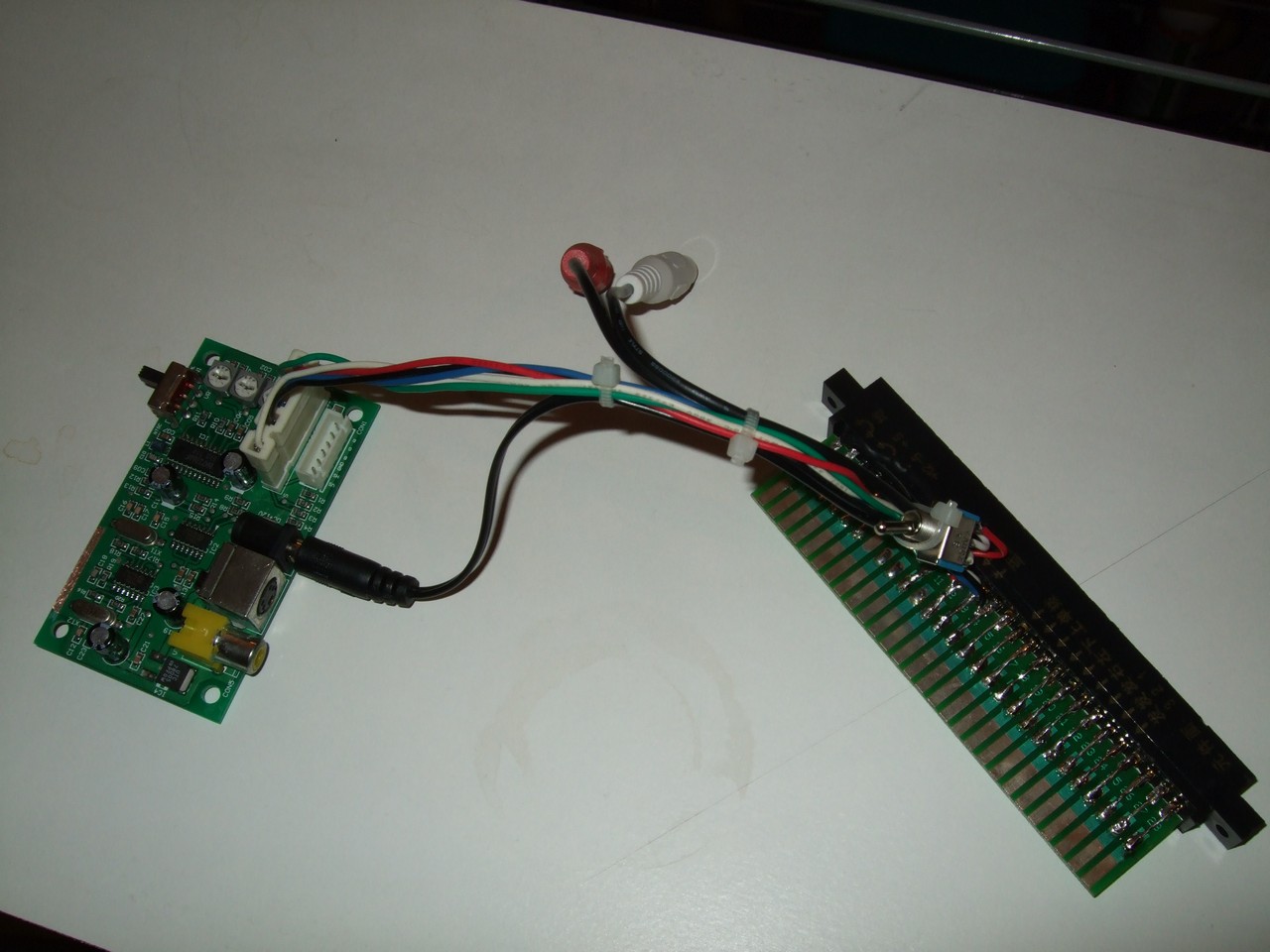
Last point, I'm building things like this :
ImageImage

Svideo in PAL/NTSC output, Mono/Stereo switch.
Jamma In/Out to be plugged in every Cab or with any Arcade-system.
I realize all the mounting around the converter because some friends haven't the guts to do it :)
If you're interested, I can open a thread to sell some ones.
User avatar
Dave_K.
Posts: 4571
Joined: Wed Jan 26, 2005 5:43 am
Location: SF Bay Area
Contact:

Post by Dave_K. »

Very nice imalipursram, and welcome to the forum! I've seen similar setups sold on YAJ (looks like the same capture board too):
Image

But I like that yours has a stereo/mono switch. I'm also looking to build one exactly like this, but with the jrok component PCB (to plug into Hava HD or similar for capturing).

What price were you looking to sell these at?
zakk
Posts: 1410
Joined: Wed Jan 26, 2005 6:04 am
Location: New York, NY
Contact:

Post by zakk »

You're not going to be plugging PCB output directly into a Hava, I can tell you that much!

edit:

what..

Gunbird 2.
Image

Ketsui
Image
imalipusram
Posts: 5
Joined: Mon Apr 07, 2008 7:47 am

Post by imalipusram »

Dave_K. wrote:I've seen similar setups sold on YAJ (looks like the same capture board too)
What price were you looking to sell these at?
Hi !
It's sure very similar.
I've sold 4 of them for 80euros each, shipped in France.
zakk
Posts: 1410
Joined: Wed Jan 26, 2005 6:04 am
Location: New York, NY
Contact:

Post by zakk »

So this is the post where I correct myself because I was wrong and/or dumb.

The hava will deal with PCB signals, well most of them. I just had some dumb stuff going on, mostly the fact that my rgb->component thingy seems to not deal with csync at all.

Anyways, the rundown so far:

Galuda 2: works fine
Gunbird 2: works fine
Ketsui: works fine, a little blurry sometimes. I had this issue with other capture cards; it looks like field order weirdness or something. It was always correctable.
Garegga: works fine
Dangun: captures but the image is shifted/doubled (I don't think it's recoverable in post-processing)
RF Jet: I had no illusions this would work. It kinda looks like Dangun but with a bunch of noise at the bottom. Probably not recoverable in post.
Post Reply