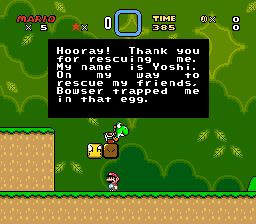
At any rate, it doesn't really matter if HDMI only crushes colors on half the displays and capture devices. The fact that it does and DVI doesn't means DVI is the safer more universal alternative for the average user. Just the other day I was watching an old friend of mine's video series called Game Sack on youtube, and I noticed the overblown nuke greens in several videos for both Neo Geo and SNES. I asked him if he was using a Framemeister with HDMI out, and sure enough, he was. I asked him to take a look at DVI mode, and he was able to see the difference. Oh but what do I know? I'm just a 'fibbing clown'.
XRGB-mini Framemeister
-
FBX
- Posts: 2349
- Joined: Wed Feb 18, 2015 10:18 am
- Location: DFW area, Texas
- Contact:
Re: XRGB-mini Framemeister (now available !)
I don't mind if RGBE has something to counterpoint, but he can't help but be a complete douche about it, so I usually just ignore whatever he posts.
At any rate, it doesn't really matter if HDMI only crushes colors on half the displays and capture devices. The fact that it does and DVI doesn't means DVI is the safer more universal alternative for the average user. Just the other day I was watching an old friend of mine's video series called Game Sack on youtube, and I noticed the overblown nuke greens in several videos for both Neo Geo and SNES. I asked him if he was using a Framemeister with HDMI out, and sure enough, he was. I asked him to take a look at DVI mode, and he was able to see the difference. Oh but what do I know? I'm just a 'fibbing clown'.
-
RGB32E
- Posts: 1400
- Joined: Thu Nov 05, 2009 12:50 am
Re: XRGB-mini Framemeister (now available !)
Never said anything about DVI mode. Nice straw man argument buddy!FBX wrote:I asked him to take a look at DVI mode, and he was able to see the difference. Oh but what do I know? I'm just a 'fibbing clown'.
-
TheShadowRunner
- Posts: 278
- Joined: Sun Feb 24, 2013 7:41 pm
Re: XRGB-mini Framemeister (now available !)
Well I now wonder if this overblown fluo green RGB HDMI issue isn't just one of the many Mini bugs (ie, triggered by some setting somewhere)
FBX, have you tried completely resetting the Mini, without using profiles and simply outputting 720p@60 with the Super Famicom as input [and setting the HDMI input on your TV also to all default settings, neutral, etc)
-
Shuco13
- Posts: 147
- Joined: Fri Aug 01, 2014 6:15 am
Re: XRGB-mini Framemeister (now available !)
This might be true for RGB sources but as soon as you use other inputs such as component, DVI WILL fail since it ignores the type of input. HDMI may have its issues aswell but at least makes making color- and greyscale-adapted profiles easier and more stable.FBX wrote:I asked him to take a look at DVI mode, and he was able to see the difference. Oh but what do I know? I'm just a 'fibbing clown'.
In any case, people should really stop making comparison shots of stock settings or of "what they think looks right" since both is mostly broken. Unless you want to prove the reliability of default settings (which is not given) there is really nothing to compare or show off.
...aka 12345
-
Thomago
- Posts: 588
- Joined: Fri Oct 26, 2012 7:01 pm
- Location: Germany
Re: XRGB-mini Framemeister (now available !)
Actually it all but fails. The Mini's processing of my Gamecube's and PS2's Component signal always looked better (as in: less flickering, better color accuracy) in DVI mode, despite the color space conversion. I mean... theoretically HDMI output is superior, but that doesn't help much if it only works reliably in 50% of all cases.Shuco13 wrote:his might be true for RGB sources but as soon as you use other inputs such as component, DVI WILL fail since it ignores the type of input.
-
Shuco13
- Posts: 147
- Joined: Fri Aug 01, 2014 6:15 am
Re: XRGB-mini Framemeister (now available !)
Where does it say so? In fact the opposite is true for DVI. It's probably possible to set it right for one input but it fails when the same preset (=settings which aren't saved by profiles) is used with another input. This is just what is handled better in HDMI.but that doesn't help much if it only works reliably in 50% of all cases.
...aka 12345
-
Thomago
- Posts: 588
- Joined: Fri Oct 26, 2012 7:01 pm
- Location: Germany
Re: XRGB-mini Framemeister (now available !)
I really don't know what you mean.
-
austin532
- Posts: 844
- Joined: Wed Mar 12, 2014 12:44 am
- Location: Arizona, US
Re: XRGB-mini Framemeister (now available !)
Is it just me or does 480p Component actually look noticeably better in DVI mode? The problem now is that 480i looks like crap and is really soft.
Framemeister 240p scanline settings: http://shmups.system11.org/viewtopic.ph ... start=9600
-
Thomago
- Posts: 588
- Joined: Fri Oct 26, 2012 7:01 pm
- Location: Germany
Re: XRGB-mini Framemeister (now available !)
From my experience it should be the other way around (and independent of HDMI or DVI mode): 480p is on the soft side due to the infamous "false contouring"-thingy, while 480i is perfectly sharp. Maybe your 480i source applies some sort of flicker filter to the image?
-
Fudoh
- Posts: 13044
- Joined: Mon Mar 06, 2006 3:29 am
- Location: Germany
- Contact:
Re: XRGB-mini Framemeister (now available !)
from the same source ? Differences in source quality matter a lot. PS2 and DC are a lot better than Cube, Wii or XBox. I don't think I've ever noticed a different in processing when switching between HDMI and DVI output - unless your TV handles them differently.Is it just me or does 480p Component actually look noticeably better in DVI mode? The problem now is that 480i looks like crap and is really soft.
-
austin532
- Posts: 844
- Joined: Wed Mar 12, 2014 12:44 am
- Location: Arizona, US
Re: XRGB-mini Framemeister (now available !)
Yeah from the same source with same settings. Original Wii hooked up to the Mini using D-Terminal adapter. I wouldn't call it a huge difference but DVI does look sharper compared to HDMI.
What's weird with the Wii though is some games look sharper in 480p while others look sharper in 480i.
Framemeister 240p scanline settings: http://shmups.system11.org/viewtopic.ph ... start=9600
-
Chocograph
- Posts: 104
- Joined: Wed Apr 22, 2015 8:43 am
Re: XRGB-mini Framemeister (now available !)
And yet whatever settings you try, an emulator will still give you a better (as in 100% clean) image whereas the meister has weird color issues with noise etc. Funny thread. Funny forum.
-
axlblazeadam
- Posts: 107
- Joined: Tue Sep 08, 2015 3:16 pm
Re: XRGB-mini Framemeister (now available !)
True, and a CD will give a better sound quality than a vinyl.Chocograph wrote:And yet whatever settings you try, an emulator will still give you a better (as in 100% clean) image whereas the meister has weird color issues with noise etc. Funny thread. Funny forum.
-
Thomago
- Posts: 588
- Joined: Fri Oct 26, 2012 7:01 pm
- Location: Germany
Re: XRGB-mini Framemeister (now available !)
Or you could play on a CRT! Funny how people even bother with something like the Framemeister!
-
BuckoA51
- Posts: 3424
- Joined: Sat Oct 02, 2010 10:08 am
- Location: Ireland
- Contact:
Re: XRGB-mini Framemeister (now available !)
Could just play modern games in 1080p or 4k, could just go outside!
OSSC Forums - http://www.videogameperfection.com/forums
Please check the Wiki before posting about Morph, OSSC, XRGB Mini or XRGB3 - http://junkerhq.net/xrgb/index.php/Main_Page
-
Thomago
- Posts: 588
- Joined: Fri Oct 26, 2012 7:01 pm
- Location: Germany
Re: XRGB-mini Framemeister (now available !)
Mobile gaming then?BuckoA51 wrote:could just go outside!
-
Cosmonal
- Posts: 13
- Joined: Thu Feb 03, 2011 11:34 am
Re: XRGB-mini Framemeister (now available !)
For some people, it's better to play using a LCD upscaled with Framemeister, me included: can't stand playing old games on CRT after seeing my beloved 240p -- including Atari 2600 games, YES ^_^ -- on a LCD set with the image upscaled correctly with the Framemeister). But it's a matter of taste, keep playing wherever you love!Thomago wrote:Or you could play on a CRT! Funny how people even bother with something like the Framemeister!
Yar's Revenge flickering on a LCD -- IF you're using a Framemeister to keep all frames in place without any combing artifacts -- is just awesome! (oh, I don't like scanlines for playing, just for nostalgia sometimes). You see... its all a matter of taste!
Cosmic Effect
Videogames Ontem e Hoje
-
Chocograph
- Posts: 104
- Joined: Wed Apr 22, 2015 8:43 am
Re: XRGB-mini Framemeister (now available !)
All I can say is you should take a look at the retroarch emulator crt.royale shader for yourself if you haven't already. I love my CRT and my framemeister but that's the best LCD shader for sure (depending on what you prefer). Thinking about getting rid of my big CRT for good.
-
BuckoA51
- Posts: 3424
- Joined: Sat Oct 02, 2010 10:08 am
- Location: Ireland
- Contact:
Re: XRGB-mini Framemeister (now available !)
I don't think you need to tell people on here about Retroarch or pixel shaders, nor should I really have to explain to you the many disadvantages of emulators compared to using the real hardware, even through a Framemiester.
OSSC Forums - http://www.videogameperfection.com/forums
Please check the Wiki before posting about Morph, OSSC, XRGB Mini or XRGB3 - http://junkerhq.net/xrgb/index.php/Main_Page
-
Thomago
- Posts: 588
- Joined: Fri Oct 26, 2012 7:01 pm
- Location: Germany
Re: XRGB-mini Framemeister (now available !)
@Cosmonal: Uh... it seems your sarcasm detector ist broken. 
-
Chocograph
- Posts: 104
- Joined: Wed Apr 22, 2015 8:43 am
Re: XRGB-mini Framemeister (now available !)
Any post around here says I don't.BuckoA51 wrote:I don't think you need to tell people on here about Retroarch or pixel shaders, nor should I really have to explain to you the many disadvantages of emulators compared to using the real hardware, even through a Framemiester.
-
Xyga
- Posts: 7181
- Joined: Tue Nov 05, 2013 8:22 pm
- Location: block
Re: XRGB-mini Framemeister (now available !)
CRT-Royale is fantastic until you realize only a damn expensive cutting-edge monitor is necessary to do it at least a bit of justice, and that monitor won't be larger than 27" anyway.
Strikers1945guy wrote:"Do we....eat chicken balls?!"
-
FBX
- Posts: 2349
- Joined: Wed Feb 18, 2015 10:18 am
- Location: DFW area, Texas
- Contact:
Re: XRGB-mini Framemeister (now available !)
Clown here with definitive proof A/D crushes colors when adjusted beyond default 128:

These shots were taken at default color values in DVI mode. The same thing happens in HDMI.
Note how even at 135, original shading intent is already being compromised to some degree. THIS is why I never adjust A/D beyond 131 at the most.

These shots were taken at default color values in DVI mode. The same thing happens in HDMI.
Note how even at 135, original shading intent is already being compromised to some degree. THIS is why I never adjust A/D beyond 131 at the most.
-
TheShadowRunner
- Posts: 278
- Joined: Sun Feb 24, 2013 7:41 pm
Re: XRGB-mini Framemeister (now available !)
I'm confused now, yesterday you made the point that it (the 3 shades) WAS different between DVI and HDMI..?FBX wrote:These shots were taken at default color values in DVI mode. The same thing happens in HDMI.
Did you have different A/D settings between HDMI and DVI?
-
Thomago
- Posts: 588
- Joined: Fri Oct 26, 2012 7:01 pm
- Location: Germany
Re: XRGB-mini Framemeister (now available !)
Interesting!FBX wrote:Note how even at 135, original shading intent is already being compromised to some degree. THIS is why I never adjust A/D beyond 131 at the most.
I took the liberty to compare your screenshots with this emulator shot:

The colors match up perfectly with the "135" setting, while the "128" setting is too dark. So I guess "135" is nearer to the "original intent".
Would you mind taking another "135" screenshot that copies the emulator screenshot?
-
FBX
- Posts: 2349
- Joined: Wed Feb 18, 2015 10:18 am
- Location: DFW area, Texas
- Contact:
Re: XRGB-mini Framemeister (now available !)
I'll do you one better and capture the same image I used from an emulator. There's a possibility different emulators use different brightness settings and/or different palettes, so I'll check between two different emulators to make sure and get back to you on that.Thomago wrote:Interesting!FBX wrote:Note how even at 135, original shading intent is already being compromised to some degree. THIS is why I never adjust A/D beyond 131 at the most.
I took the liberty to compare your screenshots with this emulator shot:
The colors match up perfectly with the "135" setting, while the "128" setting is too dark. So I guess "135" is nearer to the "original intent".
Would you mind taking another "135" screenshot that copies the emulator screenshot?
TheShadowRunner wrote: I'm confused now, yesterday you made the point that it (the 3 shades) WAS different between DVI and HDMI..?
Did you have different A/D settings between HDMI and DVI?
The point of the image is about A/D increases causing crushed colors, not about the HDMI RGB issue, which itself on some displays and capture devices will also crush colors and overblow the greens. For example, you can do the forced YPbPr trick for HDMI to get correct colors, and then increase A/D to see the same effect as on DVI mode. Since my Avermedia capture device shows HDMI RGB mode with already crushed colors and overblown greens, I cannot show a direct comparison of A/D increases in action. I can for HDMI YPbPr if you'd like.
-
Thomago
- Posts: 588
- Joined: Fri Oct 26, 2012 7:01 pm
- Location: Germany
Re: XRGB-mini Framemeister (now available !)
Good idea!
-
Shuco13
- Posts: 147
- Joined: Fri Aug 01, 2014 6:15 am
Re: XRGB-mini Framemeister (now available !)
Seriously?FBX wrote:Clown here with definitive proof A/D crushes colors when adjusted beyond default 128:
These shots were taken at default color values in DVI mode. The same thing happens in HDMI.
Note how even at 135, original shading intent is already being compromised to some degree. THIS is why I never adjust A/D beyond 131 at the most.
1. Of course, at a certain threshold, you'll always end up crushing whites, blacks, colors or whatever as soon as you rise any setting on any device.
2. Are you really surprised you're getting a flawed picture with just changing ONE SETTING and leaving everythin else at default. Sorry this is just not how tuning is meant to be.
3. You do know that it's also possible to lower A/D and not just rise it, don't you? Apart from the fact that it was never necessary to go beyond the <135 threshold, it'd rather try to stay on/go below 128 to avoid crushing colors even more if I had that problem.
...aka 12345
-
FBX
- Posts: 2349
- Joined: Wed Feb 18, 2015 10:18 am
- Location: DFW area, Texas
- Contact:
Re: XRGB-mini Framemeister (now available !)
Here's a complete comparison set that also shows two emulator examples:

Note how none of the Framemeister modes on the capture device properly show the differences in shade intensity compared to emulators. Look specifically at the ground grass versus the light green in the shrub on the emulator pics.
At any rate. Hopefully this demonstrates well enough what can happen on each output mode depending on the capture device or display you use.

Note how none of the Framemeister modes on the capture device properly show the differences in shade intensity compared to emulators. Look specifically at the ground grass versus the light green in the shrub on the emulator pics.
At any rate. Hopefully this demonstrates well enough what can happen on each output mode depending on the capture device or display you use.
Oh okay, well now we're changing the goal posts here. Wouldn't be reasonable to theorize that going below 128 would start to crush colors in the opposite direction (i.e. dark shades getting crushed instead of light shades)? You also claim it's a matter of 'tuning' other settings, but are you absolutely certain that would bring back crushed colors from A/D settings? I've got a strong suspicion it will not, but nevertheless I'll do even more experimenting to find out. Next, I'll look into HDMI RGB and adjusting A/D in the lower direction, as well as experiment with A/D higher and see if Brightness or Gamma or Black level will restore crushed colors.Shuco13 wrote: 3. You do know that it's also possible to lower A/D and not just rise it, don't you? Apart from the fact that it was never necessary to go beyond the <135 threshold, it'd rather try to stay on/go below 128 to avoid crushing colors even more if I had that problem.
-
TheShadowRunner
- Posts: 278
- Joined: Sun Feb 24, 2013 7:41 pm
Re: XRGB-mini Framemeister (now available !)
Hmm don't all these tests just go to show that the Avermedia capture device just isn't suited for the Mini outputting RGB at all? Makes me wonder how the X-Capture Mini would play along..
But regardless, if you remove the capture device altogether and hook the Mini direct to your TV (which is what I assumed you were doing in the first place..), with default A/D level and outputting HDMI RGB, do you still experience the overblown green and 2 shades?