Gameboy Advance RGB NTSC
-
12345
- Posts: 144
- Joined: Sat May 31, 2014 11:08 am
Re: Gameboy Advance RGB NTSC
Ok one last thing you could try: Try switching between the DVI and HDMI setting. Also often results in a different color space.
-
Thomago

- Posts: 588
- Joined: Fri Oct 26, 2012 7:01 pm
- Location: Germany
Re: Gameboy Advance RGB NTSC
Nah, that does nothing 
-
BazookaBen

- Posts: 2159
- Joined: Thu Apr 17, 2008 8:09 pm
- Location: North Carolina
Re: Gameboy Advance RGB NTSC
Maybe the weird refresh rate is somehow effecting the color processing on the Framemeister.
-
Thomago
- Posts: 588
- Joined: Fri Oct 26, 2012 7:01 pm
- Location: Germany
Re: Gameboy Advance RGB NTSC
That would be my guess too.
-
Smashbro29
- Posts: 532
- Joined: Thu Dec 15, 2011 2:46 am
Re: Gameboy Advance RGB NTSC
Is 240p any better than 480p on the mini?
-
Thomago
- Posts: 588
- Joined: Fri Oct 26, 2012 7:01 pm
- Location: Germany
Re: Gameboy Advance RGB NTSC
Yes. The Mini's 240p handling is top-notch; 480p handling however is rather lackluster.
-
Smashbro29
- Posts: 532
- Joined: Thu Dec 15, 2011 2:46 am
Re: Gameboy Advance RGB NTSC
But isn't that really only about which input you use? I know it sucks at using component via D-terminal but I was told a viable solution was to transcode it to RGB.Thomago wrote:Yes. The Mini's 240p handling is top-notch; 480p handling however is rather lackluster.
-
bobrocks95

- Posts: 3663
- Joined: Mon Apr 30, 2012 2:27 am
- Location: Kentucky
Re: Gameboy Advance RGB NTSC
Both are true, the Mini handles 240p better and certain inputs better. Since GBA games are low-resolution anyway, there's nothing to be gained by getting the GBI to run in 480p if you have a Mini.
PS1 Disc-Based Game ID BIOS patch for MemCard Pro and SD2PSX automatic VMC switching.
-
BazookaBen
- Posts: 2159
- Joined: Thu Apr 17, 2008 8:09 pm
- Location: North Carolina
Re: Gameboy Advance RGB NTSC
Indeed, for example, 720p is a perfect 3x 240p. Starting from 480p though, get's you a weird 1.5x scale which doesn't work as well.bobrocks95 wrote:Both are true, the Mini handles 240p better and certain inputs better. Since GBA games are low-resolution anyway, there's nothing to be gained by getting the GBI to run in 480p if you have a Mini.
-
Smashbro29
- Posts: 532
- Joined: Thu Dec 15, 2011 2:46 am
Re: Gameboy Advance RGB NTSC
Interesting. I emu_kidid says without an SD card adapter I can't load swiss and then GBI so I'm outta luck unless there's a way to boot Melee in 240p over component.bobrocks95 wrote:Both are true, the Mini handles 240p better and certain inputs better. Since GBA games are low-resolution anyway, there's nothing to be gained by getting the GBI to run in 480p if you have a Mini.
Speaking of this 3:2 is not 4:3 and the Gameboy/Color also have their own aspect ratio. I'm going to try to make profiles That make it all perfect and as blown up as possible.bobrocks95 wrote:Indeed, for example, 720p is a perfect 3x 240p. Starting from 480p though, get's you a weird 1.5x scale which doesn't work as well.
Last edited by Smashbro29 on Mon Aug 24, 2015 3:28 am, edited 1 time in total.
-
BONKERS
- Posts: 425
- Joined: Thu Dec 11, 2014 10:41 am
Re: Gameboy Advance RGB NTSC
It's not 4:3, but it's 1:1 scaled within that window.
320x240 x 3 = 960x720
240x160 within that x3 =720x480 with 960x720
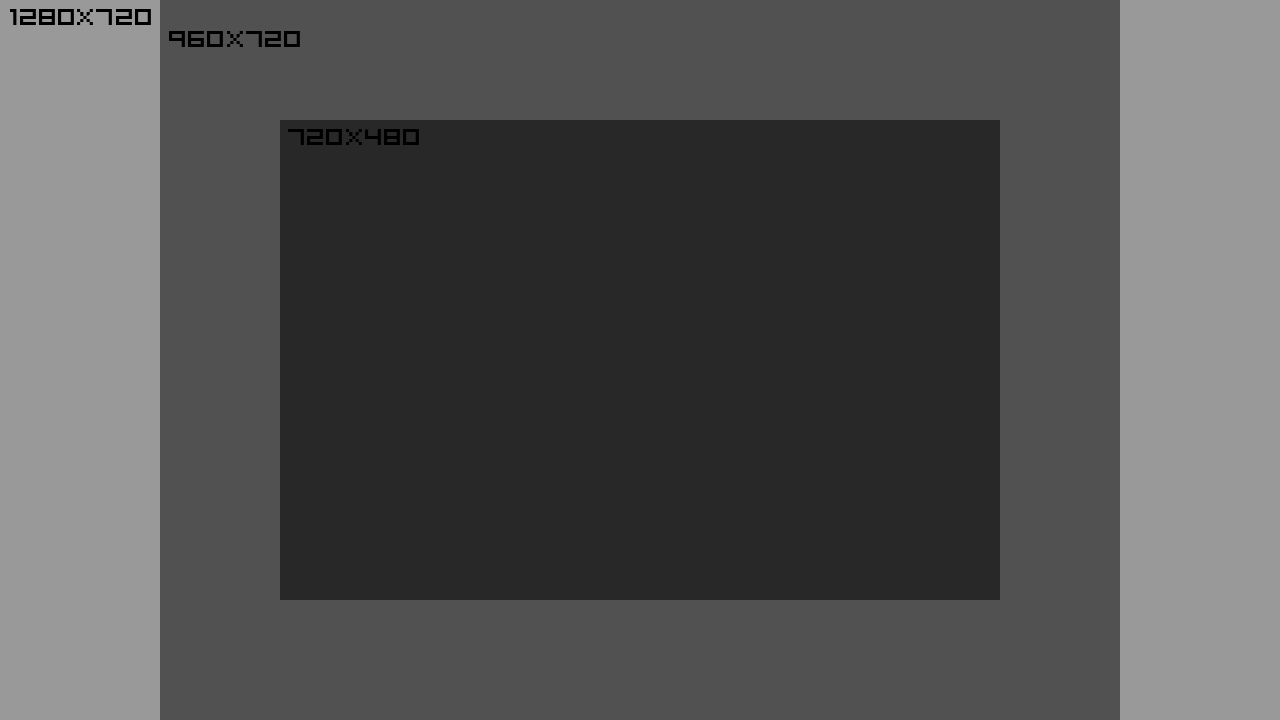
An alternative would be if you could scale 240p to 4x in a 720p window 1:1 allowing the 160p GBA signal to scale 4x to 960x640
That'd also work nicely for GB games too, taking 160x144 to 640x576 at 4x Scale. Ideally though on a 1080p set, GB/GBC should be 7x7.
Within the confines of the GBI and the 240p signal, at 1080p you'd need to scale 240p 7x7 as well but only showing it at a 1:1 ratio. (Cropping and not Zoomed)
320x240 x 3 = 960x720
240x160 within that x3 =720x480 with 960x720
An alternative would be if you could scale 240p to 4x in a 720p window 1:1 allowing the 160p GBA signal to scale 4x to 960x640
That'd also work nicely for GB games too, taking 160x144 to 640x576 at 4x Scale. Ideally though on a 1080p set, GB/GBC should be 7x7.
Within the confines of the GBI and the 240p signal, at 1080p you'd need to scale 240p 7x7 as well but only showing it at a 1:1 ratio. (Cropping and not Zoomed)
-
Smashbro29
- Posts: 532
- Joined: Thu Dec 15, 2011 2:46 am
Re: Gameboy Advance RGB NTSC
BONKERS wrote:It's not 4:3, but it's 1:1 scaled within that window.
320x240 x 3 = 960x720
240x160 within that x3 =720x480 with 960x720
http://u.cubeupload.com/MrBonk/scaling.png
An alternative would be if you could scale 240p to 4x in a 720p window 1:1 allowing the 160p GBA signal to scale 4x to 960x640
That'd also work nicely for GB games too, taking 160x144 to 640x576 at 4x Scale. Ideally though on a 1080p set, GB/GBC should be 7x7.
Within the confines of the GBI and the 240p signal, at 1080p you'd need to scale 240p 7x7 as well but only showing it at a 1:1 ratio. (Cropping and not Zoomed)

I found this while thinking about how to utilize the space. Feel like it's a helpful visual aid of what we're trying to do here.
Seemingly 3:2 is a bit wider. I'm thinking how do we use the most of the 1080p space as possible.
I'm reading your post more thoroughly and it seems like if crop off the 4:3 space on top and bottom that aren't being used we'll definitely have more room to play with.
-
Einzelherz

- Posts: 1279
- Joined: Wed Apr 09, 2014 2:09 am
Re: Gameboy Advance RGB NTSC
There's a difference with searching for pixel perfect/integer scaling and maximum stretch.Smashbro29 wrote:BONKERS wrote:It's not 4:3, but it's 1:1 scaled within that window.
320x240 x 3 = 960x720
240x160 within that x3 =720x480 with 960x720
http://u.cubeupload.com/MrBonk/scaling.png
An alternative would be if you could scale 240p to 4x in a 720p window 1:1 allowing the 160p GBA signal to scale 4x to 960x640
That'd also work nicely for GB games too, taking 160x144 to 640x576 at 4x Scale. Ideally though on a 1080p set, GB/GBC should be 7x7.
Within the confines of the GBI and the 240p signal, at 1080p you'd need to scale 240p 7x7 as well but only showing it at a 1:1 ratio. (Cropping and not Zoomed)
I found this while thinking about how to utilize the space. Feel like it's a helpful visual aid of what we're trying to do here.
Seemingly 3:2 is a bit wider. I'm thinking how do we use the most of the 1080p space as possible.
I'm reading your post more thoroughly and it seems like if crop off the 4:3 space on top and bottom that aren't being used we'll definitely have more room to play with.
-
Smashbro29
- Posts: 532
- Joined: Thu Dec 15, 2011 2:46 am
Re: Gameboy Advance RGB NTSC
Cool, what? I figured GBA games use the entire space.Einzelherz wrote:
There's a difference with searching for pixel perfect/integer scaling and maximum stretch.
-
Einzelherz
- Posts: 1279
- Joined: Wed Apr 09, 2014 2:09 am
Re: Gameboy Advance RGB NTSC
You're talking about filling up the entire screen, which is fine, but you'll have a scale of 6.75 (on a 1080 high screen) so the pixels will not be multiplied by a full integer. This would also require devices to accept a 160p type signal, which they don't.Smashbro29 wrote:Cool, what? I figured GBA games use the entire space.Einzelherz wrote:
There's a difference with searching for pixel perfect/integer scaling and maximum stretch.
OR you could have the 240x160 maxxed in a 240p signal which would be 1.5x scaling. So for every two real pixels three will be displayed, which leads to a lack of sharpness + interpolation issues. Then if you scale that to full screen on a 1080 it'll scale 4.5x more (giving you the 6.75) further blurring the screen. (My mathing here may not be 100%, btw.)
Most of the guys here want perfect integer scaling, myself included, at least on a fixed pixel display.
-
Smashbro29
- Posts: 532
- Joined: Thu Dec 15, 2011 2:46 am
Re: Gameboy Advance RGB NTSC
Interesting, its just that after playing with those FBX profiles I'm pretty spoiled. Look great and fills the screen.Einzelherz wrote:You're talking about filling up the entire screen, which is fine, but you'll have a scale of 6.75 (on a 1080 high screen) so the pixels will not be multiplied by a full integer. This would also require devices to accept a 160p type signal, which they don't.Smashbro29 wrote:Cool, what? I figured GBA games use the entire space.Einzelherz wrote:
There's a difference with searching for pixel perfect/integer scaling and maximum stretch.
OR you could have the 240x160 maxxed in a 240p signal which would be 1.5x scaling. So for every two real pixels three will be displayed, which leads to a lack of sharpness + interpolation issues. Then if you scale that to full screen on a 1080 it'll scale 4.5x more (giving you the 6.75) further blurring the screen. (My mathing here may not be 100%, btw.)
Most of the guys here want perfect integer scaling, myself included, at least on a fixed pixel display.
So with perfect integer scaling how much black bar space are we talking here?
-
12345
- Posts: 144
- Joined: Sat May 31, 2014 11:08 am
Re: Gameboy Advance RGB NTSC
Again, just use ZOOM_SIZE 75 and V_WIDTH 31 and you'll get what you're looking for.
Last edited by 12345 on Tue Aug 25, 2015 5:58 pm, edited 1 time in total.
-
bobrocks95
- Posts: 3663
- Joined: Mon Apr 30, 2012 2:27 am
- Location: Kentucky
Re: Gameboy Advance RGB NTSC
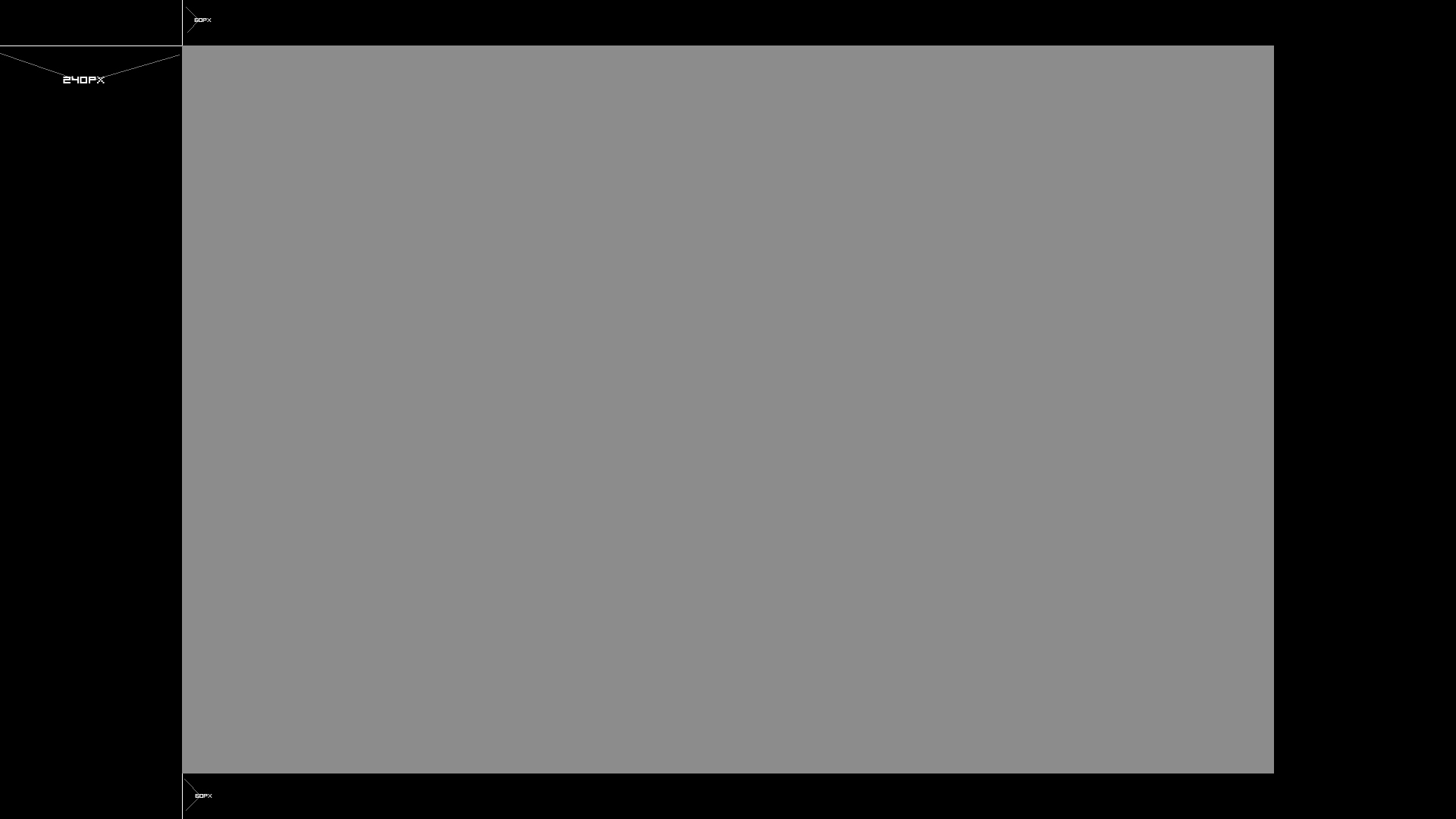
It's what, a 160p image inside a 240p frame? With 6x scaling you'd get to 960p, which is 60 black lines at the top and bottom.
PS1 Disc-Based Game ID BIOS patch for MemCard Pro and SD2PSX automatic VMC switching.
-
Smashbro29
- Posts: 532
- Joined: Thu Dec 15, 2011 2:46 am
Re: Gameboy Advance RGB NTSC
See but now I'm hearing what I wanted isn't gonna look great, so what's the proper scaling settings?12345 wrote:Again, just use ZOOM_SIZE 75 and V_WIDTH 31 and you'll get what you're looking for.
Right now I'm stuck at 480p, I need my SD card adapter to come in so I can try 240p and be on the same page as everyone.
But I'm only thinking of ideas within my limited knowledge, I come to the forums to be told what I'm doing wrong so this is great.
-
BONKERS
- Posts: 425
- Joined: Thu Dec 11, 2014 10:41 am
Re: Gameboy Advance RGB NTSC
1.5x1.5 isn't 3 though. It's 2.25x. Which is good for Anti-Aliasing. But for upscaling pixel perfect.Einzelherz wrote:You're talking about filling up the entire screen, which is fine, but you'll have a scale of 6.75 (on a 1080 high screen) so the pixels will not be multiplied by a full integer. This would also require devices to accept a 160p type signal, which they don't.Smashbro29 wrote:Cool, what? I figured GBA games use the entire space.Einzelherz wrote:
There's a difference with searching for pixel perfect/integer scaling and maximum stretch.
OR you could have the 240x160 maxxed in a 240p signal which would be 1.5x scaling. So for every two real pixels three will be displayed, which leads to a lack of sharpness + interpolation issues. Then if you scale that to full screen on a 1080 it'll scale 4.5x more (giving you the 6.75) further blurring the screen. (My mathing here may not be 100%, btw.)
Most of the guys here want perfect integer scaling, myself included, at least on a fixed pixel display.
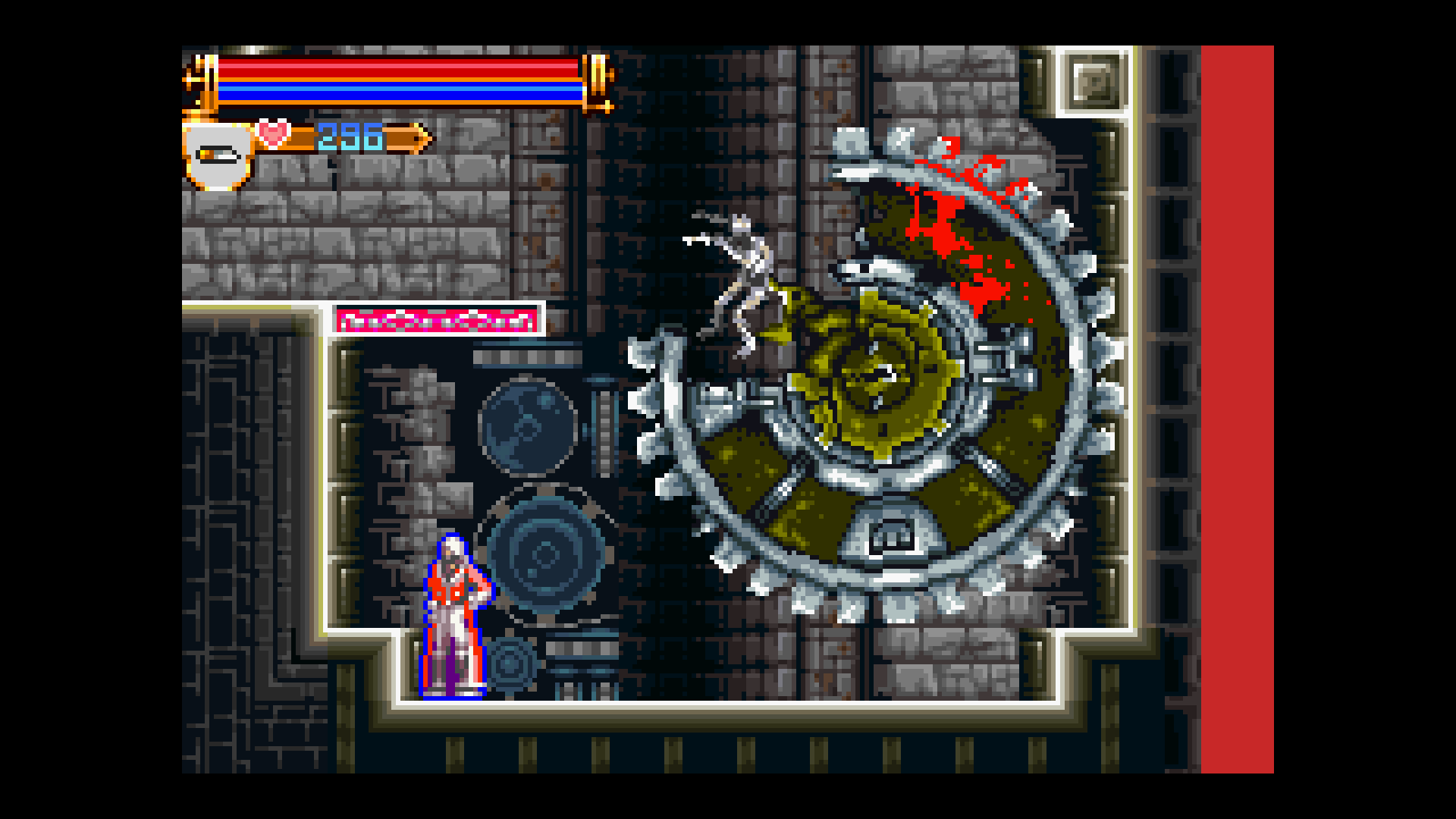
If you want the biggest integer 240x160 scaled to 1080p. You essentially need the GBA to take up 1440x960 worth of space.
-
Thomago
- Posts: 588
- Joined: Fri Oct 26, 2012 7:01 pm
- Location: Germany
Re: Gameboy Advance RGB NTSC
I actually tried, for several hours, to zoom the GBI's output to a 1280x800 (DVI mode!) res. Unfortunately the Framemeister wouldn't let me, as it alway cropped the picture to a 4:3 frame, despite the 16:10 output resolution 
-
Einzelherz
- Posts: 1279
- Joined: Wed Apr 09, 2014 2:09 am
Re: Gameboy Advance RGB NTSC
What part did I mention 1.5x by 1.5x? Not being snippy, just confused.BONKERS wrote: 1.5x1.5 isn't 3 though. It's 2.25x. Which is good for Anti-Aliasing. But for upscaling pixel perfect.
If you want the biggest integer 240x160 scaled to 1080p. You essentially need the GBA to take up 1440x960 worth of space.
-
12345
- Posts: 144
- Joined: Sat May 31, 2014 11:08 am
Re: Gameboy Advance RGB NTSC
THIS is the setting for proper 6X scaling for a 240p input (160p in a 240p frame) at 1080p output. Your results will look like the pictures BONKERS posted. You even get proper scanlines, as described several pages ago.Smashbro29 wrote:See but now I'm hearing what I wanted isn't gonna look great, so what's the proper scaling settings?12345 wrote:Again, just use ZOOM_SIZE 75 and V_WIDTH 31 and you'll get what you're looking for.
-
BONKERS
- Posts: 425
- Joined: Thu Dec 11, 2014 10:41 am
Re: Gameboy Advance RGB NTSC
You mentionedEinzelherz wrote:What part did I mention 1.5x by 1.5x? Not being snippy, just confused.BONKERS wrote: 1.5x1.5 isn't 3 though. It's 2.25x. Which is good for Anti-Aliasing. But for upscaling pixel perfect.
If you want the biggest integer 240x160 scaled to 1080p. You essentially need the GBA to take up 1440x960 worth of space.
That to me sounded like you were doing 1.5 + 1.5 = 3240x160 maxxed in a 240p signal which would be 1.5x scaling. So for every two real pixels three will be displayed
I misunderstood what you meant I think
Now that I am doing the math (320/240) X (240/160) = 1.3333333333333333333333333333333 X 1.5
-
Smashbro29
- Posts: 532
- Joined: Thu Dec 15, 2011 2:46 am
Re: Gameboy Advance RGB NTSC
I really appreciate your enthusiasm in helping me. When I'm able to load in 240p when I get my SD memory card I'll definitely give it a shot and show you how it looks.12345 wrote:THIS is the setting for proper 6X scaling for a 240p input (160p in a 240p frame) at 1080p output. Your results will look like the pictures BONKERS posted. You even get proper scanlines, as described several pages ago.Smashbro29 wrote:See but now I'm hearing what I wanted isn't gonna look great, so what's the proper scaling settings?12345 wrote:Again, just use ZOOM_SIZE 75 and V_WIDTH 31 and you'll get what you're looking for.
-
Einzelherz
- Posts: 1279
- Joined: Wed Apr 09, 2014 2:09 am
Re: Gameboy Advance RGB NTSC
I did make a mistake, actually. I scaled the vertical res but forgot the gba was wider than SDTV so I should have scaled the horizontal. So instead of the 1.5x it should have been 1.33x.BONKERS wrote:You mentionedEinzelherz wrote:What part did I mention 1.5x by 1.5x? Not being snippy, just confused.BONKERS wrote: 1.5x1.5 isn't 3 though. It's 2.25x. Which is good for Anti-Aliasing. But for upscaling pixel perfect.
If you want the biggest integer 240x160 scaled to 1080p. You essentially need the GBA to take up 1440x960 worth of space.That to me sounded like you were doing 1.5 + 1.5 = 3240x160 maxxed in a 240p signal which would be 1.5x scaling. So for every two real pixels three will be displayed
I misunderstood what you meant I think
Now that I am doing the math (320/240) X (240/160) = 1.3333333333333333333333333333333 X 1.5
-
Stainomo
- Posts: 63
- Joined: Fri Apr 13, 2012 2:01 pm
- Location: Belgium
Re: Gameboy Advance RGB NTSC
This might have been asked here but couldn't immediately find it.
How does this compare to a Super Game Boy 2? Buying a Gameboy player or Super Game Boy 2 is about the same price - I have both an Pal Gamecube and a Super Famicom with an RGB cable so I can choose.
How does this compare to a Super Game Boy 2? Buying a Gameboy player or Super Game Boy 2 is about the same price - I have both an Pal Gamecube and a Super Famicom with an RGB cable so I can choose.
-
Thomago
- Posts: 588
- Joined: Fri Oct 26, 2012 7:01 pm
- Location: Germany
Re: Gameboy Advance RGB NTSC
Just in case... you know that the Game Boy Player play GBA games and the Super Game Boy 2 doesn't? Makes a comparison kind of moot imho.
-
Stainomo
- Posts: 63
- Joined: Fri Apr 13, 2012 2:01 pm
- Location: Belgium
Re: Gameboy Advance RGB NTSC
I know but right now i'm not too interrested in GBA, i only had original gameboy games when it was current genThomago wrote:Just in case... you know that the Game Boy Player play GBA games and the Super Game Boy 2 doesn't? Makes a comparison kind of moot imho.

-
BONKERS
- Posts: 425
- Joined: Thu Dec 11, 2014 10:41 am
Re: Gameboy Advance RGB NTSC
IIRC The SGB2 still doesn't have quite the correct aspect ratio. And can't play GBC only games (?_
But for GB games you'll be fine
But for GB games you'll be fine