The newest version of Swiss allows 240p forcing for the Gameboy Player. It looks wonderful (I think it's pixel-perfect? Not 100% sure), AND the hiccups where a frame is doubled happen half as often, about every 10 seconds, since the refresh rate of the GameCube in 240p mode is closer to the GBA's.
EDIT: I still need to test for lag, I'll do that later today. I don't have any scientific ways to do it, but I'll compare between 240p and 480i and see if I can notice a difference.
Gameboy Advance RGB NTSC
-
bobrocks95

- Posts: 3663
- Joined: Mon Apr 30, 2012 2:27 am
- Location: Kentucky
Re: Gameboy Advance RGB NTSC
PS1 Disc-Based Game ID BIOS patch for MemCard Pro and SD2PSX automatic VMC switching.
-
Seraphic
- Posts: 492
- Joined: Fri Mar 19, 2010 1:46 pm
Re: Gameboy Advance RGB NTSC
Swiss download link? I'll give it a try too.bobrocks95 wrote:The newest version of Swiss allows 240p forcing for the Gameboy Player. It looks wonderful (I think it's pixel-perfect? Not 100% sure), AND the hiccups where a frame is doubled happen half as often, about every 10 seconds, since the refresh rate of the GameCube in 240p mode is closer to the GBA's.
EDIT: I still need to test for lag, I'll do that later today. I don't have any scientific ways to do it, but I'll compare between 240p and 480i and see if I can notice a difference.
-
Fudoh

- Posts: 13044
- Joined: Mon Mar 06, 2006 3:29 am
- Location: Germany
- Contact:
Re: Gameboy Advance RGB NTSC
wow, sounds nice. What do I need to run this tool ? A modchip ?
-
bobrocks95
- Posts: 3663
- Joined: Mon Apr 30, 2012 2:27 am
- Location: Kentucky
Re: Gameboy Advance RGB NTSC
Download link is here: http://www.gc-forever.com/forums/downlo ... hp?id=1531
In case you need to be registered and logged in on the site, here's the thread with the link as well:http://www.gc-forever.com/forums/viewto ... =25&t=1375
You need some method of running homebrew to launch Swiss. That can be a modchip, or SD Card to memory card adapters/boot discs like the older Action Replay that comes with an SD Card adapter for adding codes, or an SD Gecko for the Gamecube.
The cheapest and easiest option if you don't have anything to boot homebrew already would be the SD Media Launcher, since a lot of the other SD card adapters aren't produced any more: http://uk.codejunkies.com/Products/GCNW ... 00580.aspx (They have a US site as well for anyone interested)
In case you need to be registered and logged in on the site, here's the thread with the link as well:http://www.gc-forever.com/forums/viewto ... =25&t=1375
You need some method of running homebrew to launch Swiss. That can be a modchip, or SD Card to memory card adapters/boot discs like the older Action Replay that comes with an SD Card adapter for adding codes, or an SD Gecko for the Gamecube.
The cheapest and easiest option if you don't have anything to boot homebrew already would be the SD Media Launcher, since a lot of the other SD card adapters aren't produced any more: http://uk.codejunkies.com/Products/GCNW ... 00580.aspx (They have a US site as well for anyone interested)
PS1 Disc-Based Game ID BIOS patch for MemCard Pro and SD2PSX automatic VMC switching.
-
Fudoh
- Posts: 13044
- Joined: Mon Mar 06, 2006 3:29 am
- Location: Germany
- Contact:
Re: Gameboy Advance RGB NTSC
I'll track down such a SD Cube adapter. In the meantime, please test ahead! And screenshots please 
-
blizzz

- Posts: 1150
- Joined: Fri Sep 16, 2011 6:19 pm
- Location: Germany
- Contact:
Re: Gameboy Advance RGB NTSC
Does it say anywhere if they are in stock? Shipping to EU is rather cheap (£4.50) so I'd like to give it a try.bobrocks95 wrote:The cheapest and easiest option if you don't have anything to boot homebrew already would be the SD Media Launcher, since a lot of the other SD card adapters aren't produced any more: http://uk.codejunkies.com/Products/GCNW ... 00580.aspx (They have a US site as well for anyone interested)
-
Seraphic
- Posts: 492
- Joined: Fri Mar 19, 2010 1:46 pm
Re: Gameboy Advance RGB NTSC
Are you using SD Media Launcher? That's what I have, but I have never used it.bobrocks95 wrote:Download link is here: http://www.gc-forever.com/forums/downlo ... hp?id=1531
In case you need to be registered and logged in on the site, here's the thread with the link as well:http://www.gc-forever.com/forums/viewto ... =25&t=1375
You need some method of running homebrew to launch Swiss. That can be a modchip, or SD Card to memory card adapters/boot discs like the older Action Replay that comes with an SD Card adapter for adding codes, or an SD Gecko for the Gamecube.
The cheapest and easiest option if you don't have anything to boot homebrew already would be the SD Media Launcher, since a lot of the other SD card adapters aren't produced any more: http://uk.codejunkies.com/Products/GCNW ... 00580.aspx (They have a US site as well for anyone interested)
Do I copy the SWISS files over to the memory card, plug that into the Media launcher, insert Media launcher into memory card slot two and then power on GameCube with the Media launcher disk in with a game in the GameBoy Player?
-
bobrocks95
- Posts: 3663
- Joined: Mon Apr 30, 2012 2:27 am
- Location: Kentucky
Re: Gameboy Advance RGB NTSC
Hmm, I think I remember a lack of indication when I got mine too. Maybe it says once you've added it to your cart? I did buy mine maybe 3 or 4 months ago and it shipped from the UK, so I know they're still producing them.blizzz wrote:Does it say anywhere if they are in stock? Shipping to EU is rather cheap (£4.50) so I'd like to give it a try.
Copy the Swiss .DOL onto the SD card (compressed version loads faster), put the adapter into slot 2 with the media launcher disc, load the Swiss .DOL, swap discs to the GBP boot disc, load it with Swiss until you reach a screen that mentions you can press X to change settings. Press it and change "Force video mode" to 240p, then press Save and Exit and press A again to boot the GBP.Seraphic wrote:Are you using SD Media Launcher? That's what I have, but I have never used it.
Do I copy the SWISS files over to the memory card, plug that into the Media launcher, insert Media launcher into memory card slot two and then power on GameCube with the Media launcher disk in with a game in the GameBoy Player?
I don't have a capture card, so they'll have to be some cell phone pics unfortunately. But I'll do my best!Fudoh wrote:I'll track down such a SD Cube adapter. In the meantime, please test ahead! And screenshots please
I didn't notice any lag difference, but I also didn't notice any lag in 480i on my CRT to begin with. I may not be as sensitive to it as others, so that may need more testing from someone else. If it bothered you before it may still be irritating, but I personally have no complaints.
I will say the zoom mode looks even worse than before, which I didn't think was possible. But there's no need for that.
PS1 Disc-Based Game ID BIOS patch for MemCard Pro and SD2PSX automatic VMC switching.
-
Seraphic
- Posts: 492
- Joined: Fri Mar 19, 2010 1:46 pm
Re: Gameboy Advance RGB NTSC
Just that one "swiss_r276-compressed.dol" to the root of the memory card and nothing else is required to be copied over file wise?Copy the Swiss .DOL onto the SD card (compressed version loads faster), put the adapter into slot 2 with the media launcher disc, load the Swiss .DOL, swap discs to the GBP boot disc, load it with Swiss until you reach a screen that mentions you can press X to change settings. Press it and change "Force video mode" to 240p, then press Save and Exit and press A again to boot the GBP.
-
bobrocks95
- Posts: 3663
- Joined: Mon Apr 30, 2012 2:27 am
- Location: Kentucky
Re: Gameboy Advance RGB NTSC
Nope, that's all you need. Other files are if you're booting it on the Wii or using other methods like modchips.Seraphic wrote:Just that one "swiss_r276-compressed.dol" to the root of the memory card and nothing else is required to be copied over file wise?Copy the Swiss .DOL onto the SD card (compressed version loads faster), put the adapter into slot 2 with the media launcher disc, load the Swiss .DOL, swap discs to the GBP boot disc, load it with Swiss until you reach a screen that mentions you can press X to change settings. Press it and change "Force video mode" to 240p, then press Save and Exit and press A again to boot the GBP.
Here is a link to some comparison shots between 240p and 480i. Apologies for the cell phone shots and poor ordering (it's 240p until you hit Pokemon Crystal again, with one more 240p shot at the bottom of the Fusion start screen), my computer is broken atm so I've done this all on my phone.
http://imgur.com/a/JMkyn
This is only using S-Video, but I think the quality increase can be seen as a comparative sort of difference. Zooming in really shows the discrepancies.
I'm wondering now if it would be feasible to import a PAL GameCube for RGB? Could I use my NTSC Player or would I need a PAL one of those as well? Should still be cheaper than component cables but by how much is the question.
PS1 Disc-Based Game ID BIOS patch for MemCard Pro and SD2PSX automatic VMC switching.
-
Fudoh
- Posts: 13044
- Joined: Mon Mar 06, 2006 3:29 am
- Location: Germany
- Contact:
Re: Gameboy Advance RGB NTSC
Looks awesome, thanks!
PAL Cube works for RGB. NTSC GB Player works as well as long as you can run the NTSC boot disc. Can the SD2Cube adapter help with that ?
PAL Cube works for RGB. NTSC GB Player works as well as long as you can run the NTSC boot disc. Can the SD2Cube adapter help with that ?
-
Seraphic
- Posts: 492
- Joined: Fri Mar 19, 2010 1:46 pm
Re: Gameboy Advance RGB NTSC
Had trouble with Media Launcher finding my WaveBird and it was a little confusing getting to the actual settings, but I got it to work.
Only just now had a chance to try it and forced 240p mode looks a lot sharper then normal 480p progressive mode. I like it!
Only just now had a chance to try it and forced 240p mode looks a lot sharper then normal 480p progressive mode. I like it!
Last edited by Seraphic on Mon Aug 04, 2014 6:01 pm, edited 4 times in total.
-
bobrocks95
- Posts: 3663
- Joined: Mon Apr 30, 2012 2:27 am
- Location: Kentucky
Re: Gameboy Advance RGB NTSC
No problem, I'm sure you'll really enjoy the quality once you see it for yourself!Fudoh wrote:Looks awesome, thanks!
PAL Cube works for RGB. NTSC GB Player works as well as long as you can run the NTSC boot disc. Can the SD2Cube adapter help with that ?
Good to hear on the NTSC Gameboy Player. Since you'd need to boot into Swiss to force 240p anyway, and Swiss will boot discs or backups from any region, then yes, the SD adapter will help there.
Looks like I'll be checking eBay or asking some European members on here to see if I can get a PAL GameCube and SCART cable sometime soon!
PS1 Disc-Based Game ID BIOS patch for MemCard Pro and SD2PSX automatic VMC switching.
-
blizzz
- Posts: 1150
- Joined: Fri Sep 16, 2011 6:19 pm
- Location: Germany
- Contact:
Re: Gameboy Advance RGB NTSC
Thanks for sharing! Ordered one.bobrocks95 wrote:Hmm, I think I remember a lack of indication when I got mine too. Maybe it says once you've added it to your cart? I did buy mine maybe 3 or 4 months ago and it shipped from the UK, so I know they're still producing them.blizzz wrote:Does it say anywhere if they are in stock? Shipping to EU is rather cheap (£4.50) so I'd like to give it a try.

Now my PAL Gamecube has a use once again
-
Arasoi
- Posts: 677
- Joined: Wed Aug 16, 2006 3:52 am
- Location: https://www.youtube.com/watch?v=4FZcI8EVW-c
Re: Gameboy Advance RGB NTSC
.
Last edited by Arasoi on Sat Jun 20, 2020 10:41 am, edited 1 time in total.

-
Thomago

- Posts: 588
- Joined: Fri Oct 26, 2012 7:01 pm
- Location: Germany
Re: Gameboy Advance RGB NTSC
60 Hz is possible!
Mhmm, that sounds pretty interesting. What about the stuttering? Is it really significantly toned down in 240p?
Mhmm, that sounds pretty interesting. What about the stuttering? Is it really significantly toned down in 240p?
-
pcb_revival
- Posts: 278
- Joined: Sat Feb 12, 2005 10:40 am
- Location: North West - UK
Re: Gameboy Advance RGB NTSC
Note.
The SD Media Launcher software can only read the SD card standard (max 2GB) and not SDHC cards.
But you can card swap or use a second adaptor in slot B after swiss is loaded and then use SDHC cards.
The SD Media Launcher software can only read the SD card standard (max 2GB) and not SDHC cards.
But you can card swap or use a second adaptor in slot B after swiss is loaded and then use SDHC cards.
-
bobrocks95
- Posts: 3663
- Joined: Mon Apr 30, 2012 2:27 am
- Location: Kentucky
Re: Gameboy Advance RGB NTSC
Like I said, it happens about every 10 seconds instead of every 5. If you hated it before, it will probably still irk you.Thomago wrote:60 Hz is possible!
Mhmm, that sounds pretty interesting. What about the stuttering? Is it really significantly toned down in 240p?
PS1 Disc-Based Game ID BIOS patch for MemCard Pro and SD2PSX automatic VMC switching.
-
Thomago
- Posts: 588
- Joined: Fri Oct 26, 2012 7:01 pm
- Location: Germany
Re: Gameboy Advance RGB NTSC
The only game I want to play on the Gameboy Player is Zelda: Link's Awakening and since this game only scrolls occasionally, half as many stutters are quite a big thing 
Anyway, I just ordered one of these SD card adapters. Let's hope that Link's Awakening's flicker transparency works in 240p.
Anyway, I just ordered one of these SD card adapters. Let's hope that Link's Awakening's flicker transparency works in 240p.
-
Artemio

- Posts: 648
- Joined: Tue Jun 09, 2009 12:55 am
- Location: Mexico
- Contact:
Re: Gameboy Advance RGB NTSC
I tried it yesterday, and indeed the stutter is presentm but it looks pretty good other than that.
A photo I took yesterday from a PVM with my camera phone (click for larger version):
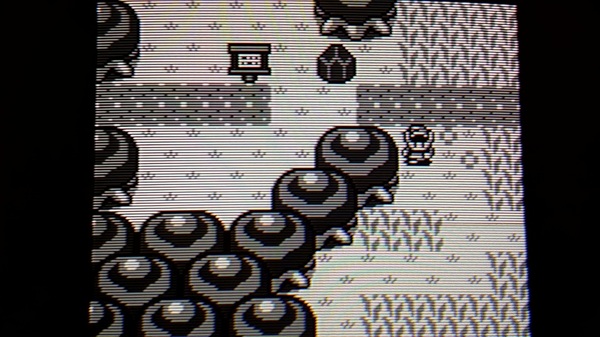
I had been playing around with the SD launcher from when I developed the 240p suite, I ordered mine from their site directly: http://us.codejunkies.com/Products/GCNW ... 00310.aspx
And also, for anyone using swiss on a non progressive PVM, I compiled a version that boots the swiss menu in 480i instead of 480p when a component cable is detected. This patch is very simple, and the problem was caused by a change in the SDK used by swiss. If anyone wants this build of swiss, let me know so I can make it available here. Of course it doesn't affect the rest of the functionality.
A photo I took yesterday from a PVM with my camera phone (click for larger version):

I had been playing around with the SD launcher from when I developed the 240p suite, I ordered mine from their site directly: http://us.codejunkies.com/Products/GCNW ... 00310.aspx
And also, for anyone using swiss on a non progressive PVM, I compiled a version that boots the swiss menu in 480i instead of 480p when a component cable is detected. This patch is very simple, and the problem was caused by a change in the SDK used by swiss. If anyone wants this build of swiss, let me know so I can make it available here. Of course it doesn't affect the rest of the functionality.
-
bobrocks95
- Posts: 3663
- Joined: Mon Apr 30, 2012 2:27 am
- Location: Kentucky
Re: Gameboy Advance RGB NTSC
The flicker transparencies worked in Oracle of Ages when I was playing it, assuming we're talking about the same thing. It shows up when you cut grass and the leaves fly into the air right?Thomago wrote:The only game I want to play on the Gameboy Player is Zelda: Link's Awakening and since this game only scrolls occasionally, half as many stutters are quite a big thing
Anyway, I just ordered one of these SD card adapters. Let's hope that Link's Awakening's flicker transparency works in 240p.
PS1 Disc-Based Game ID BIOS patch for MemCard Pro and SD2PSX automatic VMC switching.
-
Thomago
- Posts: 588
- Joined: Fri Oct 26, 2012 7:01 pm
- Location: Germany
Re: Gameboy Advance RGB NTSC
I haven't played Oracle of Ages, but I think we mean the same thing. In Link's Awakening it was most prominent with the two kids playing ball (--> shadow of the ball) next to the library and the monkey throwing stuff (--> shadow of the stuff) at the beach. You had to activate the Gameboy Player software's soften funktion, otherwise the "illusion" of transparency wouldn't work.
-
bobrocks95
- Posts: 3663
- Joined: Mon Apr 30, 2012 2:27 am
- Location: Kentucky
Re: Gameboy Advance RGB NTSC
Booted up Link's Awakening for you and it works fine.
PS1 Disc-Based Game ID BIOS patch for MemCard Pro and SD2PSX automatic VMC switching.
-
RGB0b
- Posts: 543
- Joined: Wed Dec 05, 2012 1:52 pm
Re: Gameboy Advance RGB NTSC
I added Swiss 240p captures to the Game Boy Player page:
http://www.retrorgb.com/gameboyplayer.html#240p
There's also links there for zip files of the pictures and videos. Does anyone have the ability to put videos side-by-side and keep the same framerate? If so, please PM (or email) me and hopefully I can get some comparisons up on YouTube.
http://www.retrorgb.com/gameboyplayer.html#240p
There's also links there for zip files of the pictures and videos. Does anyone have the ability to put videos side-by-side and keep the same framerate? If so, please PM (or email) me and hopefully I can get some comparisons up on YouTube.
-
Fudoh
- Posts: 13044
- Joined: Mon Mar 06, 2006 3:29 am
- Location: Germany
- Contact:
Re: Gameboy Advance RGB NTSC
you can't do that unless the two files have the exact same refresh rate. You usually have to speed up ONE of the videos to match the other.Does anyone have the ability to put videos side-by-side and keep the same framerate?
-
RGB0b
- Posts: 543
- Joined: Wed Dec 05, 2012 1:52 pm
Re: Gameboy Advance RGB NTSC
I just checked and they all have slightly different framerates. Video editing is such a pain! Oh well, all the video captures are included in the zip, so if anyone wants to view them, they can see them unmodified. I'd upload them to YouTube, but that's the same problem: They'd be compressed and the framerate changed.Fudoh wrote:you can't do that unless the two files have the exact same refresh rate. You usually have to speed up ONE of the videos to match the other.
-
bobrocks95
- Posts: 3663
- Joined: Mon Apr 30, 2012 2:27 am
- Location: Kentucky
Re: Gameboy Advance RGB NTSC
Wait, thinking about it now, are you supposed to be able to tell it's flickering? Or should it be smoothed out to appear solid? Because it's obvious, but still looks like a shadow.Thomago wrote:I haven't played Oracle of Ages, but I think we mean the same thing. In Link's Awakening it was most prominent with the two kids playing ball (--> shadow of the ball) next to the library and the monkey throwing stuff (--> shadow of the stuff) at the beach. You had to activate the Gameboy Player software's soften funktion, otherwise the "illusion" of transparency wouldn't work.
EDIT: it definitely doesn't look like it does on the Gameboy actually. I'd compare it to dithering, where in composite it looks like another color but higher quality cables reveal the effect.
Last edited by bobrocks95 on Tue Aug 05, 2014 6:00 am, edited 1 time in total.
PS1 Disc-Based Game ID BIOS patch for MemCard Pro and SD2PSX automatic VMC switching.
-
Thomago
- Posts: 588
- Joined: Fri Oct 26, 2012 7:01 pm
- Location: Germany
Re: Gameboy Advance RGB NTSC
Ideally the flickering should be smoothed out completely. Unfortunately this will lead to unwanted smearing (--> scrolling becomes unsharp), so you will have to compromise with the Gameboy Player's settings. Seems you found a good compromise
-
RGB0b
- Posts: 543
- Joined: Wed Dec 05, 2012 1:52 pm
Re: Gameboy Advance RGB NTSC
Does anyone think it's possible to integrate native 240p support into the GBP iso? This way people with modded GC's could just boot with one disc.
-
Einzelherz

- Posts: 1279
- Joined: Wed Apr 09, 2014 2:09 am
Re: Gameboy Advance RGB NTSC
Are you getting your connection through a modified component cable?retrorgb wrote:I just checked and they all have slightly different framerates. Video editing is such a pain! Oh well, all the video captures are included in the zip, so if anyone wants to view them, they can see them unmodified. I'd upload them to YouTube, but that's the same problem: They'd be compressed and the framerate changed.Fudoh wrote:you can't do that unless the two files have the exact same refresh rate. You usually have to speed up ONE of the videos to match the other.