austin532 wrote:Alright after experiencing RGB for the first time I can clearly say it's the only way to play classic games on a HDTV.
I would say it's the only way to play classic games, period it was the best way in the 80's-90's on CRT as well. Most of us in Europe, especially France, had the chance to experience almost all the systems in RGB -even the PCengine, SODIPENG imported it from Japan and sold it to the public with a built in RGB mod. Only the NES had a fake RGB signal, and a couple of other systems, otherwise we were blessed by the RGB gods. But we also had 50hz, which is a shame.
Konsolkongen wrote:Ah, you're using 720p right? You'll probably need to output in 1080p for it to work
been using 1080p all the time
Okay, then I have no idea what's going on at your end. You have stuff like the Zoom option disabled, right? Try resetting the XRGB.
It works perfectly fine here with FW 1.10. I haven't tried 1.11 yet, but as far as I can understand it only adds Korean language anyway... :/
austin532 wrote:
I am beginning to think it's my TV as I have the same problem with VGA. The colors will look washed out or not as vibrant as Component.
I believe VGA is also equal to RGBHV if I'm not mistaken. If that's true then that would explain why the colors are dull.
The component input on the Mini is extremely oversaturated and shouldn't be used to compare anything, ever
The RGB input looks far better at the default settings. But if you have gotten used to how component looks then you'll need some time to adjust to RGB.
And as Sixfortyfive said, make sure that you have the TV set correctly to accept either Limited or Full-range RGB.
Konsolkongen wrote:Ah, you're using 720p right? You'll probably need to output in 1080p for it to work
been using 1080p all the time
Okay, then I have no idea what's going on at your end. You have stuff like the Zoom option disabled, right? Try resetting the XRGB.
It works perfectly fine here with FW 1.10. I haven't tried 1.11 yet, but as far as I can understand it only adds Korean language anyway... :/
I have no clue either, it is a PSP 3000 something and some talked about a PSP zoom feature
Konsolkongen wrote:Yes the PSP Zoom feature is the Game_LB and LB2 modes. Does it say "unsupported" if you just press the buttons (LB and LB2) on the remote?
I use a PSP 3000 myself so I can say for sure that it works.
If I were you I would just reset the XRGB and try from scratch.
It does absolutely nothing o_o it says the mode on the TV but NOTHING changes
Konsolkongen wrote:Yes the PSP Zoom feature is the Game_LB and LB2 modes. Does it say "unsupported" if you just press the buttons (LB and LB2) on the remote?
I use a PSP 3000 myself so I can say for sure that it works.
If I were you I would just reset the XRGB and try from scratch.
It does absolutely nothing o_o it says the mode on the TV but NOTHING changes
Konsolkongen wrote:Yes the PSP Zoom feature is the Game_LB and LB2 modes. Does it say "unsupported" if you just press the buttons (LB and LB2) on the remote?
I use a PSP 3000 myself so I can say for sure that it works.
If I were you I would just reset the XRGB and try from scratch.
It does absolutely nothing o_o it says the mode on the TV but NOTHING changes
austin532 wrote:
I am beginning to think it's my TV as I have the same problem with VGA. The colors will look washed out or not as vibrant as Component.
I believe VGA is also equal to RGBHV if I'm not mistaken. If that's true then that would explain why the colors are dull.
The component input on the Mini is extremely oversaturated and shouldn't be used to compare anything, ever
The RGB input looks far better at the default settings. But if you have gotten used to how component looks then you'll need some time to adjust to RGB.
And as Sixfortyfive said, make sure that you have the TV set correctly to accept either Limited or Full-range RGB.
My TV has no option of that kind...that I know of. Only color option I have is setting it to Auto or Native.
austin532 wrote:
I am beginning to think it's my TV as I have the same problem with VGA. The colors will look washed out or not as vibrant as Component.
I believe VGA is also equal to RGBHV if I'm not mistaken. If that's true then that would explain why the colors are dull.
The component input on the Mini is extremely oversaturated and shouldn't be used to compare anything, ever
The RGB input looks far better at the default settings. But if you have gotten used to how component looks then you'll need some time to adjust to RGB.
And as Sixfortyfive said, make sure that you have the TV set correctly to accept either Limited or Full-range RGB.
My TV has no option of that kind...that I know of. Only color option I have is setting it to Auto or Native.
If your TV doesn't have this option then it uses Limited RGB range by default. This option goes by many names, I think it's called HDMI Black level on Samsungs. Can't remember what it's called on Sony and Panasonic.
broken harbour wrote:Does anybody have color/gamma, etc settings for S-Video? I can get the picture pretty sharp but the colors seem off.
I'm running an N64 through S-Video so maybe its the fact that basically ALL N64 games had wonky colors?
Sharing this information would be useless, as it completely relies on the screen that you are using and its settings. Said differently the color settings in the mini that will work fine for screen A will to be completely off for screen B, unless it is the very same setup.
Even if the 240p test suite, that has some simple colour grids, would be available for the N64, you would need a color calibration measuring tool to fine tune both your screen and the mini settings. As a cheap alternative you could try to get a professional printed color grading palette test/sample and do some ad-hoc visual comparison with a palette on screen (maybe there is a N64 homebrew for that, or a game that has some debug menu with such graphics?). That would be sub-optimal but better than trying to figure out for yourself the temperature of a particular shade of grey.
(BTW, I've been using this http://www.hughski.com for calibrating my screens under GNU/Linux and FreeBSD, and was planning to use it to fine tune the colour settings of my mini, granted the parameters of the mini are far from being as flexible as a proper ICC profile, and a dedicated colour calibration homebrew would be needed anyway to cover the whole colour range of the input signal).
It wouldn't be totally useless, there's settings on the XRGB Wiki for Component which has ultra-saturated colors out of the box.
@EmperorZelos: the zoom/letterbox modes should work with all input signals. Out of interest: what happens if you press them with another - let's say - classic RGBs source ?
Just a brief question to those experienced with PAL/PAL60 on the Gamecube: What would you rather suggest if you had the choice? Would you also take the same mode if you could force progressive resolution with SWISS (480p vs 576p)? Thanks!
Probably 60 Hz in most cases, I doubt many developers took the time to optimize 50 Hz for correct game speed given that they could just include PAL60 instead. But if it's optimized and the lower framerate isn't bothersome 576i could be an alternative.
I seem to be experiencing an issue with scanlines while outputting in 720p. I am not getting a true even look. It's most noticeable on darker areas and appears to give those lines a darker look to them. I am not sure what would be causing this all of a sudden. It seems like it's only noticeable on 480i games. I tried switching between Component and RGB and still no results.
12345 wrote:Just a brief question to those experienced with PAL/PAL60 on the Gamecube: What would you rather suggest if you had the choice? Would you also take the same mode if you could force progressive resolution with SWISS (480p vs 576p)? Thanks!
480p > 480i. Always 60Hz. I would never choose 50Hz for anything.
So I finally tried this. And it's a huge improvement in stuttering as I had hoped. Unfortunately it's not gone completely. I wonder if it's because I'm using the EU version of the Super Gameboy?
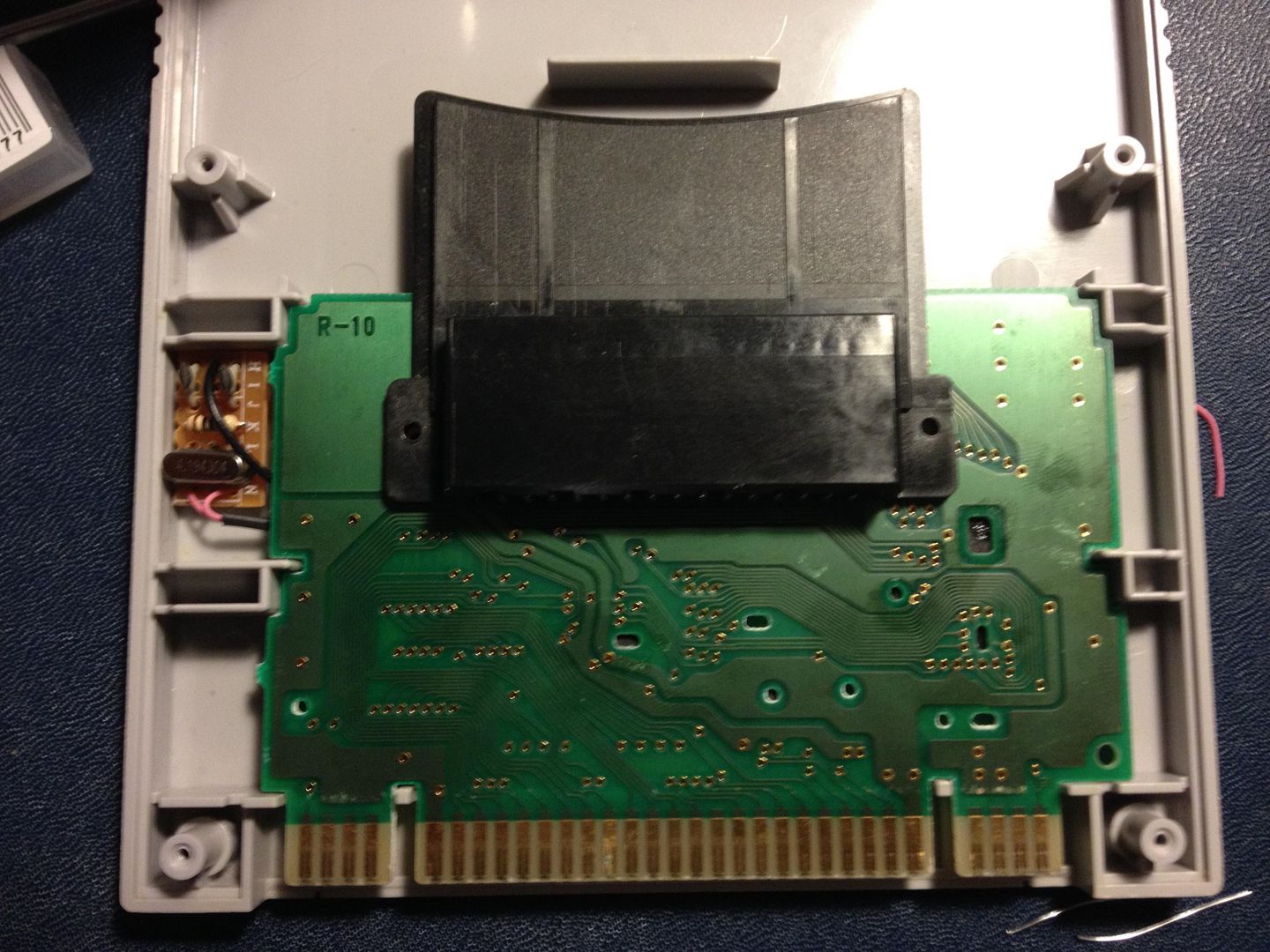
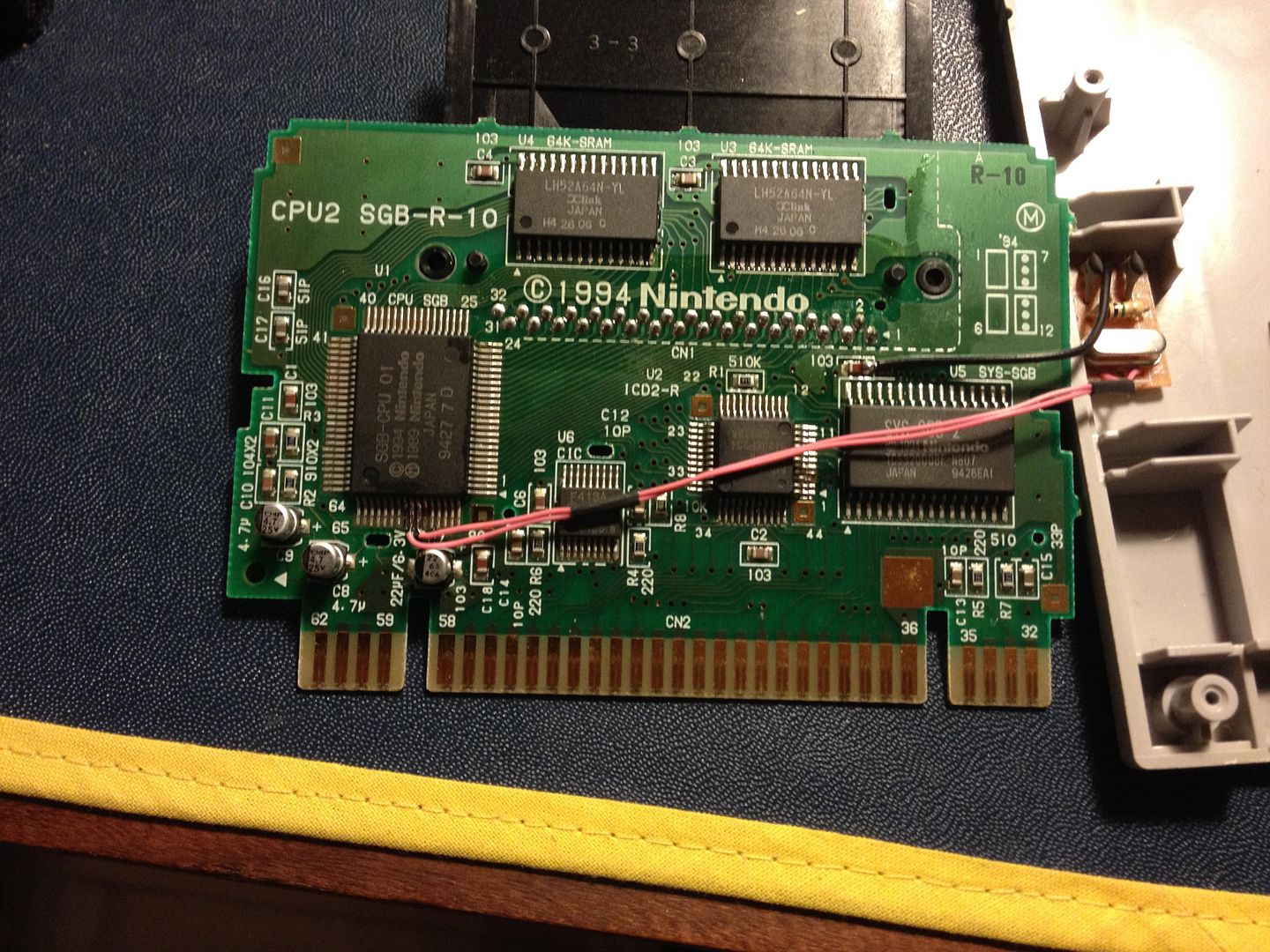
I was a little confused about lifting pin 73 and 74. In some pictures they are lifted and in others they are not. I couldn't get it to work when they were lifted so I soldered them in place again.
So I finally tried this. And it's a huge improvement in stuttering as I had hoped. Unfortunately it's not gone completely. I wonder if it's because I'm using the EU version of the Super Gameboy?
I was a little confused about lifting pin 73 and 74. In some pictures they are lifted and in others they are not. I couldn't get it to work when they were lifted so I soldered them in place again.
Perhaps this mod could be done to the GB Player on the GameCube?
Shouldn't matter anymore since the mod cuts out the SGB's source of frequency calculation from the SNES. The mod makes it independent of it. But now I realize you said EU as I'm writing this post. Are you also using a European SNES too?
Edit: The Game Boy output fps is 59.7 and I'm wondering if running it on a EU SNES would be the source of the stuttering there.
eightbitminiboss wrote:
Shouldn't matter anymore since the mod cuts out the SGB's source of frequency calculation from the SNES. The mod makes it independent of it. But now I realize you said EU as I'm writing this post. Are you also using a European SNES too?
Edit: The Game Boy output fps is 59.7 and I'm wondering if running it on a EU SNES would be the source of the stuttering there.
I figured as much. Must have been a bad connection between the Super Gameboy and SNES. Although I did try several times.
Yes it is an EU SNES, but a 1CHIP. So it's modified with a crystal for 60Hz so the output refresh rate is identical to US and JAP consoles (60.08Hz according to the XRGB).
So the clock inside the SGB is supposed to speed up the actual Game Boy Hardware ? I think it's very hard to synchronize two external clocks to run in perfect sync. But good to hear that it's a nice improvement already.
austin532 wrote:I seem to be experiencing an issue with scanlines while outputting in 720p. I am not getting a true even look. It's most noticeable on darker areas and appears to give those lines a darker look to them. I am not sure what would be causing this all of a sudden. It seems like it's only noticeable on 480i games. I tried switching between Component and RGB and still no results.
Also it seems to be some kind of issue with Gamma or Brightness and is most noticeable on the PS2 System Configuration screen along the edges of the vortex/black hole. Does any one else experience this?
When set to 1080p and using Smart_X 2 the problem goes away.
ultrageranium wrote:
One thing that comes to my mind right now is that to speed up the process, instead of a grid, single centered squares of colors (or maybe moved a bit to the side so that the mini OSD does not overlap maybe, or maybe just full screen color background) and with their RGB value printed below, would allow to attach the colorimeter on the screen once an for all, and use the pad to cycle through different presets (like the ones used in the color grids), and maybe optionally allow for custom RGB value to test borderline situations.
Thas RGB and B&W full screen modes, they are under the "White test", under test patterns. The Wii and GC versions have been updated to have custom colors via RGB values.
ultrageranium wrote:PS: Thanks a lot for the 240p suite, it really helped me a lot understand how the mini settings affect the image!
Thanks for the feedback, I've been improving it to understand more myself.
Does anyone have any pictures of the XRGB mini pcb top and bottom? I'm curious, I was gonna open mine but only found one screw and couldn't pop the plastic off.
If you made the cut like shown in TμΕΕ's schematic then it's the same as lifting the 73+74 pins, you isolate the chip from the clock signal coming from the SNES and you feed it from the external oscillator we use.
But it should work just fine with lifted pads since it's exactly the same... strange that yours didn't work, I've modded 3 SGBs so far and I just lift the pins since it's easier for me , they just work...
@fudoh
The external oscillator mod fixes the SGB's clock so it's the same speed as a real GB. Nintendo cheaped out and they decided to use a division of the SNES's clock. It was approximately the same speed but it did cause some sound issues since there was a small difference. They fixed that in their SGB2 design that uses it's own oscillator at the correct speed.
@Pasky
IIRC there are 3x screws on the mini, and you need to open it from the right side (IIRC again) since there are some clips on the left side. You'll see it when all screws are out, 2 of them are under the feet I believe.
Last edited by keropi on Wed Jun 18, 2014 6:35 pm, edited 1 time in total.
The external oscillator mod fixes the SGB's clock so it's the same speed as a real GB. Nintendo cheaped out and they decided to use a division of the SNES's clock. It was approximately the same speed but it did cause some sound issues since there was a small difference. They fixed that in their SGB2 design that uses it's own oscillator at the correct speed.
but isn't that just taking the SGB's sync problems to a "GB Player" level ? I mean the problem with a GB Player (w/ Cube) setup is that the GB hardware is running at original speed, but then you get a framerate conversion since the output get's synced to the Cube's video chip output.
Last edited by Fudoh on Wed Jun 18, 2014 9:11 am, edited 1 time in total.

 it was the best way in the 80's-90's on CRT as well. Most of us in Europe, especially France, had the chance to experience almost all the systems in RGB -even the PCengine, SODIPENG imported it from Japan and sold it to the public with a built in RGB mod. Only the NES had a fake RGB signal, and a couple of other systems, otherwise we were blessed by the RGB gods. But we also had 50hz, which is a shame.