Component or D-terminal? Both could end up getting pretty expensive thoughdark1x wrote: The Gamecube just isn't possible to use. It's a PAL system, obviously, as the NTSC Cube doesn't support RGB natively. Yet, the PAL system cannot support s-video so I'm trying to find some way to use the system.
XRGB-mini Framemeister
-
Konsolkongen
- Posts: 2398
- Joined: Fri May 16, 2008 8:28 pm
- Location: Denmark
Re: XRGB-mini Framemeister (now available !)
-
Joelepain
- Posts: 180
- Joined: Wed Sep 12, 2012 7:40 pm
Re: XRGB-mini Framemeister (now available !)
There must be a problem with your setup because a PAL Gamecube with an official RGB scart cable work really great with the xrgb mini. You just can't get progressive scan but that's the only flaw if you have some NTSC games.dark1x wrote:So I managed to obtain an official Gamecube RGB cable (DOL-013) in an attempt to resolve the picture quality problems I've experienced with other cables. Unfortunately I only get a black screen and the XRGB stops accepting any remote input until I power off the Gamecube.
If I run an adapter in the middle I can pull an image from the composite line (which looks awful) but in RGB mode I see nothing.
The Gamecube just isn't possible to use. It's a PAL system, obviously, as the NTSC Cube doesn't support RGB natively. Yet, the PAL system cannot support s-video so I'm trying to find some way to use the system.
Of course the best option for Gamecube is component but like Konsolkongen said, it's really expensive nowadays.
You should investigate on a problem of your setup because you already have the best way to use system (without selling a kidney).
Maybe a ground problem. (if I remember right, the ground on official nintendo cables is Pin 17 - composite ground)
-
airs
- Posts: 198
- Joined: Thu May 02, 2013 6:00 pm
- Location: Seattle, WA
Re: XRGB-mini Framemeister (now available !)
Are you using a Scart switch? Perhaps there's a problem with the switch or with the cable that goes from your Scart switch to your XRGB mini?dark1x wrote:So I managed to obtain an official Gamecube RGB cable (DOL-013) in an attempt to resolve the picture quality problems I've experienced with other cables. Unfortunately I only get a black screen and the XRGB stops accepting any remote input until I power off the Gamecube.
If I run an adapter in the middle I can pull an image from the composite line (which looks awful) but in RGB mode I see nothing.
The Gamecube just isn't possible to use. It's a PAL system, obviously, as the NTSC Cube doesn't support RGB natively. Yet, the PAL system cannot support s-video so I'm trying to find some way to use the system.
You should snag a component or d-terminal cable though for 480p though, I picked up one up last week for $95 shipped from someone on AssemblerGames.
-
moonlightaffair
- Posts: 12
- Joined: Thu Mar 27, 2014 4:19 pm
Re: XRGB-mini Framemeister (now available !)
Just noticed some posts here about Framemeister scanlines at 1080p via firmware 1.10...setting ZOOM to 90....
I'm using a modified NES front loader, with NESRGB mod, what are optimal settings with and without scanlines?
Just picked up my Framemeister this weekend, out of the box, using fm 1.08, I used these settings from the Wiki:
for 240p sources
IMAGE_MODE = PICTURE
AUTO_SCALER = GAME
SHARPNESS = 0 or 1 (0 recommended)
Set output resolution to 720p if you want to use scanlines or 1080p if your TV supports it and you DON'T want to use scanlines
Any settings that look better?
Is there anyway to mask the sides? There is about an inch-width vertical bar on the right/left sides (showing the background color of whatever game is playing). Was this because of old tvs and the curved dome?
I'm using a modified NES front loader, with NESRGB mod, what are optimal settings with and without scanlines?
Just picked up my Framemeister this weekend, out of the box, using fm 1.08, I used these settings from the Wiki:
for 240p sources
IMAGE_MODE = PICTURE
AUTO_SCALER = GAME
SHARPNESS = 0 or 1 (0 recommended)
Set output resolution to 720p if you want to use scanlines or 1080p if your TV supports it and you DON'T want to use scanlines
Any settings that look better?
Is there anyway to mask the sides? There is about an inch-width vertical bar on the right/left sides (showing the background color of whatever game is playing). Was this because of old tvs and the curved dome?
-
RGB32E
- Posts: 1400
- Joined: Thu Nov 05, 2009 12:50 am
Re: XRGB-mini Framemeister (now available !)
AUTO_SCALER should be set to OFF, and set the horizontal scale to 5 to get the sharpest picture. I've yet to find a source where the picture benefits from changing vertical scale from default, unless you want to blur or smooth the image.
-
moonlightaffair
- Posts: 12
- Joined: Thu Mar 27, 2014 4:19 pm
Re: XRGB-mini Framemeister (now available !)
What about 1080p? Does it work with scanlines? Gonna update the fw tonight...RGB32E wrote:AUTO_SCALER should be set to OFF, and set the horizontal scale to 5 to get the sharpest picture. I've yet to find a source where the picture benefits from changing vertical scale from default, unless you want to blur or smooth the image.
Btw, I like your Castlevania/Belmont avatar, its diagonal stretch is mesmerizing... I can't stop looking at it
-
eightbitminiboss
- Posts: 450
- Joined: Mon Sep 17, 2012 9:01 pm
Re: XRGB-mini Framemeister (now available !)
Scanlines still do not look correct at 1080p as of 1.10fw.moonlightaffair wrote:What about 1080p? Does it work with scanlines? Gonna update the fw tonight...RGB32E wrote:AUTO_SCALER should be set to OFF, and set the horizontal scale to 5 to get the sharpest picture. I've yet to find a source where the picture benefits from changing vertical scale from default, unless you want to blur or smooth the image.
Btw, I like your Castlevania/Belmont avatar, its diagonal stretch is mesmerizing... I can't stop looking at it
-
RGB32E
- Posts: 1400
- Joined: Thu Nov 05, 2009 12:50 am
Re: XRGB-mini Framemeister (now available !)
I'm not really a fan of scanlines on displays that aren't CRTs, and prefer aperture grill scanlines to shadow mask scanlines. I normally do not enable scanlines and find that 1080p scanlines with zoom 90 on the latest FW are more appealing than 720p output with scanlines (720p output is too soft):moonlightaffair wrote:What about 1080p? Does it work with scanlines? Gonna update the fw tonight...RGB32E wrote:AUTO_SCALER should be set to OFF, and set the horizontal scale to 5 to get the sharpest picture. I've yet to find a source where the picture benefits from changing vertical scale from default, unless you want to blur or smooth the image.

moonlightaffair wrote:Btw, I like your Castlevania/Belmont avatar, its diagonal stretch is mesmerizing... I can't stop looking at it
IIRC I took that picture from my first NES I RGB modded with a RGB PPU running through a XRGB-3 in B0 mode at 1080p. I took the picture from an angle, and cropped it.
-
austin532
- Posts: 844
- Joined: Wed Mar 12, 2014 12:44 am
- Location: Arizona, US
Re: XRGB-mini Framemeister (now available !)
I know this has probably been talked about before in these forums but rather than search through pages upon pages, what would you say is the best way to hook up a Dreamcast? I was leaning toward using a VGA Box connected to a SLG 3000 and then connect that to the TV. The only downside I can see doing it this way is that I don't think the SLG 3000 upscales the image so it won't look the greatest.
I would like to hook it up to the Mini but there doesn't seem to be an easy way. Should I just stick to using S-Video from the VGA Box to the Mini? Any ideas or advice would be most grateful.
Framemeister 240p scanline settings: http://shmups.system11.org/viewtopic.ph ... start=9600
-
CkRtech
- Posts: 668
- Joined: Mon Aug 27, 2012 9:30 pm
- Location: Seattle, WA
Re: XRGB-mini Framemeister (now available !)
So 1080p on fw 1.10 with zoom 90 and scanlines looks decent? What about without scanlines?
I am still sitting on 1.08 and using 720p (240p * 3) without scanlines because it just seemed like a natural scaling resolution for a 240p source.
-
Shining
- Posts: 197
- Joined: Mon Jan 16, 2012 6:14 pm
- Location: Sweden
Re: XRGB-mini Framemeister (now available !)
They sure do, if you like very 'sharp' scanlines. It's perfect for games with black borders around the picture, like Final Fight for the SNES.CkRtech wrote:So 1080p on fw 1.10 with zoom 90 and scanlines looks decent? What about without scanlines?
-
airs
- Posts: 198
- Joined: Thu May 02, 2013 6:00 pm
- Location: Seattle, WA
Re: XRGB-mini Framemeister (now available !)
Decided to...enlarge...my setup - 50" 720p Panasonic plasma I've had for a long time. Loving the mini even more! All my RGB scart systems look so clean on it. Next change will have to be TATE-ability.
Coming in the mail:
Hori D-Terminal Switch (5 ports)
Male to male D-Terminal cable
Hanzo
Kenzei

Coming in the mail:
Hori D-Terminal Switch (5 ports)
Male to male D-Terminal cable
Hanzo
Kenzei

-
opt2not
- Posts: 1289
- Joined: Fri May 20, 2011 6:31 pm
- Location: Southern California
Re: XRGB-mini Framemeister (now available !)
Looks like a nice set-up, airs.
How are you handling audio from your consoles? Through the TV?
-
IrishNinja
- Posts: 141
- Joined: Wed Jun 12, 2013 1:08 pm
- Location: Vice City
- Contact:
Re: XRGB-mini Framemeister (now available !)
^yeah, nice setup man - good use of space!
...go play Mars Matrix
Backloggery
Backloggery
-
airs
- Posts: 198
- Joined: Thu May 02, 2013 6:00 pm
- Location: Seattle, WA
Re: XRGB-mini Framemeister (now available !)
Yep, using the TV's built in speakers and the audio in the HDMI signal from the mini. I think it sounds pretty good actually! In my previous setup I had some Audioengine A5+ monitors but I don't miss them. Also, for some reason the noise I was hearing in my SNES audio has gone away. Maybe it was being caused by the scart to bnc/rca adapter I was using with the PVM, or maybe the PVM itself?opt2not wrote:Looks like a nice set-up, airs.
How are you handling audio from your consoles? Through the TV?
-
chromium
- Posts: 65
- Joined: Mon Mar 24, 2014 10:58 am
Re: XRGB-mini Framemeister (now available !)
Nice, I need something like this. I have consoles all over the floor at the momentairs wrote:Decided to...enlarge...my setup - 50" 720p Panasonic plasma I've had for a long time. Loving the mini even more! All my RGB scart systems look so clean on it. Next change will have to be TATE-ability.
Coming in the mail:
Hori D-Terminal Switch (5 ports)
Male to male D-Terminal cable
Hanzo
Kenzei
I also have way too many CRTs floating around.
-
Sixfortyfive
- Posts: 212
- Joined: Mon Sep 17, 2007 6:31 am
Re: XRGB-mini Framemeister (now available !)
With how much hardware I'm constantly moving around, buying, and reselling, the majority of my "furniture" is currently made of Amazon.com boxes.chromium wrote:Nice, I need something like this. I have consoles all over the floor at the moment
I also have way too many CRTs floating around.
-
broken harbour
- Posts: 943
- Joined: Fri Feb 01, 2013 8:18 pm
- Location: Canaduh
- Contact:
Re: XRGB-mini Framemeister (now available !)
That's awesome, what TV stand is that?airs wrote:Decided to...enlarge...my setup - 50" 720p Panasonic plasma I've had for a long time. Loving the mini even more! All my RGB scart systems look so clean on it. Next change will have to be TATE-ability.
Coming in the mail:
Hori D-Terminal Switch (5 ports)
Male to male D-Terminal cable
Hanzo
Kenzei
When I move to a house I wanted to split my setup and have one for my retro consoles in my spare room, and then all my HDMI consoles in the living room.
I see you also record music? Not many people have monitors on ISO pads.
-
eightbitminiboss
- Posts: 450
- Joined: Mon Sep 17, 2012 9:01 pm
Re: XRGB-mini Framemeister (now available !)
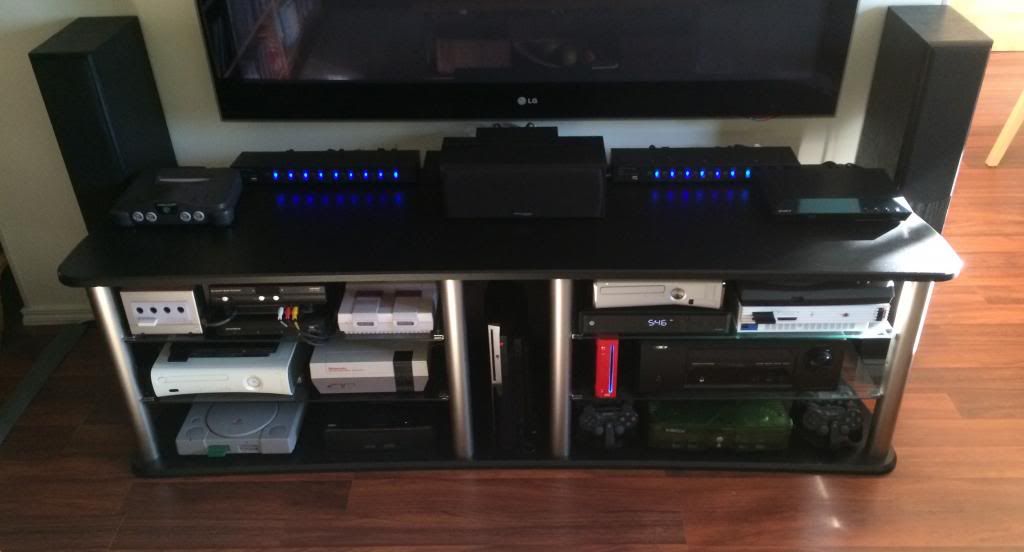
This is my setup:

Took it a few months ago, there's a PS4 in the upper right corner now.
Game storage however is another matter and still WIP with the space I'm currently dealing with...

Took it a few months ago, there's a PS4 in the upper right corner now.
Game storage however is another matter and still WIP with the space I'm currently dealing with...
-
broken harbour
- Posts: 943
- Joined: Fri Feb 01, 2013 8:18 pm
- Location: Canaduh
- Contact:
Re: XRGB-mini Framemeister (now available !)
Not that I want to derail the 'Framemeister Thread', but here's a bad iphone pic of mine:

This is in my living room, so there's a bunch of home theater stuff in addition to gaming stuff.
Yes I'm aware my 360S isn't in the best place for heat issues, I haven't actually used it since I moved it there, I'll prob move it to the top later.
Gotta find room for a future Wii-U, PS4, Jaguar and Genesis/CD/32x....

This is in my living room, so there's a bunch of home theater stuff in addition to gaming stuff.
Yes I'm aware my 360S isn't in the best place for heat issues, I haven't actually used it since I moved it there, I'll prob move it to the top later.
Gotta find room for a future Wii-U, PS4, Jaguar and Genesis/CD/32x....
-
Konsolkongen
- Posts: 2398
- Joined: Fri May 16, 2008 8:28 pm
- Location: Denmark
Re: XRGB-mini Framemeister (now available !)
We should make a thread, if there isn't one already, to show off our collections and setups 
-
arovane
- Posts: 82
- Joined: Tue Apr 08, 2014 10:04 am
- Location: Oslo, Norway
Re: XRGB-mini Framemeister (now available !)
Yes a thread to show off our collection would be a nice idea 
I was wondering, is the picture quality REALLY better when using a Dreamcast with VGA box through the mini, instead of RGB scart through the mini? I actually don't see how it would be such a big difference, as the VGA signal has to be converted in RGB to go through the mini anyway... Has somebody here tried it?
-
Fudoh
- Posts: 13044
- Joined: Mon Mar 06, 2006 3:29 am
- Location: Germany
- Contact:
Re: XRGB-mini Framemeister (now available !)
VGA = 480p, double the vertical resolution of a standard RGB signal. So, yes of course, there's a difference.
When you attach a DC to the Mini, you just convert the sync (RGBHV to RGBs), but not 31khz to 15khz.
-
arovane
- Posts: 82
- Joined: Tue Apr 08, 2014 10:04 am
- Location: Oslo, Norway
Re: XRGB-mini Framemeister (now available !)
Thanks for clarifying that. I was somewhat expecting that kind of answer, since everybody seems to be plugging their Dremacast to the mini through VGA... I've already ordered a UMSA scart adapter anyway, as some games like Street Fighter 2 X are not RGB compatible and has to be played in composite (puh...) or VGA. Will be interesting to see if those non-RGB compatible games will work with the mini though.When you attach a DC to the Mini, you just convert the sync (RGBHV to RGBs), but not 31khz to 15khz.
-
arovane
- Posts: 82
- Joined: Tue Apr 08, 2014 10:04 am
- Location: Oslo, Norway
Re: XRGB-mini Framemeister (now available !)
I'm thinking of plugging several consoles to the mini using the auto scart switcher from bandridge (have a couple of them here that I use with my CRT.
The Bandridge is a very nice switcher and works perfectly with CRT, the auto switch is absolutely mandatory when you have 10+ consoles plugged to 1 CRT. But does somebody know if I need a syncstrike to work correctly with the mini? Or if somehow, using a scart switcher will alter the signal? I guess you don't want to lose any information when you scale up a 240p signal, or 480p for that matter, onto a huge plasma screen
-
airs
- Posts: 198
- Joined: Thu May 02, 2013 6:00 pm
- Location: Seattle, WA
Re: XRGB-mini Framemeister (now available !)
Fudoh, with a Hanzo and Kenzei you could do this though, correct? To play both 31khz 480p games, and 15khz 240p games through the mini?Fudoh wrote:VGA = 480p, double the vertical resolution of a standard RGB signal. So, yes of course, there's a difference.
When you attach a DC to the Mini, you just convert the sync (RGBHV to RGBs), but not 31khz to 15khz.
-
Fudoh
- Posts: 13044
- Joined: Mon Mar 06, 2006 3:29 am
- Location: Germany
- Contact:
Re: XRGB-mini Framemeister (now available !)
yes (but I haven't tried the Kenzei sync combiner).
-
beharius
- Posts: 277
- Joined: Sat Apr 13, 2013 5:32 pm
Re: XRGB-mini Framemeister (now available !)
Yes it supports both 15khz & 31khz modes of the Dreamcast. Perfect match for the XRGB mini!
airs wrote:
Fudoh, with a Hanzo and Kenzei you could do this though, correct? To play both 31khz 480p games, and 15khz 240p games through the mini?
-
arovane
- Posts: 82
- Joined: Tue Apr 08, 2014 10:04 am
- Location: Oslo, Norway
Re: XRGB-mini Framemeister (now available !)
Would you say that using a Hanzo and Kenzei is better than using a UMSA scart adapter? What's the difference in terms of results actually?
-
beharius
- Posts: 277
- Joined: Sat Apr 13, 2013 5:32 pm
Re: XRGB-mini Framemeister (now available !)
I can't talk about UMSA because I don't have one.
I designed Kenzei especially for the DC. It's optimized for the DC in mind. There is no loss in video quality, passthrough directly from Hanzo.