About upgrading my arcade stick

The place for all discussion on gaming hardware
Post Reply
DiegoPonga
Posts: 139
Joined: Thu Mar 02, 2017 11:01 am

About upgrading my arcade stick

Post by DiegoPonga »

Hi there!

I used to have a cheap PS2/PS3/USB Mayflash arcade stick:
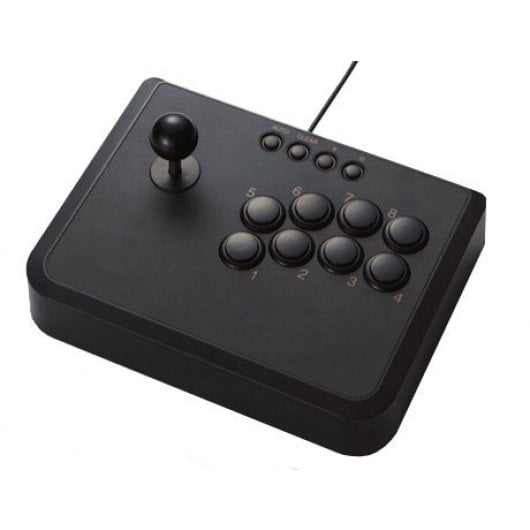
Image

I modded it, so I used my own designs, my Seimitsu joystick and my Sanwa buttons.

Now it looks like this:

Image

The problem is... I was young and innocent and I didn't solder it that good. So, as I see there are Zero Delay cheap PCBs that do not require me to solder, I think they can be an option.

Which PCB should I buy? What things should I consider? Note that I would like to keep its console support.

Also, I don't know what to do with the buttons in the front (Auto, Clear, Select, Start). How can I do to connect them to a new PCB?

Thank you very much!
Last edited by DiegoPonga on Wed Mar 15, 2017 10:22 am, edited 1 time in total.
User avatar
powerfuran
Posts: 177
Joined: Wed May 03, 2006 2:00 pm
Location: Italy
Contact:

Re: About upgrading my arcade stick

Post by powerfuran »

Hey nice stick!

Good questions, I'm basically looking for the same thing as you. I believe you could go with a product like this one here which seems to:
a) accept both 5-pin cables and separate directions (for sticks)
b) have additional functions such as a Turbo switch.

However start and select do not seem to be specifically mapped as I think they make sense only on console, not MAME.

https://www.amazon.it/Geeekpi-Arcade-Ma ... sb+encoder

I have to say I fear that it might crap out on me as they look very cheap and I have no previous experience with these.
DiegoPonga
Posts: 139
Joined: Thu Mar 02, 2017 11:01 am

Re: About upgrading my arcade stick

Post by DiegoPonga »

powerfuran wrote:Hey nice stick!

Good questions, I'm basically looking for the same thing as you. I believe you could go with a product like this one here which seems to:
a) accept both 5-pin cables and separate directions (for sticks)
b) have additional functions such as a Turbo switch.

However start and select do not seem to be specifically mapped as I think they make sense only on console, not MAME.

https://www.amazon.it/Geeekpi-Arcade-Ma ... sb+encoder

I have to say I fear that it might crap out on me as they look very cheap and I have no previous experience with these.
Thank you!

The problem is I'm interested in BOTH consoles and PC/emulators. That's why I'm kind of lost :(
User avatar
powerfuran
Posts: 177
Joined: Wed May 03, 2006 2:00 pm
Location: Italy
Contact:

Re: About upgrading my arcade stick

Post by powerfuran »

Here it looks like the same product, but you have more information.

https://www.focusattack.com/ps3-pc-zero ... -controls/

I think PS2 support can't be enabled easily and soldering is probably required.

But hey, look at this: https://www.aliexpress.com/store/produc ... 99422.html
User avatar
TransatlanticFoe
Posts: 1984
Joined: Mon Jan 24, 2011 11:06 pm
Location: UK

Re: About upgrading my arcade stick

Post by TransatlanticFoe »

Whatever did you do in your original soldering job?

The little buttons at the top are really useful as on the stock PCB they let you switch the stick between d-pad and analogue - this carries through on the PS2 to 360 and 'cube adapters I use with it.

It's a solid PCB, are you sure it's not salvagable as it is?
DiegoPonga
Posts: 139
Joined: Thu Mar 02, 2017 11:01 am

Re: About upgrading my arcade stick

Post by DiegoPonga »

TransatlanticFoe wrote:Whatever did you do in your original soldering job?

The little buttons at the top are really useful as on the stock PCB they let you switch the stick between d-pad and analogue - this carries through on the PS2 to 360 and 'cube adapters I use with it.

It's a solid PCB, are you sure it's not salvagable as it is?
I'm clamsy as hell. It's not broken, but I feel I'm not capable of solving it. Maybe I could, but I would need to remove tin first very carefully.
Post Reply