Hello all,
This is my first post, so please be kind
I’ve read the popular forum by Fudoh (http://shmups.system11.org/viewtopic.php?f=6&t=43256) and would like a little bit of advice.
I currently reside in Japan and I’m looking for a small monitor PVM or BVM. There are a lot おfPVMs on the auction sites here, such as the Sony PVM 14N5J that is around 65 USD + 18 USD Shipping. Do you think that this type of monitor would be worth it?
Any advice would be great.
Thanks
P.S. do you know if I would have to get separate speakers?
Retro Gaming Monitor Advice
-
Guspaz

- Posts: 3242
- Joined: Tue Oct 06, 2015 7:37 pm
- Location: Montréal, Canada
Re: Retro Gaming Monitor Advice
The N5 series of PVMs (such as that PVM-14N5J) do not support RGB or YPbPr, and so should be avoided. They will still do a good job with composite and s-video, but you really want RGB inputs if you're going to be investing in a PVM.
There are too many models to mention, but the close sibling of the 14N5 is the 14N6, which *does* support RGB. The 14L2 or 14L2MD is also possible to find. The 14L5 is probably the best 14" PVM you can find, because it supports both 240p/480i and 480p (the only PVM to support 480p, I believe).
BVMs are trickier, and are probably not great for a first-time buyer, but I believe all of them support RGB.
My personal monitor is a 14L2, and I'm quite happy with it, although I would like to have a 20" monitor, and the 20L5 is my (and many other people's) holy grail.
For speakers: most PVMs have built-in mono speakers, and BVMs don't have any speakers. The speakers built-in to the PVMs are quite basic, and you should plan to get external speakers or headphones for pretty much any professional monitor. If space is a concern, you can use a combination of the PVM's built-in mono speaker, and connect stereo headphones for when you want better quality. This will require a headphone amplifier, though, since consoles typically output line-level audio that will be much too quiet for headphones.
There are too many models to mention, but the close sibling of the 14N5 is the 14N6, which *does* support RGB. The 14L2 or 14L2MD is also possible to find. The 14L5 is probably the best 14" PVM you can find, because it supports both 240p/480i and 480p (the only PVM to support 480p, I believe).
BVMs are trickier, and are probably not great for a first-time buyer, but I believe all of them support RGB.
My personal monitor is a 14L2, and I'm quite happy with it, although I would like to have a 20" monitor, and the 20L5 is my (and many other people's) holy grail.
For speakers: most PVMs have built-in mono speakers, and BVMs don't have any speakers. The speakers built-in to the PVMs are quite basic, and you should plan to get external speakers or headphones for pretty much any professional monitor. If space is a concern, you can use a combination of the PVM's built-in mono speaker, and connect stereo headphones for when you want better quality. This will require a headphone amplifier, though, since consoles typically output line-level audio that will be much too quiet for headphones.
-
PeterWar
- Posts: 104
- Joined: Wed Jul 13, 2016 2:17 am
Re: Retro Gaming Monitor Advice
I'm facing a similar choise right now, reading the same forums, so maybe we can help eachother 
From what I've read most BVM and PVM don't have audio, some BVM might come with low quality mono speakers, but you'll want to plug in some speakers for stereo sound. Good news is that any speakers that can be had for a few thousand yens will be much better than the standard speakers of most consumer CRT.
When it comes to the PVM/BVM choice the rank that I've been compiling is as follows:
1-BVM D24E1WU (It is very well reviewed by phonedok in this video: https://www.youtube.com/watch?v=ffiR4E1id-8), that beast BVM has 1.000 lines of horizontal resolution.
2-BVM-A20F1U (or BVM-A20F1E in Europe) this monitor has 900 lines of horizontal resolution and its 4x3, it was claimed to be the best monitor for retrogaming, but I think there's a bit of over-hype arround this model and prices could be inflated, it was in production for many years and there might be better/younger alternatives to this model.
3-NEC XM29 (again, very well reviewd by phonedok in this video: https://www.youtube.com/watch?annotatio ... cm7k64llO0), it's a 29" Monitor
4-PVM-20L5, I think one of the newest, more compact monitors, 800 lines of horizontal resolution I'm leaning towards this choice but I don't knot if you can easily adjust geometry with this PVM, I'm quite sure you can adjust geometry with just any BVM though, this model supports 480p resolutions.
5- JVC BM-H2000PN 750 lines of horizontal resolution without the hype of being a Sony, can be found for cheap in Europe.
This list is a work in progress, hopefully we can help eachother at this point
From what I've read most BVM and PVM don't have audio, some BVM might come with low quality mono speakers, but you'll want to plug in some speakers for stereo sound. Good news is that any speakers that can be had for a few thousand yens will be much better than the standard speakers of most consumer CRT.
When it comes to the PVM/BVM choice the rank that I've been compiling is as follows:
1-BVM D24E1WU (It is very well reviewed by phonedok in this video: https://www.youtube.com/watch?v=ffiR4E1id-8), that beast BVM has 1.000 lines of horizontal resolution.
2-BVM-A20F1U (or BVM-A20F1E in Europe) this monitor has 900 lines of horizontal resolution and its 4x3, it was claimed to be the best monitor for retrogaming, but I think there's a bit of over-hype arround this model and prices could be inflated, it was in production for many years and there might be better/younger alternatives to this model.
3-NEC XM29 (again, very well reviewd by phonedok in this video: https://www.youtube.com/watch?annotatio ... cm7k64llO0), it's a 29" Monitor
4-PVM-20L5, I think one of the newest, more compact monitors, 800 lines of horizontal resolution I'm leaning towards this choice but I don't knot if you can easily adjust geometry with this PVM, I'm quite sure you can adjust geometry with just any BVM though, this model supports 480p resolutions.
5- JVC BM-H2000PN 750 lines of horizontal resolution without the hype of being a Sony, can be found for cheap in Europe.
This list is a work in progress, hopefully we can help eachother at this point
-
kamiboy
- Posts: 2000
- Joined: Sat Sep 04, 2010 4:40 pm
- Location: Denmark
Re: Retro Gaming Monitor Advice
If I lived in Japan I'd roll with a Sharp X68000 or FM Towns monitor, but that is just me.
-
Fudoh

- Posts: 13044
- Joined: Mon Mar 06, 2006 3:29 am
- Location: Germany
- Contact:
Re: Retro Gaming Monitor Advice
The whole BVM A series probably represents the youngest broadcast/production line of monitors out there. These were the last CRTs before Sony switched to LCDs (and later to OLED).2-BVM-A20F1U (or BVM-A20F1E in Europe) this monitor has 900 lines of horizontal resolution and its 4x3, it was claimed to be the best monitor for retrogaming, but I think there's a bit of over-hype arround this model and prices could be inflated, it was in production for many years and there might be better/younger alternatives to this model.
-
SuperDeadite
- Posts: 1160
- Joined: Wed Mar 23, 2011 5:31 pm
Re: Retro Gaming Monitor Advice
Living in Japan you have a lot of options. Simplest is just go on yahoo and buy an SD Sony Wega. They all take RGB through the AV-Multi port, and jp21 to AV-Multi adapters are very easy to buy.
Old PC monitors are an option, but they are getting quite old.
The high-end choice is an arcade monitor in a box, brand new ones are quite expensive, but you can often get them used for 30,000 or so if you are patient.
Old PC monitors are an option, but they are getting quite old.
The high-end choice is an arcade monitor in a box, brand new ones are quite expensive, but you can often get them used for 30,000 or so if you are patient.
-
HazukiRyo

- Posts: 7
- Joined: Wed Jul 20, 2016 2:22 pm
Re: Retro Gaming Monitor Advice
Thanks for the feedback so far ヽ(^。^)ノ
I have seen a cheap PVM 1440, but I think it has no RGB so it might not be what I want.
On the retrogamingcable website it says that the monitor only works wigh the following;
Megadrive, Super Famicom, Saturn, Playstation 1 & MSX (Panasonic FS-A1F). All Japanese versions.
I also wanted to play my PC Engine, Famicom (ver 2) and Dreamcast. Is it true that some monitors will not work with some consoles?
I have seen a cheap PVM 1440, but I think it has no RGB so it might not be what I want.
On the retrogamingcable website it says that the monitor only works wigh the following;
Megadrive, Super Famicom, Saturn, Playstation 1 & MSX (Panasonic FS-A1F). All Japanese versions.
I also wanted to play my PC Engine, Famicom (ver 2) and Dreamcast. Is it true that some monitors will not work with some consoles?
-
Shoryukev

- Posts: 651
- Joined: Thu Dec 10, 2015 7:18 pm
- Location: Cleveland, OH
Re: Retro Gaming Monitor Advice
Some consoles will not output RGB without having them modded. Many of us here mod our NES/Famicoms with a board for RGB (look here). I am not an expert on the Turbografx/PC Engine, but it is very possible that it has to be modded to support RGB as well.HazukiRyo wrote:Thanks for the feedback so far ヽ(^。^)ノ
I have seen a cheap PVM 1440, but I think it has no RGB so it might not be what I want.
On the retrogamingcable website it says that the monitor only works wigh the following;
Megadrive, Super Famicom, Saturn, Playstation 1 & MSX (Panasonic FS-A1F). All Japanese versions.
I also wanted to play my PC Engine, Famicom (ver 2) and Dreamcast. Is it true that some monitors will not work with some consoles?
It is not a flaw in the monitor, more with the systems themselves. I feel lucky that any system natively supports RGB, because I live in the USA and we never had RGB available to us as a regular consumer. I spent most of my life playing videogames over RF or composite (yuck LOL)
-
Guspaz
- Posts: 3242
- Joined: Tue Oct 06, 2015 7:37 pm
- Location: Montréal, Canada
Re: Retro Gaming Monitor Advice
You can get RGB out of a TurboGrafx/PC-Engine without a mod:
http://db-electronics.ca/product/dbgrafx-booster-ttp/
Only downside (other than bare PCB) is that it can't be used at the same time as the CD add-on.
http://db-electronics.ca/product/dbgrafx-booster-ttp/
Only downside (other than bare PCB) is that it can't be used at the same time as the CD add-on.
-
HazukiRyo
- Posts: 7
- Joined: Wed Jul 20, 2016 2:22 pm
Re: Retro Gaming Monitor Advice
Thanks for the info again. I thought that it would be a simple matter of buying a PVM and all consoles could connect to them with a special cable.Guspaz wrote:You can get RGB out of a TurboGrafx/PC-Engine without a mod:
http://db-electronics.ca/product/dbgrafx-booster-ttp/
Only downside (other than bare PCB) is that it can't be used at the same time as the CD add-on.
I have a PC Engine Core Grafix 2 (hope to get the CD addon one day). If for example I didn't use the RGB Mod, would the console still look okay on the PVM?
Spoiler
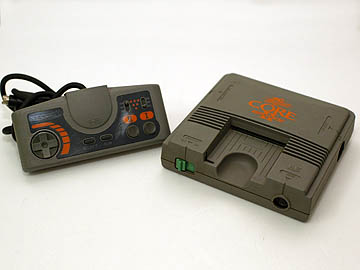
Spoiler

-
Guspaz
- Posts: 3242
- Joined: Tue Oct 06, 2015 7:37 pm
- Location: Montréal, Canada
Re: Retro Gaming Monitor Advice
I'm not experienced with the non-RGB image quality of the TurboGrafx/PC-Engine hardware. I believe that jailbars are a common problem on that platform.
For the Super Famicom, no modding will be required, but since it's an OEM cable, it's probably JP-21 and not SCART. They are physically identical, the difference is the wiring: the pins are wired to different signals in JP-21 vs SCART.
PVMs use (with only a few exceptions) BNC connectors for RGB, and so connecting a SCART or JP-21 cable to a PVM requires a SCART or JP-21 breakout cable. This is an example of such a cable:
https://www.retrogamingcables.co.uk/son ... verter-bnc
That cable is only for SCART, though: it will not work for JP-21 cables. That seller makes a JP-21-to-SCART adapter cable, but you may be better off trying to find a JP-21 breakout cable. I can't suggest where to get one, most people here stick to SCART because most switches/scalers/etc use SCART and not JP-21.
For the Super Famicom, no modding will be required, but since it's an OEM cable, it's probably JP-21 and not SCART. They are physically identical, the difference is the wiring: the pins are wired to different signals in JP-21 vs SCART.
PVMs use (with only a few exceptions) BNC connectors for RGB, and so connecting a SCART or JP-21 cable to a PVM requires a SCART or JP-21 breakout cable. This is an example of such a cable:
https://www.retrogamingcables.co.uk/son ... verter-bnc
That cable is only for SCART, though: it will not work for JP-21 cables. That seller makes a JP-21-to-SCART adapter cable, but you may be better off trying to find a JP-21 breakout cable. I can't suggest where to get one, most people here stick to SCART because most switches/scalers/etc use SCART and not JP-21.
-
nissling
- Posts: 462
- Joined: Sun May 10, 2015 8:12 am
- Location: Stockholm, Sweden
Re: Retro Gaming Monitor Advice
The composite video from the Core Grafx II is really bad. It introduces so much artifacts and adds colors that shouldn't even be there in a composite chain while gray scales look like anything but gray scales. Jailbars are indeed an issue on the PCE but the RGB video clearly makes it worth the hassle.
EDIT: Welcome aboard by the way!
EDIT: Welcome aboard by the way!
Last edited by nissling on Fri Jul 22, 2016 6:40 am, edited 1 time in total.
-
Taiyaki
- Posts: 1052
- Joined: Fri Apr 04, 2014 11:31 pm
Re: Retro Gaming Monitor Advice
I would either go all the way and go for BVM or stick with consumer Sony Trinitron sets that have S-video AND Component. Preferably a higher end model like the FV series.
That being said though there is some charm to regular mid line PVM's since the scanlines are less pronounced, you will lose in features and options however.
Personally I went through the entire PVM/BVM phase and I ended up preferring a high end consumer crt. It's the look I played on for most my life up until I was in my 20's and so it's the look I like best.
That being said though there is some charm to regular mid line PVM's since the scanlines are less pronounced, you will lose in features and options however.
Personally I went through the entire PVM/BVM phase and I ended up preferring a high end consumer crt. It's the look I played on for most my life up until I was in my 20's and so it's the look I like best.
-
HazukiRyo
- Posts: 7
- Joined: Wed Jul 20, 2016 2:22 pm
Re: Retro Gaming Monitor Advice
Thanks for all the advice again ^-^
I'll keep an eye out for a nice monitor, and maybe before I buy it I will ask you guys if you think it will be a good idea
About the cable from retrogaming cables.co.uk (https://www.retrogamingcables.co.uk/son ... verter-bnc). I'm not 100% sure how this works. As long as I can get a SCART/ JP-21 output to connect with the female connector, will it display the picture?
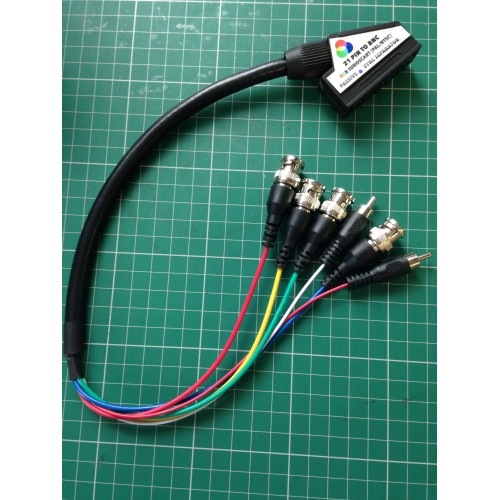
I'll keep an eye out for a nice monitor, and maybe before I buy it I will ask you guys if you think it will be a good idea
About the cable from retrogaming cables.co.uk (https://www.retrogamingcables.co.uk/son ... verter-bnc). I'm not 100% sure how this works. As long as I can get a SCART/ JP-21 output to connect with the female connector, will it display the picture?
-
Shoryukev
- Posts: 651
- Joined: Thu Dec 10, 2015 7:18 pm
- Location: Cleveland, OH
Re: Retro Gaming Monitor Advice
In most cases it is that easy, I just wanted to give you a friendly warning that not all systems work without modification. SNES, Genesis, Saturn, PS1, etc. all work with RGB no problem...but systems like NES & N64 must be modded. What I chose to do is buy a PVM that has RGB inputs as well as composite and s-video, this way I can use all my systems regardless of how they are connected. RGB is obviously better, but being able to still use my N64 is nice.HazukiRyo wrote:Thanks for the info again. I thought that it would be a simple matter of buying a PVM and all consoles could connect to them with a special cable.
You have to pick one and stick with it. If you choose SCART, you have to buy a BNC breakout cable (like in your picture) that is made for SCART. If you choose JP-21, you have to get one made for JP-21. Most people (including myself) choose SCART as it seems to be more readily available for our systems. Don't let the fact that they look the same fool you. The pins in the cable have a different order, and SCART and JP-21 are in no way compatible with each other.HazukiRyo wrote:About the cable from retrogaming cables.co.uk (https://www.retrogamingcables.co.uk/son ... verter-bnc). I'm not 100% sure how this works. As long as I can get a SCART/ JP-21 output to connect with the female connector, will it display the picture?
-
Guspaz
- Posts: 3242
- Joined: Tue Oct 06, 2015 7:37 pm
- Location: Montréal, Canada
Re: Retro Gaming Monitor Advice
Only if you match SCART to SCART, or JP-21 to JP-21. They are incompatible specifications.HazukiRyo wrote:As long as I can get a SCART/ JP-21 output to connect with the female connector, will it display the picture?
A SCART plug will fit into a JP-21 socket (and vice versa), but will not work, and can potentially cause damage if one of the voltage pins is connected to something expecting video.
You need to pick one of the two standards (SCART or JP-21) and then stick to it for *everything*, to avoid confusion. Most people choose SCART because most available cables/switches/adapters/scalers/etc. support SCART and not JP-21.
-
HazukiRyo
- Posts: 7
- Joined: Wed Jul 20, 2016 2:22 pm
Re: Retro Gaming Monitor Advice
Thanks again for the advice, I would rather somebody tell me before I buy oneShoryukev wrote:What I chose to do is buy a PVM that has RGB inputs as well as composite and s-video, this way I can use all my systems regardless of how they are connected. RGB is obviously better, but being able to still use my N64 is nice.
You said that you bought a PVM that has quite a few input options. Do you mind telling me what model you have? I'm looking for a smaller monitor to have on my desk, so something around 14" to 20" would be great.
I've see a SONY PVM-14M2MDJ on Yahoo Auctions, and it has the following inputs.


I can see the RGB at the bottom, but does this also have S-Video and Composite?
P.S. the above monitor is around 100 USD, shipping I think would be 15 USD.
-
kamiboy
- Posts: 2000
- Joined: Sat Sep 04, 2010 4:40 pm
- Location: Denmark
Re: Retro Gaming Monitor Advice
Yes, this monitor has every input a growing boy needs, RGB, component, S-video and composite. 10000 yen is an ok price.
-
HazukiRyo
- Posts: 7
- Joined: Wed Jul 20, 2016 2:22 pm
Re: Retro Gaming Monitor Advice
Thankskamiboy wrote:Yes, this monitor has every input a growing boy needs, RGB, component, S-video and composite. 10000 yen is an ok price.
I'm starting to get a clearer picture about what type of monitor I'm hunting for now!-
Shoryukev
- Posts: 651
- Joined: Thu Dec 10, 2015 7:18 pm
- Location: Cleveland, OH
Re: Retro Gaming Monitor Advice
I have a PVM-14N6U, I'm certain it's not the best by any means but it's been very enjoyable for me as an introduction to the world of RGB. It is worth noting that my monitor does not support component video (YPbPr).HazukiRyo wrote:Do you mind telling me what model you have?
As stated by Kamiboy the monitor you showed from yahoo auctions has tons of connection options. Since you are new to this I would highly suggest a monitor like that so you have your options open. I'd stay away from BMV's until you know what you're doing.
Line A will need an RCA to BNC adapter to connect composite (Yellow RCA) to it. Line B is s-video. RGB/component A and B will both accept either component (also known as YPbPr) or RGBS. Component (YPbPr) will need more RCA to BNC adapters to connect say a Wii via component video to it.
We are all here to help, but please do yourself a favor and read up on the subject. It will avoid lots of frustration and downtime later if you can't figure something out. Knowledge is power.
http://www.retrogamingcables.co.uk/comp ... osite-sync
https://www.retrogamingcables.co.uk/eur ... ersus-jp21
https://www.youtube.com/playlist?list=P ... jU65T8eFVM
-
geekmiki

- Posts: 172
- Joined: Tue Apr 30, 2013 11:48 am
- Location: Oslo, Norway
Re: Retro Gaming Monitor Advice
I have a JVC TM-H150CGU at the moment and I might have a possibility to get a 14N6U. Would it be a noticeable upgrade or should I just stick with the JVC? Any opinions?Shoryukev wrote:
I have a PVM-14N6U, I'm certain it's not the best by any means but it's been very enjoyable for me as an introduction to the world of RGB.
-
Guspaz
- Posts: 3242
- Joined: Tue Oct 06, 2015 7:37 pm
- Location: Montréal, Canada
Re: Retro Gaming Monitor Advice
If your TM-H150CGU does not have the RGB input card, then you'd see an improvement in image quality from having RGB inputs.
-
tacoguy64
- Posts: 558
- Joined: Tue Dec 30, 2014 12:42 am
Re: Retro Gaming Monitor Advice
I haven't read though the thread yet but my advice when looking for an rgb monitor is to keep your options open. Don't focus on just one or two particular monitors you want but look at everything you can come across and make decisions from there.
-
FinalBaton

- Posts: 4475
- Joined: Sun Mar 08, 2015 10:38 pm
- Location: Québec City
Re: Retro Gaming Monitor Advice
Agreedtacoguy64 wrote:I haven't read though the thread yet but my advice when looking for an rgb monitor is to keep your options open. Don't focus on just one or two particular monitors you want but look at everything you can come across and make decisions from there.
Even though we focus mainly on Sonys... stumbling upon a good Ikegami monitor for cheap, for example, would be as good a score as it comes
-FM Synth & Black Metal-
-
geekmiki
- Posts: 172
- Joined: Tue Apr 30, 2013 11:48 am
- Location: Oslo, Norway
Re: Retro Gaming Monitor Advice
Guspaz wrote:If your TM-H150CGU does not have the RGB input card, then you'd see an improvement in image quality from having RGB inputs.
I do have the RGB input card. I was just wondering if the PVM was noticeably better...
-
Shoryukev
- Posts: 651
- Joined: Thu Dec 10, 2015 7:18 pm
- Location: Cleveland, OH
Re: Retro Gaming Monitor Advice
My guess would be probably not worth it, but I've only owned the 146NU so I don't know for sure. Looking at specs online the JVC has a higher line count (750 vs 500)geekmiki wrote:I do have the RGB input card. I was just wondering if the PVM was noticeably better...
-
mvsfan
- Posts: 1209
- Joined: Sat Oct 06, 2012 12:24 am
Re: Retro Gaming Monitor Advice
I have a PVM-14N6U. Its 500 lines.
I also have a 14" 700 line Samsung Techwin S-video monitor that beats it on sharpness. the colors are richer on the sony but the Samsung is much sharper.
I think The JVC monitor will look better than your 14n6u.
I also have a 14" 700 line Samsung Techwin S-video monitor that beats it on sharpness. the colors are richer on the sony but the Samsung is much sharper.
I think The JVC monitor will look better than your 14n6u.
-
SuperDeadite
- Posts: 1160
- Joined: Wed Mar 23, 2011 5:31 pm
Re: Retro Gaming Monitor Advice
I really don't understand the obsession you seem to have with PVMs and Euro Scart cables.
You are in Japan.
Get one of these:
http://page5.auctions.yahoo.co.jp/jp/auction/e189911838
And one of these:
https://www.amazon.co.jp/穴場開発事業団-K-002- ... B0047UNOGG
And there you go, RGBS, RGsB, D-Terminal (Component), S-Video, and Composite, and decent speakers.
Plus you can just use standard Japanese 21pin cables.
If you want something smaller, they are more expensive, but you can still find TVs here with proper 21pin inputs:
http://page11.auctions.yahoo.co.jp/jp/a ... n178086198
You are in Japan.
Get one of these:
http://page5.auctions.yahoo.co.jp/jp/auction/e189911838
And one of these:
https://www.amazon.co.jp/穴場開発事業団-K-002- ... B0047UNOGG
And there you go, RGBS, RGsB, D-Terminal (Component), S-Video, and Composite, and decent speakers.
Plus you can just use standard Japanese 21pin cables.
If you want something smaller, they are more expensive, but you can still find TVs here with proper 21pin inputs:
http://page11.auctions.yahoo.co.jp/jp/a ... n178086198
-
Einzelherz

- Posts: 1279
- Joined: Wed Apr 09, 2014 2:09 am
Re: Retro Gaming Monitor Advice
I have the same JVC, and I quite like it. The 14N6U isn't a bad monitor but it's TVL is moderately lower so it won't be quite as sharp. I'd keep the JVC if I could only pick one.geekmiki wrote:I have a JVC TM-H150CGU at the moment and I might have a possibility to get a 14N6U. Would it be a noticeable upgrade or should I just stick with the JVC? Any opinions?Shoryukev wrote:
I have a PVM-14N6U, I'm certain it's not the best by any means but it's been very enjoyable for me as an introduction to the world of RGB.
-
HazukiRyo
- Posts: 7
- Joined: Wed Jul 20, 2016 2:22 pm
Re: Retro Gaming Monitor Advice
SuperDeadite wrote:I really don't understand the obsession you seem to have with PVMs and Euro Scart cables.
You are in Japan.
Get one of these:
http://page5.auctions.yahoo.co.jp/jp/auction/e189911838
And one of these:
https://www.amazon.co.jp/穴場開発事業団-K-002- ... B0047UNOGG
And there you go, RGBS, RGsB, D-Terminal (Component), S-Video, and Composite, and decent speakers.
Plus you can just use standard Japanese 21pin cables.
If you want something smaller, they are more expensive, but you can still find TVs here with proper 21pin inputs:
http://page11.auctions.yahoo.co.jp/jp/a ... n178086198
Thanks for the advice! The size of your first option is far too big for where I would like to use it. However the second one looks promising
It seems to be more expensive than the PVM's though. Would the quality be similar to a PVM? For example I was also looking at this one > http://page21.auctions.yahoo.co.jp/jp/a ... j397804031 It doesn't have the 21pin input.I'll start looking at some more Trinitrons now then, thank you ^-^