Controller Pros Welcome: Sunsoft Sunstation troubleshooting

The place for all discussion on gaming hardware
Post Reply
User avatar
EmperorIng
Posts: 5350
Joined: Mon Jun 18, 2012 3:22 am
Location: Chicago, IL

Controller Pros Welcome: Sunsoft Sunstation troubleshooting

Post by EmperorIng »

Solution: the Sunsoft Sunstation needs to be plugged into PS1/2 cable extension cord before being plugged into the PS2. At least, that's what my pad needed to do in order to respond and function normally.

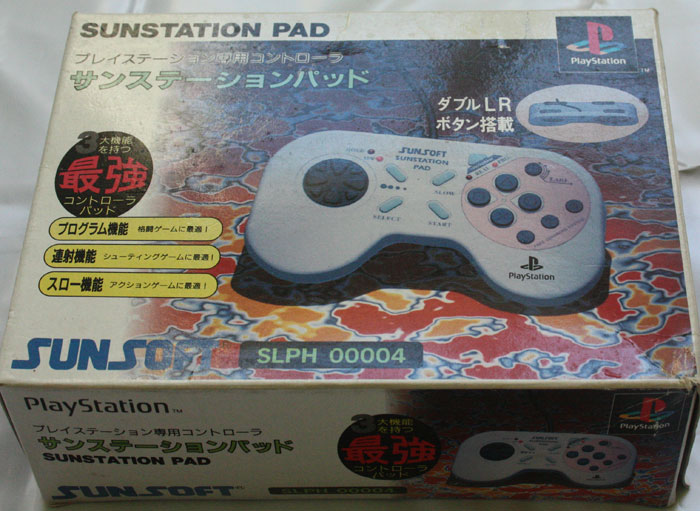
I was wondering if anyone savvy could help me out here. I picked up a pair of Sunsoft Sunstation pads recently:

Image
Image

It had been spoken of as a good PS1 controller with a comfortable d-pad and solid, sturdy build (as far as I can feel, this much is true).

However, I cannot get the thing to work. Or rather, it is not responding to any button inputs.

I briefly -briefly- got a response by holding all four shoulder buttons, and then having the "on" light flicker and stay on by pressing the button closest to the "On" light. I am not sure how anything is triggered because it seems as if a few seconds later the controller stopped responding.

If anyone has any experience with Sunsoft Sunstation pads, please help me out!

EDIT:
I have only gotten the controller to work on the 2nd-player port. Fiddling around with buttons can sometimes produce results. The turbo button (close to the "on" light?) seems to make everything wig out, but I do not know how to get the Sunstation working consistently. If anyone can point out some tips I would be appreciative.
Last edited by EmperorIng on Thu Dec 25, 2014 3:03 am, edited 2 times in total.
User avatar
EmperorIng
Posts: 5350
Joined: Mon Jun 18, 2012 3:22 am
Location: Chicago, IL

Re: Sunsoft Sunstation PSX pads - compatibility and setup?

Post by EmperorIng »

Poor form I know, but a quick bump to raise interest/awareness. I am going to keep on fiddling to see if something works (or maybe I just have defective copies? I hope not), but if anyone has any info, please share! There is practically nothing about these controllers on the internet. :cry:
User avatar
CkRtech
Posts: 668
Joined: Mon Aug 27, 2012 9:30 pm
Location: Seattle, WA

Re: Sunsoft Sunstation PSX pads - compatibility and setup?

Post by CkRtech »

I don't really know anything about this, but I can make assumptions just as much as the next guy! :mrgreen:

Here is a link to the japanese manual (of which I assume you have a hard copy in your box) - http://www.sun-denshi.co.jp/soft/suppor ... npad1.html

It seems like it shouldn't be that complicated to use by default if it is designed to power up in normal (non-programmed) mode. Does the program button cycle between Real and Prg? If you have Real selected (LED on), I assume that is for normal operation.
User avatar
undamned
Posts: 3273
Joined: Sat Jan 29, 2005 9:27 am
Location: Phoenix

Re: Sunsoft Sunstation PSX pads - compatibility and setup?

Post by undamned »

I don't know anything about these, but apparantely they were not exclusive to the PS1. Here's a pair for the Saturn: http://page.auctions.yahoo.co.jp/jp/auction/176562652

-ud
Righteous Super Hero / Righteous Love
User avatar
EmperorIng
Posts: 5350
Joined: Mon Jun 18, 2012 3:22 am
Location: Chicago, IL

Re: Sunsoft Sunstation PSX pads - compatibility and setup?

Post by EmperorIng »

The pictures are misleading (and are only examples); I only own the controllers. Thank you for the link though. I have enough time between Christmas festivities to post this little potential fix.

I did some more testing and fiddling and I think I found the solution. This might be useful for the 8 or so other people out there with these pads.

It started when I booted up the PSX RayStorm normally, and then switched to the Sunsoft pad. The screen kept on repeatedly flashing "CONTROLLER DISCONNECTED" and I could move in the brief moments this wasn't flashing. So it at least tipped me off that mine might be a connection issue.

I opened up one of the Sunsoft Sunstation pads just to see what it looked like on the inside:

Image
Image

It's a pretty hefty circuit board inside, which one would expect given the sturdiness of the controller and the features on it.

Maybe some more tech savvy folks can help me here. Looking at this particular pad's wiring, I did notice this:
Image

The orange wire was exposed. I do not know if this can actually cause problems, whether through exposure to the elements (???) or whatnot. But all the same it stuck out to me.


According to this image (from this guide):
Image

The orange wire takes care of commands, so perhaps this wire is damaged preventing the controller from inputting any commands?

Nonetheless, I thought perhaps something could be done to improve the connectivity to the PS2's controller port.

I switched to the other pad and tried cleaning the contacts to no avail. Then I thought there might be a way to bypass plugging the controller into the PS2 directly. Luckily, the PS2 Slim I bought came with an extension cord for the Dualshock. I plugged the Sunstation into this extension cord, and plugged the extension cord into the PS2, and the pad now works!

The one that is continuing to have problems is the pad I photographed up above. Could the wire have something to do with it? It works for a little while while plugged into the extension, but soon usually conks out. I hope it doesn't have to do with my opening of the controller shell. I'll have to open it again to see if anything is out of place.

I can also confirm that the Sunsoft Sunstation is compatible both with PS1 and PS2 games - at the very least it worked with all of my PS1 games and I tested it with Capcom Classics Collection Vol. 2 and Taito Legends 2. This is a big plus for shooters on those compilations.
Post Reply