Display advice

The place for all discussion on gaming hardware
Post Reply
Exidna
Posts: 90
Joined: Wed Apr 29, 2015 8:00 pm

Re: Display advice

Post by Exidna »

Fudoh wrote:
If the set is doing BFI to get to 120Hz - and I cannot understand the logic of that at all - and then strobing the backlight on top of that to get to "240Hz", why not refresh at 60Hz with a single strobe that has a duration of 4ms instead?
BFI is offered since strobing takes away much light and isn't for everyone. On the W models since 2013 Sony tried strobing without BFI and ended up with terrible ghosting. Don't ask me why they're doing it, I can just report what they're doing.
Black frame insertion should have exactly the same brightness loss as strobing the display with a 50% duty cycle.
In both situations you have an image displayed for 8ms and a black frame displayed for 8ms, halving your brightness.

The difference is that BFI is typically used for displays which cannot support backlight scanning.
E.g. CCFL backlit LCDs which cannot handle being switched on/off like that, and do not switch on/off as instantaneously as an LED.

Strobing the backlight should always result in much better apparent response times.
If you're using BFI, the transition to black and out of black is visible because the panel is still illuminated, and transitioning to/from black itself is introducing smearing of the image.

Since the backlight is entirely separate from the image with an LCD, switching the backlight off for 8ms means that whatever transition state the LCD goes through is invisible until the backlight is switched on again another 8ms later.

If you lower the duty cycle of the strobe, which will lower the brightness and flicker more, but do a better job of reducing motion blur, you also get the advantage of better response times.
If your duty cycle is 25%, the panel now has 12ms to complete its transition before the backlight is switched back on.
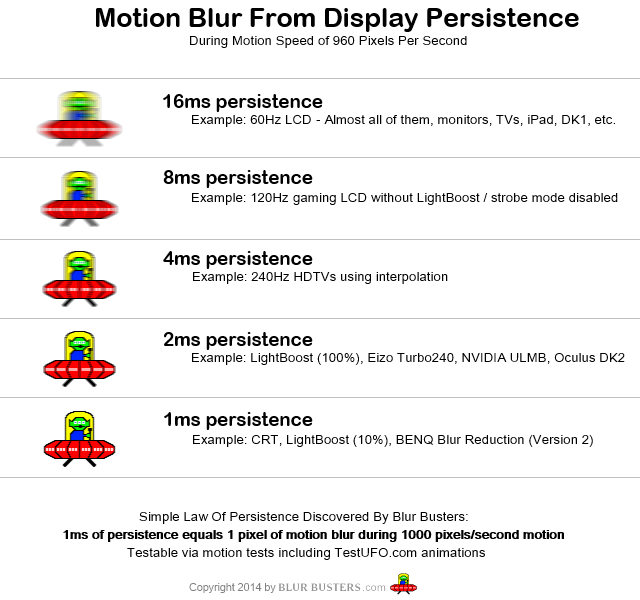
So you not only have the better motion clarity of a 4ms strobe (4 pixels of blur on an object moving at 1000px/s, rather than 8) but the panel has an additional 4ms to complete any transitions.
If you reduce the strobe duration to 1ms - equal to or better than some CRTs - the panel has 15ms to complete a transition.
If the panel is able to complete all transitions under 15ms you have eliminated any smearing on the panel - not because it isn't happening, but because you can't see it when the backlight is off.

What was possibly happening with the 2013 panels - and I can only speculate - is that the increased clarity from strobing the backlight made existing reponse time issues more visible.
Or perhaps people complaining of this were trying to use the Impulse Mode - assuming it did one strobe per refresh - with modern 30 FPS games, which repeats each frame twice, thus producing a double-image and judder on the screen.
Unseen wrote:
Exidna wrote:One strobe per refresh has a vastly different appearance to multiple strobes. It's the only time 24p ever looks judder-free without using interpolation for example.
Fun fact: Film projectors for cinemas show every frame of the film twice to increase the flicker rate to 48Hz.
Yes, I am aware of that. But if you have a screen which supports an input that is a multiple of 24Hz and supports it natively (i.e. displays it at the input rate, doesn't otherwise touch the signal) you can use software to apply black frame insertion and get a proper low-persistence "24Hz" output.
Of course the flicker is unacceptable at that rate. The only solution is moving to higher framerates. (or interpolation...)
User avatar
Fudoh
Posts: 13044
Joined: Mon Mar 06, 2006 3:29 am
Location: Germany
Contact:

Re: Display advice

Post by Fudoh »

Black frame insertion should have exactly the same brightness loss as strobing the display with a 50% duty cycle.
the loss of brightness on the Sony FALD LED sets just using BFI isn't big, 20% max, while strobing on the newer Edge-lit sets costs easily 70%+ in brightness (that's without additional BFI). On the FALD sets strobing is just available in addition to BFI.
Exidna
Posts: 90
Joined: Wed Apr 29, 2015 8:00 pm

Re: Display advice

Post by Exidna »

Fudoh wrote:
Black frame insertion should have exactly the same brightness loss as strobing the display with a 50% duty cycle.
the loss of brightness on the Sony FALD LED sets just using BFI isn't big, 20% max, while strobing on the newer Edge-lit sets costs easily 70%+ in brightness (that's without additional BFI). On the FALD sets strobing is just available in addition to BFI.
I'm not saying you're wrong, but do you have a source for that?
What you described would reduce brightness to 25%. BFI on its own would reduce brightness to 50% since frames have to be of equal length.

What I'd expect would be that they still strobed the backlight but adjusted the strobe duration - since that can be anything they want it to be. By default, I'd expect the strobe to be 50%, since that's the easiest thing to do.
And if the brightness loss is less than 50%, I'd check that to see if they were repeating frames to increase the refresh rate, since that will increase the brightness and reduce flicker, at the cost of introducing judder.

Of course there are also modes on these Sony sets which combine interpolation with strobing to keep brightness high, reduce flicker, and eliminate judder - but that introduces significant latency and potential image quality problems.
Unfortunately the Impulse mode was introduced in the 2011 models, and my HX900 is from 2010, but it has two modes: Clear 1 and Clear 2.
Clear 1 interpolates to 240Hz and then strobes (actually since it's a full local dimming set, it scans the backlight, which can preserve a bit of brightness compared to a full strobe) which reduces the overall brightness by 50%, but film can look unnaturally smooth for example.
Clear 2 interpolates to 120Hz and scans the backlight. This reduces the brightness by 75% but since the interpolation is mild, motion in film generally still looks natural. Of course there can still be interpolation artifacts, the latency makes it unsuitable for gaming, and in some cases (maybe 5% of the films I watch) it does still result in that "sped up" look interpolation is known for.
Of course neither of these are suitable for gaming. If they simply repeated the frames to get to 120Hz and strobed - which would be a low latency option - it would judder badly.


If you have one of these sets yourself, and a camera where you can manually set the shutter speed, you should be able to check the frequency yourself. TFT Central's method works well.
If you use a shutter speed which is 1/10, 1/20, or 1/30, it makes things easy, since we're not looking to find an unknown PWM frequency, we're looking to count the number of strobes and that should be some multiple of 60.
So 60Hz with one strobe per frame at 1/20s should show three bars. 120Hz would show 4 bars at 1/30s. 240Hz would show 8 bars at 1/30s or 4 at 1/60s etc.
User avatar
Fudoh
Posts: 13044
Joined: Mon Mar 06, 2006 3:29 am
Location: Germany
Contact:

Re: Display advice

Post by Fudoh »

I'm not saying you're wrong, but do you have a source for that?
any of the reviews including my own from 2010.
Of course there are also modes on these Sony sets which combine interpolation with strobing to keep brightness high, reduce flicker, and eliminate judder - but that introduces significant latency and potential image quality problems.
of course, I know. In it's implementation on the HX9 it's not usable for serious gaming.
Clear 1 interpolates to 240Hz // Clear 2 interpolates to 120Hz
that depends on the cadence in the incoming signal. If a movie cadence is detected (23,9/24/25fps, 30fps in parts) that's right, but there's no interframe creation (other than BFI) for 60Hz content. Also if you disable the film mode (I think it's cine something on the US sets) the higher IFC settings are automatically disabled and default back to the lowest IFC setting.
If you have one of these sets yourself, and a camera where you can manually set the shutter speed
we used a 240Hz high-speed to camera to completely analyze Sony's motionflow settings/combinations back in 2010.
Exidna
Posts: 90
Joined: Wed Apr 29, 2015 8:00 pm

Re: Display advice

Post by Exidna »

Fudoh wrote:
Clear 1 interpolates to 240Hz // Clear 2 interpolates to 120Hz
that depends on the cadence in the incoming signal. If a movie cadence is detected (23,9/24/25fps, 30fps in parts) that's right, but there's no interframe creation (other than BFI) for 60Hz content. Also if you disable the film mode (I think it's cine something on the US sets) the higher IFC settings are automatically disabled and default back to the lowest IFC setting.
The Clear modes all use interpolation, even with a 60 FPS/60Hz input, or with any other combination of settings. They do not use BFI.
Only the Impulse mode on the 2011 and newer displays does not use interpolation.

Level 4 in Mario World:
Clear 2/Plus
MotionFlow Off

And if anyone is wondering, the Clear 2/Plus image has more noise because it is ISO 6400 instead of ISO 1600 to maintain the same brightness in the photograph. (Clear 2/Plus drops the brightness to 25%)
Last edited by Exidna on Sat May 09, 2015 10:03 am, edited 1 time in total.
User avatar
Fudoh
Posts: 13044
Joined: Mon Mar 06, 2006 3:29 am
Location: Germany
Contact:

Re: Display advice

Post by Fudoh »

The Clear modes all use interpolation, even with a 60 FPS/60Hz input, or with any other combination of settings.
in the sense that they up the refresh to 120 or 240Hz, yes, but there are no new calculated frames in between with 60fps sources. Nada, zilch.
Exidna
Posts: 90
Joined: Wed Apr 29, 2015 8:00 pm

Re: Display advice

Post by Exidna »

Fudoh wrote:
The Clear modes all use interpolation, even with a 60 FPS/60Hz input, or with any other combination of settings.
in the sense that they up the refresh to 120 or 240Hz, yes, but there are no new calculated frames in between with 60fps sources. Nada, zilch.
They are not repeating frames, or inserting black frames. Look at how it turns the water in Mario World into mush in the photos above. Those are clear interpolation errors.
User avatar
Fudoh
Posts: 13044
Joined: Mon Mar 06, 2006 3:29 am
Location: Germany
Contact:

Re: Display advice

Post by Fudoh »

yepp, you're right about that. I even remember a discussion about the same thing five years ago. If you take a 240Hz video and frame-step through it, you will still see that there's no added motion though, so we can just wonder what the processor's doing here in the first place. Given the fact the lag remains high on these modes, maybe the processor is doing interpolation internally, but not passing the frames to its output...
cstle
Posts: 136
Joined: Mon Jul 26, 2010 6:42 pm

Re: Display advice

Post by cstle »

Is there any difference between the Asus VN279QL and VN279QLB other than the USB ports on the QLB? No screen quality difference?
User avatar
Fudoh
Posts: 13044
Joined: Mon Mar 06, 2006 3:29 am
Location: Germany
Contact:

Re: Display advice

Post by Fudoh »

No screen quality difference?
none.
User avatar
brownvim
Posts: 291
Joined: Fri Oct 28, 2011 8:24 pm
Location: Birmingham, England

Re: Display advice

Post by brownvim »

evil_ash_xero wrote:Due to intense shaming, I went ahead and ordered the Dell S2740L.

Could someone recommend a stand that I can get for it, so I can TATE my games?

Thanks.
I have this monitor, I prefer gloss screens for clarity and the low input lag was essential. Contrast ratio isn't the best though when next to my Eizo FG2421.

I now have the Sony FW900, it's so good. Going back to LCDs is horrible for fast motion. Even with the Eizo having 240hz mode it's nice but too dark and input lag is noticeable.
Lord of Pirates
Posts: 523
Joined: Sun May 12, 2013 5:03 pm

Re: Display advice

Post by Lord of Pirates »

I wasn't planning on the XB270HU originally but with the MG279Q delayed, the general lack of features on the XG270HU, and the XL2730Z having overshoot I decided to go for the XB. I did get it for less than retail with tax, so there's that. I'll post some pictures whenever it gets to me :D.
tacoguy64
Posts: 558
Joined: Tue Dec 30, 2014 12:42 am

Re: Display advice

Post by tacoguy64 »

Im a little bit more knowledgeable when it comes to pc monitors than the average techie but I haven't been paying much attention to them for about two years now. I'm looking for a new pc monitor that I will be using in conjuntion with the and xrgb mini to play shmups. I think anywhere from size 24-32 inches is where i want to be at. Most likely will have to get something that is 16:9 format since 16:10 is all but dead. I think I can keep this monitor at 1080p since getting anything higher would be almost useless. One that can rotate would be nice but not required if i could easily mount it. response time just gotta be fast enough, im not super sensitive when it comes to that. Refresh time I would like a bit higher to provide a smoother experience. And as for price i think below $300 is what something that im looking for should cost.
User avatar
Fudoh
Posts: 13044
Joined: Mon Mar 06, 2006 3:29 am
Location: Germany
Contact:

Re: Display advice

Post by Fudoh »

A few nice 16:10 displays are still available, but the Mini doesn't really support it very well.

1440p is an option if you like scanlines. This way you can feed 720p from the Mini and usually end up with pretty nice scaling. At least there's less hassle in upscaling 720p to 1440p than it is to 1080p.

If you also like to use MAME with HSLS 1440p over 1080p is a pretty big plus, so maybe that's soemthing you want to factor in.

Over 27" and it gets expensive. For 32" you have very little PC monitor options and usually end up with TVs instead.
User avatar
bytestorm
Posts: 175
Joined: Wed Nov 09, 2011 5:19 am
Location: Sweden

Re: Display advice

Post by bytestorm »

Sorry to dig this one up but looking at the Asus MG279Q myself now.. no news on its performance with mame?

Or could there be a new champion on the rise around the same price point perhaps? :D
Looking to buy, working or faulty: Dodonpachi, Deathsmiles, Ibara, Rainbow Islands, Bubble Bobble.
User avatar
bobrocks95
Posts: 3662
Joined: Mon Apr 30, 2012 2:27 am
Location: Kentucky

Re: Display advice

Post by bobrocks95 »

Be aware the Freesync range is pretty low on it, and there's a panel lottery involved to avoid IPS glow.

It is cheaper now than when I last looked so that's a plus.
PS1 Disc-Based Game ID BIOS patch for MemCard Pro and SD2PSX automatic VMC switching.
User avatar
bytestorm
Posts: 175
Joined: Wed Nov 09, 2011 5:19 am
Location: Sweden

Re: Display advice

Post by bytestorm »

bobrocks95 wrote:Be aware the Freesync range is pretty low on it, and there's a panel lottery involved to avoid IPS glow.

It is cheaper now than when I last looked so that's a plus.
Hi!

Low free sync range? Will that effect mame? :/ i am not sure wich range the games in mame have but..
Looking to buy, working or faulty: Dodonpachi, Deathsmiles, Ibara, Rainbow Islands, Bubble Bobble.
User avatar
bobrocks95
Posts: 3662
Joined: Mon Apr 30, 2012 2:27 am
Location: Kentucky

Re: Display advice

Post by bobrocks95 »

Can't really speak to its usage in MAME since I don't have a Freesync or Gsync monitor. But if you're using it for PC games, the Freesync feature only works between 35 and 90Hz despite it being a 144Hz screen.

I can't think of anything that would miss in MAME, unless some odd old computers use a higher refresh rate?

Regardless though I haven't heard that Free/Gsync works all that well in MAME. Again though, haven't used it. I remember byuu on twitter not being all that impressed.
PS1 Disc-Based Game ID BIOS patch for MemCard Pro and SD2PSX automatic VMC switching.
User avatar
bytestorm
Posts: 175
Joined: Wed Nov 09, 2011 5:19 am
Location: Sweden

Re: Display advice

Post by bytestorm »

Thanks for the reply! Hmm.. indeed seems to be a very mixed bag of results regarding emulators. For the high price I want it to be perfect.. or else I might as well just buy a standard 27 IPS monitor as i had before. Truth is that I never experienced any problems with mame and my old dell 2312 or what it was called.. but maybe I didn't look hard enough? Did have major lag in all raising titles though. . Battle garegga and such.

Hmm..i have a Yamada denki close by but they only sell IO Data monitors and i have never seen or heard Nything about them before so I might have to go in to Tokyo and have a look in a bigger shop perhaps.
Looking to buy, working or faulty: Dodonpachi, Deathsmiles, Ibara, Rainbow Islands, Bubble Bobble.
User avatar
Xyga
Posts: 7181
Joined: Tue Nov 05, 2013 8:22 pm
Location: block

Re: Display advice

Post by Xyga »

Both G-Sync and FreeSync are said to work very well for MAME in general, but funnily-enough also said to have problems dealing with hardware refreshes the closest to 60Hz.
Not sure which ones though / where the 'problem range' is situated exactly. Between 59~60 entirely ? Or just something like 59.80~60 ? 59.97095647~60 ? Dunno...
There aren't tons of fascinating arcade game hardwares within that range, UI builds like MAMEUIFX let you filter by refresh, you can check what's in there.
Strikers1945guy wrote:"Do we....eat chicken balls?!"
Post Reply