Xrgb-Mini help

The place for all discussion on gaming hardware
Post Reply
Kazziki
Posts: 14
Joined: Tue Jan 14, 2014 7:23 pm
Location: Sweden

Xrgb-Mini help

Post by Kazziki »

(Hope this is the right place to post this)


Hey guys this is really complicated to explain, but i hope i can do a good of enough job.
So that someone might be able to help me out.
Here's the situation!
I have a XRGB-mini. That i hooked up to a scartswitcher (The Bandridge auto switcher, which i saw recommended on here).
So i got a couple of systems hooked up to the scartswitch. Which in turn is plugged in through
the front of the XRGB-mini's "RGB in" port.
I use the "European SCART to Framemeister XRGB Mini Converter adapter with built in LM1881N sync stripper" to do this.

Here's the problem. Whenever i try this i only get sound and a "no signal" message.
That's the same for NES, SNES, Mega drive.
So i figured maybe there's something wrong with the scart that goes from the scartswitch to the xrgb-mini itself.
Swapped that out, same result.

Removed the scartswitcher.
So that's:, Console -> Cable -> xrgb-mini's rgb port - > hdmi out - > TV.
Same result for NES and SNES, Only sound and "No signal" message.
But Mega Drive all of a sudden work's fine. (WTH :/ )

I figured maybe something was wrong with the cables for the NES and SNES? (Even though MegaDrive won't work with added scartswitch).
So i tried the cables alone, just console to TV. And it works fine.

So i'm stumped here. Is there some sort of setting on the XRGB-mini i'm missing?
Something wrong with some cable that i just can't figure out?
Insufficient power?
I'm pretty new to this stuff and just wanna achieve awesome picture quality :)
(Everything is PAL besides the xrgb-mini)

(The stuff i used)

(Scart switch)
http://www.amazon.co.uk/Bandridge-Perfo ... B0015YYN2Q

(Cables used are from retrogamingcables.co.uk)
(specifecly the following.)

NES - http://www.retrogamingcables.co.uk/nint ... scart.html
SNES - http://www.retrogamingcables.co.uk/supe ... -sale.html
MD - http://www.retrogamingcables.co.uk/sega ... build.html
Euro scart adapter - http://www.retrogamingcables.co.uk/mico ... ipper.html

Thanks in advance.
EmperorZelos
Posts: 265
Joined: Fri Jul 19, 2013 3:39 pm

Re: Xrgb-Mini help

Post by EmperorZelos »

I recognise that, when I use a switch without an external powered sync strike/stripper/cleaner the same can happen because the scart switch weakens the sync signal to a level where the framemeister doesnt pick it up for osme reason.
User avatar
broken harbour
Posts: 943
Joined: Fri Feb 01, 2013 8:18 pm
Location: Canaduh
Contact:

Re: Xrgb-Mini help

Post by broken harbour »

I had a similar problem, try fiddling with the 'sync level' setting on your Framemeister, that fixed most of my issues. Some systems need a high #, some a mid #.....

I don't know why.
Kazziki
Posts: 14
Joined: Tue Jan 14, 2014 7:23 pm
Location: Sweden

Re: Xrgb-Mini help

Post by Kazziki »

Yeah i can see that, however this one does have it's own power supply. So hopefully that's not it.

I read through the Xrgb-mini wiki page.
It specifies that it does not support composite only RGB.
So i guess that answers why the NES cable i mention is not working properly.

But looking at the SNES one it does not say composite but RGB in the title.
Even though "Video format" under "technical information" sais: RGB & Composite video.
So i'm confused.

Maybe the scartswitch itself converts the signal somehow.

That would also explain why the Mega Drive cable works alone but not when going through the switch.

So yeah i'm a little lost here. :?
Hopefully someone comes along and tells me what i need to swap out in order to get my setup working.
Kazziki
Posts: 14
Joined: Tue Jan 14, 2014 7:23 pm
Location: Sweden

Re: Xrgb-Mini help

Post by Kazziki »

broken harbour wrote:I had a similar problem, try fiddling with the 'sync level' setting on your Framemeister, that fixed most of my issues. Some systems need a high #, some a mid #.....

I don't know why.
Thanks for the tip, no luck for me as of yet though.

I tried fiddling around with it but to no avail, with Sync _mode "off" and on "auto".
i tried different numbers under Sync_level.
changed it and rebooted in between as well.
User avatar
broken harbour
Posts: 943
Joined: Fri Feb 01, 2013 8:18 pm
Location: Canaduh
Contact:

Re: Xrgb-Mini help

Post by broken harbour »

change scart switches, the only one I got to work with absolutely no problems was the Shinybow. My KSC's gave me a flickery image no matter what I did.
eightbitminiboss
Posts: 450
Joined: Mon Sep 17, 2012 9:01 pm

Re: Xrgb-Mini help

Post by eightbitminiboss »

I'm on the non-automatic version of that Bandridge switch and I don't have those issues. I'd say the problem lies with the cables themselves. On that point, what type of SCART cable are you using in between the switch and XRGB-Mini? Is it fully pinned?
Jeppen
Posts: 174
Joined: Sat Dec 21, 2013 7:50 am

Re: Xrgb-Mini help

Post by Jeppen »

Kazziki wrote:Yeah i can see that, however this one does have it's own power supply. So hopefully that's not it.

I read through the Xrgb-mini wiki page.
It specifies that it does not support composite only RGB.
So i guess that answers why the NES cable i mention is not working properly.

But looking at the SNES one it does not say composite but RGB in the title.
Even though "Video format" under "technical information" sais: RGB & Composite video.
So i'm confused.

Maybe the scartswitch itself converts the signal somehow.

That would also explain why the Mega Drive cable works alone but not when going through the switch.

So yeah i'm a little lost here. :?
Hopefully someone comes along and tells me what i need to swap out in order to get my setup working.

EDIT:::::
There more I think about it, the more I don't think this will work.
I will leave the post here for future reference anyway, just wanted to say this first.
I think you're better off just using the RCA jacks input on the XRGB-mini, unless you have RGB modded the NES.
__________________________________________________________________


In order for the RGB input on the XRGB-mini to give you a picture, you need to have a either composite-sync or composite-video wired to it's CSYNC pin 3 (see image below), while a NES with composite out can deliver composite-video sync, it doesn't fall on the right pin without a little bit of effort (it was never intended to go straight to an RGB connector like that) However, I believe there is a fix.

I haven't done this as i'm going via the RCA jacks (until I get the NESRGB board :D ) but I suspect you could re-wire the NES composite video cord so that in the end it hits the XRGB-mini's pin 3 and that should do the trick.
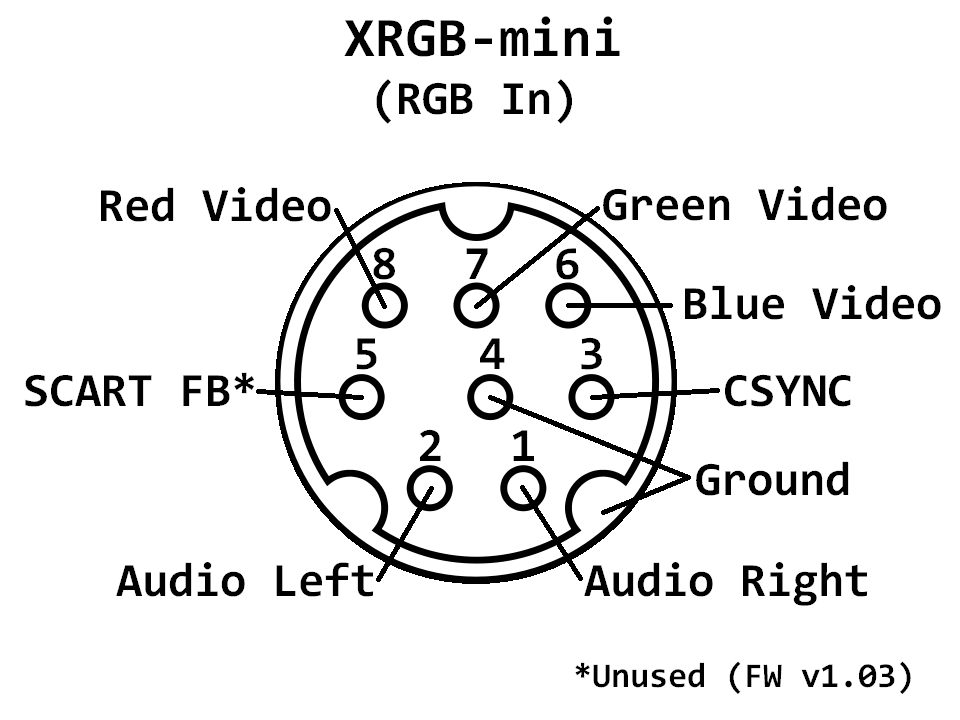
Then you might have to fiddle with the sync_level again.


******EDIT!!
BUT.. I don't know if the CSYNC pin 3 will accept video in terms of actually displaying a picture or if that is only for the sync signal as it's actually called CSYNC (Composite-Sync) and the sync stripper, stripping the signal from it's video signal.

.
Image
Last edited by Jeppen on Tue Jan 14, 2014 11:15 pm, edited 3 times in total.
User avatar
mickcris
Posts: 435
Joined: Tue Oct 08, 2013 12:43 am
Location: Texas, USA

Re: Xrgb-Mini help

Post by mickcris »

Are you sure your SNES is outputting 5v to the sync stripper? I have pretty much the same setup as you and was also having issues until i removed the sync stripper from the xrgb-mini adapter.
I do not think the NES will work with that cable to the RGB in. You will need to RGB mod it if you want to use it that way.
Last edited by mickcris on Tue Jan 14, 2014 10:59 pm, edited 2 times in total.
Kazziki
Posts: 14
Joined: Tue Jan 14, 2014 7:23 pm
Location: Sweden

Re: Xrgb-Mini help

Post by Kazziki »

broken harbour wrote:change scart switches, the only one I got to work with absolutely no problems was the Shinybow. My KSC's gave me a flickery image no matter what I did.

Happen to have a cheap 3 slot scartswitch. A no brand one, so tried that and picture came through fine on mega drive.
But still same problem for NES and SNES even though i yet again tinkered with the Sync options.

So it would seem that my large scartswitch is crap, and that there is something wrong with the cables i'm currently using.
If anyone can point me in the direction as of what cables to get for this set-up it's would be much appreciated.


eightbitminiboss wrote:I'm on the non-automatic version of that Bandridge switch and I don't have those issues. I'd say the problem lies with the cables themselves. On that point, what type of SCART cable are you using in between the switch and XRGB-Mini? Is it fully pinned?

Yes,i got a "regular" 21 pin gold plated scart(about 12$/10€ worth). Also tried an older non "gold" one. Same result.
So just to clarify. Scartswitch->"regular 21 pin gold scart"->"European SCART to Framemeister convert thing"->Xrgb-mini.

So yeah i don't know if i need like a really expensive scart or something, guy in the store just told me there pretty much all the same. Also since it works with the cheap 3-way scartswitch. Well megadrive that is. No luck on the NES or SNES.
It just confuses me even more. Maybe the Bandridge is faulty somehow.
Jeppen
Posts: 174
Joined: Sat Dec 21, 2013 7:50 am

Re: Xrgb-Mini help

Post by Jeppen »

Here's an alternative so you still could use your scart switcher.

From your NES to scart.. (if you can output Audio/Video RCA directly with a cable, that would be even better as you could cut down on the cable chain)

..to this:

http://www.ebay.com/itm/21-Pin-Scart-Co ... 565885869a


...to this and then RCA into the XRGB-mini RCA jacks

http://www.ebay.com/itm/RGB-Scart-to-Co ... 2ecbdb9ae5


Edit***
Don't buy any expensive cables, it's not that, the problem is that the signal isn't wired to the correct location.
In my view, the only expensive cable I would buy is one that has separate shielding between the wires inside.

But that's me.
User avatar
Fudoh
Posts: 13045
Joined: Mon Mar 06, 2006 3:29 am
Location: Germany
Contact:

Re: Xrgb-Mini help

Post by Fudoh »

Most important fact first: you don't need a sync stripper in front of the Mini unless you have actual sync problems. It causes more problems than it helps.

I wouldn't blaim the switch or anything else (although the switch usually recommend is the manual Bandridge one, not the automatic one), unless you tried a Mini adapter cable without a stripper. You can disable the stripper by just reconnecting the the sync line in the adapter (and thus bypassing the LM1881 IC).
Jeppen
Posts: 174
Joined: Sat Dec 21, 2013 7:50 am

Re: Xrgb-Mini help

Post by Jeppen »

Btw if you are looking to vastly improve your SNES video picture, you could do an RGB restore mod, then check this Game-Tech.US video out, could also check his entire channel, got some gold there.

http://www.youtube.com/watch?v=DGUwSd5T5hk

You could also RGB mod your NES with the NESRGB board:
http://etim.net.au/nesrgb/

This cost a bit more though and a bit of installation, but the possibility is there.
Last edited by Jeppen on Tue Jan 14, 2014 11:25 pm, edited 1 time in total.
Kazziki
Posts: 14
Joined: Tue Jan 14, 2014 7:23 pm
Location: Sweden

Re: Xrgb-Mini help

Post by Kazziki »

Jeppen wrote:
In order for the RGB input on the XRGB-mini to give you a picture, you need to have a either composite-sync or composite-video wired to it's CSYNC pin 3 (see image below), while a NES with composite out can deliver composite-video sync, it doesn't fall on the right pin without a little bit of effort (it was never intended to go straight to an RGB connector like that) However, I believe there is a fix.

I haven't done this as i'm going via the RCA jacks (until I get the NESRGB board :D ) but I suspect you could re-wire the NES composite video cord so that in the end it hits the XRGB-mini's pin 3 and that should do the trick.

Then you might have to fiddle with the sync_level again.


******EDIT!!
BUT.. I don't know if the CSYNC pin 3 will accept video in terms of actually displaying a picture or if that is only for the sync signal as it's actually called CSYNC (Composite-Sync) and the sync stripper, stripping the signal from it's video signal.

Honestly, I think you're better off just using the RCA jacks input on the XRGB-mini, unless you have RGB modded the NES.

.

Hmm yeah that sounded a little complicated. So i guess i'll have to stick with RCA on the NES part and maybe look into the
NESrgb board later down the line :)

mickcris wrote:Are you sure your SNES is outputting 5v to the sync stripper? I have pretty much the same setup as you and was also having issues until i removed the sync stripper from the xrgb-mini adapter.
I do not think the NES will work with that cable to the RGB in. You will need to RGB mod it if you want to use it that way.

No unfortunately i'm not sure. I don't have any way to measure that or the know-how, i'm pretty new in this "field".
That might be whats causing a disturbance, so how would i go about disabling this feature?
Do i need to open it up and remove 1 certain cable from 1 pin or something?

Yeah the NES thing seems out, guess i'll have to stick with the RCA until i can get a RGB mod or something.


Appreciate all the answers!
juji82
Posts: 349
Joined: Sat Nov 16, 2013 3:05 am
Location: Tokyo, Japan

Re: Xrgb-Mini help

Post by juji82 »

A bit OT.
I was interested in purchasing this : http://www.ebay.it/itm/Bandridge-Premiu ... 0966306205
the Manual one.
Is there ANY loss of quality using the manual one?
eightbitminiboss
Posts: 450
Joined: Mon Sep 17, 2012 9:01 pm

Re: Xrgb-Mini help

Post by eightbitminiboss »

juji82 wrote:A bit OT.
I was interested in purchasing this : http://www.ebay.it/itm/Bandridge-Premiu ... 0966306205
the Manual one.
Is there ANY loss of quality using the manual one?
I don't have my comparison screenshots anymore from when I first bought the switch, but there was only a very minute reduction in brightness that's not really discernible.
Jeppen
Posts: 174
Joined: Sat Dec 21, 2013 7:50 am

Re: Xrgb-Mini help

Post by Jeppen »

Kazziki wrote:
mickcris wrote:Are you sure your SNES is outputting 5v to the sync stripper? I have pretty much the same setup as you and was also having issues until i removed the sync stripper from the xrgb-mini adapter.
I do not think the NES will work with that cable to the RGB in. You will need to RGB mod it if you want to use it that way.

No unfortunately i'm not sure. I don't have any way to measure that or the know-how, i'm pretty new in this "field".
That might be whats causing a disturbance, so how would i go about disabling this feature?
Do i need to open it up and remove 1 certain cable from 1 pin or something?

Yeah the NES thing seems out, guess i'll have to stick with the RCA until i can get a RGB mod or something.


Appreciate all the answers!
Inside the scart adapter you want all the wires to not have anything attached to them, they should go straight from the connector and continue into the cable.
The Sync stripper component will be a "thing" attached to one wire right after it's connector before continuing into the cable, this "thing" is what you want to remove so the cable is just going straight without anything to disrupt it's path.

If you open the cable and there is nothing there, but wires, then this cables does not have a sync stripper.
Kazziki
Posts: 14
Joined: Tue Jan 14, 2014 7:23 pm
Location: Sweden

Re: Xrgb-Mini help

Post by Kazziki »

Jeppen wrote:Here's an alternative so you still could use your scart switcher.

From your NES to scart.. (if you can output Audio/Video RCA directly with a cable, that would be even better as you could cut down on the cable chain)

..to this:

http://www.ebay.com/itm/21-Pin-Scart-Co ... 565885869a


...to this and then RCA into the XRGB-mini RCA jacks

http://www.ebay.com/itm/RGB-Scart-to-Co ... 2ecbdb9ae5


Edit***
Don't buy any expensive cables, it's not that, the problem is that the signal isn't wired to the correct location.
In my view, the only expensive cable I would buy is one that has separate shielding between the wires inside.

But that's me.
Thanks i'll keep that in mind!
Fudoh wrote:Most important fact first: you don't need a sync stripper in front of the Mini unless you have actual sync problems. It causes more problems than it helps.

I wouldn't blaim the switch or anything else (although the switch usually recommend is the manual Bandridge one, not the automatic one), unless you tried a Mini adapter cable without a stripper. You can disable the stripper by just reconnecting the the sync line in the adapter (and thus bypassing the LM1881 IC).
I see, The comment under the product itself sounded like it would fit my bill. So i just went with it.
And now here i am, hehe.

Okay so first step would seem to be disabling this sync stripper and see what results i get.
Anyone have a guide on that? All new stuff for me.

Okay, yea that might be the case. The couple of post's i saw said the automatic one was fine as well and that you were able to turn the automatic switching off. Haven't found an option for that yet though.
Have not tried an adapter without the stripper and going into it i just figured it wouldn't hurt.
little did i know.
Jeppen wrote:Btw if you are looking to vastly improve your SNES video picture, you could do an RGB restore mod, then check this Game-Tech.US video out, could also check his entire channel, got some gold there.

http://www.youtube.com/watch?v=DGUwSd5T5hk

You could also RGB mod your NES with the NESRGB board:
http://etim.net.au/nesrgb/

This cost a bit more though and a bit of installation, but the possibility is there.

Not that techy myself i'm afraid, not a total beginner but a little to far off for now ^^
But who know's maybe in the future!
User avatar
Fudoh
Posts: 13045
Joined: Mon Mar 06, 2006 3:29 am
Location: Germany
Contact:

Re: Xrgb-Mini help

Post by Fudoh »

Okay so first step would seem to be disabling this sync stripper and see what results i get.
Anyone have a guide on that? All new stuff for me.
If you can take a digicam shot of the opened Scart header, we can tell you. There're two cables going into the LM1881 board (video and 5V) and one's coming from it (sync). You just take the two wires (video in and sync out) and drill them together.
User avatar
mickcris
Posts: 435
Joined: Tue Oct 08, 2013 12:43 am
Location: Texas, USA

Re: Xrgb-Mini help

Post by mickcris »

Jeppen wrote:Btw if you are looking to vastly improve your SNES video picture, you could do an RGB restore mod, then check this Game-Tech.US video out, could also check his entire channel, got some gold there.

http://www.youtube.com/watch?v=DGUwSd5T5hk

You could also RGB mod your NES with the NESRGB board:
http://etim.net.au/nesrgb/

This cost a bit more though and a bit of installation, but the possibility is there.
He has a PAL SNES and I don't think they had mini's in PAL, so his SNES should already have RGB output without any mods.
Kazziki
Posts: 14
Joined: Tue Jan 14, 2014 7:23 pm
Location: Sweden

Re: Xrgb-Mini help

Post by Kazziki »

Fudoh wrote:
Okay so first step would seem to be disabling this sync stripper and see what results i get.
Anyone have a guide on that? All new stuff for me.
If you can take a digicam shot of the opened Scart header, we can tell you. There're two cables going into the LM1881 board (video and 5V) and one's coming from it (sync). You just take the two wires (video in and sync out) and drill them together.

Alright this is probably hard to capture properly but i took two picture (let me know if you need from another angle)

pic 1: http://sv.tinypic.com/view.php?pic=29fs9x0&s=5

pic 2: http://sv.tinypic.com/view.php?pic=20sauck&s=5


mickcris wrote: He has a PAL SNES and I don't think they had mini's in PAL, so his SNES should already have RGB output without any mods.
Yeah i'm pretty sure we don't have the mini here. As for the RGB output i could not tell you. But they website i bough the SNES cable from does say it outputs "Video format: RGB & Composite video". So i would assume so :)
Jeppen
Posts: 174
Joined: Sat Dec 21, 2013 7:50 am

Re: Xrgb-Mini help

Post by Jeppen »

Kazziki wrote: Alright this is probably hard to capture properly but i took two picture (let me know if you need from another angle)

pic 2: http://sv.tinypic.com/view.php?pic=20sauck&s=5

The important thing for people here to know is what wires are going into that circuit board. It looks like it's the purple + the pink, but difficult to make out.
Could you hold up all the wires going into the board and take another picture?

If you even could tell us where those wires lead to on the scart connector it would be very helpful.
Kazziki wrote:
mickcris wrote: He has a PAL SNES and I don't think they had mini's in PAL, so his SNES should already have RGB output without any mods.
Yeah i'm pretty sure we don't have the mini here. As for the RGB output i could not tell you. But they website i bough the SNES cable from does say it outputs "Video format: RGB & Composite video". So i would assume so :)
Oh haha wow, I had no idea, not so into SNES, waaay too modern for me!

:D
User avatar
mickcris
Posts: 435
Joined: Tue Oct 08, 2013 12:43 am
Location: Texas, USA

Re: Xrgb-Mini help

Post by mickcris »

Kazziki wrote:
Fudoh wrote:
Okay so first step would seem to be disabling this sync stripper and see what results i get.
Anyone have a guide on that? All new stuff for me.
If you can take a digicam shot of the opened Scart header, we can tell you. There're two cables going into the LM1881 board (video and 5V) and one's coming from it (sync). You just take the two wires (video in and sync out) and drill them together.

Alright this is probably hard to capture properly but i took two picture (let me know if you need from another angle)

pic 1: http://sv.tinypic.com/view.php?pic=29fs9x0&s=5

pic 2: http://sv.tinypic.com/view.php?pic=20sauck&s=5


mickcris wrote: He has a PAL SNES and I don't think they had mini's in PAL, so his SNES should already have RGB output without any mods.
Yeah i'm pretty sure we don't have the mini here. As for the RGB output i could not tell you. But they website i bough the SNES cable from does say it outputs "Video format: RGB & Composite video". So i would assume so :)
Here is a video where someone disabled the sync stripper on your same cable:
http://www.youtube.com/watch?v=9_ALl1W0Mbg
Im on a computer with no sound so im not sure if he says what wires to switch. Yours looks like its also got a bit of glue you are going to have to remove. You are going to have to solder so hopefully you know how to do that. if not, it may be easier to buy one without the sync stripper. I am 99% sure the sync stripper is your problem.

http://www.retrogamingcables.co.uk/euro ... -sale.html
EmperorZelos
Posts: 265
Joined: Fri Jul 19, 2013 3:39 pm

Re: Xrgb-Mini help

Post by EmperorZelos »

if you use a sync stripper with one of those 5V pin things and not external then it could very well be the culprit, had the same issue before I got an externally powered one.
Kazziki
Posts: 14
Joined: Tue Jan 14, 2014 7:23 pm
Location: Sweden

Re: Xrgb-Mini help

Post by Kazziki »

Jeppen wrote: The important thing for people here to know is what wires are going into that circuit board. It looks like it's the purple + the pink, but difficult to make out.
Could you hold up all the wires going into the board and take another picture?

If you even could tell us where those wires lead to on the scart connector it would be very helpful.

I decided to make things easier on myself and you guys, so i ordered the one without the sync stripper.
luckily there pretty cheap the only downside is waiting for it to arrive. :)
Hopefully that let's the signal come through properly.
mickcris wrote:
Here is a video where someone disabled the sync stripper on your same cable:
http://www.youtube.com/watch?v=9_ALl1W0Mbg
Im on a computer with no sound so im not sure if he says what wires to switch. Yours looks like its also got a bit of glue you are going to have to remove. You are going to have to solder so hopefully you know how to do that. if not, it may be easier to buy one without the sync stripper. I am 99% sure the sync stripper is your problem.

http://www.retrogamingcables.co.uk/euro ... -sale.html

Yeah there's a lot of glue in that thing. Thanks for the video, that did shed some light on what cables i'm actually supposed to mess with. But judging from the description of the video, he was turning on his sync strip on. But yeah same cables non the less.
But i figured wth, i went on and ordered the one without a sync stripper as well. instead of possibly messing with the current cable.
Who know's in the future i might need that sync strip :shock:, and since i'm not really 100% sure of what do to maybe that's for the best.

EmperorZelos wrote:if you use a sync stripper with one of those 5V pin things and not external then it could very well be the culprit, had the same issue before I got an externally powered one.
Hopefully getting the other one fixes the problem :)


Shout out to everyone trying to help!
Appreciate the effort.
I'll make sure to post my results if swapping it indeed fixes my issue.
Jeppen
Posts: 174
Joined: Sat Dec 21, 2013 7:50 am

Re: Xrgb-Mini help

Post by Jeppen »

Kazziki wrote: I'll make sure to post my results if swapping it indeed fixes my issue.
Yes please come back and post wether it worked or not, this is good info for other people as well :)
Kazziki
Posts: 14
Joined: Tue Jan 14, 2014 7:23 pm
Location: Sweden

Re: Xrgb-Mini help

Post by Kazziki »

Jeppen wrote:
Yes please come back and post wether it worked or not, this is good info for other people as well :)

So after about 1 ½ weeks i finally got the Euroscart adapter without a sync stripper.
Sure enough that did the trick!
Megadrive(genesis), and the SNES works like a charm. Even when connected through the scart switch!
Which gave me nothing but sound before.

Of course the NES did not.
But like we mentioned before, that's because it's not a RGB signal.
So i'll stick with RCA for now :)

So bottom line: Got rid of the sync stripper and everything works.
I want to thank everyone that helped out with fast reply's and made this troubleshooting a lot quicker.

Oh and while you're here!
What settings do you prefer/use on the XRGB-Mini?
Have any tips on how to make certain consoles look there best. (Ofc i understand that some options may differ depending on the TV.)
I myself am kind of new to it, and have pretty much just enabled "miester-mode".
So tips are welcome!

Cheers!
User avatar
Fudoh
Posts: 13045
Joined: Mon Mar 06, 2006 3:29 am
Location: Germany
Contact:

Re: Xrgb-Mini help

Post by Fudoh »

and have pretty much just enabled "miester-mode".
which is the worst. For 240p sources like yours use the "picture" mode instead and enable scanlines by hand ("C" button). Set H_SCALER to 5, V_SCALER to 6, SHARPNESS to 0.
Kazziki
Posts: 14
Joined: Tue Jan 14, 2014 7:23 pm
Location: Sweden

Re: Xrgb-Mini help

Post by Kazziki »

Fudoh wrote: which is the worst. For 240p sources like yours use the "picture" mode instead and enable scanlines by hand ("C" button). Set H_SCALER to 5, V_SCALER to 6, SHARPNESS to 0.

Thanks, appreciate it.
Post Reply