PVM 2044QM Troubleshooting Update: Screen Wobble

The place for all discussion on gaming hardware
Post Reply
User avatar
Skykid
Posts: 17661
Joined: Sun Nov 18, 2007 2:16 pm
Location: Planet Dust Asia

PVM 2044QM Troubleshooting Update: Screen Wobble

Post by Skykid »

UPDATE 10/11/13

After doing some adjustment to the display (it was seriously underscanned) and the vertical linearity to reduce a lower screen warping, pretty much everything is ok except an unusual oddity I can't quite figure out.

Here's a short video:

http://www.youtube.com/watch?v=73dbp5Xp ... e=youtu.be

The upper portion of the screen has this wobble only when there's a predominantly black background. In-game is usually fine, unless there's a point when the display is particularly dark.

The strange thing is, if I use the horizontal centering and shift the screen to the right, it completely solves the problem: but I'm losing around a CM of screen!
Shifting the image to the left exacerbates the problem to the point that the entire screen rolls.

Anyone have any idea what may be causing this? It's not something that's prevalent during games, because the conditions required are normally on title screens, or like the video on Contra's continue screen - but occasionally it crops up when images fade in and out.

At the moment it's a toss up between overscanning the screen to almost a CM loss on the right side or accepting this irritating wobble cropping up now and then, but I'd like to pin down a way of solving it if possible.

Thanks for the help!


Original Post:
Grabbed a PVM from a really nice guy on ebay who was moving house and let me have it for the grand sum of £5. Back breaking work to get it across London, but did the job with a little help from my friends.

Now I'm trying to figure out how to set it up, and failing.

Using a BNC -> Scart adaptor wired for Euro. There are a load of inputs in the back and it's unclear what goes where precisely. Every time we put the green in, it turns the picture off - but then I don't know where it's meant to be. Any picture I've managed to get is missing a colour, so either looks greeny yellow or red.

There is a switch on the back between component and RGB, with RGB seeming to get to the closest correct image. There are four buttons on the front with component and VTR buttons bringing up the pictures depending on what leads go where.

With the yellow on its own plugged into 'Video' I get what looks like a composite image, and I can channel the audio from the TV speakers, but again the colours aren't correct.

Anyway, component is obviously what the PVM is all about. System is 60hz SNES. If someone can help (Ian, I know you have one) that would be great. Here are some pics of the set and inputs:

Image

Image

Image
Last edited by Skykid on Sun Nov 10, 2013 3:07 am, edited 1 time in total.
Always outnumbered, never outgunned - No zuo no die

User avatar
Skykid
Posts: 17661
Joined: Sun Nov 18, 2007 2:16 pm
Location: Planet Dust Asia

Re: My first PVM: Troubleshooting setup for 2044 QM

Post by Skykid »

Here's a pic of Turbo.

Image

Ken is meant to be red, but the whole thing is missing a channel and is tinted green. I have no idea why the green wire turns the picture off. This capture was done with R, B and Y plugged in, and switch on RGB.
Always outnumbered, never outgunned - No zuo no die

ZellSF
Posts: 2726
Joined: Mon Apr 09, 2012 11:12 pm

Re: My first PVM: Troubleshooting setup for 2044 QM

Post by ZellSF »

The inputs seems obvious to me:

R/R-Y: Either RED signal of RGB or Red/Luma signal of Component (red component cable)
G/Y: Either GREEN signal of RGB or Sync signal of component (green component cable)
B/B-Y: Either BLUE signal of RGB or Blue/Luma signal of component (blue component cable)

The switch determines if you're using the first set (RGB) or second set (R-Y/Y/B-Y) of inputs. What exact cable you're using to connect the SNES to the PVM might be useful to know.
User avatar
Skykid
Posts: 17661
Joined: Sun Nov 18, 2007 2:16 pm
Location: Planet Dust Asia

Re: My first PVM: Troubleshooting setup for 2044 QM

Post by Skykid »

With this setup:

Image

I get no picture. If I replace the green with yellow I get a black and white image, but the green instantly kills it again. Switch is on component.

I'm using a euro scart with the snes.

Thanks for the help.
Always outnumbered, never outgunned - No zuo no die

ZellSF
Posts: 2726
Joined: Mon Apr 09, 2012 11:12 pm

Re: My first PVM: Troubleshooting setup for 2044 QM

Post by ZellSF »

Disclaimer: I'm not knowledgeable about PWMs I just thought those inputs seemed obvious.

Try moving all those three cables to IN ports not OUT ports (move all connectors one step left), use the yellow composite cable (I think you said you had one) for SYNC IN. Set the switch to RGB.

Assuming you're trying to get RGB working and not component. I don't think the SNES directly supports component unless modded.
Last edited by ZellSF on Sat Nov 02, 2013 4:45 pm, edited 1 time in total.
22point8
Posts: 261
Joined: Wed Nov 14, 2012 5:59 pm
Location: London, England, UK

Re: My first PVM: Troubleshooting setup for 2044 QM

Post by 22point8 »

Image

Service Manual: http://sdrv.ms/18NlFfL
User avatar
cools
Posts: 2057
Joined: Mon Nov 26, 2007 4:57 pm
Location: South Wales
Contact:

Re: My first PVM: Troubleshooting setup for 2044 QM

Post by cools »

What he said. As long as sync is connected on an IN, any combination of 1-3 colours will get you an image, though red should be into the R in etc if you want the picture to be displayed correctly.

Switch to RGB
Image
User avatar
Skykid
Posts: 17661
Joined: Sun Nov 18, 2007 2:16 pm
Location: Planet Dust Asia

Re: My first PVM: Troubleshooting setup for 2044 QM

Post by Skykid »

^ This exact setup on mine renders no image at all, screen is dead as a doornail, and it's switched to RGB.

EDIT:

Got it, what a facepalm! :roll:

There's a button on the front panel noted EXT which is off by default. Switching it on obviously pipes the sync lead to the TV and wallah, I got a picture. And it's beautiful. ^_^

Thanks for the help chaps, now I need to open the monster and do some overscan settings etc.

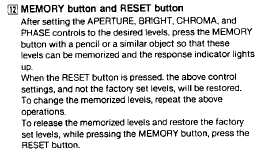
Can anyone tell me about recording settings on one of these? It's got a 'memory' button that I assume keeps the settings, but not for multiple setups?
Always outnumbered, never outgunned - No zuo no die

22point8
Posts: 261
Joined: Wed Nov 14, 2012 5:59 pm
Location: London, England, UK

Re: My first PVM: Troubleshooting setup for 2044 QM

Post by 22point8 »

Skykid wrote:
^ This exact setup on mine renders no image at all, screen is dead as a doornail, and it's switched to RGB.

EDIT:

Got it, what a facepalm! :roll:

There's a button on the front panel noted EXT which is off by default. Switching it on obviously pipes the sync lead to the TV and wallah, I got a picture. And it's beautiful. ^_^

Thanks for the help chaps, now I need to open the monster and do some overscan settings etc.

Can anyone tell me about recording settings on one of these? It's got a 'memory' button that I assume keeps the settings, but not for multiple setups?
Image

Also, glad to see it isn't just mine that look that bad on composite.
fagin
Posts: 1654
Joined: Fri Mar 19, 2010 2:29 pm
Location: UK

Re: My first PVM: Troubleshooting setup for 2044 QM

Post by fagin »

Considering you'd only paid a fiver, I was going to suggest you can find out your ****ing self! :D :D

Glad you got it sorted.
User avatar
Skykid
Posts: 17661
Joined: Sun Nov 18, 2007 2:16 pm
Location: Planet Dust Asia

Re: My first PVM: Troubleshooting setup for 2044 QM

Post by Skykid »

fagin wrote:Considering you'd only paid a fiver, I was going to suggest you can find out your ****ing self! :D :D

Glad you got it sorted.
Ha ha, good price for sure!

Thanks for the memory save tip. Shame I'm limited to one setup save but whatever.

This model has no on screen geometry options etc, so I need to open it up for a little tweaking. I'll try to be less of a pussy than Ian and jump right in without killing myself outright, but at the moment my only issue is with a slight oversaturation of colour (if it is that.)

It seems it could be sharper and there might be something that can be adjusted to make the pixels a little crisper. I don't know if anyone knows what does what internally that I could try going for?
Always outnumbered, never outgunned - No zuo no die

22point8
Posts: 261
Joined: Wed Nov 14, 2012 5:59 pm
Location: London, England, UK

Re: My first PVM: Troubleshooting setup for 2044 QM

Post by 22point8 »

Focus, on the flyback. But experiment with lowering the contrast too, and don't mess with gains/drives and bias, or screen volts. The screen volts seem to majorly affect green bias.

Only adjust geometry and focus.
User avatar
Skykid
Posts: 17661
Joined: Sun Nov 18, 2007 2:16 pm
Location: Planet Dust Asia

Re: My first PVM: Troubleshooting setup for 2044 QM

Post by Skykid »

22point8 wrote:Focus, on the flyback. But experiment with lowering the contrast too, and don't mess with gains/drives and bias, or screen volts. The screen volts seem to majorly affect green bias.

Only adjust geometry and focus.
Cool thanks for the heads up. Will get on it tomorrow. I did adjust the pots for rgb gain in the front of the tv (see pic) but it only has a small tint effect, and in the end I just reduced the three to zero (off). I'm assuming you're talking about a central gain pot inside the chassis?
Always outnumbered, never outgunned - No zuo no die

22point8
Posts: 261
Joined: Wed Nov 14, 2012 5:59 pm
Location: London, England, UK

Re: My first PVM: Troubleshooting setup for 2044 QM

Post by 22point8 »

On mine the green gain on the front panel doesn't do anything. The front panel ones are general, the ones inside are red and blue bias and drive for 6500, red and blue bias and drive 9300 and red (R) and blue (B) bias (next to sub-brightness) for RGB mode. The service manual isn't actually clear on that it just says 'adjust rv1709' or something but inside its too difficult to actually see what numbered thing you are adjusting, and it doesn't help that these pots are right next to the big power supply board! Only mess with these if you have a colorimeter or spectrophotometer. Outside of the geometry settings you need an oscilloscope or multimeter, I don't have those and have no reason to adjust those things anyway.
User avatar
Skykid
Posts: 17661
Joined: Sun Nov 18, 2007 2:16 pm
Location: Planet Dust Asia

Re: My first PVM: Troubleshooting setup for 2044 QM

Post by Skykid »

THIS THING IS PORN :shock:

Image
Always outnumbered, never outgunned - No zuo no die

User avatar
ninn
Posts: 119
Joined: Tue Jan 04, 2011 1:30 pm
Location: Vienna

Re: My first PVM: Troubleshooting setup for 2044 QM

Post by ninn »

MOIRE PORN :P
User avatar
matrigs
Posts: 682
Joined: Mon Jan 18, 2010 7:27 pm
Location: Poland

Re: My first PVM: Troubleshooting setup for 2044 QM

Post by matrigs »

Skykid wrote:THIS THING IS PORN :shock:
there is no hope for humanity
speedlolita
Posts: 603
Joined: Sat Aug 15, 2009 9:13 pm
Location: Europe

Re: My first PVM: Troubleshooting setup for 2044 QM

Post by speedlolita »

Skykid wrote:THIS THING IS PORN :shock:
Welcome, to the master race. :wink:
User avatar
Skykid
Posts: 17661
Joined: Sun Nov 18, 2007 2:16 pm
Location: Planet Dust Asia

Re: PVM 2044QM Troubleshooting Update: Screen Wobble

Post by Skykid »

Updated the OP:
UPDATE 10/11/13

After doing some adjustment to the display (it was seriously underscanned) and the vertical linearity to reduce a lower screen warping, pretty much everything is ok except an unusual oddity I can't quite figure out.

Here's a video I took:

http://www.youtube.com/watch?v=73dbp5Xp ... e=youtu.be

The upper portion of the screen has this wobble only when there's a predominantly black background. In-game is usually fine, unless there's a point when the display is particularly dark.

The strange thing is, if I use the horizontal centering and shift the screen to the right, it completely solves the problem: but I'm losing around a CM of screen!
Shifting the image to the left exacerbates the problem to the point that the entire screen rolls.

Anyone have any idea what may be causing this? It's not something that's prevalent during games, because the conditions required are normally on title screens, or like the video on Contra's continue screen - but occasionally it crops up when images fade in and out.

At the moment it's a toss up between overscanning the screen to almost a CM loss on the right side or accepting this irritating wobble cropping up now and then, but I'd like to pin down a way of solving it if possible.

Thanks for the help!
Always outnumbered, never outgunned - No zuo no die

User avatar
Skykid
Posts: 17661
Joined: Sun Nov 18, 2007 2:16 pm
Location: Planet Dust Asia

Re: PVM 2044QM Troubleshooting Update: Screen Wobble

Post by Skykid »

Anyone?
Always outnumbered, never outgunned - No zuo no die

User avatar
Skykid
Posts: 17661
Joined: Sun Nov 18, 2007 2:16 pm
Location: Planet Dust Asia

Re: PVM 2044QM Troubleshooting Update: Screen Wobble

Post by Skykid »

These are the pots I can play with:

Image

Image

One of you tech maniacs must have an idea of why this might occur. :idea:
Always outnumbered, never outgunned - No zuo no die

Post Reply