To make sure the SCART in my HDTV definitively isn't RGB...

The place for all discussion on gaming hardware
BitFaced
Posts: 347
Joined: Thu Mar 21, 2013 6:31 pm

Re: To make sure the SCART in my HDTV definitively isn't RGB

Post by BitFaced »

Fudoh wrote: you'll need the proper cable (DSub15 on the one end and 3x RCA/Cinch on the other end).

certainly better than now. Wii (btw) outputs 480p for most sources already, so you don't run that through a linedoubler.

no, but you can use a SLG-HD.
Link please?
Yeah but I might anyway because it'll all go through the same switcher into the linedoubler.
I looked one up and yeah, I totally could, especially as it's cheaper than I expected (with a name like SLG-HD I thought its price would be up there with higher end scaler/linedoubler devices but it turned out to be cheaper than the SLG 3000!). Just hope everything would work with it that's originally SCART, Composite, S-Video or Component.
So...
Sources & RGB SCART to YUV -> Composite/S-Video/Component Switchers -> iScan Pro -> SLG HD
...Right?
BitFaced
Posts: 347
Joined: Thu Mar 21, 2013 6:31 pm

Re: To make sure the SCART in my HDTV definitively isn't RGB

Post by BitFaced »

Also, what specific types of games need and do not need scanlines? :
3D PS1 Games
2D PS1 Games
3D PS2 Games
2D PS2 Games
3D N64 Games
2D N64 Games
3D NGC Games
2D NGC Games
3D Wii Games
2D Wii Games
User avatar
Fudoh
Posts: 13045
Joined: Mon Mar 06, 2006 3:29 am
Location: Germany
Contact:

Re: To make sure the SCART in my HDTV definitively isn't RGB

Post by Fudoh »

If you're after authenticity you want to add scanlines to 240p sources, not to 480i or 480p ones. 240p sources include both 240p outputs and original 240p titles just running in 480i or 480p. Doesn't matter if 2D or 3D.
BitFaced
Posts: 347
Joined: Thu Mar 21, 2013 6:31 pm

Re: To make sure the SCART in my HDTV definitively isn't RGB

Post by BitFaced »

Fudoh wrote:If you're after authenticity you want to add scanlines to 240p sources, not to 480i or 480p ones. 240p sources include both 240p outputs and original 240p titles just running in 480i or 480p. Doesn't matter if 2D or 3D.
So, (* = Please verify for me)

PS1 = 240p
PS2 = 480i or 480p with some 240p (or intended/originally 240p) games? (Not including PS1 games or GS Mode Selector)*
NES/SNES/N64 = 240p
NGC = 480i or 480p with some 240p (or intended/originally 240p) games?*
Wii = 480i or 480p with some 240p (or intended/originally 240p) games?*

I know PS2 games (including 240p games) can be upscaled from 240p through GS Mode Selector, but would I then need to use the SLG HD or not? And I guess the NGC's Game Boy Player and Wii's Virtual Console would be among games to be 480i or 480p but were originally 240p and need the SLG HD.
User avatar
Fudoh
Posts: 13045
Joined: Mon Mar 06, 2006 3:29 am
Location: Germany
Contact:

Re: To make sure the SCART in my HDTV definitively isn't RGB

Post by Fudoh »

GBA games are about the only low-res titles running on the Cube. Everything else is hi-res. Also for GBA you're very likely much better off using a Retron 5. If you had a NTSC cube with component cables it would be different, but with a PAL cube.....
BitFaced
Posts: 347
Joined: Thu Mar 21, 2013 6:31 pm

Re: To make sure the SCART in my HDTV definitively isn't RGB

Post by BitFaced »

Fudoh wrote:GBA games are about the only low-res titles running on the Cube. Everything else is hi-res. Also for GBA you're very likely much better off using a Retron 5. If you had a NTSC cube with component cables it would be different, but with a PAL cube.....
I see what you mean...
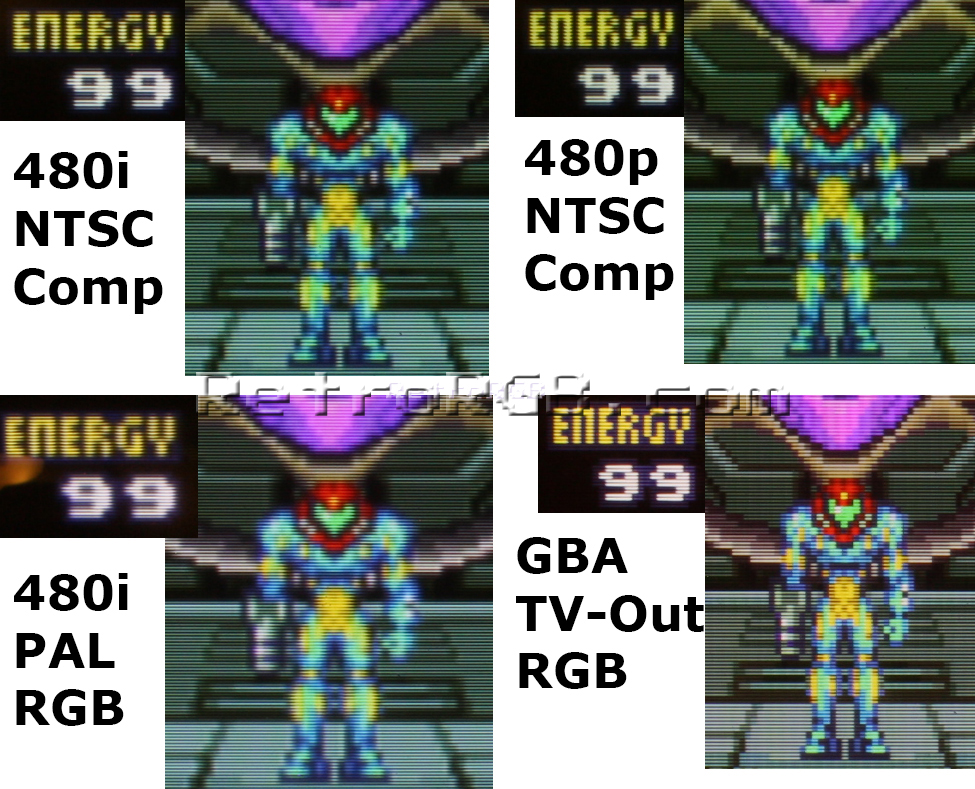
Image
So a SLG of any kind wouldn't help? Because it could just be the GBA part and not the GB/GBC part but I don't remember them looking like that when playing Game Boy on it through RGB SCART (which BTW is just has the diagonal moving lines from it being a bad cable, so I'm going to get a new one). But if I were to get a new GBA-TV device how would the Super Retro Adapter do? Assuming it wasn't separate from the SNES/SFC like the RetroGen or RetroPort with crappy Composite it would run off the SNES/SFC which can do RGB.
User avatar
Fudoh
Posts: 13045
Joined: Mon Mar 06, 2006 3:29 am
Location: Germany
Contact:

Re: To make sure the SCART in my HDTV definitively isn't RGB

Post by Fudoh »

so far they're all with seperate composite output. You have to wait for the Retron 5 to do better.

The 4th of the snapshots above is from a modded TV de Advance, but it outputs in 480i instead of 240p which causes other problems...
BitFaced
Posts: 347
Joined: Thu Mar 21, 2013 6:31 pm

Re: To make sure the SCART in my HDTV definitively isn't RGB

Post by BitFaced »

So what are all of the sources that were originally 240p but now run in 480i/p?
User avatar
Fudoh
Posts: 13045
Joined: Mon Mar 06, 2006 3:29 am
Location: Germany
Contact:

Re: To make sure the SCART in my HDTV definitively isn't RGB

Post by Fudoh »

VC games in the Wii, classic compilations (Taito, Capcom) on PS2. Stuff like that.
BitFaced
Posts: 347
Joined: Thu Mar 21, 2013 6:31 pm

Re: To make sure the SCART in my HDTV definitively isn't RGB

Post by BitFaced »

So Mega Collection and Gems Collection would count?
Also, would I need to use a RGB SCART cable for 240p games on PS2 because they don't look as good or function at all through component?
User avatar
Fudoh
Posts: 13045
Joined: Mon Mar 06, 2006 3:29 am
Location: Germany
Contact:

Re: To make sure the SCART in my HDTV definitively isn't RGB

Post by Fudoh »

RGB and component have the same quality and all games work with both. Some TVs can't show 240p through component though.
BitFaced
Posts: 347
Joined: Thu Mar 21, 2013 6:31 pm

Re: To make sure the SCART in my HDTV definitively isn't RGB

Post by BitFaced »

Fudoh wrote:RGB and component have the same quality and all games work with both. Some TVs can't show 240p through component though.
Sure hope mine can. Would the linedoubler help at all?
User avatar
Fudoh
Posts: 13045
Joined: Mon Mar 06, 2006 3:29 am
Location: Germany
Contact:

Re: To make sure the SCART in my HDTV definitively isn't RGB

Post by Fudoh »

doesn't matter. Once you run through a linedoubler you have 480p, not 240p.
BitFaced
Posts: 347
Joined: Thu Mar 21, 2013 6:31 pm

Re: To make sure the SCART in my HDTV definitively isn't RGB

Post by BitFaced »

Fudoh wrote:doesn't matter. Once you run through a linedoubler you have 480p, not 240p.
Wouldn't that help the situation?
User avatar
Fudoh
Posts: 13045
Joined: Mon Mar 06, 2006 3:29 am
Location: Germany
Contact:

Re: To make sure the SCART in my HDTV definitively isn't RGB

Post by Fudoh »

exactly, that's why you don't have to worry about it.
BitFaced
Posts: 347
Joined: Thu Mar 21, 2013 6:31 pm

Re: To make sure the SCART in my HDTV definitively isn't RGB

Post by BitFaced »

Sorry, where do I get the proper cable to make the iScan Pro output Component?
User avatar
Fudoh
Posts: 13045
Joined: Mon Mar 06, 2006 3:29 am
Location: Germany
Contact:

Re: To make sure the SCART in my HDTV definitively isn't RGB

Post by Fudoh »

BitFaced
Posts: 347
Joined: Thu Mar 21, 2013 6:31 pm

Re: To make sure the SCART in my HDTV definitively isn't RGB

Post by BitFaced »

Damn I didn't think that would work.
Thanks!
User avatar
Fudoh
Posts: 13045
Joined: Mon Mar 06, 2006 3:29 am
Location: Germany
Contact:

Re: To make sure the SCART in my HDTV definitively isn't RGB

Post by Fudoh »

this just works, because the iScan switches to component internally. So you get a real component signal already - it's just using the same output connector as the RGBHV signal.
BitFaced
Posts: 347
Joined: Thu Mar 21, 2013 6:31 pm

Re: To make sure the SCART in my HDTV definitively isn't RGB

Post by BitFaced »

Some new thoughts about the NGC-Game Boy Player PAL issue:
The Component cables for GameCube aren't cheap, but I thought that perhaps I could use Swiss's 480p/576p forcing on the Game Boy Player with Component cables. Would that help?
ZellSF
Posts: 2726
Joined: Mon Apr 09, 2012 11:12 pm

Re: To make sure the SCART in my HDTV definitively isn't RGB

Post by ZellSF »

BitFaced wrote:Some new thoughts about the NGC-Game Boy Player PAL issue:
The Component cables for GameCube aren't cheap, but I thought that perhaps I could use Swiss's 480p/576p forcing on the Game Boy Player with Component cables. Would that help?
You need component cables for 480p.

You can tell the software to try to output 480p, but without component cables you won't get any image.
BitFaced
Posts: 347
Joined: Thu Mar 21, 2013 6:31 pm

Re: To make sure the SCART in my HDTV definitively isn't RGB

Post by BitFaced »

ZellSF wrote:
BitFaced wrote:Some new thoughts about the NGC-Game Boy Player PAL issue:
The Component cables for GameCube aren't cheap, but I thought that perhaps I could use Swiss's 480p/576p forcing on the Game Boy Player with Component cables. Would that help?
You need component cables for 480p.

You can tell the software to try to output 480p, but without component cables you won't get any image.
So... Forced 480p/576p with Component cables would make the NGC Game Boy Player PAL image situation better, right?
User avatar
Fudoh
Posts: 13045
Joined: Mon Mar 06, 2006 3:29 am
Location: Germany
Contact:

Re: To make sure the SCART in my HDTV definitively isn't RGB

Post by Fudoh »

Don't know what the issues are, but there's no way that 576p50 would in any way help GBA playback. You need 480p60.
BitFaced
Posts: 347
Joined: Thu Mar 21, 2013 6:31 pm

Re: To make sure the SCART in my HDTV definitively isn't RGB

Post by BitFaced »

Fudoh wrote:Don't know what the issues are, but there's no way that 576p50 would in any way help GBA playback. You need 480p60.
And I can force that on PAL Game Boy Player with Swiss and Component cables, right?
BitFaced
Posts: 347
Joined: Thu Mar 21, 2013 6:31 pm

Re: To make sure the SCART in my HDTV definitively isn't RGB

Post by BitFaced »

Fudoh wrote:The 4th of the snapshots above is from a modded TV de Advance, but it outputs in 480i instead of 240p which causes other problems...
What 480i problems specifically?
User avatar
Fudoh
Posts: 13045
Joined: Mon Mar 06, 2006 3:29 am
Location: Germany
Contact:

Re: To make sure the SCART in my HDTV definitively isn't RGB

Post by Fudoh »

The clock timing issue causes the deinterlacer to fail on those moments which can cause serious hickups in scrolling.
BitFaced
Posts: 347
Joined: Thu Mar 21, 2013 6:31 pm

Re: To make sure the SCART in my HDTV definitively isn't RGB

Post by BitFaced »

Fudoh wrote:The clock timing issue causes the deinterlacer to fail on those moments which can cause serious hickups in scrolling.
So not recommended then?
But are those problems with 480i in general?
Post Reply