Cinemateq Picture Optimizer - are they any good?

The place for all discussion on gaming hardware
User avatar
Fudoh
Posts: 13045
Joined: Mon Mar 06, 2006 3:29 am
Location: Germany
Contact:

Re: Cinemateq Picture Optimizer - are they any good?

Post by Fudoh »

What a journey!

I don't really understand why the setup is working with sync set to RGBs (it shouldn't), but hell, point is it's working now :)
fagin
Posts: 1654
Joined: Fri Mar 19, 2010 2:29 pm
Location: UK

Re: Cinemateq Picture Optimizer - are they any good?

Post by fagin »

Fudoh wrote:What a journey!

I don't really understand why the setup is working with sync set to RGBs (it shouldn't), but hell, point is it's working now :)
The whole thing doesn't make much sense if I am honest. The chip not needing any power and the slg led doesn't even light up, but it all still works.
fagin
Posts: 1654
Joined: Fri Mar 19, 2010 2:29 pm
Location: UK

Re: Cinemateq Picture Optimizer - are they any good?

Post by fagin »

Comparison images:

Image
User avatar
blizzz
Posts: 1150
Joined: Fri Sep 16, 2011 6:19 pm
Location: Germany
Contact:

Re: Cinemateq Picture Optimizer - are they any good?

Post by blizzz »

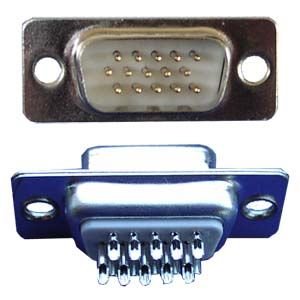
How would I build my own sync inverter for the CPO? Would it be enough to buy two of these DSub15 Connectors (one male and one female) and connect everything directly except Pin 13 and 14 which would require the 74HC04 on Pin 1, 3 (in) and 2, 4 (out)? Would I still need to connect Vcc and GND and could I just take the +5V which should be on Pin 9?

The total cost for everything is less than 2-3€, which to me sounds better than spending 30-50€ on an Extron interface + BNC cables and stuff. But I'm a total noob when it comes to soldering cables, so I might have overlooked some obvious flaws in this idea.
fagin
Posts: 1654
Joined: Fri Mar 19, 2010 2:29 pm
Location: UK

Re: Cinemateq Picture Optimizer - are they any good?

Post by fagin »

That sounds fine to me.... All I did was butcher an existing VGA lead I had.

I can't remember if I kept the GND connected for the IC, but you can easily check that yourself (by trying it both ways). Whatever you do, don't power the IC..... that's what caused me all the issues (if you read back).
User avatar
blizzz
Posts: 1150
Joined: Fri Sep 16, 2011 6:19 pm
Location: Germany
Contact:

Re: Cinemateq Picture Optimizer - are they any good?

Post by blizzz »

My idea was to take a SO14 IC and put it into the plug. Wow, that was a bad idea. All those tiny cables will give me nightmares and I highly doubt that it'll work in the end. I don't have the nerves to do the other end of the cable yet.

Image

Edit: Finished it but it doesn't work. Monitor goes into standby (no signal) for any video source. But at least it looks really nice :)
(the small IC is the one I used in the cable)

Image
User avatar
blizzz
Posts: 1150
Joined: Fri Sep 16, 2011 6:19 pm
Location: Germany
Contact:

Re: Cinemateq Picture Optimizer - are they any good?

Post by blizzz »

fagin, I need your help. I completely rewired the cable, but it still doesn't work with the IC. If I remove the hexinverter it displays a picture, but with it it's just black and my monitor goes into standby. Do you think that I need a TI one? I'm using this one at the moment...

I'm also unsure about the Film Mode. Force SM gives me a really great picture but with interlacing, all other modes give me a softer image. Is there a way to get pure linedoubling that's as sharp as the Force SM mode?

Image

Edit: I noticed that the LED of the SLG3000 lights up a little with my cable.

Edit2: I can use the GBS-8220 as a scan inverter, but the quality of the video decreases slightly. It's still way better than using the GBS-8220 for upscaling though. I also tried a different 74HC04 but it's the same black screen as before.

Edit3: Using a 5V power supply gives me a "signal out of range" error on the monitor. But now the led on the SLG3000 lights up correctly.
fagin
Posts: 1654
Joined: Fri Mar 19, 2010 2:29 pm
Location: UK

Re: Cinemateq Picture Optimizer - are they any good?

Post by fagin »

Remove the +5v from the IC and try it again.
User avatar
blizzz
Posts: 1150
Joined: Fri Sep 16, 2011 6:19 pm
Location: Germany
Contact:

Re: Cinemateq Picture Optimizer - are they any good?

Post by blizzz »

I tried it without +5V, with Pin9 and an external power supply. Neither works.
On which Pin is the sync when I'm using RGBs?
User avatar
blizzz
Posts: 1150
Joined: Fri Sep 16, 2011 6:19 pm
Location: Germany
Contact:

Re: Cinemateq Picture Optimizer - are they any good?

Post by blizzz »

I have no idea what I just did, but it's working now. All I did was switching all output modes.

It's kinda random though, sometimes it works, sometimes it doesn't and I have to switch output modes again. It also works on RGsB sometimes. The picture is a bit unstable in the horizontal direction, could be my subpar wiring skills or the 74HC04.
fagin
Posts: 1654
Joined: Fri Mar 19, 2010 2:29 pm
Location: UK

Re: Cinemateq Picture Optimizer - are they any good?

Post by fagin »

IIRC I only inverted the H sync and left the V sync as is (disconnected power to IC and used RGBs as the output from the CPO).
User avatar
blizzz
Posts: 1150
Joined: Fri Sep 16, 2011 6:19 pm
Location: Germany
Contact:

Re: Cinemateq Picture Optimizer - are they any good?

Post by blizzz »

When I connect H sync alone it doesn't work, unless I touch pin13 (gnd) with my hand, but even then it's without scanlines. If I connect H+V sync without +5V and GND I get randomly "input out of range" or a picture which is a bit shaky but otherwise fine. Once I got a picture it stays, so turning the CPO on/off multiple times until it displays something works. But it's still weird. Connecting GND results in my monitor going to sleep.

Edit: Fixed the shaking with a different IC, but it's still random whether it turns on or not.
fagin
Posts: 1654
Joined: Fri Mar 19, 2010 2:29 pm
Location: UK

Re: Cinemateq Picture Optimizer - are they any good?

Post by fagin »

This is such a simple circuit it should just work!! I never found this to be the case in reality though. If you can get hold of a TI version , it would be worth trying.
User avatar
blizzz
Posts: 1150
Joined: Fri Sep 16, 2011 6:19 pm
Location: Germany
Contact:

Re: Cinemateq Picture Optimizer - are they any good?

Post by blizzz »

I found another issue with my CPO when I set the output to YUV. It looks like the luminance (?) of the next frame is mixed into the current frame. Could this be caused by my cable or is it just how the CPO works?

Here's what it looks like
Image Image Image

This is the cable I'm using (only R,G,B connected to my capture card)
Image
User avatar
blizzz
Posts: 1150
Joined: Fri Sep 16, 2011 6:19 pm
Location: Germany
Contact:

Re: Cinemateq Picture Optimizer - are they any good?

Post by blizzz »

Does anyone know the differences between the Picture Optimizer Plus and Plus II? I can't find any info for the first one. I've got an offer for one, but if it can't change sync polarity it's of no use to me.
fagin
Posts: 1654
Joined: Fri Mar 19, 2010 2:29 pm
Location: UK

Re: Cinemateq Picture Optimizer - are they any good?

Post by fagin »

I can't find anything specifically, but found a post on the AV forums that was about a firmware update. It said it was the same update for all POP series, so I would assume they are very similar.

Have you seen a picture of it? Has it got the built in screen on the front? If it has I would be inclined to think it has the polarity switching.
User avatar
blizzz
Posts: 1150
Joined: Fri Sep 16, 2011 6:19 pm
Location: Germany
Contact:

Re: Cinemateq Picture Optimizer - are they any good?

Post by blizzz »

It looks the same like the POP II, just without the II on the front. I guess there's only one way to find out...
User avatar
emphatic
Posts: 8033
Joined: Mon Aug 18, 2008 3:47 pm
Location: Alingsås, Sweden
Contact:

Re: Cinemateq Picture Optimizer - are they any good?

Post by emphatic »

Wow, just won one on eBay!
Image | My games - http://www.emphatic.se
RegalSin wrote:Street Fighters. We need to aviod them when we activate time accellerator.
User avatar
blizzz
Posts: 1150
Joined: Fri Sep 16, 2011 6:19 pm
Location: Germany
Contact:

Re: Cinemateq Picture Optimizer - are they any good?

Post by blizzz »

Oh well, the guy with the POP wants that I send him the money via mail which is extremely unsafe and not even allowed by postal regulations here. Guess that option is dead for me.
emphatic wrote:Wow, just won one on eBay!
Grats, I assume you got the one for 30€ plus shipping? That's a really great price, hope you'll have fun with it. For 240p games I use Force VT and TV mode off.
User avatar
emphatic
Posts: 8033
Joined: Mon Aug 18, 2008 3:47 pm
Location: Alingsås, Sweden
Contact:

Re: Cinemateq Picture Optimizer - are they any good?

Post by emphatic »

blizzz wrote:
emphatic wrote:Wow, just won one on eBay!
Grats, I assume you got the one for 30€ plus shipping? That's a really great price, hope you'll have fun with it. For 240p games I use Force VT and TV mode off.
Yes, from Germany. If Google translate is good enough, then the the one I got is "as new". :) I'm going to use it exclusively with a supergun for playing horizontal PCB's on my Plasma feeding it through an SLG3000. Hopefully I can figure out a good setting. The remote is included as well.
Image | My games - http://www.emphatic.se
RegalSin wrote:Street Fighters. We need to aviod them when we activate time accellerator.
User avatar
blizzz
Posts: 1150
Joined: Fri Sep 16, 2011 6:19 pm
Location: Germany
Contact:

Re: Cinemateq Picture Optimizer - are they any good?

Post by blizzz »

emphatic wrote:I'm going to use it exclusively with a supergun for playing horizontal PCB's on my Plasma feeding it through an SLG3000.
Read back in this thread a bit... The PO outputs the wrong sync polarity (-/+) for the SLG3000. You'll have to build your own sync inverter (which I never quite managed to do correctly) or use an Extron RGB Interface that can change -/+ to +/+.
Last edited by blizzz on Sun Jul 22, 2012 1:37 pm, edited 1 time in total.
User avatar
emphatic
Posts: 8033
Joined: Mon Aug 18, 2008 3:47 pm
Location: Alingsås, Sweden
Contact:

Re: Cinemateq Picture Optimizer - are they any good?

Post by emphatic »

Wasn't that rectified by just using a custom resolution in the end though? And wasn't the issue with reversed polarity that the SLG3000 didn't get power from the sync line? I could just use a +5V from my supergun's PSU to power it if that's the case. Let's see if fagin can clear this up. :lol:

BTW, were you the other bidder on the CPO I won?
Image | My games - http://www.emphatic.se
RegalSin wrote:Street Fighters. We need to aviod them when we activate time accellerator.
fagin
Posts: 1654
Joined: Fri Mar 19, 2010 2:29 pm
Location: UK

Re: Cinemateq Picture Optimizer - are they any good?

Post by fagin »

The PO unlike the POP does not allow you to adjust the polarity of the sync. Without altering the polarity on the sync, the PO will not work with a SLG.
User avatar
emphatic
Posts: 8033
Joined: Mon Aug 18, 2008 3:47 pm
Location: Alingsås, Sweden
Contact:

Re: Cinemateq Picture Optimizer - are they any good?

Post by emphatic »

Ah. Well, I'll have to look into that when I've received the thing.
Image | My games - http://www.emphatic.se
RegalSin wrote:Street Fighters. We need to aviod them when we activate time accellerator.
User avatar
emphatic
Posts: 8033
Joined: Mon Aug 18, 2008 3:47 pm
Location: Alingsås, Sweden
Contact:

Re: Cinemateq Picture Optimizer - are they any good?

Post by emphatic »

I'm still awaiting my package from Germany. :| Meanwhile, would someone be kind and post the settings for the best custom resolution here so i don't have to get as many new grey hairs when it's here? Or is it the "industry standard" 480p modeline that Fudoh posted?

Also, what's the model name of the TI circuit that fagin used so I can try to find one on eBay? The 74HC04? Do I wire it up like this but without powering it? http://www.twobits.com/sync.html
Image | My games - http://www.emphatic.se
RegalSin wrote:Street Fighters. We need to aviod them when we activate time accellerator.
User avatar
blizzz
Posts: 1150
Joined: Fri Sep 16, 2011 6:19 pm
Location: Germany
Contact:

Re: Cinemateq Picture Optimizer - are they any good?

Post by blizzz »

I think simple line-doubling works best.

Yes, the 74HC04 is the right one and it does something without power. It only seems to work for V sync, so I never got it working with RGBHV, only RGBS.
User avatar
emphatic
Posts: 8033
Joined: Mon Aug 18, 2008 3:47 pm
Location: Alingsås, Sweden
Contact:

Re: Cinemateq Picture Optimizer - are they any good?

Post by emphatic »

Picked this up from the post office today, manual wasn't included and i never found a menu to tweak the custom modes. How and where, please?
Image | My games - http://www.emphatic.se
RegalSin wrote:Street Fighters. We need to aviod them when we activate time accellerator.
fagin
Posts: 1654
Joined: Fri Mar 19, 2010 2:29 pm
Location: UK

Re: Cinemateq Picture Optimizer - are they any good?

Post by fagin »

You don't need to tweak for custom modes. Simply linedouble!
User avatar
emphatic
Posts: 8033
Joined: Mon Aug 18, 2008 3:47 pm
Location: Alingsås, Sweden
Contact:

Re: Cinemateq Picture Optimizer - are they any good?

Post by emphatic »

Ah, that's what I tried. :) Cheers!
Image | My games - http://www.emphatic.se
RegalSin wrote:Street Fighters. We need to aviod them when we activate time accellerator.
User avatar
Antiriad
Posts: 32
Joined: Sun Sep 09, 2012 9:28 pm
Location: Italy

Re: Cinemateq Picture Optimizer - are they any good?

Post by Antiriad »

Hi! :D
I'm new here and not much expert about upscaling, so I'm sorry if I'll repeat something yet solved but I need some clarifications, I hope you can help me.

I've just won on Ebay a Cinemateq Picture Optimizer Plus 2 (CPO+2) and I would like to use it with a SLG-3000 exclusively on a Sony Playstation 2 source.

This is the setup I would like to set:

PS2 > Component (or RGB?) > CPO+2 > VGA > SLG-3000 > VGA > TV HD

Will it work?
It's better Component cable or SCART RGB for the connection between PS2 and CPO+2?
Plain, which are the best/required basic settings on CPO+2 for this setup?

I really thank you for your support and your patience. :wink:
Post Reply