Hello!
I just bought an Egret II. I really want to move the cab upstairs to my room but My friends don't feel comfortable helping me moving up the Cab up the stairs...
I read someone said they took out the monitor to make it a lot easier to move up..
I have no background with cabs. I fresh meat and am wondering if it is too dangerous for me to attempt to remove the monitor. I quickly glanced over some articles regarding CRTs and about discharging and imploding...
Can I just unscrew some bolts and disconnect some wires and Im good or is it much much more complicated??
Thanks!
Removing monitor from Egret II
-
clamchowder01
- Posts: 26
- Joined: Tue Jan 27, 2009 7:50 pm
- Location: California
-
Radiantsvgun

- Posts: 39
- Joined: Fri Jul 25, 2008 1:46 am
- Location: Atlanta, GA
Re: Removing monitor from Egret II
I've done this before-
Follow up: I thought I'd post this for anyone else who may need it in the future:
I necked my e2 monitor and had to replace it. I necked it because I didn't understand how to remove the monitor in it and trying to move it without properly securing it, I necked the monitor. So here's my guide to disassembling the e2:
Dissembling an E2:
After unplugging the cab
1. Open the back panel
2. Carefully remove neckboard
3. Remove yoke wires from Chassis : Yellow and black goes in very front, red and blue to the right side behind the metal, and double red on the left side.
4. Lift up control panel and remove the 2 screws holding the front piece down.
5. Lift up front piece (remove bezel if you want) and remove the 4 screws holding the monitor in. The monitor will still be sitting on the pegs.
6. Discharge the anode (I wore a rubber glove because by the time I got to this part I was covered in sweat)
7. Remove anode.
8. Grip the monitor firmly and pull backwards, do not yank it fast or you could hit the tube on the back.
9. If you want to remove the rotate mech, it is also being held in by 4 screws and it just pulls out.
10. With an Allen wrench set, remove the CP. And you're done.
This took me from 10pm to about 2 am to figure out. The hardest part was getting the yoke wires in the right place. You have to feel around for the twin connecters in the front because the chassis has limited access
Follow up: I thought I'd post this for anyone else who may need it in the future:
I necked my e2 monitor and had to replace it. I necked it because I didn't understand how to remove the monitor in it and trying to move it without properly securing it, I necked the monitor. So here's my guide to disassembling the e2:
Dissembling an E2:
After unplugging the cab
1. Open the back panel
2. Carefully remove neckboard
3. Remove yoke wires from Chassis : Yellow and black goes in very front, red and blue to the right side behind the metal, and double red on the left side.
4. Lift up control panel and remove the 2 screws holding the front piece down.
5. Lift up front piece (remove bezel if you want) and remove the 4 screws holding the monitor in. The monitor will still be sitting on the pegs.
6. Discharge the anode (I wore a rubber glove because by the time I got to this part I was covered in sweat)
7. Remove anode.
8. Grip the monitor firmly and pull backwards, do not yank it fast or you could hit the tube on the back.
9. If you want to remove the rotate mech, it is also being held in by 4 screws and it just pulls out.
10. With an Allen wrench set, remove the CP. And you're done.
This took me from 10pm to about 2 am to figure out. The hardest part was getting the yoke wires in the right place. You have to feel around for the twin connecters in the front because the chassis has limited access
-
Radiantsvgun
- Posts: 39
- Joined: Fri Jul 25, 2008 1:46 am
- Location: Atlanta, GA
Re: Removing monitor from Egret II
Listen, if you don't want to remove the cab, you might want to just try using an allen wrench to remove the control panel. The CP on an Egret 2 adds like 20 pounds. It makes a difference with it off.
-
clamchowder01
- Posts: 26
- Joined: Tue Jan 27, 2009 7:50 pm
- Location: California
Re: Removing monitor from Egret II
Thanks man but I'm still not comfortable with this..
I think I need diagrams... Got any manuals in English... I only have the Japanese Versions.
1) What's necking?
2) Where's the neck board?
3) What are the Yoke Wires?
4) Does CP mean Control Panel?
Plus I'm scared of the discharging the anode part.. also I am a newb and have never dealt with discharing anything...
Can I just remove the whole monitor with the rotating mech as one whole piece?
I think I need diagrams... Got any manuals in English... I only have the Japanese Versions.
1) What's necking?
2) Where's the neck board?
3) What are the Yoke Wires?
4) Does CP mean Control Panel?
Plus I'm scared of the discharging the anode part.. also I am a newb and have never dealt with discharing anything...
Can I just remove the whole monitor with the rotating mech as one whole piece?
-
Radiantsvgun
- Posts: 39
- Joined: Fri Jul 25, 2008 1:46 am
- Location: Atlanta, GA
Re: Removing monitor from Egret II
It's cool dude, I broke my monitor and had to replace it. I had no prior experience with monitors until the E2. Necking is when the neckboard of the tube breaks and the glass monitor is completely useless. Trust me, you do not want that to happen.
I don't have any diagrams, its one of those things you just have to jump in. It's okay to be scared or nervous, but just remember to be careful. If I were you, I'd try removing the CP and then trying to lift it. Make sure the monitor is secure before moving it though.
I don't have any diagrams, its one of those things you just have to jump in. It's okay to be scared or nervous, but just remember to be careful. If I were you, I'd try removing the CP and then trying to lift it. Make sure the monitor is secure before moving it though.
-
robivy64

- Posts: 899
- Joined: Wed Jul 25, 2007 11:12 pm
- Location: Fort Worth, TX
Re: Removing monitor from Egret II
While I recommend removing the monitor to move an arcade machine, I do NOT recommend removing an Egret II monitor.
There are some cabinets that do not allow for the easy removal of a monitor (AWSD, Konami Windy, and Egret II are just a few).
If you are not used to doing this, this is not the cabinet to try this on.
The entire control panel is easily removable from the front of the Egret II, and it will help you with moving it. I have moved an E2 up and down stairs a few times, and it's not that bad with the CP off.
There are some cabinets that do not allow for the easy removal of a monitor (AWSD, Konami Windy, and Egret II are just a few).
If you are not used to doing this, this is not the cabinet to try this on.
The entire control panel is easily removable from the front of the Egret II, and it will help you with moving it. I have moved an E2 up and down stairs a few times, and it's not that bad with the CP off.
Last edited by robivy64 on Thu Apr 01, 2010 4:41 am, edited 1 time in total.
-
clamchowder01
- Posts: 26
- Joined: Tue Jan 27, 2009 7:50 pm
- Location: California
Re: Removing monitor from Egret II
How did you discharge the anode?
-
robivy64
- Posts: 899
- Joined: Wed Jul 25, 2007 11:12 pm
- Location: Fort Worth, TX
Re: Removing monitor from Egret II
http://www.youtube.com/watch?v=bDAiLtTDuf4clamchowder01 wrote:How did you discharge the anode?
-
cools

- Posts: 2057
- Joined: Mon Nov 26, 2007 4:57 pm
- Location: South Wales
- Contact:
Re: Removing monitor from Egret II
I've no issue with removing the monitor from a Windy, but the E2 monitor just looks far too at risk of necking.
Leave it in the cab, really. 3-4 people should be able to shift an E2 up a flight of stairs without any issue at all.
Leave it in the cab, really. 3-4 people should be able to shift an E2 up a flight of stairs without any issue at all.

-
slap_fight

- Posts: 64
- Joined: Thu Sep 21, 2006 5:09 pm
- Location: london
Re: Removing monitor from Egret II
yep. invite a couple of friends over for a kebab or curry, there are holes in the back for the E2 for 1 person to grab hold of and pull, the other 2 guys take the bottom and lift it up 1 step at a time if necessary. you could lie the cab down first to make sure the wheels are clean so you don't dirty your carpet. with the control panel out, those at the bottom should be able to get into decent enough positions to give it a good go.
-
Devil Soundwave

- Posts: 55
- Joined: Wed Jun 03, 2009 10:08 am
- Location: North London, UK
Re: Removing monitor from Egret II
I had the monitor out of Dandy/Kernow's E2 a number of times, but that's due to the fact I literally can't move a machine without doing so as I more often than not have to move machines on my own.cools wrote:I've no issue with removing the monitor from a Windy, but the E2 monitor just looks far too at risk of necking.
Leave it in the cab, really. 3-4 people should be able to shift an E2 up a flight of stairs without any issue at all.
That said, i have hefted plenty of monitors in the last few years including my Windy and Windy2 ones, and I concur with the general concensus - if you are not familiar with doing it, don't practise on an E2.
I think when i did it I took the entire rotate mech out but can't remember.
TBH, once the CP is off, carrying it upstairs is easy even with the monitor in - tell your mates to stop being pussies!

I had to take it apart ot get it out to my van, but when it arrived from IC09 it was just me and my (weak) friend who carried it up, guts and all.
-
emphatic

- Posts: 8030
- Joined: Mon Aug 18, 2008 3:47 pm
- Location: Alingsås, Sweden
- Contact:
Re: Removing monitor from Egret II
I didn't realize that it would be so hard to do with these cabs. Good to know. But just take it slow and carefully and take a long rest when possible. It's better to fix some temporary handles with a movers harness or so onto it that you can easily remove without damage to the cabinet. Removing the screen when you have no idea what you're doing is way too hazardous.
 | My games - http://www.emphatic.se
RegalSin wrote:Street Fighters. We need to aviod them when we activate time accellerator.
-
CIT

- Posts: 4692
- Joined: Thu Jun 30, 2005 2:39 pm
- Location: Germany
- Contact:
Re: Removing monitor from Egret II
I would also advise against removing the screen. If you have no experience doing this it will be dangerous both for the cab and for yourself (risk of electrocution!).
I carried an Egret II up six flights of stairs into my apartment together with a friend yesterday, and – while heavy – it was definitely doable.
I went up the stairs first, holding the cab at the two handles in the back, while my friend grabbed the two "feet" on the front-bottom of the cab.
Don't rush things and take a break after each flight. If you go slow and easy you should have no problems getting the cab upstairs. Also make sure to wear anti-slip protective gloves, they definitely help!
I carried an Egret II up six flights of stairs into my apartment together with a friend yesterday, and – while heavy – it was definitely doable.
I went up the stairs first, holding the cab at the two handles in the back, while my friend grabbed the two "feet" on the front-bottom of the cab.
Don't rush things and take a break after each flight. If you go slow and easy you should have no problems getting the cab upstairs. Also make sure to wear anti-slip protective gloves, they definitely help!
-
kernow

- Posts: 1225
- Joined: Mon May 26, 2008 8:26 pm
- Location: Plymouth, Devon, UK
Re: Removing monitor from Egret II
I have no guns for this kinda thing. 
-
jonny5

- Posts: 5089
- Joined: Sat Feb 16, 2008 5:48 pm
- Location: toronto
Re: Removing monitor from Egret II
how much does an e2 weigh?
me and brendz have brought a couple astros with the monitors in up to my 3rd floor apartment...which involves a 30 stair up to the second and then 13 stairs, landing, 13 stairs to my apartment
just the 2 of us....they arent that heavy...and if an e2 is at all like an astro it has handles on the back...if it doesnt have handles, just take off the back plate and grab it that way
dont pull the monitor....
versus citys....not so much fun...monitors in or not
me and brendz have brought a couple astros with the monitors in up to my 3rd floor apartment...which involves a 30 stair up to the second and then 13 stairs, landing, 13 stairs to my apartment
just the 2 of us....they arent that heavy...and if an e2 is at all like an astro it has handles on the back...if it doesnt have handles, just take off the back plate and grab it that way
dont pull the monitor....
versus citys....not so much fun...monitors in or not
-
cools
- Posts: 2057
- Joined: Mon Nov 26, 2007 4:57 pm
- Location: South Wales
- Contact:
-
jonny5
- Posts: 5089
- Joined: Sat Feb 16, 2008 5:48 pm
- Location: toronto
Re: Removing monitor from Egret II
take off the CP....and even with an additional 10% in weight it will still be under/around 200 lbs....if you cant lift that with 2 people you a nancycools wrote:10% more than an Astro.
-
cools
- Posts: 2057
- Joined: Mon Nov 26, 2007 4:57 pm
- Location: South Wales
- Contact:
Re: Removing monitor from Egret II
I agree entirely. Shifted mine out of the house last week with two of us. More people makes it just a tad less risky
-
jonny5
- Posts: 5089
- Joined: Sat Feb 16, 2008 5:48 pm
- Location: toronto
Re: Removing monitor from Egret II
i would find it more awkward with more than 2 people....there is only so much room to grab the cab....plus its easier to coordinate with just 2 peoplecools wrote:I agree entirely. Shifted mine out of the house last week with two of us. More people makes it just a tad less risky
i wish i had a video of me and 2 other people moving in the versus citys....even with the monitors out its like 300lbs.....and we had to lift it over our heads to get it around my landing.....
or perhaps when brendz and i brought a neo big red woody up with just the 2 of us....it almost fell on me twice and took us about 1 1/2 hours....it took about 5 mins. to get the astros up
-
kernow
- Posts: 1225
- Joined: Mon May 26, 2008 8:26 pm
- Location: Plymouth, Devon, UK
Re: Removing monitor from Egret II
God you're so strong and handsome. 
-
jonny5
- Posts: 5089
- Joined: Sat Feb 16, 2008 5:48 pm
- Location: toronto
Re: Removing monitor from Egret II
strong....sure....handsome? not reallykernow wrote:God you're so strong and handsome.
-
robivy64
- Posts: 899
- Joined: Wed Jul 25, 2007 11:12 pm
- Location: Fort Worth, TX

-
kernow
- Posts: 1225
- Joined: Mon May 26, 2008 8:26 pm
- Location: Plymouth, Devon, UK
Re: Removing monitor from Egret II
*check out those gunnns* 
-
clamchowder01
- Posts: 26
- Joined: Tue Jan 27, 2009 7:50 pm
- Location: California
Re: Removing monitor from Egret II
Thanks guys for the responses!! I think I will just try to lift upstairs with monitor in. Discharging monitor seems pretty easy, but I really don't want to neck the monitor..
-
clamchowder01
- Posts: 26
- Joined: Tue Jan 27, 2009 7:50 pm
- Location: California
Re: Removing monitor from Egret II
I just thought about how it will fit through the door of my room which is too small for the Egret II. The Control panel is thing sticking out with the joystick and buttons correct?? How do you take that thing off?
-
PC Engine Fan X!
- Posts: 9785
- Joined: Wed Jan 26, 2005 10:32 pm
Re: Removing monitor from Egret II
Yes, the control panel (CP) is the part of the candy cab with the all the necessary Sanwa or Seimitsu branded joysticks, push buttons & wiring harness setup.
You'd use your handy set of Japanese candy cab keys and unlock both left-side and right-side locking levers underneath the Egret II's control panel. Once both the monitor's bezel covering & the control panel are raised up, you'll find 4 four bolts/machined threaded screws that hold it in place. Plus you'll need to disconnect both player 1 and player 2 CP wiring harness plugs (that connect all the joysticks & push buttons to the candy cab's wiring interface) as well.
Unscrew them off with two pairs of Allen wrenches and you're good to go. Careful when unscrewing the last two remaing bolts as the CP is quite heavy and might require an extra hand to catch it once removed. If they haven't been unscrewed before, they've been intially tightened to factory torque specs at Taito's manufacturing plant and will require a bit of extra effort/muscle to loosen them up.
Reverse the steps to re-install said CP back on the ol' Egret II cab. When re-installing the bolts/screws, you'll find out that you don't to apply as much torque to tighten up the bolts to hold the CP in place and will be easier the next time if you need to take the CP off again. Easy as pie.
PC Engine Fan X! ^_~
You'd use your handy set of Japanese candy cab keys and unlock both left-side and right-side locking levers underneath the Egret II's control panel. Once both the monitor's bezel covering & the control panel are raised up, you'll find 4 four bolts/machined threaded screws that hold it in place. Plus you'll need to disconnect both player 1 and player 2 CP wiring harness plugs (that connect all the joysticks & push buttons to the candy cab's wiring interface) as well.
Unscrew them off with two pairs of Allen wrenches and you're good to go. Careful when unscrewing the last two remaing bolts as the CP is quite heavy and might require an extra hand to catch it once removed. If they haven't been unscrewed before, they've been intially tightened to factory torque specs at Taito's manufacturing plant and will require a bit of extra effort/muscle to loosen them up.
Reverse the steps to re-install said CP back on the ol' Egret II cab. When re-installing the bolts/screws, you'll find out that you don't to apply as much torque to tighten up the bolts to hold the CP in place and will be easier the next time if you need to take the CP off again. Easy as pie.
PC Engine Fan X! ^_~
-
clamchowder01
- Posts: 26
- Joined: Tue Jan 27, 2009 7:50 pm
- Location: California
Re: Removing monitor from Egret II
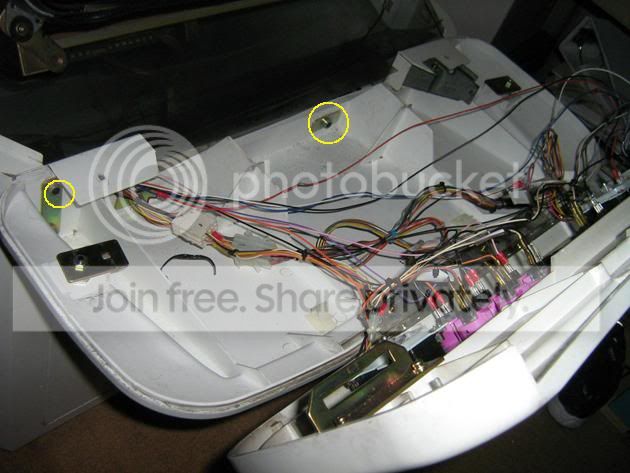
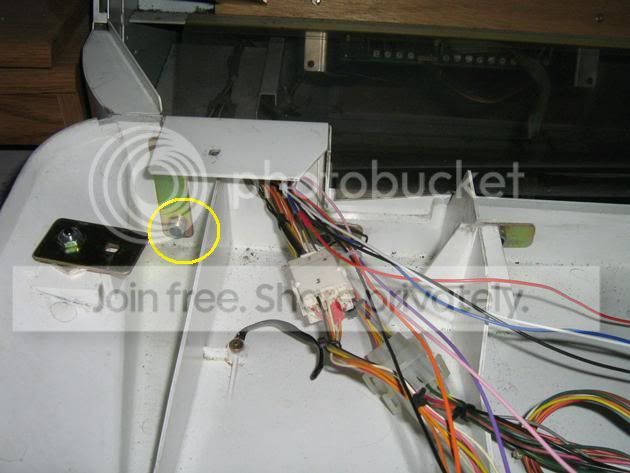
The Allen bolts are soo freakin tight.. I can't even move them.. To make sure I'm turning the right way, if I'm facing the machine like I'm playing it, i should turn it clockwise to loosen it right?
-
PC Engine Fan X!
- Posts: 9785
- Joined: Wed Jan 26, 2005 10:32 pm
Re: Removing monitor from Egret II
The reason why the bolts are so tight is because the person who assembled the CP to your Egret 2 torqued them to factory specs. Like I said earlier, it will take a bit of muscle and strength to loosen them up and finally remove them. See those big bulky plastic12-pin JST connectors? Just simply unplug them but make sure to label them as Player 1 connector and Player 2 connector (so you know which to replug them back in once you want to re-install the CP). No need to cut the wires off either.
To loosen the nuts, you'd want to rotate the Allen wrench anti-clockwise. To tighten them, you would rotate clockwise. I had to use two Allen wrenches to get the four bolts off on my Egret 2, one on the frontside of the bolthead set to rotate "anti-clockwise" and the other on the backside of the screwhead set to "stationary position". Works like a charm.
PC Engine Fan X! ^_~
To loosen the nuts, you'd want to rotate the Allen wrench anti-clockwise. To tighten them, you would rotate clockwise. I had to use two Allen wrenches to get the four bolts off on my Egret 2, one on the frontside of the bolthead set to rotate "anti-clockwise" and the other on the backside of the screwhead set to "stationary position". Works like a charm.
PC Engine Fan X! ^_~
-
clamchowder01
- Posts: 26
- Joined: Tue Jan 27, 2009 7:50 pm
- Location: California
Re: Removing monitor from Egret II
Ive got all the center ones off but I havent even attempted the two side pair of bolts yet... The right side pair is going to be tough...
-
PC Engine Fan X!
- Posts: 9785
- Joined: Wed Jan 26, 2005 10:32 pm
Re: Removing monitor from Egret II
You could try spraying a bit of WD-40 and let it penatrate a bit through the bolt/screws. Then try loosening them up.
PC Engine Fan X! ^_~
PC Engine Fan X! ^_~