Extron Emotia GX Operating Instructions
-
Kenchan

- Posts: 426
- Joined: Fri Aug 03, 2007 12:17 pm
- Location: Reno, NV
Extron Emotia GX Operating Instructions
I picked up an Extron Emotia scan converter a long time ago, they don't come with power cables. I also bought the 5-pin DIN I need to make my own. I know I asked about this a year or two ago, but I need it again because I'm actually doing it now. I need a pinout for this type of power connector so I can make an adapter and get this thing working finally ^^;
Last edited by Kenchan on Thu Jul 23, 2009 2:45 pm, edited 1 time in total.
-
it290

- Posts: 2855
- Joined: Thu Mar 17, 2005 1:00 am
- Location: polar malortex, illinois
Re: Extron Emotia 5-Pin DIN Power Connector Pinout
I have a Super Emotia, so I can't guarantee the pinout is the same, but my pinout looks like this (coming out of the power supply)
Apologies for the poor ascii diagram. Hope that helps.
Code: Select all
RTN/GND             +5V
      -12V      +12V
         RTN/GND

We here shall not rest until we have made a drawing-room of your shaft, and if you do not all finally go down to your doom in patent-leather shoes, then you shall not go at all.
-
Kenchan
- Posts: 426
- Joined: Fri Aug 03, 2007 12:17 pm
- Location: Reno, NV
Re: Extron Emotia 5-Pin DIN Power Connector Pinout
Yeah it's a Super Emotia GX I have. Is -12v necessary? It seems to power up fine. I built a connector that pulls 2x Ground, +5v and +12v off an IDE 4-pin on a PC power supply, since this will stay in my Egret II as a dedicated converter.
Time for the dumb question. I'm trying to remember why I got this. This converts VGA to low-res, right?
Time for the dumb question. I'm trying to remember why I got this. This converts VGA to low-res, right?
-
it290
- Posts: 2855
- Joined: Thu Mar 17, 2005 1:00 am
- Location: polar malortex, illinois
Re: Extron Emotia 5-Pin DIN Power Connector Pinout
Heh yep, that's what it does. The ability to select between interlaced and non-interlaced modes is really the best feature. I'm not sure if -12 is necessary; it is present on the stock PS for my Super Emotia, but again, the pinouts may be different between models. I would imagine that if the connector is the same and everything else is identical that -12 should be there, though.
We here shall not rest until we have made a drawing-room of your shaft, and if you do not all finally go down to your doom in patent-leather shoes, then you shall not go at all.
-
Fudoh

- Posts: 13047
- Joined: Mon Mar 06, 2006 3:29 am
- Location: Germany
- Contact:
Re: Extron Emotia 5-Pin DIN Power Connector Pinout
you can play Death Smiles with Scanlines on a LCD, using this combo: 360 via VGA -> Emotia via RGBs -> XRGB2/3 -> LCDTime for the dumb question. I'm trying to remember why I got this. This converts VGA to low-res, right?

-
thamasha69

- Posts: 129
- Joined: Thu Dec 27, 2007 10:21 pm
Re: Extron Emotia 5-Pin DIN Power Connector Pinout
I would love to see screenshots of that. Been contemplating an Emotia specifically for DDP BLEX and Death Smiles on 360.you can play Death Smiles with Scanlines on a LCD, using this combo: 360 via VGA -> Emotia via RGBs -> XRGB2/3 -> LCD
-
Kenchan
- Posts: 426
- Joined: Fri Aug 03, 2007 12:17 pm
- Location: Reno, NV
Re: Extron Emotia 5-Pin DIN Power Connector Pinout
Million-dollar question: how do I use this?
Powers up I assume fine, video passthru of course works without power. I've got RGB/S coming out the BNC connectors to VGA, and feeding that thru a J-PAC into JAMMA. Screen shows very weak signal, like it's not amplified, out-of-sync. J-PAC shows Sync In, no Sync Ok. Plugging the RGB/S thru to a monitor directly shows nothing. Changing settings such as PAL/NTSC makes a visible change.
Here is the setup in full:
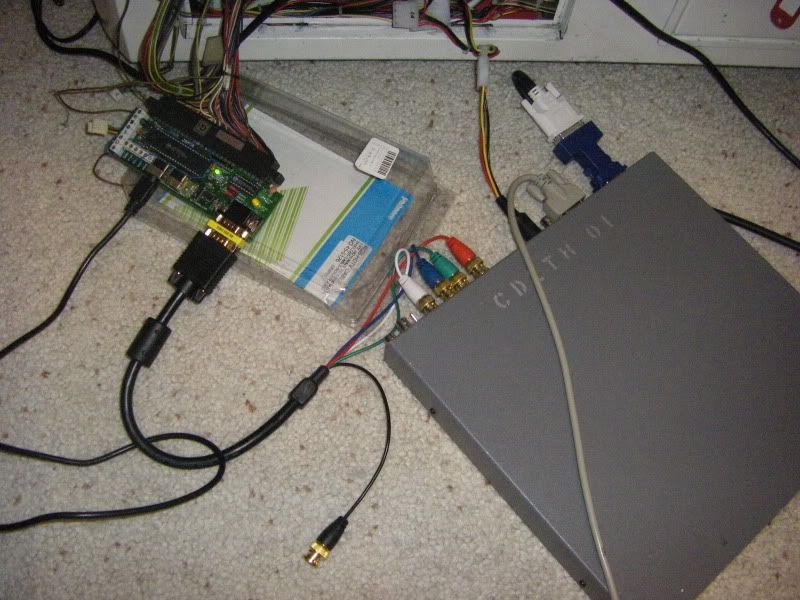

-12V is still not being used.
Powers up I assume fine, video passthru of course works without power. I've got RGB/S coming out the BNC connectors to VGA, and feeding that thru a J-PAC into JAMMA. Screen shows very weak signal, like it's not amplified, out-of-sync. J-PAC shows Sync In, no Sync Ok. Plugging the RGB/S thru to a monitor directly shows nothing. Changing settings such as PAL/NTSC makes a visible change.
Here is the setup in full:
-12V is still not being used.
-
emphatic

- Posts: 8037
- Joined: Mon Aug 18, 2008 3:47 pm
- Location: Alingsås, Sweden
- Contact:
Re: Extron Emotia 5-Pin DIN Power Connector Pinout
I just got an Emotia off eBay as well, so I'm just as curious about this. I was going to put mine inside my EGRET II and use BNC->D-Sub->J-Pac->JAMMA. Hopefully it'll arrive next week from the U.S.
Kenchan: What resolution are you putting INTO the Emotia? Did you get a manual with your unit?
Kenchan: What resolution are you putting INTO the Emotia? Did you get a manual with your unit?
 | My games - http://www.emphatic.se
RegalSin wrote:Street Fighters. We need to aviod them when we activate time accellerator.
-
Kenchan
- Posts: 426
- Joined: Fri Aug 03, 2007 12:17 pm
- Location: Reno, NV
Re: Extron Emotia 5-Pin DIN Power Connector Pinout
There's a guide on the bottom of the unit. There's docs on the site though. It's all for the Super Emotia II, but it looks to apply pretty well to mine as well.
Product Label - http://www.extron.com/download/files/la ... otiagx.pdf
Specifications - http://www.extron.com/download/files/sp ... 2-spec.pdf
Brochure - http://www.extron.com/download/files/br ... a2ebro.pdf
Manual - http://www.extron.com/download/files/us ... gx-man.pdf
It should support up to 1024x768, but I tried a variety of different resolutions.
Product Label - http://www.extron.com/download/files/la ... otiagx.pdf
Specifications - http://www.extron.com/download/files/sp ... 2-spec.pdf
Brochure - http://www.extron.com/download/files/br ... a2ebro.pdf
Manual - http://www.extron.com/download/files/us ... gx-man.pdf
It should support up to 1024x768, but I tried a variety of different resolutions.
-
emphatic
- Posts: 8037
- Joined: Mon Aug 18, 2008 3:47 pm
- Location: Alingsås, Sweden
- Contact:
Re: Extron Emotia 5-Pin DIN Power Connector Pinout
Did you try 480p? Mine is a Super Emotia. Hopefully it'll arrive next week. How much power do these use btw, I need a transformer from 240W -> 110W here in Sweden (mine came with a power cord), and I just need to know if it needs more than 70W to run. And the aux power outlet in my EGRET II is currently powering my Japanese 360 @ 150W, I just don't know how much more the transformer running the EGRET will muster.Kenchan wrote:There's a guide on the bottom of the unit. There's docs on the site though. It's all for the Super Emotia II, but it looks to apply pretty well to mine as well.
Product Label - http://www.extron.com/download/files/la ... otiagx.pdf
Specifications - http://www.extron.com/download/files/sp ... 2-spec.pdf
Brochure - http://www.extron.com/download/files/br ... a2ebro.pdf
Manual - http://www.extron.com/download/files/us ... gx-man.pdf
It should support up to 1024x768, but I tried a variety of different resolutions.
| My games - http://www.emphatic.seRegalSin wrote:Street Fighters. We need to aviod them when we activate time accellerator.
-
Fudoh
- Posts: 13047
- Joined: Mon Mar 06, 2006 3:29 am
- Location: Germany
- Contact:
Re: Extron Emotia GX Operating Instructions
There's hardly anything you can do wrong. Make sure the RGB/YPbPr button is pressed and check the 75Ohm termination switch. Try the black sync cable instead of the white one (there's no standard which color's right, don't pay attention what's written on the cable). I don't know the JPAC unit, but is it designed to handle C-Sync through the VGA port ?
-
Fudoh
- Posts: 13047
- Joined: Mon Mar 06, 2006 3:29 am
- Location: Germany
- Contact:
Re: Extron Emotia GX Operating Instructions
all the Extron PSUs are multi-voltage, so you don't need a converter. You just need a standard european power cable from your wall outlet to the Extron PSU.I need a transformer from 240W -> 110W here in Sweden (mine came with a power cord),
around 15W.and I just need to know if it needs more than 70W to run.
-
emphatic
- Posts: 8037
- Joined: Mon Aug 18, 2008 3:47 pm
- Location: Alingsås, Sweden
- Contact:
Re: Extron Emotia GX Operating Instructions
This is excellent news. Thanks a lot!Fudoh wrote:all the Extron PSUs are multi-voltage, so you don't need a converter. You just need a standard european power cable from your wall outlet to the Extron PSU.I need a transformer from 240W -> 110W here in Sweden (mine came with a power cord),
I've reconsidered how to connect my Emotia to my EGRET II. As I already have a 360 pad hacked to a JAMMA fingerboard, I'm just gonna solder the BNC connector cables to said fingerboard instead. No need to use the J-Pac, JAMMA video!
One last question from me; are there any differences between "RGB -> VGA" and "VGA -> RGB" cables? To me, the correct one to use would be "RGB -> VGA", right? I just figured that could be what's causing Kenchan's issues. If it doesn't have to do with the wrong sync cable or unsupported signal to the Emotia.
| My games - http://www.emphatic.seRegalSin wrote:Street Fighters. We need to aviod them when we activate time accellerator.
-
Kenchan
- Posts: 426
- Joined: Fri Aug 03, 2007 12:17 pm
- Location: Reno, NV
Re: Extron Emotia GX Operating Instructions
I haven't tried using the black cable either, I'll see if that helps when I get home.
-
Kenchan
- Posts: 426
- Joined: Fri Aug 03, 2007 12:17 pm
- Location: Reno, NV
Re: Extron Emotia GX Operating Instructions
That's a no-go. I can tell at least it's spitting out something from the PC because the picture changes when I open or close a window or something. Here's the picture I'm getting:

Plugging in black doesn't give me Sync In on the J-PAC, white does. If I plug white into something like one of the genlocks then black into Sync, it stays on.
Plugging in black doesn't give me Sync In on the J-PAC, white does. If I plug white into something like one of the genlocks then black into Sync, it stays on.
-
Fudoh
- Posts: 13047
- Joined: Mon Mar 06, 2006 3:29 am
- Location: Germany
- Contact:
Re: Extron Emotia GX Operating Instructions
I'd still blame the JPAC module. If there's a VGA input, I think it wants a split sync signal (H+V). After all the JPAC is designed to have a PC as a source and even if a PC is set to 15khz output, it still delivery a split sync signal. Have you tried the Video or S-Video output into a normal TV just to check the basic function ?
-
Kenchan
- Posts: 426
- Joined: Fri Aug 03, 2007 12:17 pm
- Location: Reno, NV
Re: Extron Emotia GX Operating Instructions
Same issue on S-Video. I guess that means I need to break down and find a -12v source ):
EDIT: Just got my Capcom I/O in, same thing with video.
Side note, I think this has been posted before and I've seen details, what's the easiest and/or best way to output JVS from a PC? I think I'm going to want to just use a Capcom JVS I/O from now on in general.
EDIT: Just got my Capcom I/O in, same thing with video.
Side note, I think this has been posted before and I've seen details, what's the easiest and/or best way to output JVS from a PC? I think I'm going to want to just use a Capcom JVS I/O from now on in general.
-
emphatic
- Posts: 8037
- Joined: Mon Aug 18, 2008 3:47 pm
- Location: Alingsås, Sweden
- Contact:
Re: Extron Emotia GX Operating Instructions
I'm about to solder a VGA (DB-9) connector to my JAMMA fingerboard. Do the BNC connectors use 1 or 2 cables per color?
I thought about using this:
http://www.epanorama.net/documents/vga2 ... l#vga_4bnc (the section for 4 BNC -> VGA) as my pinout guide. But as I'm not outputting RGB to VGA but just using a VGA connector (like on the J-Pac) I'm a bit confused. I guess I'll have to wait for my BNC cable to arrive and just see what cord leads to which pin on the DB-9 connector.
I thought about using this:
http://www.epanorama.net/documents/vga2 ... l#vga_4bnc (the section for 4 BNC -> VGA) as my pinout guide. But as I'm not outputting RGB to VGA but just using a VGA connector (like on the J-Pac) I'm a bit confused. I guess I'll have to wait for my BNC cable to arrive and just see what cord leads to which pin on the DB-9 connector.
| My games - http://www.emphatic.seRegalSin wrote:Street Fighters. We need to aviod them when we activate time accellerator.
-
emphatic
- Posts: 8037
- Joined: Mon Aug 18, 2008 3:47 pm
- Location: Alingsås, Sweden
- Contact:
Re: Extron Emotia GX Operating Instructions
I got my Super Emotia today, and when I connected it to my EGRET II, the results were absolutely crap. It actually looks like a S-Video connector that's badly inserted into a computer on a TV. If I connect it to my Xiong-Ba tri-sync monitor, it looks much better. But as it's a tri-sync, I of course prefer using VGA @ 480P on that monitor. The main reason I got this was to run games in 240P on my EGRET II, so I'm quite disappointed right now. Is there some sort of sync splitter or something I need? I'm gonna try it through the J-Pac tomorrow and keep my fingers crossed it'll work.
| My games - http://www.emphatic.seRegalSin wrote:Street Fighters. We need to aviod them when we activate time accellerator.
-
Fudoh
- Posts: 13047
- Joined: Mon Mar 06, 2006 3:29 am
- Location: Germany
- Contact:
Re: Extron Emotia GX Operating Instructions
Any chance you can take a snapshot with a digicam ? I've used nearly a dozen of different Emotia units on all kinds of monitors and displays and the result was always quite pleasing (and believe me, my standards are high).
-
emphatic
- Posts: 8037
- Joined: Mon Aug 18, 2008 3:47 pm
- Location: Alingsås, Sweden
- Contact:
Re: Extron Emotia GX Operating Instructions
I'll take some pics tomorrow. I'm starting to think that perhaps I'll need a video amplifier for it in my EGRET II. I have RGB+Sync soldered into a JAMMA fingerboard. Do I have to do something with the sync? Like use a sync splitter or something? Thanks a lot for your time.Fudoh wrote:Any chance you can take a snapshot with a digicam ? I've used nearly a dozen of different Emotia units on all kinds of monitors and displays and the result was always quite pleasing (and believe me, my standards are high).
| My games - http://www.emphatic.seRegalSin wrote:Street Fighters. We need to aviod them when we activate time accellerator.
-
emphatic
- Posts: 8037
- Joined: Mon Aug 18, 2008 3:47 pm
- Location: Alingsås, Sweden
- Contact:
Re: Extron Emotia GX Operating Instructions
I've taken some photos now. Unfortunately, I can't plug the video through my J-Pac, as it has a male connector, and so does my RGB cable. I have a gender changer adapter for VGA, but that's already in use on the input. I'm supposed to use the CPU, and not the MONITOR on my Super Emotia for the input, right?
Here's a gallery with pictures: http://www.pici.se/gal/emphatic/Extron% ... %20Emotia/
First up is a series of pics of DS from 360 through Emotia (NTSC). The most noticeable side-effect in these pics are the apparent ghosting from left to right as well as some ground flicker (click images for higher res):


The CAVE logo isn't supposed to have any shadow, right?
Next, I've taken some pics on my high res cabinet (I used Emotia's PAL here, as my Xiong Ba wouldn't even sync up to the signal otherwise) and the picture looks much better, but as this cabinet has VGA support, no need for the Super Emotia here:


And finally, some pictures of my EGRET II running ESPGALUDA II (PCB) for reference:


I'll hook it up to my wooden cab as well and see if I get better results (19" screen).
Edit: Connected the 360 to my wooden cab and the picture looks awesome. So, it seems that there's some sort of sync irregularity involved when connecting the Emotias to an EGRET II. Or need for amplification/sync splitting. I'll hook my laptop up to the EGRET II through my J-Pac later (that should let me use the gender changer needed) and see if I get a steady, ghosting free picture.
Here's a gallery with pictures: http://www.pici.se/gal/emphatic/Extron% ... %20Emotia/
First up is a series of pics of DS from 360 through Emotia (NTSC). The most noticeable side-effect in these pics are the apparent ghosting from left to right as well as some ground flicker (click images for higher res):
The CAVE logo isn't supposed to have any shadow, right?
Next, I've taken some pics on my high res cabinet (I used Emotia's PAL here, as my Xiong Ba wouldn't even sync up to the signal otherwise) and the picture looks much better, but as this cabinet has VGA support, no need for the Super Emotia here:
And finally, some pictures of my EGRET II running ESPGALUDA II (PCB) for reference:
I'll hook it up to my wooden cab as well and see if I get better results (19" screen).
Edit: Connected the 360 to my wooden cab and the picture looks awesome. So, it seems that there's some sort of sync irregularity involved when connecting the Emotias to an EGRET II. Or need for amplification/sync splitting. I'll hook my laptop up to the EGRET II through my J-Pac later (that should let me use the gender changer needed) and see if I get a steady, ghosting free picture.
| My games - http://www.emphatic.seRegalSin wrote:Street Fighters. We need to aviod them when we activate time accellerator.
-
Fudoh
- Posts: 13047
- Joined: Mon Mar 06, 2006 3:29 am
- Location: Germany
- Contact:
Re: Extron Emotia GX Operating Instructions
There's just one VGA input on the Emotia, it's the "CPU" port, the monitor labeled one is an VGA output.
What I see on your pics is definitely *not* normal. I quite recently tried a 360 with Death Smiles, but unfortunately I haven't taken any pics (yet). It was basically impossible to see any differences between the converted 360 picture and raw 240p. For reference I can just repost two screenshots from my website. Eventually I'll do screenshots of a running 360 as well, but I don't have the time or the working setup right now.
Raw 240p:

Converted VGA to 240p:

Now the question is, what's the problem ? May I see how you did the connection between the Emotia's RGBs Output and the Jamma input of your Egret II cab ? Did you set the 360 to a proper VGA resolution (640*480) instead of a HD resolution (480p) ?
If you set the Emotia output to 480i interlaced instead, do the shadows disappear ? What does change ?
You live in Sweden, so your TV should have a Scart input right ? Did you try your Emotia on this one already as well ? Any different behaviour ?
What I see on your pics is definitely *not* normal. I quite recently tried a 360 with Death Smiles, but unfortunately I haven't taken any pics (yet). It was basically impossible to see any differences between the converted 360 picture and raw 240p. For reference I can just repost two screenshots from my website. Eventually I'll do screenshots of a running 360 as well, but I don't have the time or the working setup right now.
Raw 240p:
Converted VGA to 240p:
Now the question is, what's the problem ? May I see how you did the connection between the Emotia's RGBs Output and the Jamma input of your Egret II cab ? Did you set the 360 to a proper VGA resolution (640*480) instead of a HD resolution (480p) ?
If you set the Emotia output to 480i interlaced instead, do the shadows disappear ? What does change ?
You live in Sweden, so your TV should have a Scart input right ? Did you try your Emotia on this one already as well ? Any different behaviour ?
-
emphatic
- Posts: 8037
- Joined: Mon Aug 18, 2008 3:47 pm
- Location: Alingsås, Sweden
- Contact:
Re: Extron Emotia GX Operating Instructions
Firstly, did you see I edited my last post?
Working flawlessly on Xiong-Ba tri-sync cabinet (Wei-Ya monitor) running in Emotia's PAL mode: and on my wooden 19" cabinet running in Emotia's NTSC and PAL modes:
640x480 from my 360 -> VGA cable (with MALE connector) -> VGA gender changer -> Super Emotia (CPU) -> RGB+Sync to D-Sub (VGA connector) cable (with MALE connector) -> D-Sub (VGA connector) soldered to a JAMMA fingerboard R, G, B + Sync
Also tried running my 360 AND my Laptop through my J-Pac to my EGRET II, but the Sanwa monitor refused to sync. Tried without all jumpers on the J-Pac and with 31kHz and 24kHz jumpered as well.
I'm not able to experiment further right now as I'm home alone with two kids full of energy. So if you've got some theories that would need testing, I can do some of that later or tomorrow maybe.
I used:Fudoh wrote:Now the question is, what's the problem ? May I see how you did the connection between the Emotia's RGBs Output and the Jamma input of your Egret II cab ? Did you set the 360 to a proper VGA resolution (640*480) instead of a HD resolution (480p) ?
If you set the Emotia output to 480i interlaced instead, do the shadows disappear ? What does change ?
You live in Sweden, so your TV should have a Scart input right ? Did you try your Emotia on this one already as well ? Any different behaviour ?
Working flawlessly on Xiong-Ba tri-sync cabinet (Wei-Ya monitor) running in Emotia's PAL mode: and on my wooden 19" cabinet running in Emotia's NTSC and PAL modes:
640x480 from my 360 -> VGA cable (with MALE connector) -> VGA gender changer -> Super Emotia (CPU) -> RGB+Sync to D-Sub (VGA connector) cable (with MALE connector) -> D-Sub (VGA connector) soldered to a JAMMA fingerboard R, G, B + Sync
Also tried running my 360 AND my Laptop through my J-Pac to my EGRET II, but the Sanwa monitor refused to sync. Tried without all jumpers on the J-Pac and with 31kHz and 24kHz jumpered as well.
I'm not able to experiment further right now as I'm home alone with two kids full of energy. So if you've got some theories that would need testing, I can do some of that later or tomorrow maybe.
| My games - http://www.emphatic.seRegalSin wrote:Street Fighters. We need to aviod them when we activate time accellerator.
-
emphatic
- Posts: 8037
- Joined: Mon Aug 18, 2008 3:47 pm
- Location: Alingsås, Sweden
- Contact:
Re: Extron Emotia GX Operating Instructions
I think I might have got something. I don't have VIDEO GROUND soldered to my JAMMA fingerboard. Fudoh, do you have any suggestions on what pin of the D-Sub I could draw that from?
| My games - http://www.emphatic.seRegalSin wrote:Street Fighters. We need to aviod them when we activate time accellerator.
-
emphatic
- Posts: 8037
- Joined: Mon Aug 18, 2008 3:47 pm
- Location: Alingsås, Sweden
- Contact:
Re: Extron Emotia GX Operating Instructions
Kenchan: Before trying to find another power source for your Emotia, try soldering up a D-Sub connector to a JAMMA fingerboard like this first as I could never get my EGRET II to play nice with my J-Pacs:

What was missing from my setup was VIDEO GROUND. I tried holding a loose cable from regular ground on my JAMMA fingerboard position 1 to VIDEO GROUND position 14, and all of the crazy ghosting and what not disappeared. I'm gonna solder a cable to it tonight.
Edit: For anyone reading this quite old post and want to put your 360 in your JAMMA cabinet, before buying an Emotia unit, please have a look at viletims Console -> JAMMA adapter (quite easy to find the thread here in the Hardware section) as it's much easier to install in the cabinet. I've had some PM's asking on how to connect an Extron device to JAMMA AFTER someone has already blindly purchased an Emotia of sorts. Read up some more before taking the plunge and don't jump through all the hoops I went through.
What was missing from my setup was VIDEO GROUND. I tried holding a loose cable from regular ground on my JAMMA fingerboard position 1 to VIDEO GROUND position 14, and all of the crazy ghosting and what not disappeared. I'm gonna solder a cable to it tonight.
Edit: For anyone reading this quite old post and want to put your 360 in your JAMMA cabinet, before buying an Emotia unit, please have a look at viletims Console -> JAMMA adapter (quite easy to find the thread here in the Hardware section) as it's much easier to install in the cabinet. I've had some PM's asking on how to connect an Extron device to JAMMA AFTER someone has already blindly purchased an Emotia of sorts. Read up some more before taking the plunge and don't jump through all the hoops I went through.
Last edited by emphatic on Mon Aug 01, 2011 1:28 pm, edited 1 time in total.
| My games - http://www.emphatic.seRegalSin wrote:Street Fighters. We need to aviod them when we activate time accellerator.
-
Fudoh
- Posts: 13047
- Joined: Mon Mar 06, 2006 3:29 am
- Location: Germany
- Contact:
Re: Extron Emotia GX Operating Instructions
nice to hear! Would be cool if you took a few pictures of the running Emotia on your Egret.
-
emphatic
- Posts: 8037
- Joined: Mon Aug 18, 2008 3:47 pm
- Location: Alingsås, Sweden
- Contact:
Re: Extron Emotia GX Operating Instructions
You can count on it, man. I'm very excited and will snap lots of pictures.
Edit: Feel free to use the schematic on your scanlines demystified page if you want to.
Edit: Feel free to use the schematic on your scanlines demystified page if you want to.
| My games - http://www.emphatic.seRegalSin wrote:Street Fighters. We need to aviod them when we activate time accellerator.
-
emphatic
- Posts: 8037
- Joined: Mon Aug 18, 2008 3:47 pm
- Location: Alingsås, Sweden
- Contact:
Re: Extron Emotia GX Operating Instructions
I didn't snap so many pictures after all, but the ground to video ground fix worked.
Here's what it DS looks like on my high res Xiong Ba (480p):

And a similar shot of it running in lo res on EGRET II (240p from the Super Emotia):

Here's what my finished lil' box looks like (inside my hi res cab):


That hole to the right is going to house another D-Sub to connect controls for another player, but I don't see it happening anytime soon, as I never play fighters or other 2 player games. You can see the extra cables going from the project box to the "kick harness" for buttons 5 & 6 on the left wall of the cabinet.
This last picture is how I have it all setup inside my EGRET II:

Currently, all cables running out of the Emotia and the 360 is going through a hole in the floor of the cab into the high res one "next door". It's an ESPGALUDA II pcb in the EGRET II in this picture, and all of the cables are beneath the antistatic bubble wrap and soft padding.
Here's what it DS looks like on my high res Xiong Ba (480p):
And a similar shot of it running in lo res on EGRET II (240p from the Super Emotia):
Here's what my finished lil' box looks like (inside my hi res cab):
That hole to the right is going to house another D-Sub to connect controls for another player, but I don't see it happening anytime soon, as I never play fighters or other 2 player games.
You can see the extra cables going from the project box to the "kick harness" for buttons 5 & 6 on the left wall of the cabinet.This last picture is how I have it all setup inside my EGRET II:
Currently, all cables running out of the Emotia and the 360 is going through a hole in the floor of the cab into the high res one "next door". It's an ESPGALUDA II pcb in the EGRET II in this picture, and all of the cables are beneath the antistatic bubble wrap and soft padding.
| My games - http://www.emphatic.seRegalSin wrote:Street Fighters. We need to aviod them when we activate time accellerator.
-
thamasha69
- Posts: 129
- Joined: Thu Dec 27, 2007 10:21 pm
Re: Extron Emotia GX Operating Instructions
That is awesome thank you for sharing. Would love to use one of these with my xrgb2 and Sigma controls for my 360.