So does this mean that you can choose whether the HDMI is using HV or CSync? The one DAC that just came out, Reflex Prism, needs AND CSync to feed its internal transcoder to output S-Video and YPbPr. Otherwise it just outputs RGBHV.
VoidScaler - a lagless line blending 15KHz downscaler firmware for OSSC
-
SG-17

- Posts: 6
- Joined: Tue Dec 02, 2025 11:59 am
- Contact:
Re: VoidScaler - a lagless line blending 15KHz downscaler firmware for OSSC
-
nusilver
- Posts: 6
- Joined: Tue Nov 01, 2016 1:04 am
Re: VoidScaler - a lagless line blending 15KHz downscaler firmware for OSSC
I did actually get Analogue Pocket working fine (I had to press the 10+ --/- button... not sure what it did), but it scales very unevenly, no matter if its outputting 720p or 1080p, and no matter if I'm using original carts or FPGA cores, and no matter the scaling method used in the Pockets menus (Integer, Integer+, etc.) The only other scaler I have access to is a Framemeister (the only OSSC I have is running Voidscaler), so I don't think I have a way to provide timing information, unless perhaps I can chain OSSC/Voidscaler to the Framemeister and then out to the display. But again--it's working now with both my Analogue devices, and it's ***awesome*** for Analogue 3D. Switch 2 is working great as well. Not sure what's going on with Pocket to cause it to scale so poorly, but it was enough to just make me throw my hands up and order a PC Engine since that was really the only console I wanted that I didn't already have original hardware for.e8root wrote: ↑Wed Dec 03, 2025 5:29 pm For Analogue devices or other devices which don't work - please provide some timing information. Something like OSSC Pro or RT4K (if it shows actual geometry) would perhaps be the best but information from OSSC itself using original firmware showing detected horizontal/vertical refresh is better than nothing. Definitely it would be the best to confirm DAC used actually works by having signal displayed somewhere else.
-
doonut
- Posts: 31
- Joined: Mon Aug 07, 2017 7:07 am
Re: VoidScaler - a lagless line blending 15KHz downscaler firmware for OSSC
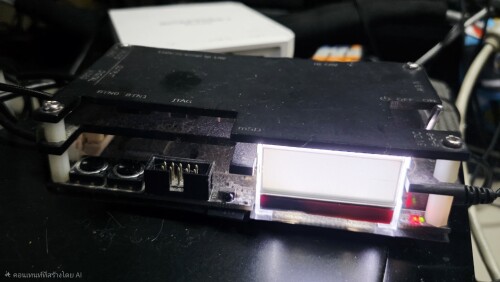
็Hi,
Reverting to the original firmware (ossc_1.12-aud.bin) caused problems.
Prior to that, I attempted to hold down the second button, activate bootload mode by turning on the switch, press both buttons at once, and then press remote number 10.
Are there any recommendations on how to solve some of it? (OSSC DVI version)
-
3style
- Posts: 23
- Joined: Mon Sep 23, 2019 8:39 pm
- Location: Netherlands
Re: VoidScaler - a lagless line blending 15KHz downscaler firmware for OSSC
What is your setup regarding hdmi to vga dac cables?nusilver wrote: ↑Thu Dec 04, 2025 12:56 amI did actually get Analogue Pocket working fine (I had to press the 10+ --/- button... not sure what it did), but it scales very unevenly, no matter if its outputting 720p or 1080p, and no matter if I'm using original carts or FPGA cores, and no matter the scaling method used in the Pockets menus (Integer, Integer+, etc.) The only other scaler I have access to is a Framemeister (the only OSSC I have is running Voidscaler), so I don't think I have a way to provide timing information, unless perhaps I can chain OSSC/Voidscaler to the Framemeister and then out to the display. But again--it's working now with both my Analogue devices, and it's ***awesome*** for Analogue 3D. Switch 2 is working great as well. Not sure what's going on with Pocket to cause it to scale so poorly, but it was enough to just make me throw my hands up and order a PC Engine since that was really the only console I wanted that I didn't already have original hardware for.e8root wrote: ↑Wed Dec 03, 2025 5:29 pm For Analogue devices or other devices which don't work - please provide some timing information. Something like OSSC Pro or RT4K (if it shows actual geometry) would perhaps be the best but information from OSSC itself using original firmware showing detected horizontal/vertical refresh is better than nothing. Definitely it would be the best to confirm DAC used actually works by having signal displayed somewhere else.
And do you use a consumer crt or pvm?
-
TOGL
- Posts: 5
- Joined: Sun Nov 30, 2025 6:27 pm
Re: VoidScaler - a lagless line blending 15KHz downscaler firmware for OSSC
Sorry for the late response, but does Converter that you linked perform any downscaling by itself, without the need for the Voidscaler?PC Engine Fan X! wrote: ↑Mon Dec 01, 2025 12:41 pmThis Tendak HDMI to RCA analog output works like a charm in 240p output: https://www.amazon.com/Tendak-Composite ... 530&sr=8-2fernan1234 wrote: ↑Mon Dec 01, 2025 5:12 amSadly there's no real solution for this, at least if you're trying to use a progressive/240p picture. If you're dealing with interlaced then the situation is much better, and the best solution will actually be almost any cheap HDMI to composite converter.
PC Engine Fan X! ^_~
I bought an "Onn" HDMI to RCA Converter box (https://www.walmart.com/ip/onn-HDMI-to- ... om=/search) to try and test it out and see if I bought a bad VGA to Composite Coverter from my previous comment, and I can get video to my CRT now, but the Onn Converter does it's own downscaling, which makes it not possible to change the Voidscaler settings properly to get it working the way I would prefer, with less input delay and less shimmer for 480i.
If the device that you're recommending does its own internal downscaling, then I don't think it will work for my use case.
Another thing I cannot get to work properly with the Onn Converter is Letterbox 16:9 on my 4:3 crt, as the Onn's downscaling interferes and forces it to stay in the 4:3 aspect ratio, along with 720P on the Voidscaler not working with the Onn converter, making the video Zoom in way too much.
-
PC Engine Fan X!
- Posts: 9782
- Joined: Wed Jan 26, 2005 10:32 pm
Re: VoidScaler - a lagless line blending 15KHz downscaler firmware for OSSC
TOGL wrote: ↑Sat Dec 06, 2025 4:38 pmSorry for the late response, but does Converter that you linked perform any downscaling by itself, without the need for the Voidscaler?PC Engine Fan X! wrote: ↑Mon Dec 01, 2025 12:41 pmThis Tendak HDMI to RCA analog output works like a charm in 240p output: https://www.amazon.com/Tendak-Composite ... 530&sr=8-2fernan1234 wrote: ↑Mon Dec 01, 2025 5:12 am
Sadly there's no real solution for this, at least if you're trying to use a progressive/240p picture. If you're dealing with interlaced then the situation is much better, and the best solution will actually be almost any cheap HDMI to composite converter.
PC Engine Fan X! ^_~
I bought an "Onn" HDMI to RCA Converter box (https://www.walmart.com/ip/onn-HDMI-to- ... om=/search) to try and test it out and see if I bought a bad VGA to Composite Coverter from my previous comment, and I can get video to my CRT now, but the Onn Converter does it's own downscaling, which makes it not possible to change the Voidscaler settings properly to get it working the way I would prefer, with less input delay and less shimmer for 480i.
If the device that you're recommending does its own internal downscaling, then I don't think it will work for my use case.
Another thing I cannot get to work properly with the Onn Converter is Letterbox 16:9 on my 4:3 crt, as the Onn's downscaling interferes and forces it to stay in the 4:3 aspect ratio, along with 720P on the Voidscaler not working with the Onn converter, making the video Zoom in way too much.
For TOGL,
The above Tendak HDMI to Analog output doesn't need the use of a Voidscalar necessary. I personally use to downconvert my Switch Oled's 1080p/720p/640p signal so thaf it displays properly on my 9" Sony Trinitron CRT TV setup in 240p. The Tendak downconvertor will display a 16:9 screen aspect ratio on a 4:3 aspect ratio TV setup if the main source is setup to do so (i.e. -- if said game title has it's own internal screen sizing adjustment parameters, of course).
PC Engine Fan X! ^_~
-
fidde_se

- Posts: 10
- Joined: Mon Mar 21, 2022 10:13 am
- Location: SWEDEN
Re: VoidScaler - a lagless line blending 15KHz downscaler firmware for OSSC

To make navigating a little easier.
-
TOGL
- Posts: 5
- Joined: Sun Nov 30, 2025 6:27 pm
Re: VoidScaler - a lagless line blending 15KHz downscaler firmware for OSSC
PC Engine Fan X! wrote: ↑Sun Dec 07, 2025 1:49 pmTOGL wrote: ↑Sat Dec 06, 2025 4:38 pmSorry for the late response, but does Converter that you linked perform any downscaling by itself, without the need for the Voidscaler?PC Engine Fan X! wrote: ↑Mon Dec 01, 2025 12:41 pm
This Tendak HDMI to RCA analog output works like a charm in 240p output: https://www.amazon.com/Tendak-Composite ... 530&sr=8-2
PC Engine Fan X! ^_~
I bought an "Onn" HDMI to RCA Converter box (https://www.walmart.com/ip/onn-HDMI-to- ... om=/search) to try and test it out and see if I bought a bad VGA to Composite Coverter from my previous comment, and I can get video to my CRT now, but the Onn Converter does it's own downscaling, which makes it not possible to change the Voidscaler settings properly to get it working the way I would prefer, with less input delay and less shimmer for 480i.
If the device that you're recommending does its own internal downscaling, then I don't think it will work for my use case.
Another thing I cannot get to work properly with the Onn Converter is Letterbox 16:9 on my 4:3 crt, as the Onn's downscaling interferes and forces it to stay in the 4:3 aspect ratio, along with 720P on the Voidscaler not working with the Onn converter, making the video Zoom in way too much.
For TOGL,
The above Tendak HDMI to Analog output doesn't need the use of a Voidscalar necessary. I personally use to downconvert my Switch Oled's 1080p/720p/640p signal so thaf it displays properly on my 9" Sony Trinitron CRT TV setup in 240p. The Tendak downconvertor will display a 16:9 screen aspect ratio on a 4:3 aspect ratio TV setup if the main source is setup to do so (i.e. -- if said game title has it's own internal screen sizing adjustment parameters, of course).
PC Engine Fan X! ^_~
If that is the case, does it work well with 480i as well, in your experience?
If it works great for both resolutions, then I may consider buying it.
-
nusilver
- Posts: 6
- Joined: Tue Nov 01, 2016 1:04 am
Re: VoidScaler - a lagless line blending 15KHz downscaler firmware for OSSC
Check the links in the description on my video. Also, I’m using a PVM. I have a consumer CRT in my crawl space but I don’t really have a reason to pull it out of there—my setup with all of my consoles is quite robust and complex—so won’t be testing with it unless the PVM dies on me.3style wrote: ↑Thu Dec 04, 2025 11:56 amWhat is your setup regarding hdmi to vga dac cables?nusilver wrote: ↑Thu Dec 04, 2025 12:56 amI did actually get Analogue Pocket working fine (I had to press the 10+ --/- button... not sure what it did), but it scales very unevenly, no matter if its outputting 720p or 1080p, and no matter if I'm using original carts or FPGA cores, and no matter the scaling method used in the Pockets menus (Integer, Integer+, etc.) The only other scaler I have access to is a Framemeister (the only OSSC I have is running Voidscaler), so I don't think I have a way to provide timing information, unless perhaps I can chain OSSC/Voidscaler to the Framemeister and then out to the display. But again--it's working now with both my Analogue devices, and it's ***awesome*** for Analogue 3D. Switch 2 is working great as well. Not sure what's going on with Pocket to cause it to scale so poorly, but it was enough to just make me throw my hands up and order a PC Engine since that was really the only console I wanted that I didn't already have original hardware for.e8root wrote: ↑Wed Dec 03, 2025 5:29 pm For Analogue devices or other devices which don't work - please provide some timing information. Something like OSSC Pro or RT4K (if it shows actual geometry) would perhaps be the best but information from OSSC itself using original firmware showing detected horizontal/vertical refresh is better than nothing. Definitely it would be the best to confirm DAC used actually works by having signal displayed somewhere else.
And do you use a consumer crt or pvm?
https://youtu.be/z8s7rlh51ZI?si=OykDt_WaHsvLc2kk
-
Durg
- Posts: 5
- Joined: Mon Nov 24, 2025 9:07 am
Re: VoidScaler - a lagless line blending 15KHz downscaler firmware for OSSC
Has anyone got line blending working with the current firmware? If so, what resolutions work? I can do it with reshade but would be nice to have everywhere else.
-
Bahn Yuki

- Posts: 237
- Joined: Thu Oct 15, 2015 11:33 pm
- Location: Salem OR
- Contact:
Re: VoidScaler - a lagless line blending 15KHz downscaler firmware for OSSC
Any luck on a 540p custom resolution? I know the ossc pro can provide it, perhaps it's something easily ported over to voidscaler?
LG 83C1(OLED),LG 42C2(OLED),TCL 75R635(MiniLED),Apple Studio Monitor 21(PCCRT),SONY 34XBR960(HDCRT)
SONY 32XBR250,Samsung UBJ590(LED),Panasonic P50VT20(Plasma),JVC NZ8
SONY 32XBR250,Samsung UBJ590(LED),Panasonic P50VT20(Plasma),JVC NZ8
-
3style
- Posts: 23
- Joined: Mon Sep 23, 2019 8:39 pm
- Location: Netherlands
Re: VoidScaler - a lagless line blending 15KHz downscaler firmware for OSSC
I also have this issue not that everything looks yellow instead of normal (on both ps4 and analogue, 720p and 1080p). I have an active dac on both sides.pelvicthrustman wrote: ↑Wed Nov 12, 2025 6:21 am Just tested this using:
- StarTech HD2VGAA2 (HDMI to VGA Adapter) for input
- This 15KHz compatible HDMI to Component converter for output: https://www.amazon.com/dp/B074V57Y73 (I have not lag tested it, but it looks like a clone of the old Portta design)
I was able to get my Switch at 1080p to show up on my 480i only Trinitron (KD-27FS170), the only issues I had were:
- There are bizarre warping artifacts in the signal that show up on some but not all scanlines until I press '8' on the remote to reset the Pixel Clock which makes the picture perfectly stable
- About 75% of the time the picture is weirdly tinted when I start the OSSC (makes most things look yellow and yellow look blue) - when that happens I just power cycle the OSSC until the colors look normal
Other observations:
- While I can switch between 240p and 480i with no problem I honestly can not tell any difference between the decimation and blending settings (could be a me problem, I didn't test extensively)
- Changing settings too many times causes the whole thing to stop working, requiring a power cycle to fix
Pretty sure every issue I observed was called out in the release notes so nothing unexpected.
Overall looking great so far! Can't wait to test future updates.
I already tried power cycling, but this does not work. Is there a solution for this?
-
e8root

- Posts: 25
- Joined: Sun Aug 17, 2025 6:30 am
Re: VoidScaler - a lagless line blending 15KHz downscaler firmware for OSSC
Line blending currently only works when input resolution is 720p. It does not work for 1080p.
Eventually I will want line blending for all modes.
Few notes:
Yellow screen issue
Never had this issue and I have no idea how it could happen other than it being DAC issue.
What I would try is adjusting ADC gain and precisely lowering it.
Or try different DAC/device.
BTW. In general I would recommend to in case of issues and especially with testing unsupported devices like Analogue device also test with PC using provided EDID to confirm that output works correctly.
480i looking the same as 240p
Definitely there is an issue with HDMI to Component DACs due to how they process signal. So far I have no solution to this and I am not sure these DACs can produce proper 480i. Could anyone verify with something like PS3 or X360 or TV tuner which can produce 480i on HDMI that 480i is possible on such DACs?
For HDMI to VGA adapters getting proper 480i might require changing csync combiner type (mapped to two arrows button in bottom right corner) and to nail it perfectly also some tuning using |<< and >>| buttons.
Current default is the so called B type combiner because it produces no curl at the top of the screen (note: with other types mapped at 0 - AND and XNOR mapped at 3) it might be there even if its not visible) and produce great results but I noticed with one of my monitors it somehow isn't ideal.
Eventually I will want to make proper csync with equalization pulses and this might also be what is required for HDMI to Component DACs. If it will be helpful I am not sure.
540p custom resolution and porting anything from OSSC Pro.
This is completely different firmware and not based on OSSC Pro or even OSSC code. Also OSSC hardware is very limited. 1080p to 540p should be possible tho.
Operation with HDMI to Composite converters
To get S-Video/Composite I would say HDMI to VGA DAC should be used and then separate RGB to S-Video transcoder. Eventually I will add native S-Video output. I already did some POC and it looked great.
Otherwise all in one devices are likely downscalers themselves and very unlikely to pass through 15KHz signal as is to then transcode it. I could try getting one to test but I really don't think such device could ever be supported.
Is there any evidence of such device working with already 15KHz signals correctly? By correctly I mean not doing its own rescaling and not adding lag?
Reflex Prism
This is special case as it is dedicated for MISTer FPGA device and in theory it should work. From description of it I would say it should work out of the box.
AND sync combiner is achieved by pushing two arrows button (right bottom button) until LCD says 0. CSync combiner is enabled by default.
Possible issues I can think of are:
a) Pixel clock too high. Pressing button 8 cuts it by half but it might still be too high. For 720p modes it should be possible to further cut pixel clock in half. For 1080p maybe too but not at this time.
b) Difference in VSync handling. I assume MISTer FPGA when combined sync is enabled just keeps original VSync signal - but then again I have never checked it. It is most compatible option. No VSync doesn't seem to work with HDMI TX chip and CSync on both HSync and VSync doesn't seem to work with all DACs.
c) Something else about signal prevents this DAC to switch to15KHz operation correctly. It should have 262 lines for 240p or 262/263 lines for 480i so I would not expect issues here. Maybe something about DE signal or horizontal/vertical sync length?
Unlikely I will buy Reflex Prism just to support it but I will keep support for this device on my mind. Figuring out what the issue is might need some targeted testing like adding bunch of options. Owners who want to help development please PM me.
Uneven scaling
VoidScaler currently does 3:1 (720p), 4:1 (720p and 'overscanned 1080p) or 5:1 (1080p) downscaling. If output device or game cannot become pixel perfect it means it doesn't output integer upscaled image in one of these modes.
Having to press "8" button
I might revert pixel clock to not be doubled with next release.
Made it double because some of my DACs have issue with clock being too low. Otherwise for DACs I normally it doesn't make much difference either way.
What would be your suggestion here?
Also overall regarding other settings?
Bricked OSSC
OSSC can be always recovered using JTAG such as Altera USB Blaster or compatible.
Some people say cheapest JTAG dongles might not work or be problematic. I have not tested . I use clone from KAMAMI ZL32PRG and it works great.
Recovery procedure will require installing drivers and installing Quartus software. Can be done in VirtualBox to not install it on main system. I normally develop in VBox and it works fine after attaching my JTAG dongle USB device to VM.
https://junkerhq.net/xrgb/index.php?tit ... C_via_JTAG
Audio passthrough
Jut in case anyone wondered it is not supported.
It is just a matter of sending right I2C commands to audio ADC and DAC so supporting it won't really take any toll on FPGA resource usage so I will eventually want it supported for completeness. Otherwise of course passing audio in this case is completely pointless.
p.s. Thanks fidde_se for the remote control button map. Great idea!
Eventually I will want line blending for all modes.
Few notes:
Yellow screen issue
Never had this issue and I have no idea how it could happen other than it being DAC issue.
What I would try is adjusting ADC gain and precisely lowering it.
Or try different DAC/device.
BTW. In general I would recommend to in case of issues and especially with testing unsupported devices like Analogue device also test with PC using provided EDID to confirm that output works correctly.
480i looking the same as 240p
Definitely there is an issue with HDMI to Component DACs due to how they process signal. So far I have no solution to this and I am not sure these DACs can produce proper 480i. Could anyone verify with something like PS3 or X360 or TV tuner which can produce 480i on HDMI that 480i is possible on such DACs?
For HDMI to VGA adapters getting proper 480i might require changing csync combiner type (mapped to two arrows button in bottom right corner) and to nail it perfectly also some tuning using |<< and >>| buttons.
Current default is the so called B type combiner because it produces no curl at the top of the screen (note: with other types mapped at 0 - AND and XNOR mapped at 3) it might be there even if its not visible) and produce great results but I noticed with one of my monitors it somehow isn't ideal.
Eventually I will want to make proper csync with equalization pulses and this might also be what is required for HDMI to Component DACs. If it will be helpful I am not sure.
540p custom resolution and porting anything from OSSC Pro.
This is completely different firmware and not based on OSSC Pro or even OSSC code. Also OSSC hardware is very limited. 1080p to 540p should be possible tho.
Operation with HDMI to Composite converters
To get S-Video/Composite I would say HDMI to VGA DAC should be used and then separate RGB to S-Video transcoder. Eventually I will add native S-Video output. I already did some POC and it looked great.
Otherwise all in one devices are likely downscalers themselves and very unlikely to pass through 15KHz signal as is to then transcode it. I could try getting one to test but I really don't think such device could ever be supported.
Is there any evidence of such device working with already 15KHz signals correctly? By correctly I mean not doing its own rescaling and not adding lag?
Reflex Prism
This is special case as it is dedicated for MISTer FPGA device and in theory it should work. From description of it I would say it should work out of the box.
AND sync combiner is achieved by pushing two arrows button (right bottom button) until LCD says 0. CSync combiner is enabled by default.
Possible issues I can think of are:
a) Pixel clock too high. Pressing button 8 cuts it by half but it might still be too high. For 720p modes it should be possible to further cut pixel clock in half. For 1080p maybe too but not at this time.
b) Difference in VSync handling. I assume MISTer FPGA when combined sync is enabled just keeps original VSync signal - but then again I have never checked it. It is most compatible option. No VSync doesn't seem to work with HDMI TX chip and CSync on both HSync and VSync doesn't seem to work with all DACs.
c) Something else about signal prevents this DAC to switch to15KHz operation correctly. It should have 262 lines for 240p or 262/263 lines for 480i so I would not expect issues here. Maybe something about DE signal or horizontal/vertical sync length?
Unlikely I will buy Reflex Prism just to support it but I will keep support for this device on my mind. Figuring out what the issue is might need some targeted testing like adding bunch of options. Owners who want to help development please PM me.
Uneven scaling
VoidScaler currently does 3:1 (720p), 4:1 (720p and 'overscanned 1080p) or 5:1 (1080p) downscaling. If output device or game cannot become pixel perfect it means it doesn't output integer upscaled image in one of these modes.
Having to press "8" button
I might revert pixel clock to not be doubled with next release.
Made it double because some of my DACs have issue with clock being too low. Otherwise for DACs I normally it doesn't make much difference either way.
What would be your suggestion here?
Also overall regarding other settings?
Bricked OSSC
OSSC can be always recovered using JTAG such as Altera USB Blaster or compatible.
Some people say cheapest JTAG dongles might not work or be problematic. I have not tested . I use clone from KAMAMI ZL32PRG and it works great.
Recovery procedure will require installing drivers and installing Quartus software. Can be done in VirtualBox to not install it on main system. I normally develop in VBox and it works fine after attaching my JTAG dongle USB device to VM.
https://junkerhq.net/xrgb/index.php?tit ... C_via_JTAG
Audio passthrough
Jut in case anyone wondered it is not supported.
It is just a matter of sending right I2C commands to audio ADC and DAC so supporting it won't really take any toll on FPGA resource usage so I will eventually want it supported for completeness. Otherwise of course passing audio in this case is completely pointless.
p.s. Thanks fidde_se for the remote control button map. Great idea!
-
3style
- Posts: 23
- Joined: Mon Sep 23, 2019 8:39 pm
- Location: Netherlands
Re: VoidScaler - a lagless line blending 15KHz downscaler firmware for OSSC
Thanks for your clarification. Last night it worked really fine btw, dont know why it sometimes becomes yellow.e8root wrote: ↑Sun Dec 14, 2025 5:01 pm Line blending currently only works when input resolution is 720p. It does not work for 1080p.
Eventually I will want line blending for all modes.
Few notes:
Yellow screen issue
Never had this issue and I have no idea how it could happen other than it being DAC issue.
What I would try is adjusting ADC gain and precisely lowering it.
Or try different DAC/device.
BTW. In general I would recommend to in case of issues and especially with testing unsupported devices like Analogue device also test with PC using provided EDID to confirm that output works correctly.
480i looking the same as 240p
Definitely there is an issue with HDMI to Component DACs due to how they process signal. So far I have no solution to this and I am not sure these DACs can produce proper 480i. Could anyone verify with something like PS3 or X360 or TV tuner which can produce 480i on HDMI that 480i is possible on such DACs?
For HDMI to VGA adapters getting proper 480i might require changing csync combiner type (mapped to two arrows button in bottom right corner) and to nail it perfectly also some tuning using |<< and >>| buttons.
Current default is the so called B type combiner because it produces no curl at the top of the screen (note: with other types mapped at 0 - AND and XNOR mapped at 3) it might be there even if its not visible) and produce great results but I noticed with one of my monitors it somehow isn't ideal.
Eventually I will want to make proper csync with equalization pulses and this might also be what is required for HDMI to Component DACs. If it will be helpful I am not sure.
540p custom resolution and porting anything from OSSC Pro.
This is completely different firmware and not based on OSSC Pro or even OSSC code. Also OSSC hardware is very limited. 1080p to 540p should be possible tho.
Operation with HDMI to Composite converters
To get S-Video/Composite I would say HDMI to VGA DAC should be used and then separate RGB to S-Video transcoder. Eventually I will add native S-Video output. I already did some POC and it looked great.
Otherwise all in one devices are likely downscalers themselves and very unlikely to pass through 15KHz signal as is to then transcode it. I could try getting one to test but I really don't think such device could ever be supported.
Is there any evidence of such device working with already 15KHz signals correctly? By correctly I mean not doing its own rescaling and not adding lag?
Reflex Prism
This is special case as it is dedicated for MISTer FPGA device and in theory it should work. From description of it I would say it should work out of the box.
AND sync combiner is achieved by pushing two arrows button (right bottom button) until LCD says 0. CSync combiner is enabled by default.
Possible issues I can think of are:
a) Pixel clock too high. Pressing button 8 cuts it by half but it might still be too high. For 720p modes it should be possible to further cut pixel clock in half. For 1080p maybe too but not at this time.
b) Difference in VSync handling. I assume MISTer FPGA when combined sync is enabled just keeps original VSync signal - but then again I have never checked it. It is most compatible option. No VSync doesn't seem to work with HDMI TX chip and CSync on both HSync and VSync doesn't seem to work with all DACs.
c) Something else about signal prevents this DAC to switch to15KHz operation correctly. It should have 262 lines for 240p or 262/263 lines for 480i so I would not expect issues here. Maybe something about DE signal or horizontal/vertical sync length?
Unlikely I will buy Reflex Prism just to support it but I will keep support for this device on my mind. Figuring out what the issue is might need some targeted testing like adding bunch of options. Owners who want to help development please PM me.
Uneven scaling
VoidScaler currently does 3:1 (720p), 4:1 (720p and 'overscanned 1080p) or 5:1 (1080p) downscaling. If output device or game cannot become pixel perfect it means it doesn't output integer upscaled image in one of these modes.
Having to press "8" button
I might revert pixel clock to not be doubled with next release.
Made it double because some of my DACs have issue with clock being too low. Otherwise for DACs I normally it doesn't make much difference either way.
What would be your suggestion here?
Also overall regarding other settings?
Bricked OSSC
OSSC can be always recovered using JTAG such as Altera USB Blaster or compatible.
Some people say cheapest JTAG dongles might not work or be problematic. I have not tested . I use clone from KAMAMI ZL32PRG and it works great.
Recovery procedure will require installing drivers and installing Quartus software. Can be done in VirtualBox to not install it on main system. I normally develop in VBox and it works fine after attaching my JTAG dongle USB device to VM.
https://junkerhq.net/xrgb/index.php?tit ... C_via_JTAG
Audio passthrough
Jut in case anyone wondered it is not supported.
It is just a matter of sending right I2C commands to audio ADC and DAC so supporting it won't really take any toll on FPGA resource usage so I will eventually want it supported for completeness. Otherwise of course passing audio in this case is completely pointless.
p.s. Thanks fidde_se for the remote control button map. Great idea!
It also works really nice on the mega sg (megadrive analogue). When turned on I press a few times on zoom/PIC to get the correct aspect ration (720P). Also I switch to 240p (progressive line blending). This looks like a great alternative to the obsolete analogue DAC.
-
Durg
- Posts: 5
- Joined: Mon Nov 24, 2025 9:07 am
Re: VoidScaler - a lagless line blending 15KHz downscaler firmware for OSSC
Using the edid resolutions for 720p did the trick. Very happy!
Modifying them for 4:3 is going well. Need some more time to dial it in perfect
Modifying them for 4:3 is going well. Need some more time to dial it in perfect
-
doonut
- Posts: 31
- Joined: Mon Aug 07, 2017 7:07 am
-
RebeL9
- Posts: 234
- Joined: Mon Jan 02, 2012 9:38 am
Re: VoidScaler - a lagless line blending 15KHz downscaler firmware for OSSC
Is there a way to output 240p from Wii?
I suppose since 480p is not supported it currently isn’t supported?
I suppose since 480p is not supported it currently isn’t supported?
-
moodfm
- Posts: 3
- Joined: Wed Dec 31, 2025 7:17 pm
Re: VoidScaler - a lagless line blending 15KHz downscaler firmware for OSSC
Hi, I just got a bitfunx ossc (1. and wanted to try out void scaler but i’m unable to get anything other than a garbled image. My current chain is as follows: PC->Startech HDMI to VGA DAC->VGA cable->OSSC->cheap-o HDMI to VGA DAC->VGA cable->RGB to component converter-> Component Cable->CRT. There are a ton of points of failure here so I’m not even sure where to begin
and wanted to try out void scaler but i’m unable to get anything other than a garbled image. My current chain is as follows: PC->Startech HDMI to VGA DAC->VGA cable->OSSC->cheap-o HDMI to VGA DAC->VGA cable->RGB to component converter-> Component Cable->CRT. There are a ton of points of failure here so I’m not even sure where to begin-
moodfm
- Posts: 3
- Joined: Wed Dec 31, 2025 7:17 pm
Re: VoidScaler - a lagless line blending 15KHz downscaler firmware for OSSC
^ Hardware Version 1.8** I didn’t know 8 and ) made the cool guy emoji!
Here’s an image of what i’m talking about: https://imgur.com/a/3lXL1IB
Here’s an image of what i’m talking about: https://imgur.com/a/3lXL1IB
-
manfredi90
- Posts: 16
- Joined: Thu Nov 20, 2025 7:09 pm
Re: VoidScaler - a lagless line blending 15KHz downscaler firmware for OSSC
A few things I'd check, perhaps silly:moodfm wrote: ↑Thu Jan 01, 2026 4:21 am Hi, I just got a bitfunx ossc (1.
- Are you sure you're starting with a resolution of 720p or 1080p?
- Are all the various DACs powered externally (if possible) via their USB ports?
- Have you tried changing the sync mode (buttons 3-6) and pixel clock doubling (button 8 )?
Since you're using a PVM, I think it's best to use a VGA-BNC cable and not go through component (which seems unnecessary to me). This way, you remove a variable from the equation.
-
jd213
- Posts: 546
- Joined: Mon Feb 01, 2016 9:03 am
- Location: Pennsylvania
Re: VoidScaler - a lagless line blending 15KHz downscaler firmware for OSSC
It does look like a sync issue, but PVMs won't take RGBHV from a HDMI>VGA adapter, so he'd either have to convert to Component like he currently is, or convert to RGBS with an Extron or something. Edit: Above is wrong, I forgot that VoidScaler can output RGBS for HDMI>VGA adapters
In addition to the buttons suggested, maybe see if the Component converter will display on anything else, if possible.
In addition to the buttons suggested, maybe see if the Component converter will display on anything else, if possible.
Last edited by jd213 on Thu Jan 01, 2026 6:47 pm, edited 1 time in total.
-
manfredi90
- Posts: 16
- Joined: Thu Nov 20, 2025 7:09 pm
Re: VoidScaler - a lagless line blending 15KHz downscaler firmware for OSSC
voidscaler actually already allows you to generate an RGBS signal with C-sync (this is the mode I personally use, and I don't use any sync combiner)jd213 wrote: ↑Thu Jan 01, 2026 5:20 pm It does look like a sync issue, but PVMs won't take RGBHV from a HDMI>VGA adapter, so he'd either have to convert to Component like he currently is, or convert to RGBS with an Extron or something.
In addition to the buttons suggested, maybe see if the Component converter will display on anything else, if possible.
-
jd213
- Posts: 546
- Joined: Mon Feb 01, 2016 9:03 am
- Location: Pennsylvania
Re: VoidScaler - a lagless line blending 15KHz downscaler firmware for OSSC
Ah right, forgot about that. Haven't tried it on my PVM yet, only a RGB to S-Video adapter on my consumer CRT.
-
moodfm
- Posts: 3
- Joined: Wed Dec 31, 2025 7:17 pm
Re: VoidScaler - a lagless line blending 15KHz downscaler firmware for OSSC
Well your silly questions were completely valid!! It was running at an odd resolution (something like 768p) and that was the problem. Switching to 720p solved it immediately. I was so sure I was feeding it 720p/1080p that I hadn’t bothered to actually checkmanfredi90 wrote: ↑Thu Jan 01, 2026 4:15 pmA few things I'd check, perhaps silly:moodfm wrote: ↑Thu Jan 01, 2026 4:21 am Hi, I just got a bitfunx ossc (1.
- Are you sure you're starting with a resolution of 720p or 1080p?
- Are all the various DACs powered externally (if possible) via their USB ports?
- Have you tried changing the sync mode (buttons 3-6) and pixel clock doubling (button 8 )?
Since you're using a PVM, I think it's best to use a VGA-BNC cable and not go through component (which seems unnecessary to me). This way, you remove a variable from the equation.
 Thank you so much for your help and patience
-
TOGL
- Posts: 5
- Joined: Sun Nov 30, 2025 6:27 pm
Re: VoidScaler - a lagless line blending 15KHz downscaler firmware for OSSC
I finally got the Voidscaler working with my Composite only CRT in a way that I am happy with and wanted to share how I have my setup made for others if they're stuck in a similar situation.
I have the most recent FW for Voidscaler at this time (0.80-dev051125) with 3 specific adapters to convert the video for the OSSC to work with.
I used the Benefei HDMI to VGA Cable https://www.amazon.com/dp/B07CTK4TH4?re ... title&th=1 , (6ft) as the Source Input for the VGA port of the OSSC 1.8, and for the Output through the HDMI Port, I used a Cable Matters HDMI to VGA Adapter https://www.amazon.com/dp/B00879DM56?re ... asin_title , that gets power with a MicroUSB Cable, which will plug into a special adapter that I found for converting VGA to Composite that has no upscaling properties like other converter boxes do, and the adapter is found here: https://antoniovillena.com/product/mike ... e-adapter/ .
I then plugged a generic Composite Video Cable into the special adapter from antoniovillena.com and confirmed that I can get video on my Composite Only CRT, though I had to Press the #6 Button (RGBS Output) on the OSSC Remote to get the video displaying correctly.
While the video image is not perfect, which is a given, due to the low quality of Composite, it is playable, but you will have to get either a USB Powered Speaker to connect to your PC/Newer Console or use a speaker with and audio jack if your PC or console supports it.
https://imgur.com/a/PKApU6P
I have the most recent FW for Voidscaler at this time (0.80-dev051125) with 3 specific adapters to convert the video for the OSSC to work with.
I used the Benefei HDMI to VGA Cable https://www.amazon.com/dp/B07CTK4TH4?re ... title&th=1 , (6ft) as the Source Input for the VGA port of the OSSC 1.8, and for the Output through the HDMI Port, I used a Cable Matters HDMI to VGA Adapter https://www.amazon.com/dp/B00879DM56?re ... asin_title , that gets power with a MicroUSB Cable, which will plug into a special adapter that I found for converting VGA to Composite that has no upscaling properties like other converter boxes do, and the adapter is found here: https://antoniovillena.com/product/mike ... e-adapter/ .
I then plugged a generic Composite Video Cable into the special adapter from antoniovillena.com and confirmed that I can get video on my Composite Only CRT, though I had to Press the #6 Button (RGBS Output) on the OSSC Remote to get the video displaying correctly.
While the video image is not perfect, which is a given, due to the low quality of Composite, it is playable, but you will have to get either a USB Powered Speaker to connect to your PC/Newer Console or use a speaker with and audio jack if your PC or console supports it.
https://imgur.com/a/PKApU6P
-
3style
- Posts: 23
- Joined: Mon Sep 23, 2019 8:39 pm
- Location: Netherlands
Re: VoidScaler - a lagless line blending 15KHz downscaler firmware for OSSC
Nice work. which consoles did you test exactly?TOGL wrote: ↑Sun Jan 11, 2026 1:54 pm I finally got the Voidscaler working with my Composite only CRT in a way that I am happy with and wanted to share how I have my setup made for others if they're stuck in a similar situation.
I have the most recent FW for Voidscaler at this time (0.80-dev051125) with 3 specific adapters to convert the video for the OSSC to work with.
I used the Benefei HDMI to VGA Cable https://www.amazon.com/dp/B07CTK4TH4?re ... title&th=1 , (6ft) as the Source Input for the VGA port of the OSSC 1.8, and for the Output through the HDMI Port, I used a Cable Matters HDMI to VGA Adapter https://www.amazon.com/dp/B00879DM56?re ... asin_title , that gets power with a MicroUSB Cable, which will plug into a special adapter that I found for converting VGA to Composite that has no upscaling properties like other converter boxes do, and the adapter is found here: https://antoniovillena.com/product/mike ... e-adapter/ .
I then plugged a generic Composite Video Cable into the special adapter from antoniovillena.com and confirmed that I can get video on my Composite Only CRT, though I had to Press the #6 Button (RGBS Output) on the OSSC Remote to get the video displaying correctly.
While the video image is not perfect, which is a given, due to the low quality of Composite, it is playable, but you will have to get either a USB Powered Speaker to connect to your PC/Newer Console or use a speaker with and audio jack if your PC or console supports it.
https://imgur.com/a/PKApU6P
-
manfredi90
- Posts: 16
- Joined: Thu Nov 20, 2025 7:09 pm
Re: VoidScaler - a lagless line blending 15KHz downscaler firmware for OSSC
Does anyone know if it is already possible to use voidscaler with the alternative firmware feature present in the latest ossc firmware (1.2) or if we have to wait for a future update?
-
RebeL9
- Posts: 234
- Joined: Mon Jan 02, 2012 9:38 am
Re: VoidScaler - a lagless line blending 15KHz downscaler firmware for OSSC
I plan to get an OSSC for downscaling.
Anyone tried it out and can explain their setup to cables?
I plan to use it on my BVM monitors.
The only thing I kind of miss is ability to downscale from 480p (Wii, DC, Xbox) to 240p.
Anyone tried it out and can explain their setup to cables?
I plan to use it on my BVM monitors.
The only thing I kind of miss is ability to downscale from 480p (Wii, DC, Xbox) to 240p.
-
charlizardon
- Posts: 23
- Joined: Wed Mar 04, 2020 12:05 pm
Re: VoidScaler - a lagless line blending 15KHz downscaler firmware for OSSC
Edit: Sideloading is now possible as of the latest FW revision.
The Corio2 is a decent and affordable alternative for line blending, and it's very well documented, but if you don't already have one, consider the upsell to the OSSC Pro instead.
You mentioned the inability to downscale 480p. The OSSC Pro can do this ssentially lagless. If low lag is important to you, the A-LM mode on the Pro is incredibly robust for downscaling even if it's "only" through line dropping. It's been my go-to option for a while and I have many of the more viable downscaling methods at disposal in my setup (Corio2, DSC 301 HD, GBS-C, VoidScaler, OSSC Pro, VSC 500 etc.).
The Pro can also singlehandedly solve any of your considerations on how to connect the analog signal to your BVM if you pair it with an AV out expansion card.
I don't doubt that VoidScaler will lay the groundwork and set the standard for line blended downscaling, but I'd rather bet that marqs finds a way to import/implement these features in an official capacity down the line, either as a more barebones option on the Classic, or a fully fledged scaling mode on the Pro.
Even if I'm totally wrong about VoidScaler, it's likely that the FW makes its way to the Pro regardless.
Considering the state of the current VoidScaler FW, it honestly doesn't justify purchasing an OSSC Classic for downscaling alone. There's still no version that makes it possible to sideload VoidScaler on the base 1.20 FW. VoidScaler on the Classic needs an external DAC on both the input (if HDMI) and the output. Those need to be factored into the total cost of your purchase if you don't already have them laying around. On top of that there's the the lack of a UI.
The Corio2 is a decent and affordable alternative for line blending, and it's very well documented, but if you don't already have one, consider the upsell to the OSSC Pro instead.
You mentioned the inability to downscale 480p. The OSSC Pro can do this ssentially lagless. If low lag is important to you, the A-LM mode on the Pro is incredibly robust for downscaling even if it's "only" through line dropping. It's been my go-to option for a while and I have many of the more viable downscaling methods at disposal in my setup (Corio2, DSC 301 HD, GBS-C, VoidScaler, OSSC Pro, VSC 500 etc.).
The Pro can also singlehandedly solve any of your considerations on how to connect the analog signal to your BVM if you pair it with an AV out expansion card.
I don't doubt that VoidScaler will lay the groundwork and set the standard for line blended downscaling, but I'd rather bet that marqs finds a way to import/implement these features in an official capacity down the line, either as a more barebones option on the Classic, or a fully fledged scaling mode on the Pro.
Even if I'm totally wrong about VoidScaler, it's likely that the FW makes its way to the Pro regardless.
Last edited by charlizardon on Sat Feb 21, 2026 6:58 pm, edited 1 time in total.
-
e8root
- Posts: 25
- Joined: Sun Aug 17, 2025 6:30 am
Re: VoidScaler - a lagless line blending 15KHz downscaler firmware for OSSC
I added sideload version of firmware to the last release https://github.com/e8root/voidscaler/re ... -dev051125
Not sure if there is any option to automatically boot to 2nd firmware. No option for it and holding buttons on OSSC during startup doesn't do it either.
So just in case - be aware that OSSC firmware boots to 480p and depending on settings might even boot to much higher input resolution.
Otherwise I found perfect solution for Component output: Bitfunx SCART/VGA to Component -the one with three knobs for RGB gain. It works very well for Compoent and gives excellent image quality. Tested it with $3 HDMI to VGA DAC. Same as HDMI to Component DACs but 480i works without a hitch or any other issues I noted with these DACs. Quality is also better than OSSC Pro extra AV out component output so I would also recommend this adapter for OSSC Pro users instead of using Component from legacy AV out.
I also made mode to change external XNOR to Type B combiner which I will be including in the next release. That Bitfunx Composite converter I mentioned above has XNOR combiner for the VGA/RGBHV input and that change was made so VGA to SCART cable is not needed to use it for best image quality. That said it should also be useful for owners of external sync combiners (that use XNOR) who prefer to use them due to already having them and being sure they are electrically sound. XNOR vs Type B - the XNOR has worse 480i field alignment and curl in some CRTs which is usually hidden by overscan but is visible on underscanned monitors.
From other developments I got PS2, Component cables, Component to VGA converter and VGA cable for Dreamcast. Plan is to first make 480p support via VGA only and then if size permits add RGBS and Component inputs.
Not sure if there is any option to automatically boot to 2nd firmware. No option for it and holding buttons on OSSC during startup doesn't do it either.
So just in case - be aware that OSSC firmware boots to 480p and depending on settings might even boot to much higher input resolution.
Otherwise I found perfect solution for Component output: Bitfunx SCART/VGA to Component -the one with three knobs for RGB gain. It works very well for Compoent and gives excellent image quality. Tested it with $3 HDMI to VGA DAC. Same as HDMI to Component DACs but 480i works without a hitch or any other issues I noted with these DACs. Quality is also better than OSSC Pro extra AV out component output so I would also recommend this adapter for OSSC Pro users instead of using Component from legacy AV out.
I also made mode to change external XNOR to Type B combiner which I will be including in the next release. That Bitfunx Composite converter I mentioned above has XNOR combiner for the VGA/RGBHV input and that change was made so VGA to SCART cable is not needed to use it for best image quality. That said it should also be useful for owners of external sync combiners (that use XNOR) who prefer to use them due to already having them and being sure they are electrically sound. XNOR vs Type B - the XNOR has worse 480i field alignment and curl in some CRTs which is usually hidden by overscan but is visible on underscanned monitors.
From other developments I got PS2, Component cables, Component to VGA converter and VGA cable for Dreamcast. Plan is to first make 480p support via VGA only and then if size permits add RGBS and Component inputs.