using 1080p preset, one of two presets tv supports via HDMI, and 720p is messed up with scaling. But i get stretched image compared to my TV scaler. Tried to use scaling settings, but it maxes out (cannot correct more) and still is not perfect 4:3.
PAL PS2.
gbs-c incorrect aspect ratio
-
NoAffinity

- Posts: 1098
- Joined: Mon May 07, 2018 5:27 pm
- Location: Escondido, CA, USA
Re: gbs-c incorrect aspect ratio
Im not sure infollow the question but here's the basics as far as gbs-c processing:
1) 1080 P is a 4:3 image imposed on a 16:9 canvas (will have pillar boxes)
2) 720p is the only true 16:9 image
If you have a "direct" or similar aspect setting on your tv, this will pass through the image as it is output by gbs-c, and you can expect the above. The 720p profile is good for scaling 16:9 480p signals.
1) 1080 P is a 4:3 image imposed on a 16:9 canvas (will have pillar boxes)
2) 720p is the only true 16:9 image
If you have a "direct" or similar aspect setting on your tv, this will pass through the image as it is output by gbs-c, and you can expect the above. The 720p profile is good for scaling 16:9 480p signals.
-
mrchief
- Posts: 24
- Joined: Wed Jun 25, 2025 2:42 pm
Re: gbs-c incorrect aspect ratio
Made some catpures. Discovered that GBSC crushes blacks. RGB ranges are matched. PS2 native captures is from component and RGB scart is for GBSC, i dont have PS2 component cables, my capture card has custom ones.
https://imgur.com/a/2ypPkEb
And aspect ratio thing, on TV looks Ok, bus image is shifted to the left. Probably LCD monitor had its own thing, even it was automatically set to 16:9. need doublecheck.
https://imgur.com/a/2ypPkEb
And aspect ratio thing, on TV looks Ok, bus image is shifted to the left. Probably LCD monitor had its own thing, even it was automatically set to 16:9. need doublecheck.
-
mrchief
- Posts: 24
- Joined: Wed Jun 25, 2025 2:42 pm
Re: gbs-c incorrect aspect ratio
ok, black crush was just color correction issue needed brightness +13, could be needed more. But shouldn't default setting be in tune with input signal? Will try to increase contrast to match brightness of direct capture. Very bizarre.
emulated sega captures (ps2) for comparison:
https://imgur.com/a/34BrqbP
emulated sega captures (ps2) for comparison:
https://imgur.com/a/34BrqbP
-
mrchief
- Posts: 24
- Joined: Wed Jun 25, 2025 2:42 pm
Re: gbs-c incorrect aspect ratio

left - GBSC, PS2 PAL, RGB - HDMI (1080p preset, brightness gain +13). Right - direct component. Artifacts from compressed screenshot.
and scaling is incorrect.
-
NoAffinity
- Posts: 1098
- Joined: Mon May 07, 2018 5:27 pm
- Location: Escondido, CA, USA
Re: gbs-c incorrect aspect ratio
Do you have your gbs-c set to auto gain? You're supposed to set it to auto gain while in a lure white screen, leave it there for a minute or so, then leave gbs- set to auto gain. Aside from that, I've never seen perfect colors from gbs-c. It is, after all a budget scaler running a custom firmware which is no longer an active project. Output from different gbs units will vary as well.
-
mrchief
- Posts: 24
- Joined: Wed Jun 25, 2025 2:42 pm
Re: gbs-c incorrect aspect ratio
Yeah, with auto gain, using "240p test suite" with sega emualation, and it does very quick. Colors inaccuracy could be a hardware oversight with capacitors, etc. But its a global thing with GBSC, could be programmed wrong. Someone should do a capture from stock GBS8200.NoAffinity wrote: ↑Sun Aug 03, 2025 7:02 pm Do you have your gbs-c set to auto gain? You're supposed to set it to auto gain while in a lure white screen, leave it there for a minute or so, then leave gbs- set to auto gain. Aside from that, I've never seen perfect colors from gbs-c. It is, after all a budget scaler running a custom firmware which is no longer an active project. Output from different gbs units will vary as well.
Checked .pdf manuals found scaling calculations.
VSCALE = 1024 * (Input V.active / Output V.active)
HSCALE = 1024 * (Input H.active / Output H.active)
So if i wanted integer 2x scale with overscan (768x576) targeting 1440x1080 (4:3 frame), i would need to use scale value of 512 for V and H scale, if i calculated correctly. 1080p preset values makes no sense, or my calculations are wrong.
Sad reality of open source, people who did nothing profits from it.
very close color accuracy to OSSC, 5725 has potential.
https://www.youtube.com/watch?v=tIsAeTEaZQA
-
mrchief
- Posts: 24
- Joined: Wed Jun 25, 2025 2:42 pm
Re: gbs-c incorrect aspect ratio
starting to figure out registers
0xFF, // s3_16
0x3, // s3_17
0x20, // s3_18
So, vscale value of 1023 in the registers equals input resolution of 1918,125, hscale value of 512 equals resolution of 540, if calculations used 1920x1080.
so input resolution is 1918,125x540, but how.
Pal resolution, 720x576 (3:2) > 768x576 (4:3)
0xFF, // s3_16
0x3, // s3_17
0x20, // s3_18
So, vscale value of 1023 in the registers equals input resolution of 1918,125, hscale value of 512 equals resolution of 540, if calculations used 1920x1080.
so input resolution is 1918,125x540, but how.
Pal resolution, 720x576 (3:2) > 768x576 (4:3)
-
mrchief
- Posts: 24
- Joined: Wed Jun 25, 2025 2:42 pm
Re: gbs-c incorrect aspect ratio
Hello,
couldn't figure out video scaling, so i made adjustments by eye to good enough.
trying to figure out colors. Starting from ADC. Voltage for RGB lines in scart specification should be 0.7V? So we calculate gain control: (0.7Vpp/1Vpp)*255(FF)= 178.5 [HEX] B2 or B3, but registers are 7B ( 0x7B, // s5_9, 0x7B, // s5_A, 0x7B, // s5_B) - calculates roughly to 0.4824V (in GBSC code and 1080p preset), this could explain dimmer image?. offset says to use 64, and it is, hex: 40.
Also in ADC there are hardcoded offset in GBSC code to mitigate hardware errors? from debug console after calibration, ADC offset [HEX]: R:40, G:43, R:40, this could explain tint?
GBS-C is pretty good, reduces input lag significantly, games are much more fun to play. Problem is scaling issues and colors (seems - correct, but lacking in color punch).
Edit:
Double checked the graph, i think my calculations were wrong, because I ignore the blue line. So values should be 0.5Vpp is 00H and 1Vpp is FFH, so calculated 0.7Vpp hex value is 66H. Problem is, i don't know how to test it, since i have a premade gbs-c and i dont want to mess it up.
current gain value: 123 (7BH), new value: 102 (66H). Comment in gbsc firmware says: // gain is actually range, increasing it dims the image.
couldn't figure out video scaling, so i made adjustments by eye to good enough.
trying to figure out colors. Starting from ADC. Voltage for RGB lines in scart specification should be 0.7V? So we calculate gain control: (0.7Vpp/1Vpp)*255(FF)= 178.5 [HEX] B2 or B3, but registers are 7B ( 0x7B, // s5_9, 0x7B, // s5_A, 0x7B, // s5_B) - calculates roughly to 0.4824V (in GBSC code and 1080p preset), this could explain dimmer image?. offset says to use 64, and it is, hex: 40.
Also in ADC there are hardcoded offset in GBSC code to mitigate hardware errors? from debug console after calibration, ADC offset [HEX]: R:40, G:43, R:40, this could explain tint?
GBS-C is pretty good, reduces input lag significantly, games are much more fun to play. Problem is scaling issues and colors (seems - correct, but lacking in color punch).
Edit:
Double checked the graph, i think my calculations were wrong, because I ignore the blue line. So values should be 0.5Vpp is 00H and 1Vpp is FFH, so calculated 0.7Vpp hex value is 66H. Problem is, i don't know how to test it, since i have a premade gbs-c and i dont want to mess it up.
current gain value: 123 (7BH), new value: 102 (66H). Comment in gbsc firmware says: // gain is actually range, increasing it dims the image.
Spoiler
Last edited by mrchief on Fri Sep 19, 2025 12:09 pm, edited 2 times in total.
-
NoAffinity
- Posts: 1098
- Joined: Mon May 07, 2018 5:27 pm
- Location: Escondido, CA, USA
Re: gbs-c incorrect aspect ratio
I don't proclaim to know the technicalities to your level @mrchief, or even half of what youre talking abour, but i've been an enthusiastic tester for past iterations of the custom firmware, and long-time user. Do you anticipate releasing a firmware update with your improvements?
-
mrchief
- Posts: 24
- Joined: Wed Jun 25, 2025 2:42 pm
Re: gbs-c incorrect aspect ratio
https://safenote.co/r/68ac8adf1c87f5@00831259 - expires in 14days, dont know where else to upload without account
i dont use github
changed value in gain registers (S5_9, S5_A, S5_B) in all in all presets:7BH to 66H. offset registers are fine - 40H
changed gain registers in gbsc code from 7BH to 66H, except in ADC calibration, i hope this will make colors pop like it shoud.
GBS::ADC_RGCTRL::write(0x66);
GBS::ADC_GGCTRL::write(0x66);
GBS::ADC_BGCTRL::write(0x66);
Changed offset value GBS::ADC_GOFCTRL::write(0x42); from 42H to 40H
I have no experience doing this. Trying to understand it by reading technical files and GBSC code.
Not sure if we need to disable auto gain and ADC calibration, since it uses 7BH register values.
i dont use github
changed value in gain registers (S5_9, S5_A, S5_B) in all in all presets:7BH to 66H. offset registers are fine - 40H
changed gain registers in gbsc code from 7BH to 66H, except in ADC calibration, i hope this will make colors pop like it shoud.
GBS::ADC_RGCTRL::write(0x66);
GBS::ADC_GGCTRL::write(0x66);
GBS::ADC_BGCTRL::write(0x66);
Changed offset value GBS::ADC_GOFCTRL::write(0x42); from 42H to 40H
I have no experience doing this. Trying to understand it by reading technical files and GBSC code.
Not sure if we need to disable auto gain and ADC calibration, since it uses 7BH register values.
-
NoAffinity
- Posts: 1098
- Joined: Mon May 07, 2018 5:27 pm
- Location: Escondido, CA, USA
Re: gbs-c incorrect aspect ratio
Very nice! I had a chance to test this build last night, briefly. It is immediately noticeable that the colors are sharper and more vibrant, and the image is overall much brighter). I want to say that the scaling is sharper too, but it was a brief test, I'll see if I can carve out some time this weekend to produce some side by side comparisons of rama final fw vs this build.
-
NoAffinity
- Posts: 1098
- Joined: Mon May 07, 2018 5:27 pm
- Location: Escondido, CA, USA
Re: gbs-c incorrect aspect ratio
Did some quick screen captures from a couple different systems. The differences are very minimal, to my eyes, but my opinion is that mrchief's fw provides slightly improved colors and a slight improvement to sharpness.
In all comparisons below, mrchief's fw is on the left, rama's is on the right.
What do you think?


In all comparisons below, mrchief's fw is on the left, rama's is on the right.
What do you think?
Spoiler
-
mrchief
- Posts: 24
- Joined: Wed Jun 25, 2025 2:42 pm
Re: gbs-c incorrect aspect ratio
NoAffinity wrote: ↑Fri Aug 29, 2025 11:08 pm Did some quick screen captures from a couple different systems. The differences are very minimal, to my eyes, but my opinion is that mrchief's fw provides slightly improved colors and a slight improvement to sharpness.
In all comparisons below, mrchief's fw is on the left, rama's is on the right.
What do you think?
Spoiler
Nice. Calling it mrchief's firmware is wrong. :DD
Which setup you use to record? What consoles are captured? 4th gen consoles tend to output above 0.7Vpp RGB, so they can clip image with 66H gain value. Im targeting PS2 atm

It's kinda tricky to dial offset, since you need to measure output voltage from RGB lines and calculate LSB value accordingly when input is BLACK - nothing. Need to dig more into methodology. 8200 boards could be fairly equal. But with prebuilts, there can be differences affecting offset.
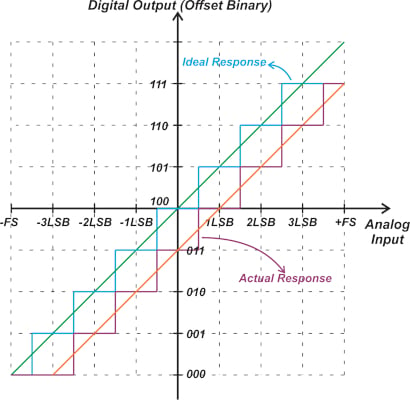
There is also a very different component input configuration compared to manual. Formula on the left. RGB to RGB, full range internal YUV. On the right YUV 4:2:2 16-235 to RGB
And tv5725 can accept and output digital video. Not sure why prebuilts chose to simply redesign the board only.
Spoiler

Last edited by mrchief on Fri Sep 19, 2025 12:09 pm, edited 1 time in total.
-
NoAffinity
- Posts: 1098
- Joined: Mon May 07, 2018 5:27 pm
- Location: Escondido, CA, USA
Re: gbs-c incorrect aspect ratio
Ps1 Street Fighter Ex 2 Plus
Genesis Model 2 Super Street Fighter 2
Genesis Model 2 Outrun
Saturn Night Warrirors
Scart RGBS output for all. Genesis is triple bypass modded with csync out. Saturn and ps1 are stock outputs with sunc on luma. Console -> GBS-C 960p profile -> OSSC pass through to Magewell HDMI capture in OBS.
Genesis Model 2 Super Street Fighter 2
Genesis Model 2 Outrun
Saturn Night Warrirors
Scart RGBS output for all. Genesis is triple bypass modded with csync out. Saturn and ps1 are stock outputs with sunc on luma. Console -> GBS-C 960p profile -> OSSC pass through to Magewell HDMI capture in OBS.
-
mrchief
- Posts: 24
- Joined: Wed Jun 25, 2025 2:42 pm
Re: gbs-c incorrect aspect ratio
Nice. VirtaulDub2 is better, since it can capture in FFV1, it can detect input format so you can dial correct settings.NoAffinity wrote: ↑Tue Sep 02, 2025 1:23 am Ps1 Street Fighter Ex 2 Plus
Genesis Model 2 Super Street Fighter 2
Genesis Model 2 Outrun
Saturn Night Warrirors
Scart RGBS output for all. Genesis is triple bypass modded with csync out. Saturn and ps1 are stock outputs with sunc on luma. Console -> GBS-C 960p profile -> OSSC pass through to Magewell HDMI capture in OBS.
Can you capture outrun with OSSC, so we could compare GBSC "updated" firmware with OSSC.
-
CrossMojonation
- Posts: 1
- Joined: Fri Sep 05, 2025 4:55 pm
Re: gbs-c incorrect aspect ratio
I've got a similar setup, so happy to test the firmware as well. My capture card should arrive next week.
This isn't entirely selfless, as I think I might have aspect ratio issues with my GBS-C as well. 1280x960 and 480p are both narrower than what my OSSC outputs.
This isn't entirely selfless, as I think I might have aspect ratio issues with my GBS-C as well. 1280x960 and 480p are both narrower than what my OSSC outputs.
-
NoAffinity
- Posts: 1098
- Joined: Mon May 07, 2018 5:27 pm
- Location: Escondido, CA, USA
Re: gbs-c incorrect aspect ratio
Here we go. Updated firmware cap still on the left, OSSC on the right.
*OSSC dialed in for pixel sharpness

*OSSC dialed in for pixel sharpness
Spoiler
-
mrchief
- Posts: 24
- Joined: Wed Jun 25, 2025 2:42 pm
Re: gbs-c incorrect aspect ratio
Thanks, strangely both OSSC and now GBS clips cloud detail - blue squares. Edited ADC gain and offset calibration values. Component sync was 0.25V, changed to 0.3V what manual suggests. Y is 1Vpp, -0.3V (sync) 0.7V (color) = 1Vpp, currently input gain value is set to 80H in "applyYuvPatches", 1Vpp should be FFH gain value.NoAffinity wrote: ↑Sat Sep 06, 2025 4:11 am Here we go. Updated firmware cap still on the left, OSSC on the right.
*OSSC dialed in for pixel sharpness
Spoiler
Tested GBS with ADC disabled?
Changes:
Spoiler
GBS::VDS_SYNC_LEV::write(0x80); // 0.25Vpp sync (leave more room for Y)
80H to 132H (0.3Vpp)
void setAdcParametersGainAndOffset()
{
GBS::ADC_ROFCTRL::write(0x40);
GBS::ADC_GOFCTRL::write(0x40);
GBS::ADC_BOFCTRL::write(0x40);
// Do not call setAdcGain() and overwrite adco->r_gain. This function should
// only be called during startup, or during doPostPresetLoadSteps(), and if
// `uopt->enableAutoGain == 1` then doPostPresetLoadSteps() will revert
// these writes with `adco->r_gain`.
GBS::ADC_RGCTRL::write(0x7B); 7BH to 66H
GBS::ADC_GGCTRL::write(0x7B); 7BH to 66H
GBS::ADC_BGCTRL::write(0x7B); 7BH to 66H
}
void calibrateAdcOffset()
GBS::ADC_RGCTRL::write(0x7F); - 7F to 66H, not sure why 7F
GBS::ADC_GGCTRL::write(0x7F); - 7F to 66H
GBS::ADC_BGCTRL::write(0x7F); - 7F to 66H
GBS::ADC_ROFCTRL::write(0x7F);
GBS::ADC_GOFCTRL::write(0x3D); // start
GBS::ADC_BOFCTRL::write(0x7F);
GBS::DEC_TEST_SEL::write(1); // 5_1f = 0x1c
80H to 132H (0.3Vpp)
void setAdcParametersGainAndOffset()
{
GBS::ADC_ROFCTRL::write(0x40);
GBS::ADC_GOFCTRL::write(0x40);
GBS::ADC_BOFCTRL::write(0x40);
// Do not call setAdcGain() and overwrite adco->r_gain. This function should
// only be called during startup, or during doPostPresetLoadSteps(), and if
// `uopt->enableAutoGain == 1` then doPostPresetLoadSteps() will revert
// these writes with `adco->r_gain`.
GBS::ADC_RGCTRL::write(0x7B); 7BH to 66H
GBS::ADC_GGCTRL::write(0x7B); 7BH to 66H
GBS::ADC_BGCTRL::write(0x7B); 7BH to 66H
}
void calibrateAdcOffset()
GBS::ADC_RGCTRL::write(0x7F); - 7F to 66H, not sure why 7F
GBS::ADC_GGCTRL::write(0x7F); - 7F to 66H
GBS::ADC_BGCTRL::write(0x7F); - 7F to 66H
GBS::ADC_ROFCTRL::write(0x7F);
GBS::ADC_GOFCTRL::write(0x3D); // start
GBS::ADC_BOFCTRL::write(0x7F);
GBS::DEC_TEST_SEL::write(1); // 5_1f = 0x1c
-
NoAffinity
- Posts: 1098
- Joined: Mon May 07, 2018 5:27 pm
- Location: Escondido, CA, USA
Re: gbs-c incorrect aspect ratio
FW updated, new screenshot added to the left.
As mentioned, the GBS-C (960p) output runs through OSSC in pass thru mode. OSSC is set to default settings. Not sure if that's having an influence on coloration, etc.

As mentioned, the GBS-C (960p) output runs through OSSC in pass thru mode. OSSC is set to default settings. Not sure if that's having an influence on coloration, etc.
Spoiler
-
mrchief
- Posts: 24
- Joined: Wed Jun 25, 2025 2:42 pm
Re: gbs-c incorrect aspect ratio
Found out that auto offset is used with 24bit YUV input:NoAffinity wrote: ↑Sun Sep 07, 2025 4:09 pm FW updated, new screenshot added to the left.
As mentioned, the GBS-C (960p) output runs through OSSC in pass thru mode. OSSC is set to default settings. Not sure if that's having an influence on coloration, etc.
Spoiler
Spoiler


I put some emulated images (PC blastem and PS2 picodrive). updated GBS-C is fairly similar to emulation:
Spoiler

-
mrchief
- Posts: 24
- Joined: Wed Jun 25, 2025 2:42 pm
Re: gbs-c incorrect aspect ratio
Updated my prebuilt GBS-C. Changes are less dramatic compared to sega genesis, no visible red color shift. New upgrade results in a brighter image overall. But i need to increase gain to 14 new firwmare. stock firmware to 10. Otherwise it crushes black detail, not sure why. Whites are still grayish. maybe integrated vga to hdmi adapter is not so good.
OBS 4:2:0, Top - "stock", Bottom - updated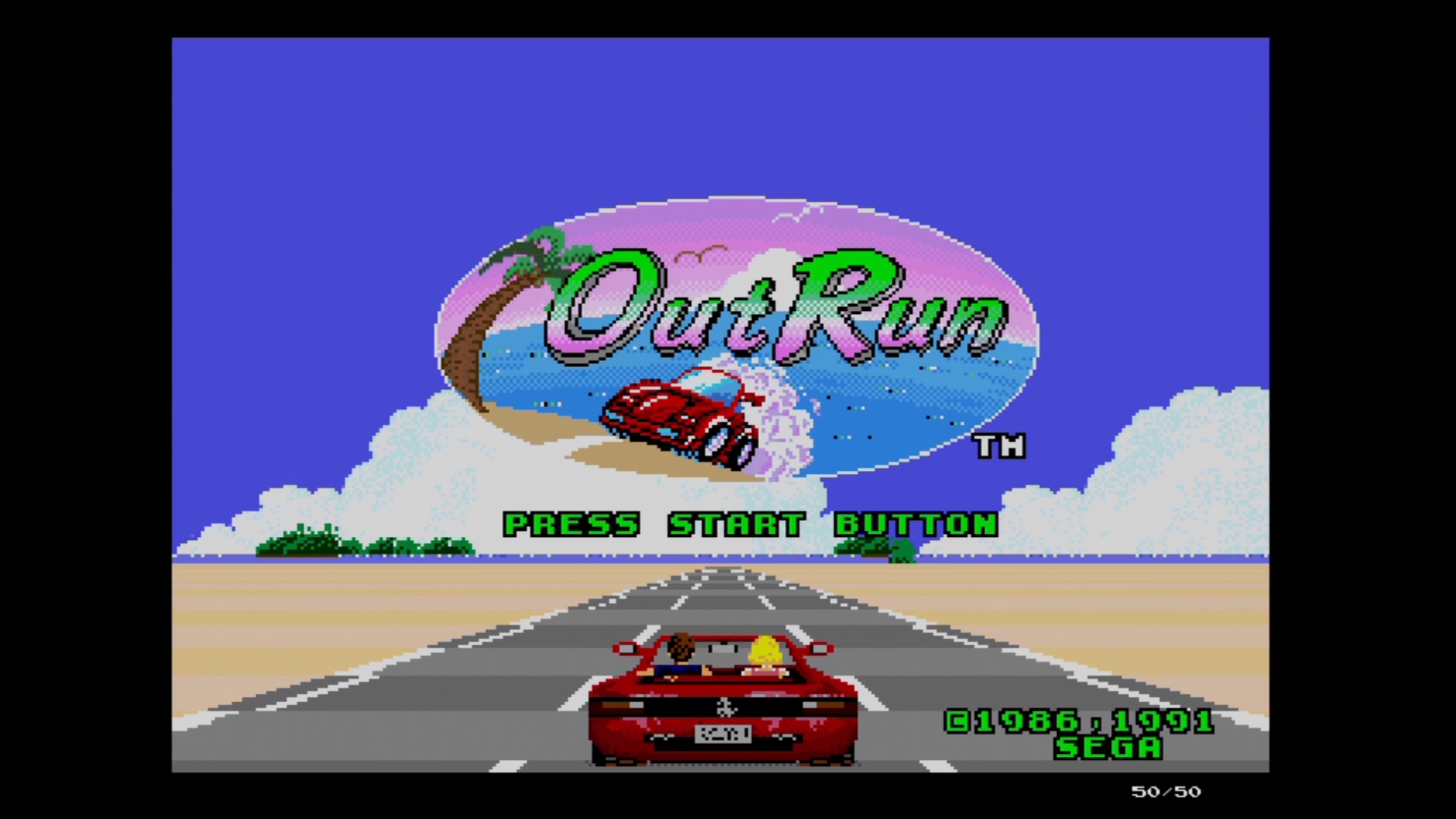
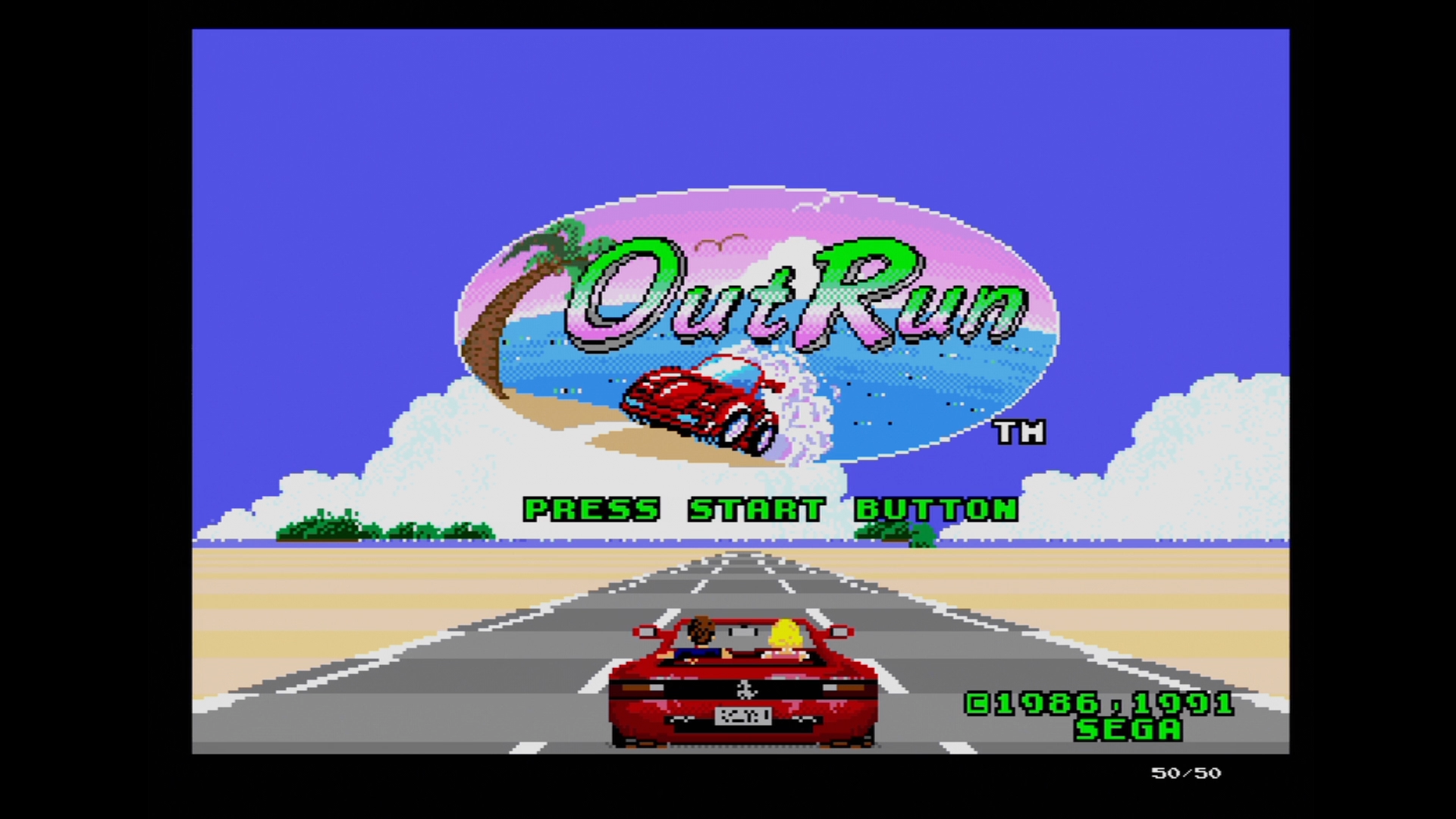
OBS 4:2:0, Top - "stock", Bottom - updated
Spoiler
-
NoAffinity
- Posts: 1098
- Joined: Mon May 07, 2018 5:27 pm
- Location: Escondido, CA, USA
Re: gbs-c incorrect aspect ratio
man, great work. Keep 'em coming and thank you!
-
NoAffinity
- Posts: 1098
- Joined: Mon May 07, 2018 5:27 pm
- Location: Escondido, CA, USA
Re: gbs-c incorrect aspect ratio
Just checking - no new updates since the Sept. 06 upload?
-
mrchief
- Posts: 24
- Joined: Wed Jun 25, 2025 2:42 pm
Re: gbs-c incorrect aspect ratio
Tryin to figure out why i need to increase gain, otherwise black crush.NoAffinity wrote: ↑Sun Sep 21, 2025 5:59 pm Just checking - no new updates since the Sept. 06 upload?
Can you test your GBS-C on 16:9 tv/monitor. By increasing gain till you seen underscan borders of input signal becoming gray next to black borders of TV (unused pixel - perfect black) when running 4:3 content. And then slowly dial down and stopping at the number you no longer see gray tint.
-
NoAffinity
- Posts: 1098
- Joined: Mon May 07, 2018 5:27 pm
- Location: Escondido, CA, USA
Re: gbs-c incorrect aspect ratio
Where do I see the readout on this newer UI? I'm probably being dense, but I'm not seeing it.mrchief wrote: ↑Sun Sep 21, 2025 7:36 pmTryin to figure out why i need to increase gain, otherwise black crush.NoAffinity wrote: ↑Sun Sep 21, 2025 5:59 pm Just checking - no new updates since the Sept. 06 upload?
Can you test your GBS-C on 16:9 tv/monitor. By increasing gain till you seen underscan borders of input signal becoming gray next to black borders of TV (unused pixel - perfect black) when running 4:3 content. And then slowly dial down and stopping at the number you no longer see gray tint.
:edit: I found debug mode. My one vga capable monitor which is 16:9 seems to fill the entire screen even if the aspect ratio is maintained. I have 2 AR options in the screen's menu, "fill" or "maintain aspect ratio", and while "fill" widens the image and "maintain" looks correct, the entire screen brightens or darkens. So, I'm afraid I may not have a good test bed for this particular test.
-
mrchief
- Posts: 24
- Joined: Wed Jun 25, 2025 2:42 pm
Re: gbs-c incorrect aspect ratio
brightness controls, first use debug view (debug menu) and find out what parts of monitor are not used by GBS-C.NoAffinity wrote: ↑Mon Sep 22, 2025 2:46 amWhere do I see the readout on this newer UI? I'm probably being dense, but I'm not seeing it.mrchief wrote: ↑Sun Sep 21, 2025 7:36 pmTryin to figure out why i need to increase gain, otherwise black crush.NoAffinity wrote: ↑Sun Sep 21, 2025 5:59 pm Just checking - no new updates since the Sept. 06 upload?
Can you test your GBS-C on 16:9 tv/monitor. By increasing gain till you seen underscan borders of input signal becoming gray next to black borders of TV (unused pixel - perfect black) when running 4:3 content. And then slowly dial down and stopping at the number you no longer see gray tint.
:edit: I found debug mode. My one vga capable monitor which is 16:9 seems to fill the entire screen even if the aspect ratio is maintained. I have 2 AR options in the screen's menu, "fill" or "maintain aspect ratio", and while "fill" widens the image and "maintain" looks correct, the entire screen brightens or darkens. So, I'm afraid I may not have a good test bed for this particular test.
-
NoAffinity
- Posts: 1098
- Joined: Mon May 07, 2018 5:27 pm
- Location: Escondido, CA, USA
Re: gbs-c incorrect aspect ratio
As noted, I figured out how to activate debug mode, and was able to see the values increasing snd decreasing. The 16:9 screen is have, however, has 2 aspect ratio options, and for both options, regardless of how the image is scaled by the monitor, there are no "edge pixels". The entire screen brightens and darkens. This is most noticeable at the threshold between max brightness and max darkness.
-
mrchief
- Posts: 24
- Joined: Wed Jun 25, 2025 2:42 pm
Re: gbs-c incorrect aspect ratio
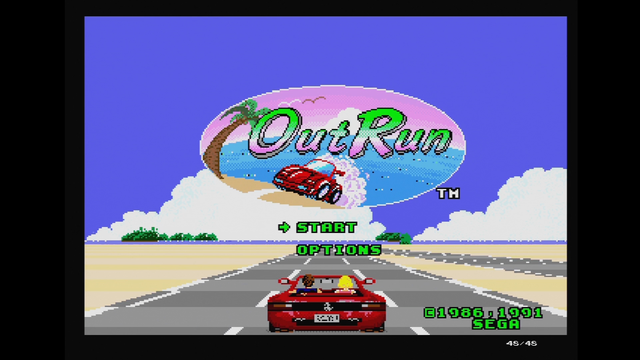
NoAffinity wrote: ↑Mon Sep 22, 2025 3:01 pm As noted, I figured out how to activate debug mode, and was able to see the values increasing snd decreasing. The 16:9 screen is have, however, has 2 aspect ratio options, and for both options, regardless of how the image is scaled by the monitor, there are no "edge pixels". The entire screen brightens and darkens. This is most noticeable at the threshold between max brightness and max darkness.
Spoiler
-
mrchief
- Posts: 24
- Joined: Wed Jun 25, 2025 2:42 pm
Re: gbs-c incorrect aspect ratio
new year hello
trying to figure out output formatter, how to calculate VDS_DIS_VB_SP = vtotal - (active window + back porch)? right now it's just guess work if the image is scaled correctly and GBS-C automatically do its thing. Why V Scale is such a big value - 1023. scaling formula for vertical: 1024x(Vinput/Voutput)
debbuger output:
trying to figure out output formatter, how to calculate VDS_DIS_VB_SP = vtotal - (active window + back porch)? right now it's just guess work if the image is scaled correctly and GBS-C automatically do its thing. Why V Scale is such a big value - 1023. scaling formula for vertical: 1024x(Vinput/Voutput)
Spoiler
preset v/h scale
1023 = 1024?
512 = 513?
1
01010101
10100100
010110100100
1444 - HTOTAL (preset)
01010101
01000110
10001100101
1125 - VTOTAL (preset)
2640x1125
640x512
s3_13 01100101
s3_14 11000100
s3_15 00000001
Vds_dis_vb_st - 10001100101 - 1125
VDS_DIS_VB_SP - 00000011100 - 28
s3_10 11101110
s3_11 00000100
s3_12 00010000
VDS_DIS_HB_ST - 010011101110 - 1262 (2640)
VDS_DIS_HB_SP - 000100000000 - 256
s3_04 10110100
s3_05 10100100
s3_06 00001010
VDS_HB_ST - 010010110100 - 1204
VDS_HB_SP - 000010101010 - 170
0x8, // s3_A 00001000
0x80, // s3_B 10000000
Vds_hs_st - 000000001000 - 8
0x80, // s3_B 10000000
0x3, // s3_C 00000011
Vds_hs_sp - 000000111000 - 56
1125x50=56250Hz
2640x1125=148.50MHz
front porch 528 + 240, sync pulse 44, back porch 148 + 240 = 2640 (240 for 1440 active)
front porch 4, sync pulse 36, back porch 5 = 1125
1023 = 1024?
512 = 513?
1
01010101
10100100
010110100100
1444 - HTOTAL (preset)
01010101
01000110
10001100101
1125 - VTOTAL (preset)
2640x1125
640x512
s3_13 01100101
s3_14 11000100
s3_15 00000001
Vds_dis_vb_st - 10001100101 - 1125
VDS_DIS_VB_SP - 00000011100 - 28
s3_10 11101110
s3_11 00000100
s3_12 00010000
VDS_DIS_HB_ST - 010011101110 - 1262 (2640)
VDS_DIS_HB_SP - 000100000000 - 256
s3_04 10110100
s3_05 10100100
s3_06 00001010
VDS_HB_ST - 010010110100 - 1204
VDS_HB_SP - 000010101010 - 170
0x8, // s3_A 00001000
0x80, // s3_B 10000000
Vds_hs_st - 000000001000 - 8
0x80, // s3_B 10000000
0x3, // s3_C 00000011
Vds_hs_sp - 000000111000 - 56
1125x50=56250Hz
2640x1125=148.50MHz
front porch 528 + 240, sync pulse 44, back porch 148 + 240 = 2640 (240 for 1440 active)
front porch 4, sync pulse 36, back porch 5 = 1125
Spoiler
HT / scale: 1437 1023
HS ST/SP: 56 8
HB ST/SP: (d) 1258 252
HB ST/SP: 1200 166
VT/scale: 1125 512
VS ST/SP: 6 1
VB ST/SP: (d) 1125 28
VB ST/SP: 3 16
IF VB ST/SP: 32 34
CsVT: 310
CsVS_ST/SP: 4 1
HS ST/SP: 56 8
HB ST/SP: (d) 1258 252
HB ST/SP: 1200 166
VT/scale: 1125 512
VS ST/SP: 6 1
VB ST/SP: (d) 1125 28
VB ST/SP: 3 16
IF VB ST/SP: 32 34
CsVT: 310
CsVS_ST/SP: 4 1