So my Sony BVM-D24E1WU cannot output 1080p. This sucks for games that render natively at 1080p like Super Smash Bros. for Wii U (60FPS), Twilight Princess HD (30FPS), Wind Waker HD (30FPS), Rayman Legends (60FPS), etc.. I can either output 720p or 1080i. So which do you guys think is better and why?
I'll start off with my opinion. I think 720p is better since there's no interlace flicker and it has smoother motion than 1080i. 720p is also what 90% of Wii U games natively render at, so switching between 720p and 1080i for a few games could be cumbersome.
1080p Wii U games in 720p or 1080i?
-
philexile
- Posts: 425
- Joined: Fri Feb 26, 2010 8:22 pm
Re: 1080p Wii U games in 720p or 1080i?
1080i looks pretty great on the BVMs. The flicker is very, very, very subtle. I doubt you'll notice.
-
Fudoh

- Posts: 13044
- Joined: Mon Mar 06, 2006 3:29 am
- Location: Germany
- Contact:
Re: 1080p Wii U games in 720p or 1080i?
was interlace flicker ever a problem ? I think combing is the bigger issue and that's visible. It might not bother everyone, but it's hard to unsee it, once you know what you're looking for.
-
Lawfer

- Posts: 2283
- Joined: Fri Dec 01, 2006 3:30 am
Re: 1080p Wii U games in 720p or 1080i?
Then just stick to 720p? You've got a nice screen, so better take advantage of native 16:9 720p support, because outside of CRTs that support 720p you might not know but finding a native 720p LCD is basically impossible since technically almost no LCD screen had a native 1280x720 resolution (inb4 people mentions 1366x768 screens as "720p"). This is a big plus for PS3, Xbox 360 and Wii U since these consoles are pretty much 720p consoles and the PS3 has basically no upscaling capabilities.GeneraLight wrote:I'll start off with my opinion. I think 720p is better since there's no interlace flicker and it has smoother motion than 1080i. 720p is also what 90% of Wii U games natively render at, so switching between 720p and 1080i for a few games could be cumbersome.
Last edited by Lawfer on Fri Feb 02, 2018 8:48 pm, edited 1 time in total.
-
Ikaruga11
- Posts: 1457
- Joined: Thu Apr 07, 2016 1:32 pm
Re: 1080p Wii U games in 720p or 1080i?
I currently play my Wii U on a 23.8" Eizo Foris FS2434 AH-IPS 1080p LED 60hz monitor. http://www.eizo.com/products/foris/fs2434/ It has two HDMI ports and outputs both Full Range RGB (0-255) and Limited Range RGB (16-235). Needless to say, the picture quality is extremely sharp and colorful with excellent viewing angles. No geometry, convergence, focus or linearity issues to worry about. It even has a 4.9ms gtg response time and 0.05ms of input lag. The problem is the motion clarity and choppiness inherent to LCD technology. It's extremely noticeable, even in slower games like Twilight Princess HD. CRTs do not have this issue. But my D24 will only output 720p or 1080i at the most. So I have to choose, or should I just stick with my LED monitor?
I'm also considering getting a Sony GDM-FW900 or Sony BVM-F24U, both of which can do 1080p at 60 frames per second no problem while having perfect motion clarity. Although I've heard the GDM-FW900 has a high failure rate among other issues, and the BVM-F24U only does 4:2:2 at 1080p60.
I'm also considering getting a Sony GDM-FW900 or Sony BVM-F24U, both of which can do 1080p at 60 frames per second no problem while having perfect motion clarity. Although I've heard the GDM-FW900 has a high failure rate among other issues, and the BVM-F24U only does 4:2:2 at 1080p60.
Thanks.philexile wrote:1080i looks pretty great on the BVMs. The flicker is very, very, very subtle. I doubt you'll notice.
I heard interlace flicker was more noticeable on professional and broadcast CRT monitors.Fudoh wrote:was interlace flicker ever a problem ? I think combing is the bigger issue and that's visible. It might not bother everyone, but it's hard to unsee it, once you know what you're looking for.
-
Lawfer
- Posts: 2283
- Joined: Fri Dec 01, 2006 3:30 am
Re: 1080p Wii U games in 720p or 1080i?
Not for me, the only time I noticed flickering was when I have my PAL Wii switch from 480i 60Hz to 576i 50Hz.GeneraLight wrote:I heard interlace flicker was more noticeable on professional and broadcast CRT monitors.
Interesting I didn't even know that thing existed, does it only do 1080p?GeneraLight wrote:Sony BVM-F24U, both of which can do 1080p at 60 frames per second no problem while having perfect motion clarity.
Can CRTs even do 4:4:4 through analog connections?GeneraLight wrote:and the BVM-F24U only does 4:2:2 at 1080p60.
Last edited by Lawfer on Fri Feb 02, 2018 9:11 pm, edited 1 time in total.
-
BazookaBen

- Posts: 2159
- Joined: Thu Apr 17, 2008 8:09 pm
- Location: North Carolina
Re: 1080p Wii U games in 720p or 1080i?
This is an easy answer for me.
30fps? Use 1080i. At 720p, you're leaving out some of the horizontal resolution. At 1080i, you get all the visual information, since the you get odd lines for the first frame on the first scan, even lines for the first frame on the second scan.
60fps? Use 720p. What you lose in horizontal resolution, you gain more in vertical resolution, since at 1080i you're only getting 540 lines every scan (which is a non-issue at 30fps, as demonstrated above).
Try it out for yourself, I think you'll come to the same conclusion.
30fps? Use 1080i. At 720p, you're leaving out some of the horizontal resolution. At 1080i, you get all the visual information, since the you get odd lines for the first frame on the first scan, even lines for the first frame on the second scan.
60fps? Use 720p. What you lose in horizontal resolution, you gain more in vertical resolution, since at 1080i you're only getting 540 lines every scan (which is a non-issue at 30fps, as demonstrated above).
Try it out for yourself, I think you'll come to the same conclusion.
-
Fudoh
- Posts: 13044
- Joined: Mon Mar 06, 2006 3:29 am
- Location: Germany
- Contact:
Re: 1080p Wii U games in 720p or 1080i?
but the F24 has analogue inputs as well, so you wouldn't have to bother with 4:2:2 SDI.and the BVM-F24U only does 4:2:2 at 1080p60.
But tech specs aside, you make it sound as if a F24 was easy to find. I've never seen one available anywhere. Did you ?
-
Lawfer
- Posts: 2283
- Joined: Fri Dec 01, 2006 3:30 am
Re: 1080p Wii U games in 720p or 1080i?
I have never ever seen it on ebay, heck I have never ever seen it for sale anywhere before (didn't even know it existed until now), though from what I can tell it doesn't offer much versatility in terms of hookups, it will only take RGBHV:Fudoh wrote:But tech specs aside, you make it sound as if a F24 was easy to find. I've never seen one available anywhere. Did you ?

-
Ikaruga11
- Posts: 1457
- Joined: Thu Apr 07, 2016 1:32 pm
Re: 1080p Wii U games in 720p or 1080i?
I see. So the refresh rate is what matters when it comes to interlaced flicker.Lawfer wrote:Not for me, the only time I noticed flickering was when I have my PAL Wii switch from 480i 60Hz to 576i 50Hz.GeneraLight wrote:I heard interlace flicker was more noticeable on professional and broadcast CRT monitors.
That's really odd and doesn't make sense. It looks like manufacturers were adhering to the old XGA standard of 1024x768 (4:3) and added the extra 342 pixels for a 16:9 aspect ratio.Lawfer wrote:Then just stick to 720p? You've got a nice screen, so better take advantage of native 16:9 720p support, because outside of CRTs that support 720p you might not know but finding a native 720p LCD is basically impossible since technically almost no LCD screen had a native 1280x720 resolution (inb4 people mentions 1366x768 screens as "720p").GeneraLight wrote:I'll start off with my opinion. I think 720p is better since there's no interlace flicker and it has smoother motion than 1080i. 720p is also what 90% of Wii U games natively render at, so switching between 720p and 1080i for a few games could be cumbersome.
Well TPHD and WWHD both do 30FPS, while Smash 4 and Rayman Legends do 60FPS. I can play Twilight Princess and Wind Waker on the GameCube and Wii, Smash 4 on the 3DS and Rayman Legends on the PS4, PC XBoxOne or Switch. I doubt the Wii U version of Rayman Legends is the best way to play the game, so forget about Rayman. Twilight Princess HD and Wind Waker HD both still use the same exact models as the original releases, I believe. So wouldn't 720p not be as much of a loss in clarity than in other 1080p games, if any loss at all? The Wii U version of Smash 4 is way better than the 3DS version in my opinion, and fluid 60FPS is a must. Plus I don't want to constantly be switching between 720p and 1080i in the System Settings when I'm playing TPHD or WWHD. Which is a lot.BazookaBen wrote:This is an easy answer for me.
30fps? Use 1080i. At 720p, you're leaving out some of the horizontal resolution. At 1080i, you get all the visual information, since the you get odd lines for the first frame on the first scan, even lines for the first frame on the second scan.
60fps? Use 720p. What you lose in horizontal resolution, you gain more in vertical resolution, since at 1080i you're only getting 540 lines every scan (which is a non-issue at 30fps, as demonstrated above).
Try it out for yourself, I think you'll come to the same conclusion.
Oh. I thought the F24 only had digital inputs. That's pretty good news then.Fudoh wrote:but the F24 has analogue inputs as well, so you wouldn't have to bother with 4:2:2 SDI.and the BVM-F24U only does 4:2:2 at 1080p60.
But tech specs aside, you make it sound as if a F24 was easy to find. I've never seen one available anywhere. Did you ?
Unfortunately, I've never seen an F24 anywhere. Are they still being used in post-production/editing, or are they just extremely rare?
-
orange808

- Posts: 3877
- Joined: Sat Aug 20, 2016 5:43 am
Re: 1080p Wii U games in 720p or 1080i?
FWIW, that one accepts SoG, composite sync, component, and RGBHV.Lawfer wrote:I have never ever seen it on ebay, heck I have never ever seen it for sale anywhere before (didn't even know it existed until now), though from what I can tell it doesn't offer much versatility in terms of hookups, it will only take RGBHV:Fudoh wrote:But tech specs aside, you make it sound as if a F24 was easy to find. I've never seen one available anywhere. Did you ?
We apologise for the inconvenience
-
Lawfer
- Posts: 2283
- Joined: Fri Dec 01, 2006 3:30 am
Re: 1080p Wii U games in 720p or 1080i?
These screens can do 1280x720 and 1920x1080 apparently, they take RGBHV (which is quite rare for CRT broadcast monitors as most take RGBS), if it was just an issue with still being used you would still see a few pop up for sale from time to time, which means they are probably just very rare. It's not unheard of, Sony has made many different PVM, PGM, HDM, BVM etc. monitors, some of which are pretty obscure and that I pretty much just only saw once on ebay on never before heard of.GeneraLight wrote:Unfortunately, I've never seen an F24 anywhere. Are they still being used in post-production/editing, or are they just extremely rare?
I wasn't sure, there was no indication from the info online that it accepted component.orange808 wrote:FWIW, that one accepts SoG, composite sync, component, and RGBHV.
-
Fudoh
- Posts: 13044
- Joined: Mon Mar 06, 2006 3:29 am
- Location: Germany
- Contact:
Re: 1080p Wii U games in 720p or 1080i?
I thought so as well, but it seems as the F24U is indeed RGB only. Would make sense, since it doesn't use the same input boards as the other monitors of that age and it honestly just seems to be a FW900 tucked in a BVM case and equipped with a HD-SDI input.FWIW, that one accepts SoG, composite sync, component, and RGBHV.
-
BazookaBen
- Posts: 2159
- Joined: Thu Apr 17, 2008 8:09 pm
- Location: North Carolina
Re: 1080p Wii U games in 720p or 1080i?
You should at least try both options to see if there is a noticeable improvement in detail one way or the other.GeneraLight wrote:Plus I don't want to constantly be switching between 720p and 1080i in the System Settings when I'm playing TPHD or WWHD. Which is a lot.
And by the way, if you use your PC with the BVM, you can always try 1440i and see how it looks. As far as your BVM concerned, it's displaying 720p (1440i and 720p are both 45kHz horizontal scan rate). You'll have to use CRU or your GPU's custom resolution tool to create the resolution though
-
Ikaruga11
- Posts: 1457
- Joined: Thu Apr 07, 2016 1:32 pm
Re: 1080p Wii U games in 720p or 1080i?
It can do 720p60 (doesn't mention 30), 1080p60/50/30, 1080i60/50/30, 1080p24, 1080p24sf, etc. http://broadcaststore.com/store/model_d ... ?id=671081Lawfer wrote:Interesting I didn't even know that thing existed, does it only do 1080p?
But I'm not even going to bother with the F24 as it is impossible to find. Also, that just reminded me that the Sony GDM-FW900 is actually a 16:10 display, not 16:9. Which means 16:9 content will have black bars on the top and bottom of the screen, just like letterboxed 4:3. I can stand pillarboxing, but not letterboxing. So it looks like the GDM-FW900 is out for games as well. I'll still consider it for a PC monitor though.
I believe so.Lawfer wrote:Can CRTs even do 4:4:4 through analog connections?
Alright, I will.BazookaBen wrote:You should at least try both options to see if there is a noticeable improvement in detail one way or the other.GeneraLight wrote:Plus I don't want to constantly be switching between 720p and 1080i in the System Settings when I'm playing TPHD or WWHD. Which is a lot.
I'll consider that. I actually need to buy a new hard drive and operating system since my HDD became corrupted a few weeks ago. Should I get Linux, Ubuntu, Windows 7, 8.1 or 10?And by the way, if you use your PC with the BVM, you can always try 1440i and see how it looks. As far as your BVM concerned, it's displaying 720p (1440i and 720p are both 45kHz horizontal scan rate). You'll have to use CRU or your GPU's custom resolution tool to create the resolution though
-
BazookaBen
- Posts: 2159
- Joined: Thu Apr 17, 2008 8:09 pm
- Location: North Carolina
Re: 1080p Wii U games in 720p or 1080i?
Windows 10, sadly. Only a fraction of games these days make it to Linux (Ubuntu is a version of Linux by the way).
And I think you need to soften your stance on 16:10. The FW900 is one of the best displays ever created.
And I think you need to soften your stance on 16:10. The FW900 is one of the best displays ever created.
-
juji82
- Posts: 349
- Joined: Sat Nov 16, 2013 3:05 am
- Location: Tokyo, Japan
-
Lawfer
- Posts: 2283
- Joined: Fri Dec 01, 2006 3:30 am
Re: 1080p Wii U games in 720p or 1080i?
Does this thing accepts VGA connections?
-
Fudoh
- Posts: 13044
- Joined: Mon Mar 06, 2006 3:29 am
- Location: Germany
- Contact:
Re: 1080p Wii U games in 720p or 1080i?
vs.though from what I can tell it doesn't offer much versatility in terms of hookups, it will only take RGBHV:
??Does this thing accepts VGA connections?
-
Lawfer
- Posts: 2283
- Joined: Fri Dec 01, 2006 3:30 am
Re: 1080p Wii U games in 720p or 1080i?
Well, I am not sure, but there are some "VGA-like" connectors on the sides, see:Fudoh wrote:vs.though from what I can tell it doesn't offer much versatility in terms of hookups, it will only take RGBHV:??Does this thing accepts VGA connections?

Though I am guessing these are likely "REMOTE" or "PARELLEL" connections? Though I notice that there are 5 of them, 3 males and 2 females, so I was just wondering?
And technically VGA is RGBHV, so say even if these VGA-like connections turn out to not be VGA inputs, you still could easily get an Xbox 360 VGA output with a breakout cable such as this:
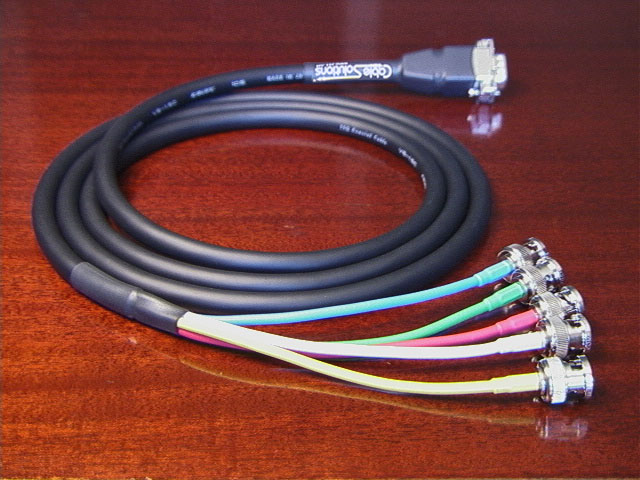
-
Fudoh
- Posts: 13044
- Joined: Mon Mar 06, 2006 3:29 am
- Location: Germany
- Contact:
Re: 1080p Wii U games in 720p or 1080i?
The ports on the left are no video inputs. To connect a "VGA" source you'd use a breakout cable like the one you linked to.
But note that the F24U does NOT list 720p a compatible analogue input. It's intended for 1080i/p signals on SXGA only. It has an integrated scan converter, which is enforced on same signals and which might limit the usable signals to those listed only.
But note that the F24U does NOT list 720p a compatible analogue input. It's intended for 1080i/p signals on SXGA only. It has an integrated scan converter, which is enforced on same signals and which might limit the usable signals to those listed only.
-
Lawfer
- Posts: 2283
- Joined: Fri Dec 01, 2006 3:30 am
Re: 1080p Wii U games in 720p or 1080i?
What about the one on the bottom side?Fudoh wrote:The ports on the left are no video inputs.
So are you saying this monitor as far as consoles go is only good for 1080i/p?Fudoh wrote:But note that the F24U does NOT list 720p a compatible analogue input. It's intended for 1080i/p signals on SXGA only. It has an integrated scan converter, which is enforced on same signals and which might limit the usable signals to those listed only.
-
Fudoh
- Posts: 13044
- Joined: Mon Mar 06, 2006 3:29 am
- Location: Germany
- Contact:
Re: 1080p Wii U games in 720p or 1080i?
connector for the control box.What about the one on the bottom side?
I don't have one nor do I know anybody who's got one. Check the manual yourself. All other BVMs list analogue 720p as being compatible - this one doesn't.So are you saying this monitor as far as consoles go is only good for 1080i/p?
-
Xer Xian

- Posts: 895
- Joined: Sun Feb 06, 2005 3:23 pm
- Location: Italy
Re: 1080p Wii U games in 720p or 1080i?
BazookaBen gave a really smart answer here. Case is closed, please abandon thread.BazookaBen wrote:This is an easy answer for me.
30fps? Use 1080i. At 720p, you're leaving out some of the horizontal resolution. At 1080i, you get all the visual information, since the you get odd lines for the first frame on the first scan, even lines for the first frame on the second scan.
60fps? Use 720p. What you lose in horizontal resolution, you gain more in vertical resolution, since at 1080i you're only getting 540 lines every scan (which is a non-issue at 30fps, as demonstrated above).
Try it out for yourself, I think you'll come to the same conclusion.
-
Lawfer
- Posts: 2283
- Joined: Fri Dec 01, 2006 3:30 am
Re: 1080p Wii U games in 720p or 1080i?
Got it.Fudoh wrote:connector for the control box.
Sorry I didn't know there was a manual available online, I found it and it doesn't seem like Analog RGB ports are listed as compatible with neither 720p nor 1080i, only 1080p seem to be available, which all of a sudden makes this monitor seem not all that interesting anymore.Fudoh wrote:I don't have one nor do I know anybody who's got one. Check the manual yourself. All other BVMs list analogue 720p as being compatible - this one doesn't.
But the way you worded it here:
"It has an integrated scan converter"
It makes it sound like even with SDI, this monitor does not handle 720p natively?
-
Fudoh
- Posts: 13044
- Joined: Mon Mar 06, 2006 3:29 am
- Location: Germany
- Contact:
Re: 1080p Wii U games in 720p or 1080i?
hmm, I'm not this happy about his answer...BazookaBen gave a really smart answer here. Case is closed, please abandon thread.
Let's talk about 30/60fps games for a moment and to make it simpler let's assume they're 480i/480p, so the scanlines are more visible than with 1080i signals. Timing between fields on an interlaced signal is identical to the timing between to frames on a progressive signal.
On a 60fps game displayed interlaced we get:
A(odd) / B(even) / C(odd) / D(even) and so on which gives us the combing effects you want to avoid.
On a 30fps game displayed interlaced we get:
A(odd) / A(even) / B(odd) / B(even) and so on, which still gives us the combing effects on every other field transition (since the timings between the matching A fields and the A/B transition fields is identical).
On a 60fps game displayed progressive we get:
A(complete) / B(complete) / C(complete) - hence no combing.
On a 30fps game dispalyed progressive we get:
A(complete) / A(complete) / B(complete) / B(complete) - again hence no combing.
This is why I don't see why the question wether a game is running in 30 or 60fps changes a bit about wether you should run it in interlaced or progressive. 30fps doesn't save you from combing.
Or am I approaching this wrong ??
-
Fudoh
- Posts: 13044
- Joined: Mon Mar 06, 2006 3:29 am
- Location: Germany
- Contact:
Re: 1080p Wii U games in 720p or 1080i?
are there any interesting native 1080i sources? 1080p is fine. WiiU can output that and you can use a 4:4:4 upscaler for lower res signals. I'd still pick one up if I could fine one (which isn't located overseas).Sorry I didn't know there was a manual available online, I found it and it doesn't seem like Analog RGB ports are listed as compatible with neither 720p nor 1080i, only 1080p seem to be available, which all of a sudden makes this monitor seem not all that interesting anymore.
-
Xer Xian
- Posts: 895
- Joined: Sun Feb 06, 2005 3:23 pm
- Location: Italy
Re: 1080p Wii U games in 720p or 1080i?
No, you're actually right. I didn't think it through.Fudoh wrote: On a 30fps game displayed interlaced we get:
A(odd) / A(even) / B(odd) / B(even) and so on, which still gives us the combing effects on every other field transition (since the timings between the matching A fields and the A/B transition fields is identical).
Or am I approaching this wrong ??
Thanks for correcting me!
Edit: by the way, regarding 30fps games. Repeated frames will cause a double-image effect on CRTs/strobed displays, but not on sample-and-hold. Just a fun fact.
-
Lawfer
- Posts: 2283
- Joined: Fri Dec 01, 2006 3:30 am
Re: 1080p Wii U games in 720p or 1080i?
Interesting native sources? No, not much really, some PS3 games will output in 1080i but at the cost of performance, so better stick with 720p, you can choose to have your Xbox 360 and Wii U games output games in 1080i and some original Xbox games can do 1080i too.Fudoh wrote:are there any interesting native 1080i sources? 1080p is fine. WiiU can output that and you can use a 4:4:4 upscaler for lower res signals. I'd still pick one up if I could fine one (which isn't located overseas).Sorry I didn't know there was a manual available online, I found it and it doesn't seem like Analog RGB ports are listed as compatible with neither 720p nor 1080i, only 1080p seem to be available, which all of a sudden makes this monitor seem not all that interesting anymore.
There is also the PS TV if you can convert HDMI to Analog RGB and hack your PS TV to remove HDCP to get 1080i with it.
I'd get one if the price was alright, but it would have been more interesting if you got a bigger CRT that could output natively 720p and 1080p (unlike modern display technology that is bound to a specific native resolution, like 1080p or 4K) for both current gen (1080p mainly) and last gen consoles (720p). Based on the pamphlet available online (I didn't find any operation manual) it's basically just 1080p through Analog RGB and 720p, 1080i and 1080p through HD-SDI.
-
Fudoh
- Posts: 13044
- Joined: Mon Mar 06, 2006 3:29 am
- Location: Germany
- Contact:
Re: 1080p Wii U games in 720p or 1080i?
Manual: http://www.broadcaststore.com/pdf/model ... manual.pdf
you CAN, yes, but these aren't internally rendered in 1080i to start with, are they?Interesting? No, not much really, you can run Xbox 360 and Wii U to output games in 1080i, some PS3 games will support it too (but at the cost of performance, so better stick with 720p), some original Xbox games can do 1080i too.