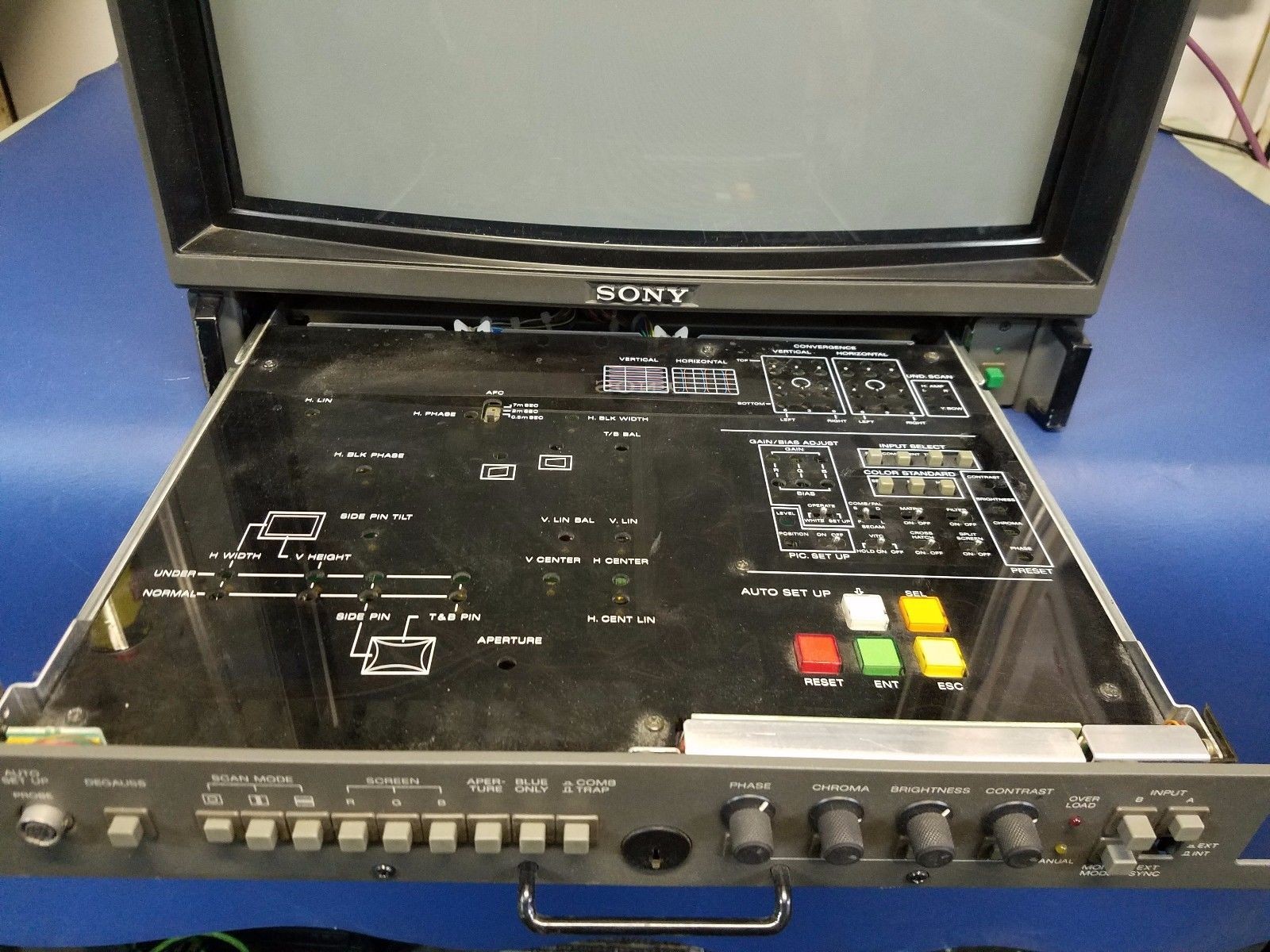
I was able to get a BVM-1910 for free and ordered a SCART to BNC cable. I have up to this point used a Framemeister to a modern TV. My issue is the image on the unit is green with diagonal green lines. Here is a description of settings and result:
External sync OFF = No recognizable image on any setting.
External sync ON on Component = Green Image; can barely make out what is displayed.
External sync ON on RGB = No recognizable image... EXCEPT right when I switch to the input I get 1 frame of "clear" picture (couldn't catch it on camera that well... was too fast).
Any help is appreciated.
Last edited by 41714049 on Wed Dec 20, 2017 4:41 pm, edited 1 time in total.
It looks like you're running Mike Tyson's Punchout on the original Nintendo (NES)? Which can only output via Composite natively. Are you using Composite (usually a yellow RCA cable), OR is your NES modded to output RGB? (or are you using a clone system with some other output options?)
If your NES isn't modded, and you happen to be using some sort of Composite to SCART cable that's probably your problem right there. Which input, or input card are you using for this on the BVM? Can that input card take Composite? I would try running the NES straight to the BVM with a yellow composite cable (or any RCA video cable, or even Component cable you have laying around) and see if it'll display. Sync would be set to internal, and you might have to go into the BVM's menu to setup which input it's using (most people aren't familiar with these 1910/1911 models as they're quite old so I'm not familiar with it's menu operation).
Dochartaigh wrote:It looks like you're running Mike Tyson's Punchout on the original Nintendo (NES)? Which can only output via Composite natively. Are you using Composite (usually a yellow RCA cable), OR is your NES modded to output RGB? (or are you using a clone system with some other output options?)
If your NES isn't modded, and you happen to be using some sort of Composite to SCART cable that's probably your problem right there. Which input, or input card are you using for this on the BVM? Can that input card take Composite? I would try running the NES straight to the BVM with a yellow composite cable (or any RCA video cable, or even Component cable you have laying around) and see if it'll display. Sync would be set to internal, and you might have to go into the BVM's menu to setup which input it's using (most people aren't familiar with these 1910/1911 models as they're quite old so I'm not familiar with it's menu operation).
Thanks for the reply. This is a modded Famicom with Tim Worthington board. Has been used on Framemeister for RGB so I know the RGB works as expected. This BVM version does not have a menu that I can find... everything appears to be a separate button on the pull out tray.
41714049 wrote:
Thanks for the reply. This is a modded Famicom with Tim Worthington board. Has been used on Framemeister for RGB so I know the RGB works as expected. This BVM version does not have a menu that I can find... everything appears to be a separate button on the pull out tray.
Don't know what to tell you then - the monitor might have a hardware problem, but give the 1911 manual a read:
41714049 wrote:
Thanks for the reply. This is a modded Famicom with Tim Worthington board. Has been used on Framemeister for RGB so I know the RGB works as expected. This BVM version does not have a menu that I can find... everything appears to be a separate button on the pull out tray.
Don't know what to tell you then - the monitor might have a hardware problem, but give the 1911 manual a read:
Sorry I'm striking out everywhere. There's a guy on YouTube who made a video about the BVM-1910 - might want to message him. This below link should be the manual I found, OCR'd, and uploaded. It's for the BVM-2010P, 2010PD, 2010PM, 2010PMD models - which are most likely the EU designation/model numbers of the USA BVM-1910 model. Maybe it'll help. If you haven't tested the monitor before it could simply be malfunctioning.
Oh, and the on-screen display/menu for auto-setup (if I'm reading it correctly) only works with an optional card on the 1910 - whereas the 1911 I believe it has a built in on-screen menu which'll give you more options and things like how many hours the monitor has on it.
Dochartaigh wrote:Sorry I'm striking out everywhere. There's a guy on YouTube who made a video about the BVM-1910 - might want to message him. This below link should be the manual I found, OCR'd, and uploaded. It's for the BVM-2010P, 2010PD, 2010PM, 2010PMD models - which are most likely the EU designation/model numbers of the USA BVM-1910 model. Maybe it'll help. If you haven't tested the monitor before it could simply be malfunctioning.
Oh, and the on-screen display/menu for auto-setup (if I'm reading it correctly) only works with an optional card on the 1910 - whereas the 1911 I believe it has a built in on-screen menu which'll give you more options and things like how many hours the monitor has on it.
Thanks... this came out of a working broadcast studio... but for free... didn't test before picking up.
I will review the manual and see where I get with it.
Syntax wrote:Dont BVM require csync or ttl csync? I know they are picky.
If you get a clear image for a split second is say that's your problem.
Ill be trying with other consoles today with TTL CSync. Thanks.
and just to get the most obvious issue out of the way: are you sure your breakout cable is wired for the right direction ? If it's wired for the other direction (BNC to Scart), then the Sync signal won't reach your monitor.
Fudoh wrote:and just to get the most obvious issue out of the way: are you sure your breakout cable is wired for the right direction ? If it's wired for the other direction (BNC to Scart), then the Sync signal won't reach your monitor.
That is the first thing I checked... And I think it is right. I will post pin numbers soon.
Found the Geen issue! There was a broken connector on the front side of the board for the gun. Was hard to see as the unit had to be partially taken apart to see this.
Last issue, think there is no fix to this, but I will try... there is a light vertical band across the screen. Can see it all the time, but when a game cuts to all black screen it is super visible.
Confirmed that all 3 colors project that band, each slightly offset from the other - hence the rainbow effect on the edges of the band. Here is another example running Mike Tyson's Punchout.
mikejmoffitt wrote:The BVM-1910 shows a line like that during power-on, but it should go away relatively quickly. Make sure it isn't in setup mode or anything like that!
Setup mode shows something similar just squished down vertically. It is in Operate mode.

 .
.