Extron 164xi to consumer CRT - Help needed!

The place for all discussion on gaming hardware
Post Reply
User avatar
Shining
Posts: 197
Joined: Mon Jan 16, 2012 6:14 pm
Location: Sweden

Extron 164xi to consumer CRT - Help needed!

Post by Shining »

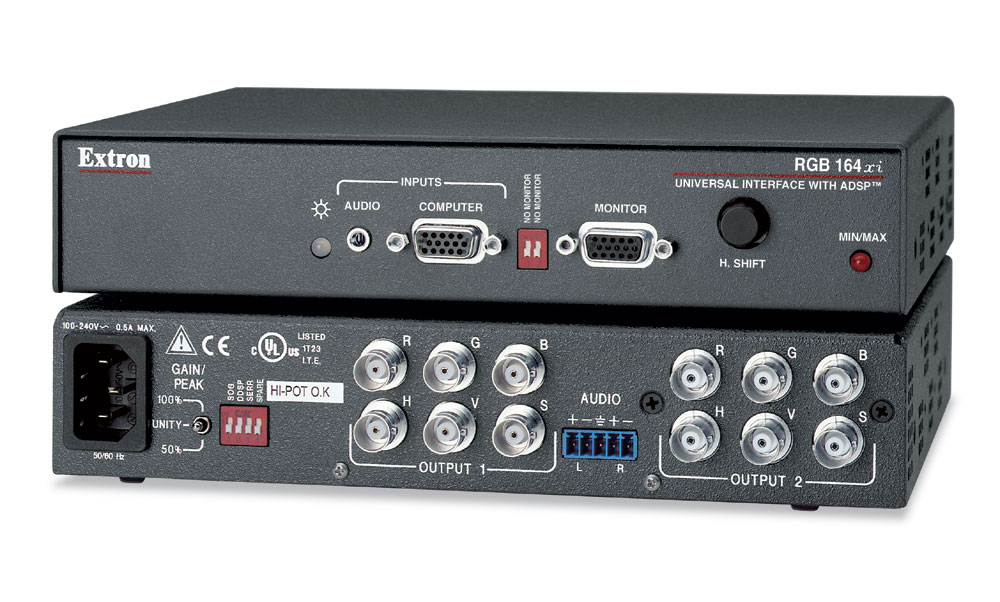
I've added an Extron 164xi to my setup because of the horizontal shift function. The options i have in the service menu of the TV are just not enough. My setup goes like this:

Consoles > RGB Scart > Hydra Scart Switch > Sync Strike > VGA cable > Extron > BNC to Scart cable (75Ω friendly)

The BNC to Scart cable is the one from Retro Gaming Cables - https://www.retrogamingcables.co.uk/mal ... rter-cable
The Sync Strike is powered by the PSU that came with it.

Now to the problem. When i fire up the console i get a green signal on the Extron as if it detects the signal from the console, but all i get is a black screen. I can tell something is happening though, as the 'RGB AV text' on the TV goes away and there is like flickering white lines at the bottom of the screen. I tried the different DIP switch settings to no avail. Next i tried the same chain, but hooked up to the XRGB-Mini/LCD instead, and when turning on the DDSP switch i did get a somewhat stable picture on the Mini. So all cables seems to be working fine.

I tried many different consoles, removed the scart switch from the chain, even tried a different TV and the result was the same - a black picture when hooked up to a TV. What can be the problem here? The TV not switching over to RGB mode even tho i selected RGB mode on the remote control?
Image
User avatar
Kez
Posts: 840
Joined: Thu Jul 20, 2017 7:09 am

Re: Extron 164xi to consumer CRT - Help needed!

Post by Kez »

Obvious question but worth checking - the BNC cable you linked implies that they at some point added a direction switch. Does your cable have this switch? If so, have you ensured that it is set for BNC->SCART and not the other way around?
User avatar
Shining
Posts: 197
Joined: Mon Jan 16, 2012 6:14 pm
Location: Sweden

Re: Extron 164xi to consumer CRT - Help needed!

Post by Shining »

Yeah, i forgot to mention that. The flip is set to BNC > Scart.
User avatar
Xer Xian
Posts: 895
Joined: Sun Feb 06, 2005 3:23 pm
Location: Italy

Re: Extron 164xi to consumer CRT - Help needed!

Post by Xer Xian »

I gave a quick read to the manual - I think all DIP switches should be set to off (down position) except for SERR. That is, unless you have the infamous bending on the top left corner (what model is your TV?).

There are also internal jumpers that may be messing with the sync signal - you should check if they are set as default or not: https://www.extron.com/download/files/u ... i_RevD.pdf
retro_gaming_cables
Posts: 23
Joined: Tue Jun 25, 2013 12:19 pm
Location: UK
Contact:

Re: Extron 164xi to consumer CRT - Help needed!

Post by retro_gaming_cables »

If you are plugging the Male SCART directly into a SCART enabled TV, this will not work. As the TV expects an RGB select pulse on SCART pin 16, which this BNC to SCART cable cannot provide.
User avatar
Shining
Posts: 197
Joined: Mon Jan 16, 2012 6:14 pm
Location: Sweden

Re: Extron 164xi to consumer CRT - Help needed!

Post by Shining »

Ok.. so what alternatives do i have now?
User avatar
Fudoh
Posts: 13044
Joined: Mon Mar 06, 2006 3:29 am
Location: Germany
Contact:

Re: Extron 164xi to consumer CRT - Help needed!

Post by Fudoh »

First you need to find out if you really need that switching voltage. My mid 90s Sony didn't need it and it did indeed display RGB when the RGB input was manually selected.

Just connect your scart switch to your TV using any cheap Scart cable and remove both pins 8 and 16 from the TV side of the cable. You might be able to remove these temporarily. If not the Sync Strike (or Extron) won't need these, so don't worry.

If your TV requires the switching voltage after all you can add a battery (or power supply) to your output from cable from the Extron.
retro_gaming_cables
Posts: 23
Joined: Tue Jun 25, 2013 12:19 pm
Location: UK
Contact:

Re: Extron 164xi to consumer CRT - Help needed!

Post by retro_gaming_cables »

without the voltage your TV will be expecting composite video

Pin 16
Blanking signal up
RGB-selection voltage up
0–0.4 V → composite
1–3 V → RGB

(Extract from wikipedia) https://en.wikipedia.org/wiki/SCART

You can go down the external battery route, or you could fit a chopped USB cable to the Male SCART via a 180 ohm resistor to pin 16, which will drop the voltage to the 1 - 3 Volts required for RGB select. Using a USB cable means you can plug into a phone charger, or another AV device nearby which has USB port.
User avatar
Shining
Posts: 197
Joined: Mon Jan 16, 2012 6:14 pm
Location: Sweden

Re: Extron 164xi to consumer CRT - Help needed!

Post by Shining »

Thanks guys, i tested the battery route (3v coin) and it worked flawlessly! But i guess that battery wont last long.. I spliced a micro USB cable and found two wires inside. A red and black one. The red should go to pin 16 and the black to GND? And the resistor to pin 16 only?
retro_gaming_cables
Posts: 23
Joined: Tue Jun 25, 2013 12:19 pm
Location: UK
Contact:

Re: Extron 164xi to consumer CRT - Help needed!

Post by retro_gaming_cables »

yes thats right. Black is ground, Red is 5 volts which needs to go to pin 16 via 180ohm resistor
SamIAm
Posts: 475
Joined: Thu Mar 03, 2005 1:09 am

Re: Extron 164xi to consumer CRT - Help needed!

Post by SamIAm »

I don't know about the 164xi, but my 160xi is powered internally by +5V and -5V. In my case, I tapped the +5V to power an LM1881 sync stripper. In your case, I'm sure you could use it for these blanking/RGB select pins.
User avatar
Shining
Posts: 197
Joined: Mon Jan 16, 2012 6:14 pm
Location: Sweden

Re: Extron 164xi to consumer CRT - Help needed!

Post by Shining »

Yeah, i guess i could do that. This PSU set to output 3v should also work, right? https://www.kjell.com/se/.mvc/Document/ ... 2a00b2277e

Edit: Yep, that PSU worked as well! I've learned so much from this. Up to this point, i've only soldered a couple of battery sockets on SNES carts.
Post Reply