That has display port, DVI and VGA inputs only.
Thanks for your consideration.
Richie.
Best solution to get a PS4 working on a PC monitor
-
neorichieb1971
- Posts: 8017
- Joined: Wed Jan 26, 2005 1:28 am
- Location: Bedford, UK
- Contact:
Best solution to get a PS4 working on a PC monitor
This industry has become 2 dimensional as it transcended into a 3D world.
-
ZellSF
- Posts: 2726
- Joined: Mon Apr 09, 2012 11:12 pm
Re: Best solution to get a PS4 working on a PC monitor
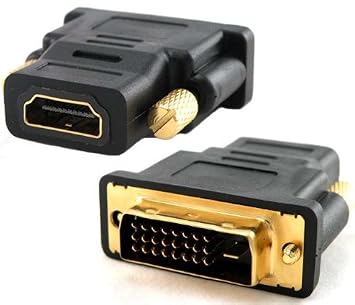
A passive 1-2$ HDMI to DVI adapter? Just search on eBay for HDMI to DVI.
-
Gnomenthusiast
- Posts: 66
- Joined: Tue Nov 15, 2016 6:22 am
Re: Best solution to get a PS4 working on a PC monitor
Just use a HDMI -> DVI adaptor.
As it's just a monitor, you'll have to take the audio somewhere else anyway, so use the optical out on the PS4 or wireless headphones (Wireless Gold Headset perfect for this).
As it's just a monitor, you'll have to take the audio somewhere else anyway, so use the optical out on the PS4 or wireless headphones (Wireless Gold Headset perfect for this).
-
jandrogo

- Posts: 274
- Joined: Thu Feb 07, 2008 11:51 pm
- Location: Spain
Re: Best solution to get a PS4 working on a PC monitor
I use one of those hdmi-dvi passive converters and never had a problem fedding image to a NecEA23wmi
Last edited by jandrogo on Mon Aug 07, 2017 6:30 pm, edited 1 time in total.
Working in the japanese language achievement
-
speedlolita
- Posts: 603
- Joined: Sat Aug 15, 2009 9:13 pm
- Location: Europe
Re: Best solution to get a PS4 working on a PC monitor
As above, sound will be the bigger issue given the PS4 has no AV multi. You're limited to optical, or wireless solutions.
-
jandrogo
- Posts: 274
- Joined: Thu Feb 07, 2008 11:51 pm
- Location: Spain
Re: Best solution to get a PS4 working on a PC monitor
I think you can also output sound through USB output to a dac or any device that can decode it.speedlolita wrote:As above, sound will be the bigger issue given the PS4 has no AV multi. You're limited to optical, or wireless solutions.
I have an astro mixamp pro who receives the sound through toslink, and I don't delay between sound or image. FYI
Working in the japanese language achievement
-
ZellSF
- Posts: 2726
- Joined: Mon Apr 09, 2012 11:12 pm
Re: Best solution to get a PS4 working on a PC monitor
I actually forgot about audio. There's an option there that's not mentioned. A HDMI to DisplayPort adapter, though I really wouldn't run audio through a PC monitor...
-
Dochartaigh
- Posts: 1575
- Joined: Thu Mar 02, 2017 6:53 pm
Re: Best solution to get a PS4 working on a PC monitor
PS4 runs sound through the same HDMI, so any monitor with speakers which takes HDMI should give you picture + sound, right?
I bought this one on the cheap a couple years ago (maybe a year ago):
https://www.amazon.com/gp/product/B00QS ... PDKIKX0DER
To my surprise it has built in speakers - not great, but actually get decently loud and not noticeably distorted at normal volumes at least. I haven't played any games with dialog so I don't know how they'll do with that - I use it as a test monitor for Raspberry Pi retro gaming builds. Has DVI 9easy to get a DVI to VGA converter if you really need VGA), HDMI, DisplayPort inputs. I honestly have no clue how it ranks amongst other cheaper monitors, but it's IPS at least and does above 1080p if you wanted it to.
I bought this one on the cheap a couple years ago (maybe a year ago):
https://www.amazon.com/gp/product/B00QS ... PDKIKX0DER
To my surprise it has built in speakers - not great, but actually get decently loud and not noticeably distorted at normal volumes at least. I haven't played any games with dialog so I don't know how they'll do with that - I use it as a test monitor for Raspberry Pi retro gaming builds. Has DVI 9easy to get a DVI to VGA converter if you really need VGA), HDMI, DisplayPort inputs. I honestly have no clue how it ranks amongst other cheaper monitors, but it's IPS at least and does above 1080p if you wanted it to.
-
HydrogLox
- Posts: 1164
- Joined: Tue May 22, 2012 3:35 pm
- Location: Ontario, Canada
Re: Best solution to get a PS4 working on a PC monitor
Notes on audio:
Select [All Audio] instead of [Chat Audio]
Audio Devices | PlayStation®4 User's Guide
- PS4 and PS4 Pro have a TOSLINK (digital optical) output. The PS4 Slim does not. (On my PS4 Pro I have used a C&E Digital Optical Coax to Analog R/L audio converter to connect it to a cheap pair of Logitech Speakers which also feature a 3.5 mm stereo headset jack.)
- Splitting the audio off HDMI doesn't always work. I have an HDMI audio splitter which works perfectly fine with a TV (which has speakers) but remains silent when used with a speaker-less computer monitor. So it is entirely possible that the PS4 engages in some kind of handshake that enables/disables audio over HDMI.
- "Ghetto audio" is possible over the DUALSHOCK™4 stereo headset jack‡.
Select [All Audio] instead of [Chat Audio]
Audio Devices | PlayStation®4 User's Guide
Last edited by HydrogLox on Mon Aug 07, 2017 8:38 pm, edited 1 time in total.
-
Guspaz

- Posts: 3242
- Joined: Tue Oct 06, 2015 7:37 pm
- Location: Montréal, Canada
Re: Best solution to get a PS4 working on a PC monitor
More likely the monitor only accepts 2.0 PCM, and you haven't set the PS4 to only output that. I know that with my monitor (which can also decode audio off HDMI and send it to a 3.5mm port), anything other than 2.0 PCM results in silence.
If you have TOSLINK output from the PS4, you can use a DAC like this:
https://www.monoprice.com/product?p_id=6884
No idea what the audio quality from that DAC is like, though it seems well reviewed.
Bluetooth audio will add lag. I don't know what codecs the PS4 supports, worst case you're using SBR to your headphones and that can be 250ms+ in the worst case.
The PS4 reportedly supports USB DACs (sound cards), which can be purchased for a song and a dance (although good quality ones do cost a bit), it's worth trying one of those.
If you have TOSLINK output from the PS4, you can use a DAC like this:
https://www.monoprice.com/product?p_id=6884
No idea what the audio quality from that DAC is like, though it seems well reviewed.
Bluetooth audio will add lag. I don't know what codecs the PS4 supports, worst case you're using SBR to your headphones and that can be 250ms+ in the worst case.
The PS4 reportedly supports USB DACs (sound cards), which can be purchased for a song and a dance (although good quality ones do cost a bit), it's worth trying one of those.
-
HydrogLox
- Posts: 1164
- Joined: Tue May 22, 2012 3:35 pm
- Location: Ontario, Canada
Re: Best solution to get a PS4 working on a PC monitor
It doesn't accept anything given that it completely lacks any audio support and I was using an HDMI/DVI adaptor.Guspaz wrote:More likely the monitor only accepts 2.0 PCM, and you haven't set the PS4 to only output that.
-
Gnomenthusiast
- Posts: 66
- Joined: Tue Nov 15, 2016 6:22 am
Re: Best solution to get a PS4 working on a PC monitor
This is probably the best audio solution in the OP's case (HDMI->DVI, no speakers or HDMI on monitor).
https://www.amazon.co.uk/Sony-PlayStati ... B00I8S4E1C
Wireless (Dongle included), no lag, decent sound quality and works with PC too. Controls for volume/chat etc on the cups.
These used to be branded as wireless gold headset I think. Recommended.
https://www.amazon.co.uk/Sony-PlayStati ... B00I8S4E1C
Wireless (Dongle included), no lag, decent sound quality and works with PC too. Controls for volume/chat etc on the cups.
These used to be branded as wireless gold headset I think. Recommended.