PVM 20L5 Audio Questions

The place for all discussion on gaming hardware
Post Reply
User avatar
tjstogy
Posts: 341
Joined: Tue Sep 01, 2015 1:27 am
Location: New York

PVM 20L5 Audio Questions

Post by tjstogy »

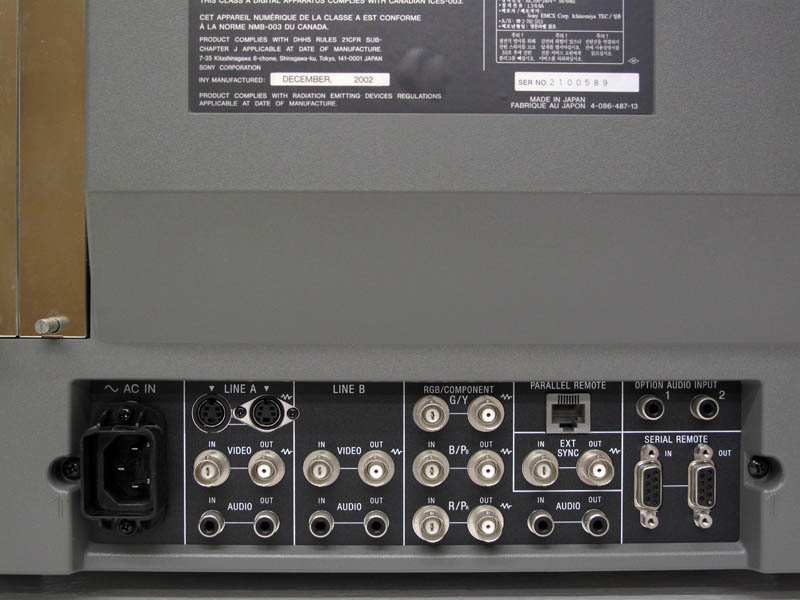
So-- the PVM 20L5 has a single mono audio input, and a single mono audio output for use w/ RGB. (I'd imagine with a mono to stereo adapter, it actually outputs stereo, correct?) Currently, I'm using a breakout cable and bypassing the monitor for audio use, by instead plugging the stereo portion of the breakout directly into powered speakers.

- Is this the preferable way of doing it?
- Would there be any reason to go through the monitors audio amplifier, other than if I only had passive speakers?
- Ideally I'd like to be able to have a Gamecube hooked up, but this will be by component, which naturally has it's own stereo cables (the rest of my setup is RGB, so its currently a non issue). This is what got me thinking that I may need to use my monitors audio passthrough... again-- I don't know if it IS passthrough? I think it must be amplified?

Just trying to keep it simple, ya know? I don't want to be unplugging stuff just to get it all working once in a while.

Image
User avatar
FinalBaton
Posts: 4475
Joined: Sun Mar 08, 2015 10:38 pm
Location: Québec City

Re: PVM 20L5 Audio Questions

Post by FinalBaton »

I always advise people in this scenario to get a cheap used integrated amp or receiver(which have many inputs and outputs for audio), but whenever I do that on here, I get ripped apart >w<
-FM Synth & Black Metal-
User avatar
Unseen
Posts: 738
Joined: Sun May 25, 2014 8:12 pm
Contact:

Re: PVM 20L5 Audio Questions

Post by Unseen »

tjstogy wrote:So-- the PVM 20L5 has a single mono audio input, and a single mono audio output for use w/ RGB. (I'd imagine with a mono to stereo adapter, it actually outputs stereo, correct?)
Feeding the same mono signal into both channels of a stereo input does not magically create a stereo image - that information has been lost when the signal was originally converted to mono.
- Is this the preferable way of doing it?
Yes!
- Would there be any reason to go through the monitors audio amplifier, other than if I only had passive speakers?
The monitor's audio is ok if you just want to test if audio is working at all or if you value the convenience of the integrated speakers higher than the effort needed to set up proper external speakers.
This is what got me thinking that I may need to use my monitors audio passthrough... again-- I don't know if it IS passthrough? I think it must be amplified?
The audio out connectors are just passthrough without any amplification. There is absolutely no need to feed an audio signal into the monitor at all if you do not plan to use its speakers.
FinalBaton wrote:I always advise people in this scenario to get a cheap used integrated amp or receiver(which have many inputs and outputs for audio), but whenever I do that on here, I get ripped apart >w<
Isn't it funny how people insist on whatever tech they consider the absolute best for video, sparing no expense but combine it with low-end audio? =)
gray117
Posts: 1235
Joined: Fri Jul 25, 2008 10:19 pm
Location: Leeds

Re: PVM 20L5 Audio Questions

Post by gray117 »

FinalBaton wrote:I always advise people in this scenario to get a cheap used integrated amp or receiver(which have many inputs and outputs for audio), but whenever I do that on here, I get ripped apart >w<
... why? ... you'd generally be right. The only scenario where it'll probably be overkill would be if you're already using a video switcher/scaler that accounts for switching the audio already, then just get a set of active speakers.

Otherwise yep - cheap receiver, and just use it for audio, typically about 6<->10 L/R inputs, a couple optical, a couple composite and a headphone jack out for when you want to be quiet. Will have you totally covered. Probably pre-hdmi receivers can usually picked up for practically nothing. A couple of reasonable but cheap enough passive speakers. You'll have pro-logic support if of interest - otherwise just great stereo processing for the most part. Surround processing should you ever want it + get enough speakers.

tjstogy wrote: (I'd imagine with a mono to stereo adapter, it actually outputs stereo, correct?)
.

Er no need for mono conversion as such, I think you're mixing up having 1 or 2 cables here with stereo/mono? Regardless of whether you're combining 2 L + R component inputs into a composite input, or providing a single composite input already :
If you're putting in a stereo composite signal - you'll get out a stereo composite signal.
If you're putting in a mono composite signal - you'll get out a mono signal.

... you can then separate out the single composite into L/R component audio with an adapter if needed (if mono L+R will be the same, if stereo L+R will be different) ... but per above there's no need to pass audio through the tv at all really - plug into a receiver or straight into (active) speakers.
tacoboy42
Posts: 30
Joined: Wed Jul 23, 2014 6:51 pm

Re: PVM 20L5 Audio Questions

Post by tacoboy42 »

I have the 14L5 which is essentially the same other than the size. I use a small stereo amp that has more than enough power to a pair of small bookshelf speakers and works great.

so yes just bypass the internal speaker, that speaker is just there to use for reference when video editing or recording, these monitors were designed for a video studio/broadcast studio not a high end video game setup.
User avatar
Guspaz
Posts: 3242
Joined: Tue Oct 06, 2015 7:37 pm
Location: Montréal, Canada

Re: PVM 20L5 Audio Questions

Post by Guspaz »

PVM internal speakers are terrible. They're fine for testing, but you'd never want to use them to actually play anything.

I use a small bluetooth sound bar from BlitzWolf that I got for around $40 (20W total speakers), and connect the console audio via the 3.5mm input. It's compact so it fits in front of my PVM, and while it isn't going to replace your home hifi, it's quite decent and represents an enormous improvement in the audio quality over the PVM's own speaker. If I need proper quality, I've always got the expensive headphones for that.
Last edited by Guspaz on Fri May 05, 2017 6:35 pm, edited 1 time in total.
User avatar
FinalBaton
Posts: 4475
Joined: Sun Mar 08, 2015 10:38 pm
Location: Québec City

Re: PVM 20L5 Audio Questions

Post by FinalBaton »

Unseen wrote: Isn't it funny how people insist on whatever tech they consider the absolute best for video, sparing no expense but combine it with low-end audio? =)
It really is!
tacoboy42 wrote:I use a small stereo amp that has more than enough power to a pair of small bookshelf speakers and works great.
That's the way to do it!
-FM Synth & Black Metal-
jwo825
Posts: 78
Joined: Tue Nov 29, 2016 11:45 pm

Re: PVM 20L5 Audio Questions

Post by jwo825 »

I have a 20L5 as well and it is an absolutely gorgeous monitor. But the speaker isn't the strongest. Not terrible, just a secondary consideration to the main function. I am in the same boat as you with RGB modding. Of my 10 consoles, only my Gamecube will not be going RGB. I have a nice Technics AV receiver that I got from a thrift store for $40. It took a long time for it to come along, but patience paid off. It even has a phono jack so I have my turntable connected as well. It's tedious to go mono in, then split mono out back to the receiver and better speakers. I found it much easier to just get the female/female adapters for a buck a piece and route the audio straight from the breakout to the receiver and skip the PVM all together. Another annoying thing about the PVM is that the volume graphic stays up for like 10 seconds after you're done, so you get to skip that as well. Also, I have any mono audio system modded for fake stereo. For example, when I installed my NESRGB, I just wired the audio to R and L pins on a multi-out port. Not quite the same, but it gives a nice sound.
User avatar
tjstogy
Posts: 341
Joined: Tue Sep 01, 2015 1:27 am
Location: New York

Re: PVM 20L5 Audio Questions

Post by tjstogy »

Thanks for the info guys. I've been happily using these good powered speakers: http://amzn.to/2qJH8bj

Have not used the PVM speaker, and agree it's silly if people actually do that.

But the question remains- how do I hook up a gamecube, wii, etc to this?

In other words, I currently have a SNES, NES, N64, Genesis, all running through RGB--- the breakout cable goes to the above powered speakers.

If I want to add some other systems that won't be in RGB, but instead component, what's to do? How would I get them to work on the above speakers properly without having to fuss?
User avatar
Guspaz
Posts: 3242
Joined: Tue Oct 06, 2015 7:37 pm
Location: Montréal, Canada

Re: PVM 20L5 Audio Questions

Post by Guspaz »

Complex solution: connect the output of your component video switch to a YPbPr-to-RGBS converter, and connect that to your SCART switch, so that audio is automatically routed along with the video.

Simple solution: plug the audio output from your component switch and the audio output from your SCART switch into an audio switch, and when you change the video input on the PVM, also change the audio source on the audio switch. If you can't find an audio switch, a manual composite video switch will work fine.

Even simpler solution: your speakers have two audio inputs (RCA on back, 3.5mm on front). Connect the second audio source to the speakers. If the speakers disable the RCA inputs when you connect a 3.5mm plug to the aux input, just plug and unplug it as required: it's a single cable on the front so it should be easy.
Post Reply