6th gen. doubts: component or SCART?

The place for all discussion on gaming hardware
Post Reply
DiegoPonga
Posts: 139
Joined: Thu Mar 02, 2017 11:01 am

6th gen. doubts: component or SCART?

Post by DiegoPonga »

Hi there!

I'm afraid I have some new questions about getting the best picture out of my old consoles.

I have just realized I had some misconception about this gen. Thus, I'm afraid I need your wisdom and knowledge once again :mrgreen:

So what I have is:

—PAL Dreamcast
—PAL PlayStation 2
—PAL Xbox
—PAL GameCube (w/ Digital Video port)
—PAL Wii

I (wrongly) thought that the best option was RGB through SCART... but that seems to be different. In fact, this generation looks a bit more complicated like any other when talking about this.

—As far as I know, both DC and Xbox won't display a 480p signal (nor a 720p one in the case of Xbox) through regular SCART, but just through component cables. Thus, I planned to connect them to a Toro and a Garo. The former allows me to use SCART with both Dreamcast modes (240p/480i and 480p) while the latter allows me to convert a 480p or 720p YPbPr signal into a SCART. What do you think? Is this a good option?

These are the pieces:

ImageImage

—About PlayStation 2, can I run PAL games at 480p with a SCART? Or do I need component? Any other trick I may know about this system?

—Regarding to GameCube... If I understood it correctly, there are no 480p PAL games on the GameCube. Is that true? If that is the case, what could I do? Is a PAL gamecube capable of running NTSC at 480p60 using a freeloader or SD Gecko?

—About Wii... I have two important questions. First of all, can a PAL Wii through SCART display a 480p signal for games? Secondly, would NTSC GC games display at 480p in a PAL Wii (previously breaking region locking, of course)?

—Just in case: for every single console prior to the 6th gen, SCART is certainly the best option, isn't it?

Thank you very much, Shmups community :)
User avatar
ckong
Posts: 257
Joined: Tue Sep 09, 2008 8:17 am
Location: The Netherlands

Re: 6th gen. doubts: component or SCART?

Post by ckong »

Oh boy, it seems that you have a lot of reading-up to do. :D You can find the answers on your questions on a million places, all over the internet and they have been handled also very, very often here on this forum. I guess Google is your best friend. With reading-up you will learn a lot of stuff.
DiegoPonga
Posts: 139
Joined: Thu Mar 02, 2017 11:01 am

Re: 6th gen. doubts: component or SCART?

Post by DiegoPonga »

ckong wrote:Oh boy, it seems that you have a lot of reading-up to do. :D You can find the answers on your questions on a million places, all over the internet and they have been handled also very, very often here on this forum. I guess Google is your best friend. With reading-up you will learn a lot of stuff.
I actually googled a lot, trust me!

The thing is different people say different things. Some ignore SCART because they are not European, some say PAL dpes not support 480p60 on any console, some say it depends om the game...

That's why I would say that it is more complicated than in other generations. Also, I would say that there is a lot of misinformation around. Thus, I preffer to ask directly :mrgreen:
ZellSF
Posts: 2726
Joined: Mon Apr 09, 2012 11:12 pm

Re: 6th gen. doubts: component or SCART?

Post by ZellSF »

I don't really think the mess that PS2 and RGB is is easily searchable information. While I agree he should Google, I'm bored:
DiegoPonga wrote: —As far as I know, both DC and Xbox won't display a 480p signal (nor a 720p one in the case of Xbox) through regular SCART, but just through component cables. Thus, I planned to connect them to a Toro and a Garo. The former allows me to use SCART with both Dreamcast modes (240p/480i and 480p) while the latter allows me to convert a 480p or 720p YPbPr signal into a SCART. What do you think? Is this a good option?
The Dreamcast will output 480p over SCART or VGA (NOT component). The Toro gives you both and you'll have no problems connecting it to a modern scaler or a old CRT display.

For the Xbox, why do you need to convert the component signal to SCART? Good scaling solutions accept component and consumer CRTs will not accept 480p over SCART. Unless your display requires RGB and supports 480p (a computer CRT for example) you don't need to convert like this.
DiegoPonga wrote:—About PlayStation 2, can I run PAL games at 480p with a SCART? Or do I need component? Any other trick I may know about this system?
PS2 will output 480p over component or RGB with sync on green. Sync on green is a bit uncommon, so it might not work depending on your scalers or display. Even if it does, you're not really gaining much. Just use component.

Very few PS2 games support 480p at all, and I'm guessing some of the ones that do won't support it with PAL region software. If you have NTSC region 480p software, it will output 480p just fine on a PAL (region modded) PS2.

You can force 480 via homebrew, but compatibility isn't very high and it's much lower for PAL region software.
DiegoPonga wrote: —Regarding to GameCube... If I understood it correctly, there are no 480p PAL games on the GameCube. Is that true? If that is the case, what could I do? Is a PAL gamecube capable of running NTSC at 480p60 using a freeloader or SD Gecko?
PAL region software does not support 480p. But if you have a region modded PAL Gamecube, it will play NTSC 480p titles just fine.

You can force PAL region software into 480p using homebrew, but compatibility isn't perfect. Google a compatibility list and expect to rebuy some titles.
DiegoPonga wrote:—About Wii... I have two important questions. First of all, can a PAL Wii through SCART display a 480p signal for games? Secondly, would NTSC GC games display at 480p in a PAL Wii (previously breaking region locking, of course)?
The Wii does not support 480p over RGB (SCART). You will need component cables if you want 480p from a Wii.

Like the other systems mentioned, as long as you have NTSC Wii software, it will display properly at 480p on a PAL Wii.
DiegoPonga
Posts: 139
Joined: Thu Mar 02, 2017 11:01 am

Re: 6th gen. doubts: component or SCART?

Post by DiegoPonga »

ZellSF wrote:I don't really think the mess that PS2 and RGB is is easily searchable information. While I agree he should Google, I'm bored:
Thanks! It isn't easy, as I said. Many people say many different things, so I prefer to post it here, where people tend to be more experienced in terms of retro A/V options.
ZellSF wrote:The Dreamcast will output 480p over SCART or VGA (NOT component). The Toro gives you both and you'll have no problems connecting it to a modern scaler or a old CRT display.
So the best option is:

Dreamcast > Toro > SCART > SCART switch > OSSC > LCD TV

And toggling between 240p/480i and 480p depending on the game.

Am I right?
ZellSF wrote:For the Xbox, why do you need to convert the component signal to SCART? Good scaling solutions accept component and consumer CRTs will not accept 480p over SCART. Unless your display requires RGB and supports 480p (a computer CRT for example) you don't need to convert like this.
Just because of simplification in my setup. I'd like to have everything as simple and similar as possible. Thus, using the same cables plugged into the same switch would be interesting. It is not a must, but it is a criteria.

I don't know if Garo is needed. I mean, which is the diference between Garo and one of these?

Image
ZellSF wrote:PS2 will output 480p over component or RGB with sync on green. Sync on green is a bit uncommon, so it might not work depending on your scalers or display. Even if it does, you're not really gaining much. Just use component.

Very few PS2 games support 480p at all, and I'm guessing some of the ones that do won't support it with PAL region software. If you have NTSC region 480p software, it will output 480p just fine on a PAL (region modded) PS2.

You can force 480 via homebrew, but compatibility isn't very high and it's much lower for PAL region software.
Then component seems to be at least as good as SCART. I would just sacrifice a little bit of sharpness for easiness in my setup.
ZellSF wrote:PAL region software does not support 480p. But if you have a region modded PAL Gamecube, it will play NTSC 480p titles just fine.

You can force PAL region software into 480p using homebrew, but compatibility isn't perfect. Google a compatibility list and expect to rebuy some titles.
That's good, actually. Thank you very much!

I assume that the only way for achieving this 480p signal is through component cable (or D-Terminal) or anything that uses the not-so-digital Digital Output.
ZellSF wrote:The Wii does not support 480p over RGB (SCART). You will need component cables if you want 480p from a Wii.

Like the other systems mentioned, as long as you have NTSC Wii software, it will display properly at 480p on a PAL Wii.
Oh, thank you once again!

By the way, does a cheap Wii component cable work on a GC? I would say that their A/V ports are the same (or at least quite similar).

———

So, for these consoles, the best option would be:

DC > Toro > SCART > SCART switch > OSSC > LCD TV
Xbox > Component cable > 4:1 component switch > Component cable > OSSC > LCD TV
PS2 > Component cable > ″
GC > Component cable > ″
Wii > Component cable > ″

However, OSSC does not allow L/R audio input, so probably it's smarter to convert that signal into SCART (may I use a cheap, simple converter or a Garo?) and then plug it into my SCART switch.
User avatar
theclaw
Posts: 273
Joined: Sat Nov 26, 2011 2:41 pm

Re: 6th gen. doubts: component or SCART?

Post by theclaw »

PAL Xbox removed official 480p / 720p / 1080i support. The dashboard settings are different. You can use a softmod, in doing so enabling imports or backups from discs. Some games might've left their 480p mode intact, and won't need actual forcing, but I don't have a list.

Garo is a signal converter box, it changes component into VGA or SCART. The display still has to accept the console's resolution & sync rate. https://www.beharbros.com/garo

I could go on about how Gamecube trolls importers. The component cable itself 100% works on PAL systems. Despite that, each PAL game individually cut out its 480p prompt. Then there's issues like the firmware language (in particular Japanese games may have glitches run in the wrong region).
ZellSF
Posts: 2726
Joined: Mon Apr 09, 2012 11:12 pm

Re: 6th gen. doubts: component or SCART?

Post by ZellSF »

DiegoPonga wrote: So the best option is:

Dreamcast > Toro > SCART > SCART switch > OSSC > LCD TV

And toggling between 240p/480i and 480p depending on the game.

Am I right?
Best option is probably VGA, since then you can run audio cable independently away from noise from the video cable. And you're not likely to need the VGA input on the OSSC for something else, but you are likely to need more SCART ports. You're not very likely to discern any audio or video quality differences between SCART and VGA though, so it's mostly about which ports you want to use.
DiegoPonga wrote:
I don't know if Garo is needed. I mean, which is the diference between Garo and one of these?

Image
That's just a passive adapter. The signal is still component, it's just run over a different set of wires. The device you're outputting to must support component over SCART. Which is much more unusual than just having a regular component connector.
DiegoPonga wrote:That's good, actually. Thank you very much!

I assume that the only way for achieving this 480p signal is through component cable (or D-Terminal) or anything that uses the not-so-digital Digital Output.
The output is very digital. You might be confused because component is analog, but the signal coming out of the digital AV port is not component. That's why it's so problematic, you need a Nintendo proprietary chip to convert digital signal into analog component.
DiegoPonga wrote: By the way, does a cheap Wii component cable work on a GC? I would say that their A/V ports are the same (or at least quite similar).
No, the Gamecube has no component encoder. It can't output component without external hardware (that Nintendo embedded in their now expensive cables). The Wii in contrast has a component encoder on the motherboard.
User avatar
orange808
Posts: 3877
Joined: Sat Aug 20, 2016 5:43 am

Re: 6th gen. doubts: component or SCART?

Post by orange808 »

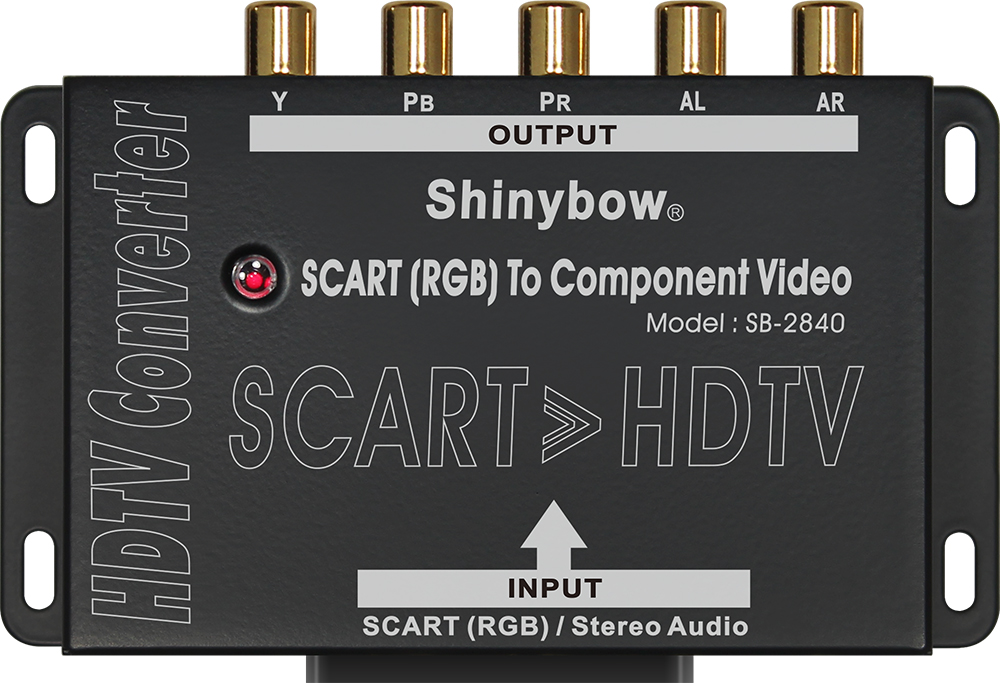
For PS2, I use SCART to a Shinybow 2840. That will get you a clean component output that works for all the PS2 output modes. The Shinybow handles all the sync on green silliness. It's just plug and play.

PS2 -> SCART -> Shinybow 2840 -> component
We apologise for the inconvenience
DiegoPonga
Posts: 139
Joined: Thu Mar 02, 2017 11:01 am

Re: 6th gen. doubts: component or SCART?

Post by DiegoPonga »

theclaw wrote:PAL Xbox removed official 480p / 720p / 1080i support. The dashboard settings are different. You can use a softmod, in doing so enabling imports or backups from discs. Some games might've left their 480p mode intact, and won't need actual forcing, but I don't have a list.

Garo is a signal converter box, it changes component into VGA or SCART. The display still has to accept the console's resolution & sync rate. https://www.beharbros.com/garo

I could go on about how Gamecube trolls importers. The component cable itself 100% works on PAL systems. Despite that, each PAL game individually cut out its 480p prompt. Then there's issues like the firmware language (in particular Japanese games may have glitches run in the wrong region).
Oh, you've posted a terrible information :|

Well, it doesn't really matter, but it is yet another console I'll have to mod in order to display proper resolutions and/or run games from other regions.

Do you know if that's something that only PAL Xbox had? I mean, a PAL game can be compatible with 480p/720p? Or it's like in GC and I need to mod the console and/or get NTSC games?

By the way, neither 480p or 720p standards are worse in Xbox, are they? I mean, like reducing fps or sharpness in order to display those signals.
ZellSF wrote:Best option is probably VGA, since then you can run audio cable independently away from noise from the video cable. And you're not likely to need the VGA input on the OSSC for something else, but you are likely to need more SCART ports. You're not very likely to discern any audio or video quality differences between SCART and VGA though, so it's mostly about which ports you want to use.
The thing is OSSC does not have a L/R audio input, so it would be smarter to use Taro and plug it into my SCART switch.
ZellSF wrote:That's just a passive adapter. The signal is still component, it's just run over a different set of wires. The device you're outputting to must support component over SCART. Which is much more unusual than just having a regular component connector.
So, Garo is quite useful. It would consume just one SCART slot for 4 consoles (PS2, Xbox, GC* and Wii), so it is not a huge sacrifice.

* If I had a YPbPr cable for it, which I assume is not possible right now. I'm sure I'll find an eventual solution for it.
ZellSF wrote:The output is very digital. You might be confused because component is analog, but the signal coming out of the digital AV port is not component. That's why it's so problematic, you need a Nintendo proprietary chip to convert digital signal into analog component.
ZellSF wrote:No, the Gamecube has no component encoder. It can't output component without external hardware (that Nintendo embedded in their now expensive cables). The Wii in contrast has a component encoder on the motherboard.
Oh, God. That seems to be ahead of its time... but also quite clunky (and expensive). Probably some people come up soon with a solution. I would love a soft solution like Taro instead of inserting an HDMI mod in it. Anyway, I think it's soon to make a decision with GC, while DC, Xbox, PS2 and Wii seem to have pretty obvious choices.
orange808 wrote:For PS2, I use SCART to a Shinybow 2840. That will get you a clean component output that works for all the PS2 output modes. The Shinybow handles all the sync on green silliness. It's just plug and play.

PS2 -> SCART -> Shinybow 2840 -> component
Do you mean this?

Image

I already have a component cable for PS2, so I don't need it. However, it might be very interesting for people with similar anxieties. Thanks for posting.
User avatar
orange808
Posts: 3877
Joined: Sat Aug 20, 2016 5:43 am

Re: 6th gen. doubts: component or SCART?

Post by orange808 »

The PS2 component cables are notoriously noisy.

Thanks for the reply. I'll try to get my anxiety under control. RGB is the best way and component is noisy.
We apologise for the inconvenience
User avatar
theclaw
Posts: 273
Joined: Sat Nov 26, 2011 2:41 pm

Re: 6th gen. doubts: component or SCART?

Post by theclaw »

DiegoPonga wrote: Oh, you've posted a terrible information :|

Well, it doesn't really matter, but it is yet another console I'll have to mod in order to display proper resolutions and/or run games from other regions.

Do you know if that's something that only PAL Xbox had? I mean, a PAL game can be compatible with 480p/720p? Or it's like in GC and I need to mod the console and/or get NTSC games?

By the way, neither 480p or 720p standards are worse in Xbox, are they? I mean, like reducing fps or sharpness in order to display those signals.
It depends. If the developer was too lazy to disable 480p or 720p within the game, they'll automatically work.
Xbox, Dreamcast, and Wii games don't nag you by having to confirm 480p each time. GC and PS2 games do.

Without modding, GC needs a commercial disc to run homebrew to force 480p. Such as Action Replay or SD Media Launcher.
Usually compatibility tests are done on PAL games. My personal NTSC list is only for the Qoob modchip setting, other options like Swiss might have better results. https://gbatemp.net/threads/qoob-us-jpn ... st.358717/
DiegoPonga wrote: Do you mean this?


Image

I already have a component cable for PS2, so I don't need it. However, it might be very interesting for people with similar anxieties. Thanks for posting.
PS2 has different frustrations with RGB or component. RGB turns DVD movies green, and 480p makes the output go sync-on-green.
Then some HDTVs don't accept 240p component, affecting PS1 games.
Overall component is easier to use.
DiegoPonga
Posts: 139
Joined: Thu Mar 02, 2017 11:01 am

Re: 6th gen. doubts: component or SCART?

Post by DiegoPonga »

orange808 wrote:The PS2 component cables are notoriously noisy.

Thanks for the reply. I'll try to get my anxiety under control. RGB is the best way and component is noisy.
Oh, I think you misunderstood my last post... I didn't say you are anxious or anything like that. I meant that this Shinybow can be a good option for people that have similar wishes and aspirations as me.

Really, sorry if it seemed to be different, but I was not trying to sound rude or anything, but rather nice :D
theclaw wrote:It depends. If the developer was too lazy to disable 480p or 720p within the game, they'll automatically work.
Xbox, Dreamcast, and Wii games don't nag you by having to confirm 480p each time. GC and PS2 games do.
Thank you very much. Do you know of a Xbox app that allow me to run games at 480p or 720p? Something like Swiss and GS Mode Selector would do with GameCube and PlayStation 2 respectively.
theclaw wrote:Without modding, GC needs a commercial disc to run homebrew to force 480p. Such as Action Replay or SD Media Launcher.
Usually compatibility tests are done on PAL games. My personal NTSC list is only for the Qoob modchip setting, other options like Swiss might have better results. https://gbatemp.net/threads/qoob-us-jpn ... st.358717/
I was thinking about buying an SD Gecko and run Swiss.
theclaw wrote:PS2 has different frustrations with RGB or component. RGB turns DVD movies green, and 480p makes the output go sync-on-green.
Then some HDTVs don't accept 240p component, affecting PS1 games.
Overall component is easier to use.
Does sync on green have any problem when plugged into a SCART switch? I hope not, but... don't know exactly. If it hasn't any problem, I think RGB-SCART would be interesting. As you guys are saying, YPbPr in PlayStation 2 is not the best option and some original PlayStation games may have problems. So, probably SCART is the smartest option, thank you very much.
User avatar
theclaw
Posts: 273
Joined: Sat Nov 26, 2011 2:41 pm

Re: 6th gen. doubts: component or SCART?

Post by theclaw »

Not exactly. Original PlayStation games don't have problems with the component cable.
The television may have problems with them. This distinction is because the same thing happens to any other 240p component source. (Mega Man X Collection, ICO, Disagea Hour of Darkness, etc)

To avoid name confusion, no. Mega Man Anniversary Collection is not affected. It upscales the games to 480i on PS2 and GC.
480p was later added as an Xbox exclusive bonus. (I've only tried forced 480p on GC, appears to work fine)

Frankly I'm not too interested in the Xbox and won't be very helpful there. Games can be patched to force video modes. Either from the executable, or an app. Look into Nkpatcher.
Last edited by theclaw on Tue Apr 04, 2017 8:52 am, edited 1 time in total.
DiegoPonga
Posts: 139
Joined: Thu Mar 02, 2017 11:01 am

Re: 6th gen. doubts: component or SCART?

Post by DiegoPonga »

theclaw wrote:Not exactly. Original PlayStation games don't have problems with the component cable.
The television may have problems with them. This distinction is because the same thing happens to any other 240p component source. (Mega Man X Collection, ICO, Disagea Hour of Darkness, etc)
Oh, that is a very interesting touch. I guess that, if it's connected to an OSSC, there is no such incompatibility (or at least you can solve it). However, I've read several times that PS2's YPbPr coding is far from being as colorful and sharp as RGB. The problem is the sync-on-green issue, as I don't know if it could give me problems if plugged into a SCART switch...
Last edited by DiegoPonga on Tue Apr 04, 2017 8:55 am, edited 1 time in total.
User avatar
Fudoh
Posts: 13044
Joined: Mon Mar 06, 2006 3:29 am
Location: Germany
Contact:

Re: 6th gen. doubts: component or SCART?

Post by Fudoh »

The problem is the sync-on-green issue, as I don't know if it could give me problems if plugged into a SCART switch...
only if the unit has a switching automatic and relies on the regular sync/video signal to determine when to use an input. On a manual switch this should be no issue - as long as the switch in general has the neccessary bandwith to work with 31khz signals instead of 15khz ones.
User avatar
Lawfer
Posts: 2283
Joined: Fri Dec 01, 2006 3:30 am

Re: 6th gen. doubts: component or SCART?

Post by Lawfer »

To make it simple.

From best to worst

1. 480p RGB

2. 480p YPbPr (Component)

3. 480i RGB

4. 480i YPbPr

Avoid S-Video and Composite if you can.
DiegoPonga
Posts: 139
Joined: Thu Mar 02, 2017 11:01 am

Re: 6th gen. doubts: component or SCART?

Post by DiegoPonga »

Fudoh wrote:
The problem is the sync-on-green issue, as I don't know if it could give me problems if plugged into a SCART switch...
only if the unit has a switching automatic and relies on the regular sync/video signal to determine when to use an input. On a manual switch this should be no issue - as long as the switch in general has the neccessary bandwith to work with 31khz signals instead of 15khz ones.
What about switches like the Gscartsw or the W-Hydra?
Lawfer wrote:To make it simple.

From best to worst

1. 480p RGB

2. 480p YPbPr (Component)

3. 480i RGB

4. 480i YPbPr

Avoid S-Video and Composite if you can.
Thank you very much! I agree, but the problem here is that PS2 is the only console that accepts 480p RGB. Xbox, GameCube and Wii do not allow 480p through SCART, but only through YPbPr...
theclaw wrote:To avoid name confusion, no. Mega Man Anniversary Collection is not affected. It upscales the games to 480i on PS2 and GC.
480p was later added as an Xbox exclusive bonus. (I've only tried forced 480p on GC, appears to work fine)

Frankly I'm not too interested in the Xbox and won't be very helpful there. Games can be patched to force video modes. Either from the executable, or an app. Look into Nkpatcher.
Thanks once again! I assume there should be an interesting app like Swiss in the original Xbox scene. As soon as I read something about it, I'll post it here. For PAL users, this would be a must.
User avatar
Mantis128
Posts: 66
Joined: Mon Apr 25, 2016 9:31 am
Contact:

Re: 6th gen. doubts: component or SCART?

Post by Mantis128 »

I think RGsB 480P via SCART would be the best for the PS2 since you could just use the SCART for 15Khz RGBs but then be able to easily swith to 480P without having to change cables for the two games that use 480P.
DiegoPonga
Posts: 139
Joined: Thu Mar 02, 2017 11:01 am

Re: 6th gen. doubts: component or SCART?

Post by DiegoPonga »

Mantis128 wrote:I think RGsB 480P via SCART would be the best for the PS2 since you could just use the SCART for 15Khz RGBs but then be able to easily swith to 480P without having to change cables for the two games that use 480P.
Well, actually, there are some homebrew apps that allow you to force progressive scan. Never tested, though, but it seems to be a nice idea.

I see SCART as the best option for PS2 too, but RGsB is kind of blowing my mind. I do not want to experience problems with that standard over my SCART switches.
Post Reply