Some help choosing retro-room devices (CRT, audio equipment)

The place for all discussion on gaming hardware
DiegoPonga
Posts: 139
Joined: Thu Mar 02, 2017 11:01 am

Some help choosing retro-room devices (CRT, audio equipment)

Post by DiegoPonga »

Hi there!

This is my first post around here, so forgive me if I say anything that's wrong. Please, indulge my ignorance.

First of all, I am trying to build a retro-room. Well, a video game room actually. What would it have? Consoles, TVs and speakers. Easy, isn't it? Not that much, actually...

I assume I have many errors, misconceptions, etc. Please, don't be rude, just try to explain what is a mistake and I'll try to understand ;)

1. Help me with TVs

I want to have the following systems inside my new VG room: Atari 2600, NES, Top-Loader NES (NTSC), SNES, MegaDrive, Saturn, Nintendo 64, Dreamcast, PlayStation 2, GameCube, Xbox, Xbox 360, PlayStation 3, Wii, PlayStation 4, Xbox One, Wii U, NES mini and Nintendo Switch. Also, a PC and a MAME-dedicated small PC I want to build.

I would assume that the most logical choice would be splitting those systems into two different groups:

a) CRT group — Atari 2600, NES, Top-Loader, SNES, MegaDrive, Saturn, Nintendo 64, Dreamcast, PlayStation 2, GameCube, Xbox, Wii, MAME-PC.

b) HDTV group — Xbox 360, PlayStation 3, Xbox One, PlayStation 4, Wii U, NES mini, Nintendo Switch, PC.

1.a Which is the best CRT for me?

All these consoles can handle RGB (some of them require modding), so this CRT TV should be compatible with RGB. These use three standard resolutions: 240p, 480p and 720p (some Xbox games). Also, there are two main aspect ratio standards: 4:3 and 16:9. As I'm European, I would like to be able to play in both PAL and NTSC and also in both 50Hz and 60Hz.

Another interesting option I would like to consider is that I can rotate it in order to play vertical top-down shmups. Many of them use a 9:16 aspect ratio, so it would be interesting if I can take a CRT that can handle RGB, these resolutions (240p, 480p, 720p), these aspect ratios (4:3, 16:9), these standards (PAL, NTSC) and these refresh rates (50Hz, 60Hz) and that can be easily rotated.


1.b Which is the best HDTV for me?

I think this is quite easier. These systems use three standards: 720p, 1080p and 4K. So a 4K TV would do the job, since 4K is 720p × 3 and 1080p × 2. Apart from resolution, refresh rate should be variable and as high as possible. I think it would be better to wait a year until we see displays that uses the advantages of HDMI 2.1.

That would mean that I could play perfect both Xbox 360/PlayStation 3 that used 720p30 standards and PC beasts such as Overwatch, which I could run it at 1080p144 or even higher.

Another important thing is that the TV should have lowest input lag as possible. Many alleged "high-end" TVs are actually crappy when talking about lag. Problem is I want it to be as big as I can, since it is going to be my girlfriend's TV for cinema to and, as such, our main TV.

So, in other words, I want an HDTV with 4K, variable refresh rate, high refresh rate, HDMI 2.1 input, > 50″, lowest input lag possible. The TV I'm looking for does not exist... YET. But it would eventually be made, wouldn't it? :D


2. Help me with audio

Consoles handle many different audio codecs. Although it actually depends on the game, consoles use to have a specific Dolby codec that makes it easier to get good 5.1 sound. I would like to find a solution for this problem: which would be the best AVR and Home-Theatre for these systems?

I elaborated a list of systems according to their audio capabilities. Please, do note that this depends on the specific game, so this is just a general list of basic information.

a) Mono — Atari 2600, NES, Top-Loader, NES mini

b) Stereo — MegaDrive, SNES, Saturn, Nintendo 64, Dreamcast, MAME-PC

c) Dolby ProLogic II and/or Dolby Digital — PlayStation 2, GameCube, Xbox, Wii

d) Dolby TrueHD — Xbox 360, PlayStation 3, Xbox One, PlayStation 4, PC

e) Dolby Atmos — Depends on the game, but currently just a couple of PS4/PC games can handle this standard

f) Linear PCM — Wii U, Nintendo Switch

So, in order to build up a 5.1.2 setup, which would be a good option? Note that I cannot afford a +€10,000 device.

The idea is I can switch easily between mono, stereo, 5.1 and Atmos without any problem.

Thank you very much!
User avatar
Xer Xian
Posts: 895
Joined: Sun Feb 06, 2005 3:23 pm
Location: Italy

Re: Some help choosing retro-room devices (CRT, audio equipm

Post by Xer Xian »

You're gonna have a hard time finding a CRT that can handle all those resolutions well. Pure ED ('native' 480p) TVs were never widespread even 15 years ago (in Europe at least), and are almost non-existent now. HD CRTs seem to be more of an american thing to me, and they make use of digital processing to display most of the supported resolutions anyway (and they are huge). This leaves PC CRT monitors only, but they usually need to be paired with at least a line doubler for 240p and 480i signals, and I think you'd need a full blown video processor to convert 50hz PAL games since monitors don't go below 60hz. I would get a good consumer SD CRT for everthing prior to 1999 and move the 6th gen consoles (DC, PS2..) to an LCD/OLED HDTV that has good handling of 480p signals since most of their libraries are 480p either native or with soft-modding (PS2). Either that or just go for a single, modern display for everything in tandem with a video processor for SD consoles.

I'd also suggest anyone looking to build such game rooms to do some retro-reading on this (or others) forum's section or watch some dedicated youtube channels (as My life in gaming), since there's already a wealth of information around on this. That's what I've done at least, and I'm still learning a lot of course, so these were just my proverbial 2 cents.
Lord of Pirates
Posts: 523
Joined: Sun May 12, 2013 5:03 pm

Re: Some help choosing retro-room devices (CRT, audio equipm

Post by Lord of Pirates »

Knowing your budget would go a long way for people to make suggestions for you.


If you want the lowest lag possible and high refresh rates you're looking at monitors, not TVs. You're also looking at a substantial amount of money to drive high refresh rates at high resolution if you don't already have a suitable computer.
ShadowofBob
Posts: 59
Joined: Fri Feb 19, 2016 8:25 am
Location: Boulder, CO

Re: Some help choosing retro-room devices (CRT, audio equipm

Post by ShadowofBob »

Like others have said you are pretty much stuck with a CRT pc monitor to cover all of those. A 24" Sony FW900 would be great if you hook it up to a OSSC. No lag for any of those consoles. Biggest disadvantage might be size if you want something a little larger so you can play on a couch.

You could still use a HD CRT like the Sony 34XBR960(16:9) or 36XS955(4:3). Just be aware it will introduce ~33ms(2 frames) of lag in 480p. 720p might be worse and 1080i is supposedly better, but I don't have solid numbers on those. Not really that worse than existing HDTVs. The main problem with this is the size and that they don't take 1080p which rules out your Xbox One and PS4 unless you don't mind running them at 720p or getting another drive to convert 1080p to 1080i. I have one in my game room with an OSSC and don't mind it all, but I leave my Xbox One of my living room TV. Great color/contrast for my games and have everything from a Genesis up to an Xbox 360.

If you don't like the limitations of either of those options I would go with a 4K OLED TV. I don't have much experience with one myself, but they would fit most of your requirements when combined with an OSSC.

As far as audio goes I'd just get a receiver and set up a compact 5.1 setup. I am going to be doing this in my gameroom once I have pieced everything together. I'm in no rush though and my Sony XBR910 has great sound on it's own since the chassis allows for such larger speakers.
Last edited by ShadowofBob on Fri Mar 03, 2017 9:31 pm, edited 1 time in total.
User avatar
Shoryukev
Posts: 651
Joined: Thu Dec 10, 2015 7:18 pm
Location: Cleveland, OH

Re: Some help choosing retro-room devices (CRT, audio equipm

Post by Shoryukev »

A PVM would be able to handle 50 and 60hz over RGB, but most models only accept 240p and 480i. Having said that, I think it would still be a good option for you since most modern HDTVs do a good job of displaying 480p.

As far as audio, most any 5.1 or 7.1 receiver these days will handle all of those codecs so you should be good to go. I would recommend turning off all the decoding and running dual mono and stereo for your retro stuff though, I personally can't stand the DSP modes of my yamaha unit when I'm retro gaming.

There is a ton of information to be found on these forums to help you out regardless of which path you go down. Once you get your feet wet and learn a little bit of the terminology it will open up a world of things to search for. Happy hunting!
User avatar
Hoagtech
Posts: 1025
Joined: Mon Apr 27, 2015 3:53 am
Location: Bellingham, WA

Re: Some help choosing retro-room devices (CRT, audio equipm

Post by Hoagtech »

Lord of Pirates wrote:Knowing your budget would go a long way for people to make suggestions for you.


If you want the lowest lag possible and high refresh rates you're looking at monitors, not TVs. You're also looking at a substantial amount of money to drive high refresh rates at high resolution if you don't already have a suitable computer.
If you were in the states I would offer you one of my 37" Megaview monitors. These guys excel at vga to xga resolutions and have built in scan converter doublers for your classics.


I would reccomend sony 5.1 DTS sound systems as they still have more support on blue rays than the 7.1's also the sony's seem to support legacy modes like pro logic 2 all the way back to dolby 4 way surround and just skip the TrueHD and Atmos as DTS is almost the same thing. "well kind of you would be missing out on support for those codecs" But avoid soundbars like the plauge. They incorporate your rear surround in your front speakers.

If you had to have both spend $4k on a bose atmos 5.1 and get a 4 way surround tower speaker system for your classics.

And your tv is all about your budget. Because your in Europe Samsung non curved would be your cheapest option and there are Sony 4K sets available that are reasonably priced. Check Rtings and input lag database for input lag ratings.
Copyright 1987
User avatar
Xyga
Posts: 7181
Joined: Tue Nov 05, 2013 8:22 pm
Location: block

Re: Some help choosing retro-room devices (CRT, audio equipm

Post by Xyga »

Most members of retrogaming communitites will push you to seek broadcast monitors like the Sony PVM/BVM, or a FW900, all very hyped and sought-after and today often expensive in good condition.
But for cheap and hassle-free 240p and 480i -> you know most if any working 4:3 European consumer CRT TV will do, as long as it's not a '100Hz' model. Most you'll find will handle both 50Hz and 60Hz sources without any issues.
Not trying to stop you from getting a high-end broadcast beauty, but since you live in Europe you'll have hundreds of other opportunities that will also look great and completely genuine without breaking the bank.

Regarding 16:9/9:16 shmups I don't know if you're serious but that's quite rare outside of - at least - the HD generation ports of arcade titles such as found on the 360, which you can all play on a rotate-able flat panel anyway (hd lcd monitor or tv)
I would never recommend going after a 16:9 CRT, especially for shmups. 4:3 consumers CRTs of 21" or 25" are often easy to set vertically, larger ones of about 27"~29" are sometimes quite heavy, especially the 'flat tube' ones, but it's doable too.
Strikers1945guy wrote:"Do we....eat chicken balls?!"
User avatar
Shoryukev
Posts: 651
Joined: Thu Dec 10, 2015 7:18 pm
Location: Cleveland, OH

Re: Some help choosing retro-room devices (CRT, audio equipm

Post by Shoryukev »

I didn't realize consumer CRT sets in europe could handle 60hz (I'm in the US so my knowledge is extremely limited). I must have been confusing myself with the color standards for NTSC and PAL, but when you use RGB none of that matters anyways. Must be nice to live somewhere where CRTs are common with RGB enabled SCART inputs!!! PVMs and BVMs are nice, but there are plenty of regular CRT televisions that rival their quality.
User avatar
Xyga
Posts: 7181
Joined: Tue Nov 05, 2013 8:22 pm
Location: block

Re: Some help choosing retro-room devices (CRT, audio equipm

Post by Xyga »

^ Well 'rival' is a bit strong, but they're as much the real deal as SD arcade monitors are, since we're talking about the same definition.
People even give them away today, actually you have to catch them before they go to the dumpster.
Strikers1945guy wrote:"Do we....eat chicken balls?!"
tacoguy64
Posts: 558
Joined: Tue Dec 30, 2014 12:42 am

Re: Some help choosing retro-room devices (CRT, audio equipm

Post by tacoguy64 »

I would look at what is the best tv's you have available close to you first. Big presentation displays like the NEC XM29 or the Mitsubishi diamond line are usually the more sought after retro console displays. There are others like Sony PVM 2530, or the Panasonic presentation displays. Most these monitors are great because of their size, multi-sync, and fantastic image quality. Unfortunately they are much harder to find and usually much more expensive than consumer sets. Late model consumer tv's are pretty nice as well and should not be looked over. The best of these consumer sets will give you a nice picture with a good size. Plus they are cheaper and easier to find. The Sony kv27fv300 stands out as one of the best consumer models you can get for that size. And if you don't care about size, and just want the best picture, go for the sony bvm 20f1u.

You should also look into devices like the xrgb mini and the ossc.
User avatar
Xyga
Posts: 7181
Joined: Tue Nov 05, 2013 8:22 pm
Location: block

Re: Some help choosing retro-room devices (CRT, audio equipm

Post by Xyga »

^ I think the fv300/fv310 don't exist in Europe in the end (I used to believe there were similar models but no)

When looking for consumer sets remember the late models with big 'flat' tubes may have harsh geometry issues (picture twisted in places, curbed in abnormal ways breaking straight lines) that are more difficult to fix than on curved tube models.
Of course the late flat models (like the big Sony Trinitron) may have less running hours, but if you can find late 90's to early 2000's curved of big name brands in acceptable condition, you have to try.

None should cost you over 50€ or something, and that's for the big ones in great condition. The smaller 21~25" honestly shouldn't go for more than 10~20€ or even free.
Remember: avoid the 100Hz labelled models. Those force doubled-HZ scanning that destroys the original low resolution look of the games.
Strikers1945guy wrote:"Do we....eat chicken balls?!"
DiegoPonga
Posts: 139
Joined: Thu Mar 02, 2017 11:01 am

Re: Some help choosing retro-room devices (CRT, audio equipm

Post by DiegoPonga »

Wow! Thank you very much!

You know, in any other forums, this topic would be dead, but here it had many messages! Thanks a lot to all of you who are helping me ;)
Xer Xian wrote:You're gonna have a hard time finding a CRT that can handle all those resolutions well. Pure ED ('native' 480p) TVs were never widespread even 15 years ago (in Europe at least), and are almost non-existent now. HD CRTs seem to be more of an american thing to me, and they make use of digital processing to display most of the supported resolutions anyway (and they are huge). This leaves PC CRT monitors only, but they usually need to be paired with at least a line doubler for 240p and 480i signals, and I think you'd need a full blown video processor to convert 50hz PAL games since monitors don't go below 60hz. I would get a good consumer SD CRT for everthing prior to 1999 and move the 6th gen consoles (DC, PS2..) to an LCD/OLED HDTV that has good handling of 480p signals since most of their libraries are 480p either native or with soft-modding (PS2). Either that or just go for a single, modern display for everything in tandem with a video processor for SD consoles.

I'd also suggest anyone looking to build such game rooms to do some retro-reading on this (or others) forum's section or watch some dedicated youtube channels (as My life in gaming), since there's already a wealth of information around on this. That's what I've done at least, and I'm still learning a lot of course, so these were just my proverbial 2 cents.
Thank you very much!

What you are saying is quite interesting, actually. The problem is 480p is kind of a must for some fighting games from the 6th gen. I really enjoy playing Project M (a Smash Bros. Brawl competitive mod), so I would need a 480p60 signal with no input lag.
Lord of Pirates wrote:Knowing your budget would go a long way for people to make suggestions for you.


If you want the lowest lag possible and high refresh rates you're looking at monitors, not TVs. You're also looking at a substantial amount of money to drive high refresh rates at high resolution if you don't already have a suitable computer.
Well, this is another interesting thing. However, I would like to see what I need first and then I'll see if I have the money.
ShadowofBob wrote:Like others have said you are pretty much stuck with a CRT pc monitor to cover all of those. A 24" Sony FW900 would be great if you hook it up to a OSSC. No lag for any of those consoles. Biggest disadvantage might be size if you want something a little larger so you can play on a couch.

You could still use a HD CRT like the Sony 34XBR960(16:9) or 36XS955(4:3). Just be aware it will introduce ~33ms(2 frames) of lag in 480p. 720p might be worse and 1080i is supposedly better, but I don't have solid numbers on those. Not really that worse than existing HDTVs. The main problem with this is the size and that they don't take 1080p which rules out your Xbox One and PS4 unless you don't mind running them at 720p or getting another drive to convert 1080p to 1080i. I have one in my game room with an OSSC and don't mind it all, but I leave my Xbox One of my living room TV. Great color/contrast for my games and have everything from a Genesis up to an Xbox 360.

If you don't like the limitations of either of those options I would go with a 4K OLED TV. I don't have much experience with one myself, but they would fit most of your requirements when combined with an OSSC.

As far as audio goes I'd just get a receiver and set up a compact 5.1 setup. I am going to be doing this in my gameroom once I have pieced everything together. I'm in no rush though and my Sony XBR910 has great sound on it's own since the chassis allows for such larger speakers.
Thanks a lot!

Don't like that ~2 frames of input lag in 480p. It would kill me for games that need frame-perfect inputs. Aren't there CRTs that handle at least 480p with no input lag?
tacoguy64 wrote:I would look at what is the best tv's you have available close to you first. Big presentation displays like the NEC XM29 or the Mitsubishi diamond line are usually the more sought after retro console displays. There are others like Sony PVM 2530, or the Panasonic presentation displays. Most these monitors are great because of their size, multi-sync, and fantastic image quality. Unfortunately they are much harder to find and usually much more expensive than consumer sets. Late model consumer tv's are pretty nice as well and should not be looked over. The best of these consumer sets will give you a nice picture with a good size. Plus they are cheaper and easier to find. The Sony kv27fv300 stands out as one of the best consumer models you can get for that size. And if you don't care about size, and just want the best picture, go for the sony bvm 20f1u.

You should also look into devices like the xrgb mini and the ossc.
Now you mention the NEC XM29, I'm watching many videoreviews on YouTube that says it's the “Holly Grial.” However, I can't find any of these on eBay. Did they have another name? Or is it just a pretty rare monitor that nobody knows about?

Thank you very much!
Xyga wrote:^ I think the fv300/fv310 don't exist in Europe in the end (I used to believe there were similar models but no)

When looking for consumer sets remember the late models with big 'flat' tubes may have harsh geometry issues (picture twisted in places, curbed in abnormal ways breaking straight lines) that are more difficult to fix than on curved tube models.
Of course the late flat models (like the big Sony Trinitron) may have less running hours, but if you can find late 90's to early 2000's curved of big name brands in acceptable condition, you have to try.

None should cost you over 50€ or something, and that's for the big ones in great condition. The smaller 21~25" honestly shouldn't go for more than 10~20€ or even free.
Remember: avoid the 100Hz labelled models. Those force doubled-HZ scanning that destroys the original low resolution look of the games.
Thank you very much for the advise!
User avatar
Xer Xian
Posts: 895
Joined: Sun Feb 06, 2005 3:23 pm
Location: Italy

Re: Some help choosing retro-room devices (CRT, audio equipm

Post by Xer Xian »

DiegoPonga wrote: Now you mention the NEC XM29, I'm watching many videoreviews on YouTube that says it's the “Holly Grial.” However, I can't find any of these on eBay. Did they have another name? Or is it just a pretty rare monitor that nobody knows about?
It is a pretty rare big multisync monitor, but everybody in the retrogaming communities knows about the Nec XM series or the Sony PVM/BVM's or the high-tier PC CRT monitors like the FW900 by now. They are difficult to find and when you do find one, you will most likely have to shell out quite some cash to get hold of it (especially if you're looking on ebay), and then hope they get to your place safely. Also, being professional equipment these devices often have some quirks that you must be aware of to make use of them (for example, the XM29 only takes clean sync RGB). I am not trying to discourage you, many users here and elsewhere have scored nice pieces of equipment after some hunting and you can do the same - you just need to have patience if you want to go for the best you can get (money would help too) :)

By the way there's an FW900 on ebay, shipping is available to all of Europe: http://www.ebay.co.uk/itm/Sony-GDM-FW90 ... SwSlBYsxkg

Personally, I'm not ruling out to acquire some of this stuff, but not at today's inflated prices. I needed no-lag native 480p as you as well and just bought a cheap 4:3 CRT monitor.
Lord of Pirates
Posts: 523
Joined: Sun May 12, 2013 5:03 pm

Re: Some help choosing retro-room devices (CRT, audio equipm

Post by Lord of Pirates »

DiegoPonga wrote:Wow! Thank you very much!

You know, in any other forums, this topic would be dead, but here it had many messages! Thanks a lot to all of you who are helping me ;)


Thank you very much!

What you are saying is quite interesting, actually. The problem is 480p is kind of a must for some fighting games from the 6th gen. I really enjoy playing Project M (a Smash Bros. Brawl competitive mod), so I would need a 480p60 signal with no input lag.

Well, this is another interesting thing. However, I would like to see what I need first and then I'll see if I have the money.

Thanks a lot!

Don't like that ~2 frames of input lag in 480p. It would kill me for games that need frame-perfect inputs. Aren't there CRTs that handle at least 480p with no input lag?
Now you mention the NEC XM29, I'm watching many videoreviews on YouTube that says it's the “Holly Grial.” However, I can't find any of these on eBay. Did they have another name? Or is it just a pretty rare monitor that nobody knows about?

Thank you very much!

Thank you very much for the advise!
CRT monitors. If you don't limit yourself to top of the line CRT monitors you shouldn't have too much trouble finding something decent for cheap or free. The XM29 is very well known at this point. I'd ignore anyone trying to sell a CRT that won't show you pictures of it running (unless they're very close by and you can test it yourself).
DiegoPonga
Posts: 139
Joined: Thu Mar 02, 2017 11:01 am

Re: Some help choosing retro-room devices (CRT, audio equipm

Post by DiegoPonga »

By the way, guys... Do you know if there is still hope of a lagless newer display technology? Since 8K will be the main standard in some 10 years, it would be nice if the market forgets LEDs and turns into something that guarantees zero input lag. 8K is a multiple to 240p, 480p, 720p, 1080p, 1440p and 4K, which have been the main standards for console and PC gaming for all these years. So 8K plus a newer technology (something like defunct FED or SED) would be a good replacement for classic CRTs, wouldn't it?
Xer Xian wrote:
DiegoPonga wrote: Now you mention the NEC XM29, I'm watching many videoreviews on YouTube that says it's the “Holly Grial.” However, I can't find any of these on eBay. Did they have another name? Or is it just a pretty rare monitor that nobody knows about?
It is a pretty rare big multisync monitor, but everybody in the retrogaming communities knows about the Nec XM series or the Sony PVM/BVM's or the high-tier PC CRT monitors like the FW900 by now. They are difficult to find and when you do find one, you will most likely have to shell out quite some cash to get hold of it (especially if you're looking on ebay), and then hope they get to your place safely. Also, being professional equipment these devices often have some quirks that you must be aware of to make use of them (for example, the XM29 only takes clean sync RGB). I am not trying to discourage you, many users here and elsewhere have scored nice pieces of equipment after some hunting and you can do the same - you just need to have patience if you want to go for the best you can get (money would help too) :)

By the way there's an FW900 on ebay, shipping is available to all of Europe: http://www.ebay.co.uk/itm/Sony-GDM-FW90 ... SwSlBYsxkg

Personally, I'm not ruling out to acquire some of this stuff, but not at today's inflated prices. I needed no-lag native 480p as you as well and just bought a cheap 4:3 CRT monitor.
Hm, that's a high price if we take into account this FW900 has some scratches all over the screen.

The problem I see with CRT PC monitors is that many of them do not handle 240p nor 50Hz PAL format, do they? That's kind of sad for me :(

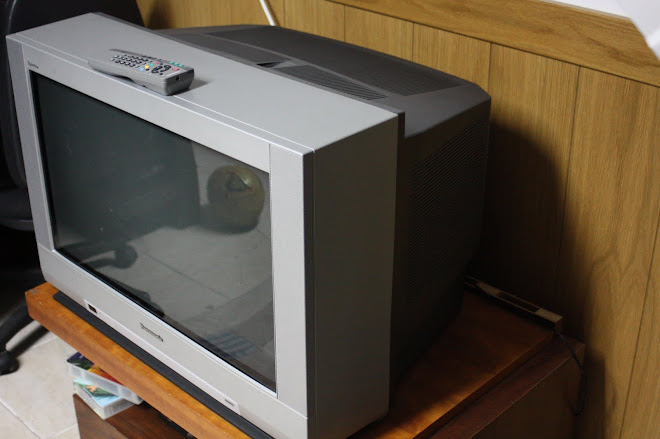
I've looked around at my local 2nd market store and I found a Panasonic Quintrix TX-28PK20F.
Image

It seems it has RGB support, but do not know if it handles 240 and 480 lines and progressive scan with no lag. Apart from that, it looked healthy. Didn't find any scratches on screen or any big purple stain that many old CRT have. How can I figure it out?
Lord of Pirates wrote:CRT monitors. If you don't limit yourself to top of the line CRT monitors you shouldn't have too much trouble finding something decent for cheap or free. The XM29 is very well known at this point. I'd ignore anyone trying to sell a CRT that won't show you pictures of it running (unless they're very close by and you can test it yourself).
Thank you very much!
User avatar
Xyga
Posts: 7181
Joined: Tue Nov 05, 2013 8:22 pm
Location: block

Re: Some help choosing retro-room devices (CRT, audio equipm

Post by Xyga »

DiegoPonga wrote:Panasonic Quintrix TX-28PK20F
16:9 and 100Hz, you can't buy anything worse than that for retrogaming with whatever console.
Strikers1945guy wrote:"Do we....eat chicken balls?!"
User avatar
FinalBaton
Posts: 4475
Joined: Sun Mar 08, 2015 10:38 pm
Location: Québec City

Re: Some help choosing retro-room devices (CRT, audio equipm

Post by FinalBaton »

I'd say the best solution for your needs probably is the NEC XM/XP in 29 inch or 37 inch, or the concurrent Mitsubishi Megaview multisync monitors. These accept anything from 240p to 1080i@60fps, including 720p, and even higher PC resolutions in progressive scan (like 1600x1200 and sometimes higher). They're not exactly easy to find cheap, but if you check your local listings, and contact broadcast/multimedia companies, you might find one.

But if your HDTV handles 480p well and you're okay with that, you could play your 480p and up games on that, and play your 240p/480i stuff on a consumer CRT. You live in europe I think? you're in luck, there are good quality RGB capable consumer SD CRTs available to you for cheap.

Or you could get a PC CRT monitor and an OSSC. Pass your 240p/480i consoles in the OSSC first and then into the PC CRT monitor. The 480p and up consoles go straight into the monitor (with a transcoder if required).
-FM Synth & Black Metal-
DiegoPonga
Posts: 139
Joined: Thu Mar 02, 2017 11:01 am

Re: Some help choosing retro-room devices (CRT, audio equipm

Post by DiegoPonga »

Xyga wrote:
DiegoPonga wrote:Panasonic Quintrix TX-28PK20F
16:9 and 100Hz, you can't buy anything worse than that for retrogaming with whatever console.
Jeez, that's so sad.

Is there any web where I can check many different models? I am googleing around and I don't find values such as resolution, refresh rate, etc.
FinalBaton wrote:I'd say the best solution for your needs probably is the NEC XM/XP in 29 inch or 37 inch, or the concurrent Mitsubishi Megaview multisync monitors. These accept anything from 240p to 1080i@60fps, including 720p, and even higher PC resolutions in progressive scan (like 1600x1200 and sometimes higher). They're not exactly easy to find cheap, but if you check your local listings, and contact broadcast/multimedia companies, you might find one.

But if your HDTV handles 480p well and you're okay with that, you could play your 480p and up games on that, and play your 240p/480i stuff on a consumer CRT. You live in europe I think? you're in luck, there are good quality RGB capable consumer SD CRTs available to you for cheap.

Or you could get a PC CRT monitor and an OSSC. Pass your 240p/480i consoles in the OSSC first and then into the PC CRT monitor. The 480p and up consoles go straight into the monitor (with a transcoder if required).
Hi! Thanks a lot for helping me!

Which would you say are the advantages or disadvantages of using OSSC?
User avatar
Xyga
Posts: 7181
Joined: Tue Nov 05, 2013 8:22 pm
Location: block

Re: Some help choosing retro-room devices (CRT, audio equipm

Post by Xyga »

DiegoPonga wrote:Is there any web where I can check many different models? I am googleing around and I don't find values such as resolution, refresh rate, etc.
Nope. It's up to your locale's best used wares website. Google "used sony trinitron" for instance, and see what pops up.
You're looking for 4:3 CRT TVs labelled 50Hz (most are also compatible with 60Hz even if it isn't said)

Anyway again that's for 240p and 480i, don't look at consumer TVs for 480p or even 720p. For the latter it'll be only either one of the NEC or Mitsubishi broadcast monitors people recommend you, or a HDTV/PC Monitor, standalone or with a scaler/multiplier like the OSSC if you want to play everything on a single flat panel display.

(or OSSC and stuff, whatever you want for that)
Strikers1945guy wrote:"Do we....eat chicken balls?!"
DiegoPonga
Posts: 139
Joined: Thu Mar 02, 2017 11:01 am

Re: Some help choosing retro-room devices (CRT, audio equipm

Post by DiegoPonga »

Xyga wrote:
DiegoPonga wrote:Is there any web where I can check many different models? I am googleing around and I don't find values such as resolution, refresh rate, etc.
Nope. It's up to your locale's best used wares website. Google "used sony trinitron" for instance, and see what pops up.
You're looking for 4:3 CRT TVs labelled 50Hz (most are also compatible with 60Hz even if it isn't said)

Anyway again that's for 240p and 480i, don't look at consumer TVs for 480p or even 720p. For the latter it'll be only either one of the NEC or Mitsubishi broadcast monitors people recommend you, or a HDTV/PC Monitor, standalone or with a scaler/multiplier like the OSSC if you want to play everything on a single flat panel display.

(or OSSC and stuff, whatever you want for that)
Huh... Then probably I have to change my plans... What about a TN-LED 4K monitor? Would it be almost lagless when playing 240p games through RGB (SCART-to-HDMI or OSSC)?
User avatar
Xyga
Posts: 7181
Joined: Tue Nov 05, 2013 8:22 pm
Location: block

Re: Some help choosing retro-room devices (CRT, audio equipm

Post by Xyga »

There are tons of almost lagless lcd monitors today (about 1/4 frame of lag if not less, which is nothing) TN, IPS or VA doesn't affect lag in any really significant way.
If you want even less close to zero lag throughout the screen, even if that desn't make sense because no living creature could feel the difference, you'll need to use one of the latest top-of-the-line gaming monitors from ASUS, VIEWSONIC, ACER etc and use emulation, because overcoming the 50Hz-60Hz cap will be a requirement (120Hz or strobed output are musts).
No direct RGB from consoles + OSSC there though.

TN is not recommended at all - it's shit period - IPS is oveall better but we've seen people experiencing image persistence issues with those when using interlaced sources (like 480i, so no PS2/GC from an OSSC for instance, or use a different scaler like a DVDO), then there's VA which isn't bad at all, great contrast, but those have the slowest pixel response times of out of the three types (not bad but not really enough to play FPS games for instance).

My advice won't change: get yourself a proper 4:3 consumer crt TV for 240p and 480i, and either a PC crt or pc LCD (IPS or VA) with an OSSC for all progressive sources like 240p, 480p, 720p etc.

Or a NEC/Mitsu for everything period...if you can find one. :p
Strikers1945guy wrote:"Do we....eat chicken balls?!"
User avatar
Xer Xian
Posts: 895
Joined: Sun Feb 06, 2005 3:23 pm
Location: Italy

Re: Some help choosing retro-room devices (CRT, audio equipm

Post by Xer Xian »

.. so Diego, with this we basically did the full circle and came back to my first reply in this thread :mrgreen:

Until you find one of those coveted all-purpose monitors, the OSSC paired with a fixed-resolution display (LCD/OLED) or a CRT monitor will cover all your needs, except for PAL 50hz games which would require a video processor capable of refresh rate conversion. Go the OSSC+LCD/OLED route if you want hassle-free compatibility with modern consoles and PC gaming (at the cost of a small, basically unnoticeable lag and barely noticeable ghosting effect); go the OSSC+VGA converter+CRT monitor route for absolutely unnoticeable lag and ghosting (at the cost of hassle-free modern gaming support). Again, PAL 50hz games do not fit in either scenario. Go for a SD CRT TV + modern display for the best of both worlds and PAL 50hz support.

Edit: But am I right with the 50hz thing? LCD/OLED TVs should support the PAL standard. It would just be monitors that refuse the signal..
DiegoPonga
Posts: 139
Joined: Thu Mar 02, 2017 11:01 am

Re: Some help choosing retro-room devices (CRT, audio equipm

Post by DiegoPonga »

Xyga wrote:There are tons of almost lagless lcd monitors today (about 1/4 frame of lag if not less, which is nothing) TN, IPS or VA doesn't affect lag in any really significant way.
If you want even less close to zero lag throughout the screen, even if that desn't make sense because no living creature could feel the difference, you'll need to use one of the latest top-of-the-line gaming monitors from ASUS, VIEWSONIC, ACER etc and use emulation, because overcoming the 50Hz-60Hz cap will be a requirement (120Hz or strobed output are musts).
No direct RGB from consoles + OSSC there though.

TN is not recommended at all - it's shit period - IPS is oveall better but we've seen people experiencing image persistence issues with those when using interlaced sources (like 480i, so no PS2/GC from an OSSC for instance, or use a different scaler like a DVDO), then there's VA which isn't bad at all, great contrast, but those have the slowest pixel response times of out of the three types (not bad but not really enough to play FPS games for instance).

My advice won't change: get yourself a proper 4:3 consumer crt TV for 240p and 480i, and either a PC crt or pc LCD (IPS or VA) with an OSSC for all progressive sources like 240p, 480p, 720p etc.

Or a NEC/Mitsu for everything period...if you can find one. :p
Thank you very much for all your advise! I had some wrong ideas, and you solved it!

However, here's the $1,000,000 question: Would I have any noticeable* input lag on an LCD with OSSC when playing 480p games on an LCD display?

* 1 frame or more. Since 1 frame would kill it for some frame-perfect competitive games.
Xer Xian wrote:.. so Diego, with this we basically did the full circle and came back to my first reply in this thread :mrgreen:

Until you find one of those coveted all-purpose monitors, the OSSC paired with a fixed-resolution display (LCD/OLED) or a CRT monitor will cover all your needs, except for PAL 50hz games which would require a video processor capable of refresh rate conversion. Go the OSSC+LCD/OLED route if you want hassle-free compatibility with modern consoles and PC gaming (at the cost of a small, basically unnoticeable lag and barely noticeable ghosting effect); go the OSSC+VGA converter+CRT monitor route for absolutely unnoticeable lag and ghosting (at the cost of hassle-free modern gaming support). Again, PAL 50hz games do not fit in either scenario. Go for a SD CRT TV + modern display for the best of both worlds and PAL 50hz support.
Quite true :mrgreen:

The problem is, you know, I'm Spanish and as such I have PAL consoles. Many games had shitty conversion (for example, Sonic 1 on the Genesis). I plan to make some mods on these consoles in order to play 240p60 instead of 288p50, but that doesn't work with European games that did a proper conversion.

Then we have the PAL NES, which is not moddable in that sense. PAL NES is not an NTSC NES with another color setup and capped refresh rate. It uses a different CPU, a slower one, so it runs games ~17% slower. Quite seedy, if you ask me.

In other words, there are many games that run at 50Hz on my library... What can I do? A variable refresh rate (VRR) monitor would do the job?

EDIT: I forgot something quite relevant... What about lightguns?

Thank you very much, guys, you're helping me a lot!
User avatar
Xyga
Posts: 7181
Joined: Tue Nov 05, 2013 8:22 pm
Location: block

Re: Some help choosing retro-room devices (CRT, audio equipm

Post by Xyga »

DiegoPonga wrote:However, here's the $1,000,000 question: Would I have any noticeable* input lag on an LCD with OSSC when playing 480p games on an LCD display?

* 1 frame or more. Since 1 frame would kill it for some frame-perfect competitive games.
All LCDs (and OLEDs) in normal operation use what's called the sample-and-hold method for drawing the picture. A simplified explanation would be 'drawing it from the top to the bottom of the panel' in 16.7 seconds time, which is exactly one frame.

What's called "input lag" is the time the display's internal circuit board needs to register the source signal and start drawing it on the panel, but most people use the term to speak about what's actually the total display lag (real).

If you've followed, the total lag of a 60Hz LCD is its input lag + the whole duration of the drawing of a full frame.
Meaning the lag will be at its lowest at the top of the screen, +8.4ms in the middle +16.7 at the bottom.

Rough example: let's say a 60Hz lcd has 5ms of input lag:
- top of the screen: total lag is 5ms
- middle of the screen:total lag is 13.4ms
- bottom of the screen: total lag is 21.7ms

Now then one that has zero input lag, ideally:
- top 0ms
- middle 8.4ms
- bottom 16.7ms

There are a number of things that will make the figures vary by a few miliseconds, including the testing method itself, so they're never the same on every display nor with every review, but what's most important is to remember that different reviewers (from different websites) will not all tell about the same figures. Some will tell you the input lag (equivalent to the top of the screen time), some the middle total lag, some even take the top, middle and bottom then average it.

More precisely:
- a website like Rtings specilizing in TVs used to measure lag by the middle of the screen
- a high-end monitors specialist like tftcentral.co.uk measures the input lag (top) and adds a little time equivalent to half the panel's average pixel response times
- an independent reviewer like NCX on wecravegamestoo forums only gives the raw input lag through fast camera test
- the website 'displaylag' gives the average of top, middle and bottom together
- there's also pcmonitors.info but I'm not sure which method they use
- etc

Whichever of those, if they tell you the lag is under one frame (less than 16.7ms), it's pretty safe to assume it really is (unless they've screwed up ^^)
And no, less than one frame isn't noticeable, unless you're some kind of cyborg or superhuman champion world-recordist for 10 years straight.
Strikers1945guy wrote:"Do we....eat chicken balls?!"
User avatar
BazookaBen
Posts: 2159
Joined: Thu Apr 17, 2008 8:09 pm
Location: North Carolina

Re: Some help choosing retro-room devices (CRT, audio equipm

Post by BazookaBen »

Man, this thread is a big wall of text, I can't deal with it. But I'll go ahead and tell you my set up.

Two CRT's:

One 15kHz for all 240p games and a few 30fps 480i games.

And one high-frequency PC CRT monitor for 480p(and above) games. With that, I have a component>VGA converter for the consoles that only do component out, like Wii, Gamecube, Xbox.
DiegoPonga
Posts: 139
Joined: Thu Mar 02, 2017 11:01 am

Re: Some help choosing retro-room devices (CRT, audio equipm

Post by DiegoPonga »

Xyga wrote:
DiegoPonga wrote:However, here's the $1,000,000 question: Would I have any noticeable* input lag on an LCD with OSSC when playing 480p games on an LCD display?

* 1 frame or more. Since 1 frame would kill it for some frame-perfect competitive games.
All LCDs (and OLEDs) in normal operation use what's called the sample-and-hold method for drawing the picture. A simplified explanation would be 'drawing it from the top to the bottom of the panel' in 16.7 seconds time, which is exactly one frame.

What's called "input lag" is the time the display's internal circuit board needs to register the source signal and start drawing it on the panel, but most people use the term to speak about what's actually the total display lag (real).

If you've followed, the total lag of a 60Hz LCD is its input lag + the whole duration of the drawing of a full frame.
Meaning the lag will be at its lowest at the top of the screen, +8.4ms in the middle +16.7 at the bottom.

Rough example: let's say a 60Hz lcd has 5ms of input lag:
- top of the screen: total lag is 5ms
- middle of the screen:total lag is 13.4ms
- bottom of the screen: total lag is 21.7ms

Now then one that has zero input lag, ideally:
- top 0ms
- middle 8.4ms
- bottom 16.7ms

There are a number of things that will make the figures vary by a few miliseconds, including the testing method itself, so they're never the same on every display nor with every review, but what's most important is to remember that different reviewers (from different websites) will not all tell about the same figures. Some will tell you the input lag (equivalent to the top of the screen time), some the middle total lag, some even take the top, middle and bottom then average it.

More precisely:
- a website like Rtings specilizing in TVs used to measure lag by the middle of the screen
- a high-end monitors specialist like tftcentral.co.uk measures the input lag (top) and adds a little time equivalent to half the panel's average pixel response times
- an independent reviewer like NCX on wecravegamestoo forums only gives the raw input lag through fast camera test
- the website 'displaylag' gives the average of top, middle and bottom together
- there's also pcmonitors.info but I'm not sure which method they use
- etc

Whichever of those, if they tell you the lag is under one frame (less than 16.7ms), it's pretty safe to assume it really is (unless they've screwed up ^^)
And no, less than one frame isn't noticeable, unless you're some kind of cyborg or superhuman champion world-recordist for 10 years straight.
Thanks once again for your explanation! You helped me a lot!

The problem I had is I played Super Smash Bros. Melee and Project M back in the day. When I used my LCD, it was > 4 frames of input lag. Many moves and special techniques were extremely difficult for me. When I realized this could be solved with a CRT, things changed A LOT. That's why I'd kill for NO lag at all.

So, if I understood your message properly, if those tests say a specific LCD/OLED display is < 16.7ms, then it's perfect. Thank you very much!

By the way, do you know if those figures are just for 4K monitors? Those big 50-70″ TVs present way more than just 16.7ms, don't they? Is it expected to change in the near future?
BazookaBen wrote:Man, this thread is a big wall of text, I can't deal with it. But I'll go ahead and tell you my set up.

Two CRT's:

One 15kHz for all 240p games and a few 30fps 480i games.

And one high-frequency PC CRT monitor for 480p(and above) games. With that, I have a component>VGA converter for the consoles that only do component out, like Wii, Gamecube, Xbox.
Well, it has been growing a lot, it's true :mrgreen:

That setup is cool, by the way. However, if I can take advantage of a modern display, I think I should try.
User avatar
Xyga
Posts: 7181
Joined: Tue Nov 05, 2013 8:22 pm
Location: block

Re: Some help choosing retro-room devices (CRT, audio equipm

Post by Xyga »

DiegoPonga wrote:By the way, do you know if those figures are just for 4K monitors? Those big 50-70″ TVs present way more than just 16.7ms, don't they? Is it expected to change in the near future?
No it's for everything, any kind of resolution. Display lag is mostly due to the internal circuit and firmware design, panel refresh rate, and/or drawing method.
Some 4K TVs even fall slightly under 1 frame like the Vizio P (not available in Europe) or some Panasonic models in Japan IIRC.
It's all up to manufacturers to make sub-1 frame TVs, they can if they want to, but on the rare occurences where it happens it is almost certainly accidental. ^^

Sub-1 frame monitors are much more common most probably because they have more generic electronic designs, with less unnecessary things stuffed inside.
Strikers1945guy wrote:"Do we....eat chicken balls?!"
User avatar
bobrocks95
Posts: 3663
Joined: Mon Apr 30, 2012 2:27 am
Location: Kentucky

Re: Some help choosing retro-room devices (CRT, audio equipm

Post by bobrocks95 »

I'm with BazookaBen, I can't quite read the thread either!

I'm sure you've already been told that you can't consolidate displays as much as you want to... i.e. there aren't really high refresh rate TVs (I think some can be overclocked and fed 100Hz or 120Hz?), and there definitely aren't adaptive-sync TVs.

I'm up to 4 displays at this point.

1) Sony KV-32FV310 - 15kHz CRT for anything 240p/480i, which includes the PS2
2) Panasonic TH-42PWD8UK - EDTV Plasma (resolution of 854x480) for 480p consoles, which is the Gamecube, Wii, and original Xbox, as well as the PSTV which looks better on a low-res display
3) Sony KDL-50W700B - HDTV VA panel LCD for anything 720p and up
4) Samsung C24FG70 - 144Hz FreeSync VA panel LCD monitor for PC usage.

I could consolidate my CRT and Plasma if I were to ever find a big multisync CRT like the XM29 or XM37, but I doubt I'll ever come across one. I'd also consider keeping the Plasma for widescreen-only Wii games.

Maybe the OSSC could cut out my CRT and Plasma entirely? I'd have to get another display that supports Line x3 and above, I think 480p looks too soft on my HDTV compared to the EDTV.

I don't know if that's helpful at all or not! I think you'll definitely have to get a dedicated monitor for PC usage, but maybe you already figured that out for yourself, I dunno...
PS1 Disc-Based Game ID BIOS patch for MemCard Pro and SD2PSX automatic VMC switching.
DiegoPonga
Posts: 139
Joined: Thu Mar 02, 2017 11:01 am

Re: Some help choosing retro-room devices (CRT, audio equipm

Post by DiegoPonga »

Xyga wrote:
DiegoPonga wrote:By the way, do you know if those figures are just for 4K monitors? Those big 50-70″ TVs present way more than just 16.7ms, don't they? Is it expected to change in the near future?
No it's for everything, any kind of resolution. Display lag is mostly due to the internal circuit and firmware design, panel refresh rate, and/or drawing method.
Some 4K TVs even fall slightly under 1 frame like the Vizio P (not available in Europe) or some Panasonic models in Japan IIRC.
It's all up to manufacturers to make sub-1 frame TVs, they can if they want to, but on the rare occurences where it happens it is almost certainly accidental. ^^

Sub-1 frame monitors are much more common most probably because they have more generic electronic designs, with less unnecessary things stuffed inside.
Well, these are good news, indeed.

Now we talk about modern 4K TVs... HDMI new 2.1 standard is said to include 4K@144Hz (and higher) and adaptive sync. So, do you think it is possible that manufacturers include variable refresh rates for future models?

If I can have in some 5 years a 60″ 4K TV with both 240Hz and adaptive sync joint to a couple of GWSCARTs and an OSSC, I could rest in peace.

Nevertheless, if that were the case, I'd rather wait to a future iteration of OSSC, with both HDMI and audio support.
bobrocks95 wrote:I'm with BazookaBen, I can't quite read the thread either!

I'm sure you've already been told that you can't consolidate displays as much as you want to... i.e. there aren't really high refresh rate TVs (I think some can be overclocked and fed 100Hz or 120Hz?), and there definitely aren't adaptive-sync TVs.

I'm up to 4 displays at this point.

1) Sony KV-32FV310 - 15kHz CRT for anything 240p/480i, which includes the PS2
2) Panasonic TH-42PWD8UK - EDTV Plasma (resolution of 854x480) for 480p consoles, which is the Gamecube, Wii, and original Xbox, as well as the PSTV which looks better on a low-res display
3) Sony KDL-50W700B - HDTV VA panel LCD for anything 720p and up
4) Samsung C24FG70 - 144Hz FreeSync VA panel LCD monitor for PC usage.

I could consolidate my CRT and Plasma if I were to ever find a big multisync CRT like the XM29 or XM37, but I doubt I'll ever come across one. I'd also consider keeping the Plasma for widescreen-only Wii games.

Maybe the OSSC could cut out my CRT and Plasma entirely? I'd have to get another display that supports Line x3 and above, I think 480p looks too soft on my HDTV compared to the EDTV.

I don't know if that's helpful at all or not! I think you'll definitely have to get a dedicated monitor for PC usage, but maybe you already figured that out for yourself, I dunno...
Thank you very much!

Actually, seeing what other people do and have is quite useful.

My problem is, you know, I have a girlfriend and that means I cannot have too many displays around here. If I can concentrate every single system in just one 4K TV as the one described above, I'll have to do it.
User avatar
Xyga
Posts: 7181
Joined: Tue Nov 05, 2013 8:22 pm
Location: block

Re: Some help choosing retro-room devices (CRT, audio equipm

Post by Xyga »

DiegoPonga wrote:Now we talk about modern 4K TVs... HDMI new 2.1 standard is said to include 4K@144Hz (and higher) and adaptive sync. So, do you think it is possible that manufacturers include variable refresh rates for future models?
No idea what manufacturers will really make of that new spec, it's still too early to tell.
If their implementation of adaptive sync as a new mass-market standard, or 'VRR' support as they call it, works with any source over HDMI, with broad-enough range, and without adding lag, then it'll be fantastic...
...but you know things like that only rarely meet our full expectations, there'll probably be some disappointing technical limitation and/or a financial drawback.
Wait and see.
Strikers1945guy wrote:"Do we....eat chicken balls?!"
Post Reply