Why do PS1 Downloads on PS3 still have a wrong aspect ratio?

The place for all discussion on gaming hardware
Post Reply
User avatar
Fudoh
Posts: 13044
Joined: Mon Mar 06, 2006 3:29 am
Location: Germany
Contact:

Why do PS1 Downloads on PS3 still have a wrong aspect ratio?

Post by Fudoh »

I think I asked a similar question about a year back or so. Since I'm still wondering why this is nowhere adressed though it would be easy to fix, I wanted to refresh the topic.

Here we have a pic of a PS2 game on my LCD, just to get an idea about a correct 4:3 ratio (0% overscan on the display)

Image

Next we have R-Types (PSN store download) using the internal PS3 upscaler (1080p). Since it's a download game, it has forced smoothing on (no way to turn it off). Upscaling is set to "normal". Note the picture is too narrow.

Image

Next up is the same game, PS3's upscaling engine set to "fullscreen". It's just stretching to 16:9, but you can still see the massive black bars on the left and right causing the wrong aspect ratio.

Image

The fourth picture shows that the wrong aspect ratio is kept even if the PS3's upscaler is turned off (here the PS3 outputs 480p instead of 1080p). The aspect ratio of the game is the same as on picture 2.

Image

The last picture shows the correct aspect ratio. This can either achieved by using a CD-based PS1 game instead of a PS3 download or by applying a 11% horizontal zoom via an external scaling device. I've crosschecked with my original R-Types CD and it's the same. The picture was taken using the 11% horizontal stretch.

Image

While the forced smoothing on download'able PS1 games is horror enough (but manageable by using 480p out instead of 1080p out), I find the wrong aspect ratio on all PS1 downloads really annoying.

Has nobody ever noticed this before ? Has anyone an idea why this happens ? Why does the PS3 apply different aspect ratios to original CDs and to download games ?

Fudoh
neorichieb1971
Posts: 8015
Joined: Wed Jan 26, 2005 1:28 am
Location: Bedford, UK
Contact:

Post by neorichieb1971 »

What happens when you set your TV to 4:3 with everything set to normal?


I've never once played a PS1 game on PS3, since seeing Parappa around my friends house and seeing the god awful resolution and blur effects it put me off for life. What you have there my friend is a great picture, albeit with a bad ratio frame.
This industry has become 2 dimensional as it transcended into a 3D world.
User avatar
Fudoh
Posts: 13044
Joined: Mon Mar 06, 2006 3:29 am
Location: Germany
Contact:

Post by Fudoh »

If I set the PS3 to fullscreen (stretch to 16:9) and the TV to 4:3 it's the same as on the pictures 2 and 4 (too narrow).
User avatar
indstr
Posts: 802
Joined: Mon Oct 29, 2007 4:27 pm
Contact:

Post by indstr »

Basically, having an HDTV and a ps3 makes you a faggot. If you don't like the shit, play it on an actual PS1 and an "SDTV" (also a faggoty term) and also stop wasting your money buying games twice. If you're going to waste it, give it to me instead. Thanks :D
User avatar
Strider77
Posts: 4740
Joined: Thu Jul 27, 2006 7:01 am

Post by Strider77 »

why not use the a real PS1 disc is it fixes the issue?

and to the above poster.... I bet any SD game I own being played my HDTV with my setup for would beat the living shit out of any SD display device you own (yes I have no filtering, pure RGB and even scanlines on my HD TV.

it would make your SDTV look like a faggot.
User avatar
Fudoh
Posts: 13044
Joined: Mon Mar 06, 2006 3:29 am
Location: Germany
Contact:

Post by Fudoh »

I usually use PS1 discs on a PS2 (less lag than on a PS3), I just wondered why no one ever noticed this wrong aspect ratio on download'able games. And I have to admit, it's sometimes just easier to choose the R-Types icon on the PS3 instead of pulling out the disc ;)

And I concur of course with Strider77 in terms of SD vs. HDTV quality. While the idea of SDTV is intrigueing (native res & scanlines), after using good HD sets for years now, there's no going back. My SD games look far superior to any SD televesion set I know (and that includes Sony's PVM series and other "nice" sets). Most people just don't get what picture a HD set can produce when using the right setup - simply hooking up the system to the TV just won't do the trick.
User avatar
D
Posts: 3852
Joined: Tue Feb 01, 2005 3:49 pm
Location: Almere, Netherlands
Contact:

Post by D »

Toss your ps1 if you have a hdtv and a ps3
play a ps1 game on a ps3 upscaled to 1080p. Set the smoothing to off > you will come. crystal sharp image!
User avatar
Fudoh
Posts: 13044
Joined: Mon Mar 06, 2006 3:29 am
Location: Germany
Contact:

Post by Fudoh »

I know, recently played through Dracula X this way. Still wondering why the CD version and the download version of the same game are treated differently in terms of their aspect ratio...
User avatar
Strider77
Posts: 4740
Joined: Thu Jul 27, 2006 7:01 am

Post by Strider77 »

Toss your ps1 if you have a hdtv and a ps3
play a ps1 game on a ps3 upscaled to 1080p. Set the smoothing to off > you will come. crystal sharp image!
original hardware + upscaler = RGB and no lag and no filtering

Image

original hardware + XRGB = RGB with scanlines and no lag and no filtering

Image

really if your picky about picture and plan on using a HDTV with legacy devices then a upscaler/linedoubler is a must.

My TV excepts 480p naitively as well as HD. So I turn the scaler off.... it'll push out the old stuff in 480p and it looks more "correct" on my TV this way since 480p is just 240p times 2. Still I use my PS3 ONLY for 480i/480p games, it does a better job than the XRGB2 for 480i. ANYTHING 240p I use the XRGB with the scanline effect on.

I never thought of downloading those games via PSN store... didn't know they did that. But the filter ect drives me up the walls. Couldn't stomach it for a low res 2D game.
User avatar
Fudoh
Posts: 13044
Joined: Mon Mar 06, 2006 3:29 am
Location: Germany
Contact:

Post by Fudoh »

In the end it's matter of personal taste. Your sceenshots (Darkstalkers) have a very nice CRT-like look. When I play PS1 games on my PS2 and run them through my scaler (VP50pro) I get a picture very similar to yours (like the frist one without scanlines). PS1 games on the PS3 (original discs) have a much sharper image, the picture looks like an emulator on a PC without any filtering. I kinda like it when 10ft. away from the screen, but when I sit closer it's just too sharp, not to say unnatural.

I would have liked to keep my XRGB in the chain, but the unstable vertical sync is really annoying on large screens...
User avatar
Strider77
Posts: 4740
Joined: Thu Jul 27, 2006 7:01 am

Post by Strider77 »

is the sync become worse when you use a LCD/Plasma or is it a larger screen that does it? both?

on my TV it's not very easy to notice.... If you look for it you can see on lettering, anything with a straight edge and is white. even then it's something that really has to be searched for.

I use a CRT set b/c at the time I didn't trust the black levels or color of flat panel displays. Especially with-in my price range. I lucked out with this set in alot of ways. When I bought it I didn't know it supported 2 resolutions naitively. I didn't realize the my SD stuff would turn to garbage either until I landed a XRGB.

In the future I though of upgrading to a 1080p sony flatpanel TV and wall mount it with a rotating mount. that way EVERYTHING would be taken care of with one TV. My only concern is if the XRGB will not look as good on something else other than the set it's on now. If it looks as good as it does on this set then I would be thrilled.

If I went flat panel and kept it to around the same size would it look just as good?
Last edited by Strider77 on Tue Jul 29, 2008 2:34 pm, edited 1 time in total.
User avatar
Fudoh
Posts: 13044
Joined: Mon Mar 06, 2006 3:29 am
Location: Germany
Contact:

Post by Fudoh »

I had a XRGB2+ running on my 52" 1080p Sony LCD. If you're not bothered by the sync issue now, then you probably won't be on a larger HDTV either. The picture you'll get is quite similar. What messes up the picture on most flat panels is really the deinterlacing, but since you handle that one externally, you're good to go. Scaling a scanlined picture to 768p introduced slight moire patterns, but scaling to 1080p is quite alright.

The only nerve-wrecking thing about my Sony is that I have to fiddle through the menu everytime to switch the gamemode on and off. There's no concrete button on the remote for it. It switches off the 120Hz and Motion Enhancer to minimize the lag, but the stuff is really nice for movies etc...
User avatar
Strider77
Posts: 4740
Joined: Thu Jul 27, 2006 7:01 am

Post by Strider77 »

what sony TV would you recommend/own. what "line" anyway.... 52 inch is to big for me.
User avatar
Fudoh
Posts: 13044
Joined: Mon Mar 06, 2006 3:29 am
Location: Germany
Contact:

Post by Fudoh »

I'm not this firm with the US names of the TVs. I've got a X3500 which is a XBR5. From a gamer's point of view the W or V series (W4000/4100 or V3000/3100) is probably to be recommended.
User avatar
fuko
Posts: 56
Joined: Sun Dec 16, 2007 8:39 pm

Post by fuko »

D wrote:Toss your ps1 if you have a hdtv and a ps3
not if you want to play import games and your ps3 is domestic. Nobody has made a ps3 fliptop lid yet...
User avatar
D
Posts: 3852
Joined: Tue Feb 01, 2005 3:49 pm
Location: Almere, Netherlands
Contact:

Post by D »

This thread needs pictures of any ps1 darkstalkers game run on a ps3, upscaled to 1080p onto a 1080p display with smoothing set to off and make a closeup picture.
User avatar
Strider77
Posts: 4740
Joined: Thu Jul 27, 2006 7:01 am

Post by Strider77 »

why darkstalkers? I can do it with something else... I own no capcom fighter on PS1 except for alpha 1 and 2'.

in the hunt or something? ESP galuda? I can do it in 480p.... less scaling that way, a more natural match.

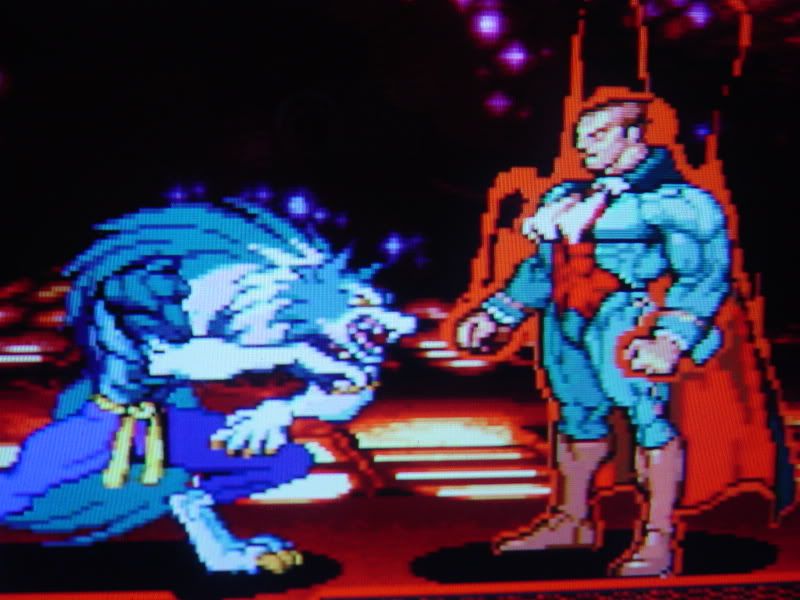
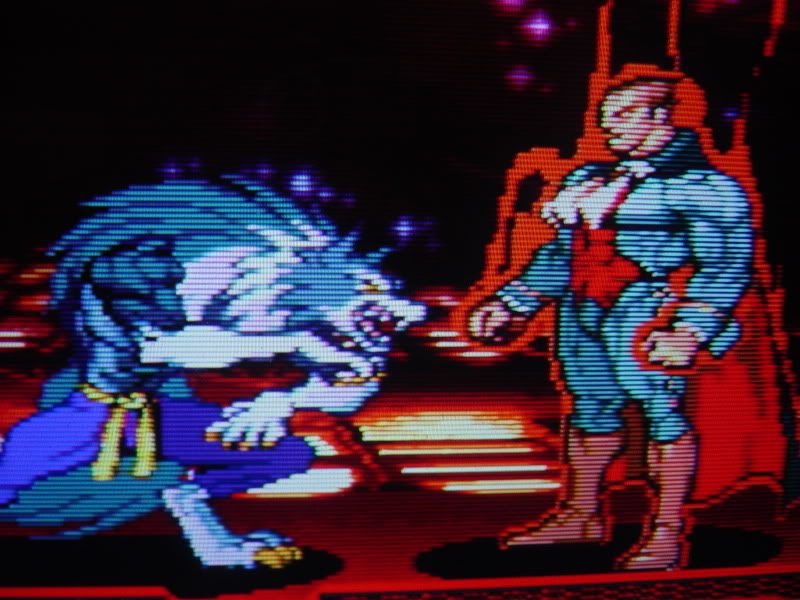
original hardware on HDTV via XRGB

Image
Image

PS3 on HDTV

Image
Image


to me... original hardware ownz. but the PS3 does quite a amazing job. personal choice for me is with simulated scanlines. makes it look less blocky and more crisp.
User avatar
D
Posts: 3852
Joined: Tue Feb 01, 2005 3:49 pm
Location: Almere, Netherlands
Contact:

Post by D »

not 480p, set the ps3 to 1080p!
It's razorsharp.
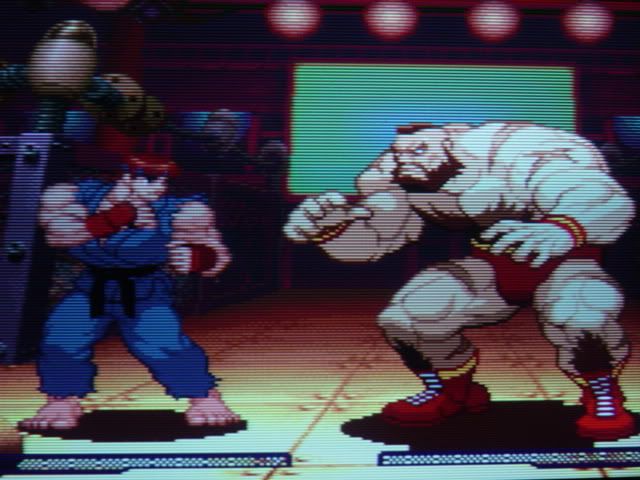
Oh, the hell with it. Here's Ghouls 'n Ghosts from the Capcom Collection.
PS1 game upscaled to 1080p, smoothing "OFF"
And I took this with a digital camera. When you see it in person it looks so much sharper, don't know how to properly capture it.
Image

Look at poor Arthur, he looks as square as he ever did.
Image

In this shot you see weird little lines going through the pixel, but when I look at the screen, there not there, just blocky goodness!
User avatar
Strider77
Posts: 4740
Joined: Thu Jul 27, 2006 7:01 am

Post by Strider77 »

scaling it to 1080p isn't what makes it look more sharp, it's the fact your tv only has 1080p as a naitive rez. If you set it to anything else you'd get the PS3 scaling and then the TV also.

The PS3 with smothing off will recreate the image the same either way.

I think that PS3 close up pic of 'gief has some blur... snapped between frames... :(
Last edited by Strider77 on Thu Jul 31, 2008 5:45 am, edited 1 time in total.
User avatar
D
Posts: 3852
Joined: Tue Feb 01, 2005 3:49 pm
Location: Almere, Netherlands
Contact:

Post by D »

Strider77 wrote:scaling it to 1080p isn't what makes it look more sharp, it's the fact your tv only has 1080p as a naitive rez. If you set it to anything else you'd get the PS3 scaling and then the TV also.

The PS3 with smothing off will recreate the image the same either way.

I think that PS3 close up pic of 'gief has some blur... snapped between frames
Well, actually my set is not even 1080p native. It just accepts 1080p.
The resolution is 1366 X 768. And the pictures I uploaded don't do it justice.
User avatar
Strider77
Posts: 4740
Joined: Thu Jul 27, 2006 7:01 am

Post by Strider77 »

you should have it set to 720p then... your getting a image that's being scaled twice, take a look and see what you think. the picture may look pretty much the same but it will cut out more lag.
User avatar
Kiken
Posts: 3991
Joined: Tue Jan 25, 2005 11:08 pm
Contact:

Post by Kiken »

fuko wrote:
D wrote:Toss your ps1 if you have a hdtv and a ps3
not if you want to play import games and your ps3 is domestic. Nobody has made a ps3 fliptop lid yet...
All PS1 and 2 games experience 3 frames of lag due to the PS3's internal upscaling. Or did Sony fix that on later revisions?
User avatar
Fudoh
Posts: 13044
Joined: Mon Mar 06, 2006 3:29 am
Location: Germany
Contact:

Post by Fudoh »

The PS3 lag with PS2 games is introduced by the "internal, but external" (meaning it's inside the Ps3, but it's chained after the actual videochip) scaling engine. This means 480i PS2 are affected most (2.5-3 frames (45-50ms) probably). If you have a PS2 game which you can switch to 480p then the videochip's 480p rendering is directly available on the output. The games feel more responsive (you can test with OutRun2SP for example), so I would say, it's 1-1.5 frame lag on those games only.

PS1 games are rendered in 1080p directly. There's no 2-step processing as with 480i PS2 games. From my experience, they feel responsive enough and I wouldn't say that the delay's higher than on 480p PS2 games, in other words, 1-1.5 frames max again (25ms max).

That's all on current firmware. If your TV introduces a lag on the HDMI input, then it'll become nasty though. The Gamemode on my Sony LCD makes a difference of about 3 frames (45-50ms).
User avatar
Specineff
Posts: 5803
Joined: Wed Jan 26, 2005 12:54 am
Location: Ari-Freaking-Zona!
Contact:

Post by Specineff »

lol, Sony.
Don't hold grudges. GET EVEN.
jezzo
Posts: 1
Joined: Fri Feb 17, 2017 8:48 pm

Re: Why do PS1 Downloads on PS3 still have a wrong aspect ra

Post by jezzo »

Sorry for digging out this old thread, but this was the only relevant one which actually touches the issue i'm having. Which is incorrect aspect ratio on US PSN PS1 games on PS3 and PS TV.

I got a lot of PSN US PS1 classics and started playing them on PS3 with Smoothing ON. At a first glance the aspect ratio looked off, but i said "no way they can screw this up". Well, after running FFVIII i was sure that something is wrong - no way Squall was so skinny. I've checked the background resolution of this game on the internet: 320x224, which gives us 1,428 when divided and then checked aspect ratio on the screen i was getting with burette. Results: 1.21...

I started to search forums googles and so on for the solution. This topic was one of the most relevant ones and convinced me that this issue really exists and it's not my particular console or tv fault. After some time (and one tweet on twitter about this from one guy) i managed to get the rules which are applying for downloaded US PS1 games on PS3:
480p with smoothing off or on - aspect ratio incorrect
1080p normal smoothing off - aspect ratio correct
1080p normal smoothing on - aspect ratio incorrect
1080 full screen smoothing on, then changed to 4:3 via TV scaler - aspect ratio incorrect
I don't know how people can play and not notice this... There is very little info about this issue over the internet...

I've tried playing ps1 games without the binear filtering (smoothing off) to enjoy correct aspect ratio, but the games looks terribly with all the blocky pixels flying around 50 inch screen. I tried turn down the resolution of the PS3 to 720p and sharpness of the TV to minimum to reduce the visibility of the pixels- it helped a bit but nowhere near the results of smoothing being on.
I though that maybe i will buy PS TV as it have bilinear filtering built in for PS1 games. Guess what? Aspect ratio is also off there without any internal option to fix it!
TV (Sony btw) i'm having also doesn't provide any horizontal stretch possibilities. Ridiculous!

Therefore, please guys/ladies, do you have any idea how to fix this aspect ratio without external device?
If i need external device for this 10-15% horizontal stretch, could you please advice which should i buy? I've tried to find myself some affordable external scaler that would allow me to do this without quality loss, but failed miserably with my litte knowledge on the topic. Everybody talking everywhere about the Framemeister but it's cost the same as new ps4pro console, and i don't even know if i will be able to do the horizontal strech with this device anyway... Please help :)
BONKERS
Posts: 425
Joined: Thu Dec 11, 2014 10:41 am

Re: Why do PS1 Downloads on PS3 still have a wrong aspect ra

Post by BONKERS »

I played through part of ATL2 a few years ago at 720p, I did notice the scaling artifacts. But didn't notice the AR issue.
User avatar
Xer Xian
Posts: 894
Joined: Sun Feb 06, 2005 3:23 pm
Location: Italy

Re: Why do PS1 Downloads on PS3 still have a wrong aspect ra

Post by Xer Xian »

I think everyone here abandoned the idea of using PS3 backwards compatibility long ago due to very poor fidelity. Aspect ratio inaccuracy is just one of the several issues you just have to put up with PS3 BC along with lag, subpar scaling, compatibility problems.. not even fat PS3s running original software are exempt from these in varying degrees.

That said, I understand that you already have a PSN library which perhaps would be a shame to let go. Unfortunately though, if your TV does not allow for AR adjustments, I guess your only option is indeed to buy an external video processor. DVDO and Micomsoft units won't let you down but are probably way overkill for such a menial task. Gefen VGA to DVI scalers should allow for AR control and can be found for as little as $30-40 on ebay.com - but you would have to buy a 3rd party PS3 VGA cable and a DVI to HDMI cable to use it with your setup. It will also add at least another frame of lag on top of what you have already, and you will always be looking at a picture that has been processed twice (by the PS3 and then the external box), which is hardly optimal in any case.

You can also look into the PS3 homebrew scene and see if someone has addressed any of the BC shortcomings of the PS3. It may be worth to wait for advancements on the PSTV front too (if you can run Henkaku). In any case though, it will never be the same as playing on the original hardware due to compatibility issues and limited output capabilities of these machines.
BONKERS
Posts: 425
Joined: Thu Dec 11, 2014 10:41 am

Re: Why do PS1 Downloads on PS3 still have a wrong aspect ra

Post by BONKERS »

Always the option of using a PSP GO with component cables if your TV scales 480p/240p/480i well.
User avatar
theclaw
Posts: 273
Joined: Sat Nov 26, 2011 2:41 pm

Re: Why do PS1 Downloads on PS3 still have a wrong aspect ra

Post by theclaw »

Huh, this is enlightening. I never really thought about why I ditched the backwards compatible PS3 for a slim.
At the time there didn't seem to be a reason.
Post Reply