Dear all,
I want to seek your help for the BKM-21D Composite Card.
How can I connect to AV Signal in a BVMD20F1 Monitor , it has 3 SDI ports (both in&out) and RGB ports (both in&out)
which port should I connect to get AV composite signal ?
If i would like to connect my FC (NES) with the AV composite signal ? how can I connect the cable ? and how can I select manu in BVM monitor ?
Thanks for your help...
waiting for the further reply...
BKM-21D Composite Signal Connected
-
Guspaz

- Posts: 3242
- Joined: Tue Oct 06, 2015 7:37 pm
- Location: Montréal, Canada
Re: BKM-21D Composite Signal Connected
The BKM-21D accepts composite video inputs on the input jacks for channels 4, 5, and 6. It requires the use of a 75-ohm terminator on the output jack of whichever one(s) you use.
The manual for this card (in Japanese and English) can be seen here:
http://www.broadcaststore.com/pdf/model ... km-21d.pdf
You must configure the details of which connector is used and with what format of signal on the INPUT CONFIGURATION menu of the monitor. The operations manual for your monitor can be found here:
http://www.alangordon.com/beta/wp-conte ... manual.pdf
That contains detailed information on the layout of the INPUT CONFIGURATION menu and how to use it. If Engilsh is not your native language, you may want to find a version of the manual in your native language.
The manual for this card (in Japanese and English) can be seen here:
http://www.broadcaststore.com/pdf/model ... km-21d.pdf
You must configure the details of which connector is used and with what format of signal on the INPUT CONFIGURATION menu of the monitor. The operations manual for your monitor can be found here:
http://www.alangordon.com/beta/wp-conte ... manual.pdf
That contains detailed information on the layout of the INPUT CONFIGURATION menu and how to use it. If Engilsh is not your native language, you may want to find a version of the manual in your native language.
-
snoopyj
- Posts: 37
- Joined: Fri Jul 25, 2014 2:12 am
Re: BKM-21D Composite Signal Connected
My English is O.K Thanks for your prompt reply. I just want to comfirm who use 21D to connent FC (NES) and how to connect the cableGuspaz wrote:The BKM-21D accepts composite video inputs on the input jacks for channels 4, 5, and 6. It requires the use of a 75-ohm terminator on the output jack of whichever one(s) you use.
The manual for this card (in Japanese and English) can be seen here:
http://www.broadcaststore.com/pdf/model ... km-21d.pdf
You must configure the details of which connector is used and with what format of signal on the INPUT CONFIGURATION menu of the monitor. The operations manual for your monitor can be found here:
http://www.alangordon.com/beta/wp-conte ... manual.pdf
That contains detailed information on the layout of the INPUT CONFIGURATION menu and how to use it. If Engilsh is not your native language, you may want to find a version of the manual in your native language.
ANYONE can help ?
-
Fudoh

- Posts: 13047
- Joined: Mon Mar 06, 2006 3:29 am
- Location: Germany
- Contact:
Re: BKM-21D Composite Signal Connected
You just need an adapter plug, like this: http://www.discount-security-cameras.ne ... ca_lrg.jpg
You can also connect it to any of the inputs on the stock RGB board. The composite decoder on the 21D will work for those as well.
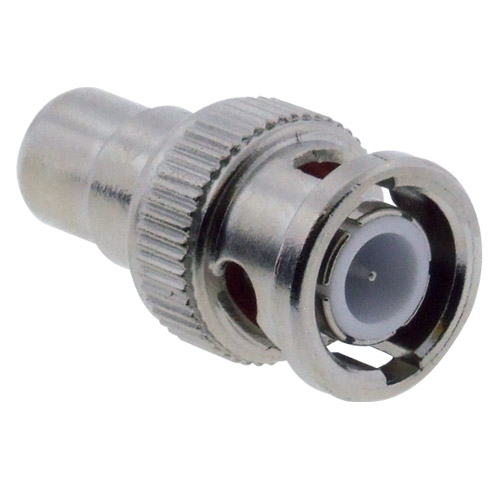
You can also connect it to any of the inputs on the stock RGB board. The composite decoder on the 21D will work for those as well.