UPDATE: I was able to resolve this issue by getting CSYNC from the composite video pin on the Genesis AV port through an LM1881 (http://retrorgb.com/syncstripper.html) rather than the CSYNC provided at the Genesis AV port or any of the sources available on the Genesis motherboard.
-----
I've been having problems getting my XRGB Mini to display video output from my Sega Genesis. The Sega Genesis displays fine without the XRGB Mini and the XRGB Mini displays output from other consoles such as my N64 and Super Famicom just fine.
You can see the problem in this youtube video which starts with showing the unit display just fine through my Onkyo TX-SR608 receiver then shows it fail to display reliably through my XRGB Mini:
https://www.youtube.com/watch?v=A7GGzAxH-7k
When trying to use my Genesis through my XRGB mini I have flickering of the video, lost segments of output, color alterations, bands of green, and even rebooting of my TV.
I am running my XRGB Mini output in HDMI through my Oknyo AVR to my Samsung LED LCD.
I have played with the SYNC_LEVEL setting on the XRGB Mini unit and even maxxing out that setting at 31 does not seem to help. I have to enter the RGB video mode to change this setting though, so I don't think it actually has any effect on the "VIDEO" (composite video) input mode of the XRGB Mini.
Using the same console I have tried to output video over S-Video through the XRGB-Mini and the colors are also very weird and sync gets lost. Over RGB using CSYNC (yes my Genesis 3 VA1 has native RGB/CSYNC output) the XRGB Mini fails almost entirely to display anything and only shows a few pixels on occasion.
The myriad of problems when using the XRGB Mini makes me wonder if the SYNC input is not sensitive enough on the XRGB unit. I wonder if putting in an THS7314DR to amplify the SYNC channel will allow the XRGB to pick it up, but I don't know enough about the XRGB hardware to know if this is the problem for sure.
When wiring up the RGB cable I have tried using sync over composite video and also using CSYNC as output on the Genesis min DIN connector, neither got a stable sync with the XRGB unit. I also tried the signal directly from pin 10 on the CXA1645 for CSYNC, that didn't work either. I tried the CSYNC from pin 10 on the CXA1645 through a 75 ohm resistor and 220uf capacitor, that didn't work either.
It is my belief that all of these cases have the same root cause: a sync signal coming from the Genesis which is too weak for the XRGB Mini to pick up, but I find it strange that a simple composite input on my AVR picks up the signal just fine while my $400 XRGB fails to do so.
Any help is much appreciated.
[SOLVED] XRGB Mini w/ Genesis 3 & Composite Video
-
TheBearded1
- Posts: 19
- Joined: Fri Oct 30, 2015 5:54 am
[SOLVED] XRGB Mini w/ Genesis 3 & Composite Video
Last edited by TheBearded1 on Wed Nov 04, 2015 8:37 am, edited 2 times in total.
-
Ripthorn
- Posts: 145
- Joined: Thu Nov 27, 2014 8:36 pm
- Location: Hellhole
Re: XRGB Mini w/ Sega Genesis: Composite Video Not Working
Sync get lost on Sonic 2 because the two players mode runs at 480i
My framemeister hates composite video and s-video from my MD2/CDX/X-EYE too, lots of artifacts, horizontal jailbars and weird colors, but RGB works fine. I wonder why it happens.
32x/CDX/X-EYE requires a booster on CSYNC to function properly on Framemeister I think, perhaps the genesis 3 requires this booster too.
Sorry, my post was not very useful , but at least you know you're not alone.
My framemeister hates composite video and s-video from my MD2/CDX/X-EYE too, lots of artifacts, horizontal jailbars and weird colors, but RGB works fine. I wonder why it happens.
32x/CDX/X-EYE requires a booster on CSYNC to function properly on Framemeister I think, perhaps the genesis 3 requires this booster too.
Sorry, my post was not very useful
, but at least you know you're not alone. -
FBX

- Posts: 2349
- Joined: Wed Feb 18, 2015 10:18 am
- Location: DFW area, Texas
- Contact:
Re: XRGB Mini w/ Sega Genesis: Composite Video Not Working
Like Ripthorn said, Sonic 2's splitscreen mode is incompatible with the Framemeister. It's an unfortunate coincidence that you chose that game to demonstrate with.
At any rate, I got a boosted-sync RGB cable from Retro_Console_Accessories and it has worked great. You should be using something like that instead of composite anyway.
At any rate, I got a boosted-sync RGB cable from Retro_Console_Accessories and it has worked great. You should be using something like that instead of composite anyway.
-
TheBearded1
- Posts: 19
- Joined: Fri Oct 30, 2015 5:54 am
Re: XRGB Mini w/ Sega Genesis: Composite Video Not Working
I do not want to eventually use composite mode. I fell back to attempting that when I failed to get RGB working. My suspicion was that any sync signal from this console would fail in a similar way, and I was confirming that by trying composite video and s-video.
I have an RGB cable, but not one with an LM1881. I will be trying that.
I have an RGB cable, but not one with an LM1881. I will be trying that.
-
Hoagtech

- Posts: 1025
- Joined: Mon Apr 27, 2015 3:53 am
- Location: Bellingham, WA
Re: XRGB Mini w/ Sega Genesis: Composite Video Not Working
It depends on the model. Most models of "2" require a sync stripper. I got mine from retro console accessories on eBay. You plug the power into the stripper and then the stripper cable into the power outlet of the mini.
Unfortunately they make cables randomly and they are sold out of the : "euroscart to Jp-21 xrgb mini w/sync stripper cord" your looking for but I would send her a seller message as they have excellent service and make custom cables on demand.
If you just want a solution for your genesis you could try their Csync cable with boost. (Same seller)
Boosted sync cable for model 2: http://www.ebay.ca/itm/US-seller-Genesi ... xydgZTKJLC
Unfortunately they make cables randomly and they are sold out of the : "euroscart to Jp-21 xrgb mini w/sync stripper cord" your looking for but I would send her a seller message as they have excellent service and make custom cables on demand.
If you just want a solution for your genesis you could try their Csync cable with boost. (Same seller)
Boosted sync cable for model 2: http://www.ebay.ca/itm/US-seller-Genesi ... xydgZTKJLC
Copyright 1987
-
TheBearded1
- Posts: 19
- Joined: Fri Oct 30, 2015 5:54 am
Re: XRGB Mini w/ Sega Genesis: Composite Video Not Working
That might work, but I'm on a quest to make all of my consoles work with the exact same cable.
I bought an LM1881 chip (apparently the chip used in sync cleaners and boosters) which I will be placing directly in the console so that it will work with any RGB cable. I don't think the boost cables are the best idea so long as one has the skills to fix the sync within the unit: I'm not a fan of undocumented specific cable needs which I or some future owner years down the road may not be aware of or forget and accidentally trash a console that works just fine.
I bought an LM1881 chip (apparently the chip used in sync cleaners and boosters) which I will be placing directly in the console so that it will work with any RGB cable. I don't think the boost cables are the best idea so long as one has the skills to fix the sync within the unit: I'm not a fan of undocumented specific cable needs which I or some future owner years down the road may not be aware of or forget and accidentally trash a console that works just fine.
-
Hoagtech
- Posts: 1025
- Joined: Mon Apr 27, 2015 3:53 am
- Location: Bellingham, WA
Re: XRGB Mini w/ Sega Genesis: Composite Video Not Working
Well that's not the one I referenced. Do you know who RetroConsoleAccessories are?TheBearded1 wrote:That might work, but I'm on a quest to make all of my consoles work with the exact same cable.
I bought an LM1881 chip (apparently the chip used in sync cleaners and boosters) which I will be placing directly in the console so that it will work with any RGB cable. I don't think the boost cables are the best idea so long as one has the skills to fix the sync within the unit: I'm not a fan of undocumented specific cable needs which I or some future owner years down the road may not be aware of or forget and accidentally trash a console that works just fine.
I'm telling you to get a cable made That "plugs in and is made specifically for XRGB Mini" made by the greatest video game scart cable maker on the Internet. My first reccomended action was the sync stripper, which I leave on for all consoles. But that other cable would do the trick.
I would reccomend against the chip. Soldering could fudge up that pricey mini you got.
Copyright 1987
-
TheBearded1
- Posts: 19
- Joined: Fri Oct 30, 2015 5:54 am
Re: XRGB Mini w/ Sega Genesis: Composite Video Not Working
One day I might be brave enough to solder on my mini, but that day is not today! Specifically I would love to put an analog audio passthrough on it. I will be putting the sync stripper/booster into the genesis.Hoagtech wrote:TheBearded1 wrote:Soldering could fudge up that pricey mini you got.
-
viletim
- Posts: 565
- Joined: Mon Aug 07, 2006 6:44 am
- Location: Sydney, Australia
- Contact:
Re: XRGB Mini w/ Sega Genesis: Composite Video Not Working
TheBearded1,
The XRGB-Mini has a composite video input (for sync) so you should connect the composite video signal here. It is guaranteed to work by design!
The composite sync output from the Genesis is a TTL signal and is not designed to drive 75 ohm video inputs. It is not guaranteed to work, and it appears it does not in fact. If you absolutely insist on using the TTL sync signal (many do, even though there is no good reason for it) you must place some components in series so the composite video input does not load the signal. You can use a 470 ohm resistor and a 220u capacitor. The resistor must go into the console end of the cable (put other resistor in this end at well) the capacitor can go anywhere.
The LM1881 based sync separator circuit is about equivalent to what you would find in a 1970's television set. The XRGB-Mini has a much better one in it already. Using an external sync separator causes more problems that it solves.
The XRGB-Mini has a composite video input (for sync) so you should connect the composite video signal here. It is guaranteed to work by design!
The composite sync output from the Genesis is a TTL signal and is not designed to drive 75 ohm video inputs. It is not guaranteed to work, and it appears it does not in fact. If you absolutely insist on using the TTL sync signal (many do, even though there is no good reason for it) you must place some components in series so the composite video input does not load the signal. You can use a 470 ohm resistor and a 220u capacitor. The resistor must go into the console end of the cable (put other resistor in this end at well) the capacitor can go anywhere.
The LM1881 based sync separator circuit is about equivalent to what you would find in a 1970's television set. The XRGB-Mini has a much better one in it already. Using an external sync separator causes more problems that it solves.
-
BuckoA51

- Posts: 3424
- Joined: Sat Oct 02, 2010 10:08 am
- Location: Ireland
- Contact:
Re: XRGB Mini w/ Sega Genesis: Composite Video Not Working
You'd think wouldn't you, yet my N64 (NUJ1 model with RetroRGB amp) gives no picture at all unless I use a sync stripper. Get one of the ones that gets power by piggy-backing the Mini's DC input and 99% of the time it's probably redundant, but doesn't cause any problems that I can see.The LM1881 based sync separator circuit is about equivalent to what you would find in a 1970's television set. The XRGB-Mini has a much better one in it already. Using an external sync separator causes more problems that it solves.
OSSC Forums - http://www.videogameperfection.com/forums
Please check the Wiki before posting about Morph, OSSC, XRGB Mini or XRGB3 - http://junkerhq.net/xrgb/index.php/Main_Page
Please check the Wiki before posting about Morph, OSSC, XRGB Mini or XRGB3 - http://junkerhq.net/xrgb/index.php/Main_Page
-
TheBearded1
- Posts: 19
- Joined: Fri Oct 30, 2015 5:54 am
Re: XRGB Mini w/ Sega Genesis: Composite Video Not Working
This is exactly what does not work for me. The genesis connected via composite video to the XRGB does not stay in sync. I've tried also svideo with sync on luma and also rgb with csync and sync on composite.viletim wrote:The XRGB-Mini has a composite video input (for sync) so you should connect the composite video signal here. It is guaranteed to work by design!
-
TheBearded1
- Posts: 19
- Joined: Fri Oct 30, 2015 5:54 am
Re: XRGB Mini w/ Sega Genesis: Composite Video Not Working
The csync I have tried is connected to pin 5 on the genesis video output and is used in the Sega scart connectors, which seems to contradict your statement. Is not every video input 75 ohms? It'd be helpful if you could explain in more detail.viletim wrote:The composite sync output from the Genesis is a TTL signal and is not designed to drive 75 ohm video inputs.
-
viletim
- Posts: 565
- Joined: Mon Aug 07, 2006 6:44 am
- Location: Sydney, Australia
- Contact:
Re: XRGB Mini w/ Sega Genesis: Composite Video Not Working
The sync signal is used in Sega's cable because the French version of the Master System doesn't have a video encoder circuit at all. Here's the circuit.TheBearded1 wrote:The csync I have tried is connected to pin 5 on the genesis video output and is used in the Sega scart connectors, which seems to contradict your statement. Is not every video input 75 ohms? It'd be helpful if you could explain in more detail.viletim wrote:The composite sync output from the Genesis is a TTL signal and is not designed to drive 75 ohm video inputs.
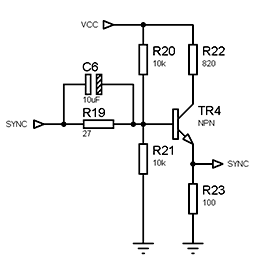
My point is you don't make a digital TTL sync signal into a 75 ohm signal by slapping a 75 ohm resistor onto it. The output impedance hardly matters at all in this case. The signal level is the critical one. It's extra tricky for the Genesis as this sync signal is connected to the video encoder internally. The video encoder wants a signal that swings up to 2.0V high and below 0.8V low (TTL standard) and the TV (or XRGB-mini in this cast) wants an AC coupled 300mVp-p signal.
When you connect only a 75 ohm resistor to the sync signal you load it with a combined impedance of 150 ohms. A heavy load like this can't bet driven at TTL levels so the video encoder doesn't get a valid sync signal. The video encoder (which is also the RGB driver) won't output a valid video signal without it.
-
viletim
- Posts: 565
- Joined: Mon Aug 07, 2006 6:44 am
- Location: Sydney, Australia
- Contact:
Re: XRGB Mini w/ Sega Genesis: Composite Video Not Working
You should find the actual problem and fix it instead. This seems to be just a band-aid fix. There's nothing technically difficult about stripping the sync from a composite signal. My Framemiester has no trouble with it (though I admit that proves nothing in particular).BuckoA51 wrote:You'd think wouldn't you, yet my N64 (NUJ1 model with RetroRGB amp) gives no picture at all unless I use a sync stripper. Get one of the ones that gets power by piggy-backing the Mini's DC input and 99% of the time it's probably redundant, but doesn't cause any problems that I can see.The LM1881 based sync separator circuit is about equivalent to what you would find in a 1970's television set. The XRGB-Mini has a much better one in it already. Using an external sync separator causes more problems that it solves.
The problem with these in series sync stripper circuits is they are often implemented in a cack-handed way. Sometimes they don't terminate the composite signal with 75 ohms. This makes the composite signal is double size (in amplitude) and couples quite well into the audio. Some of them try to try to source power from the SCART switching signals and this doesn't work if the signals are standards compliant.
-
BuckoA51
- Posts: 3424
- Joined: Sat Oct 02, 2010 10:08 am
- Location: Ireland
- Contact:
Re: XRGB Mini w/ Sega Genesis: Composite Video Not Working
Easy for you being a total hardware genius, not so much for the rest of usYou should find the actual problem and fix it instead.
True, I've lost count of the number of people having this problem, always better to get the power from the DC in by piggy-back.Some of them try to try to source power from the SCART switching signals and this doesn't work if the signals are standards compliant.
OSSC Forums - http://www.videogameperfection.com/forums
Please check the Wiki before posting about Morph, OSSC, XRGB Mini or XRGB3 - http://junkerhq.net/xrgb/index.php/Main_Page
Please check the Wiki before posting about Morph, OSSC, XRGB Mini or XRGB3 - http://junkerhq.net/xrgb/index.php/Main_Page
-
TheBearded1
- Posts: 19
- Joined: Fri Oct 30, 2015 5:54 am
Re: [SOLVED] XRGB Mini w/ Genesis 3 & Composite Video
TL;DR: As hoped an LM1881 resolved my issue. On the Genesis 3 take composite video through an LM1881 to get a clean CSYNC for use with the XRGB Mini.
I bought the sync stripper LM1881 circuit from retrorgb.com (http://retrorgb.com/syncstripper.html) and installed it in my genesis. I wired the "V-IN" pad on the sync stripper board to the composite video pin on the genesis AV port (http://www.gamesx.com/avpinouts/genesisav.htm) which is easily accessible on the underside of the motherboard and easily located with some thin gauge wire inserted into the correct pin on the AV port and a probe from a multimeter.
Using hot glue I tacked the board onto a piece of anti-static bag, did the same with my RF shield to ensure there was not any shorts onto it, and then tacked the board onto the lid near the cartridge port. You can see the Sync Stripper board installed in the lid of my Genesis 3 here:
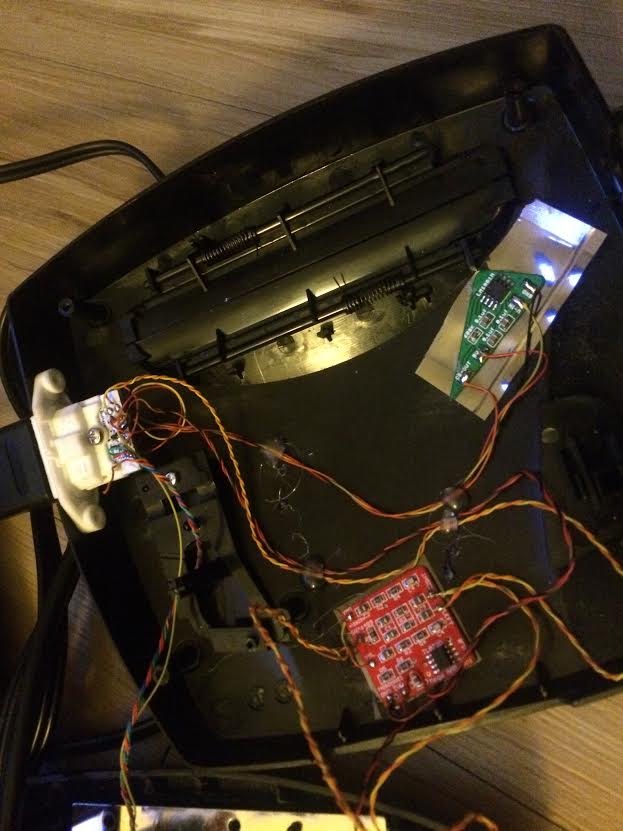
The other board installed is the megaamp mini (http://assemblergames.com/l/threads/hel ... ost-739007) and the white piece where the sync stripper wires go is a Helder SNES AV port (http://assemblergames.com/l/threads/f-s ... ket.50494/).
I bought the sync stripper LM1881 circuit from retrorgb.com (http://retrorgb.com/syncstripper.html) and installed it in my genesis. I wired the "V-IN" pad on the sync stripper board to the composite video pin on the genesis AV port (http://www.gamesx.com/avpinouts/genesisav.htm) which is easily accessible on the underside of the motherboard and easily located with some thin gauge wire inserted into the correct pin on the AV port and a probe from a multimeter.
Using hot glue I tacked the board onto a piece of anti-static bag, did the same with my RF shield to ensure there was not any shorts onto it, and then tacked the board onto the lid near the cartridge port. You can see the Sync Stripper board installed in the lid of my Genesis 3 here:
The other board installed is the megaamp mini (http://assemblergames.com/l/threads/hel ... ost-739007) and the white piece where the sync stripper wires go is a Helder SNES AV port (http://assemblergames.com/l/threads/f-s ... ket.50494/).