Hooking the graphics card to a TV with SCART?
-
Hector Fahrenheit

- Posts: 5
- Joined: Tue Oct 06, 2015 11:02 pm
- Contact:
Hooking the graphics card to a TV with SCART?
I managed to find someone in my area selling a Sony Trinitron (KV-32FQ70E). I'm in Europe so the TV has SCART (which I'm told is great?) but I want to connect it to my graphics card for some retro gaming sessions. My card has HDMI, DVI-D and a DVI-I, currently occupied with my LCD monitor. How exactly do I connect the TV to the card?
-
Guspaz

- Posts: 3242
- Joined: Tue Oct 06, 2015 7:37 pm
- Location: Montréal, Canada
Re: Hooking the graphics card to a TV with SCART?
Warning: I'm not an expert and I don't live in Europe.
You'll probably need some sort of converter box. You've got an analog output (DVI-I will do VGA), but it would output RGBHV, and your SCART television probably supports some different method of sync (RGBS, perhaps, or RGsB, I'm not too sure what european televisions use, but I know it's not RGBHV), and it may or may not support the same frequencies as your computer (something like 480i or 576i support on a VGA output is quite rare, I think). If your TV does support progressive scan, you might be able to get a VGA to SCART adapter, if you get one that takes care of the different sync signal. Also, a DVI-I to VGA adapter, obviously. But if your TV doesn't, then you'd need a downscaler, or you'd need a videocard with something like an S-VIDEO port.
I found the service manual for your TV: http://diagramas.diagramasde.com/televi ... 2FQ70E.pdf
Page 6 seems to have some info about what signals are supported on what ports. If you have a videocard that supports S-Video, you've got an S-Video port on the front of your TV. I think one of the SCART ports also supports S-VIDEO via the SCART connector.
You'll probably need some sort of converter box. You've got an analog output (DVI-I will do VGA), but it would output RGBHV, and your SCART television probably supports some different method of sync (RGBS, perhaps, or RGsB, I'm not too sure what european televisions use, but I know it's not RGBHV), and it may or may not support the same frequencies as your computer (something like 480i or 576i support on a VGA output is quite rare, I think). If your TV does support progressive scan, you might be able to get a VGA to SCART adapter, if you get one that takes care of the different sync signal. Also, a DVI-I to VGA adapter, obviously. But if your TV doesn't, then you'd need a downscaler, or you'd need a videocard with something like an S-VIDEO port.
I found the service manual for your TV: http://diagramas.diagramasde.com/televi ... 2FQ70E.pdf
Page 6 seems to have some info about what signals are supported on what ports. If you have a videocard that supports S-Video, you've got an S-Video port on the front of your TV. I think one of the SCART ports also supports S-VIDEO via the SCART connector.
-
BazookaBen

- Posts: 2159
- Joined: Thu Apr 17, 2008 8:09 pm
- Location: North Carolina
Re: Hooking the graphics card to a TV with SCART?
DVI-I can put out RGBHV (aka VGA) signal, which is basically the same thing that SCART uses (RGBS). The only issue is that you will need to combine H and V into S.
There are DVI-I to SCART adapters on the internet, but I'm not sure if they combine sync or not. You could fix that easily yourself by either shorting the H and V pins with a piece of wire on the VGA side, or by enabling composite sync in you graphics card settings (AMD has this option under VGA settings). If you already have a DVI to VGA adapter, you can also just use a VGA to SCART adapter, which may be easier to find.
The next step is creating and enabling 15hz resolutions in your graphics driver. With my Radeon 7970, it's pretty easy, I just have to use the Custom Resolution Utility to create a 240p or 480i resolution. With other graphics cards, you may need to go through other steps, like using Soft 15khz or something. Also need to make sure your TV is 60hz compatible otherwise you'll only be playing PAL games on it.
There are DVI-I to SCART adapters on the internet, but I'm not sure if they combine sync or not. You could fix that easily yourself by either shorting the H and V pins with a piece of wire on the VGA side, or by enabling composite sync in you graphics card settings (AMD has this option under VGA settings). If you already have a DVI to VGA adapter, you can also just use a VGA to SCART adapter, which may be easier to find.
The next step is creating and enabling 15hz resolutions in your graphics driver. With my Radeon 7970, it's pretty easy, I just have to use the Custom Resolution Utility to create a 240p or 480i resolution. With other graphics cards, you may need to go through other steps, like using Soft 15khz or something. Also need to make sure your TV is 60hz compatible otherwise you'll only be playing PAL games on it.
-
Xyga

- Posts: 7181
- Joined: Tue Nov 05, 2013 8:22 pm
- Location: block
Re: Hooking the graphics card to a TV with SCART?
It's one of those dreaded 100Hz models, pretty useless for retrogaming because you won't be able to display true 15KHz low resolutions on it.
Don't waste your time trying.
Don't waste your time trying.
Strikers1945guy wrote:"Do we....eat chicken balls?!"
-
Hector Fahrenheit
- Posts: 5
- Joined: Tue Oct 06, 2015 11:02 pm
- Contact:
Re: Hooking the graphics card to a TV with SCART?
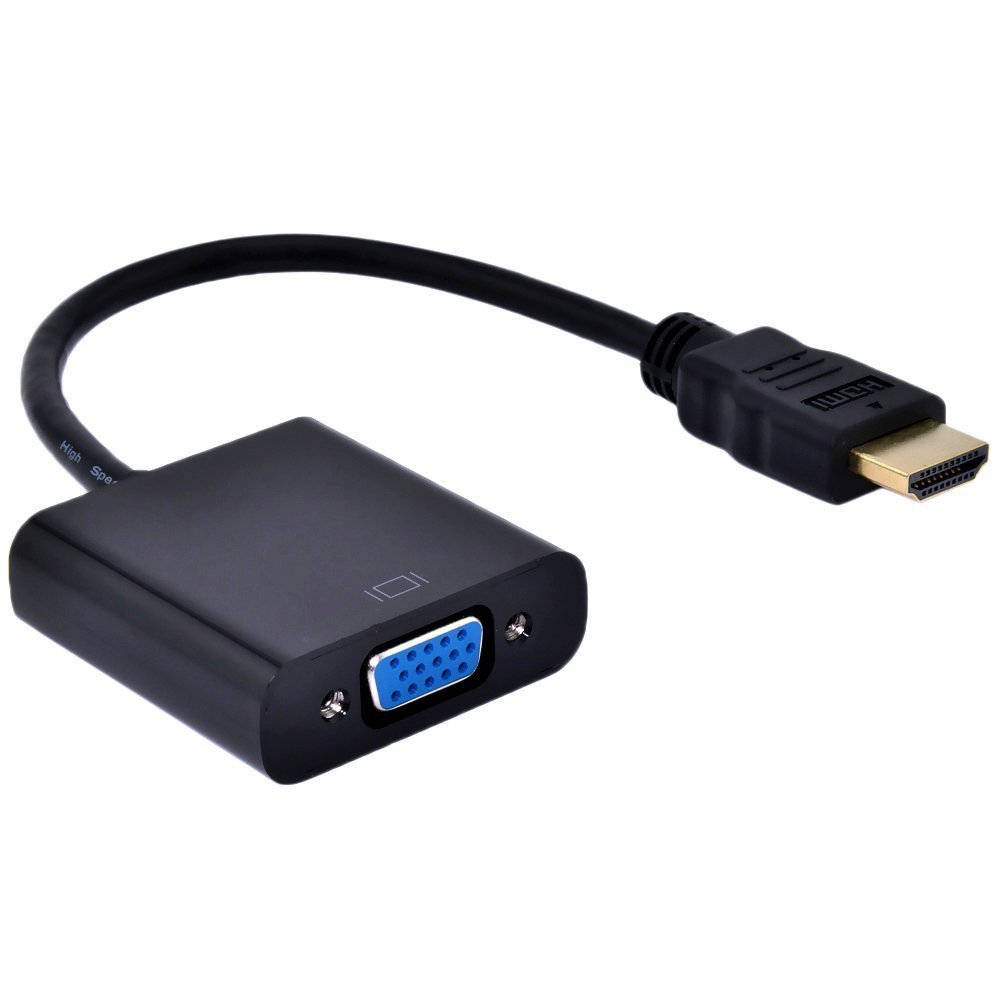
I discovered I have a VGA to HDMI converter in my drawer of cable hell, one like this http://ecx.images-amazon.com/images/I/5 ... L1000_.jpg. This was infact the setup I used with my CTR monitor some years back which only had a built-in VGA connector. For my TV I assume adding a VGA to SCART adapter and the superwide modeline (as described below) should suffice? I don't know about sync...
 so most of them died on me). Isn't 15khz display emulation possible through shaders in that case? I'm referring to advice from the game tech wiki in regards to CRT monitors:
Sorry if I should have mentioned this earlier.
so most of them died on me). Isn't 15khz display emulation possible through shaders in that case? I'm referring to advice from the game tech wiki in regards to CRT monitors:
Sorry if I should have mentioned this earlier.
Keep in mind my question was specifically asking about the best way of connecting the TV to my gfx card (Radeon R7 280x) as this is the hardware forum. I won't be playing on actual hardware but through emulation... (I wasn't exactly respectful to my old consoles as a kidXyga wrote:It's one of those dreaded 100Hz models, pretty useless for retrogaming because you won't be able to display true 15KHz low resolutions on it.
Don't waste your time trying.
so most of them died on me). Isn't 15khz display emulation possible through shaders in that case? I'm referring to advice from the game tech wiki in regards to CRT monitors:
Spoiler
240p/480i Emulation
Given the many advantages that CRT monitors possess, they make ideal displays for emulation, particularly for 5th-gen games and below. However, to get the most out of them, some extra steps may be necessary. For instance, some games used interlaced modes, which without a shader results in ugly deinterlacing artifacts. Also, even at 480p, games that ran at 240p and below look blocky and pixellated, not to mention correcting the aspect ratio for games using non-square pixels results in scaling artifacts, just as on an LCD. The scaling issues can be dealt with using a superwide 240p resolution, but that requires using 120hz with black frame insertion, and games that use 480i get downsampled to 240p, making it a less than ideal solution in those cases, although it does have lower latency due lower frame times between vsync.
To correctly display games that need both 240p and 480i resolutions, the solution lies in creating a custom superwide 3840x480 modeline, combining it with a shader that scanlines 240p content and interlaces 480i content, and using both through RetroArch, essentially turning your monitor into an extremely sharp CRT TV. On Nvidia cards, the custom modeline can easily be set within your graphics card's drivers. On AMD, it requires the use of third-party software, such as Custom Resolution Utility. Simply add a detailed resolution with the exact settings shown on the picture, restart your computer, and the monitor should now be able to make use of the new modeline. As for the shader, hunterk's interlacing.cg gives you black lines that will oscillate when given an image with 400 or higher vertical resolution, emulating the behavior of 15kHz displays. There are also some shader presets that combine the interlacing shader with tvout-tweaks and image-adjustment for accurate RGB signal emulation and color controls, and also some that utilize Themaister's NTSC shader for composite/s-video emulation.
Given the many advantages that CRT monitors possess, they make ideal displays for emulation, particularly for 5th-gen games and below. However, to get the most out of them, some extra steps may be necessary. For instance, some games used interlaced modes, which without a shader results in ugly deinterlacing artifacts. Also, even at 480p, games that ran at 240p and below look blocky and pixellated, not to mention correcting the aspect ratio for games using non-square pixels results in scaling artifacts, just as on an LCD. The scaling issues can be dealt with using a superwide 240p resolution, but that requires using 120hz with black frame insertion, and games that use 480i get downsampled to 240p, making it a less than ideal solution in those cases, although it does have lower latency due lower frame times between vsync.
To correctly display games that need both 240p and 480i resolutions, the solution lies in creating a custom superwide 3840x480 modeline, combining it with a shader that scanlines 240p content and interlaces 480i content, and using both through RetroArch, essentially turning your monitor into an extremely sharp CRT TV. On Nvidia cards, the custom modeline can easily be set within your graphics card's drivers. On AMD, it requires the use of third-party software, such as Custom Resolution Utility. Simply add a detailed resolution with the exact settings shown on the picture, restart your computer, and the monitor should now be able to make use of the new modeline. As for the shader, hunterk's interlacing.cg gives you black lines that will oscillate when given an image with 400 or higher vertical resolution, emulating the behavior of 15kHz displays. There are also some shader presets that combine the interlacing shader with tvout-tweaks and image-adjustment for accurate RGB signal emulation and color controls, and also some that utilize Themaister's NTSC shader for composite/s-video emulation.
-
BuckoA51

- Posts: 3424
- Joined: Sat Oct 02, 2010 10:08 am
- Location: Ireland
- Contact:
Re: Hooking the graphics card to a TV with SCART?
He's saying your display IS a 15khz display, it's just not a great one for retrogames in general. You can't emulate a 15khz display on a 15khz display.
OSSC Forums - http://www.videogameperfection.com/forums
Please check the Wiki before posting about Morph, OSSC, XRGB Mini or XRGB3 - http://junkerhq.net/xrgb/index.php/Main_Page
Please check the Wiki before posting about Morph, OSSC, XRGB Mini or XRGB3 - http://junkerhq.net/xrgb/index.php/Main_Page
-
Hector Fahrenheit
- Posts: 5
- Joined: Tue Oct 06, 2015 11:02 pm
- Contact:
Re: Hooking the graphics card to a TV with SCART?
Alright, my bad.BuckoA51 wrote:He's saying your display IS a 15khz display, it's just not a great one for retrogames in general. You can't emulate a 15khz display on a 15khz display.
What would be the difference between a CRT that displays true 15khz and mine, visually speaking, when playing games.
-
Guspaz
- Posts: 3242
- Joined: Tue Oct 06, 2015 7:37 pm
- Location: Montréal, Canada
Re: Hooking the graphics card to a TV with SCART?
That's an active converter, it's going to take the digital HDMI signal and convert it to an analog VGA signal, probably introducing some lag.Hector Fahrenheit wrote:I discovered I have a VGA to HDMI converter in my drawer of cable hell, one like this http://ecx.images-amazon.com/images/I/5 ... L1000_.jpg. This was infact the setup I used with my CTR monitor some years back which only had a built-in VGA connector. For my TV I assume adding a VGA to SCART adapter and the superwide modeline (as described below) should suffice? I don't know about sync...
Your videocard supports native VGA output via the DVI-I port (DVI-I means it has both a DVI and a VGA signal), all you need is a simple passive converter that just routes the pins. That is what you should be using, because there is no conversion happening. They look like this:
https://www.monoprice.com/product?c_id= ... 1&format=2
-
Xyga
- Posts: 7181
- Joined: Tue Nov 05, 2013 8:22 pm
- Location: block
Re: Hooking the graphics card to a TV with SCART?
@Hector: Yes it's the hardware forum but its is completely related.
Correct me if I'm wrong but what you're thinking of doing is using that 100Hz TV like it would be a kind of 'low res PC monitor', probably using a single compatible 480p modeline for 'desktop and programs' like emulators as intended.
But 100Hz TV's are neither like 15KHz TV's nor PC monitors (that RA quote refers to the latter), for sure it will look horrible in most cases because it is not a high resolution PC monitor or HD CRT with enough native resolution that it will be able to display desktop and programs with the scaling that it implies and properly doubled games w/ scanlines over it, without switching active resolutions.
Since AFAIK all 100Hz TV's apply deinterlacing to lower progressive 15Hz signals before doubling the frequency to 31KHz, I imagine a potentially much better looking workaround would be per-emulated-hardware alternative interlaced modelines, for instance 640x480i@60Hz instead of 320x240p@60Hz.
This way you would 'trick' the TV into displaying a doubled signal, progressive every time.
No idea if that would work with any specified alternative interlaced mode though, you will probably run into unaccepted modes (by the TV or the GPU) and maybe even forced anti-flicker/aliasing filters on the TV side (bad for the picture integrity and clarity) but that depends on the specific model specs and features.
Finding the 'right' modes will be a difficult step-by-step process.
Again 100Hz sets are different from both normal 15KHz tv's and normal 31khz pc monitors, people only use those for things like consoles with available progressive scan modes, like the PS2 with compatible games or the original Xbox I believe, so there isn't much info about using them for anything like actual 15KHz emulation (aside from "stay away from 100hz sets!" I mean).
IMHO the place with the most knowledge on that is surely the BYOAC forums, which is home to most 15KHz emu and related hardwae topics theses days.
Check this thread for instance: http://forum.arcadecontrols.com/index.p ... c=114152.0
EDIT: here's another possibly more useful bit from Calamity: http://forum.arcadecontrols.com/index.p ... c=132386.0
Correct me if I'm wrong but what you're thinking of doing is using that 100Hz TV like it would be a kind of 'low res PC monitor', probably using a single compatible 480p modeline for 'desktop and programs' like emulators as intended.
But 100Hz TV's are neither like 15KHz TV's nor PC monitors (that RA quote refers to the latter), for sure it will look horrible in most cases because it is not a high resolution PC monitor or HD CRT with enough native resolution that it will be able to display desktop and programs with the scaling that it implies and properly doubled games w/ scanlines over it, without switching active resolutions.
Since AFAIK all 100Hz TV's apply deinterlacing to lower progressive 15Hz signals before doubling the frequency to 31KHz, I imagine a potentially much better looking workaround would be per-emulated-hardware alternative interlaced modelines, for instance 640x480i@60Hz instead of 320x240p@60Hz.
This way you would 'trick' the TV into displaying a doubled signal, progressive every time.
No idea if that would work with any specified alternative interlaced mode though, you will probably run into unaccepted modes (by the TV or the GPU) and maybe even forced anti-flicker/aliasing filters on the TV side (bad for the picture integrity and clarity) but that depends on the specific model specs and features.
Finding the 'right' modes will be a difficult step-by-step process.
Again 100Hz sets are different from both normal 15KHz tv's and normal 31khz pc monitors, people only use those for things like consoles with available progressive scan modes, like the PS2 with compatible games or the original Xbox I believe, so there isn't much info about using them for anything like actual 15KHz emulation (aside from "stay away from 100hz sets!" I mean).
IMHO the place with the most knowledge on that is surely the BYOAC forums, which is home to most 15KHz emu and related hardwae topics theses days.
Check this thread for instance: http://forum.arcadecontrols.com/index.p ... c=114152.0
EDIT: here's another possibly more useful bit from Calamity: http://forum.arcadecontrols.com/index.p ... c=132386.0
Usually these TVs expect an interlaced picture as input. So chances are that you'll get better results by using an interlaced source. This can be easily achieved with GroovyMAME now, by using a custom defined monitor, like this:
crt_range0 15625-15750, 49.50-65.00, 2.000, 4.700, 8.000, 0.064, 0.192, 1.024, 0, 0, 0, 0, 448, 576
This will treat all resolutions as interlaced, while still keeping the integer scaling when possible. If the TV has a decent built-in deinterlacer, it should be able to rebuild the original picture as progressive by line doubling, without massive artifacts. This result will be highly dependent on how your specific chassis works.
Strikers1945guy wrote:"Do we....eat chicken balls?!"
-
BuckoA51
- Posts: 3424
- Joined: Sat Oct 02, 2010 10:08 am
- Location: Ireland
- Contact:
Re: Hooking the graphics card to a TV with SCART?
No scanlines, more lag.. might as well just use your regular PC monitor.What would be the difference between a CRT that displays true 15khz and mine, visually speaking, when playing games.
OSSC Forums - http://www.videogameperfection.com/forums
Please check the Wiki before posting about Morph, OSSC, XRGB Mini or XRGB3 - http://junkerhq.net/xrgb/index.php/Main_Page
Please check the Wiki before posting about Morph, OSSC, XRGB Mini or XRGB3 - http://junkerhq.net/xrgb/index.php/Main_Page
-
viletim
- Posts: 565
- Joined: Mon Aug 07, 2006 6:44 am
- Location: Sydney, Australia
- Contact:
Re: Hooking the graphics card to a TV with SCART?
Shorting the H and V signals doesn't make composite sync, just something that sort of resembles composite sync. To combine the signals reliably, a few diodes are required at minimum. For the best result a logic XOR gate should be used.BazookaBen wrote: There are DVI-I to SCART adapters on the internet, but I'm not sure if they combine sync or not. You could fix that easily yourself by either shorting the H and V pins with a piece of wire on the VGA side, or by enabling composite sync in you graphics card settings (AMD has this option under VGA settings). If you already have a DVI to VGA adapter, you can also just use a VGA to SCART adapter, which may be easier to find.
-
crabfists

- Posts: 22
- Joined: Fri Jun 05, 2015 11:09 am
- Location: Warrington
Re: Hooking the graphics card to a TV with SCART?
Your graphics card needs to be able to output 15khz as natively it will spit out 31khz.
There are a few different routes to go down:
- Dedicated VGA card like ArcadeVGA that natively outputs 15khz
- Soft15khz software driver to force graphics card to 15khz. Only certain cards/OSs are supported though.
- rtemudriver custom ATI drivers for 15khz output. Only works with ATI cards
Hardware wise I use one of these:
http://arcadeforge.net/UMSA:::15.html
There are a few different routes to go down:
- Dedicated VGA card like ArcadeVGA that natively outputs 15khz
- Soft15khz software driver to force graphics card to 15khz. Only certain cards/OSs are supported though.
- rtemudriver custom ATI drivers for 15khz output. Only works with ATI cards
Hardware wise I use one of these:
http://arcadeforge.net/UMSA:::15.html
-
ckong

- Posts: 257
- Joined: Tue Sep 09, 2008 8:17 am
- Location: The Netherlands
Re: Hooking the graphics card to a TV with SCART?
I suppose that you mean RGB Scart? Scart is just a connector type, can carry (almost) every analog signal.Hector Fahrenheit wrote:.... I'm in Europe so the TV has SCART (which I'm told is great?).....
-
Hector Fahrenheit
- Posts: 5
- Joined: Tue Oct 06, 2015 11:02 pm
- Contact:
Re: Hooking the graphics card to a TV with SCART?
Sorry I wasn't able to reply earlier. Thanks for all the info guys, Xyga particularly, if anything it helped me understand stuff I didn't a few days ago. Looks like the 100hz TV won't be ideal for retrogaming so I switched back to my old CRT monitor as the wide 480p modeline + interlacing shader setup made most of my emulated games look pretty spiffy as I recall. I'd like to try and find a more suitable display but I live in Malta....tiny island...450k population...surrounded by water. I can't be picky when looking for large vintage electronics, but on the upside they go for cheap as hell. I did find a 15" Trinitron monitor (SONY CPD-100SX) for €20 on the local classifieds so maybe i'll get that.
@crabfists thanks for that info, the SCART adapter would be useful for me.
@ckong yes that's what I ment.
@crabfists thanks for that info, the SCART adapter would be useful for me.
@ckong yes that's what I ment.