Display advice
-
Fudoh

- Posts: 13047
- Joined: Mon Mar 06, 2006 3:29 am
- Location: Germany
- Contact:
Re: Display advice
The fastest tested 27" IPS display on TFTcentral was the Dell S2740. I usually wouldn't recommend it since it's glossy, but you asked for that initially anyway, didn't you ?
-
Xyga

- Posts: 7181
- Joined: Tue Nov 05, 2013 8:22 pm
- Location: block
Re: Display advice
 (absolute fail thread, go figure)
Strikers1945guy wrote:"Do we....eat chicken balls?!"
-
evil_ash_xero

- Posts: 6268
- Joined: Thu Jul 12, 2007 6:33 am
- Location: Where the fish lives
Re: Display advice
Fudoh wrote:The fastest tested 27" IPS display on TFTcentral was the Dell S2740. I usually wouldn't recommend it since it's glossy, but you asked for that initially anyway, didn't you ?
I don't even know now.
It's like a bunch of numbers and letters, at this point.I read up on that, and some say it has ghosting issues.
What do you think?
My Collection: http://www.rfgeneration.com/cgi-bin/col ... Collection
-
evil_ash_xero
- Posts: 6268
- Joined: Thu Jul 12, 2007 6:33 am
- Location: Where the fish lives
Re: Display advice
Xyga, you elitist fuck!Xyga wrote:

My Collection: http://www.rfgeneration.com/cgi-bin/col ... Collection
-
Fudoh
- Posts: 13047
- Joined: Mon Mar 06, 2006 3:29 am
- Location: Germany
- Contact:
Re: Display advice
I think it will blow you away just like any other current non-TN display. It's not the newest model, but if you're really this anal about a few ms more or less, than that's your choice.
I've seen a XRGB-3 and a Framemeister setup running on this display and it's gorgeous - if you don't mind the glossy look.
I've seen a XRGB-3 and a Framemeister setup running on this display and it's gorgeous - if you don't mind the glossy look.
-
ZellSF
- Posts: 2731
- Joined: Mon Apr 09, 2012 11:12 pm
Re: Display advice
Technically the Acer I posted is 0.5ms faster (according to TFT Central).Fudoh wrote:The fastest tested 27" IPS display on TFTcentral was the Dell S2740. I usually wouldn't recommend it since it's glossy, but you asked for that initially anyway, didn't you ?
It's PC only, but I'm sure 0,5 ms is worth giving up console gaming over for evil_ash_xero.
-
Fudoh
- Posts: 13047
- Joined: Mon Mar 06, 2006 3:29 am
- Location: Germany
- Contact:
Re: Display advice
haha, yes, but he asked for PS3 functionality in the first place....
-
bobrocks95

- Posts: 3664
- Joined: Mon Apr 30, 2012 2:27 am
- Location: Kentucky
Re: Display advice
I would like to personally commend the patience and dedication of everyone in this thread.
PS1 Disc-Based Game ID BIOS patch for MemCard Pro and SD2PSX automatic VMC switching.
-
Xyga
- Posts: 7181
- Joined: Tue Nov 05, 2013 8:22 pm
- Location: block
Re: Display advice
@Bob: I'm not patient at all, read below.
 No really this kind of puts me in a bad mood.
I'm really trying to help but nobody cares, CURSE YOU ALL !

You know guys like me, Fudoh, Zell, Ed, etc and a bunch other have been into this stuff for damn long years, we're just trying to get you away from what we know being wrong, shit stuff.
Not trying to push you towards 'elite' products as well, actually it's the opposite.
But there are from time to time people like you who just stand in disbelief and refuse every advice (why the fuck do they ask in the fist place!?), completely taking it the wrong way.
Sometimes just accept you don't know, if you're here asking it makes sense that you think that, and that your fellow members here, and there are quite a lot on shmups, are fucking smart and educated with that sort of stuff.
When I read you mention other websites or people 'on the internet' giving you advice, I'm convinced you're talking about very mainstream places and probably younger audience.
The most obvious thing is about anyone telling you like 0ms or 3ms instead of 4ms or 5 or even 10 actually matter.
Because it's absolute BULLSHIT. Only cyborgs could tell the difference.
Don't believe us ? Or just me ? Well go buy whatever you want it's your money.
Personally I'm tired of this. Trying to get what people want and thinking about the best stuff you've learned over the years and you could share with them on that difficult topic (because monitors aren't easy) takes quite a bit of time.
I don't build posts with model numbers and technical details out of nothing, I'm not throwing a dice.
You know it's the same on hardforums (one of the best places if not THE place to get advice), guys like NCX who know a fucking shitload more about this stuff than most of us here do, well he also gets plenty of people who have been into this looking for a monitor only for a few days, and he can be as nice and helpful as possible, well the n00bs still be like "shaddup what do you know ? I went to Amazon and Digitalversus and they say it' the best DUH".
Well the same happened to me several times in a few days so how am I supposed to react ?
It's simple: I'm not doing it anymore: problem solved.
Someone trying to share his experience and knowledge with you so you may hopefully avoid buying a shit product is not elitism, it's forum etiquette, just being nice between shmupper buddies.
YES !evil_ash_xero wrote:Xyga, you elitist fuck!
No really this kind of puts me in a bad mood.I'm really trying to help but nobody cares, CURSE YOU ALL !
You know guys like me, Fudoh, Zell, Ed, etc and a bunch other have been into this stuff for damn long years, we're just trying to get you away from what we know being wrong, shit stuff.
Not trying to push you towards 'elite' products as well, actually it's the opposite.
But there are from time to time people like you who just stand in disbelief and refuse every advice (why the fuck do they ask in the fist place!?), completely taking it the wrong way.
Sometimes just accept you don't know, if you're here asking it makes sense that you think that, and that your fellow members here, and there are quite a lot on shmups, are fucking smart and educated with that sort of stuff.
When I read you mention other websites or people 'on the internet' giving you advice, I'm convinced you're talking about very mainstream places and probably younger audience.
The most obvious thing is about anyone telling you like 0ms or 3ms instead of 4ms or 5 or even 10 actually matter.
Because it's absolute BULLSHIT. Only cyborgs could tell the difference.
Don't believe us ? Or just me ? Well go buy whatever you want it's your money.
Personally I'm tired of this. Trying to get what people want and thinking about the best stuff you've learned over the years and you could share with them on that difficult topic (because monitors aren't easy) takes quite a bit of time.
I don't build posts with model numbers and technical details out of nothing, I'm not throwing a dice.
You know it's the same on hardforums (one of the best places if not THE place to get advice), guys like NCX who know a fucking shitload more about this stuff than most of us here do, well he also gets plenty of people who have been into this looking for a monitor only for a few days, and he can be as nice and helpful as possible, well the n00bs still be like "shaddup what do you know ? I went to Amazon and Digitalversus and they say it' the best DUH".
Well the same happened to me several times in a few days so how am I supposed to react ?
It's simple: I'm not doing it anymore: problem solved.
Someone trying to share his experience and knowledge with you so you may hopefully avoid buying a shit product is not elitism, it's forum etiquette, just being nice between shmupper buddies.
Strikers1945guy wrote:"Do we....eat chicken balls?!"
-
Exidna
- Posts: 90
- Joined: Wed Apr 29, 2015 8:00 pm
Re: Display advice
To be clear, when I said that PWM was bad but "flicker" was not, I meant "flicker" in the sense of one strobe per refresh. (which would be strobing at a low frequency?)Xyga wrote:@Exidna: only in a situation where you're actually using intended high frequency strobing (PC).
Otherwise unless already featuring very high pulse frequency backlighting (at least over 2000Hz, which is not common) it's exactly the opposite that's happening; it induces another form blurring and eye fatigue, even migraines for some people, PWM-free LED backlighting (or 'direct-current') has been a huge improvement on motion clarity and viewing comfort these past years on standard displays.
Buying a standard 60Hz full hd, wqhd or 4K monitor with flickery backlight is bad idea people, keep that in mind.
Anyway today most led lcd displays use flicker-free direct current, only some models back to 2012 and early 2013 were still using crappy PWM.
Anything more than one strobe per refresh introduces bad judder and does have a negative effect on motion clarity.
I can't tolerate PWM displays - or plasmas for that matter which have similar high frequency temporal issues with motion.
That said, flicker-free displays are not good for motion handling - at least not at low refresh rates.
At 60Hz a flicker-free LCD has 16.67ms of "blur" while a CRT will only have 1-2ms.
144Hz only gets that down to 7ms - you would need a 500/1000Hz flicker-free display showing 500-1000 FPS content to match a CRT.
You need a "flickery" strobed display to get LCD - or OLED for that matter - down to a similar level of motion blur.
OLED has effectively zero switching times, but motion blur is almost as bad as any LCD because they are also flicker-free displays. At least LG's current models are.
For something relevant to console gaming, I believe BenQ have some monitors (XL2430T?) with a "single strobe" option in the service menu that can be activated for non-PC inputs. (i.e. consoles)Xyga wrote:We should have a separate "PC monitors relevant to PC gaming and applications advice thread", or people should prior to asking advice specify if they are seeking things like 120Hz or HF strobing and for what reason they think they need it, because when we're talking about consoles, arcade hardware, scalers etc, the uses of such specs are very much limited to only emulation, and in under quite restrictive conditions.
Many if not most 'gaming' monitors we read about all over the internet if they are considered 'good' are with the assumption that gaming = PC = mostly FPS games.
Those monitors by a monstrous majority, with only a few just released exceptions, are useless crap irrelevant to the retro-arcado-shmupper needs.
Actually flat panels are mostly irrelevant to retrogaming period. And we shouldn't buy any... ugh shiet why am I writing stuff again !!?
Honestly, I don't keep up with monitor tech much, I just want things like G-Sync/Adaptive-Sync and strobe options to start appearing in televisions. For gaming, I prefer a big screen.
I do wish that someone was still manufacturing CRTs for gaming displays. Well-used second or third-hand displays is not something I really want to get back into. I've bought too many CRTs that died within 6 months to start that again.
They fix judder, but actually make motion blur a problem again since you cannot - at least currently - combine variable refresh rate with backlight strobing.Xyga wrote:PS: G-Sync / FreeSync though still rough around the edges for the latter, are very relevant and awesome.
-
Xyga
- Posts: 7181
- Joined: Tue Nov 05, 2013 8:22 pm
- Location: block
Re: Display advice
@Exidna: understand that I'm thinking in terms of source + display (devices, products), because this is an advice thread for almost exclusively 60Hz source material (well 50Hz too).
So you've got 60Hz sources and you need a display: among the products that are actually available on the market, between a flickering 60Hz display (pre-2013 LED) and a flicker-free (current LED): which do you choose ?
Flickery 60Hz monitors have that blur and fatigue issue I've mentioned, the choice is obvious.
The BenQ option you mention I think I've read about it on blurbusters quite some time ago, is indeed pretty much the only non-PC option on the market indeed and AFAIK, but we're talking about poor TN panels, which I would personally never pick for myself nor recommend since as all shmuppers I very often play in tate (portrait) orientation.
G-Sync/FreeSync are indeed not perfect, but the point is too break free from v-sync and lag or tearing, and for people who play mostly retro arcade stuff it's like a godsend.
And the blur... I'm trying to find where the Acer XB270HU is not better than the competition in that field, whatever the mode used.
Even in normal mode it's more responsive than the Dells.
It's not perfect yeah, neither it nor the current oled are beating CRT's I think we're all aware, but that doesn't mean those suck or need to be perfect either.
Otherwise as I've said it's not a flat panel people must buy, several members I think here and from other retro/arcade communities don't ever use flat panel/matrixes for gaming.
So you've got 60Hz sources and you need a display: among the products that are actually available on the market, between a flickering 60Hz display (pre-2013 LED) and a flicker-free (current LED): which do you choose ?
Flickery 60Hz monitors have that blur and fatigue issue I've mentioned, the choice is obvious.
The BenQ option you mention I think I've read about it on blurbusters quite some time ago, is indeed pretty much the only non-PC option on the market indeed and AFAIK, but we're talking about poor TN panels, which I would personally never pick for myself nor recommend since as all shmuppers I very often play in tate (portrait) orientation.
G-Sync/FreeSync are indeed not perfect, but the point is too break free from v-sync and lag or tearing, and for people who play mostly retro arcade stuff it's like a godsend.
And the blur... I'm trying to find where the Acer XB270HU is not better than the competition in that field, whatever the mode used.
Even in normal mode it's more responsive than the Dells.
It's not perfect yeah, neither it nor the current oled are beating CRT's I think we're all aware, but that doesn't mean those suck or need to be perfect either.
Otherwise as I've said it's not a flat panel people must buy, several members I think here and from other retro/arcade communities don't ever use flat panel/matrixes for gaming.
Strikers1945guy wrote:"Do we....eat chicken balls?!"
-
Exidna
- Posts: 90
- Joined: Wed Apr 29, 2015 8:00 pm
Re: Display advice
To reiterate: when I said "flickery" I was not referring to PWM. I was referring to strobed backlights and other "flickery" displays like CRTs.Xyga wrote:So you've got 60Hz sources and you need a display: among the products that are actually available on the market, between a flickering 60Hz display (pre-2013 LED) and a flicker-free (current LED): which do you choose ?
This is the problem: there are no good monitors to buy.Xyga wrote:The BenQ option you mention I think I've read about it on blurbusters quite some time ago, is indeed pretty much the only non-PC option on the market indeed and AFAIK, but we're talking about poor TN panels, which I would personally never pick for myself nor recommend since as all shmuppers I very often play in tate (portrait) orientation.
Everything is a big compromise right now and honestly for gaming the best option is a CRT if you can find one and deal with its own problems.
Panel response times mean very little for motion blur these days. Most panels can finish a transition in <16ms. (60Hz)
What matters for clear motion is image persistence, and the only way to fix that on an LCD is to use a strobed backlight.
http://www.testufo.com/#test=photo&phot ... &height=-1

It doesn't matter if your LCD has 1ms response times, or you're using an OLED TV, if it's a flicker-free 60Hz display you won't be able to read anything on that.
View it on a display with a strobed backlight (not a display with PWM) and text will be crystal clear.
On a true 60Hz display, text should only be clear up to a speed of about 360px/s.
On a 60Hz display with a PWM backlight it may be clear up to about twice that depending on the frequency. Or it may just give you a headache.
On a display with interpolation, it may be clear up to 1080px/s depending on the rate, but you will have interpolation artifacts.
The BenQ is one of the few panels I am aware of that can use a strobed backlight mode with a non-PC input, and they are the only displays I know of which offer a single strobe option.
Sony's televisions are about the only other display I'm aware of which offers strobed backlight options for non-PC inputs, though I believe that uses multiple strobes per frame, so it's far from ideal. (less flicker/brightness loss, at the cost of introducing stuttering)
But that is why everything is a big compromise right now.
The vast majority of displays offering strobed backlights at all are using TN panels because they have the fastest response times.
So you're trading off high brightness (strobed modes reduce it to at least 50%) good contrast, and good viewing angles just to get good CRT-like motion.
If you want the best color reproduction and viewing angles, you need to get an IPS panel.
Except IPS panels have slow response times (panel smearing), average contrast ratios for an LCD, and the viewing angles and color reproduction are still nowhere close to a CRT.
If you want a "high contrast" image for an LCD display, you pick something with a VA panel.
VA panels have the best contrast for LCDs, average-to-good color reproduction, and bad viewing angles.
But that contrast is nothing close to a CRT, and you lose it all as soon as you move your head and are not dead-center on the display.
Response times on VA panels are very inconsistent as well. On average, they do better than IPS panels, except nearly all VA panels seem to have certain transitions where there is significant smearing on the panel. IPS tends to be a bit slower, but a lot more consistent.
With the Sharp VA panel in my current TV it does very poorly with reds moving over bright backgrounds for example.
An example of that would be the Mario Kart title screen. Even though that is scrolling at a relatively slow speed, anything red has inch-long trails behind it even though, on average, there is very little smearing on this panel.
Okay, but there's OLED!
Well OLED has almost zero switching times (...mostly) so there's next-to-no panel smearing.
But the scrolling map here is still going to be unreadable.
OLEDs are flicker-free displays, thus have all the motion blur issues that every other flicker-free display has - motion blur is directly linked to your framerate. So at 60Hz, you get a ton of persistence-based (not panel-based) motion blur.
Color is good, contrast is good, and viewing angles are good with OLED - though color and viewing angles are still not quite as good as a CRT. Oh, and permanent image retention is a very real problem.
You might be noticing a pattern here.
Of course CRT has a list of its own problems, but that's more to do with the size and weight of the displays, whether you can tolerate 60Hz flicker any more, and keeping something that is going to be at least 10 years old in good working order.
It depends on whether you consider "reclocking" games to be an acceptable trade-off.Xyga wrote:G-Sync/FreeSync are indeed not perfect, but the point is too break free from v-sync and lag or tearing, and for people who play mostly retro arcade stuff it's like a godsend.
I can deal with that frame or so of latency from v-sync, and the slightly inaccurate speed from adjusting the game speed to match the refresh rate of the display, to get blur-free motion.
The benefits of G-Sync/FreeSync are more for modern 3D games where the framerate could be fluctuating huge amounts in a range of 30-144 FPS rather than trying to run a fixed 58 FPS game on a 60Hz monitor.
-
Xyga
- Posts: 7181
- Joined: Tue Nov 05, 2013 8:22 pm
- Location: block
Re: Display advice
I see what you mean by 'flicker' now (I call that 'motion blur'), and there are indeed no 'full-solution' displays available yet.
The reason I favor mainstream 60Hz IPS & VA (at whatever resolution that's not the topic right now) is that they're enough for what we're doing with them.
We're not playing CoD, we're playing much slower genres (yes as a whole they're still slower-moving games on screen) that don't necessarily require the highest possible screen refresh frequencies.
Strobing is good of course, we would all want that if available and fast enough (which isn't the case with the Sonys unfortunately, too hard to watch), but even more important are clearly lag and the right speed, I think most players here would love to have that without buffering or going for tearing.
Normal 60Hz lcd displays of course require to make a choice even though they can sometimes be forced slightly under or over 60hz stuff within their individual specs limits, but that's very model-dependent and far from ideal.
In that perspective something like G-Sync is indeed much better even if not perfect.
Some people over at BYOAC tested a bit of it with emulators a while ago with mixed results, but that was on one of the first G-Sync monitors and things I hope have improved a bit now.
I would love to have several of the improvements available for all this stuff and working with actual hardware (not just pc) and work nicely, but for what we do, it's either;
- give up on your actual gaming hardware and go for a good PC + one of the best 144HZ/Strobing/G-Sync monitors and fiddle with the most vanguard emulation features.
- deal with the limitations but still get the best kind of panel there is (oled -> plus it's good for our crt shaders ^^)
- use the best of what mainstream lcd displays have to offer because there's a lot of choice, it's easier, cheaper and actually kind of works fine for what it is.
I have a feeling you are very demanding with technology (you're the true elitist! ), personally I know I can't expect too much with the current state of things, it's still fun fiddling with scalers, displays and emulators though.
The industry is too slow, maybe afraid a leap forward would mean too high an increase in R&D and manufacturing spendings...the stingy lazy bastards!
PS: actually if an external upscaler were able to efficiently force full frame-doubling on our external sources (pcb's consoles and stuff) things would get interesting.
I have Comm-Tec and Vigatec scalers supposedly doing that, but I don't know exactly how it's working, plus it's only in RGBHV/VGA output if I recall.
Fudoh would probably find ten reasons why it wouldn't work. ^^
The reason I favor mainstream 60Hz IPS & VA (at whatever resolution that's not the topic right now) is that they're enough for what we're doing with them.
We're not playing CoD, we're playing much slower genres (yes as a whole they're still slower-moving games on screen) that don't necessarily require the highest possible screen refresh frequencies.
Strobing is good of course, we would all want that if available and fast enough (which isn't the case with the Sonys unfortunately, too hard to watch), but even more important are clearly lag and the right speed, I think most players here would love to have that without buffering or going for tearing.
Normal 60Hz lcd displays of course require to make a choice even though they can sometimes be forced slightly under or over 60hz stuff within their individual specs limits, but that's very model-dependent and far from ideal.
In that perspective something like G-Sync is indeed much better even if not perfect.
Some people over at BYOAC tested a bit of it with emulators a while ago with mixed results, but that was on one of the first G-Sync monitors and things I hope have improved a bit now.
I would love to have several of the improvements available for all this stuff and working with actual hardware (not just pc) and work nicely, but for what we do, it's either;
- give up on your actual gaming hardware and go for a good PC + one of the best 144HZ/Strobing/G-Sync monitors and fiddle with the most vanguard emulation features.
- deal with the limitations but still get the best kind of panel there is (oled -> plus it's good for our crt shaders ^^)
- use the best of what mainstream lcd displays have to offer because there's a lot of choice, it's easier, cheaper and actually kind of works fine for what it is.
I have a feeling you are very demanding with technology (you're the true elitist!
), personally I know I can't expect too much with the current state of things, it's still fun fiddling with scalers, displays and emulators though.The industry is too slow, maybe afraid a leap forward would mean too high an increase in R&D and manufacturing spendings...the stingy lazy bastards!
PS: actually if an external upscaler were able to efficiently force full frame-doubling on our external sources (pcb's consoles and stuff) things would get interesting.
I have Comm-Tec and Vigatec scalers supposedly doing that, but I don't know exactly how it's working, plus it's only in RGBHV/VGA output if I recall.
Fudoh would probably find ten reasons why it wouldn't work. ^^
Strikers1945guy wrote:"Do we....eat chicken balls?!"
-
Smashbro29
- Posts: 532
- Joined: Thu Dec 15, 2011 2:46 am
Re: Display advice
Heard TN is shit, need something 27+ with really low input lag and true 120 or 144hz.
-
Fudoh
- Posts: 13047
- Joined: Mon Mar 06, 2006 3:29 am
- Location: Germany
- Contact:
Re: Display advice
there are only 2 monitors on the market meeting these requirements. The Asus MG279Q and the Acer XB270HU. The Acer is a G-Sync display, the Asus is a FreeSync Display.Heard TN is shit, need something 27+ with really low input lag and true 120 or 144hz.
-
Exidna
- Posts: 90
- Joined: Wed Apr 29, 2015 8:00 pm
Re: Display advice
Actually, I find that it's the opposite. I don't mind the motion blur that I get from my TV with most modern 3D games, yet I find it a huge distraction with older 2D titles or 3D games - even if they are not particularly fast moving.Xyga wrote:The reason I favor mainstream 60Hz IPS & VA (at whatever resolution that's not the topic right now) is that they're enough for what we're doing with them.
We're not playing CoD, we're playing much slower genres (yes as a whole they're still slower-moving games on screen) that don't necessarily require the highest possible screen refresh frequencies.
If I was trying to play competitive games like CS/Quake/UT/CoD then I suppose I would mind, but while I would like it to be better, I rarely find it to be a problem. Perhaps it's just been too long now and I'm starting to get used to it.
Can you clarify what you mean by Sony TVs not being "fast enough" with their strobe?Xyga wrote:Strobing is good of course, we would all want that if available and fast enough (which isn't the case with the Sonys unfortunately, too hard to watch), but even more important are clearly lag and the right speed, I think most players here would love to have that without buffering or going for tearing.
Do you mean that you still have some motion blur remaining, or that you have noticeable flicker and the picture gets too dim?
Because you cannot avoid flicker if you stick to a 60Hz source and want to eliminate motion blur. You need a source which is running at higher framerates - and you can only do that with 3D games, since all our old 2D stuff is fixed at ~60Hz for home consoles, and something around that for arcade games. (e.g. 55Hz rather than ~60Hz)
Anything you do to reduce flicker increases the amount of motion blur that you see. They are directly linked and there's no way around it. That's just how our vision works.
And as you increase the brightness of the display - because many people find the strobed modes too dim (new LCDs with 800-1000 cd/m² brightness are going to make a big difference for strobed modes) then flicker becomes easier to detect.
As for latency, if the display itself has little-to-no latency, I generally don't find V-Sync with a frame cap to be too bad.
On Windows at least, the framerate is uncapped (so the input is sampled early) and the system will buffer 3 frames instead of 1 by default, and those need to be taken care of ASAP.
I would of course prefer no buffering and no tearing in addition to no motion blur, but right now the choice is either V-Synced Blur-free gaming, or G-Sync/FreeSync lag-free gaming with a ton of motion blur.
Well I suppose the third option is blur-free gaming with V-Sync off, but I don't consider that to be a valid option. Screen tearing is, in my opinion, absolutely unacceptable.
To be clear: with a good front-end like RetroArch, you can have it adjust the game speed to match your refresh rate.Xyga wrote:Normal 60Hz lcd displays of course require to make a choice even though they can sometimes be forced slightly under or over 60hz stuff within their individual specs limits, but that's very model-dependent and far from ideal.
So if a game is supposed to run at 58Hz and your monitor is 60Hz, you can run it a little bit faster, in order to sync up to the display, so that there is no stuttering/tearing.
To do that, you need to:
- Disable the "limit maximum run speed" option
- Enable the "audio sync" feature and set the "maximum timing skew" as high as possible. (I actually modified this in the config file to '10' so that it is always in effect)
- Enable V-Sync (preferably with "Hard GPU Sync" on) and disable "windowed fullscreen mode".
- Hit the 'enter' key on "Estimated Monitor FPS" to reset the counter. Let it count a full 2048 samples. Reset this once or twice until the deviation is as low as possible - typically it should be below 1% and <0.5% is even better. Hit the 'X' key to set this value.
- Restart RetroArch.
Now your games should be perfectly synchronized to the refresh rate, and you should have very low latency, even without G-Sync/FreeSync.
If you have audio crackling (common with the MAME core, I find) adjust the audio latency until it goes away. This mainly depends on the sound device you're using.
I just hate that we went from some really great CRT displays to LCDs with all these problems.Xyga wrote:I have a feeling you are very demanding with technology (you're the true elitist!
The industry is too slow, maybe afraid a leap forward would mean too high an increase in R&D and manufacturing spendings...the stingy lazy bastards!
LCDs - especially the new 4K and 5K panels - are really great for things like reading text and viewing/editing photographs, but they suck for motion, contrast, and viewing angles. Even the very best ones.
The few displays out there with strobed modes have good motion clarity but the trade-off is basically everything else. And at that point, why not go back to a CRT, if you can get one?
A lot of people seem to have this idea that OLEDs are basically "flat CRTs" when they're really not.
They're more like high-contrast LCDs with improved - but not fixed - viewing angles, which are susceptible to permanent image retention.
Frame-doubling means two strobes per image, which means you have bad judder problems - similar to 30 FPS on 60Hz with a CRT. Flicker-free LCD doesn't care about that as it just holds the image for longer.Xyga wrote:PS: actually if an external upscaler were able to efficiently force full frame-doubling on our external sources (pcb's consoles and stuff) things would get interesting.
I have Comm-Tec and Vigatec scalers supposedly doing that, but I don't know exactly how it's working, plus it's only in RGBHV/VGA output if I recall.
Fudoh would probably find ten reasons why it wouldn't work. ^^
The end result is something similar to the old "100Hz" CRT TVs which - anyone that has seen them can attest - were no good for gaming.
As I explained before, there is a reason all these 120/144Hz displays are using TN panels - they're the only ones fast enough.Smashbro29 wrote:Heard TN is shit, need something 27+ with really low input lag and true 120 or 144hz.
There are some IPS-like displays starting to be released which seem to just barely have quick enough response times for high refresh rates, but purely from a gaming standpoint, rather than image quality, they still don't seem to match the best TN displays.
And if you want something for use with consoles, wait for BenQ to release monitors with the same/similar panels, as they're the only monitor manufacturer I know of which offer strobed modes with a single strobe per refresh which works with non-PC sources.
-
ZellSF
- Posts: 2731
- Joined: Mon Apr 09, 2012 11:12 pm
Re: Display advice
To remind people:Fudoh wrote:there are only 2 monitors on the market meeting these requirements. The Asus MG279Q and the Acer XB270HU. The Acer is a G-Sync display, the Asus is a FreeSync Display.Heard TN is shit, need something 27+ with really low input lag and true 120 or 144hz.
G-Sync = PC only, full advantage of G-Sync requires Nvidia GPU.
FreeSync = Can connect consoles, full advantage of FreeSync requires AMD GPU.
For PC gaming, FreeSync/G-Sync is amazing and I would definitely recommend it. And I wouldn't recommend any other display than one of those two to a PC gamer. If you're a Nvidia user that wants to play console games, I would recommend getting a separate display for that.
I spend all my money on monitors

-
Fudoh
- Posts: 13047
- Joined: Mon Mar 06, 2006 3:29 am
- Location: Germany
- Contact:
Re: Display advice
that's wrong. Just look at the higher end Sonys, which have 96Hz strobing for 24p or 120Hz strobing 60p sources.Because you cannot avoid flicker if you stick to a 60Hz source and want to eliminate motion blur.
-
Exidna
- Posts: 90
- Joined: Wed Apr 29, 2015 8:00 pm
Re: Display advice
So it's half (or one quarter) as effective and now introducing judder.Fudoh wrote:that's wrong. Just look at the higher end Sonys, which have 96Hz strobing for 24p or 120Hz strobing 60p sources.Because you cannot avoid flicker if you stick to a 60Hz source and want to eliminate motion blur.
One strobe per refresh has a vastly different appearance to multiple strobes. It's the only time 24p ever looks judder-free without using interpolation for example.
If you ever have the opportunity to look at those "100Hz" CRT televisions (maybe equivalent to US HD sets?) which did two "strobes" per frame when you fed them a 50/60Hz input (outputting 100/120Hz) it really takes away a huge amount from the CRT's advantage in motion handling.
Edit: actually, 24p should look judder-free on a flicker-free LCD as well, as long as it's refreshing at a multiple of 24, but you'll get a ton of motion blur. (equivalent to 42ms!)
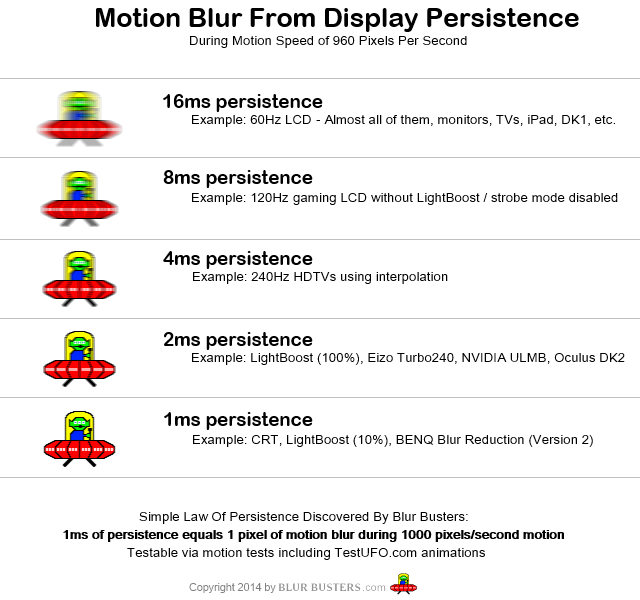
With a flicker-free LCD, each additional refresh just holds the image for longer.
With a strobed backlight, each refresh is repeating the image. Repeating the same image for an object in motion causes it to judder.
For judder-free motion you either need a full persistence flicker-free display, or a display which strobes once per frame. You can't do it any other way.
No consoles have DisplayPort out, or support for FreeSync.ZellSF wrote:FreeSync = Can connect consoles, full advantage of FreeSync requires AMD GPU.
Apparently the GPU in the PS4/XB1 should be capable of it, but they do not have an appropriate video output, or software support for it.
FreeSync (VESA Adaptive-Sync) does not require an AMD GPU, though they are the only vendor with drivers that have support for it right now.
-
ZellSF
- Posts: 2731
- Joined: Mon Apr 09, 2012 11:12 pm
Re: Display advice
What I meant was that the FreeSync display has HDMI in (for consoles), G-Sync displays do not.No consoles have DisplayPort out, or support for FreeSync.
-
Fudoh
- Posts: 13047
- Joined: Mon Mar 06, 2006 3:29 am
- Location: Germany
- Contact:
Re: Display advice
It's a combination of black frame insertion and strobing. 60Hz source + 60 black frames = 120Hz + 120Hz strobing = 240Hz.For judder-free motion you either need a full persistence flicker-free display, or a display which strobes once per frame. You can't do it any other way.
It's great.
-
evil_ash_xero
- Posts: 6268
- Joined: Thu Jul 12, 2007 6:33 am
- Location: Where the fish lives
Re: Display advice
Due to intense shaming, I went ahead and ordered the Dell S2740L.
Could someone recommend a stand that I can get for it, so I can TATE my games?
Thanks.
Could someone recommend a stand that I can get for it, so I can TATE my games?
Thanks.
My Collection: http://www.rfgeneration.com/cgi-bin/col ... Collection
-
Exidna
- Posts: 90
- Joined: Wed Apr 29, 2015 8:00 pm
Re: Display advice
I'm not sure that I understand what you mean here.Fudoh wrote:It's a combination of black frame insertion and strobing. 60Hz source + 60 black frames = 120Hz + 120Hz strobing = 240Hz.For judder-free motion you either need a full persistence flicker-free display, or a display which strobes once per frame. You can't do it any other way.
It's great.
Black frame insertion is essentially equal to strobing the display - only it's not as good, because you are relying on the LCD panel to quickly transition from an image to black and back again, and the LCD panel has visible light output when displaying "black" rather than strobing the backlight which switches off the light source entirely, instead of trying to block it with an LCD panel.
If the set is doing BFI to get to 120Hz - and I cannot understand the logic of that at all - and then strobing the backlight on top of that to get to "240Hz", why not refresh at 60Hz with a single strobe that has a duration of 4ms instead?
That way the panel only needs to have response times <12ms, and the transitions required between each frame should typically be far smaller.
With BFI plus strobing, the panel needs to have response times <8ms, and needs to go from a full image to black, or from black to the image in that time, rather than only small changes frame-to-frame.
That would mean they are still displaying one image per frame, just doing it at 240Hz for some bizarre reason.
Or did you mean something else?
E.g. repeating each frame twice (60Hz > 120Hz) and strobing the backlight once per refresh. (which TV manufacturers sell as "240Hz")
Because that would reduce motion blur from an effective 16ms to 8ms without very noticeable flicker (120Hz) but introduce judder/double-images because it's repeating each frame twice.
Ah I see. Well BenQ have some G-Sync monitors with multiple inputs. Essentially there are two controller boards in one display, since the G-Sync modules are supplied by NVIDIA and only support a DisplayPort input.ZellSF wrote:What I meant was that the FreeSync display has HDMI in (for consoles), G-Sync displays do not.No consoles have DisplayPort out, or support for FreeSync.
-
Fudoh
- Posts: 13047
- Joined: Mon Mar 06, 2006 3:29 am
- Location: Germany
- Contact:
Re: Display advice
BFI is offered since strobing takes away much light and isn't for everyone. On the W models since 2013 Sony tried strobing without BFI and ended up with terrible ghosting. Don't ask me why they're doing it, I can just report what they're doing.If the set is doing BFI to get to 120Hz - and I cannot understand the logic of that at all - and then strobing the backlight on top of that to get to "240Hz", why not refresh at 60Hz with a single strobe that has a duration of 4ms instead?
-
evil_ash_xero
- Posts: 6268
- Joined: Thu Jul 12, 2007 6:33 am
- Location: Where the fish lives
Re: Display advice
Actually, doing a little research, I need a Vesa 100mm rotating stand, that will hold a 27 inch monitor, that weighs 20 pounds.
I have a NeoFlex, but it only holds up to 16, and it's about 24 inch max.
Anyone know of a good Vesa 100mm rotating stand, that can hold a 27 inch?
I have a NeoFlex, but it only holds up to 16, and it's about 24 inch max.
Anyone know of a good Vesa 100mm rotating stand, that can hold a 27 inch?
My Collection: http://www.rfgeneration.com/cgi-bin/col ... Collection
-
Unseen

- Posts: 738
- Joined: Sun May 25, 2014 8:12 pm
- Contact:
Re: Display advice
Fun fact: Film projectors for cinemas show every frame of the film twice to increase the flicker rate to 48Hz.Exidna wrote:One strobe per refresh has a vastly different appearance to multiple strobes. It's the only time 24p ever looks judder-free without using interpolation for example.
GCVideo releases: https://github.com/ikorb/gcvideo/releases
-
Smashbro29
- Posts: 532
- Joined: Thu Dec 15, 2011 2:46 am
Re: Display advice
Aww don't feel bad man.ZellSF wrote:To remind people:Fudoh wrote:there are only 2 monitors on the market meeting these requirements. The Asus MG279Q and the Acer XB270HU. The Acer is a G-Sync display, the Asus is a FreeSync Display.Heard TN is shit, need something 27+ with really low input lag and true 120 or 144hz.
G-Sync = PC only, full advantage of G-Sync requires Nvidia GPU.
FreeSync = Can connect consoles, full advantage of FreeSync requires AMD GPU.
For PC gaming, FreeSync/G-Sync is amazing and I would definitely recommend it. And I wouldn't recommend any other display than one of those two to a PC gamer. If you're a Nvidia user that wants to play console games, I would recommend getting a separate display for that.
I spend all my money on monitors
Do you or anyone know where I can find the input lag numbers on these?
-
Fudoh
- Posts: 13047
- Joined: Mon Mar 06, 2006 3:29 am
- Location: Germany
- Contact:
Re: Display advice
that should be fine. The S2740L should be around 10 pounds without its stand and the 24" max rating just means that you *might* have to tilt back the stand while rotating the display. Just check the maximum height setting of the Neoflex to make sure it's high enough for a tated 27" display.Actually, doing a little research, I need a Vesa 100mm rotating stand, that will hold a 27 inch monitor, that weighs 20 pounds.
I have a NeoFlex, but it only holds up to 16, and it's about 24 inch max.
Anyone know of a good Vesa 100mm rotating stand, that can hold a 27 inch?
-
Fudoh
- Posts: 13047
- Joined: Mon Mar 06, 2006 3:29 am
- Location: Germany
- Contact:
Re: Display advice
should both in the < 3 ms category.Do you or anyone know where I can find the input lag numbers on these?
-
Smashbro29
- Posts: 532
- Joined: Thu Dec 15, 2011 2:46 am
Re: Display advice
Thanks, is the asus even out? It's not amazon, newegg, anywhere.Fudoh wrote:should both in the < 3 ms category.