1-Chip with Tim Worthington's YPbPr Kit

The place for all discussion on gaming hardware
Skips
Posts: 404
Joined: Tue Oct 22, 2013 3:03 am

1-Chip with Tim Worthington's YPbPr Kit

Post by Skips »

I am sure lots have done this already but I did not see an actual thread about it. The component video kit released by Tim for his NESRGB kit works just fine in the 1-Chip and mini models of the SNES. I'm sure it will work just fine in older revisions but I don't have one on hand to see exactly what needs to be done.

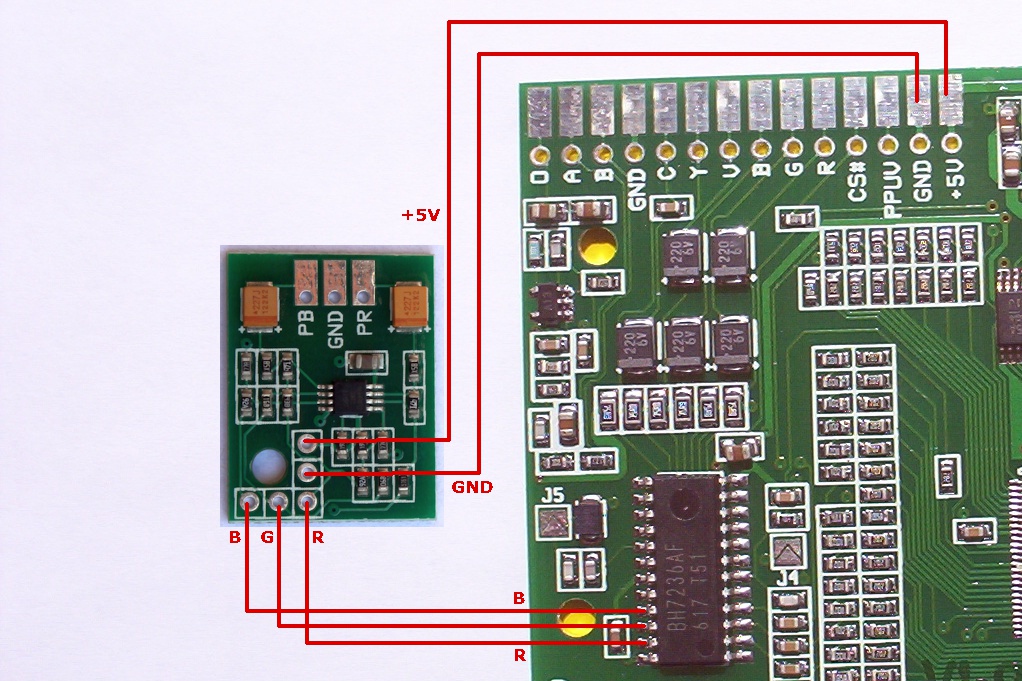
Pretty much just connect the kit to the RGB out pins of the encoder and use the luma signal for Y. Luma is a bit strong coming from the av port on the 1-Chip and Mini so you will need a resistor inline going out to the Y port/jack. It is somewhere between 28 and 45 ohms, I dont have any resistors smaller than 75 ohms on hand so I cant say for sure (75 ohms is too high though). Ill order some later to get an exact resistance for it. Figured there were some who did not know this so I figured I would post it. The video quality is better than the older model SNES component video mods and is still better looking that the CSY2100 Clones. You might need to view the pictures fullsize, the image scaling might make them look meh.

Replaced the RF box with the port.

Image

Screenshots taken via the PEXHDCAP

Image

Image

Image

Image

Image

Image
I am no longer taking free or paid modding projects, please do not contact me asking for my services. Thanks :).
creamygarlicdip
Posts: 67
Joined: Wed Oct 15, 2014 8:32 pm

Re: 1-Chip with Tim Worthington's YPbPr Kit

Post by creamygarlicdip »

thats cool looks great
User avatar
BazookaBen
Posts: 2159
Joined: Thu Apr 17, 2008 8:09 pm
Location: North Carolina

Re: 1-Chip with Tim Worthington's YPbPr Kit

Post by BazookaBen »

That's cool, but I'm gonna need proof that it looks better than the CSY clones (post-calibration).
Skips
Posts: 404
Joined: Tue Oct 22, 2013 3:03 am

Re: 1-Chip with Tim Worthington's YPbPr Kit

Post by Skips »

BazookaBen wrote:That's cool, but I'm gonna need proof that it looks better than the CSY clones (post-calibration).
Guess you will have to buy a kit then and see for yourself :p. I really dont feel like tearing down my scart setup to plug that cheap thing back in. It is burried away in my parts drawer hopefully forever. Tim sells these kits for 25 AUD I believe and that comes with the port and adapter. They seriously are not much. The csy2100 also has a slight color fade in and out problem that some tvs and the pexhdcap pick up. This does not have that issue.
I am no longer taking free or paid modding projects, please do not contact me asking for my services. Thanks :).
User avatar
RGB32E
Posts: 1400
Joined: Thu Nov 05, 2009 12:50 am

Re: 1-Chip with Tim Worthington's YPbPr Kit

Post by RGB32E »

Skips wrote:
BazookaBen wrote:That's cool, but I'm gonna need proof that it looks better than the CSY clones (post-calibration).
Guess you will have to buy a kit then and see for yourself :p.
I'm sure FBX can totally "settle this". :mrgreen:

Seriously though, did you really have to add an additional resistor to the luma line? Non-mini 1CHIP systems should already have a 75 ohm resistor in series for the luma output. Did you add 220uF caps before feeding the RGB signals to the circuit?
User avatar
yxkalle
Posts: 135
Joined: Sun Feb 16, 2014 4:32 am
Location: Stockholm, Sweden

Re: 1-Chip with Tim Worthington's YPbPr Kit

Post by yxkalle »

RGB32E wrote:... Did you add 220uF caps before feeding the RGB signals to the circuit?
That shouldn't be needed. On the NESRGB you just tap the RGB signals comming out of the video encoder chip. :)

Image
User avatar
FBX
Posts: 2349
Joined: Wed Feb 18, 2015 10:18 am
Location: DFW area, Texas
Contact:

Re: 1-Chip with Tim Worthington's YPbPr Kit

Post by FBX »

RGB32E wrote:
Skips wrote:
BazookaBen wrote:That's cool, but I'm gonna need proof that it looks better than the CSY clones (post-calibration).
Guess you will have to buy a kit then and see for yourself :p.
I'm sure FBX can totally "settle this". :mrgreen:
Talking trash on me in other threads? Thanks a lot. How about you keep those passive-aggressive comments to yourself?
User avatar
RGB32E
Posts: 1400
Joined: Thu Nov 05, 2009 12:50 am

Re: 1-Chip with Tim Worthington's YPbPr Kit

Post by RGB32E »

yxkalle wrote:That shouldn't be needed. On the NESRGB you just tap the RGB signals comming out of the video encoder chip. :)

Image
Makes sense. Essentially the same installation as the NESRGB. Still curious about he luma levels though. I'll have to give this a try with my extra kit.

Another thought is that one could build this into a cable like the kickstarter component cable. However, I'd imagine a number of the resistor values would need to change if integrated in a SNES plug instead of directly from the RGB encoder output.
Skips
Posts: 404
Joined: Tue Oct 22, 2013 3:03 am

Re: 1-Chip with Tim Worthington's YPbPr Kit

Post by Skips »

RGB32E wrote:
yxkalle wrote:That shouldn't be needed. On the NESRGB you just tap the RGB signals comming out of the video encoder chip. :)

Image
Makes sense. Essentially the same installation as the NESRGB. Still curious about he luma levels though. I'll have to give this a try with my extra kit.

Another thought is that one could build this into a cable like the kickstarter component cable. However, I'd imagine a number of the resistor values would need to change if integrated in a SNES plug instead of directly from the RGB encoder output.
It does need a resistor on luma otherwise the picture is too bright and washed out. this is coming off the video port and not directly off the encoder. No extra caps or anything are needed, just connect it to the rgb out pins on the encoder.

It would be best to connect it to the rgb out pins on the encoder and not from the multiout. Tim desgined it to pull from the encoder on the nesrgb kit before it hits any caps or resistors. tapping rgb from the video port places it after these components which may look it incorrect.
I am no longer taking free or paid modding projects, please do not contact me asking for my services. Thanks :).
User avatar
yxkalle
Posts: 135
Joined: Sun Feb 16, 2014 4:32 am
Location: Stockholm, Sweden

Re: 1-Chip with Tim Worthington's YPbPr Kit

Post by yxkalle »

Skips wrote:It does need a resistor on luma otherwise the picture is too bright and washed out.
Do these consoles produce an overly bright S-video picture too? If not, I'm a bit confused...
Skips
Posts: 404
Joined: Tue Oct 22, 2013 3:03 am

Re: 1-Chip with Tim Worthington's YPbPr Kit

Post by Skips »

yxkalle wrote:
Skips wrote:It does need a resistor on luma otherwise the picture is too bright and washed out.
Do these consoles produce an overly bright S-video picture too? If not, I'm a bit confused...
Yes, the 1-chip's luma signal does make its S-video picture a bit brighter than normal. The SNES mini would also need a resistor just because you would have to pull luma directly off the encoder since it does not have s-video out to the video port. I did the mod dude, you need a resistor or its going to be too bright.
I am no longer taking free or paid modding projects, please do not contact me asking for my services. Thanks :).
User avatar
RGB32E
Posts: 1400
Joined: Thu Nov 05, 2009 12:50 am

Re: 1-Chip with Tim Worthington's YPbPr Kit

Post by RGB32E »

Just installed Tim's NESRGB-COMPONENT in a SNES mini and the resulting output is surprisingly good! I went with the standard 75 ohm -> 220uF configuration for the luma output and that seemed to be just fine. Sure, the 1CHIP outputs a higher than standard level RGB (0.85Vpp instead of 0.7Vpp IIRC), but it doesn't in the end make THAT much of a difference after dialing in the appropriate settings.

Here are some pictures of my test installation and screen shots using a XRGB-mini:

Image

Image

Image
User avatar
BazookaBen
Posts: 2159
Joined: Thu Apr 17, 2008 8:09 pm
Location: North Carolina

Re: 1-Chip with Tim Worthington's YPbPr Kit

Post by BazookaBen »

This definitely seems like the cheapest way to get component from a SNES. I guess it could work with PS1 and Saturn as well?
User avatar
RGB32E
Posts: 1400
Joined: Thu Nov 05, 2009 12:50 am

Re: 1-Chip with Tim Worthington's YPbPr Kit

Post by RGB32E »

BazookaBen wrote:This definitely seems like the cheapest way to get component from a SNES. I guess it could work with PS1 and Saturn as well?
Cheapest and possibly best yet! :lol: Sure, any console that can output RGB and S-Video should work with the proper installation. However, if you're using a XRGB, there's really no point in not using RGB if it is available from a console.
User avatar
BazookaBen
Posts: 2159
Joined: Thu Apr 17, 2008 8:09 pm
Location: North Carolina

Re: 1-Chip with Tim Worthington's YPbPr Kit

Post by BazookaBen »

RGB32E wrote: However, if you're using a XRGB, there's really no point in not using RGB if it is available from a console.

Well yeah, I have a few PVM's and consumer CRT with a 9A60 so I don't need this, but this could be a good solution for people in the States that only have a normal consumer set. Although making custom component cables for your SNES/PS1/etc. could become a chore.
User avatar
CkRtech
Posts: 668
Joined: Mon Aug 27, 2012 9:30 pm
Location: Seattle, WA

Re: 1-Chip with Tim Worthington's YPbPr Kit

Post by CkRtech »

I have some extra SNESes that I thought about giving away to some friends. I wondered if this might be a good solution for them. Glad to see it. :mrgreen:
User avatar
keropi
Posts: 323
Joined: Sat Sep 20, 2008 9:33 am
Location: Ioannina , Greece

Re: 1-Chip with Tim Worthington's YPbPr Kit

Post by keropi »

main problem with it is that most lcd sets just don't work with 240p/component...
User avatar
Xan
Posts: 867
Joined: Mon Sep 23, 2013 12:04 pm

Re: 1-Chip with Tim Worthington's YPbPr Kit

Post by Xan »

It's obviously for the North American region only with component CRTs. In Europe this would be completely pointless.
User avatar
Einzelherz
Posts: 1279
Joined: Wed Apr 09, 2014 2:09 am

Re: 1-Chip with Tim Worthington's YPbPr Kit

Post by Einzelherz »

keropi wrote:main problem with it is that most lcd sets just don't work with 240p/component...
Yeah but it's very easy to test with a regular SNES and AV cables before you buy and install this. AV yellow into green port and set as component in.

I assume making these into an all in one Multi AV out cable would both create a less pretty screen and basically be this: http://www.hdretrovision.com/snes/
User avatar
CkRtech
Posts: 668
Joined: Mon Aug 27, 2012 9:30 pm
Location: Seattle, WA

Re: 1-Chip with Tim Worthington's YPbPr Kit

Post by CkRtech »

keropi wrote:main problem with it is that most lcd sets just don't work with 240p/component...
I don't know about "most," but it is a bit of a dice roll. If those HD Retrovision cables sell like mad, I bet the community will create quite the compatibility chart.
Xan wrote:It's obviously for the North American region only with component CRTs. In Europe this would be completely pointless.
No. I think most people buying these cables in North America are going to be hooking it up to their regular, everyday TV - likely LCD.
User avatar
Josh128
Posts: 2351
Joined: Thu Jan 16, 2014 9:01 am

Re: 1-Chip with Tim Worthington's YPbPr Kit

Post by Josh128 »

Wonder how this would work for a launch model SNES? Since its SVideo ( at least on my personal original model console) is superior to its RGB>Component output through a 2100 clone, this solution, seeing that it uses the SNES Luma, might give the best picture possible for the console. Also, since the original models come with proper SVideo by default, maybe the signal levels are perfect and wouldnt require the resistor and caps?

Very interesting. I'd love to know how it compares to RGBs on the original model consoles.
User avatar
Einzelherz
Posts: 1279
Joined: Wed Apr 09, 2014 2:09 am

Re: 1-Chip with Tim Worthington's YPbPr Kit

Post by Einzelherz »

My RGB->component looks better than Svideo on my SHVC SNES. The colors are different, but it's sharper. Could probably rewire the luma to the composite or csync line to see if it improves.
User avatar
Fudoh
Posts: 13045
Joined: Mon Mar 06, 2006 3:29 am
Location: Germany
Contact:

Re: 1-Chip with Tim Worthington's YPbPr Kit

Post by Fudoh »

main problem with it is that most lcd sets just don't work with 240p/component...
fun fact: Samsung was the biggest problem a few years back and they really got it right over time. Now their LCDs (and Plasmas) are about the only flat screen sets that actually recognize 240p as 240p without applying any kind of deinterlacing.
User avatar
Xan
Posts: 867
Joined: Mon Sep 23, 2013 12:04 pm

Re: 1-Chip with Tim Worthington's YPbPr Kit

Post by Xan »

If their 1080p sets do the same heavy interpolation the F4500 does I'm definitely not a big fan of that for 2D graphics. But I suppose everyone that's serious about using 240p consoles on a LCD will (or should) get a scaler anyway. Doing this mod and still looking at crappy deinterlacing artifacts afterwards doesn't seem that worthwile to me personally.
User avatar
P1kas
Posts: 33
Joined: Wed Oct 01, 2014 12:04 pm

Re: 1-Chip with Tim Worthington's YPbPr Kit

Post by P1kas »

Has anyone identified the appropriate resistor to install alongside the chip for the correct brightness levels? Also, where in this setup would I place it? Between the Luma signal from the enconder and the output plug?

Would such a resistor be easily available at a store such as RadioShack(US)?

Thanks for any help!
BONKERS
Posts: 425
Joined: Thu Dec 11, 2014 10:41 am

Re: 1-Chip with Tim Worthington's YPbPr Kit

Post by BONKERS »

Xan wrote:If their 1080p sets do the same heavy interpolation the F4500 does I'm definitely not a big fan of that for 2D graphics. But I suppose everyone that's serious about using 240p consoles on a LCD will (or should) get a scaler anyway. Doing this mod and still looking at crappy deinterlacing artifacts afterwards doesn't seem that worthwile to me personally.
There is a growing list here http://www.hdretrovision.com/240p/#list of how some TVs process it. So there is some hope for those people. THough it seems many improperly process the signal.

There are also a lot of consumer CRTs out there that have component input that are a lot easier to get ahold of than a PVM/etc probably too.

I am interested in seeing how this mod would work on a Megadrive, bypassing the need for scart or a scart>YPbPr transcoder
User avatar
Josh128
Posts: 2351
Joined: Thu Jan 16, 2014 9:01 am

Re: 1-Chip with Tim Worthington's YPbPr Kit

Post by Josh128 »

Xan wrote:If their 1080p sets do the same heavy interpolation the F4500 does I'm definitely not a big fan of that for 2D graphics. But I suppose everyone that's serious about using 240p consoles on a LCD will (or should) get a scaler anyway. Doing this mod and still looking at crappy deinterlacing artifacts afterwards doesn't seem that worthwile to me personally.
The full 1080p PN51F5300's dedicated 240p mode is similar to the F4500s interpolation, but doesnt look as good IMO due to the increased pixel density. No idea if their LCDs 240p modes are similar to the plasmas. I fully intended to start a thread on the PN51F5300 months ago when I got one, I just never got around to it. Its got a phenomenal picture for HD and full HD sources.
Last edited by Josh128 on Fri May 01, 2015 11:43 am, edited 1 time in total.
User avatar
Josh128
Posts: 2351
Joined: Thu Jan 16, 2014 9:01 am

Re: 1-Chip with Tim Worthington's YPbPr Kit

Post by Josh128 »

There is a very nice thread at http://www.racketboy.com/forum/viewtopi ... 52&t=46303 attempting to document differences between SNES revisions, I think he is right on when talking about the color bleed/ghosting to the right on the original consoles, seems to describe my original model RGBs problem almost perfectly. Strange thing is, mine does no such thing when using Svideo, which is why I think this kit might be the ticket for the best PQ out of the console.
Why do the pre-1CHIP consoles have a softer picture? Well its due to Color Bleed. You might be thinking "What, even via RGB"? Well the answer is, yes. Many have noticed how the colors of pixels bleed to the right, and this is what's making the picture look softer (some call it ghosting, but its not the same thing. Ghosting is "signal reflections" and is not innate to the PPU)

While the reason for the pixel bleeding is currently unknown, its possible that the DAC (Digital-to-Analog Converter) is causing the distortion. It could also be the transistors after PPU2 (or a combination of the DAC and Transistors). I myself use to believe that Nintendo intentionally added mild bleeding for the purpose of blending dithered patterns, but I honestly do not know for sure (Side Note: Sega's Genesis has pretty poor Composite output, which caused massive color bleed. They took advantage of this by using tons of dithering, which would create new colors and fake transparencies. See this link for more info).
I disagree that there is a discernable frame rate difference in Star Fox though. Even with quick play throughs on both consoles of the the entire game looking for anything at all, I could not notice any difference. If there is a difference, perhaps its so miniscule you'd need a Digital Foundry type frame counter to see it.
creamygarlicdip
Posts: 67
Joined: Wed Oct 15, 2014 8:32 pm

Re: 1-Chip with Tim Worthington's YPbPr Kit

Post by creamygarlicdip »

Fudoh wrote:
main problem with it is that most lcd sets just don't work with 240p/component...
fun fact: Samsung was the biggest problem a few years back and they really got it right over time. Now their LCDs (and Plasmas) are about the only flat screen sets that actually recognize 240p as 240p without applying any kind of deinterlacing.
I can verify this, i have a 46" samsung led 1080p, when i connect my wii with component cables i can output virtual console games and emulators in 240p, the tv hud says 240p too. I don't really know anything about the deinterlacing, but it actually looks quite good..
User avatar
Xan
Posts: 867
Joined: Mon Sep 23, 2013 12:04 pm

Re: 1-Chip with Tim Worthington's YPbPr Kit

Post by Xan »

In your case there is no deinterlacing as the TV properly detects the signal. When it doesn't, that can usually be seen as artifacts during menu scrolling and other anomalies.
Post Reply