PS4 hardware question...
-
dave4shmups

- Posts: 5630
- Joined: Wed Jan 26, 2005 2:01 am
- Location: Denver, Colorado, USA
PS4 hardware question...
So, I know that the PS4 has the Playstation Store, where you can (among other things) purchase and download PS1 games. But does the PS4 have texture smoothing for them, like the PS3 does? And how much of a difference does it make on an HDTV, which PS1 games obviously were not made for?
"Farewell to false pretension
Farewell to hollow words
Farewell to fake affection
Farewell, tomorrow burns"
Farewell to hollow words
Farewell to fake affection
Farewell, tomorrow burns"
-
Immryr

- Posts: 1449
- Joined: Mon Sep 01, 2014 4:17 pm
Re: PS4 hardware question...
there are no ps1 games in the ps4 store as yet.
-
system11

- Posts: 6325
- Joined: Tue Jan 25, 2005 10:17 pm
- Location: UK
- Contact:
Re: PS4 hardware question...
They're trying to push this via the PSNow service, which is streaming games.
Streaming games is a shitty concept and nobody should support it.
Streaming games is a shitty concept and nobody should support it.
System11's random blog, with things - and stuff!
http://blog.system11.org
http://blog.system11.org
-
FBX

- Posts: 2349
- Joined: Wed Feb 18, 2015 10:18 am
- Location: DFW area, Texas
- Contact:
Re: PS4 hardware question...
Amen! I went from having my OWN collection of PS1 games on the PS3 to discovering on the PS4 they are streamed and you can only 'rent' them for a couple months. SCREW THAT!system11 wrote:They're trying to push this via the PSNow service, which is streaming games.
Streaming games is a shitty concept and nobody should support it.
-
BONKERS
- Posts: 425
- Joined: Thu Dec 11, 2014 10:41 am
Re: PS4 hardware question...
PS4 doesn't support emulation for PS1 at this point. (It SHOULD though since it was all in software on the PS3. The PS4 should be more than powerful enough)dave4shmups wrote:So, I know that the PS4 has the Playstation Store, where you can (among other things) purchase and download PS1 games. But does the PS4 have texture smoothing for them, like the PS3 does? And how much of a difference does it make on an HDTV, which PS1 games obviously were not made for?
The smoothing filter is basically just a bilinear blur. IMO it looks like ass. Running the games without it, is essentially how games would look if you upscaled them with an XRGB.
I'm REALLY hoping Sony ups their game and releases PS1 and PS2 software emulation for the PS4 that lets you use your own discs. While continuing to sell "Classics" on the store. Not all games are available for purchase
-
Xan

- Posts: 867
- Joined: Mon Sep 23, 2013 12:04 pm
Re: PS4 hardware question...
I thought they looked like ass in any case, like a horrible pixelized mess with way too apparent graphical flaws from the high resolution. On an XRGB you can at least force scanlines to make it look a little less harsh.
It's a CRT or bust for these 5th gen consoles, IMO.
It's a CRT or bust for these 5th gen consoles, IMO.
-
FBX
- Posts: 2349
- Joined: Wed Feb 18, 2015 10:18 am
- Location: DFW area, Texas
- Contact:
Re: PS4 hardware question...
It's actually worse because it is upscaled without being a direct multiple of the original resolution, which leaves the image with misshapen pixels. So it's either play with blurry crap, or play with an incorrectly scaled image. This is why I am highly thankful for the Framemeister's zoom features.BONKERS wrote:dave4shmups wrote:Running the games without it, is essentially how games would look if you upscaled them with an XRGB.
-
dave4shmups
- Posts: 5630
- Joined: Wed Jan 26, 2005 2:01 am
- Location: Denver, Colorado, USA
Re: PS4 hardware question...
Yeah, I agree that CRTs are best for the 5th gen consoles.Xan wrote:I thought they looked like ass in any case, like a horrible pixelized mess with way too apparent graphical flaws from the high resolution. On an XRGB you can at least force scanlines to make it look a little less harsh.
It's a CRT or bust for these 5th gen consoles, IMO.
"Farewell to false pretension
Farewell to hollow words
Farewell to fake affection
Farewell, tomorrow burns"
Farewell to hollow words
Farewell to fake affection
Farewell, tomorrow burns"
-
BONKERS
- Posts: 425
- Joined: Thu Dec 11, 2014 10:41 am
Re: PS4 hardware question...
Here are the video modes the hardware of the PS1 actually supportsFBX wrote:It's actually worse because it is upscaled without being a direct multiple of the original resolution, which leaves the image with misshapen pixels. So it's either play with blurry crap, or play with an incorrectly scaled image. This is why I am highly thankful for the Framemeister's zoom features.BONKERS wrote:dave4shmups wrote:Running the games without it, is essentially how games would look if you upscaled them with an XRGB.
320x240 original output+-------+--------------------+-------------------+
| Mode | Resolution (H x V) | Scan |
+-------+--------------------+-------------------+
| 0 | 256 x 240 | |
| 1 | 320 x 240 | Non-Interlaced |
| 2 | 512 x 240 | |
| 3 | 640 x 240 | |
+-------+--------------------+-------------------+
| 4 | 256 x 480 | |
| 5 | 320 x 480 | Interlaced |
| 6 | 512 x 480 | |
| 7 | 640 x 480 | |
+-------+--------------------+-------------------+
480p output = EXACT line doubling nothing else. Games have empty space because they originally did because of overscan,performance or whatever reason. (Ex: Arc the Lad 2 has a lot of undrawn lines on the top of the screen even on a CRT on the original console)
960x720p output in a 1280x720 buffer = An even 3x3 in each direction.
It's when you get into 1080p territory that it turns into an integer multiple instead. 4.5x4.5 each direction
You must be stretching it to full screen if you think it's scaled incorrectly, misinterpreting the empty space as improper scaling or you aren't using 1:1 pixel mapping on your TV. Using the Zoom feature on your XRGB alone proves that you don't seem to understand resolution factoring.. If you take a signal from the PS1 and multiply it an even 2 times on each axis. You are still gonna have a lot of empty space in the image on a modern TV. Not only from pillarboxing, but from undrawn lines and garbage in the overscan areas.
Let's even quote Fudoh from his own site
My testing material for the following consisted of OutRun2SP (jap, PS2, 480p) and Metal Slug X (jap, PS1, 240p). The Optoma has a very blocky scaling algorithm, which tends to produce stepping artefacts on movie material, but on graphics (like videogames) it works real wonders. I've never before seen such good scaling for videogame signals. If you check the MSX title screen comparison at the bottom of the page, you'll see that the Optoma output matches the pure digital emulation of PS1 games on a PS3. It's really, really breathtaking and something I would wish for on a possible XRGB-3 successor.
PS1 games looks just FINE upscaled to 720p or 480p on the PS3.If your vintage gaming needs are limited to PS1 and/or PS2 games you might want to consider getting a PS3 and playing your PS1 and PS2 games on this one. Only the older 60gb PS3 models did have a hardware PS2 emulator integrated, the newer PS3 models are only able to play PS1 games (and PAL models never had hardware compatibility).
PS1 games are rendered in software and can be output in any resolution you want. If you set your output to 480p you get a PS1 picture very similar to what the good videoprocessors will do. Being emulated, there are no deinterlacing artefacts at all. If you set the output to 1080p the picture gets a bit too sharp. Every single pixel is dead-on with this setting. The only (small) downside to playing PS1 games is that you're limited to the region of your PS3 (e.g. only US PS1 games on your US PS3) and that there's a small delay of about 1.5 frames.
The PS3 outperforms every other processor on PS1 games (with the XRGB-3 being the only one to come close)
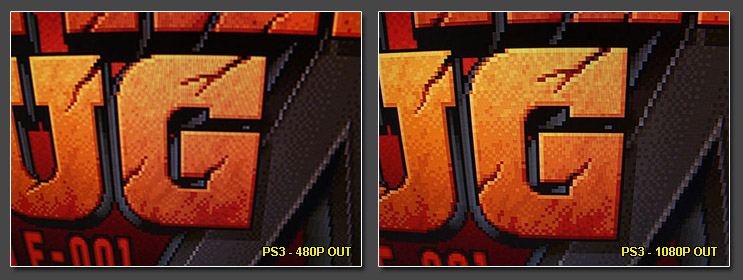
You aren't going to magically make them look like anything other than they are 100% output from the original console in the purest form.
faux scanlines really don't make it look any better. Since there is so much more to a CRT than just the scanlines. And the scanlines are just the TV skipping drawing every other line anyway.Xan wrote:I thought they looked like ass in any case, like a horrible pixelized mess with way too apparent graphical flaws from the high resolution. On an XRGB you can at least force scanlines to make it look a little less harsh.
It's a CRT or bust for these 5th gen consoles, IMO.
Games are pixellated, well duh yeah it's gonna look pixellated. Games are 9/10 times very low resolution. It's best just to get used to it. It's not like modern console games are keen on high quality Anti Aliasing either. So aliasing is something everyone should be used to by this point when it comes to consoles.
Adding faux scanlines or a dedicated upscaling unit that costs hundreds of dollars isn't going to be able to really beat the PS3's upscaling at 480p and 720p in any significant objective manner.
Last edited by BONKERS on Wed Apr 29, 2015 1:33 pm, edited 3 times in total.
-
FBX
- Posts: 2349
- Joined: Wed Feb 18, 2015 10:18 am
- Location: DFW area, Texas
- Contact:
Re: PS4 hardware question...
BONKERS wrote:
PS1 games looks just FINE upscaled to 720p or 480p on the PS3.
You aren't going to magically make them look like anything other than they are 100% output from the original console in the purest form.
Edit: I think I see where the misunderstanding is. I was referring to PS3 on a 1080p display. The unfiltered graphics aren't a direct scale, but I believe you mentioned this in reference to the "4.5" figure you gave.
-
FBX
- Posts: 2349
- Joined: Wed Feb 18, 2015 10:18 am
- Location: DFW area, Texas
- Contact:
Re: PS4 hardware question...
I already know all about that. Ask ANYONE that has reviewed my profiles in the Framemeister thread. My 4x scale for 1080p profiles have black borders on the top and bottom (i.e. they show the entire image including garbage in the overscan area), while the 5x scale profiles for SNES and Genesis actually overscan the image by 4 pixels off the top and bottom. This is because 5x224 = 1120, which of course is too large to fit in 1080.BONKERS wrote:Using the Zoom feature on your XRGB alone proves that you don't seem to understand resolution factoring.. If you take a signal from the PS1 and multiply it an even 2 times on each axis. You are still gonna have a lot of empty space in the image on a modern TV. Not only from pillarboxing, but from undrawn lines and garbage in the overscan areas.
-
Grimakis
- Posts: 84
- Joined: Tue Mar 10, 2015 12:38 pm
Re: PS4 hardware question...
Agreed. FBX's 5x Scaling Profile on the Framemeister is good because in games where there are blank borders on the top and bottom, his settings will ZOOM/OVERSCAN them out and leave a correctly scaled image.FBX wrote:I already know all about that. Ask ANYONE that has reviewed my profiles in the Framemeister thread. My 4x scale for 1080p profiles have black borders on the top and bottom (i.e. they show the entire image including garbage in the overscan area), while the 5x scale profiles for SNES and Genesis actually overscan the image by 4 pixels off the top and bottom. This is because 5x224 = 1120, which of course is too large to fit in 1080.BONKERS wrote:Using the Zoom feature on your XRGB alone proves that you don't seem to understand resolution factoring.. If you take a signal from the PS1 and multiply it an even 2 times on each axis. You are still gonna have a lot of empty space in the image on a modern TV. Not only from pillarboxing, but from undrawn lines and garbage in the overscan areas.
So he is using a perfect 5x scale, knowing fully that the top and bottom of the image will be cut off. Since on the Genesis, the top and bottom contain garbage anyway, it's no loss. Not sure about PS1 though.
Regards,
George.
-
FBX
- Posts: 2349
- Joined: Wed Feb 18, 2015 10:18 am
- Location: DFW area, Texas
- Contact:
Re: PS4 hardware question...
I decided it was best to only have 4x scale for PS1. This is due to the larger 240 vertical resolution, so a 5x scale version would cut 24 pixel rows off the top and the same on the bottom. This is too much image data lost, so 4x with some black borders is the better way to go.Grimakis wrote:Agreed. FBX's 5x Scaling Profile on the Framemeister is good because in games where there are blank borders on the top and bottom, his settings will ZOOM/OVERSCAN them out and leave a correctly scaled image.FBX wrote:I already know all about that. Ask ANYONE that has reviewed my profiles in the Framemeister thread. My 4x scale for 1080p profiles have black borders on the top and bottom (i.e. they show the entire image including garbage in the overscan area), while the 5x scale profiles for SNES and Genesis actually overscan the image by 4 pixels off the top and bottom. This is because 5x224 = 1120, which of course is too large to fit in 1080.BONKERS wrote:Using the Zoom feature on your XRGB alone proves that you don't seem to understand resolution factoring.. If you take a signal from the PS1 and multiply it an even 2 times on each axis. You are still gonna have a lot of empty space in the image on a modern TV. Not only from pillarboxing, but from undrawn lines and garbage in the overscan areas.
So he is using a perfect 5x scale, knowing fully that the top and bottom of the image will be cut off. Since on the Genesis, the top and bottom contain garbage anyway, it's no loss. Not sure about PS1 though.
Regards,
George.
-
Xan
- Posts: 867
- Joined: Mon Sep 23, 2013 12:04 pm
Re: PS4 hardware question...
Guess you have never seen the console running on a RGB CRT? The natural smoothing together with lack of scaling makes certain games look quite amazing despite the "very low resolution". Blowing them up to 1080p on a 50" screen or whatever on the other hand won't flatter them at all, though that's still not as bad as forcing a higher resolution in an emulator and perhaps AA for the heck of it... perfectly smooth 3d models with even more pixelated backdrops and much more visible perspective errors, really gives off an uncanny valley effect to me.BONKERS wrote:Games are pixellated, well duh yeah it's gonna look pixellated. Games are 9/10 times very low resolution. It's best just to get used to it. It's not like modern console games are keen on high quality Anti Aliasing either. So aliasing is something everyone should be used to by this point when it comes to consoles.
And yeah, the uneven pixels from the PS3 upscaling were quite apparent to me as well when I tried it even though I didn't know a proper term for it. Frankly, it's fucking silly to claim that PS1 games upscaled on a PS3 look perfectly fine.
-
FBX
- Posts: 2349
- Joined: Wed Feb 18, 2015 10:18 am
- Location: DFW area, Texas
- Contact:
Re: PS4 hardware question...
Technically he's right concerning 480 and 720 output. But the thing is, most everyone uses their PS3 at 1080 output on a 1080 display, so the fact that the PS1 emulation is perfectly scaled at 480 and 720 is a moot point for most people. My complaint to Sony is that they didn't offer an underscanned image mode for 1080p PS1 output so the graphics would be properly scaled.Xan wrote:
And yeah, the uneven pixels from the PS3 upscaling were quite apparent to me as well when I tried it even though I didn't know a proper term for it. Frankly, it's fucking silly to claim that PS1 games upscaled on a PS3 look perfectly fine.
For the record I LOVE perfectly sharp pixels when it comes to 240p PS1 games. It's only when you get into 480i/p stuff like on the Gamecube and PS2 that I start to prefer filtering.
-
Xan
- Posts: 867
- Joined: Mon Sep 23, 2013 12:04 pm
Re: PS4 hardware question...
OK, but in practice there really isn't such a thing as a native 720p display. Most of these TVs are really 768p, so the signal winds up being rescaled anyway. I suppose on better TVs you could use 1:1 mapping but I doubt most would figure to do that.
-
creamygarlicdip
- Posts: 67
- Joined: Wed Oct 15, 2014 8:32 pm
Re: PS4 hardware question...
i bought final fantasy 9 from psn store and played it on my ps3. it looked lousy on my 46" 1080p LED via hdmi. I experimented with different resolutions and was unsatisfied- the aspect ratio is stretched too high and it looks jaggy. I tried it connected to my 1080i crt tv, which looked better, in 1080i hdmi output mode it gave the correct aspect ratio it looked like. But still it didn't quite seem right.
So i bought an s-video cable for my modded playstation 1 and tried a copy of the game on that, it looked much better. I connected it to the sony widescreen crt 1080i.
The best solution for ps1 games is play them on a ps1 or ps2. I play mine on my ps1 via s-video cable or ps2 via component cables is a great solution.
The ps2 has the ps1 hardware built into it so its genuine not emulation.
So i bought an s-video cable for my modded playstation 1 and tried a copy of the game on that, it looked much better. I connected it to the sony widescreen crt 1080i.
The best solution for ps1 games is play them on a ps1 or ps2. I play mine on my ps1 via s-video cable or ps2 via component cables is a great solution.
The ps2 has the ps1 hardware built into it so its genuine not emulation.
-
Xan
- Posts: 867
- Joined: Mon Sep 23, 2013 12:04 pm
Re: PS4 hardware question...
No, the PS2 doesn't have "all" of the PS1 hardware inside. The GPU is emulated, hence why the PS1 driver offers a texture filtering option. We also recently discovered that a few pixels are apparently cut off when outputting PS1 games on a PS2.
-
Xan
- Posts: 867
- Joined: Mon Sep 23, 2013 12:04 pm
Re: PS4 hardware question...
Just did some testing with PS3 upscaling again. I forgot mentioning this earlier but I'm actually using a PAL unit so it's even worse there with only 576p output being cleanly scaled. 1080p is the worst with 3.75x. I was using 576p 1:1 mapping now on a 1080p LCD and I suppose the scaling looks clean, though personally I still can't find anything appealing about the blockiness of it all. The input lag is also way too much for my taste, feels more than the 1.5 frames Fudoh has stated (and my LCD is generally rated as nearly lagless on the net).
-
Ed Oscuro

- Posts: 18654
- Joined: Thu Dec 08, 2005 4:13 pm
- Location: uoıʇɐɹnƃıɟuoɔ ɯǝʇsʎs
Re: PS4 hardware question...
Also, today we learned that 4.5 is not an integer. Right? 
-
FBX
- Posts: 2349
- Joined: Wed Feb 18, 2015 10:18 am
- Location: DFW area, Texas
- Contact:
Re: PS4 hardware question...
Right. I think it classifies as a "rational" number, but certainly not an integer.Ed Oscuro wrote:Also, today we learned that 4.5 is not an integer. Right?
Something else I learned today while browsing the same material that was linked to put me in my place:
Cons: only the old PS3 models had a PS2 mode. 2-frame delay on PS2 games, soft picture, weird 1080p scaling, pricey just for PS1 games.
Specifically the bold underlined part is EXACTLY what my complaint to Sony was.
-
Ed Oscuro
- Posts: 18654
- Joined: Thu Dec 08, 2005 4:13 pm
- Location: uoıʇɐɹnƃıɟuoɔ ɯǝʇsʎs
Re: PS4 hardware question...
Yep, 9:2 (or 9/2) = 4.5FBX wrote:Right. I think it classifies as a "rational" number, but certainly not an integer.
-
dave4shmups
- Posts: 5630
- Joined: Wed Jan 26, 2005 2:01 am
- Location: Denver, Colorado, USA
Re: PS4 hardware question...
What about PS1 games on the Vita? I'm not sure what effect a smaller screen would have on the graphics.
"Farewell to false pretension
Farewell to hollow words
Farewell to fake affection
Farewell, tomorrow burns"
Farewell to hollow words
Farewell to fake affection
Farewell, tomorrow burns"
-
Xan
- Posts: 867
- Joined: Mon Sep 23, 2013 12:04 pm
Re: PS4 hardware question...
I used to play them on the PSP for a while, I often found the screen size too small in 1:1 mode (or whatever they called it, original?) and scaling to 272 lines makes it blurry since they use some filtering to cover up the uneven scaling. It does 240p via component out and that's pretty good though. No idea about the Vita, I heard it uses the same emulator, hopefully they implemented a 2x scaling mode since the Vita has four times the resolution of the PSP.
-
ZellSF
- Posts: 2726
- Joined: Mon Apr 09, 2012 11:12 pm
Re: PS4 hardware question...
Vita has plenty options for whatever you want:
Original (2x if my eyes are correct)
Normal (scaled to 4:3 fullscreen)
Zoom (3x I think, which crops out huge parts of most games)
Full (stretch to 16:9)
Custom (if you want to correct overscan for some titles)
Plus an option for bilinear filtering if you want to smooth out scaling artifacts. Regardless of your preferences you can get PSX games to look fantastic on a Vita (the screen quality also helps).
Someone who cared about image quality obviously worked on the Vita, as PSP scaling is perfect too (2x, and options for bilinear filtering and trying to reproduce PSP color levels).
Input lag isn't exactly better than on a PS3 though.
Original (2x if my eyes are correct)
Normal (scaled to 4:3 fullscreen)
Zoom (3x I think, which crops out huge parts of most games)
Full (stretch to 16:9)
Custom (if you want to correct overscan for some titles)
Plus an option for bilinear filtering if you want to smooth out scaling artifacts. Regardless of your preferences you can get PSX games to look fantastic on a Vita (the screen quality also helps).
Someone who cared about image quality obviously worked on the Vita, as PSP scaling is perfect too (2x, and options for bilinear filtering and trying to reproduce PSP color levels).
Input lag isn't exactly better than on a PS3 though.
-
mehguy

- Posts: 260
- Joined: Mon May 05, 2014 10:52 pm
- Location: Canada
Re: PS4 hardware question...
I hate streaming games too. Its stupid. i kinda hate psnow. I cant even own the game forever and i cant even download it to my ps4. nice.system11 wrote:They're trying to push this via the PSNow service, which is streaming games.
Streaming games is a shitty concept and nobody should support it.
-
Grimakis
- Posts: 84
- Joined: Tue Mar 10, 2015 12:38 pm
Re: PS4 hardware question...
Like it or not, this is the future. We have already accepted this for movies via Netflix and the like. Eventually, it will become far more cost effective to have games running on super computers in a remote location, rather than having a lower quality machine sitting under your TV. Of course this technology will have to mature first.mehguy wrote:I hate streaming games too. Its stupid. i kinda hate psnow. I cant even own the game forever and i cant even download it to my ps4. nice.system11 wrote:They're trying to push this via the PSNow service, which is streaming games.
Streaming games is a shitty concept and nobody should support it.
Also, this will work out to eliminate piracy. Whereas last generation, cracking consoles and playing ISOs was all too commonplace, in an all-streaming future, that won't be possible. We won't even own hardware capable of playing the games.
This will serve to to separate people who just like to play games, from people who like to hoard discs and consoles. Unfortunately I am in the "hoarding" category of gamers.
-
Hoagtech

- Posts: 1025
- Joined: Mon Apr 27, 2015 3:53 am
- Location: Bellingham, WA
Re: PS4 hardware question...
It's a complicated mod to play ps3 ps2 and ps1 games on your ps4.
It requires a piece of duct tape and a ps3. simply duct tape the 2 consoles together and install a co2 emitter with 1/8" copper tubing between the consoles on a timer that goes off every 2 hours and lets out a burst to keep your components cool
had to do it..
It requires a piece of duct tape and a ps3. simply duct tape the 2 consoles together and install a co2 emitter with 1/8" copper tubing between the consoles on a timer that goes off every 2 hours and lets out a burst to keep your components cool
had to do it..
Copyright 1987
-
FBX
- Posts: 2349
- Joined: Wed Feb 18, 2015 10:18 am
- Location: DFW area, Texas
- Contact:
Re: PS4 hardware question...
Not really. Netflix is great for TV shows and checking out movies you're on the fence on, but everyone I know does like I do and still collects their favorites on blu-ray. The compression image quality of netflix movies doesn't hold a candle to having a blu-ray hard copy.Grimakis wrote:
Like it or not, this is the future. We have already accepted this for movies via Netflix and the like.
I also don't see the future of gaming being FORCED online streaming. There will always be a demand for offline gaming, and companies would be foolish not to tap into that.
-
Grimakis
- Posts: 84
- Joined: Tue Mar 10, 2015 12:38 pm
Re: PS4 hardware question...
Thats what you think... For now. Watch what happens. This generation doesn't bode well for consoles in general. With Sony investing a good deal in streaming technology, I doubt its just to stream old last gen games.FBX wrote:Not really. Netflix is great for TV shows and checking out movies you're on the fence on, but everyone I know does like I do and still collects their favorites on blu-ray. The compression image quality of netflix movies doesn't hold a candle to having a blu-ray hard copy.Grimakis wrote:
Like it or not, this is the future. We have already accepted this for movies via Netflix and the like.
I also don't see the future of gaming being FORCED online streaming. There will always be a demand for offline gaming, and companies would be foolish not to tap into that.
I'd say that by next gen, discs are on the way out. By PS6, no more discs, download only. Once that happens, we are only a hop skip and a jump away from streaming.