New AV Amp Now Getting HDCP Warning When trying to Capture!?

The place for all discussion on gaming hardware
User avatar
lettuce
Posts: 1336
Joined: Wed Jun 22, 2011 7:10 pm
Location: Bedfordshire, England.

Re: New AV Amp Now Getting HDCP Warning When trying to Captu

Post by lettuce »

Fudoh wrote:Maybe your AVR resamples stereo to a higher sample rate, 96khz maybe ?
Hmm was just looking at the tech sheet...

http://www.pioneer.eu/uk/products/42/98 ... specs.html

somethings that might relate to the issue....

DSD-to-PCM Convertor (2 channel / Multi-channel)

PQLS (+)Bit-stream / Multi-surround / 2-channel
A precision quartz controller eliminates distortion caused by timing errors (jitter), giving you the best possible digital-to-analogue conversion from audio CD sources when you use the HDMI interface. This is valid as an HDMI function for PQLS-compatible players.

D/A Converter192 kHz / 24-bit

A/D Converter96 kHz / 24-bit

Hi-bit / Hi-samplingHi-bit 24 processing
User avatar
Fudoh
Posts: 13045
Joined: Mon Mar 06, 2006 3:29 am
Location: Germany
Contact:

Re: New AV Amp Now Getting HDCP Warning When trying to Captu

Post by Fudoh »

You could simply use the pre-outs instead.
User avatar
lettuce
Posts: 1336
Joined: Wed Jun 22, 2011 7:10 pm
Location: Bedfordshire, England.

Re: New AV Amp Now Getting HDCP Warning When trying to Captu

Post by lettuce »

Fudoh wrote:You could simply use the pre-outs instead.
From the amp? i doubt they'd be carry audio from the hdmi socket!??, usually if using hdmi its only hdmi that carries the audio it doesnt send audio from the input to any other sockets other than the hdmi
User avatar
Fudoh
Posts: 13045
Joined: Mon Mar 06, 2006 3:29 am
Location: Germany
Contact:

Re: New AV Amp Now Getting HDCP Warning When trying to Captu

Post by Fudoh »

It has to. You have to be able to use your AVR as a pre-amp/decoder only and use the pre-outs to power monoblocks, a dedicated multi-channel amp or active speakers.
User avatar
lettuce
Posts: 1336
Joined: Wed Jun 22, 2011 7:10 pm
Location: Bedfordshire, England.

Re: New AV Amp Now Getting HDCP Warning When trying to Captu

Post by lettuce »

Fudoh wrote:It has to. You have to be able to use your AVR as a pre-amp/decoder only and use the pre-outs to power monoblocks, a dedicated multi-channel amp or active speakers.
So if i hooked phone lead up to the per-out on the rear....

Image

and then connect the other end of the phono to the X-Capture device your saying i would get the audio from the HDMI source???....i didnt think you could get audio from any other source other that the HDMI socket when you were using HDMI??
User avatar
Fudoh
Posts: 13045
Joined: Mon Mar 06, 2006 3:29 am
Location: Germany
Contact:

Re: New AV Amp Now Getting HDCP Warning When trying to Captu

Post by Fudoh »

yes, this will work.

The pre-outs carry the same signal you get from the speaker connectors - just without the amplification. That's their purpose.

I mean, you're already using the sub pre-out, don't you ?
User avatar
lettuce
Posts: 1336
Joined: Wed Jun 22, 2011 7:10 pm
Location: Bedfordshire, England.

Re: New AV Amp Now Getting HDCP Warning When trying to Captu

Post by lettuce »

Fudoh wrote:yes, this will work.

The pre-outs carry the same signal you get from the speaker connectors - just without the amplification. That's their purpose.

I mean, you're already using the sub pre-out, don't you ?
Yeah current the sub it connected up next to the L&R preouts, im trying to remember the reason i didnt do this on my old sony amp...maybe it didnt have L&R Pre-Outs. What audio will be be getting from these just left and right stereo...im trying to work out how this will effect games that are 5.1 and how that will come across in the capture
User avatar
Fudoh
Posts: 13045
Joined: Mon Mar 06, 2006 3:29 am
Location: Germany
Contact:

Re: New AV Amp Now Getting HDCP Warning When trying to Captu

Post by Fudoh »

You will lose all the surround effects, so I would still make sure your console is set to stereo and that you don't engage any DSP programs on your AVR.
User avatar
lettuce
Posts: 1336
Joined: Wed Jun 22, 2011 7:10 pm
Location: Bedfordshire, England.

Re: New AV Amp Now Getting HDCP Warning When trying to Captu

Post by lettuce »

Fudoh wrote:You will lose all the surround effects, so I would still make sure your console is set to stereo and that you don't engage any DSP programs on your AVR.
Hmm this might be a deal breaker then as i would still want 5.1 coming from the amp when playing...maybe that HDPC stripper with the 3.5mm jack i linked to on the other page is the best option then
User avatar
Fudoh
Posts: 13045
Joined: Mon Mar 06, 2006 3:29 am
Location: Germany
Contact:

Re: New AV Amp Now Getting HDCP Warning When trying to Captu

Post by Fudoh »

I don't fully get it. If you want native 5.1 from the console then you couldn't record it in the first place, could you ?

And if you engange a stereo to 5.1 upsampling program, you'll still get (pretty much) stereo on the L/R pre-outs, so you'd be fine, wouldn't you ?
User avatar
CkRtech
Posts: 668
Joined: Mon Aug 27, 2012 9:30 pm
Location: Seattle, WA

Re: New AV Amp Now Getting HDCP Warning When trying to Captu

Post by CkRtech »

lettuce wrote:Hmm this might be a deal breaker then as i would still want 5.1 coming from the amp when playing...maybe that HDPC stripper with the 3.5mm jack i linked to on the other page is the best option then
Assuming your receiver still outputs the preouts while you are using it as your listening device, then you just need a sound card or something that can take 6 channel analog input. Your capture software would naturally also have to support it. You would also need to split the subwoofer out if you want to hear your sub as well as record the LFE.
User avatar
lettuce
Posts: 1336
Joined: Wed Jun 22, 2011 7:10 pm
Location: Bedfordshire, England.

Re: New AV Amp Now Getting HDCP Warning When trying to Captu

Post by lettuce »

CkRtech wrote:
lettuce wrote:Hmm this might be a deal breaker then as i would still want 5.1 coming from the amp when playing...maybe that HDPC stripper with the 3.5mm jack i linked to on the other page is the best option then
Assuming your receiver still outputs the preouts while you are using it as your listening device, then you just need a sound card or something that can take 6 channel analog input. Your capture software would naturally also have to support it. You would also need to split the subwoofer out if you want to hear your sub as well as record the LFE.
Yeah that could work, i have a Creative X-Fi Titanium so that should be able to do it
User avatar
blizzz
Posts: 1150
Joined: Fri Sep 16, 2011 6:19 pm
Location: Germany
Contact:

Re: New AV Amp Now Getting HDCP Warning When trying to Captu

Post by blizzz »

Maybe the new Blackmagic capture card would suit your needs. It can record 1080p60 with surround sound, though from what I've heard the drivers are pretty bad.
User avatar
lettuce
Posts: 1336
Joined: Wed Jun 22, 2011 7:10 pm
Location: Bedfordshire, England.

Re: New AV Amp Now Getting HDCP Warning When trying to Captu

Post by lettuce »

blizzz wrote:Maybe the new Blackmagic capture card would suit your needs. It can record 1080p60 with surround sound, though from what I've heard the drivers are pretty bad.
Yeah i was looking at the back the other week, but reviews arent great with it not working as intended out the box (or though i think the new update has sorted issues) and the fan being rather loud on the device, taking that into consideration i think ill leave it for the time being maybe they'll release a fanless version at some point. Is there any other devices that support 5.1-7.1 over hdmi on the market?

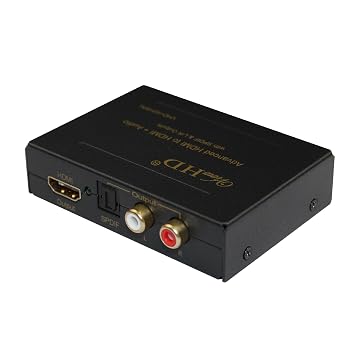
Im wondering if something like this would allow me to enjoy 5.1 while gaming whilst converting and sending the audio to the capture device in stereo......

Image

noticed it has the EDID switch, if changing that to 2 channel i wonder if it would send a compatible audio signal to the Xcapture!?
User avatar
Fudoh
Posts: 13045
Joined: Mon Mar 06, 2006 3:29 am
Location: Germany
Contact:

Re: New AV Amp Now Getting HDCP Warning When trying to Captu

Post by Fudoh »

Im wondering if something like this would allow me to enjoy 5.1 while gaming whilst converting and sending the audio to the capture device in stereo......
no, it's just disembedding the audio.

How did you handle this on your Sony AVR before ? Was the Sony feeding a 2ch downmix to the HDMI out while delivering decoded multi channel audio to the speakers ?
User avatar
lettuce
Posts: 1336
Joined: Wed Jun 22, 2011 7:10 pm
Location: Bedfordshire, England.

Re: New AV Amp Now Getting HDCP Warning When trying to Captu

Post by lettuce »

Fudoh wrote:
Im wondering if something like this would allow me to enjoy 5.1 while gaming whilst converting and sending the audio to the capture device in stereo......
no, it's just disembedding the audio.

How did you handle this on your Sony AVR before ? Was the Sony feeding a 2ch downmix to the HDMI out while delivering decoded multi channel audio to the speakers ?
Well with the sony i was using a 6x2 HDMI matrix and a Fiio D07 Digital To Analog Converter device. The trouble with 90% of new amps they dont have really have toslink outputs where the Sony did plus i was getting a slight audio sync issue with the Fiio device. i guess i could get one of those ViewHD hdcp strippers with a toslink connection and use the Diio device again but would still have to deal with the audio being out of sync
User avatar
lettuce
Posts: 1336
Joined: Wed Jun 22, 2011 7:10 pm
Location: Bedfordshire, England.

Re: New AV Amp Now Getting HDCP Warning When trying to Captu

Post by lettuce »

Ok got a phono to phono cable today to hook up to the pre-out sockets on the rear of my amp and to the phono sockets on the X-Capture device. I set the XBox One to Stereo audio and change the audio setting on AmaRec program from 'Embedded' to 'Line-In' but im still not getting audio from the AmarRec program!! :(

Any ideas?
User avatar
BuckoA51
Posts: 3424
Joined: Sat Oct 02, 2010 10:08 am
Location: Ireland
Contact:

Re: New AV Amp Now Getting HDCP Warning When trying to Captu

Post by BuckoA51 »

I tried the whole pre-amp socket route too and couldn't get it to work, though it really should, thinking about it. I just assumed since it wasn't properly amped it was too quiet a signal for the capture card to process.

I actually use two boxes to do what you want to do. An audio de-embedder like the one you linked to above and a Digital to Analog Audio decoder that supports converting Dolby Digital to analogue stereo.

The de-embedder I have will automatically drop down LPCM to 2.0 anyway (since you can't stream more than 2.0 LPCM through optical anyway) and simply pass through Dolby Digital which is then decoded by the Digital to Analog Audio decoder.

Bingo, full surround sound while playing and 2.0 while capturing.
OSSC Forums - http://www.videogameperfection.com/forums
Please check the Wiki before posting about Morph, OSSC, XRGB Mini or XRGB3 - http://junkerhq.net/xrgb/index.php/Main_Page
User avatar
lettuce
Posts: 1336
Joined: Wed Jun 22, 2011 7:10 pm
Location: Bedfordshire, England.

Re: New AV Amp Now Getting HDCP Warning When trying to Captu

Post by lettuce »

BuckoA51 wrote:I tried the whole pre-amp socket route too and couldn't get it to work, though it really should, thinking about it. I just assumed since it wasn't properly amped it was too quiet a signal for the capture card to process.

I actually use two boxes to do what you want to do. An audio de-embedder like the one you linked to above and a Digital to Analog Audio decoder that supports converting Dolby Digital to analogue stereo.

The de-embedder I have will automatically drop down LPCM to 2.0 anyway (since you can't stream more than 2.0 LPCM through optical anyway) and simply pass through Dolby Digital which is then decoded by the Digital to Analog Audio decoder.

Bingo, full surround sound while playing and 2.0 while capturing.
Hmm alot of the hdmi de-embedder's with an optical or 3.5m jack ive seen state that those ports are only active when receiving a stereo signal and if using 5.1 audio then they dont work, does the one you have work differently to that then?. I have actually order this device now....

Image

Also do you get any sync issues between the audio and video when using your Digital to Analog audio decoder, i have a FIIO D07 (D7) Digital to Analog Audio Converter http://www.amazon.com/Digital-Converter ... B00FOG4O34 and the audio always lag slightly behind the video when watching the capture back
User avatar
BuckoA51
Posts: 3424
Joined: Sat Oct 02, 2010 10:08 am
Location: Ireland
Contact:

Re: New AV Amp Now Getting HDCP Warning When trying to Captu

Post by BuckoA51 »

If there's a lag in the audio it's not significant enough that I've noticed it. Yes, you need a de-embedder that can actually downmix too if you want to use the optical out with LPCM 5.1.

I believe this can do everything you need all in one, but I've not tested it - http://www.ebay.co.uk/itm/230674888348? ... EBIDX%3AIT

Note that DTS master audio and Dolby True HD aren't supported by any de-embedder I'm aware of.
OSSC Forums - http://www.videogameperfection.com/forums
Please check the Wiki before posting about Morph, OSSC, XRGB Mini or XRGB3 - http://junkerhq.net/xrgb/index.php/Main_Page
User avatar
lettuce
Posts: 1336
Joined: Wed Jun 22, 2011 7:10 pm
Location: Bedfordshire, England.

Re: New AV Amp Now Getting HDCP Warning When trying to Captu

Post by lettuce »

Thanks!

I look over that device in more detail later, do you know if that strips HDCP though?
User avatar
lettuce
Posts: 1336
Joined: Wed Jun 22, 2011 7:10 pm
Location: Bedfordshire, England.

Re: New AV Amp Now Getting HDCP Warning When trying to Captu

Post by lettuce »

Ok this shit storm just goes from bad to worse it would seem. The ViewHD Advanced HDMI to HDMI +Audio device i ordered turned up today, which i have setup and after a bit of messing around got it to work along with audio. I was struggling getting any audio at all and found out i had to set the Pioneer amp up so i was send audio as well as the video to the HDMI output socket as it was just sending video to the HDMI outputs and audio to the speakers connected to the amp.

Heres were it would appear to go to shit, as i said I have found a way to send audio and video to the HDMI out sockets via the 'Audio P' button on the controller and then scrolling down to HDMI and then selecting either 'AMP' or 'Through' but when i do this i lose audio to my actual surround sound speakers on the amp!! Surely you are not just limited to either sending the audio through the hdmi out socket or the surround speakers, is there not a way to send the audio to the speakers as usual and also HDMI Out at the same time?. On my old Sony amp there was an option AMP+TV but cant see anything like this on the Pioneer??
Post Reply