The Pixel Purist:

The place for all discussion on gaming hardware
User avatar
FBX
Posts: 2349
Joined: Wed Feb 18, 2015 10:18 am
Location: DFW area, Texas
Contact:

Re: The Pixel Purist:

Post by FBX »

austin532 wrote:It seems only certain models have that option so are you able to create a work around this? Otherwise I will have to stick to 4x Scale settings.

Also just curious why a purist such as yourself never really cared for scanlines when they can help make the image look sharper? You are not really losing any part of the image compared to lets say if you enabled them for 480i/p games. Right? Or am I missing something?

Is it possible your "16:9" option you mentioned does the same thing as H-Stretch? If you could, describe to me what happens when you enable that mode.


With regard to scanlines, I've never seen them make the image 'sharper' unless the image is already exceptionally blurry. All they really do is give that nostalgic CRT experience that some people prefer.
User avatar
austin532
Posts: 844
Joined: Wed Mar 12, 2014 12:44 am
Location: Arizona, US

Re: The Pixel Purist:

Post by austin532 »

I don't think 16:9 is the same as h-stretch. All it does is give the image a slight overscan. Meaning it is very slightly zoomed in. It would equal to 2.5% overscan if you ran the AVS HD 709 overscan test pattern.
Framemeister 240p scanline settings: http://shmups.system11.org/viewtopic.ph ... start=9600
12345
Posts: 144
Joined: Sat May 31, 2014 11:08 am

Re: The Pixel Purist:

Post by 12345 »

austin532 wrote:I don't think 16:9 is the same as h-stretch. All it does is give the image a slight overscan. Meaning it is very slightly zoomed in. It would equal to 2.5% overscan if you ran the AVS HD 709 overscan test pattern.
Yes, it's definitely the display's fault. My set doesn't have a pure H-stretch function either, it also applys Overscan to every mode instead of Fullpixel. So whereas 480p in 4:3 looks excellent with FBX's new setting on Fullpixel, I can't stretch it accordingly for 16:9 material.
User avatar
FBX
Posts: 2349
Joined: Wed Feb 18, 2015 10:18 am
Location: DFW area, Texas
Contact:

Re: The Pixel Purist:

Post by FBX »

Wow that's strange. I thought all modern HDTVs had a wide-mode function for 1080p input.


I guess I'll have to amend the guide to reflect an alternative.

The best I could suggest at this point is to go ahead and set the display to full pixel and don't bother trying to use it to do any zooming or stretching. Instead, try using the Framemeister's ZOOM_WIDTH and change it from 41 to either zero or 1. Neither setting is exactly 16:9, but they are close, so pick the one you think looks better.
12345
Posts: 144
Joined: Sat May 31, 2014 11:08 am

Re: The Pixel Purist:

Post by 12345 »

Unfortunately, as I've already figured before, the step between ZOOM_WIDTH 1 and 0 is to big so that this is not acceptable.
But there is more I realized about the settings you provided: They might work well if the picture doesn't use the full vertical resolution but there seem to be some games which do, so that they get slight overscan because of the ZOOM_SIZE 97 instead of 100 value. In the end this makes me wonder if it's maybe just better to stay away from ZOOM and use NORMAL2 and WIDE instead, making use of the TV's overscan settings in addition, if necessary.
User avatar
FBX
Posts: 2349
Joined: Wed Feb 18, 2015 10:18 am
Location: DFW area, Texas
Contact:

Re: The Pixel Purist:

Post by FBX »

12345 wrote: They might work well if the picture doesn't use the full vertical resolution but there seem to be some games which do, so that they get slight overscan because of the ZOOM_SIZE 97 instead of 100 value.

There shouldn't be any overscan if the TV display is set to Full Pixel. For example in SSX 3 either in 480i or 480p, the ZOOM setting of 97 combined with Full Pixel makes it exactly match the vertical height. I'm considering making videos of doing the settings for each of the consoles on my display so people can see how it looks and what I'm after.
12345
Posts: 144
Joined: Sat May 31, 2014 11:08 am

Re: The Pixel Purist:

Post by 12345 »

I'm not talking about overscan. What I want to say is, that there are some games on Fullpixel which have boarders only on the sides and already match the vertical heigt without the use of zoom or overscan. So your settings might apply for most of the games but certainly not for all.
User avatar
FBX
Posts: 2349
Joined: Wed Feb 18, 2015 10:18 am
Location: DFW area, Texas
Contact:

Re: The Pixel Purist:

Post by FBX »

12345 wrote:I'm not talking about overscan. What I want to say is, that there are some games on Fullpixel which have boarders only on the sides and already match the vertical heigt without the use of zoom or overscan. So your settings might apply for most of the games but certainly not for all.

I haven't found any yet myself. Strictly speaking 480i and p of course. I've got about 10 PS2 games to check though, so I'll post back if I find any that go beyond SSX 3's vertical height.
User avatar
FBX
Posts: 2349
Joined: Wed Feb 18, 2015 10:18 am
Location: DFW area, Texas
Contact:

Re: The Pixel Purist:

Post by FBX »

I made my first video, and this just shows the process of setting both the Framemeister and my Sony display to perfect scaling for PS1 games emulated on the PS2 via component output:

https://www.youtube.com/watch?v=2xcVwBKkDRw
12345
Posts: 144
Joined: Sat May 31, 2014 11:08 am

Re: The Pixel Purist:

Post by 12345 »

FBX wrote:
12345 wrote:I'm not talking about overscan. What I want to say is, that there are some games on Fullpixel which have boarders only on the sides and already match the vertical heigt without the use of zoom or overscan. So your settings might apply for most of the games but certainly not for all.

I haven't found any yet myself. Strictly speaking 480i and p of course. I've got about 10 PS2 games to check though, so I'll post back if I find any that go beyond SSX 3's vertical height.
Here's a good example, showcasing a Wii game, not one from PS2 though: https://www.youtube.com/watch?v=1Vu9RpEoyEc
Look at how jailbars are there on the left and right while there are none below and upon the picture. I know this is just some random video but I can completely reproduce this with my console.
To prove it's not just the Wii's output which is different here, I give you another random example from the same console which is more appropriate for the settings you posted: https://www.youtube.com/watch?v=Cz6hR2bB-H4
Jailbars are clearly visible arround the whole picture.
User avatar
FBX
Posts: 2349
Joined: Wed Feb 18, 2015 10:18 am
Location: DFW area, Texas
Contact:

Re: The Pixel Purist:

Post by FBX »

12345 wrote:
FBX wrote:
12345 wrote:I'm not talking about overscan. What I want to say is, that there are some games on Fullpixel which have boarders only on the sides and already match the vertical heigt without the use of zoom or overscan. So your settings might apply for most of the games but certainly not for all.

I haven't found any yet myself. Strictly speaking 480i and p of course. I've got about 10 PS2 games to check though, so I'll post back if I find any that go beyond SSX 3's vertical height.
Here's a good example, showcasing a Wii game, not one from PS2 though: https://www.youtube.com/watch?v=1Vu9RpEoyEc
Look at how jailbars are there on the left and right while there are none below and upon the picture. I know this is just some random video but I can completely reproduce this with my console.
To prove it's not just the Wii's output which is different here, I give you another random example from the same console which is more appropriate for the settings you posted: https://www.youtube.com/watch?v=Cz6hR2bB-H4
Jailbars are clearly visible arround the whole picture.
Well the term you are looking for is 'pillarbox' for black borders on the sides and 'letterbox' for black borders on the top and bottom. Jail bars are typically interference in the graphics themselves.

At any rate, just so we can get on the same page here, what I'm saying is SSX 3 perfectly fits the top and bottom (as in there's no letterboxing, and no graphics are being cut off) when I use my settings with full pixel. Is what you were saying is you found some games there are vertically larger and already match the vertical height of the screen, but with zoom-size and zoom_overscan set to 100 (i.e. the same thing as Zoom turned off and using Standard image mode)?

Edit: The next game I tried, Silent Hill 2, had it's image centered on the bottom. In order to get it centered on the screen, I had to max out ZOOM_V_POS to 100 and that was just enough with ZOOM_SIZE set to 97 to get it to exactly match full-pixel height on my display. So it seems with PS2 games, it's going to be a case-by-case basis as to which settings to use. I'm going to keep testing more games and see how much variance there is.

Edit 2: Just tested Tekken Tag and it also had random size and centering. Best settings for it: ZOOM_SIZE: 93, ZOOM_V_POS: 60, H_SCALER: 7, V_SCALER: 5
User avatar
FBX
Posts: 2349
Joined: Wed Feb 18, 2015 10:18 am
Location: DFW area, Texas
Contact:

Re: The Pixel Purist:

Post by FBX »

UPDATE:

I've rewritten the anamorphics guide to ONLY use the Framemeister's internal 16:9 aspect correction. The various settings have been changed to reflect this, so it will no longer require any special wide modes from the TV. You can also leave the TV at "Normal" instead of "Full Pixel" for the screen size.

I've also added in notes about how each PS2 game is unique and so you'll need to experiment with the Zoom functions as a case-by-case basis. Here's the link to the updated guide (hit refresh if it still shows the older version):

http://www.firebrandx.com/ps2smoothanamorphic.html
12345
Posts: 144
Joined: Sat May 31, 2014 11:08 am

Re: The Pixel Purist:

Post by 12345 »

FBX wrote: Well the term you are looking for is 'pillarbox' for black borders on the sides and 'letterbox' for black borders on the top and bottom. Jail bars are typically interference in the graphics themselves.
No, this is neither pillarbox nor letterbox I am referring to. Have you even watched the videos? Both games show what you get if you leave ZOOM turned off and the image to NORMAL2/16:9.
FBX wrote: At any rate,... some games there are vertically larger and already match the vertical height of the screen, but with zoom-size and zoom_overscan set to 100 (i.e. the same thing as Zoom turned off and using Standard image mode).
Exactly.

Anyway, so as you said in your guide, using "Normal" or whatever overscan-setting the corresponding TV has, should also allow a fullscreen picture without borders as long as it doesn't touch the AR.
User avatar
FBX
Posts: 2349
Joined: Wed Feb 18, 2015 10:18 am
Location: DFW area, Texas
Contact:

Re: The Pixel Purist:

Post by FBX »

12345 wrote:
FBX wrote: Well the term you are looking for is 'pillarbox' for black borders on the sides and 'letterbox' for black borders on the top and bottom. Jail bars are typically interference in the graphics themselves.
No, this is neither pillarbox nor letterbox I am referring to. Have you even watched the videos? Both games show what you get if you leave ZOOM turned off and the image to NORMAL2/16:9.
Yes I did watch the videos, and I'm starting to lose my patience. If it's not the black borders you are referring to, then what did you mean by jail bars?

Here's what I'm talking about using your video and then also Resident Evil for the letterboxing example:

Image

Image
12345
Posts: 144
Joined: Sat May 31, 2014 11:08 am

Re: The Pixel Purist:

Post by 12345 »

Yes, with RE it's definitely letterboxing but for Brawl I only see vertical borders on the sides without the purpose of achieving a standard AR, which, as far as I know, is the only purpose of pillarboxing.
The second video I posted, on the other hand, shows a mix of pillar- and letterboxing (if you must say so) and not one OR the other.
User avatar
Jademalo
Posts: 233
Joined: Tue Apr 01, 2014 6:50 pm

Re: The Pixel Purist:

Post by Jademalo »

Hey FBX, just read the site, there's a lot of really good info on there! I'm also on a quest for perfect scaling, as i'm sure Fudoh knows since I've badgered him about it so much, lol.

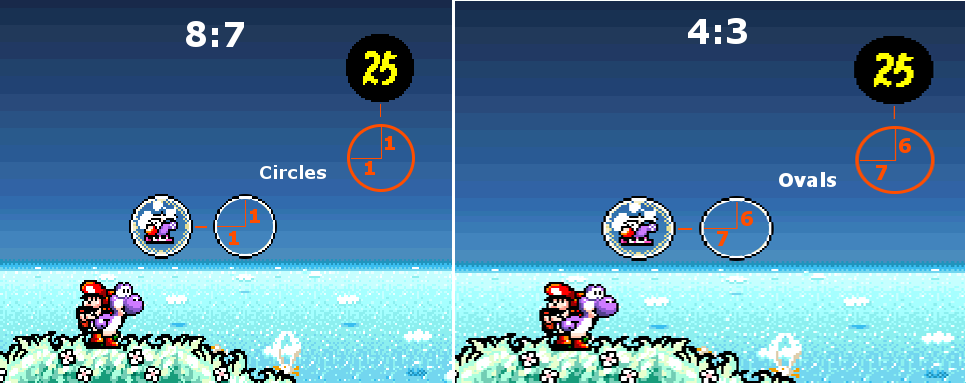
I do have one question for you though - Why do you think that emulated SNES is squashed rather than the other way around? I actually feel like the standard scaling of a snes on a tv is extremely inaccurate, and the designers didn't take account for this when designing the games.

Essentially, SNES games etc are designed to have square pixels. In ALttP, this is visible in the item box - it should be square and was obviously designed that way. Another example would be Yoshi's island, for which I have an image - https://farm3.staticflickr.com/2934/140 ... 33aa_o.png
I'm curious why you actually wanted to preserve the bizzare streching that snes games have on CRTs. When I got my mini it was actually the first thing I attempted to get rid of (and I was sucessful with zoom)
Another example of this being intended would be the GBA port of Yoshi's island, which preserves the circles correctly as an emulator would.
My understanding of this is that to display the image from a SNES it had to be streched for the tv, which turned the square pixels into 4:3 pixels making everything distorted, whereas from something like an N64 or a Wii the image has aspected pixels and needs to be squished to result in square pixels. (I think this is why x1 scaling makes N64 etc look extremely streched horizontally)

Anyway, that's just more of a curiosity. I'm currently going through my consoles and trying out different settings for perfect scaling, as far as I can tell it's nigh on impossible to get x2 scaling with proper aspect ratio preservation, lol. Yay for none square pixels! /s
My goal is a little bit different though - I'm not bothered about letterboxing or pillarboxing, I'm mainly trying to get as accurate an image as possible for use in recording. So far I've managed that with the SNES (Though you would disagree!) and I'm pretty much there with the N64. I'm having issues with the Wii though, lol.

If you want to (in a sense) compare notes, then I'd love to see what you're doing and how you go about some stuff.
12345
Posts: 144
Joined: Sat May 31, 2014 11:08 am

Re: The Pixel Purist:

Post by 12345 »

What is your approach with the N64?
What kind of issues have you got with the Wii? Maybe I can help you.
User avatar
Jademalo
Posts: 233
Joined: Tue Apr 01, 2014 6:50 pm

Re: The Pixel Purist:

Post by Jademalo »

The issues I'm having are more to do with accurate pixel scaling while keeping the correct ratios for each console. As it happens I've sorted the N64, I've just dialed everything in and it looks absolutely gorgeous. Turns out one of the main issues I was having was because Banjo Kazooie has a seriously chopped resolution for im assuming framerate purposes, lol. The issues I'm having are more with 480i/p content. I'll copy what I said to Fudoh earlier -
The main issue that I've been having is there seems to be no way to get pure x2 scaling in 1080p while keeping the correct aspect ratio and preserving circles from a 480i/p source. The only mode that does this is standard, which on 720p scales it 1.5x being inaccurate, and 1080p which scales it by an extra 120, rather than occupying 960 vertically. x1/x2/normal2 causes circles to be streched horizontally, resulting in an inaccurate image.

With the N64 and GC/Wii issues I've been having, again it's all about circle preservation. x1 and x2 don't preserve circles in everything I've tried it on (Wii Menu, multiple GC games and a few N64 games,) while standard seems to do it pretty well. In my mind a circle is the best thing available to calibrate different systems from to get the image that the devs intended, regardless if it was the image they actually managed to achieve. Squashing is a flaw to me, why not fix it? That's my outlook on the whole thing, though it's obviously different for different people. I expect there are a decent number who dislike RGB since the image is too crisp and clean, and the issues that dithering causes with that. To each their own. Obviously my BVM is calibrated so that circles are circles, and everything (except the snes in my eyes) is perfect on there.

I do understand that 480i/p at 720p is scaled bicubic, but you also have to remember my ultimate goal - to essentially preserve the exact intended output of a console except in a digital format. To that end, I'd rather have nearest neighbor scaling over bicubic, even though it's obvious that for anything past the 240p era that bicubic produces a much nicer image.
This is also why I wish the mini had profiles, I'd easily have two profiles per console, one for accurate capture, and another for playing on a big TV.

That's my thought process and reasoning. I mean, it's not like it's an amazing image vs crap image issue, it's more an accurate vs appealing issue. Appealing is insanely easy to get, but I'm the type of person who wants to see what the developer intended, not what they ended up with. That's not to say flawless, though.
Hopefully you understand what i'm banging on about, thanks in advance!
User avatar
FBX
Posts: 2349
Joined: Wed Feb 18, 2015 10:18 am
Location: DFW area, Texas
Contact:

Re: The Pixel Purist:

Post by FBX »

Jademalo wrote:Hey FBX, just read the site, there's a lot of really good info on there! I'm also on a quest for perfect scaling, as i'm sure Fudoh knows since I've badgered him about it so much, lol.

I do have one question for you though - Why do you think that emulated SNES is squashed rather than the other way around? I actually feel like the standard scaling of a snes on a tv is extremely inaccurate, and the designers didn't take account for this when designing the games.

Essentially, SNES games etc are designed to have square pixels. In ALttP, this is visible in the item box - it should be square and was obviously designed that way.
The simple fact of the matter is the SNES was made back when TVs were 4:3, and so it's a matter of historical accuracy. Also you should know that it was a case-by-case basis whether the artists took into account the 4:3 aspect ratio, and often times this variates in different points in each game! For example in ALttP, the opening sequence with the triforce is very obviously too narrow with square pixels, while applying aspect correction makes them correctly angled. In Space Megaforce, the opening sequence with the planet doesn't look right unless aspect correction is applied, and yet later in the first stage, the scaled meteoroids only look correct in square pixels. The artist situation doesn't end with the SNES either. In Castlevania: Bloodlines, there's moments where the graphics rely on aspect correction, and other moments where the artist simply forgot, like the moon in the background of the first stage boss area.


So when you have random variation on 4:3 design, really it comes down to personal taste: Vintage aspect correction, or square pixels. I choose vintage, because that's the way the games were 'meant' to be played regardless of individual mistakes by artists. That's as far as I go for vintage experience though. Some people also want scanlines, and even color bleed to make it look even closer to the original experience.
User avatar
CkRtech
Posts: 668
Joined: Mon Aug 27, 2012 9:30 pm
Location: Seattle, WA

Re: The Pixel Purist:

Post by CkRtech »

Jademalo wrote:I do have one question for you though - Why do you think that emulated SNES is squashed rather than the other way around? I actually feel like the standard scaling of a snes on a tv is extremely inaccurate, and the designers didn't take account for this when designing the games.

Essentially, SNES games etc are designed to have square pixels. In ALttP, this is visible in the item box - it should be square and was obviously designed that way. Another example would be Yoshi's island, for which I have an image - https://farm3.staticflickr.com/2934/140 ... 33aa_o.png
I'm curious why you actually wanted to preserve the bizzare streching that snes games have on CRTs.
CRTs are 4:3, therefore the stretch is correct. If companies (including Nintendo) developed the game in 8:7 with the assumption of that being the display aspect ratio, they messed up.

A counter example to LttP (arguably 8:7) would be something like Chrono Trigger - a game that takes the 4:3 stretch into account and does not look correct at 8:7.

I understand the desire of some to see 8:7-designed material displayed at that aspect ratio so circles and squares are displayed properly, but I think the default recommended display settings should shoot for getting people the closest to "normal" display at the time of the given console's release.

That being said, the best guides are the ones that can address questions before they are asked. Perhaps a section that mentions this sort of thing as well as suggested modes for achieving an 8:7 squish could be added at some point.
User avatar
FBX
Posts: 2349
Joined: Wed Feb 18, 2015 10:18 am
Location: DFW area, Texas
Contact:

Re: The Pixel Purist:

Post by FBX »

Just to add: The graphical timing of the the SNES console itself has been measured with an oscilloscope, which gave a reading of 288 square pixels. This means a 4x scale corrected SNES image would have a resolution of 1152x896. This is if you want to be 100% accurate to the console itself.

Here is a 2xscale square pixel image of the Triforce in ALttP:

Image

Now here it is with 2*288 aspect correction:

Image

Notice the triangles are distinctly more accurate than the square pixel version.
CkRtech wrote: That being said, the best guides are the ones that can address questions before they are asked. Perhaps a section that mentions this sort of thing as well as suggested modes for achieving an 8:7 squish could be added at some point.
I agree as it looks like I'll need to make a page dedicated to the issue. I can show examples of where the correction was accounted for (i.e. the triforce), and also where it wasn't (Bloodlines first stage boss moon).
User avatar
austin532
Posts: 844
Joined: Wed Mar 12, 2014 12:44 am
Location: Arizona, US

Re: The Pixel Purist:

Post by austin532 »

FBX, are you still tinkering around with the PS2 to find the perfect 4:3 image? The current settings look good but I'm curious if you can make them better. I know you are trying to perfect 16:9 at the moment but honestly I never play PS2 games in widescreen anyway as a majority of them are cropped on the top and bottom.

Also I feel setting Brightness to 37 is a tad too bright as the PS2's browser looks slightly grayish when using movie mode. 34-35 seems about right. Although I wonder if the browser is supposed to look that way because even on a CRT it doesn't look perfectly black to me.

I usually bring Saturation down to about 28 as we all know the mini over saturates the colors when using component.
Framemeister 240p scanline settings: http://shmups.system11.org/viewtopic.ph ... start=9600
User avatar
Jademalo
Posts: 233
Joined: Tue Apr 01, 2014 6:50 pm

Re: The Pixel Purist:

Post by Jademalo »

FBX wrote:
CkRtech wrote: That being said, the best guides are the ones that can address questions before they are asked. Perhaps a section that mentions this sort of thing as well as suggested modes for achieving an 8:7 squish could be added at some point.
I agree as it looks like I'll need to make a page dedicated to the issue. I can show examples of where the correction was accounted for (i.e. the triforce), and also where it wasn't (Bloodlines first stage boss moon).
Definitely a third for me. It's not too hard to do with zoom, with everything as default, if zoom size is set to 100 the zoom width needs to be set to 74. That gives everything the right ratio for square pixels.


Also that's pretty interesting, I didn't know the triforce was that bad. The main game I used for testing was Yoshi's island which is horrifically squashed, but when I was also trying to get my settings right ALTTP kept looking wrong ingame, with the item box at the top being the main culprit.
My solution is to just set that zoom option, so if a game needs the correction then I just turn it on. I do understand why some people may want to keep the weirdness, but I'm not one of them. As I said in my other post, my main test is circles. If my circles are circles, then my settings are correct. In Yoshi's island and ALTTP, circles are most definitely not circular.
12345
Posts: 144
Joined: Sat May 31, 2014 11:08 am

Re: The Pixel Purist:

Post by 12345 »

austin532 wrote: Also I feel setting Brightness to 37 is a tad too bright as the PS2's browser looks slightly grayish when using movie mode. 34-35 seems about right. Although I wonder if the browser is supposed to look that way because even on a CRT it doesn't look perfectly black to me.

I usually bring Saturation down to about 28 as we all know the mini over saturates the colors when using component.
Everything below Brightness 37 (at A/D 131, HDMI output, YcBCR) crushes blacks, it's been tested and not just a matter of taste. As for saturation, I think it would be interesting to finally see somebody measure their results with a meter.

@Jademalo
Sry, unfortunately I haven't found a way myself to match the horizontal scaling on the wii perfectly yet. Would you be so kind and share your N64 settings? I'm sure a lot of people have been having a hard time with those as well.
User avatar
FBX
Posts: 2349
Joined: Wed Feb 18, 2015 10:18 am
Location: DFW area, Texas
Contact:

Re: The Pixel Purist:

Post by FBX »

austin532 wrote:FBX, are you still tinkering around with the PS2 to find the perfect 4:3 image? The current settings look good but I'm curious if you can make them better. I know you are trying to perfect 16:9 at the moment but honestly I never play PS2 games in widescreen anyway as a majority of them are cropped on the top and bottom.

Also I feel setting Brightness to 37 is a tad too bright as the PS2's browser looks slightly grayish when using movie mode. 34-35 seems about right. Although I wonder if the browser is supposed to look that way because even on a CRT it doesn't look perfectly black to me.

I usually bring Saturation down to about 28 as we all know the mini over saturates the colors when using component.
The 37 brightness is only meant for PS1 emulation on the PS2. It seems everything is quite uniform on the emulation side, but PS2 games are quite varied as to the size and in color settings that look best. I even found various PS2 games required their own unique focus settings (H_Scaler and V_Scaler). The truth be told, it's impossible to provide a definitive full-screen PS2 setting that works for all PS2 games. This is where I'm REALLY wishing there was profile options on the firmware. How awesome would it be to be able to store them on the microSD card and trade profiles on the internet? Micomsoft BADLY needs to add in that feature.
Jademalo wrote: As I said in my other post, my main test is circles. If my circles are circles, then my settings are correct. In Yoshi's island and ALTTP, circles are most definitely not circular.
Well as I pointed out, some games have different points where a circle is accurate with aspect correction, and then in a later stage the artist didn't account for aspect correction with the circles there. What do you do then? Neither option is going to line everything up at any given moment, so you might as well go with what will be correct 90% of the time, and that's proper aspect ratio.
User avatar
austin532
Posts: 844
Joined: Wed Mar 12, 2014 12:44 am
Location: Arizona, US

Re: The Pixel Purist:

Post by austin532 »

FBX wrote: The 37 brightness is only meant for PS1 emulation on the PS2. It seems everything is quite uniform on the emulation side, but PS2 games are quite varied as to the size and in color settings that look best. I even found various PS2 games required their own unique focus settings (H_Scaler and V_Scaler). The truth be told, it's impossible to provide a definitive full-screen PS2 setting that works for all PS2 games. This is where I'm REALLY wishing there was profile options on the firmware. How awesome would it be to be able to store them on the microSD card and trade profiles on the internet? Micomsoft BADLY needs to add in that feature.
I did not know that it only applied to PS1 games on PS2. :roll: So I'm confused now. Are you saying that PS2 games are better off just using 1080p output without Zoom since they vary so much? What about PS1 games with a PS1 system using RGB? Any recommended settings? 1280 x 960 in DVI mode seems to look pretty nice and it allows for the use of scanlines to.
I know it's impossible to get perfect settings for everything as every TV, System, Game, and personal preference is different but 90% is pretty close.
Framemeister 240p scanline settings: http://shmups.system11.org/viewtopic.ph ... start=9600
User avatar
FBX
Posts: 2349
Joined: Wed Feb 18, 2015 10:18 am
Location: DFW area, Texas
Contact:

Re: The Pixel Purist:

Post by FBX »

austin532 wrote:
FBX wrote: The 37 brightness is only meant for PS1 emulation on the PS2. It seems everything is quite uniform on the emulation side, but PS2 games are quite varied as to the size and in color settings that look best. I even found various PS2 games required their own unique focus settings (H_Scaler and V_Scaler). The truth be told, it's impossible to provide a definitive full-screen PS2 setting that works for all PS2 games. This is where I'm REALLY wishing there was profile options on the firmware. How awesome would it be to be able to store them on the microSD card and trade profiles on the internet? Micomsoft BADLY needs to add in that feature.
I did not know that it only applied to PS1 games on PS2. So I'm confused now. Are you saying that PS2 games are better off just using 1080p output without Zoom since they vary so much? What about PS1 games with a PS1 system using RGB? Any recommended settings? 1280 x 960 in DVI mode seems to look pretty nice and it allows for the use of scanlines to.

I know it's impossible to get perfect settings for everything as every TV, System, Game, and personal preference is different but 90% is pretty close.
To clarify, I'm saying it's impossible to do perfect zooming to FULL screen for all PS2 games since some have different vertical heights and centering. For example, Silent Hill 2 uses a bottom-centered image while most games do not. However, you can still apply the 2xscale settings I came up with to PS2 games since the variance in vertical height will never reach the top and bottom of the screen. My perfect scale settings mimic "SMART_2X" only with the added benefit of 4:3 aspect correction. That's what I was originally after in the first place.

Also as I tried to explain in the anamorphics guide, PS2 games settings for color, brightness, and focus should be adjusted on a case-by-case basis.
User avatar
austin532
Posts: 844
Joined: Wed Mar 12, 2014 12:44 am
Location: Arizona, US

Re: The Pixel Purist:

Post by austin532 »

Just to clarify by 2x scale settings you mean the 4x settings you came up with FBX?

As for color settings I ran some test patterns through the PS2 and the defaults look best except change brightness to 37 and saturation to 26. There is definitely clipping with saturation at 32 and should be avoided like the plague. The Mini's output color is also set to RGB and the TV is set to Full RGB. Keep in mind my TV settings are calibrated so it may vary. While running a cropping test pattern I found h-pos at 68 and v-pos at 33 to look best while in Full Pixel mode.
Framemeister 240p scanline settings: http://shmups.system11.org/viewtopic.ph ... start=9600
User avatar
FBX
Posts: 2349
Joined: Wed Feb 18, 2015 10:18 am
Location: DFW area, Texas
Contact:

Re: The Pixel Purist:

Post by FBX »

austin532 wrote:Just to clarify by 2x scale settings you mean the 4x settings you came up with FBX?

As for color settings I ran some test patterns through the PS2 and the defaults look best except change brightness to 37 and saturation to 26. There is definitely clipping with saturation at 32 and should be avoided like the plague. The Mini's output color is also set to RGB and the TV is set to Full RGB. Keep in mind my TV settings are calibrated so it may vary. While running a cropping test pattern I found h-pos at 68 and v-pos at 33 to look best while in Full Pixel mode.
It would be technically 2x for PS2 games (480i and 480p) and 4x for low res games like on the PS1 emulation. The Framemeister just blanket-calls it "SMART_2X", only it doesn't have aspect correction, so my scale settings mimic that mode with aspect correction. The anamorphics guide was an attempt to see if I could come up with a universal setting for a stretched image that fills the screen, and that's when I discovered that each PS2 game has unique centering and vertical size (bummer).

Anyway, if I may ask, how are you able to get RGB output from the Framemeister when on the D-Terminal input? On mine, it won't ever switch to RGB if I'm using the component D-Terminal.
User avatar
Jademalo
Posts: 233
Joined: Tue Apr 01, 2014 6:50 pm

Re: The Pixel Purist:

Post by Jademalo »

Hey, any chance either if you have any idea how to solve this weird issue I'm having?

http://i.imgur.com/yqLH0G2.png - Component
http://i.imgur.com/ZXgZqpn.png - RGB

http://imgur.com/yqLH0G2,ZXgZqpn#0 - A thing to switch between the two easily

Ignore the incorrect scaling on the rgb image, that was just me forgetting to change it for the image. This happens for every source no matter the scaling settings, so it's not a relevant issue.
Also for the purposes of this test I used my Component to RGB transcoder, but this same issue happens regardless of the source I use, and is the same across every console I've tried it with. I also have my BVM configured so that both inputs look absolutely identical - and I mean, Identical. This isn't a source issue at all.

Anyway! I've got a bit of a weird problem with RGB colour. As you can clearly see, component is gorgeous, warm, vibrant and pretty much identical to what I see on my BVM. It really is top notch. However, RGB is extremely... Dull. Although, it's not a brightness or contrast issue. I thought it was at first and spent a while messing with them, but they didn't fix anything. It seems like the problem is actually a greeny blue hue over the entire image. I tried messing with the RGB settings, but it only made the whites extremely red, or made everything even more dull. I don't have a reliable way of capturing it, but another good example was the grass outside Peach's castle in SM64. On my BVM, it's green, the sand is orange, and the walls are grey. On the Mini, the grass is highliter neon green, the sand is blueish, and the walls are red. It's visible pretty well if you look at the top corner of the sunshine image - the grass is neon on the RGB one and correct on the Component one.

Any ideas? It's been puzzling me for a couple of days, and I can't seem to make it look right.
Thanks!

Edit: Just tried the Wii scart cable direct into the mini, same issue. So it's got absolutely nothing to do with my setup, and it's something to do with the Mini.
Edit2: Jesus, the green is actually peaking at 255 green for almost all of it on the rgb image. Why is it so ott
Last edited by Jademalo on Tue Mar 24, 2015 5:03 pm, edited 1 time in total.
Post Reply