GBS-8200 + Dreamcast 240p over vga issues

The place for all discussion on gaming hardware
Post Reply
bulletbob
Posts: 12
Joined: Tue Feb 17, 2015 2:38 pm
Location: 7th Circle, Hell

GBS-8200 + Dreamcast 240p over vga issues

Post by bulletbob »

Image my Frankenscaler retrocade? I haven't added the 1881 yet.
*edit Google isn't letting me use direct links *fixed
Try my Google folder for pictures
https://drive.google.com/folder/d/0B8Z9 ... BNWkU/edit

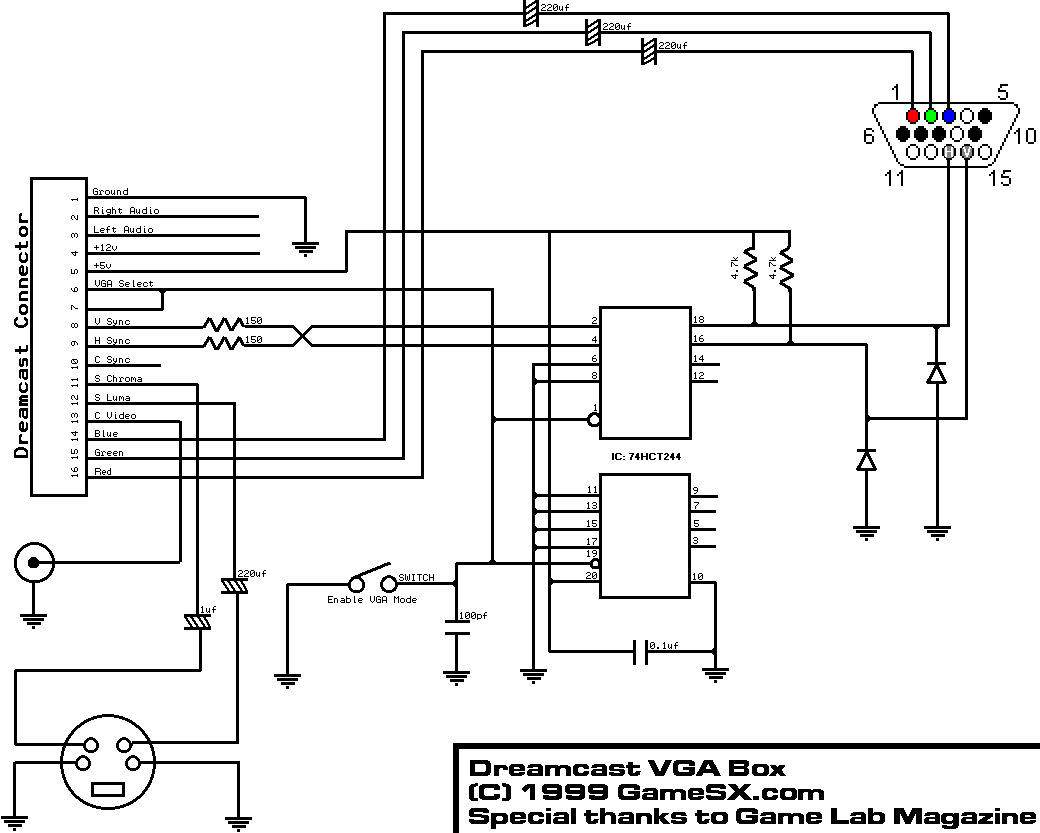
My main gaming CRT is a Samsung slim fit 3093wh. I have the gbs8200 2014 model and retro VGA slg. Primarily wanted this for my Saturn and Dreamcast. The DC works fine in 480p VGA, no sync issues picture looks good. I installed a switch for 240p mode on my vga box, breaking the connection of the 6th pin, middle blue wire(mmmonkey Mod). Well games that are not VGA compatable will boot but the picture rolls then disappears, no signal. My plasma downstairs sees it as 15khz but shows no other picture.

Has anyone bottom there DC working in 240p mode on the gbs over VGA?

Unrelated gibberish.
I was using the portta petvhs VGA to HDMI scaler at 720p to get it to my TV, but those dummies didn't put a heatsink in it so as soon as it got hot it developed vertical lines. Excellent picture otherwise. When they send my replacement I'm going to put heatsinks and a fan. Or maybe mount it in a box next to the gbs. I am currently using the sabrent pcct VGA to component, however the black levels are to dark, have to turn up the contrast in the gbs to see everything.
Last edited by bulletbob on Mon Mar 02, 2015 2:13 am, edited 4 times in total.
HydrogLox
Posts: 1164
Joined: Tue May 22, 2012 3:35 pm
Location: Ontario, Canada

Re: GBS-8200 + Dreamcast 240p over vga issues

Post by HydrogLox »

bulletbob wrote:DC working in 240p mode
FYI: Dreamcast does not have a "240p mode". Disconnecting pin 6 while leaving pin 7 grounded enables "15kHz RGB" mode. Most games will generate a 480i signal - there are a few that will generate a 240p signal: PORT-FX! 240p LIST.

That shouldn't be at the root of your problem as one of the known issues with the GBS-8200/8220 is that doesn't distinguish between 480i and 240p (Four Upcoming Classic Gaming Upscaling Solutions; GBS 8200/8220 CFW Project). And while the Dreamcast will generate H Sync and V Sync signals in addition to the more traditional C Sync signal in "15kHz RGB" mode that doesn't mean that the GBS-8200/8220 has to like those signals (... just a guess).

In fact the GBS-8200/8220 commonly has sync-issues with many RGBS signal consoles (like your Saturn). Faginrs500 published a video 4 years ago about adding a sync-stripper/amplifier to the board to address that issue.
YouTube: £50 VGA Scaler modified to accept RGB SCART input from retro consoles
YouTube: RGB Scart to VGA / SVGA /XVGA Scaler with SLG 3000
Topic: Modified CGA to VGA Scaler to accept clean sync RGB SCART

Then the Sync Strike was developed.
ArcadeForge: Sync Strike
YouTube: Sync Strike Review
Topic: New Sync Strike - Available Now!

... which ultimately got included in the all-in-one SLG-in-a-Box.
ArcadeForge: SLG-in-a-Box

So you could implement your own RGBS "sync-cleaner" (which you'll likely need for your Saturn anyway) and for Dreamcast "15kHz RGB" mode get the C Sync from pin 10 (not active in "31kHz RGB" mode). For a purchased solution buy a Sync Strike.

Not sure if this addresses your exact problem but it may be something to think about.
Last edited by HydrogLox on Wed Feb 18, 2015 5:15 pm, edited 1 time in total.
bulletbob
Posts: 12
Joined: Tue Feb 17, 2015 2:38 pm
Location: 7th Circle, Hell

Re: GBS-8200 + Dreamcast 240p over vga issues

Post by bulletbob »

Thanks for the reply,

The next question would be can I use the lm1881n for both the Saturn and the Dreamcast? Or would that only work for the Saturn?
If that's the case has anyone tried the 480p rgbs sync combining mod(74ls86) on the gbs? And would that be suitable for both or just the DC(15/31khz)?

Seems like comp video and y/c are active while in 15khz. And I was mistaken 15khz does not equal 240p.

I live in the USA if that makes any difference.
HydrogLox
Posts: 1164
Joined: Tue May 22, 2012 3:35 pm
Location: Ontario, Canada

Re: GBS-8200 + Dreamcast 240p over vga issues

Post by HydrogLox »

bulletbob wrote:The next question would be can I use the lm1881n for both the Saturn and the Dreamcast?
You can use a LM1881 with a Dreamcast in 15kHz mode if you use C Video from pin 13 (C Sync from pin 10?). Of course those pins aren't active in 31kHz mode.

Typically people do not use a GBS-8200/8220 with a Dreamcast - they run the DC strictly in 31kHz mode. For games that don't support that mode outright they use the forced VGA trick.
GamesSX: Dreamcast AV Connector wrote:Power up the Dreamcast with the switch in the 'standard mode' (Neither pin grounded) and flick the switch after the game disk has already started to be read (When loading original GD-ROM's you will hear a 'beep' sound from the drive at this point) this can often trick incompatible games into the desired mode.
However some games like "Gunbird 2" don't work that well in forced VGA, while others like "Bangai-O" don't work at all. For scanline enthusiasts the Hanzo already has a built in scanliner (the TORO variant can also output a C Sync for both 15kHz and 31kHz modes).
bulletbob
Posts: 12
Joined: Tue Feb 17, 2015 2:38 pm
Location: 7th Circle, Hell

Re: GBS-8200 + Dreamcast 240p over vga issues

Post by bulletbob »

Thanks for the info. I was hoping for a one cable solution. But I have a starting point. So basically, my idea is I could put a din barrel plug of some kind modded into my VGA box,preferably the saturn av. Wire it for rgbs and composite video out, then have the lm1881n and a scart female plug wired to the gbs,as in fagins post. That way I will only need 1 scart cable For 15khz. Plug n play. *edit* 8 pin dins are plentiful, not so for 10 pins, so I guess wire it up like the genesis/MD model1, plus the genesis1 scart cables come with a headphone plug.

I know people like to scan line the DC at 480, I usually scale it to 1024 then scan line it. For the same reason I wouldn't scanline 240p without scaling first to 480p.

Also does anyone have the pin out to the back of the DC av connector, inside under all the plastic and behind the part that actually connects to the DC? They are staggered where the wires connect.

Scan lines are sexy! :wink:
HydrogLox
Posts: 1164
Joined: Tue May 22, 2012 3:35 pm
Location: Ontario, Canada

Re: GBS-8200 + Dreamcast 240p over vga issues

Post by HydrogLox »

Consider How to use a VGA connector as your RGB-output.
In your case replace C Sync with C Video for the LM1881. For your SCART cable(s), make a breakout box from a project box and a SCART socket with a VGA (i.e. RGB) cable sticking out of it and two RCA phono connectors for audio out.
Or throw the LM1881 in the box too and add a 15 pin RGB socket on the box for Dreamcast.

What is it about http://www.gamesx.com/wiki/doku.php?id=av:dreamcastav that doesn't help you?.

Most standard Dreamcast VGA boxes do give you access to C Video (pin 13) which is what Modified CGA to VGA Scaler to accept clean sync RGB SCART uses (not C Sync/pin 10) - so you should be able to get that from the box end of the cable rather than the AV connector.
User avatar
dooklink
Posts: 85
Joined: Fri Nov 07, 2014 6:16 am
Location: Australia

Re: GBS-8200 + Dreamcast 240p over vga issues

Post by dooklink »

Just saw this post. You can check out my custom firmware progress for the GBS boards in this thread if you haven't seen it:
http://shmups.system11.org/viewtopic.php?t=52172

In regards to your issue, I can think of what is the probable cause. The Original firmware on the GBS board will only sync to 15kHz when set to RGBs and 31kHz+ when set to RGBHV. I have yet to see anything refuting that, and also haven't fixed this yet myself.

This means you will need a clean, preferably 3.3V Composite Sync signal. Composite sync means clean Composite sync, not Composite Video as sync. I've got a SyncStrike connected to a resistor divider to supply 3.3V from the SyncStrike's 5V signal. The LM1881 runs at 5V minimum I believe, there are other chips that do the same thing from Intersil and Texas Instruments that may run at 3.3V. This is only important if you don't want to run 5V sync into the chip on the GBS. The voltage level hasn't been proven to be the cause of any issues as yet though.
bulletbob
Posts: 12
Joined: Tue Feb 17, 2015 2:38 pm
Location: 7th Circle, Hell

Re: GBS-8200 + Dreamcast 240p over vga issues

Post by bulletbob »

I ordered the lm1881n from eBay so now its just a waiting game. I will follow fagins awesome guide. I am going to use db15 connectors instead of scart as I have some extra VGA male and female sockets laying around. I wish we would have had scart in the usa.

@Dooklink, I did see that firmware mod. Looks great I should probably great a raspberry pi next payday. What would be the recommended specs for the pi? I see model b+ units with 512 ram on eBay for 30 bucks. Would that be sufficient to run Raspbian and your software? Or maybe a better question is what are the specs of the unit that you use? The reason I ask is there is a couple of versions of b+ on ebay and while I might be a bit of a spec head, I am trying to keep a budget on this project. You should do a YouTube video on the whole process or ask Mr Fagin if he would. Fagin is how I found out about the gbs the mods and ultimately this forum.
I'm glad I did for some reason I thought that the dreamcast would just work, 15k 31k with the gbs and that the lm1881n chip was only needed for 50hz, I was dead wrong. Wasn't the first time and won't be the last, learn something new everyday.

When I get everything together I will post some pictures
User avatar
dooklink
Posts: 85
Joined: Fri Nov 07, 2014 6:16 am
Location: Australia

Re: GBS-8200 + Dreamcast 240p over vga issues

Post by dooklink »

Hopfully it will work for you and are happy with the results. The original firmware is so limited unfortunately.
I'm planning on doing YouTube videos one day. I don't think I'll have time for it much right now, nor do I have any mics or cameras that would be adequate.
bulletbob
Posts: 12
Joined: Tue Feb 17, 2015 2:38 pm
Location: 7th Circle, Hell

Re: GBS-8200 + Dreamcast 240p over vga issues

Post by bulletbob »

Thanks dooklink I'm going to get a cheapo pi off eBay and try it out. I am building the gbs kit a piece at a time.

I have one more sort of unrelated question, does anyone know how to brighten or boost the VGA without using the gbs or your TV contrast settings? Like what the beharbros did with their awesome VGA box,hanzo I think. Maybe a rgb amp or adding some 220uf caps to the color lines going into the sabrent vga to component scaler. I have a feeling its got some of the same bits as the gbs just different firmware.

I need it to feed my vga to component scaler that puts out a darker picture. Changing the contrast settings in the gbs fixes some games but looks blown out in the bios screen. But with a HDMI scaler I don't need to tweak anything and the picture is correct. Tokyo xtreme racer is the game I use to test contrast. The main title screen and start screen are supposed to have a road map in the background.
bulletbob
Posts: 12
Joined: Tue Feb 17, 2015 2:38 pm
Location: 7th Circle, Hell

Re: GBS-8200 + Dreamcast 240p over vga issues

Post by bulletbob »

I uploaded some videos of my project on YouTube, albeit with my note2. Also on Google drive pictures when it wants to work.
The scaler setup I'm using,
http://youtube.com/watch?v=gCYgCYSgdBIXn

Gunlord with scanlines
http://youtube.com/watch?v=uKkmV5JiE5U

I added a few more to the channel.
HydrogLox
Posts: 1164
Joined: Tue May 22, 2012 3:35 pm
Location: Ontario, Canada

Re: GBS-8200 + Dreamcast 240p over vga issues

Post by HydrogLox »

Have you considered using a (lag-free) VGA-to-HDMI converter that doesn't scale - i.e. outputs 480p over HDMI? On some displays that may actually yield superior results.
Furthermore as you do have the option to use a component input a (lag-free) VGA-to-Component transcoder is also a viable alternative (provided the display does not apply any additional processing on the component input).

There is one issue that you should be aware with the Dreamcast - it actually outputs 720x480, not 640x480 (the game uses the core 640x480 area); so some converters "squish" the image while others only use the left part of it.

http://junkerhq.net/xrgb/index.php/Drea ... uliarities
bulletbob
Posts: 12
Joined: Tue Feb 17, 2015 2:38 pm
Location: 7th Circle, Hell

Re: GBS-8200 + Dreamcast 240p over vga issues

Post by bulletbob »

HydrogLox wrote:Have you considered using a (lag-free) VGA-to-HDMI converter that doesn't scale - i.e. outputs 480p over HDMI? On some displays that may actually yield superior results.
Furthermore as you do have the option to use a component input a (lag-free) VGA-to-Component transcoder is also a viable alternative (provided the display does not apply any additional processing on the component input).

There is one issue that you should be aware with the Dreamcast - it actually outputs 720x480, not 640x480 (the game uses the core 640x480 area); so some converters "squish" the image while others only use the left part of it.

http://junkerhq.net/xrgb/index.php/Drea ... uliarities
I would love a vga2hdmi device that just converts instead of scaling, because there is lag its not unbearable to me but still.
1 a little back story
I have one of those old CRTs that had 2 HDMI ports and one said HDMI/dvi and in the service manual it states do not connect a PC, so I assume it won't work. So my thought process on that was it had to do 720p or 1080i(yuk). I went with the scalers mentioned for that very reason. Well fast forward a month and I find a dvi to HDMI adapter at goodwill for 2 bucks and try it out and it worked with my PC. And if I put any resolution over 720p up to 1080 from my pc into the TV it displays at 1080i. In windows the TV will be at 720 @ 60hz and 1080 @ 30hz. Anything above 720p looks blurry.

2
Transcoders would be ideal, however, I tried a VGA to component scaler(not a transcoder) and hated the colors and contrast, blacks had no detail, I will say a million times try Tokyo xtreme racer 1 for DC. You won't see the road map in the background of the start screen, you will with the HDMI scaler.. That's my test. HDMI transcoder/digitizer is preferable, but can't go over 720p without being forced to 1080i 30hz by the tv. I cant say all component devices are bad and I can't say all HDMI converters are good. But I will say any vga2hdmi with the silicon image chip set looks fantastic. None of them work with 15khz from the dreamcast so far. I also have all the processing turned off or set to 0 in the service menu(CTI,LTI, etc).

3
I found out about chopping of the sides with the portta and the sabrent VGA to hdmi scaler. It will chop the sides off if you have the dreamcast running first then power the scaler, you have to power on the scaler first then the dreamcast. And the gbs just smooshes the DC vga at 640x480, I would love 1280x960 on the gbs.

I probably should have tried the scart to HDMI scaler first and hoped to hack VGA into it. But I like to scale first then scanline. Can you recommend a good converter or transcoder?
HydrogLox
Posts: 1164
Joined: Tue May 22, 2012 3:35 pm
Location: Ontario, Canada

Re: GBS-8200 + Dreamcast 240p over vga issues

Post by HydrogLox »

bulletbob wrote:I would love a vga2hdmi device that just converts instead of scaling, because there is lag its not unbearable to me but still.
Currently the "Manhattan" branded ones seem to be the recommended ones.
http://shmups.system11.org/viewtopic.ph ... 6#p1001706
Ebay example: MANHATTAN PRODUCTS 177351 MANHATTAN VGA TO HDMI CONVERTER
Unfortunately the "Manhattan" brand seems to push up the price by $15-20.

Caveat: I have a non-Mahattan one that looks exactly the same - worked fine in the beginning and then developed problems after a year
http://shmups.system11.org/viewtopic.ph ... 2#p1080372
Though you had a heatsink issue on your device (for all I know the thermal compound on mine gave out).
bulletbob wrote:I tried a VGA to component scaler(not a transcoder) and hated the colors and contrast, blacks had no detail
I've had the same initial experience when I first purchased a "VGA to Component Converter PC Computer to YPbPr TV Adapter" which turned out to be a Lenkeng LKV2300 VGA to Component Video Converter - shudder. Then I managed to snag an Audio Authority 9A60 - a true transcoder - a world of difference. Now granted the "Buy It Now" prices on the 9A60 are getting ridiculous but just 5 weeks ago ebay had one up for auction for $13.95. The 9A60 does have an internal potentiometer to "squish" the Dreamcast 720x480 image - though that isn't ideal.

Please keep in mind that the GBS-8200/8220 is targeted as an inexpensive solution for using legacy 15kHz sources on current LCD panels with VGA inputs. The Samsung TX-T3093WH is CRT-based so you may not be using its capabilities to the fullest extent. According to the user manual the set supports 480i (i.e. 15kHz) over component - HDMI does not. Typically 15kHz CRT-based displays will support 240p.
http://shmups.system11.org/viewtopic.ph ... 5#p1068615

Cheap way to get component video from your old consoles

So in your particular case the HDMI inputs may not be doing you any particular favors. It may turn out that for your particular display some setup like [Extron RGB interface*** -> SLG -> 9A60 -> YPbPr] is ideal (just don't take my word for it).
(*** got a RGB192V for $40 on ebay 2 years ago - it has a horizontal shift control to address the Dreamcast 720x480 issue - others like an Extron RGB 201/203 Rxi should work to).

My suggestion is to start a new topic: "Seeking advice for ideal Saturn/Dreamcast hookup to Widescreen CRT-based Samsung TX-T3093WH" and see what happens.
Post Reply