So, I have the same Dreamcast VGA box as the one in this thread http://forum.arcadeotaku.com/viewtopic.php?f=26&t=1870.
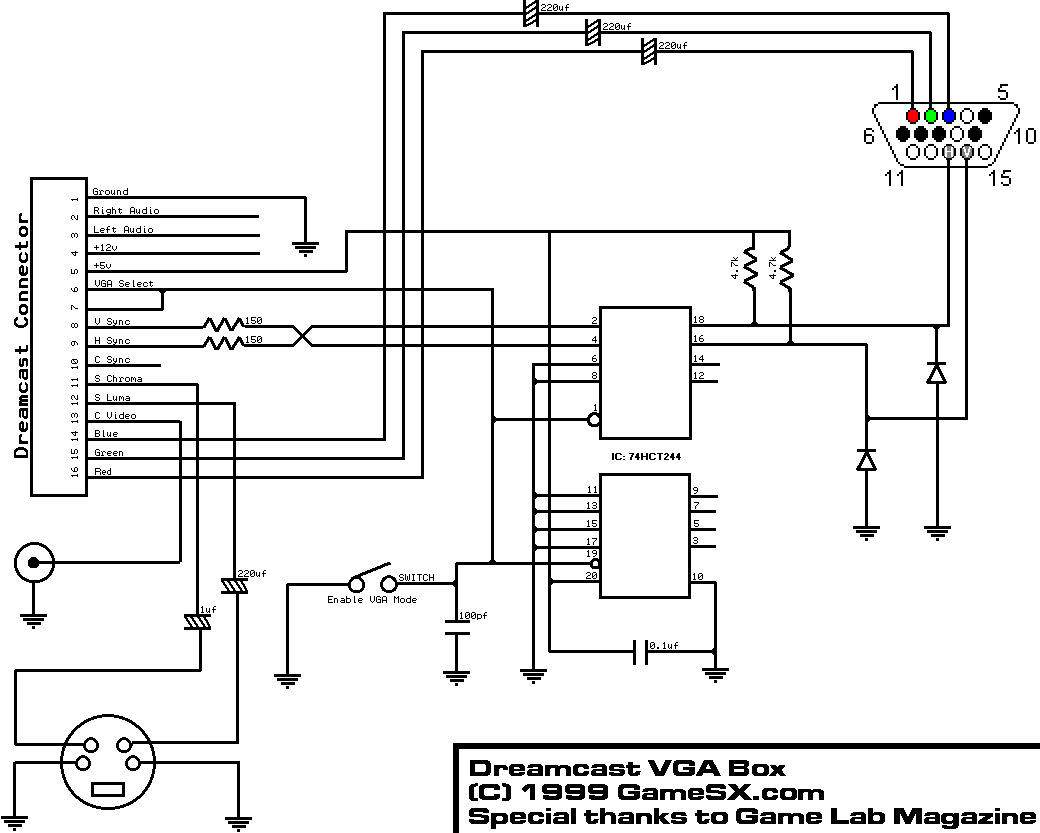
I followed the mod in that thread to make the VGA box output RGB, which is indeed making it output RGB but it's also disabling composite video (thus disabling sync). I'll explain in further detail.
Pins 6 and 7 on the Dreamcast AV connector are mode select pins that determine if it will be outputting standard video (composite or s-video), RGB, or VGA.
If both pins are not connected, it will output standard video.
If pin 7 is grounded, it will output RGB.
If pin 6 and 7 are grounded, it will output VGA.
Anyway, as per the mod above I have pin 6 disconnected in the VGA box (going to add a switch later so I can change between RGB and VGA). There's still the switch already built into the VGA box that will let me switch it back to standard video. With the switch set to standard video I get composite video just fine, with it set to RGB I apparently don't get composite (no video output on the TV with composite connected). I verified with a multimeter and by looking at the VGA box PCB that composite is just straight connected to the yellow RCA jack, so there's no logic it's running through in the VGA box that would disconnect when the switch is set to RGB/VGA.
Anyway, with it set to RGB I can get the RGB signals through the VGA port where I can see the jumpy/wavy/unstable image on the TV (same effect as if I disconnect sync on another console with RGB connected). If I put the switch back to standard video I no longer get RGB of course, but then I see the faint outlines of the image over a black screen like you get when you have sync connected without RGB being connected.
Now according to this http://members.optusnet.com.au/eviltim/ ... .htm#dcast the regular DC SCART RGB cables use composite video, so I'm baffled at my issue. It seems as if when the DC is told to output RGB (ground pin 7) it does indeed enable RGB but also disables composite video, thus turning off my sync.
I thought maybe I would just get around this by tapping pin 10 for composite sync, but I checked the VGA box with a multimeter and none of the incoming wires are connected to pin 10 :\.
Is anyone well versed the intricacies of Dreamcast RGB and has a good guess at what's going wrong?
Problem with RGB (sync over composite video) on Dreamcast
-
cr4zymanz0r

- Posts: 358
- Joined: Sat Oct 19, 2013 6:36 am
-
RGB32E

- Posts: 1400
- Joined: Thu Nov 05, 2009 12:50 am
Re: Problem with RGB (sync over composite video) on Dreamcas
In 15kHz RGB mode (pin 6|7) the only sync containing signals are on pins 8-10 (horizontal, vertical, and composite sync), and 12 and 13 are not active. Unless there's an exception for PAL region consoles, you won't get composite (pin 13) output in 15kHz RGB mode. IIRC, the official euro SCART RGB cable uses pin 10 for sync (CSYNC). The 3rd party SCART cables I've opened all use pin 10 for sync. Some VGA boxes will disable the H&V sync buffer when VGA (31kHz) mode is disabled, so you may need to modify the circuit so that H&V are still being buffered in 15kHz RGB mode.
http://gamesx.com/wiki/doku.php?id=av:dreamcastav
http://gamesx.com/wiki/doku.php?id=av:dreamcastav
-
cr4zymanz0r
- Posts: 358
- Joined: Sat Oct 19, 2013 6:36 am
Re: Problem with RGB (sync over composite video) on Dreamcas
Since composite sync is not connected in the VGA box, I guess I'll have to use horizontal and vertical sync. They are apparently still enabled on my VGA box when not in VGA mode as I got a sync signal, but not what I needed. I've never dealt much with separate horizontal and vertical sync, but I've heard that sometimes you can just connect them together for a usable composite sync. I tried this and the image became "stable", but it had a double vision type look as seen in this pic http://i.imgur.com/FWcfyTD.jpg (red and green were not connected in this pic when I was testing).
What's the easiest way for me to get a usable composite sync from the separate horizontal and vertical syncs? If it absolutely requires a circuit, is there some small pre-made solution that I could fit into the VGA box?

What's the easiest way for me to get a usable composite sync from the separate horizontal and vertical syncs? If it absolutely requires a circuit, is there some small pre-made solution that I could fit into the VGA box?
-
HydrogLox
- Posts: 1164
- Joined: Tue May 22, 2012 3:35 pm
- Location: Ontario, Canada
Re: Problem with RGB (sync over composite video) on Dreamcas
See http://shmups.system11.org/viewtopic.ph ... 7#p1058497
http://www.nexusuk.org/projects/vga2scart/circuit
http://shmups.system11.org/viewtopic.ph ... 22#p805722
http://shmups.system11.org/viewtopic.ph ... 95#p903495
Of course you could simply try to tap pin 10 yourself on the AV connector http://www.gamesx.com/grafx/dricas.gif (not active for 31kHz).
Or you could simply buy a ready-made Toro while it's still available.
Also
http://www.nexusuk.org/projects/vga2scart/circuit
http://shmups.system11.org/viewtopic.ph ... 22#p805722
http://shmups.system11.org/viewtopic.ph ... 95#p903495
Of course you could simply try to tap pin 10 yourself on the AV connector http://www.gamesx.com/grafx/dricas.gif (not active for 31kHz).
Or you could simply buy a ready-made Toro while it's still available.
-
cr4zymanz0r
- Posts: 358
- Joined: Sat Oct 19, 2013 6:36 am
Re: Problem with RGB (sync over composite video) on Dreamcas
...Derp on me for over complicating things. I didn't even think about trying to open the AV connector end of the VGA box. I ended up doing it without breaking it thankfully. I moved the wire dedicated to composite video over to pin 10 (composite sync). Now I'm getting composite sync over the yellow RCA jack and everything appears to be working fine now.HydrogLox wrote: Of course you could simply try to tap pin 10 yourself on the AV connector http://www.gamesx.com/grafx/dricas.gif (not active for 31kHz).
Or you could simply buy a ready-made Toro while it's still available.