RGB Cable Help

The place for all discussion on gaming hardware
Post Reply
User avatar
Tempest_2084
Posts: 595
Joined: Tue Feb 04, 2014 3:05 pm

RGB Cable Help

Post by Tempest_2084 »

I think I mentioned this before, but I have a RGB modded TurboDuo. However the guy who did it used a D-Sub (VGA) style connector for the RGB out (it also has sound wired up). I had another guy make me a SCART cable for it, but it doesn't seem to be working. This is the pinout he used (it should be Euro SCART):

The 9 pin (D-Sub) connector is


1 red
2 red ground
3 green
4 green ground
5 blue
6 blue ground
7 composite sync
8 left audio
9 right audio

(shell) audio ground (really all the grounds are tied together inside the machine)


This is the SCART connector:
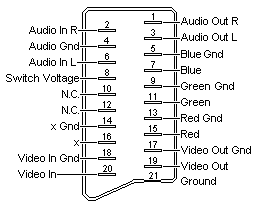
Image


Anyone know what could be wrong? The wires all look good, so I don't think it's a physical problem. Something must be wired up a little wrong.
User avatar
Fudoh
Posts: 13045
Joined: Mon Mar 06, 2006 3:29 am
Location: Germany
Contact:

Re: RGB Cable Help

Post by Fudoh »

What display are you using ? CRT ? Professional or Consumer TV ? XRGB ? Is the DSub pinout confirmed to be like this ?

If you're using a consumer TV you need a blanking voltage on Pin 16 to make the TV switch into RGB mode. Other common errors include sync on pin 19 instead on pin 20 (wrong direction).
User avatar
Tempest_2084
Posts: 595
Joined: Tue Feb 04, 2014 3:05 pm

Re: RGB Cable Help

Post by Tempest_2084 »

Sorry I should have said. It's a Sony PVM 1943-MD. I have this cable going into a Sync Strike and the Sync Strike is connected to the PVM through a RGB cable.
User avatar
Tempest_2084
Posts: 595
Joined: Tue Feb 04, 2014 3:05 pm

Re: RGB Cable Help

Post by Tempest_2084 »

I found a different pin out than the one he used. Maybe this is the correct one?

http://nfggames.com/forum2/index.php?topic=3384.0

It's a few posts down.
User avatar
Fudoh
Posts: 13045
Joined: Mon Mar 06, 2006 3:29 am
Location: Germany
Contact:

Re: RGB Cable Help

Post by Fudoh »

As I said a few weeks ago, there's no way to know. Either ask him or open up the system and just check where the lines are soldered to.
User avatar
Tempest_2084
Posts: 595
Joined: Tue Feb 04, 2014 3:05 pm

Re: RGB Cable Help

Post by Tempest_2084 »

Ill do that and get back to you.
User avatar
Tempest_2084
Posts: 595
Joined: Tue Feb 04, 2014 3:05 pm

Re: RGB Cable Help

Post by Tempest_2084 »

Fudoh wrote:What display are you using ? CRT ? Professional or Consumer TV ? XRGB ? Is the DSub pinout confirmed to be like this ?

If you're using a consumer TV you need a blanking voltage on Pin 16 to make the TV switch into RGB mode. Other common errors include sync on pin 19 instead on pin 20 (wrong direction).
Would you need that blanking voltage on pin 16 for a Sony PVM?
User avatar
Ed Oscuro
Posts: 18654
Joined: Thu Dec 08, 2005 4:13 pm
Location: uoıʇɐɹnƃıɟuoɔ ɯǝʇsʎs

Re: RGB Cable Help

Post by Ed Oscuro »

You shouldn't need to, but if you're using a multiformat PVM (i.e. the 20L5) you might want to look carefully at your settings to make sure it's selecting RGB and not component. Not sure if other PVMs have this RGB/component (YPbPr) switch ability, which unfortunately is in a menu in the 20L5.
User avatar
Tempest_2084
Posts: 595
Joined: Tue Feb 04, 2014 3:05 pm

Re: RGB Cable Help

Post by Tempest_2084 »

Ed Oscuro wrote:You shouldn't need to, but if you're using a multiformat PVM (i.e. the 20L5) you might want to look carefully at your settings to make sure it's selecting RGB and not component. Not sure if other PVMs have this RGB/component (YPbPr) switch ability, which unfortunately is in a menu in the 20L5.
Not sure if the 1943md has that or not.
Post Reply