I own 2 Sony PVM-20M2MDU. One is currently having a problem with it's vertical size. It seems to have defaulted to a setting of "0" for the V-Size. I've gone into the service menu and changing the V-Size up or down doesn't do anything. I've tested this against my working PVM of the same model and the V-Size does indeed make the screen bigger or smaller accordingly.
Any idea what could be the cause of this failure of the Vertical adjustment? It'd be a shame to lose a monitor of such quality simply because I can't increase the vertical size.
Vertical size issues with Sony PVM-20M2MDU
-
Ninjatemper
- Posts: 25
- Joined: Mon Feb 18, 2013 7:59 pm
-
Ninjatemper
- Posts: 25
- Joined: Mon Feb 18, 2013 7:59 pm
Re: Vertical size issues with Sony PVM-20M2MDU
Nobody has any ideas?
-
speedlolita
- Posts: 603
- Joined: Sat Aug 15, 2009 9:13 pm
- Location: Europe
Re: Vertical size issues with Sony PVM-20M2MDU
Find a service manual and see if it has pots inside. Perhaps it is outside of value the service menu affects?
Just a thought.
Just a thought.
-
antron

- Posts: 2861
- Joined: Wed Feb 22, 2006 7:53 pm
- Location: Egret 29, USA
Re: Vertical size issues with Sony PVM-20M2MDU
what do you see on the screen?
-
alamone
- Posts: 747
- Joined: Wed Mar 09, 2011 10:32 pm
Re: Vertical size issues with Sony PVM-20M2MDU
Have you tried all the variations on V-Size? There's a couple of them, like V-Size 60, V-Size 50, etc...
Depending on your input signal only one of them actually changes the signal, and it's not always the obvious one.
Depending on your input signal only one of them actually changes the signal, and it's not always the obvious one.
-
22point8
- Posts: 261
- Joined: Wed Nov 14, 2012 5:59 pm
- Location: London, England, UK
Re: Vertical size issues with Sony PVM-20M2MDU
That PVM has overscan/underscan and a zoom mode.
-
Ninjatemper
- Posts: 25
- Joined: Mon Feb 18, 2013 7:59 pm
Re: Vertical size issues with Sony PVM-20M2MDU
I have tried all of the v-size settings in the service menu on all of the inputs. The result remains the same. The screen stays at a vertical size of 0 no matter what values I change in the service menu and no matter what input I currently have selected.
It looks like finding a service manual and opening the case to check for pots is the next step.
The screen looks fine in all ways except for the vertical size. It looks like any monitor or pvm would look if you entered the service menu and set the v-size to 0.
It looks like finding a service manual and opening the case to check for pots is the next step.
The screen looks fine in all ways except for the vertical size. It looks like any monitor or pvm would look if you entered the service menu and set the v-size to 0.
-
cyborc

- Posts: 308
- Joined: Wed Mar 25, 2009 6:26 am
- Location: USA
Re: Vertical size issues with Sony PVM-20M2MDU
Here's the service manual. https://anonfiles.com/file/97ebfef12630 ... 931f8ba788
-
Ninjatemper
- Posts: 25
- Joined: Mon Feb 18, 2013 7:59 pm
Re: Vertical size issues with Sony PVM-20M2MDU
Thanks Cyborc. I'll have to look through this tome and see what I can do.
-
gray117
- Posts: 1235
- Joined: Fri Jul 25, 2008 10:19 pm
- Location: Leeds
Re: Vertical size issues with Sony PVM-20M2MDU
eh? not a setting - sounds like you've got a 'vertically collapsed screen'? ... Likely either blown caps or broken solder joint.
...unless I'm misunderstanding and getting the wrong end of the stick?
...you got something that looks like:
http://www.overclockers.com.au/wiki/ima ... 1small.jpg
?
...unless I'm misunderstanding and getting the wrong end of the stick?
...you got something that looks like:
http://www.overclockers.com.au/wiki/ima ... 1small.jpg
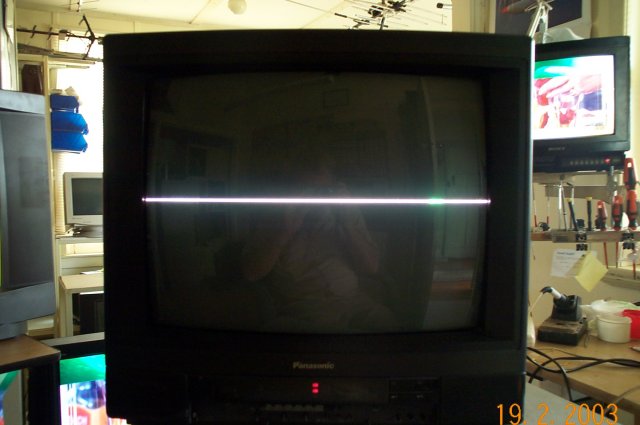
?
-
antron
- Posts: 2861
- Joined: Wed Feb 22, 2006 7:53 pm
- Location: Egret 29, USA
Re: Vertical size issues with Sony PVM-20M2MDU
I was wondering that earlier, but he confirmed that it looks normal just with the v size at its minimum. He can see the service menu.
-
Ninjatemper
- Posts: 25
- Joined: Mon Feb 18, 2013 7:59 pm
Re: Vertical size issues with Sony PVM-20M2MDU
It's definitely not vertical collapse. You can see the picture quite clearly and even play your game just fine. It's literally that the v-size is stuck at zero and no amount of adjustments will change it at all. The number will increase and decrease in the service menu, it just doesn't actually affect the vertical size of the screen. At least if it was vertical collapse I'd have some clue as to where to start digging.
-
gray117
- Posts: 1235
- Joined: Fri Jul 25, 2008 10:19 pm
- Location: Leeds
Re: Vertical size issues with Sony PVM-20M2MDU
cool, so it's not reduced to nothing just very small - suspect it is still a similar fault whereby a resistance is not changing or a circuit (part/path) is broken - not necessarily the relating to the beam but rather a control board somewhere?