Hello,
I’ve been using an XRGB-2 converter for the past three years now, and it has worked perfectly without any problems. The version that I have is the gray unit (the harder-to-find version that takes RGB input from both consoles and arcade pcb’s).
When I powered up the unit yesterday, there was NO display on my vga monitor. I also tried the other input options (composite and S-video), but there was still no display. The audio works fine, though. This was somewhat of a mystery to me, as the unit has been sitting on my desk the whole time. It didn’t fall, nothing spilled on it, and it wasn’t subjected to any harsh conditions. It simply stopped working.
I opened up the XRGB-2 unit to see if there was an obvious fix, but I can’t make heads or tails of the electronics inside. Has anyone ever had a similar problem with their XRGB-2 unit, and more importantly, how did they go about fixing it?
I would really like to keep this unit (especially since it’s the pcb-friendly version). If anyone here on the forum owns one of these, they know how hard these units are to find. Any advice on repairing the XRGB-2 unit would be greatly appreciated!!!
help repairing xrgb-2 unit

-
cl25
- Posts: 29
- Joined: Sat Feb 19, 2005 12:52 pm
Yes, I'm pretty sure it's not the monitor. I ran another signal through my DC VGA cable (with Under Defeat  ), and got a perfect picture on the monitor.
Sigh. I wouldn't be so bummed if I could just replace the unit (even though they're rather expensive). But that's a moot point since these units are out of production, and they're pretty hard to find these days.
), and got a perfect picture on the monitor. Sigh. I wouldn't be so bummed if I could just replace the unit (even though they're rather expensive). But that's a moot point since these units are out of production, and they're pretty hard to find these days.
-
PC Engine Fan X!
- Posts: 9785
- Joined: Wed Jan 26, 2005 10:32 pm
Does XRGB-2 have any fuses? They might need 2 be replaced
If you checked your XRGB-2...does there look like any fuse or fuses that need replacing?
Perhaps, it could be a faulty "Power Switch". That seems to be the most common issue with non-functioning XRGB-2s. You might need to get your XRGB-2 professionally serviced by a electronics repair person. Or just buy the upcoming XRGB-3 as a replacement upscan convertor. NCSX has recently said that the current 3rd generation XRGB-2+ model has been discountinued & therefore will be superceeded by the newest 4th generation model that is known as the XRGB-3.
I know with using my XRGB-2 for long periods of time...it starts to "Black Out" -- meaning I get a "Black" picture screen on my SVGA monitor even though the power light is on and recieving a confirmed RGB signal from the 21-pin Japanese RGB cable. Plus, the XRGB-2's A/C adapter gets mighty "hot" during those long gaming sessions...that might be why of the so-called "Black Out" effect I get sometimes when using my XRGB-2. So that means it's time to give it "a well deserved rest for the night". Then it'll be fine for next time's gaming console or arcade PCB session. I always unplug the XRGB-2's A/C adapter from my computer surge protector when not using it for long periods of time & only plug it in when I really want to use it.
PC Engine fan X! ^_~
Perhaps, it could be a faulty "Power Switch". That seems to be the most common issue with non-functioning XRGB-2s. You might need to get your XRGB-2 professionally serviced by a electronics repair person. Or just buy the upcoming XRGB-3 as a replacement upscan convertor. NCSX has recently said that the current 3rd generation XRGB-2+ model has been discountinued & therefore will be superceeded by the newest 4th generation model that is known as the XRGB-3.
I know with using my XRGB-2 for long periods of time...it starts to "Black Out" -- meaning I get a "Black" picture screen on my SVGA monitor even though the power light is on and recieving a confirmed RGB signal from the 21-pin Japanese RGB cable. Plus, the XRGB-2's A/C adapter gets mighty "hot" during those long gaming sessions...that might be why of the so-called "Black Out" effect I get sometimes when using my XRGB-2. So that means it's time to give it "a well deserved rest for the night". Then it'll be fine for next time's gaming console or arcade PCB session. I always unplug the XRGB-2's A/C adapter from my computer surge protector when not using it for long periods of time & only plug it in when I really want to use it.
PC Engine fan X! ^_~
-
Dave_K.

- Posts: 4571
- Joined: Wed Jan 26, 2005 5:43 am
- Location: SF Bay Area
- Contact:
I have a broken X-RGB2 as well. As PCEFX stated, the long power switch has been known to cause problems (it switches everything on and switches over the RGB lines). So use a multimeter and made sure its making the proper connections in the ON position. Unfortunally my switch was fine, so it something else that fried. I ended up buying an XRGB2+, works just as good, plus has an IR remote!
-
sammaza

- Posts: 74
- Joined: Sat Oct 01, 2005 2:08 am
I have my XRGB2+ mint cond black unit with D-term inputs for sale!
its this one-->
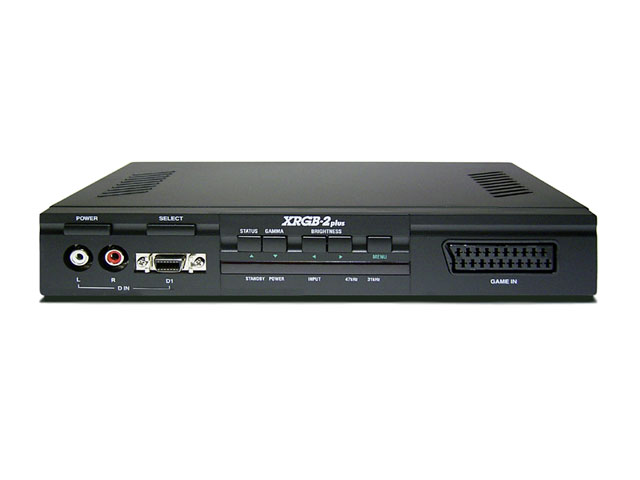
I will sell it for 125.00
paid 240.00 last year but only used it 1 time to play socom ps2 on my 22in CRT monitor.
email me if interested : [email protected]
its this one-->
I will sell it for 125.00
paid 240.00 last year but only used it 1 time to play socom ps2 on my 22in CRT monitor.
email me if interested : [email protected]
-
cl25
- Posts: 29
- Joined: Sat Feb 19, 2005 12:52 pm
I really appreciate everyone's suggestions. I opened my XRGB-2 unit again and examined it very closely to see if there was anything wrong with it - the connector attached to the power switch (which is quite long!), was actually OK. I guess something else within the unit has blown.
sammaza, thank you for the offer! I may be PM'ing you soon about purchasing the XRGB-2+ unit.
Thanks again to everyone for their help.
sammaza, thank you for the offer! I may be PM'ing you soon about purchasing the XRGB-2+ unit.
Thanks again to everyone for their help.
-
mimylovesjapan

- Posts: 177
- Joined: Wed Oct 14, 2015 1:29 pm
- Location: Japan, Osaka
Re: help repairing xrgb-2 unit
I just recieved my XRGB-2 and XSELECT-D4, and the combinaison is so great !
Just a problem with my XRGB-2.
After playing more than 3 hours, the XRGB becomes hot and the screen become strange, all the screen is waved.
I must cut the XRGB and wait for the adaptater becoming cold (2 or 3 hours) before start it again and the screen is perfect.
Do you know about this issue ?
Just a problem with my XRGB-2.
After playing more than 3 hours, the XRGB becomes hot and the screen become strange, all the screen is waved.
I must cut the XRGB and wait for the adaptater becoming cold (2 or 3 hours) before start it again and the screen is perfect.
Do you know about this issue ?
-
mimylovesjapan
- Posts: 177
- Joined: Wed Oct 14, 2015 1:29 pm
- Location: Japan, Osaka
Re: help repairing xrgb-2 unit
OK ! I found a way ! for those who have same problem :
Just change AFC bar in the menu in mode super !
Just change AFC bar in the menu in mode super !
-
Xyga

- Posts: 7181
- Joined: Tue Nov 05, 2013 8:22 pm
- Location: block
Re: help repairing xrgb-2 unit
On that topic my own XRGB2's power switch is now completely fucked up.
That thing is so bad quality it is beyond me why they picked that 'solution', it's not just switching power but the whole signal inclusing sync as well.
Stupid.
Gotta solder some things together and probably install an alternative, simple power switch.
That thing is so bad quality it is beyond me why they picked that 'solution', it's not just switching power but the whole signal inclusing sync as well.
Stupid.
Gotta solder some things together and probably install an alternative, simple power switch.
Strikers1945guy wrote:"Do we....eat chicken balls?!"