OH MY GOD THAT IS SEXY
That's pretty much exactly what I was looking for. It's not a Tate, but certainly captures the spirit of the genre. Nice work!
Show your Tate setup thats not a cab or arcade machine
-
KBZ
- Posts: 1257
- Joined: Sat Mar 26, 2005 4:47 am
-
Dave_K.

- Posts: 4571
- Joined: Wed Jan 26, 2005 5:43 am
- Location: SF Bay Area
- Contact:
Re: Show your Tate setup thats not a cab or arcade machine
Nice lowres look on DFK360!thamasha69 wrote:Video into Extron Emotia/XRGB2+ -> NEC Multisync 77F.
-
Animaitor

- Posts: 401
- Joined: Thu Jan 29, 2009 9:33 am
- Location: Tokyo
Re: Show your Tate setup thats not a cab or arcade machine
+1Dave_K. wrote:Nice lowres look on DFK360!thamasha69 wrote:Video into Extron Emotia/XRGB2+ -> NEC Multisync 77F.
xavierjesus wrote:Fcuking love sticks made from random objects. I'm off now actually to buy a plastic vagina...
-
captpain
- Posts: 1783
- Joined: Wed Jul 23, 2008 6:23 am
Re: Show your Tate setup thats not a cab or arcade machine
This is really cool... nice work!stuntman wrote: I made this about a year ago with 18mm MDF (including bezel). It wasn't a difficult build, but I took my time to get the measurements right, so that the monitor frame was a tight fit (helps keep the case rigid). I gave the measurements to the DIY store and they cut the MDF for me, ensuring nice straight edges.
[images]
The monitor controls are tucked behind the bezel, which is easily removable but stays in place without any securing mechanism due to being a snug fit (that was more luck than intention). There's a vent in the rear panel to let heat out.
-
thamasha69

- Posts: 129
- Joined: Thu Dec 27, 2007 10:21 pm
Re: Show your Tate setup thats not a cab or arcade machine
Thanks! I'm limited to s-video at the moment until I can secure a BNC/RGBs to SCART adapter. Ran the game at 640x480 with smoothing OFF and it turned out quite nice.Dave_K. wrote:Nice lowres look on DFK360!thamasha69 wrote:Video into Extron Emotia/XRGB2+ -> NEC Multisync 77F.
-
Animaitor
- Posts: 401
- Joined: Thu Jan 29, 2009 9:33 am
- Location: Tokyo
Re: Show your Tate setup thats not a cab or arcade machine
That's what I wanted to hear since CAVE didn't include an arcade mode on DFK. A BNC to 21pin RGB cable would make a big difference. Sorry for the off topic.
xavierjesus wrote:Fcuking love sticks made from random objects. I'm off now actually to buy a plastic vagina...
-
caincan

- Posts: 463
- Joined: Tue Aug 16, 2005 4:59 pm
- Location: your hope
Re: Show your Tate setup thats not a cab or arcade machine
and what about "ghetto setups in limited space" ?
my 2 spots in paris...
commodore sx64, pcengine, msx2, retron3
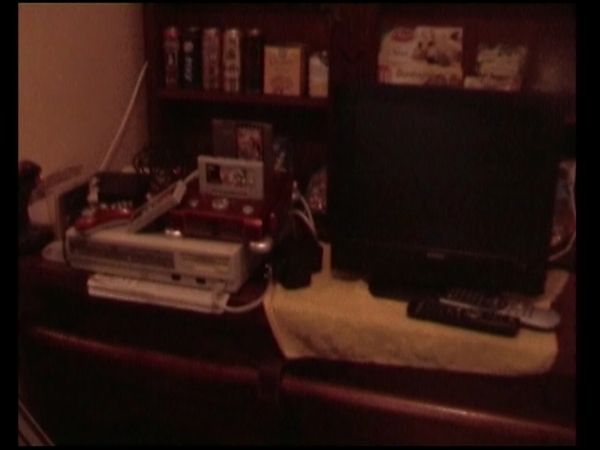


my 2 spots in paris...
commodore sx64, pcengine, msx2, retron3
-
SharkSkin-Man

- Posts: 131
- Joined: Tue Nov 29, 2005 12:01 am
- Location: UK
Re: Show your Tate setup thats not a cab or arcade machine
That's really cool.stuntman wrote:I made this about a year ago with 18mm MDF (including bezel). It wasn't a difficult build, but I took my time to get the measurements right, so that the monitor frame was a tight fit (helps keep the case rigid). I gave the measurements to the DIY store and they cut the MDF for me, ensuring nice straight edges.Kingbuzzo wrote:mesh control wrote:...I hear people recommend buying an arcade monitor and building a case for it. Has anyone actually done this?
The monitor controls are tucked behind the bezel, which is easily removable but stays in place without any securing mechanism due to being a snug fit (that was more luck than intention). There's a vent in the rear panel to let heat out.


Did you wire up a scart socket or something to the back?
-
stuntman
- Posts: 203
- Joined: Thu Jan 19, 2006 10:52 pm
- Location: UK
Re: Show your Tate setup thats not a cab or arcade machine
Thanks. No, it's a Tri-Sync monitor (Rodotron 666A-29PDF) with 15-pin VGA cable run out the back.SharkSkin-Man wrote: That's really cool.
Did you wire up a scart socket or something to the back?
Dreamcast, 360, and PC can be connected directly. I have a switch for the PC output to go through a UVC if required. PS2 and Saturn signals go through an XRGB-3.
Don't bomb. DON'T BOMB.
Damn! Should have bombed.
Damn! Should have bombed.
-
cools

- Posts: 2057
- Joined: Mon Nov 26, 2007 4:57 pm
- Location: South Wales
- Contact:



-
emphatic

- Posts: 8037
- Joined: Mon Aug 18, 2008 3:47 pm
- Location: Alingsås, Sweden
- Contact:
Re: Show your Tate setup thats not a cab or arcade machine
Nice lightning cools!
 | My games - http://www.emphatic.se
RegalSin wrote:Street Fighters. We need to aviod them when we activate time accellerator.
-
KBZ
- Posts: 1257
- Joined: Sat Mar 26, 2005 4:47 am

-
BPzeBanshee

- Posts: 4860
- Joined: Sun Feb 08, 2009 3:59 am
Re: Show your Tate setup thats not a cab or arcade machine
Meh. My legacy shmup machine setup. 

I realise that LCD monitors aren't great for shmups, but I find Batrider to look awesome TATEd with this setup. I actually spent some hours cleaning this corner of the room to rearrange my wires JUST so I could set it up precisely like this. The computer's a pain to manage so I set it up for accessibility to the back of the computer as well as having the speakers properly aimed at me.
If I had a better machine to play games I'd be running Ketsui (and soon ESPGaluda) with this setup, but the Cave PGM games run at like 8/10 auto frameskip.
That thing at the bottom left there is my UPS. I got it for $40 AUS from the local dump, it's over 10 years old and it works better than original manufacturer's specifications in terms of battery life. So I can run something like Total Annihilation or any older game on this and be playing it during a storm and the UPS will just click every time a power surge happens, leaving my play time uninterrupted.
I realise that LCD monitors aren't great for shmups, but I find Batrider to look awesome TATEd with this setup. I actually spent some hours cleaning this corner of the room to rearrange my wires JUST so I could set it up precisely like this. The computer's a pain to manage so I set it up for accessibility to the back of the computer as well as having the speakers properly aimed at me.
If I had a better machine to play games I'd be running Ketsui (and soon ESPGaluda) with this setup, but the Cave PGM games run at like 8/10 auto frameskip.
That thing at the bottom left there is my UPS. I got it for $40 AUS from the local dump, it's over 10 years old and it works better than original manufacturer's specifications in terms of battery life. So I can run something like Total Annihilation or any older game on this and be playing it during a storm and the UPS will just click every time a power surge happens, leaving my play time uninterrupted.
-
antares

- Posts: 921
- Joined: Sat Apr 21, 2007 7:29 am
- Location: Austria
Re: Show your Tate setup thats not a cab or arcade machine
I bought this 21" Sony Trinitron FD VGA screen on ebay recently for 1 Euro:

I had the same model before but without the flat panel. Nice for DC and X360 shmups
I had the same model before but without the flat panel. Nice for DC and X360 shmups
WTB: Arkanoid II Revenge Of Doh PCB, Outzone PCB, Fixeight PCB
-
Evilmaxwar

- Posts: 249
- Joined: Thu Dec 16, 2010 5:23 pm
Re: Show your Tate setup thats not a cab or arcade machine
Very sexy setup Cools !cools wrote:
Here is mine
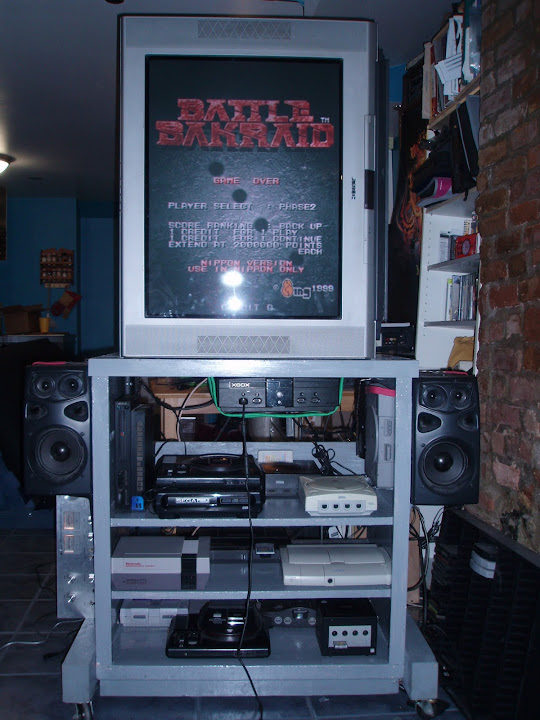
Sony Trinitron XBR 32" flat screen CRT ... 176 lbs of rotational enjoyment.
-
Matskat

- Posts: 424
- Joined: Mon Feb 22, 2010 4:12 am
- Location: STL 314 USA
Re: Show your Tate setup thats not a cab or arcade machine
Merry Shmupmas is RIGHT!


And my older setup...in my workshop of all places
Great for testing out newly built joysticks, though....


And my older setup...in my workshop of all places
Great for testing out newly built joysticks, though....
Mat$kaT
http://matskatcustoms.wordpress.com
http://shmups.system11.org/viewtopic.php?f=4&t=32709
"This is not similation. Get ready to destoroy the enemy. Target for the weak points of f**kin' machine. Do your best you have ever done."
http://matskatcustoms.wordpress.com
http://shmups.system11.org/viewtopic.php?f=4&t=32709
"This is not similation. Get ready to destoroy the enemy. Target for the weak points of f**kin' machine. Do your best you have ever done."
-
EllertMichael

- Posts: 456
- Joined: Sat Dec 11, 2010 6:17 am
- Location: Boston
Re: Show your Tate setup thats not a cab or arcade machine
WARNING: CRAPPY CELL PHONE PICTURE.
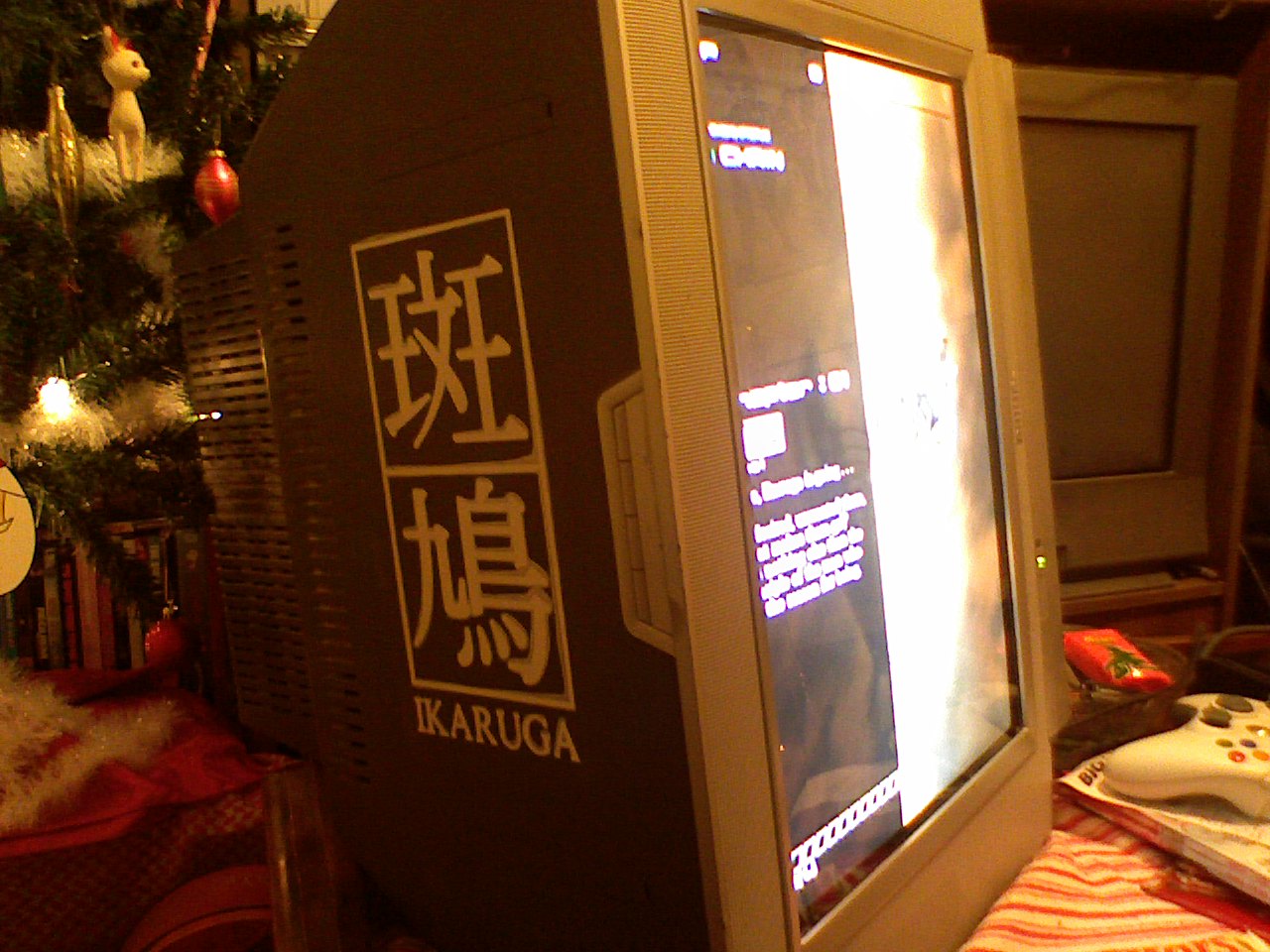
my girlfriend surprised me with a hand screen printed Ikaruga t-shirt for Christmas and before she washed out the screen I had her do my TATE television!
my girlfriend surprised me with a hand screen printed Ikaruga t-shirt for Christmas and before she washed out the screen I had her do my TATE television!

-
KBZ
- Posts: 1257
- Joined: Sat Mar 26, 2005 4:47 am
-
Mikey
- Posts: 166
- Joined: Thu May 04, 2006 7:47 pm
Re: Show your Tate setup thats not a cab or arcade machine
That looks like a Philips 32PW, or similar. I love the image on that screen.
-
EllertMichael
- Posts: 456
- Joined: Sat Dec 11, 2010 6:17 am
- Location: Boston
Re: Show your Tate setup thats not a cab or arcade machine
i think soKingbuzzo wrote:lucky man!

Also, the Melvins rule.
it's a Philips 20PT6441Mikey wrote:That looks like a Philips 32PW, or similar. I love the image on that screen.
I was looking for a TATE television and I got this for free from a friend. Arcade ports look awesome, I love it.
All I need to figure out now is how to enter screen resize/TATE mode in FinalBurn Alpha
beta 2.1! if anyone happens to know how, please let me know!!
-
BPzeBanshee
- Posts: 4860
- Joined: Sun Feb 08, 2009 3:59 am
Re: Show your Tate setup thats not a cab or arcade machine
Ive had no experience with Final Burn Alpha, but I dont suppose it has a rotate function in a video settings section in-game like in MAME?EllertMichael wrote:All I need to figure out now is how to enter screen resize/TATE mode in FinalBurn Alpha
beta 2.1! if anyone happens to know how, please let me know!!
-
EllertMichael
- Posts: 456
- Joined: Sat Dec 11, 2010 6:17 am
- Location: Boston
Re: Show your Tate setup thats not a cab or arcade machine
Yeah, I've read that there is a way to do that, just not how to do it...BPzeBanshee wrote:Ive had no experience with Final Burn Alpha, but I dont suppose it has a rotate function in a video settings section in-game like in MAME?EllertMichael wrote:All I need to figure out now is how to enter screen resize/TATE mode in FinalBurn Alpha
beta 2.1! if anyone happens to know how, please let me know!!
After some extensive googling, I found a different build of the same emulator that has an IN-GAME SERVICE MODE function by pressing LT+RT+RB so I'll try that when I get home.
I hope it has a nice resize/rotation because in standard mode everything is freakishly stretched to fill the screen. It's novel to play some vertizontical DoDonPachi but it looks more like DoFatPachi haha Not good.
-
BPzeBanshee
- Posts: 4860
- Joined: Sun Feb 08, 2009 3:59 am
Re: Show your Tate setup thats not a cab or arcade machine
There's something wrong there regarding aspect ratio in that case. Try a frontend for it maybe?EllertMichael wrote:Yeah, I've read that there is a way to do that, just not how to do it...BPzeBanshee wrote:Ive had no experience with Final Burn Alpha, but I dont suppose it has a rotate function in a video settings section in-game like in MAME?EllertMichael wrote:All I need to figure out now is how to enter screen resize/TATE mode in FinalBurn Alpha
beta 2.1! if anyone happens to know how, please let me know!!
After some extensive googling, I found a different build of the same emulator that has an IN-GAME SERVICE MODE function by pressing LT+RT+RB so I'll try that when I get home.
I hope it has a nice resize/rotation because in standard mode everything is freakishly stretched to fill the screen. It's novel to play some vertizontical DoDonPachi but it looks more like DoFatPachi haha Not good.
-
burgerkingdiamond

- Posts: 1571
- Joined: Wed Oct 06, 2010 9:56 pm
- Location: Virginia, USA
Re: Show your Tate setup thats not a cab or arcade machine
EllertMichael wrote:i think soKingbuzzo wrote:lucky man!
Also, the Melvins rule.
it's a Philips 20PT6441Mikey wrote:That looks like a Philips 32PW, or similar. I love the image on that screen.
I was looking for a TATE television and I got this for free from a friend. Arcade ports look awesome, I love it.
All I need to figure out now is how to enter screen resize/TATE mode in FinalBurn Alpha
beta 2.1! if anyone happens to know how, please let me know!!
you're asking how to TATE and resize the screen for FinalBurnAlpha for a jtag'd 360?
It took me awhile to figure out. You have to open the FBA .xml file and change one of the values from a 0 to a 1 or something like that. I can't remember exactly which one off the top of my head, but I can open mine up and check for you.
for screen resizing you have to go into the menu while playing a game and choose a certain option after choosing it you can resize the x and y dimensions of the screen independently in order to fit exactly and aspect ratio you like. Again if you want I can try it and tell you exactly how. I forgot after I got it setup right.
Let's Ass Kick Together!
1CCs : Donpachi (PCB - 1st loop) Dodonpachi (PCB - 1st loop) Battle Bakraid (PCB) Armed Police Batrider (PCB) Mushihimesama Futari 1.5 (360 - Original) Mushihimesama Futari BL (PCB - Original)
1CCs : Donpachi (PCB - 1st loop) Dodonpachi (PCB - 1st loop) Battle Bakraid (PCB) Armed Police Batrider (PCB) Mushihimesama Futari 1.5 (360 - Original) Mushihimesama Futari BL (PCB - Original)
-
burgerkingdiamond
- Posts: 1571
- Joined: Wed Oct 06, 2010 9:56 pm
- Location: Virginia, USA
Re: Show your Tate setup thats not a cab or arcade machine

Last edited by burgerkingdiamond on Sun Jan 02, 2011 3:14 pm, edited 1 time in total.
Let's Ass Kick Together!
1CCs : Donpachi (PCB - 1st loop) Dodonpachi (PCB - 1st loop) Battle Bakraid (PCB) Armed Police Batrider (PCB) Mushihimesama Futari 1.5 (360 - Original) Mushihimesama Futari BL (PCB - Original)
1CCs : Donpachi (PCB - 1st loop) Dodonpachi (PCB - 1st loop) Battle Bakraid (PCB) Armed Police Batrider (PCB) Mushihimesama Futari 1.5 (360 - Original) Mushihimesama Futari BL (PCB - Original)
-
EllertMichael
- Posts: 456
- Joined: Sat Dec 11, 2010 6:17 am
- Location: Boston
Re: Show your Tate setup thats not a cab or arcade machine
Dude, thank you! Yes, please! If it's not too much trouble... All help is greatly appreciated, my friend.burgerkingdiamond wrote:
you're asking how to TATE and resize the screen for FinalBurnAlpha for a jtag'd 360?
It took me awhile to figure out. You have to open the FBA .xml file and change one of the values from a 0 to a 1 or something like that. I can't remember exactly which one off the top of my head, but I can open mine up and check for you.
for screen resizing you have to go into the menu while playing a game and choose a certain option after choosing it you can resize the x and y dimensions of the screen independently using the analog sticks in order to fit exactly and aspect ratio you like. Again if you want I can try it and tell you exactly how. I forgot after I got it setup right.
"Abigaillll!!!"
-
speedlolita
- Posts: 603
- Joined: Sat Aug 15, 2009 9:13 pm
- Location: Europe

-
burgerkingdiamond
- Posts: 1571
- Joined: Wed Oct 06, 2010 9:56 pm
- Location: Virginia, USA
Re: Show your Tate setup thats not a cab or arcade machine
EllertMichael wrote:Dude, thank you! Yes, please! If it's not too much trouble... All help is greatly appreciated, my friend.burgerkingdiamond wrote:
you're asking how to TATE and resize the screen for FinalBurnAlpha for a jtag'd 360?
It took me awhile to figure out. You have to open the FBA .xml file and change one of the values from a 0 to a 1 or something like that. I can't remember exactly which one off the top of my head, but I can open mine up and check for you.
for screen resizing you have to go into the menu while playing a game and choose a certain option after choosing it you can resize the x and y dimensions of the screen independently using the analog sticks in order to fit exactly and aspect ratio you like. Again if you want I can try it and tell you exactly how. I forgot after I got it setup right.
"Abigaillll!!!"
Alright. I'll go through the motions today and write down exactly what to do.
Let's Ass Kick Together!
1CCs : Donpachi (PCB - 1st loop) Dodonpachi (PCB - 1st loop) Battle Bakraid (PCB) Armed Police Batrider (PCB) Mushihimesama Futari 1.5 (360 - Original) Mushihimesama Futari BL (PCB - Original)
1CCs : Donpachi (PCB - 1st loop) Dodonpachi (PCB - 1st loop) Battle Bakraid (PCB) Armed Police Batrider (PCB) Mushihimesama Futari 1.5 (360 - Original) Mushihimesama Futari BL (PCB - Original)
-
burgerkingdiamond
- Posts: 1571
- Joined: Wed Oct 06, 2010 9:56 pm
- Location: Virginia, USA
Re: Show your Tate setup thats not a cab or arcade machine
Ok. well I just don't have time to actually do this. I'm packing for Japan ( I left it for the last minute of course ).EllertMichael wrote:Dude, thank you! Yes, please! If it's not too much trouble... All help is greatly appreciated, my friend.burgerkingdiamond wrote:
you're asking how to TATE and resize the screen for FinalBurnAlpha for a jtag'd 360?
It took me awhile to figure out. You have to open the FBA .xml file and change one of the values from a 0 to a 1 or something like that. I can't remember exactly which one off the top of my head, but I can open mine up and check for you.
for screen resizing you have to go into the menu while playing a game and choose a certain option after choosing it you can resize the x and y dimensions of the screen independently using the analog sticks in order to fit exactly and aspect ratio you like. Again if you want I can try it and tell you exactly how. I forgot after I got it setup right.
"Abigaillll!!!"
But don't fear. Rest assured it is possible.
I'm assuming you know how to connect to your 360 using a router and a FTP program. Do this and find your FBAnext folder and open up the .xml file using NOTEPAD. Search through the document. You'll find something that should look like a TATE option. I don't remember what it says but it should be fairly obvious. The value will be a '0'. Change it to '1', and save it as the same ' '.xml
Don't bother trying to change any of the resolution settings in the .xml because it doesn't seem to do anything.
To get the screen to fill out start a game in FBAnext. The button command to open up the in game settings menu is I THINK holding both triggers and then right bumper. I don't remember for sure, you may already know it.
Once you get the menu open search through setting for some kind of resize, again sorry I don't remember what it is called. Once you select it it will bring back to the game but it will look like it's paused. At this point you can resize in x and y directions with either the left or right stick (not sure which). You can move the picture in the x or y direction using the opposite stick.
Sorry for my cryptic walkthrough here, but with a little experimenting this should get you to where you're trying to go.
BKD
Let's Ass Kick Together!
1CCs : Donpachi (PCB - 1st loop) Dodonpachi (PCB - 1st loop) Battle Bakraid (PCB) Armed Police Batrider (PCB) Mushihimesama Futari 1.5 (360 - Original) Mushihimesama Futari BL (PCB - Original)
1CCs : Donpachi (PCB - 1st loop) Dodonpachi (PCB - 1st loop) Battle Bakraid (PCB) Armed Police Batrider (PCB) Mushihimesama Futari 1.5 (360 - Original) Mushihimesama Futari BL (PCB - Original)
-
Vyxx

- Banned User
- Posts: 1020
- Joined: Wed Jul 01, 2009 1:13 pm
- Location: Ontario, Canada
Re: Show your Tate setup thats not a cab or arcade machine


Ghetto... I know
