What do you need the v-shift for ?
It does nothing else than what your monitor (BVM, right?) can do on its own.
The situation where I recommend a unit with a v-shift function to affect picture quality is the conversion from 480p to 240p using an Emotia or UVC unit. I don't see how a v-shift would help you with anything with a 15khz passthrough.
The Extron RGB 109xi VGA connector doesn't make any sense
-
Fudoh

- Posts: 13045
- Joined: Mon Mar 06, 2006 3:29 am
- Location: Germany
- Contact:
-
BazookaBen

- Posts: 2159
- Joined: Thu Apr 17, 2008 8:09 pm
- Location: North Carolina
Re: The Extron RGB 109xi VGA connector doesn't make any sens
On my 201rxi, v-shift helps me get a better "fake-240p" image. In its default position, the scanlines are faint and there is still a lot of flicker. Move it up a little and they get more defined and greatly reduce the flicker.Fudoh wrote:What do you need the v-shift for ?
It does nothing else than what your monitor (BVM, right?) can do on its own.
The situation where I recommend a unit with a v-shift function to affect picture quality is the conversion from 480p to 240p using an Emotia or UVC unit. I don't see how a v-shift would help you with anything with a 15khz passthrough.
And also, as I mentioned earlier, it seems ADSP always creates a lot of flagging in the upper 5-10% of the screen, so by shifting the picture upwards on the Extron, then down in your game's settings, you can hide most of the flagging and have minimal overscan
-
donluca

- Posts: 865
- Joined: Sat Feb 28, 2015 8:51 pm
- Location: Italy
- Contact:
Re: The Extron RGB 109xi VGA connector doesn't make any sens
@Fudoh: I swear I read somewhere that adjusting the picture using the vertical shift solved the shaking problem.
Right now I'm having two major issues with the Extron
PVM:
1 - Top part of the screen is deformed (check images in one of my previous posts)
2 - There's a slight shake (letting the Extron do the sync processing, it's ok otherwise) of, like, 2 lines.
It's really noticeable on static screens.
BVM:
1 - Top part of the screen is cut. No matter how much I shift the image down with the BVM controls.
2 - There's quite a bit of shaking (I'd say more than the aforementioned 2 lines).
Now, while getting the top part of the screen deformed is kinda ok-ish, getting it cut it's not.
That's why I need to get the Vertical Shift on the Extron: so I can get the image to show completely.
Interestingly, though, PAL interlaced material (576i, 50Hz) is nothing short of spectacular.
The image is rock solid and super crisp. No flicker, no shaking.
The point of my Emotia is to get 480i shown in a "fake 240p" to get scanlines fatter.
In 480i you can still see the scanlines, but they are really thin and not very appealing.
The fake 240p is awesome if it wasn't for the aforementioned issues
Is there anything I can do?
I've tried:
Mega Drive -RGB (240p so it's already great, although it seems like the Extron makes the image even sharper)
Saturn - RGB (240p is great, 480i has the 2 line shake, the screen is completely shown with no deformation on top)
PS3 - RGB (PAL, sadly, so only 576i@50Hz - awesome, crisp picture, perfect)
Wii - Component (in 480i it's a mess: 2 line shake and top deformed on PVM and cut on BVM. In 576i it's flawless)
Hopefully I've given you all the details needed to see if we can sort this out
EDIT: also, the LM1881 inside is working perfectly since the image is perfect with all consoles in any mode with DDSP enabled (Extron's sync processing disabled).
This means there's something wrong in Extron's sync processing.
Right now I'm having two major issues with the Extron
PVM:
1 - Top part of the screen is deformed (check images in one of my previous posts)
2 - There's a slight shake (letting the Extron do the sync processing, it's ok otherwise) of, like, 2 lines.
It's really noticeable on static screens.
BVM:
1 - Top part of the screen is cut. No matter how much I shift the image down with the BVM controls.
2 - There's quite a bit of shaking (I'd say more than the aforementioned 2 lines).
Now, while getting the top part of the screen deformed is kinda ok-ish, getting it cut it's not.
That's why I need to get the Vertical Shift on the Extron: so I can get the image to show completely.
Interestingly, though, PAL interlaced material (576i, 50Hz) is nothing short of spectacular.
The image is rock solid and super crisp. No flicker, no shaking.
The point of my Emotia is to get 480i shown in a "fake 240p" to get scanlines fatter.
In 480i you can still see the scanlines, but they are really thin and not very appealing.
The fake 240p is awesome if it wasn't for the aforementioned issues
Is there anything I can do?
I've tried:
Mega Drive -RGB (240p so it's already great, although it seems like the Extron makes the image even sharper)
Saturn - RGB (240p is great, 480i has the 2 line shake, the screen is completely shown with no deformation on top)
PS3 - RGB (PAL, sadly, so only 576i@50Hz - awesome, crisp picture, perfect)
Wii - Component (in 480i it's a mess: 2 line shake and top deformed on PVM and cut on BVM. In 576i it's flawless)
Hopefully I've given you all the details needed to see if we can sort this out
EDIT: also, the LM1881 inside is working perfectly since the image is perfect with all consoles in any mode with DDSP enabled (Extron's sync processing disabled).
This means there's something wrong in Extron's sync processing.
-
donluca
- Posts: 865
- Joined: Sat Feb 28, 2015 8:51 pm
- Location: Italy
- Contact:
Re: The Extron RGB 109xi VGA connector doesn't make any sens
I officially give up.
I've tried also cleaning the composite Sync up using a low pass filter as stated in the LM1881 datasheet and while it made the picture even better, I still get the 2 line shake with 480i.
That's infuriating to say the least.
This Extron thing with LM1881 and now the sync cleaner produces an awesome image in 240p, 288p and 576i, but it won't give me a rock solid image in 480i.
Doesn't matter the source, it does this with my Saturn, Wii and PS2.
I've tried playing with internal jumpers, forcing negative sync and stuff, it was all a no go. I've also tried playing with the Vertical Blanking and Vertical Hold on my PVM/BVM monitors... no dice.
Unless Fudoh comes up with something new or that I haven't tried yet, I'm officially giving up.
I'm unsure if I should try an extron rgb unit with vertical shift as the V Shift solved the shaking problem for BazookaBen... I'm afraid I'd end up with the same results.
I've tried also cleaning the composite Sync up using a low pass filter as stated in the LM1881 datasheet and while it made the picture even better, I still get the 2 line shake with 480i.
That's infuriating to say the least.
This Extron thing with LM1881 and now the sync cleaner produces an awesome image in 240p, 288p and 576i, but it won't give me a rock solid image in 480i.
Doesn't matter the source, it does this with my Saturn, Wii and PS2.
I've tried playing with internal jumpers, forcing negative sync and stuff, it was all a no go. I've also tried playing with the Vertical Blanking and Vertical Hold on my PVM/BVM monitors... no dice.
Unless Fudoh comes up with something new or that I haven't tried yet, I'm officially giving up.
I'm unsure if I should try an extron rgb unit with vertical shift as the V Shift solved the shaking problem for BazookaBen... I'm afraid I'd end up with the same results.
-
BazookaBen
- Posts: 2159
- Joined: Thu Apr 17, 2008 8:09 pm
- Location: North Carolina
Re: The Extron RGB 109xi VGA connector doesn't make any sens
I think it's a safe bet that v-shift will remove the shaking, but then you might run into the problem of shadowing/interference, as illustrated in my picture on page 1.
Ultimately, if you want an end-all solution, the guy in this thread says he has it:
http://shmups.system11.org/viewtopic.php?f=6&t=52347
Looks like a little bit of time investment, but ultimately not too complex. I'll probably try to build it one day, I might even try putting together a Component compatible version.
Ultimately, if you want an end-all solution, the guy in this thread says he has it:
http://shmups.system11.org/viewtopic.php?f=6&t=52347
Looks like a little bit of time investment, but ultimately not too complex. I'll probably try to build it one day, I might even try putting together a Component compatible version.
-
donluca
- Posts: 865
- Joined: Sat Feb 28, 2015 8:51 pm
- Location: Italy
- Contact:
Re: The Extron RGB 109xi VGA connector doesn't make any sens
The question is: how much will an Arduino + ICs + stuff cost?
I can buy an Extron interface for ~30€ shipping included.
IIRC, Arduino Uno board is 15€ plus shipping, when you add the components + shipping needed I believe you're spending the same amount but you have to put a lot of time in it too.
With the Extron you could have everything up and running in a couple of hours (including custom cabling, mods, and what not).
So I guess I'll definitely be going with another Extron unit which has the Vertical Shift and hope for the best.
Meanwhile I'll probably put my modded Extron 109xi for sale at ~20€ + shipping somewhere.
It's a shame as it gives an amazing image in all video modes but 480i
I can buy an Extron interface for ~30€ shipping included.
IIRC, Arduino Uno board is 15€ plus shipping, when you add the components + shipping needed I believe you're spending the same amount but you have to put a lot of time in it too.
With the Extron you could have everything up and running in a couple of hours (including custom cabling, mods, and what not).
So I guess I'll definitely be going with another Extron unit which has the Vertical Shift and hope for the best.
Meanwhile I'll probably put my modded Extron 109xi for sale at ~20€ + shipping somewhere.
It's a shame as it gives an amazing image in all video modes but 480i
-
BazookaBen
- Posts: 2159
- Joined: Thu Apr 17, 2008 8:09 pm
- Location: North Carolina
Re: The Extron RGB 109xi VGA connector doesn't make any sens
Another thing to consider is that all Extrons produce distortion/flagging at the top of the picture when using ADSP at 15hz, or so it seems. It does it on your 109xi, it does it on my 201rxi, and I've seen a few other reports of it. As I mentioned earlier, this can be mostly compensated for IF a game allows you to move the picture downwards after you move it upwards with the Extron. However, not all games have this.
So now is a good opportunity for you to try dooklink's solution, if you're up to the task. According to him, this will give you better results than with any Extron.
... and I'm secretly hoping you try it so I can also get help from you when I try to build it in the future.
So now is a good opportunity for you to try dooklink's solution, if you're up to the task. According to him, this will give you better results than with any Extron.
... and I'm secretly hoping you try it so I can also get help from you when I try to build it in the future.
-
donluca
- Posts: 865
- Joined: Sat Feb 28, 2015 8:51 pm
- Location: Italy
- Contact:
Re: The Extron RGB 109xi VGA connector doesn't make any sens
Ah!BazookaBen wrote:... and I'm secretly hoping you try it so I can also get help from you when I try to build it in the future.

For science!
I'd love to try that out but I couldn't find any video (or pics for that matter) of the results and no one has tried it yet and I'm worried I'd end up with something useless.
I mean... the Extron is kind of a safe bet since we know it will work albeit with some limitations.
This implementation... I don't know.
Anyway, I want to try one more thing with the Extron thing I have.
-
donluca
- Posts: 865
- Joined: Sat Feb 28, 2015 8:51 pm
- Location: Italy
- Contact:
Re: The Extron RGB 109xi VGA connector doesn't make any sens
Well... don't ask me why but with a custom circuit to put the Sync on Green it works a treat.
No shaking, rock solid picture and all.
No sense, if you ask me. Complete nonsense.
RGBs -> low pass filter on sync -> LM1881 -> C-Sync on Green with a 680Ω resistor -> Extron
No shaking, rock solid picture and all.
No sense, if you ask me. Complete nonsense.
RGBs -> low pass filter on sync -> LM1881 -> C-Sync on Green with a 680Ω resistor -> Extron
-
Fudoh
- Posts: 13045
- Joined: Mon Mar 06, 2006 3:29 am
- Location: Germany
- Contact:
Re: The Extron RGB 109xi VGA connector doesn't make any sens
excellent! Can you post some details on the circuit you used for preprocessing, both on the low passt filter and how you got SoG from the LM1881 ?
-
donluca
- Posts: 865
- Joined: Sat Feb 28, 2015 8:51 pm
- Location: Italy
- Contact:
Re: The Extron RGB 109xi VGA connector doesn't make any sens
Sure, but first I want to further investigate on the matter.
I don't like doing things randomly without figuring why if I do this and that happens and if I do this other thing then I have a different result.
This thing of the Sync on Green truly doesn't make any sense.
I'll post the schematics this night/tomorrow.
I don't like doing things randomly without figuring why if I do this and that happens and if I do this other thing then I have a different result.
This thing of the Sync on Green truly doesn't make any sense.
I'll post the schematics this night/tomorrow.
-
Fudoh
- Posts: 13045
- Joined: Mon Mar 06, 2006 3:29 am
- Location: Germany
- Contact:
Re: The Extron RGB 109xi VGA connector doesn't make any sens
the type of sync can make a difference. I've experienced it with RGBs vs. RGBHV on various machines.This thing of the Sync on Green truly doesn't make any sense.
-
donluca
- Posts: 865
- Joined: Sat Feb 28, 2015 8:51 pm
- Location: Italy
- Contact:
Re: The Extron RGB 109xi VGA connector doesn't make any sens
What the hell, and now it is working perfectly with RGBs... I swear I didn't change shit, I just put a switch to swtich the input from SoG to RGBs and now it's working perfectly with both.
This Extron is a living, thinking being.
I know this is getting ridiculous, I should have documented everything with videos, but I swear... I don't know what to say.
I've just desoldered everything and went back to how it was in the beginning just with the filter on sync and the LM1881.
And it's working.
I'm officially done with this thing.
I'll keep it as it is now and write all the schematics here.
This Extron is a living, thinking being.
I know this is getting ridiculous, I should have documented everything with videos, but I swear... I don't know what to say.
I've just desoldered everything and went back to how it was in the beginning just with the filter on sync and the LM1881.
And it's working.
I'm officially done with this thing.
I'll keep it as it is now and write all the schematics here.
-
BazookaBen
- Posts: 2159
- Joined: Thu Apr 17, 2008 8:09 pm
- Location: North Carolina
Re: The Extron RGB 109xi VGA connector doesn't make any sens
Do you still get shaking with component?
-
donluca
- Posts: 865
- Joined: Sat Feb 28, 2015 8:51 pm
- Location: Italy
- Contact:
Re: The Extron RGB 109xi VGA connector doesn't make any sens
It was all good... Until I closed the unit and tested it on my BVM.
I first tried it with the Wii (Component) and it was good.
Then I tried with my Mega drive and I couldn't get to sync (wtf?)
Then I tried the Wii again... and the screen was rolling, like it had no sync!! (in 480i, in 576i and 240p was ok! wtf!!)
Then I tried the Saturn... same as Wii! 480i I got a rolling screen and with 240p it was ok!
So I picked it up, transported back to the PVM... same stuff.
So I opened the Extron again, checked if it was all good and everything was ok (no bad solder joints, etc...), so I hooked it up and tried my Saturn... and now I have the 2 lines shake again.
At this point I believe I have a defective unit.
Everytime I open it something different happens.
Everytime I try a different console something different happens.
Everytime I close it another different thing happen.
And what's worse I have no way to diagnosticate what's going wrong.
It's just completely random.
all this with DDSP disabled of course, letting the Extron doing its thing.
With DDSP enabled (sync processing disabled) everything is always fine.
So there's definitely something wrong with the ADSP.
It's either bugged or something else.
That's the only thing I can say at this point.
UPDATE: I'm making all sort of tests and so far only one thing has been proved consistently.
If I let the unit cool down, then turn it on, it's all good.
After some time, there's the 2 line shake.
After more time, the screen starts rolling.
With the unit open, it takes quite a while (actually it never reaches the point where the screen starts rolling).
With the unit closed, after a couple of minutes the 2 line shake happens and after 10-12 minutes the screen starts rolling.
I've seen plenty of this and it's a thermal problem.
The main culprits are generally caps which cannot stand high temperatures and tend to go bad sooner then they should.
Another culprit may be transistors or voltage regulators (this happened with my SEGA Mega CD).
I think I'll do a complete recap and change the voltage regulators and report back.
I first tried it with the Wii (Component) and it was good.
Then I tried with my Mega drive and I couldn't get to sync (wtf?)
Then I tried the Wii again... and the screen was rolling, like it had no sync!! (in 480i, in 576i and 240p was ok! wtf!!)
Then I tried the Saturn... same as Wii! 480i I got a rolling screen and with 240p it was ok!
So I picked it up, transported back to the PVM... same stuff.
So I opened the Extron again, checked if it was all good and everything was ok (no bad solder joints, etc...), so I hooked it up and tried my Saturn... and now I have the 2 lines shake again.
At this point I believe I have a defective unit.
Everytime I open it something different happens.
Everytime I try a different console something different happens.
Everytime I close it another different thing happen.
And what's worse I have no way to diagnosticate what's going wrong.
It's just completely random.
all this with DDSP disabled of course, letting the Extron doing its thing.
With DDSP enabled (sync processing disabled) everything is always fine.
So there's definitely something wrong with the ADSP.
It's either bugged or something else.
That's the only thing I can say at this point.
UPDATE: I'm making all sort of tests and so far only one thing has been proved consistently.
If I let the unit cool down, then turn it on, it's all good.
After some time, there's the 2 line shake.
After more time, the screen starts rolling.
With the unit open, it takes quite a while (actually it never reaches the point where the screen starts rolling).
With the unit closed, after a couple of minutes the 2 line shake happens and after 10-12 minutes the screen starts rolling.
I've seen plenty of this and it's a thermal problem.
The main culprits are generally caps which cannot stand high temperatures and tend to go bad sooner then they should.
Another culprit may be transistors or voltage regulators (this happened with my SEGA Mega CD).
I think I'll do a complete recap and change the voltage regulators and report back.
-
donluca
- Posts: 865
- Joined: Sat Feb 28, 2015 8:51 pm
- Location: Italy
- Contact:
Re: The Extron RGB 109xi VGA connector doesn't make any sens
Fudoh wrote:excellent! Can you post some details on the circuit you used for preprocessing, both on the low passt filter and how you got SoG from the LM1881 ?
Alright, while I wait to figure stuff out, here are the mods I've done so far.
–
Getting all the grounds connected
This may sound trivial, but depending on how TVs, scalers, interfaces, etc. are designed, you may have ground issues.
To prevent issues, best thing you can do is opening the SCART connector of your console cables and check if all the grounds are linked.
A well made cable should have all the grounds linked between them, like this:


–
Clean the Sync from unwanted noise!
To do this you can use a very simple low pass filter cutting everything above 500Khz, removing unwanted disturbances/noise in our precious sync signal.
Sync in -> 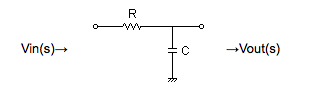 -> Sync out
You can use any combination of resistor/capacitor you like. For example 620Ω and 510pF or 680Ω and 470pF depending on availability. -> Sync outYou can use this tool will to calculate the low pass filter: http://sim.okawa-denshi.jp/en/CRlowkeisan.htm
If you use SMD or small components you can fit it into an RCA connector!
–
Get pure Sync with the LM1881
I believe we all know this, I'll just repost the circuit here:
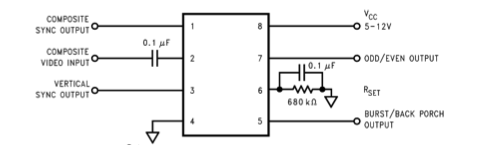
Putting our cleaned sync on green to achieve Sync on Green
Get the cleaned Sync from the LM1881 pin 1, put a 680Ω resistor in series with the cleaned Sync and slam it into the Green signal.
Just like that.
–
Getting separated Horizontal and Vertical Sync from LM1881
Even though a lot of stuff will accept Composite Sync as Horizontal Sync, there'll be times when you'll need a REAL H Sync signal.
To do this you'll need 3 AND gates, which mean you can use a 74LS00, 54LS00, etc. IC.
You can grab V-Sync from pin 3 of the LM1881.
You can use the same +5V used by the LM1881 to power the IC.
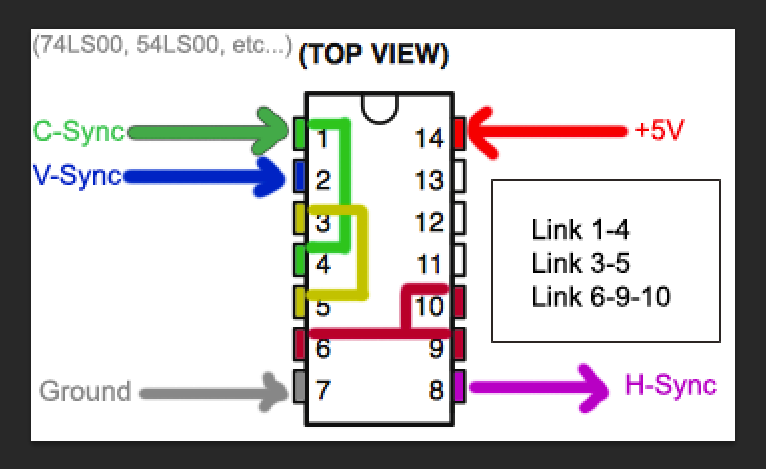
–
And... I think that's pretty much it.
Hopefully I haven't missed anything.
-
BazookaBen
- Posts: 2159
- Joined: Thu Apr 17, 2008 8:09 pm
- Location: North Carolina
Re: The Extron RGB 109xi VGA connector doesn't make any sens
I think you're forgetting that we are using the Extron for something it was never designed to do. They never intended people to use ADSP on 15hz signals, ADSP is more for people hooking up computers running VGA and higher resolutions to a projector. They didn't care how ADSP worked with 15hz because 480i has always been a standard NTSC thing that doesn't really need modification. Video games were the farthest thing from their mind.donluca wrote:
So there's definitely something wrong with the ADSP.
It's either bugged or something else.
That's the only thing I can say at this point.
For example, I also have a 460xi. With a 480i signal and ADSP on, it gives a pure garbage picture, scrambled all to hell. But it works great with everything esle (like my PC monitor). So it's not malfunctioning, it's just not designed for what we're using it for.
-
donluca
- Posts: 865
- Joined: Sat Feb 28, 2015 8:51 pm
- Location: Italy
- Contact:
Re: The Extron RGB 109xi VGA connector doesn't make any sens
I see your point, but things either work or do not work.
If this god forsaken thing it's capable of showing me a beautiful, crisp, rock solid 480i scanlined picture for the first 10 minutes, it MUST be able to do so indefinitely.
Anyway, tomorrow will be my last stand against this device.
I'll recap it and change whatever needs to be changed, and give it a last shot.
If it works, good.
If it doesn't, Skynet will have won and we're all doomed.
If this god forsaken thing it's capable of showing me a beautiful, crisp, rock solid 480i scanlined picture for the first 10 minutes, it MUST be able to do so indefinitely.
Anyway, tomorrow will be my last stand against this device.
I'll recap it and change whatever needs to be changed, and give it a last shot.
If it works, good.
If it doesn't, Skynet will have won and we're all doomed.
-
BazookaBen
- Posts: 2159
- Joined: Thu Apr 17, 2008 8:09 pm
- Location: North Carolina
Re: The Extron RGB 109xi VGA connector doesn't make any sens
It's not that simple. With my 201rxi, if I turn it on AFTER I turn on my Wii, there is a chance it will be combining lines 2 and 3 instead of 1 and 2, and I won't get a proper 240p picture. If I turn on the Extron before the Wii, it usually looks great. Also, sometimes when I first turn on ADSP I will get a shaking picture like you do. However, if change to the composite input for a moment and switch back, the shaking has usually subsided.donluca wrote:I see your point, but things either work or do not work.
If this god forsaken thing it's capable of showing me a beautiful, crisp, rock solid 480i scanlined picture for the first 10 minutes, it MUST be able to do so indefinitely.
Also, my 20L2 gives a worse picture with my 201rxi than my 20M2, so they slight variations in how monitors deal with sync can change the end result.
So there are a lot of variables here that make ADSP on 15hz finicky. My guess is that you will get the same results after installing new caps.
-
donluca
- Posts: 865
- Joined: Sat Feb 28, 2015 8:51 pm
- Location: Italy
- Contact:
Re: The Extron RGB 109xi VGA connector doesn't make any sens
Ugh, that's terrible news.
It should be either a switch on the back or a jumper inside. It's well documented in the manual.
I used to have that issue too, but forcing negative sync output on my Extron fixed it.
I've always thought the issue was on the Extron and not on the monitor side.
Now that you make me think about it, it could be a very slight variance in frequency in the Extron that makes the monitor go nuts and simply switching inputs may temporarily solve it.
Uhm, more tests to do!
Thanks for your input, greatly appreciated.
Have you tried forcing negative sync on the Extron?BazookaBen wrote:With my 201rxi, if I turn it on AFTER I turn on my Wii, there is a chance it will be combining lines 2 and 3 instead of 1 and 2, and I won't get a proper 240p picture. If I turn on the Extron before the Wii, it usually looks great. Also, sometimes when I first turn on ADSP I will get a shaking picture like you do.
It should be either a switch on the back or a jumper inside. It's well documented in the manual.
I used to have that issue too, but forcing negative sync output on my Extron fixed it.
Do you mean switching inputs on the monitor?However, if change to the composite input for a moment and switch back, the shaking has usually subsided.
I've always thought the issue was on the Extron and not on the monitor side.
Now that you make me think about it, it could be a very slight variance in frequency in the Extron that makes the monitor go nuts and simply switching inputs may temporarily solve it.
Uhm, more tests to do!
Yeah, I see. But I have the right caps at hand and changing a dozen of caps doesn't take that long, so I might as well try it.So there are a lot of variables here that make ADSP on 15hz finicky. My guess is that you will get the same results after installing new caps.
Thanks for your input, greatly appreciated.
-
BazookaBen
- Posts: 2159
- Joined: Thu Apr 17, 2008 8:09 pm
- Location: North Carolina
Re: The Extron RGB 109xi VGA connector doesn't make any sens
Yeah, just pressing the buttons on the front of the monitor.donluca wrote:Do you mean switching inputs on the monitor?
I'm sure if you hooked up your Extron to an oscilloscope, the sync signal would look really different from a true 240p signal. That's probably why monitors have trouble dealing with it.
-
donluca
- Posts: 865
- Joined: Sat Feb 28, 2015 8:51 pm
- Location: Italy
- Contact:
Re: The Extron RGB 109xi VGA connector doesn't make any sens
Oh, btw, I've just read in my 109xi manual:

So, following those specs, it HAS been designed for 15Khz signals too.
Obviously, how it handles them is another matter, and as far as I tested, it handles them pretty bad
I'm tempted to try an older unit with ADSP just to see if they supported SD signals better.
So, following those specs, it HAS been designed for 15Khz signals too.
Obviously, how it handles them is another matter, and as far as I tested, it handles them pretty bad
I'm tempted to try an older unit with ADSP just to see if they supported SD signals better.
-
BazookaBen
- Posts: 2159
- Joined: Thu Apr 17, 2008 8:09 pm
- Location: North Carolina
Re: The Extron RGB 109xi VGA connector doesn't make any sens
Actually for the record, it handles 240p just fine. Like, if you input a signal from a SNES or Genesis, you can move it around just fine with the ADSP controls. That might be the issue. Since ADSP was designed for PC use (which typically only uses progressive resolutions) it acts weird when it encounters interlaced resolutions.donluca wrote:So, following those specs, it HAS been designed for 15Khz signals too.
Obviously, how it handles them is another matter, and as far as I tested, it handles them pretty bad
Thankfully for us, it can make 480i look like 240p IF you have a good Extron/Monitor combo. But you have to admit that would never be something someone would actually want to do outside of retro gaming. Like, who would want to change a DVD's output from 480i to 240p?
-
donluca
- Posts: 865
- Joined: Sat Feb 28, 2015 8:51 pm
- Location: Italy
- Contact:
Re: The Extron RGB 109xi VGA connector doesn't make any sens
That's exactly what I've been thinking for a couple of days... until I tried hooking up my PS3 and seeing that 576i works perfectly. Same is true with my PAL Wii in 576i mode.BazookaBen wrote:Since ADSP was designed for PC use (which typically only uses progressive resolutions) it acts weird when it encounters interlaced resolutions.
The picture in 576i is nothing short of amazing: rock solid and super crisp. I've been playing Outrun Online on my PS3 with the Extron + PVM combo and it was glorious.
Why the hell is 480i the problem? That's what I'm trying to understand.
Good point!Like, who would want to change a DVD's output from 480i to 240p?
-
donluca
- Posts: 865
- Joined: Sat Feb 28, 2015 8:51 pm
- Location: Italy
- Contact:
Re: The Extron RGB 109xi VGA connector doesn't make any sens
Alright, so... Mega Drive will sync only if I send composite sync + vertical sync to the extron, LOL.
But if I send Composite Sync + V Sync, 480i has the famous 2 line shake.
The solution is easy, I'll just wire a switch to disable V-Sync when I'll play 480i games.
But if I send Composite Sync + V Sync, 480i has the famous 2 line shake.
The solution is easy, I'll just wire a switch to disable V-Sync when I'll play 480i games.
-
donluca
- Posts: 865
- Joined: Sat Feb 28, 2015 8:51 pm
- Location: Italy
- Contact:
Re: The Extron RGB 109xi VGA connector doesn't make any sens
Ok, I've recapped the damn thing (but one cap which I didn't have, eventually I'll just go out and buy it) and it's still doing the same thing.
And it's clearly a heat related issue.
When the screen starts shaking, if I turn the Extron off and then put it back on the screen will still be shaking.
But if I let it cool down for a dozen of minutes and then put it back on, the image is again stable.
And then it will start shaking again after some time.
And if the unit is closed, it will take less time for the picture to start shaking.
All these symptoms mean that there's something which when it reaches a certain temperature, it will start doing the shake thing.
The question is... what is this damned thing?
The oscillator?
EDIT: it's not the oscillator, I've just put an heatsink on it and didn't change anything.
I give up.
And I give up on all Extron units.
I'll try building the thing with Arduino and see how it goes. I'll need to speak to the guy to get some information though.
And it's clearly a heat related issue.
When the screen starts shaking, if I turn the Extron off and then put it back on the screen will still be shaking.
But if I let it cool down for a dozen of minutes and then put it back on, the image is again stable.
And then it will start shaking again after some time.
And if the unit is closed, it will take less time for the picture to start shaking.
All these symptoms mean that there's something which when it reaches a certain temperature, it will start doing the shake thing.
The question is... what is this damned thing?
The oscillator?
EDIT: it's not the oscillator, I've just put an heatsink on it and didn't change anything.
I give up.
And I give up on all Extron units.
I'll try building the thing with Arduino and see how it goes. I'll need to speak to the guy to get some information though.