Extron Emotia GX Operating Instructions
-
fagin
- Posts: 1654
- Joined: Fri Mar 19, 2010 2:29 pm
- Location: UK
Re: Extron Emotia GX Operating Instructions
My Emotia works flawlessly with any 480p source and every 15khz target I have used..... Including the consoles you have tried. When you eradicate the obvious, what's left has to be cause, however improbable it may seem.
-
Beaps
- Posts: 307
- Joined: Sat Jun 20, 2009 8:03 pm
- Location: UK - Essex
Re: Extron Emotia GX Operating Instructions
OK so another member on a different forum pointed out that the powersupply may not be the right one
Can you confirm guys


It should be
RTN/GND +5V
-12V +12V
RTN/GND
Whereas the pic you sent me says;
RTN/GND +5V
-5V +12V
RTN/GND
and depending on the orientation of the diagram on the psu label may even be outputting into the Emotia;
+5v RTN/GND
+12V -5V
RTN/GND
Can you confirm guys
It should be
RTN/GND +5V
-12V +12V
RTN/GND
Whereas the pic you sent me says;
RTN/GND +5V
-5V +12V
RTN/GND
and depending on the orientation of the diagram on the psu label may even be outputting into the Emotia;
+5v RTN/GND
+12V -5V
RTN/GND
-
Fudoh

- Posts: 13047
- Joined: Mon Mar 06, 2006 3:29 am
- Location: Germany
- Contact:
Re: Extron Emotia GX Operating Instructions
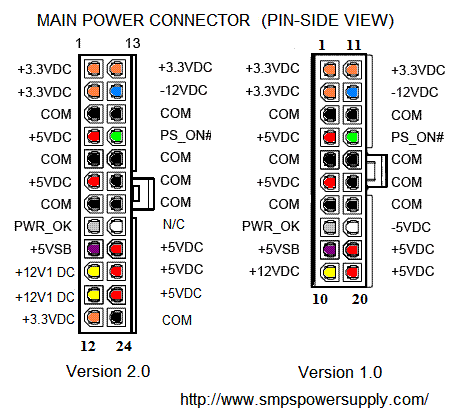
I can confirm that you need -12V and not -5V. -5V isn't even available on ATX power supplies, so they wouldn't work. The pinout on page 1 of this thread (in bright green letters) is correct.
-
fagin
- Posts: 1654
- Joined: Fri Mar 19, 2010 2:29 pm
- Location: UK
Re: Extron Emotia GX Operating Instructions
Agreed as per Fudoh's comment. That is not the correct PSU for the Emotia.
-
Nam
- Posts: 23
- Joined: Wed Jul 10, 2013 10:48 pm
- Location: West Sussex UK
Re: Extron Emotia GX Operating Instructions
Could that incorrect psu do any damage to the Emotia? Is it just supplying -5v on the pin that the Emotia needs -12v from or is it supplying incorrect voltages on other pins?Fudoh wrote:I can confirm that you need -12V and not -5V. -5V isn't even available on ATX power supplies, so they wouldn't work. The pinout on page 1 of this thread (in bright green letters) is correct.
In other words is the Emotia likely to still function with the correct psu after being powered-up using the wrong one?
-
Fudoh
- Posts: 13047
- Joined: Mon Mar 06, 2006 3:29 am
- Location: Germany
- Contact:
Re: Extron Emotia GX Operating Instructions
Given that the units works and didn't blow up, I would assume that it's just the -12V line that doesn't get the right voltage. I doubt that -5V can do any harm. The other way around would be way more serious.
-
Nam
- Posts: 23
- Joined: Wed Jul 10, 2013 10:48 pm
- Location: West Sussex UK
Re: Extron Emotia GX Operating Instructions
TFFT! Beaps tested my Emotia (power up only) before posting it on to me yesterday. I think I'll make up an ATX - DIN one over the weekend to test the unit when I get it next week.Fudoh wrote:Given that the units works and didn't blow up, I would assume that it's just the -12V line that doesn't get the right voltage. I doubt that -5V can do any harm. The other way around would be way more serious.
Thanks
-
Beaps
- Posts: 307
- Joined: Sat Jun 20, 2009 8:03 pm
- Location: UK - Essex
Re: Extron Emotia GX Operating Instructions
Oh ok so you think the problem lies in the power supply then, the extron not getting enough juice kinda thing?
I think I have a Dell small form PC somewhere, I will dig it out.
I think I have a Dell small form PC somewhere, I will dig it out.
-
fagin
- Posts: 1654
- Joined: Fri Mar 19, 2010 2:29 pm
- Location: UK
Re: Extron Emotia GX Operating Instructions
Put simply - yes.
I alluded to the fact earlier in this conversation, that I have experienced similar issues (although it wasn't with the Emotia iirc), but it was caused by lack of voltage driving the sync (again this is something I recently said about my gut feeling this is a sync issue now). I should really create a log of issues, examples and resolutions to correct.... like many others I encounter many things and I can't always remember the context. It would have been useful in this scenario to focus on specifics to look at. Anyway.... I digress.
What we have (I think) discovered, is the fact your issues are around a common denominator - the Emotia. With focus now on the PSU being incorrect, it stands to reason that is your cause.
Try an ATX PSU and let us know how you get on.
I alluded to the fact earlier in this conversation, that I have experienced similar issues (although it wasn't with the Emotia iirc), but it was caused by lack of voltage driving the sync (again this is something I recently said about my gut feeling this is a sync issue now). I should really create a log of issues, examples and resolutions to correct.... like many others I encounter many things and I can't always remember the context. It would have been useful in this scenario to focus on specifics to look at. Anyway.... I digress.
What we have (I think) discovered, is the fact your issues are around a common denominator - the Emotia. With focus now on the PSU being incorrect, it stands to reason that is your cause.
Try an ATX PSU and let us know how you get on.
-
Beaps
- Posts: 307
- Joined: Sat Jun 20, 2009 8:03 pm
- Location: UK - Essex
Re: Extron Emotia GX Operating Instructions
I am excited 
Ingredients
- Dell Power Supply
- old Jamma Wire
- 4 pin U Din
- Soldering Iron
- Solder

Ingredients
- Dell Power Supply
- old Jamma Wire
- 4 pin U Din
- Soldering Iron
- Solder
-
fagin
- Posts: 1654
- Joined: Fri Mar 19, 2010 2:29 pm
- Location: UK
-
fagin
- Posts: 1654
- Joined: Fri Mar 19, 2010 2:29 pm
- Location: UK
Re: Extron Emotia GX Operating Instructions
In anticipation of you asking 
-
Beaps
- Posts: 307
- Joined: Sat Jun 20, 2009 8:03 pm
- Location: UK - Essex
Re: Extron Emotia GX Operating Instructions
I am just trying to make it as simple as possible

Also whats the difference between +5VDC & +5VSB & which one am I using?
Also whats the difference between +5VDC & +5VSB & which one am I using?
-
antron

- Posts: 2861
- Joined: Wed Feb 22, 2006 7:53 pm
- Location: Egret 29, USA
Re: Extron Emotia GX Operating Instructions
Use DC, I think SB is standby voltage.
-
Beaps
- Posts: 307
- Joined: Sat Jun 20, 2009 8:03 pm
- Location: UK - Essex
Re: Extron Emotia GX Operating Instructions
Final check before I plug it in lol

-
Fudoh
- Posts: 13047
- Joined: Mon Mar 06, 2006 3:29 am
- Location: Germany
- Contact:
Re: Extron Emotia GX Operating Instructions
I think that's exactly the wrong way around. From the left you have to start with ground.
It has to be like on the PSU shown in your own image previously. The diagram on the PSU shows the plug pinout at the end of the cable, not the connector pinout on the Emotia.
It has to be like on the PSU shown in your own image previously. The diagram on the PSU shows the plug pinout at the end of the cable, not the connector pinout on the Emotia.
-
Beaps
- Posts: 307
- Joined: Sat Jun 20, 2009 8:03 pm
- Location: UK - Essex
Re: Extron Emotia GX Operating Instructions
Oh my days lol

Is this it
Is this it
-
Fudoh
- Posts: 13047
- Joined: Mon Mar 06, 2006 3:29 am
- Location: Germany
- Contact:
Re: Extron Emotia GX Operating Instructions
yes, this seems right to me.
-
Beaps
- Posts: 307
- Joined: Sat Jun 20, 2009 8:03 pm
- Location: UK - Essex
Re: Extron Emotia GX Operating Instructions
Wired it all up.... 
Plugged it in.....
and.....
Nothing, even the fan on the power supply not turning. Its not one them power supplies that only work when the atx molex is connected to a motherboard is it
Plugged it in.....
and.....
Nothing, even the fan on the power supply not turning. Its not one them power supplies that only work when the atx molex is connected to a motherboard is it
-
Fudoh
- Posts: 13047
- Joined: Mon Mar 06, 2006 3:29 am
- Location: Germany
- Contact:
Re: Extron Emotia GX Operating Instructions
you need to bridge green and black to power it on.
-
fagin
- Posts: 1654
- Joined: Fri Mar 19, 2010 2:29 pm
- Location: UK
Re: Extron Emotia GX Operating Instructions
No, but as Fudoh suggests..... you actually need to power it on first.Beaps wrote:Its not one them power supplies that only work when the atx molex is connected to a motherboard is it

-
Beaps
- Posts: 307
- Joined: Sat Jun 20, 2009 8:03 pm
- Location: UK - Essex
Re: Extron Emotia GX Operating Instructions
Green & black?
On the atx molex bit, if so what PIN numbers are they as my wire colours are not the same as the 20pin in fagin's picture
On the atx molex bit, if so what PIN numbers are they as my wire colours are not the same as the 20pin in fagin's picture
-
fagin
- Posts: 1654
- Joined: Fri Mar 19, 2010 2:29 pm
- Location: UK
Re: Extron Emotia GX Operating Instructions
I knew that question was coming!
We're referring to the molex. Green pin is PS_ON which needs to be bridged to Ground (black on molex). In reference to the molex diagram above, bridge PIN 14 and 15 and your PSU should "fire up".
We're referring to the molex. Green pin is PS_ON which needs to be bridged to Ground (black on molex). In reference to the molex diagram above, bridge PIN 14 and 15 and your PSU should "fire up".
-
Nam
- Posts: 23
- Joined: Wed Jul 10, 2013 10:48 pm
- Location: West Sussex UK
Re: Extron Emotia GX Operating Instructions
15 (black GND) 16 (green PS_ON) on 24 pin power connectorBeaps wrote:Green & black?
On the atx molex bit, if so what PIN numbers are they as my wire colours are not the same as the 20pin in fagin's picture
13 (black GND) 14 (green PS_ON) on 20 pin power connector
I guess you could use other GND pins but these are next to PS_ON so probably makes sense to bridge with these .
-
Beaps
- Posts: 307
- Joined: Sat Jun 20, 2009 8:03 pm
- Location: UK - Essex
Re: Extron Emotia GX Operating Instructions
fagin wrote:I knew that question was coming!
We're referring to the molex. Green pin is PS_ON which needs to be bridged to Ground (black on molex). In reference to the molex diagram above, bridge PIN 14 and 15 and your PSU should "fire up".
Hehe you know me to well brova lol
-
Fudoh
- Posts: 13047
- Joined: Mon Mar 06, 2006 3:29 am
- Location: Germany
- Contact:
Re: Extron Emotia GX Operating Instructions
could we please get some results ?
-
Beaps
- Posts: 307
- Joined: Sat Jun 20, 2009 8:03 pm
- Location: UK - Essex
Re: Extron Emotia GX Operating Instructions
Just putting he kids to bed and I will let you know in the next half hour lol
-
Beaps
- Posts: 307
- Joined: Sat Jun 20, 2009 8:03 pm
- Location: UK - Essex
Re: Extron Emotia GX Operating Instructions
OK so I am back........ 
Plugged it in and......
OH YER!!!
If you could see me now, I am doing the moonwalk across the kitchen floor!!! HE HE!!
THANKS guys for all you patients with me and the little project, another community coming together for the cause
B
Plugged it in and......
OH YER!!!
If you could see me now, I am doing the moonwalk across the kitchen floor!!! HE HE!!
THANKS guys for all you patients with me and the little project, another community coming together for the cause
B
-
fagin
- Posts: 1654
- Joined: Fri Mar 19, 2010 2:29 pm
- Location: UK
Re: Extron Emotia GX Operating Instructions
Next time call the Samaritans.... All my hair has fallen out!
Glad you got it sorted in the end.
Glad you got it sorted in the end.
-
Beaps
- Posts: 307
- Joined: Sat Jun 20, 2009 8:03 pm
- Location: UK - Essex
Re: Extron Emotia GX Operating Instructions
Wow wow wow - put the horses back in the shed, trouble at the mill?
The screen in to bright now, lol
The screen in to bright now, lol