I also got a 2.2k ohm resistor and a 0.1uF cap today
XRGB-3
-
Konsolkongen
- Posts: 2398
- Joined: Fri May 16, 2008 8:28 pm
- Location: Denmark
Re: XRGB-3
Will you put together a guide? I have a pretty good picture on my Saturn but any improvement is always a good thing 
I also got a 2.2k ohm resistor and a 0.1uF cap today
-
Konsolkongen
- Posts: 2398
- Joined: Fri May 16, 2008 8:28 pm
- Location: Denmark
Re: XRGB-3
Didn't work. I will leave it at this until i get the Gefen 
-
RGB32E
- Posts: 1400
- Joined: Thu Nov 05, 2009 12:50 am
Re: XRGB-3
That's too bad... though I'm still going to give that a try with the Saturn stuff, as I will be building the hex buffer circuit. What's the ETA on the Gefen, and which one was it again?Konsolkongen wrote:Didn't work. I will leave it at this until i get the Gefen
-
Konsolkongen
- Posts: 2398
- Joined: Fri May 16, 2008 8:28 pm
- Location: Denmark
Re: XRGB-3
Well i didn't try with the 0.1uF thing yet. What am i supposed to do with that? Connect it between GND and the Sync pin in the Scart end of the cable?
The Gefen i want is the one on Fudohs page (Gefen VGA to DVI scaler plus). Maybe i'll get it next month
-
RGB32E
- Posts: 1400
- Joined: Thu Nov 05, 2009 12:50 am
Re: Saturn m2 AV Cap and RGB Encoder Replacemt, Pt. 3
Well... After replacing the video capacitors, other system capcitors, building a sync buffer circuit, REPLACING THE MB3516A with a CXA2075 on my round button Sega Saturn.... I STILL HAVE F'ING JAIL BARS!!!!! All that work for FAIL..RGB32E wrote:I received all of the parts earlier, including 2.2k ohm resistors!
Even though my Genesis 2 has jail bars when viewed on a CRT (SS does not), I was able to fix the problem with a sync cleaner... cleaning the sync on the Saturn provides no solution!!! The RGBS signals are fed pretty much directly to the RGB encoder circuit (each with their respective RC combo).
The only thing I can think to do now is find a Sega Saturn that doesn't jail bar (my oval system remains elusive)!!! Although I still have two other round button SSs to study since one of them has weaker JBs. So, back to the drawing board...
-
Konsolkongen
- Posts: 2398
- Joined: Fri May 16, 2008 8:28 pm
- Location: Denmark
Re: XRGB-3
Too bad. Good effort though :/
-
Konsolkongen
- Posts: 2398
- Joined: Fri May 16, 2008 8:28 pm
- Location: Denmark
Re: XRGB-3
There is a new version of the WINinP viewer for windows. Don't know how long it's been there or what's new in this release.
Does anybody even use their XRGB-3 like that? :p
http://www.micomsoft.co.jp/xrgb-3.htm
Does anybody even use their XRGB-3 like that? :p
http://www.micomsoft.co.jp/xrgb-3.htm
-
RGB32E
- Posts: 1400
- Joined: Thu Nov 05, 2009 12:50 am
Re: XRGB-3
I replaced the 3 caps in one of my SNES JP21 RGB cables with solid polymer electrolytics and seem to have a little bit cleaner and sharper signal! I used these caps:
http://search.digikey.com/scripts/DkSea ... 65-3062-ND

They are a bit expensive (not really compared to retail though), and seem to give a better signal - doesn't soften the image.
Saturn Saga...
I tried out one of my other round button systems and noticed that the jail bars are almost non-existant, and the signal is sharper. My main problem Saturn was manufacturered in the Philippines, and the better one was made in Taiwan. Upon opening the Taiwan system, I found that the power supply is larger, and the number of headers that the PS connects to the main PCB with is greater by one (5->6). I didn't dig deeper, but from my sampling, the Taiwan systems output better RGB than ones made in the Philippines.
So, I hope to sample more, and create a database, or at least a better "rule of thumb". NFG took a sampling of RGB and composite quality for the Neo Geo AES and CD systems and found certain trends. So, I wonder how many different internal revisions there are? It's obvious to me that each outputs different quality signals. Fun stuff!

http://nfggames.com/games/neorgb/
'
Notice how the two newest (right most) segments have jail bars!?
http://search.digikey.com/scripts/DkSea ... 65-3062-ND

They are a bit expensive (not really compared to retail though), and seem to give a better signal - doesn't soften the image.
Saturn Saga...
I tried out one of my other round button systems and noticed that the jail bars are almost non-existant, and the signal is sharper. My main problem Saturn was manufacturered in the Philippines, and the better one was made in Taiwan. Upon opening the Taiwan system, I found that the power supply is larger, and the number of headers that the PS connects to the main PCB with is greater by one (5->6). I didn't dig deeper, but from my sampling, the Taiwan systems output better RGB than ones made in the Philippines.
http://nfggames.com/games/neorgb/
'Notice how the two newest (right most) segments have jail bars!?
-
Konsolkongen
- Posts: 2398
- Joined: Fri May 16, 2008 8:28 pm
- Location: Denmark
Re: XRGB-3
I've seen Saturn motherboards marked V0, V5 and V9. The V0 one was an oval buttoned one but i'm guessing there is quite a few different round buttoned models out there.
-
RGB32E
- Posts: 1400
- Joined: Thu Nov 05, 2009 12:50 am
Re: XRGB-3
Good point! I'll record that data for future reference!Konsolkongen wrote:I've seen Saturn motherboards marked V0, V5 and V9. The V0 one was an oval buttoned one but i'm guessing there is quite a few different round buttoned models out there.
-
l33der
- Posts: 6
- Joined: Fri Apr 30, 2010 6:44 pm
Re: XRGB-3
Okay, I'm a little lost and I don't want to spend any more money on my assumptions. I have an arcade monitor (Nanao tube, Rodotron 666a chassis) and I need to be able to receive input from PC(VGA or DVI), and PS3/PS2(component or SCART) - and it can't output more than 640x480 or break the monitor. Is the XRGB what I'm looking for? I want the cleanest image possible, and right now I'm using a video capture card to facilitate the PS3/PS2 input - it isn't pretty. I don't necessarily care one way or another about emulating scanlines - it would be nice, but I don't have to have it.
I have the SCART->JAMMA adapter sold on the board here, but I'm scared to hook that up as I don't know if I can trust it to not send a resolution which will damage the monitor. And I want something that will make sure the monitor *never* receives a resolution greater than 640x480, to make this idiot proof (as I'm not the only one who will touch it, I'm sure)
-
Fudoh
- Posts: 13044
- Joined: Mon Mar 06, 2006 3:29 am
- Location: Germany
- Contact:
Re: XRGB-3
The Rodotron 666a is a multisync chassis, meaning that it accepts 15khz as well as 31khz signals, right ? If yes, you usually don't need any kind of up or downscaling machine.
The SCART -> JAMMA adapter you bought, you case use without any problems. SCART is spec'ed at 15khz only (for 240p and 480i) signals so you'd be running the chassis at the lower end of the specs only anyway. Anything with Scart output will be fine on the monitor.
This said, I'm not really sure what you want to accomplish with any upscaling device in the setup ?
The SCART -> JAMMA adapter you bought, you case use without any problems. SCART is spec'ed at 15khz only (for 240p and 480i) signals so you'd be running the chassis at the lower end of the specs only anyway. Anything with Scart output will be fine on the monitor.
This said, I'm not really sure what you want to accomplish with any upscaling device in the setup ?
-
l33der
- Posts: 6
- Joined: Fri Apr 30, 2010 6:44 pm
Re: XRGB-3
Yeah, it's multisync - 15khz, 25khz, 31khz.Fudoh wrote:The Rodotron 666a is a multisync chassis, meaning that it accepts 15khz as well as 31khz signals, right ? If yes, you usually don't need any kind of up or downscaling machine.
The SCART -> JAMMA adapter you bought, you case use without any problems. SCART is spec'ed at 15khz only (for 240p and 480i) signals so you'd be running the chassis at the lower end of the specs only anyway. Anything with Scart output will be fine on the monitor.
This said, I'm not really sure what you want to accomplish with any upscaling device in the setup ?
I don't have SCART cables for my PS3/PS2, I have component and a component to SCART adapter - but the PS3 itself can output at 1080i on component if I'm correct... what would happen in that case?
I'm basically looking for a device that will allow me to restrict output to a given resolution (640x480, in this case) so that at any time, I can safely assume the monitor won't receive a bad resolution. So, if someone launches a PC game that runs at 1024x768 by default and it changes the PC's resolution, for example - I want it to either not display anything (and thus no damage occurs) or display the image at 640x480. When the PC is booting it's constantly changing resolutions, I want to make sure it never sends 800x600 or something, for example. Am I making any sense?
In short, I want something where I can input any resolution, and control the output resolution to only be X (in this case, 640x480) - preferably through scaling, either up or down.
-
Fudoh
- Posts: 13044
- Joined: Mon Mar 06, 2006 3:29 am
- Location: Germany
- Contact:
Re: XRGB-3
won't help you, because the signal remains component and your monitor only accepts RGBs/RGBHV.I don't have SCART cables for my PS3/PS2, I have component and a component to SCART adapter
sure you do, it's just your approach which makes it complicated. All your systems can be set to restrict their output resolution to what your monitor will handle. You can do this your PC as well and tell Windows that games that output higher resolutions are scaled down internally before outputting...Am I making any sense?
yes, want a video processor, but the XRGB isn't the right choice for this. The XRGB's is a upscaler and not built to handle higher resolution PC signals (and output them downscaled). You'd need a full blown videoprocessor like a DVDO VP30/50/50Pro or Edge, but you're looking at quite some money here.In short, I want something where I can input any resolution, and control the output resolution to only be X (in this case, 640x480) - preferably through scaling, either up or down.
There are easier solutions. You could start by getting a Scart cable for your PS2/PS3. A PC won't output a higher resolution than the connected monitor supports if it's configured correctly. Also I wouldn't worry too much. Pumping a higher frequency signal into a monitor for a short while hardly does any image...
-
l33der
- Posts: 6
- Joined: Fri Apr 30, 2010 6:44 pm
Re: XRGB-3
I suppose perhaps I'm trying to go a little overboard. I've got the PC set up properly but during the POST it sends some weird resolutions that make the monitor switch modes a bunch of times - something I'm not entirely comfortable with. I was trying to avoid situations like that, not actively scale stuff for long periods of time.
I tried a J-PAC, but it only blocks signals *below* 640x480. I can pass 800x600 or 1024x768 through it, it seems.
I'll get a proper SCART cable and use that for the consoles, I was just hoping for a bulletproof device which prevented all possible "bad" signals going to the monitor, in case my roommate loses his mind and changes the PC resolution to 1280x1024 or something just for laughs.
Just out of curiosity, how bad is it (as in, will destroy the tube, or the electronics? and how fast?) to send "bad" signals to the monitor? Does the higher resolution you go do more damage faster?
I tried a J-PAC, but it only blocks signals *below* 640x480. I can pass 800x600 or 1024x768 through it, it seems.
I'll get a proper SCART cable and use that for the consoles, I was just hoping for a bulletproof device which prevented all possible "bad" signals going to the monitor, in case my roommate loses his mind and changes the PC resolution to 1280x1024 or something just for laughs.
Just out of curiosity, how bad is it (as in, will destroy the tube, or the electronics? and how fast?) to send "bad" signals to the monitor? Does the higher resolution you go do more damage faster?
-
Fudoh
- Posts: 13044
- Joined: Mon Mar 06, 2006 3:29 am
- Location: Germany
- Contact:
Re: XRGB-3
you can use something like an Emotia or UVC. And as said before every fullblown video processor does that as well.I was just hoping for a bulletproof device which prevented all possible "bad" signals going to the monitor, in case my roommate loses his mind and changes the PC resolution to 1280x1024 or something just for laughs.
I can hardly imagine that anybody has ever blown a monitor this way. Several newer chassis recognize that the signal is out of range and display a message. The chassis which do so are protected again damage, so no worries there. If you monitor only display a rolling picture with higher frequencies it should still take a lot of time to really damage a monitor. Probably you'd only fry the chassis in the long run and not the actual tube.Just out of curiosity, how bad is it (as in, will destroy the tube, or the electronics? and how fast?) to send "bad" signals to the monitor? Does the higher resolution you go do more damage faster?
-
l33der
- Posts: 6
- Joined: Fri Apr 30, 2010 6:44 pm
Re: XRGB-3
I have the UVC, and I tried it out - it does a decent enough job, except it can't output at 31khz, only 24khz and 15khz.. though I may use it anyway, I just need to increase the font in MAME (which I set down to like, 7) to be readable.Fudoh wrote:you can use something like an Emotia or UVC. And as said before every fullblown video processor does that as well.I was just hoping for a bulletproof device which prevented all possible "bad" signals going to the monitor, in case my roommate loses his mind and changes the PC resolution to 1280x1024 or something just for laughs.
I can hardly imagine that anybody has ever blown a monitor this way. Several newer chassis recognize that the signal is out of range and display a message. The chassis which do so are protected again damage, so no worries there. If you monitor only display a rolling picture with higher frequencies it should still take a lot of time to really damage a monitor. Probably you'd only fry the chassis in the long run and not the actual tube.Just out of curiosity, how bad is it (as in, will destroy the tube, or the electronics? and how fast?) to send "bad" signals to the monitor? Does the higher resolution you go do more damage faster?
Thanks for all the help, I'll jump out of this thread now as it clearly does not pertain to me!
-
Konsolkongen
- Posts: 2398
- Joined: Fri May 16, 2008 8:28 pm
- Location: Denmark
Re: XRGB-3
This weekend i was visiting a bunch of my friends to celebrate the release of Super Street Fighter IV which was great fun. One of my friends had brought a Japanese gray model 1 Saturn for testing. He had it for a long time but never tested it because of the voltage difference and he didn't have a stepdown converter. Turned out the Saturn didn't work. The fuse on the power supply was blown and probably from plugging it in a danish 220V power socket.RGB32E wrote: Saturn Saga...
I tried out one of my other round button systems and noticed that the jail bars are almost non-existant, and the signal is sharper... ...So, I hope to sample more, and create a database, or at least a better "rule of thumb"... ...So, I wonder how many different internal revisions there are? It's obvious to me that each outputs different quality signals. Fun stuff!![]()
![]()
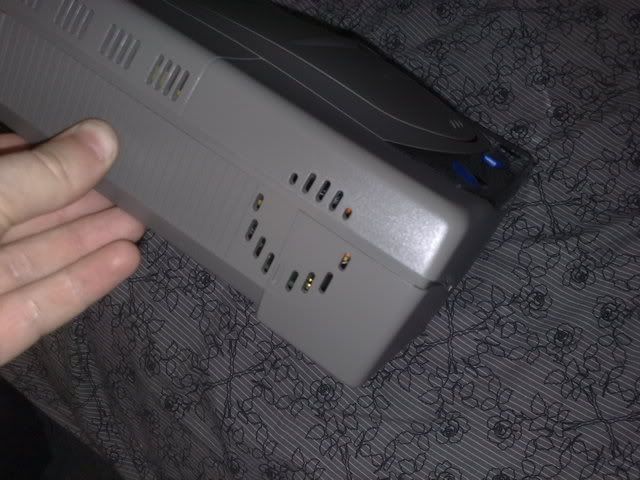
The thing about this Saturn which i find very interesting is that my friend got it from his work. He works for Pan Vision in Denmark which used to be the Danish distributor for SEGA. In the drive was a burned pre-release copy of the game Blazing Dragons which gave us the idea that it might be a debug or test unit. Also on the left side of the machine are some strange round holes that looks like there might be a fan inside (there aren't any though):

I've never seen a Japanese Model 1 Saturn before so i don't know if these holes are normal. I know that the European console doesn't have them...
Anyway, my friend asked if any of us wanted the console and i immediately said yes hoping that i could make it work and that it possibly was a debug unit. I changed the fuse last night and the Saturn worked again. I have no idea what a debug machine is supposed to act like, but it turned out it didn't read the burned disc or played imports.
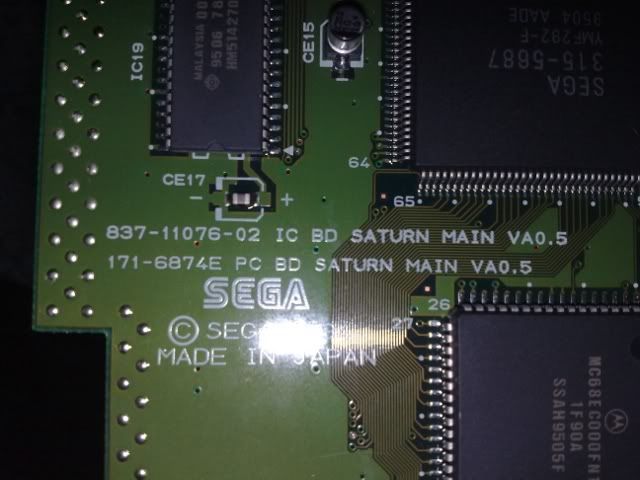
I then opened the Saturn again to regionmod it and discovered another strange thing. This motherboard revision is marked "VA0.5". I've seen model 1's marked VA0 but point something is completely new to me. Applying simple logic that would make this Saturn only half a Saturn or 1½ Saturn's

I don't see any difference in this Saturn or my other ones, but it would be cool if someone could explain the holes in the side and the motherboard revision.
This Saturn has a slightly better image than my Model 2. You can still see jailbars without LowPassFilter but it's definitely better than the other and it might be caused by the RGB cable. So that supports the theory that the Model 1 Saturns have better picture than Model 2's.
BTW does anyone have any experience in 50/60Hz modding a Japanese console? I know the theory is the same as modding an EU console but the two times i tried on Jap Model 2 consoles they have died!? And it's not that i don't know what i'm doing, all three EU consoles i have 50/60Hz modified (both models) have worked perfectly ever since.
Why would i ever want 50Hz? Well there are a handful of games only released in Europe that will only work in that setting
Also during the weekend i installed a Unibios in my friends AES. It went pretty painless and turned out great. This chip size is the same as the Famicom/NES's graphic chip so now there is no stopping me from RGB modding a Famicom in the near future
-
RGB32E
- Posts: 1400
- Joined: Thu Nov 05, 2009 12:50 am
Re: XRGB-3
Cool find Konsolkongen! Thanks for sharing. Looks like an early dev/test kit! 
Anyways, I've ordered the VDigi Wii HDMI upscaler and will let you guys know how well it works. This review makes the device seem promising:
http://www.dcemu.co.uk/vbulletin/showth ... p?t=304869
Though him posting 1080i shots was kinda worthless, since the deinterlacing on his HDMI capture card blends fields and has chroma errors (chroma shift to the right - bleeding). But if 1080p output is more akin to the pics posted for 480p (pixel resize, see below), I will be happy with the purchase!

So, the biggest advatages this unit (over TV scaling or XRGB-3) seem to be:
1. No ringing
2. IRE correction - people have complained that this unit is brighter than component. I think component is TOO BRIGHT!!! Perhaps this is caused by an IRE level of 7.5 or above instead of 0.
Lowering the brightness/contrast on the TV isn't a correct fix for this... the PS3 doesn't need correction and the 360 allows for manual setting.
3. Spec'd 8 ms processing time
Anyways, I've ordered the VDigi Wii HDMI upscaler and will let you guys know how well it works. This review makes the device seem promising:
http://www.dcemu.co.uk/vbulletin/showth ... p?t=304869
Though him posting 1080i shots was kinda worthless, since the deinterlacing on his HDMI capture card blends fields and has chroma errors (chroma shift to the right - bleeding). But if 1080p output is more akin to the pics posted for 480p (pixel resize, see below), I will be happy with the purchase!

So, the biggest advatages this unit (over TV scaling or XRGB-3) seem to be:
1. No ringing
2. IRE correction - people have complained that this unit is brighter than component. I think component is TOO BRIGHT!!! Perhaps this is caused by an IRE level of 7.5 or above instead of 0.
3. Spec'd 8 ms processing time
Last edited by RGB32E on Fri May 07, 2010 2:46 am, edited 1 time in total.
-
Konsolkongen
- Posts: 2398
- Joined: Fri May 16, 2008 8:28 pm
- Location: Denmark
Re: XRGB-3
Unfortunately not. I just contacted Yakumo from Segagagadomain as i figured he have probably seen a lot more Saturns on his shopping tours in Japan, than most of us put together. He said that it's normal for the Japanese models to have holes on the side like that. I forgot to mention that this Saturn have much larger LED's (2x 2LED's on both sides) and he says that only the very first Japanese Saturns looked like thatRGB32E wrote:Cool find Konsolkongen! Thanks for sharing. Looks like an early dev/test kit!![]()
Oh well. I have already regionmodified it to hell so if i just install a modchip it will play the beta versions and work exactly like a test unit :p
And its cool gray color matches that of my Residente Vil Dreamcast perfectly.
-
Fudoh
- Posts: 13044
- Joined: Mon Mar 06, 2006 3:29 am
- Location: Germany
- Contact:
Re: XRGB-3
I think that's exactly what they wanted to avoid. Anyway, let us know how it looks once you get the HDMI upscaler. Should be easily convertable to built an all-purpose 480p YUV to HDMI upscaler. I was wondering why they did choose to built it with a dedicated Wii plug in the first place.But if 1080p output is more akin to the pics posted for 480p (pixel resize, see below), I will be happy with the purchase!
Unfortunately the Wii's really the worst looking system in my setup. I find myself switching between pure transcoding and scaling on either the Optoma or the DVDO all the time without any luck in finding the ultimate solution. Time for Nintendo to release a Wii 2 with 720p rendering of the original Wii games.
It's just not funny anymore when I see how the current Cube/Wii emu outclasses the real thing by now....

-
Konsolkongen
- Posts: 2398
- Joined: Fri May 16, 2008 8:28 pm
- Location: Denmark
Re: XRGB-3
I wonder if the PS3 would be powerful enough to emulate the Wii if it got hacked properly? It could work pretty nice with the Move controller i think 
-
RGB32E
- Posts: 1400
- Joined: Thu Nov 05, 2009 12:50 am
Re: XRGB-3
Well... I think I'll be able to give more insight into the idiosyncrasies of this unit than the info I've been able to find on the net.Fudoh wrote:I think that's exactly what they wanted to avoid. Anyway, let us know how it looks once you get the HDMI upscaler.
That's exactly what I was thinking! I would imagine that if the unit is worthwhile, it would be great for PS2 games as well (480i/p). I think having the Wii connection makes it more accessable to most consumers, keep costs to a minumum, and the unit only has to work with signals from the Wii - given how much trouble it is to support RGB from all systems...Fudoh wrote:Should be easily convertable to built an all-purpose 480p YUV to HDMI upscaler. I was wondering why they did choose to built it with a dedicated Wii plug in the first place.
Me too for the most part... component directly to the XBR8, or run through an Extron CVC 300. While the CVC 300 is currently my best solution, it isn't usable for 480i. Only time will tell if the VDigi unit receives my stamp of approval!Fudoh wrote:Unfortunately the Wii's really the worst looking system in my setup. I find myself switching between pure transcoding and scaling on either the Optoma or the DVDO all the time without any luck in finding the ultimate solution. Time for Nintendo to release a Wii 2 with 720p rendering of the original Wii games.
It would be awesome if Nintendo allowed 720p/1080p rendering for legacy games!
Not at all surprising considering what the Wii is from a HW standpoint. Still disappointing none the less!Fudoh wrote:It's just not funny anymore when I see how the current Cube/Wii emu outclasses the real thing by now....
-
uroko-sakanabito
Re: XRGB-3
Does the x-rgb work with x68k and FMTowns ?
can somebody confirm this ?
-
Shou
- Posts: 443
- Joined: Wed Jan 04, 2006 7:12 am
- Location: Central Tokyo, Japan, Asia, Earth, Solar System, Milky Way
- Contact:
Re: XRGB-3
It will only work for the X68 games which display in 15kHz, the 31kHz stuff will require a downscan converter. FMT games all display in 31kHz.uroko-sakanabito wrote:Does the x-rgb work with x68k and FMTowns ?
can somebody confirm this ?
become history
-
Fudoh
- Posts: 13044
- Joined: Mon Mar 06, 2006 3:29 am
- Location: Germany
- Contact:
Re: XRGB-3
no, sorry, that's not right.It will only work for the X68 games which display in 15kHz, the 31kHz stuff will require a downscan converter. FMT games all display in 31kHz.
As long as you use the multiscan input on the XRGB-3 (e.g. the RGB input on the back), the XRGB-3 will process both, the 15khz and the 31khz output of those machines. You might need to switch between sync modes (composite / seperated) when switching between 15 and 31 khz output, but that's all there is to it.
-
Shou
- Posts: 443
- Joined: Wed Jan 04, 2006 7:12 am
- Location: Central Tokyo, Japan, Asia, Earth, Solar System, Milky Way
- Contact:
Re: XRGB-3
Sorry, I was referring to the XRGB-2/2+.Fudoh wrote:no, sorry, that's not right.It will only work for the X68 games which display in 15kHz, the 31kHz stuff will require a downscan converter. FMT games all display in 31kHz.
As long as you use the multiscan input on the XRGB-3 (e.g. the RGB input on the back), the XRGB-3 will process both, the 15khz and the 31khz output of those machines. You might need to switch between sync modes (composite / seperated) when switching between 15 and 31 khz output, but that's all there is to it.
become history
-
evil_ash_xero
- Posts: 6268
- Joined: Thu Jul 12, 2007 6:33 am
- Location: Where the fish lives
Re: XRGB-3
I've had this thing for a while now, and it's kind of hit or miss.
I'm still having problems with all of my polygonal games looking more "jaggy" than they do on any of my CRTs. Any options I can fiddle with to tone this down?
My Collection: http://www.rfgeneration.com/cgi-bin/col ... Collection
-
Animaitor
- Posts: 401
- Joined: Thu Jan 29, 2009 9:33 am
- Location: Tokyo
Re: XRGB-3
Have any of you tried the English firmware? It seems the value of VL_H can't be reached to 255 again as with some previous Japanese firmwares and stops at 248, causing the image to have thick light but visible lines across the screen. I might have to go back to a previous firmware. Do you remember which one did fix this problem?
xavierjesus wrote:Fcuking love sticks made from random objects. I'm off now actually to buy a plastic vagina...
-
Konsolkongen
- Posts: 2398
- Joined: Fri May 16, 2008 8:28 pm
- Location: Denmark
Re: XRGB-3
I'm still on the first english release as i don't use the D2 zoom feature. The japanese 2.12 and the english 2.12e doesn't have that problem you are mentioning.