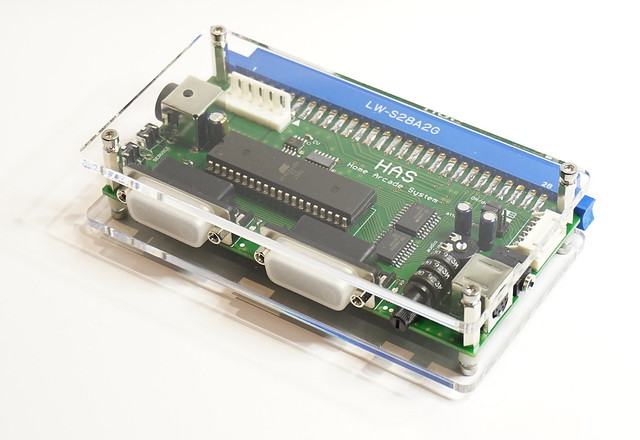
Project HAS - my take on designing a single PCB supergun
-
Supergun

- Posts: 6
- Joined: Thu Apr 25, 2013 3:48 am
- Location: Orlando, Florida, USA
- Contact:
Re: Project HAS - my take on designing a single PCB supergun
Does anybody here know where I can buy one of these?
The word impossible can only be found in a dictionary of fools.
-
bergalon
- Posts: 2
- Joined: Mon Oct 16, 2017 7:01 pm
Re: Project HAS - my take on designing a single PCB supergun
Anyone with an extra one of these I'd love to grab one. Total arcade newb here and JNX recommended RGB's board. Thanks!
-
bestinshow
- Posts: 2
- Joined: Sat Oct 07, 2017 10:37 pm
Re: Project HAS - my take on designing a single PCB supergun
There is a thread in the sales forum: viewtopic.php?f=4&t=52895bergalon wrote:Anyone with an extra one of these I'd love to grab one. Total arcade newb here and JNX recommended RGB's board. Thanks!
-
NENDO
- Posts: 2
- Joined: Thu Oct 16, 2014 9:01 pm
Re: Project HAS - my take on designing a single PCB supergun
How the heck do I buy one if I don't meet the requirements to view the sales thread?
-
schoscho

- Posts: 1
- Joined: Mon Jan 15, 2018 12:23 pm
- Location: Switzerland
Re: Project HAS - my take on designing a single PCB supergun
I've got the same question.NENDO wrote:How the heck do I buy one if I don't meet the requirements to view the sales thread?

-
Nemo1985X
- Posts: 1
- Joined: Tue Feb 05, 2013 7:46 pm
Re: Project HAS - my take on designing a single PCB supergun
schoscho wrote:I've got the same question.NENDO wrote:How the heck do I buy one if I don't meet the requirements to view the sales thread?
I’m wondering the same thing.
-
strygo
- Posts: 506
- Joined: Sun Mar 05, 2017 5:47 am
- Location: Snohomish, WA
Re: Project HAS - my take on designing a single PCB supergun
There is a much more lively HAS thread on arcade-projects.com that I would recommend following. Here's the link:
https://www.arcade-projects.com/forums/ ... /&pageNo=1
https://www.arcade-projects.com/forums/ ... /&pageNo=1
-
RGB

- Posts: 527
- Joined: Sat Aug 04, 2007 3:11 pm
- Location: Europe
Re: Project HAS - my take on designing a single PCB supergun
This project has come a long way. The current version is 4.2 and it's finally readily available for purchase in my store:
https://rgbslab.com/
Thank you for being so supportive throughout all these years.

https://rgbslab.com/
Thank you for being so supportive throughout all these years.
-
RGB
- Posts: 527
- Joined: Sat Aug 04, 2007 3:11 pm
- Location: Europe
Re: Project HAS - my take on designing a single PCB supergun
I haven't posted here in a while. The HAS has gone through a major redesign in 2024. It now comes with a 1.3" OLED and an extensive menu system. It doesn't have physical switches or potentiometers - you can change brightness, calibrate each color, and switch between mono/stereo audio via the menu.
There is even a dedicated gameplay mode for shmups. I called it "Shmups Arrange Mode". You can control both ship 1 and ship 2 using player 1 controls:
● Player 1 joystick input = Player 1 + Player 2 joystick output
● Player 1, button set to 1 = Player 1 + Player 2 button 1 output ( P1+P2 SHOT).
● Player 1, button set to 2 = Player 1 button 2 output (P1 BOMB).
● Player 1, button set to 3 = Player 1 + Player 2 button 3 output.
● Player 1, button set to 4 = Player 1 + Player 2 button 4 output.
● Player 1, button set to 5 = Player 2 button 2 output (P2 BOMB).
● Player 1, button set to 6 = Player 2 button Start output (P2 START).
There's also a way to slow down (Cave-style) your ship's movement in games that don't natively have this feature. You basically set a special macro called "Affect Joystick" to one of the buttons and apply rapid-fire to it. During gameplay, when you hold that button while moving the joystick, the joystick will "inherit" the rapid-fire rate from the button, making the ship move more slowly.
The full list of features can be found in the product description and in the User Guide - https://rgbslab.com/products/has-v5-0 / https://rgbslab.com/pages/has-instruction-manual


There is even a dedicated gameplay mode for shmups. I called it "Shmups Arrange Mode". You can control both ship 1 and ship 2 using player 1 controls:
● Player 1 joystick input = Player 1 + Player 2 joystick output
● Player 1, button set to 1 = Player 1 + Player 2 button 1 output ( P1+P2 SHOT).
● Player 1, button set to 2 = Player 1 button 2 output (P1 BOMB).
● Player 1, button set to 3 = Player 1 + Player 2 button 3 output.
● Player 1, button set to 4 = Player 1 + Player 2 button 4 output.
● Player 1, button set to 5 = Player 2 button 2 output (P2 BOMB).
● Player 1, button set to 6 = Player 2 button Start output (P2 START).
There's also a way to slow down (Cave-style) your ship's movement in games that don't natively have this feature. You basically set a special macro called "Affect Joystick" to one of the buttons and apply rapid-fire to it. During gameplay, when you hold that button while moving the joystick, the joystick will "inherit" the rapid-fire rate from the button, making the ship move more slowly.
The full list of features can be found in the product description and in the User Guide - https://rgbslab.com/products/has-v5-0 / https://rgbslab.com/pages/has-instruction-manual