Thank you
OSSC (DIY video digitizer & scandoubler)
-
Konsolkongen
- Posts: 2398
- Joined: Fri May 16, 2008 8:28 pm
- Location: Denmark
-
SavagePencil
- Posts: 854
- Joined: Mon Nov 11, 2013 4:06 pm
Re: OSSC (DIY video digitizer & scandoubler)
What's the best way to handle profiles in the 1.XX world? I was a big dummy and forgot to export my 0.90 ones before the update. And the online tool only goes up to 0.89. Should I re-create them by hand or is there a method to migrate the 0.90 ones?
I tried using Win32 ImageWriter or whatever it's called to cook my 0.90 bin file to SD card, but the 1.07 import failed on those.
-
headlesshobbs
- Posts: 386
- Joined: Sun Jul 04, 2010 11:14 pm
Re: OSSC (DIY video digitizer & scandoubler)
Was there ever any testing to see if 1440x480p works?
"Don't HD my SD!!"
-
orange808
- Posts: 3871
- Joined: Sat Aug 20, 2016 5:43 am
Re: OSSC (DIY video digitizer & scandoubler)
How would I test that?headlesshobbs wrote: ↑Thu Oct 19, 2023 9:24 pm Was there ever any testing to see if 1440x480p works?
We apologise for the inconvenience
-
headlesshobbs
- Posts: 386
- Joined: Sun Jul 04, 2010 11:14 pm
Re: OSSC (DIY video digitizer & scandoubler)
nvm
Last edited by headlesshobbs on Sun Oct 22, 2023 7:55 pm, edited 1 time in total.
-
AlxUnderBase
- Posts: 34
- Joined: Tue Aug 28, 2018 5:24 am
- Location: Constanta,Romania
- Contact:
Re: OSSC (DIY video digitizer & scandoubler)
Thank you @marqs ! Moded the 1.6 unit today and updated with 1.07 fw !


-
paulb_nl
- Posts: 341
- Joined: Sat Feb 20, 2016 5:05 pm
Re: OSSC (DIY video digitizer & scandoubler)
If you go back to 0.90 firmware then you can still export the profiles to sd card which haven't been overwitten on 1.xx firmware and import that bin file in the profile manager once I have added 1.xx support.SavagePencil wrote: ↑Thu Oct 19, 2023 3:49 pm What's the best way to handle profiles in the 1.XX world? I was a big dummy and forgot to export my 0.90 ones before the update. And the online tool only goes up to 0.89. Should I re-create them by hand or is there a method to migrate the 0.90 ones?
Speaking of which, I need an exported profiles bin file with a saved 1.07 profile in it which would help me to add support to the profile manager. So if someone can upload that somewhere then that would be very helpful.
-
XtraSmiley
- Posts: 711
- Joined: Fri Apr 20, 2018 9:22 am
- Location: Washigton DC
Re: OSSC (DIY video digitizer & scandoubler)
My friend, any differences in arcade PCBs?AlxUnderBase wrote: ↑Fri Oct 20, 2023 2:21 pm Thank you @marqs ! Moded the 1.6 unit today and updated with 1.07 fw !
-
AlxUnderBase
- Posts: 34
- Joined: Tue Aug 28, 2018 5:24 am
- Location: Constanta,Romania
- Contact:
Re: OSSC (DIY video digitizer & scandoubler)
Buddy , now , i can play Midway T Unit pcbs without additional items like dvdo or something similar , or sync helpers ... at least , on the that monitor ive tried , it worked , but isnt worked on lcd tv from my room (anyway , that lcd tv adds some lag also - maybe it have gaming setting and i dont know about it, but im sure is a matter of settings and isnt from ossc unit)XtraSmiley wrote: ↑Sat Oct 21, 2023 2:51 pmMy friend, any differences in arcade PCBs?AlxUnderBase wrote: ↑Fri Oct 20, 2023 2:21 pm Thank you @marqs ! Moded the 1.6 unit today and updated with 1.07 fw !
here is on gaming lcd monitor (here im sure it takes anything , also tried M72 - all good too - no lag , very nice how look and feels when play)

here is on my consumer lcd tv from room (he didnt sync Jaleco MMS1 before update - i tried P:47 , but now i didnt tried to see if sync's)

-
XtraSmiley
- Posts: 711
- Joined: Fri Apr 20, 2018 9:22 am
- Location: Washigton DC
Re: OSSC (DIY video digitizer & scandoubler)
Awesome! I still haven't modded mine, been a little nervous about trying it, I don't have a steady hand or good eyesight!
-
H6rdc0re
- Posts: 229
- Joined: Tue Jan 17, 2017 8:22 pm
Re: OSSC (DIY video digitizer & scandoubler)
With 1440p available for 6x 240p sources. Would it be possible to add 1440p 3x 480p as well for 4:3 sources?
-
marqs
- Posts: 1139
- Joined: Sat Dec 15, 2012 12:11 pm
- Location: Finland
Re: OSSC (DIY video digitizer & scandoubler)
Technically it is possible, and perhaps 16:9 mode (2560x1440@60) as well. The HDMI transmitter is specced to 225MHz TMDS clock which is quite on par with 4:3 480p x3 while 16:9 mode would run at 'overclocked' 295MHz. For reference, the 165MHz transmitter on DE10-Nano is able to drive ~250MHz, and 300MHz transmitter in OSSC Pro reaches ~410MHz, at least in room temperature.
However, as I've mentioned in VGP forums, there's some obstables for adding any new features. My focus will on Pro on the upcoming months so I've summarized below what would need to be done in order to implement the feature if someone wants to have a try:
1. Reduction of SW image size by 1-2kB (either by tighter optimization or by removal of existing features)
2. Addition of new generic 480p sampling presets (960x480 and 1280x480) for respective Linex3 modes
3. Addition of related functionality (menu options, scanconverter configs etc.)
4. Addition of a new PLL configuration (50MHz -> 150MHz)
-
AlxUnderBase
- Posts: 34
- Joined: Tue Aug 28, 2018 5:24 am
- Location: Constanta,Romania
- Contact:
Re: OSSC (DIY video digitizer & scandoubler)
@marqs i tested my rgb modded snes and 1.08 working (snes mini + voultar rgb board + c11 ghosting fix + retrogaming cable scart)
No Loose sync - same screens mentioned in the previous post . Only thing i want to mention is : the samsung lcd works only till 5x and no sync on 6x , but works on passtrough (also i set game mode on tv)
On benq monitor works 6x and anything i tried. No loose sync or sounds . All good .
Cheers
No Loose sync - same screens mentioned in the previous post . Only thing i want to mention is : the samsung lcd works only till 5x and no sync on 6x , but works on passtrough (also i set game mode on tv)
On benq monitor works 6x and anything i tried. No loose sync or sounds . All good .
Cheers
-
Agent BSoD
- Posts: 12
- Joined: Thu Nov 12, 2020 7:03 pm
Re: OSSC (DIY video digitizer & scandoubler)
Just upgraded to the OSSC 1.8 (my OSSC 1.6 unexpectedly died while in use) and flashed 1.08 to it, and I'm pretty sure I found a bug as this never happened with 0.90. Using GBI on the GameCube (gbihf-ossc, latest version, through the EON GCHD-MkII and HDRetrovision Wii component cables) is giving me the wrong aspect ratio. I should be getting square pixels. Instead, I'm getting a horizontal stretch, making it more wide than it should be. It's happening with both Line2x 240x360 and Line3x 240x360 options, but is not present with Line2x or Passthru. My Retrotink 5x is not exhibiting this. I've been messing around with settings for a while to no avail so I'm pretty certain it's a bug in the firmware.
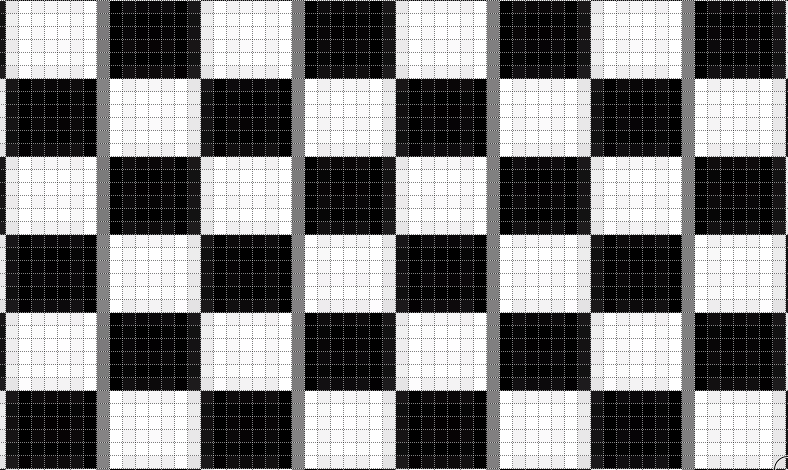
Here's the checkerboard pattern from the GBA 160p test suite. Phase is already dialed in. (zoomed in with paint.net)

Here's the checkerboard pattern from the GBA 160p test suite. Phase is already dialed in. (zoomed in with paint.net)

-
marqs
- Posts: 1139
- Joined: Sat Dec 15, 2012 12:11 pm
- Location: Finland
Re: OSSC (DIY video digitizer & scandoubler)
X-scale settings for GBI presets seem to have got lost in the v1.xx series update. Will need to fix for next firmwareAgent BSoD wrote: ↑Thu Dec 07, 2023 3:05 am Just upgraded to the OSSC 1.8 (my OSSC 1.6 unexpectedly died while in use) and flashed 1.08 to it, and I'm pretty sure I found a bug as this never happened with 0.90. Using GBI on the GameCube (gbihf-ossc, latest version, through the EON GCHD-MkII and HDRetrovision Wii component cables) is giving me the wrong aspect ratio. I should be getting square pixels. Instead, I'm getting a horizontal stretch, making it more wide than it should be. It's happening with both Line2x 240x360 and Line3x 240x360 options, but is not present with Line2x or Passthru. My Retrotink 5x is not exhibiting this. I've been messing around with settings for a while to no avail so I'm pretty certain it's a bug in the firmware.
-
tongshadow
- Posts: 693
- Joined: Sat Jan 07, 2017 5:11 pm
Re: OSSC (DIY video digitizer & scandoubler)
So, I got another OSSC and for the heck of it I decided to mod it so it could be used as a free lag-tester. Sure, the Time-sleuth is more precise as it's built solely for the purpose of measing display lag from many signal types, but the OSSC is good enough for comparing added lag.
I wanted to measure my LG C2 to see if the infamous added lag from 4:3 was still present, I'm using the latest firmware update btw, and the results are self-explanatory. I used 240p as a source because it allows me to test all available resolution outputs. Game Mode and all bells and whistles for low lag are on.
240p (Passthrough) - 3.17ms (stretched), 19.89ms (4:3)
480i (Passthrough) - 28.26ms
720x480 (2x mode) - 19.98ms
1280x720 (3x mode) - 3.22ms
1280x960 (4x mode) - 19.79ms
1920x1080 (5x mode) - 4.55ms
1600x1200 (5x mode) - 19.86ms
Black Frame Insertion (1280x720) - 19.9ms
Black Frame Insertion (1280x960) - 36.6ms
Black Frame Insertion (1920x1080) - 21.22ms
I wanted to measure my LG C2 to see if the infamous added lag from 4:3 was still present, I'm using the latest firmware update btw, and the results are self-explanatory. I used 240p as a source because it allows me to test all available resolution outputs. Game Mode and all bells and whistles for low lag are on.
240p (Passthrough) - 3.17ms (stretched), 19.89ms (4:3)
480i (Passthrough) - 28.26ms
720x480 (2x mode) - 19.98ms
1280x720 (3x mode) - 3.22ms
1280x960 (4x mode) - 19.79ms
1920x1080 (5x mode) - 4.55ms
1600x1200 (5x mode) - 19.86ms
Black Frame Insertion (1280x720) - 19.9ms
Black Frame Insertion (1280x960) - 36.6ms
Black Frame Insertion (1920x1080) - 21.22ms
-
Guspaz
- Posts: 3242
- Joined: Tue Oct 06, 2015 7:37 pm
- Location: Montréal, Canada
Re: OSSC (DIY video digitizer & scandoubler)
They didn’t fix it for the C3 either. LG doesn’t care.
-
kardus
- Posts: 81
- Joined: Sun Dec 20, 2015 4:21 am
Re: OSSC (DIY video digitizer & scandoubler)
Does anyone have any case STLs for the old DVI port versions?
-
bobrocks95
- Posts: 3662
- Joined: Mon Apr 30, 2012 2:27 am
- Location: Kentucky
Re: OSSC (DIY video digitizer & scandoubler)
Has anyone reprogrammed an OSSC remote for a GCVideo Carby adapter? Seem to have misplaced my Carby one and the OSSC remote is fairly generic afaik. Is it easy to program back afterwards so I can sell the OSSC?
PS1 Disc-Based Game ID BIOS patch for MemCard Pro and SD2PSX automatic VMC switching.
-
Guspaz
- Posts: 3242
- Joined: Tue Oct 06, 2015 7:37 pm
- Location: Montréal, Canada
Re: OSSC (DIY video digitizer & scandoubler)
You don't need to reprogram the OSSC remote to do that, you can just have the GCVideo learn the OSSC remote's signals. I use my OSSC remote for my gcvideo and OSSC without having reprogrammed anything. AFAIK almost any remote will do.
-
bobrocks95
- Posts: 3662
- Joined: Mon Apr 30, 2012 2:27 am
- Location: Kentucky
Re: OSSC (DIY video digitizer & scandoubler)
Thanks Guspaz, good point you can keep the IR codes the same on the remote and just get the device to learn them. I'll look into it!
PS1 Disc-Based Game ID BIOS patch for MemCard Pro and SD2PSX automatic VMC switching.
-
marqs
- Posts: 1139
- Joined: Sat Dec 15, 2012 12:11 pm
- Location: Finland
Re: OSSC (DIY video digitizer & scandoubler)
The GBI presets are now fixed in v1.09 which was just released. The firmware also has a few sync processing improvements which e.g. enable a workaround that finally makes Taito F3 compatibie without any special cables/adapters.marqs wrote: ↑Fri Dec 08, 2023 6:25 pmX-scale settings for GBI presets seem to have got lost in the v1.xx series update. Will need to fix for next firmwareAgent BSoD wrote: ↑Thu Dec 07, 2023 3:05 am Just upgraded to the OSSC 1.8 (my OSSC 1.6 unexpectedly died while in use) and flashed 1.08 to it, and I'm pretty sure I found a bug as this never happened with 0.90. Using GBI on the GameCube (gbihf-ossc, latest version, through the EON GCHD-MkII and HDRetrovision Wii component cables) is giving me the wrong aspect ratio. I should be getting square pixels. Instead, I'm getting a horizontal stretch, making it more wide than it should be. It's happening with both Line2x 240x360 and Line3x 240x360 options, but is not present with Line2x or Passthru. My Retrotink 5x is not exhibiting this. I've been messing around with settings for a while to no avail so I'm pretty certain it's a bug in the firmware.
-
Agent BSoD
- Posts: 12
- Joined: Thu Nov 12, 2020 7:03 pm
Re: OSSC (DIY video digitizer & scandoubler)
Yep that looks a lot better. Thanks!
Edit: Actually, I've been messing around with it a bit with different capture cards and something still doesn't seem right. The resolution output with GBI presets seems very odd to me. Line2x gives me 1336 x 720, and Line3x gives me 2048 x 1080. My Datapath E1S has no issue with this and output is perfect, but my Avermedia 4K tries to put those into one of its predefined resolutions (i.e. 2560 x 1080) and horizontal scaling happens, resulting in the checkerboard pattern doing something rather similar to the image I posted earlier. Going by some screenshots I have from my older OSSC, the only thing changing is the thickness of the black borders on the horizontal edges. The actual aspect ratio of the games are correct though.
-
marqs
- Posts: 1139
- Joined: Sat Dec 15, 2012 12:11 pm
- Location: Finland
Re: OSSC (DIY video digitizer & scandoubler)
Try resetting the profile or set H.active to 240 if you had saved settings using previous fw version. Some of the preset timings were changed but I did not trigger profile version update since no major changes were done.Agent BSoD wrote: ↑Tue Jan 09, 2024 2:48 amYep that looks a lot better. Thanks!
Edit: Actually, I've been messing around with it a bit with different capture cards and something still doesn't seem right. The resolution output with GBI presets seems very odd to me. Line2x gives me 1336 x 720, and Line3x gives me 2048 x 1080. My Datapath E1S has no issue with this and output is perfect, but my Avermedia 4K tries to put those into one of its predefined resolutions (i.e. 2560 x 1080) and horizontal scaling happens, resulting in the checkerboard pattern doing something rather similar to the image I posted earlier. Going by some screenshots I have from my older OSSC, the only thing changing is the thickness of the black borders on the horizontal edges. The actual aspect ratio of the games are correct though.
-
Agent BSoD
- Posts: 12
- Joined: Thu Nov 12, 2020 7:03 pm
Re: OSSC (DIY video digitizer & scandoubler)
Yep that fixed it. H.active was set to 256 on my profile, must've been a leftover from how I had it set up in some earlier version. Setting that to 240 and doing some image readjustments brought it back to normal.
-
NightSprinter
- Posts: 232
- Joined: Thu May 02, 2013 2:24 pm
Re: OSSC (DIY video digitizer & scandoubler)
I have a Kaico version, but for some reason using the 256x240 optimized timings to test my Nt Mini's RGB out (as I eventually will be getting my SNES and RGB cable out of FL) is resulting in "not compatible" being shown from my EVGA XR1 Pro. Using Generic 4:3 works fine, but I get shimmering pictures.
-
NightSprinter
- Posts: 232
- Joined: Thu May 02, 2013 2:24 pm
Re: OSSC (DIY video digitizer & scandoubler)
Nevermind, figured it out. Turns out the fractional horizontal sampling had to be set to 0.25, and it now works up to 5x in all three 5x resolutions.NightSprinter wrote: ↑Sat Jun 08, 2024 3:26 pm I have a Kaico version, but for some reason using the 256x240 optimized timings to test my Nt Mini's RGB out (as I eventually will be getting my SNES and RGB cable out of FL) is resulting in "not compatible" being shown from my EVGA XR1 Pro. Using Generic 4:3 works fine, but I get shimmering pictures.
-
KekGs
- Posts: 4
- Joined: Mon Apr 12, 2021 9:50 am
Re: OSSC (DIY video digitizer & scandoubler)
Hello all.
Long time user of OSSC, but after a while I decided to jump onto the pure analog capture.
A while back, I pulled out the OSSC and got updated that we can mod our OSSC for a Line 6x, I did the mod and updated to latest firmware which was a success!
When I try to do Line 5x and use optimal timings I get a very distored picture, Can't remember that it was like that ever?
https://ibb.co/SR7XvSB
It's a PS2 NTSC Console running a 320x240p game (Final fantasy IX) in this case, Retrogaming Cables from UK (SCART) into the OSSC, and then from OSSC into a Magewell USB HDMI Capture.
Whenever I do a Generic 4:3, the image is "perfect" and stable, but as soon as I pick 320x240p optimal timings, I get this image.
Can someone explain this to me? I really hope I didn't mess up the mod cause it works great on my SNES with Optimal timings for 256x224.
Would love to hear what you experts have to say.
The OSSC was bought from VGP and I believe it's the 1.6 model.
Thanks!
Long time user of OSSC, but after a while I decided to jump onto the pure analog capture.
A while back, I pulled out the OSSC and got updated that we can mod our OSSC for a Line 6x, I did the mod and updated to latest firmware which was a success!
When I try to do Line 5x and use optimal timings I get a very distored picture, Can't remember that it was like that ever?
https://ibb.co/SR7XvSB
It's a PS2 NTSC Console running a 320x240p game (Final fantasy IX) in this case, Retrogaming Cables from UK (SCART) into the OSSC, and then from OSSC into a Magewell USB HDMI Capture.
Whenever I do a Generic 4:3, the image is "perfect" and stable, but as soon as I pick 320x240p optimal timings, I get this image.
Can someone explain this to me? I really hope I didn't mess up the mod cause it works great on my SNES with Optimal timings for 256x224.
Would love to hear what you experts have to say.
The OSSC was bought from VGP and I believe it's the 1.6 model.
Thanks!
-
marqs
- Posts: 1139
- Joined: Sat Dec 15, 2012 12:11 pm
- Location: Finland
Re: OSSC (DIY video digitizer & scandoubler)
Do you know if the capture card is supposed to support pixel clocks beyond 165MHz?KekGs wrote: ↑Wed Jun 19, 2024 9:12 am Hello all.
Long time user of OSSC, but after a while I decided to jump onto the pure analog capture.
A while back, I pulled out the OSSC and got updated that we can mod our OSSC for a Line 6x, I did the mod and updated to latest firmware which was a success!
When I try to do Line 5x and use optimal timings I get a very distored picture, Can't remember that it was like that ever?
https://ibb.co/SR7XvSB
It's a PS2 NTSC Console running a 320x240p game (Final fantasy IX) in this case, Retrogaming Cables from UK (SCART) into the OSSC, and then from OSSC into a Magewell USB HDMI Capture.
Whenever I do a Generic 4:3, the image is "perfect" and stable, but as soon as I pick 320x240p optimal timings, I get this image.
Can someone explain this to me? I really hope I didn't mess up the mod cause it works great on my SNES with Optimal timings for 256x224.
Would love to hear what you experts have to say.
The OSSC was bought from VGP and I believe it's the 1.6 model.
Thanks!
-
marqs
- Posts: 1139
- Joined: Sat Dec 15, 2012 12:11 pm
- Location: Finland
Re: OSSC (DIY video digitizer & scandoubler)
Firmware version v1.10 is now out and possibly will be final official release as the project soon reaches 10th anniversary. Some quirks can still be found and there are always things to improve for those who are willing to spend the development/debug effort. A recent example is a tweak to reduce ADC sampling jitter which was half-accidentally found during Lumacode development. Wish that would have been available already years ago, but better late than never.
* Added support for Lumacode
* Added HDMI VRR flag option
* Reduced sampling jitter on optimized modes
* Fixed sync drop issue with some sources like MSX
* Fixed auto input detection loop
* High/optimal sampling rate modes added for passthru
* Added support for Lumacode
* Added HDMI VRR flag option
* Reduced sampling jitter on optimized modes
* Fixed sync drop issue with some sources like MSX
* Fixed auto input detection loop
* High/optimal sampling rate modes added for passthru