So with my Toro in transit I'm starting to wonder how to hook this sucker up.
I have two TVs:
-Random ass 55 Inch RCA with HDMI/Component/Composite Inputs
-Sony 2030 with which I use the sony 25 pin d-sub connector with scart
I do have a framemeister but once I got the crt I put it in the closet and it sits there today
How should I hook up the VGA out on the Toro?
As of now my setup is nes/snes/genesis/n64/ps1 on the crt and everything via component/hdmi on the LCD.
Dreamcast with Toro
-
Fudoh

- Posts: 13044
- Joined: Mon Mar 06, 2006 3:29 am
- Location: Germany
- Contact:
Re: Dreamcast with Toro
For 15khz RGB from the Toro you simply connect a Scart to Scart cable to the same adapter you're now using for your other RGB sources.
On the LCD you need to convert VGA to HDMI or component. If the TV has stellar component picture, then this would be better than HDMI. VGA is simpler and cheaper though if you don't need 100% perfect quality. To get the best quality you'd need to go from VGA to component and from component to HDMI.
On the LCD you need to convert VGA to HDMI or component. If the TV has stellar component picture, then this would be better than HDMI. VGA is simpler and cheaper though if you don't need 100% perfect quality. To get the best quality you'd need to go from VGA to component and from component to HDMI.
-
scottmog

- Posts: 66
- Joined: Thu Sep 18, 2014 4:46 pm
- Location: Anaheim, CA
Re: Dreamcast with Toro
Thank you Fudoh, I'll need to look for a reputable converter to component then. I have a pretty large component switch box with many other consoles plugged in.
-
Hoagtech

- Posts: 1025
- Joined: Mon Apr 27, 2015 3:53 am
- Location: Bellingham, WA
Re: Dreamcast with Toro
Does anyone know of a cheap vga to hdmi converter that is lag free and displays the loew black levels correctly?
I am looking for this same thing. I have an ossc but I think there may be a better option.
I am looking for this same thing. I have an ossc but I think there may be a better option.
Copyright 1987
-
Fudoh
- Posts: 13044
- Joined: Mon Mar 06, 2006 3:29 am
- Location: Germany
- Contact:
Re: Dreamcast with Toro
no, there isn't, since the OSSC is the only converter option that will give you the DC's full resolution. Why are you looking for other options ?I have an ossc but I think there may be a better option.
-
Hoagtech
- Posts: 1025
- Joined: Mon Apr 27, 2015 3:53 am
- Location: Bellingham, WA
Re: Dreamcast with Toro
The xrgb mini did the same on scale 2x.
I get compression artifacts on my dreamcast when running in vesa mode on the ossc. And my frame is correct aspect but is oversquashed.
Their should be the same borders as a line doubled 480p image (960 in a 1080 frame) but I can still outlines of video outside the border before my tvs back porch cuts its off. And if it was 960 the borders should be smaller
I feel like the dreamcast image is compressed inside of its own native resolution on vga output or converted rgbs
It makes the lady in shenmue on the startup cinematic look like she has a mustache because I see compression.
Also I have yet to test the 240p suite but my image seemed darker than on RGBs from the framemeister
I get compression artifacts on my dreamcast when running in vesa mode on the ossc. And my frame is correct aspect but is oversquashed.
Their should be the same borders as a line doubled 480p image (960 in a 1080 frame) but I can still outlines of video outside the border before my tvs back porch cuts its off. And if it was 960 the borders should be smaller
I feel like the dreamcast image is compressed inside of its own native resolution on vga output or converted rgbs
It makes the lady in shenmue on the startup cinematic look like she has a mustache because I see compression.
Also I have yet to test the 240p suite but my image seemed darker than on RGBs from the framemeister
Copyright 1987
-
HydrogLox
- Posts: 1164
- Joined: Tue May 22, 2012 3:35 pm
- Location: Ontario, Canada
Re: Dreamcast with Toro
http://junkerhq.net/xrgb/index.php/Drea ... c_settingsHoagtech wrote:I get compression artifacts on my dreamcast when running in vesa mode on the ossc.
Obviously I'm missing something ...When using the Dreamcast with the OSSC, ensure that "480p in sampler" is set to "DTV 480p". This should correct the aspect ratio issue described above without the need to use another processor.
No other special settings are required.
-
Hoagtech
- Posts: 1025
- Joined: Mon Apr 27, 2015 3:53 am
- Location: Bellingham, WA
Re: Dreamcast with Toro
I did (and read that) and it didn't correct the aspect at all. The only mode that worked was the vesa 640 x 480 mode.HydrogLox wrote:http://junkerhq.net/xrgb/index.php/Drea ... c_settingsHoagtech wrote:I get compression artifacts on my dreamcast when running in vesa mode on the ossc.Obviously I'm missing something ...When using the Dreamcast with the OSSC, ensure that "480p in sampler" is set to "DTV 480p". This should correct the aspect ratio issue described above without the need to use another processor.
No other special settings are required.
Copyright 1987
-
Guspaz

- Posts: 3242
- Joined: Tue Oct 06, 2015 7:37 pm
- Location: Montréal, Canada
Re: Dreamcast with Toro
That option controls if sampling is done for a 720x480 or 640x480 image. As far as the OSSC is concerned, the image is the same width either way, it's about how many samples per line are taken.
The dreamcast outputs a 720x480 image, so if we want to sample each pixel, we need to use the DTV setting for 720x480.
The problem is that while the image the Dreamcast outputs is 720x480, it only uses the middle 640 pixels for the game itself. That's a problem because if you stretch out 720 to 16:9, then your DreamCast image gets stretched out to a 1.58 aspect ratio, if you compress 720 to 4:3, then your dreamcast gets squished to a 1.19 aspect ratio... and neither of those make sense.
What we really need to do is have the outer parts of the Dreamcast signal ignored so that we sample the 720 image but only use the 640 part of the image.
There are, AFAIK, two ways that you could do this. First, if your display supports it, you should be able to play with the OSSC's advanced timing settings to set the active area to 640 such that your display will see a 640x480 image and show it as 4:3. Second, you can correct the aspect ratio after it leaves the OSSC (either on a scaler or your display) to scale the image to 4:3.
Anyhow, you always want to use the DTV setting with the Dreamcast, because 720x480 sampling (or higher) is the only option to avoid throwing away pixels.
The dreamcast outputs a 720x480 image, so if we want to sample each pixel, we need to use the DTV setting for 720x480.
The problem is that while the image the Dreamcast outputs is 720x480, it only uses the middle 640 pixels for the game itself. That's a problem because if you stretch out 720 to 16:9, then your DreamCast image gets stretched out to a 1.58 aspect ratio, if you compress 720 to 4:3, then your dreamcast gets squished to a 1.19 aspect ratio... and neither of those make sense.
What we really need to do is have the outer parts of the Dreamcast signal ignored so that we sample the 720 image but only use the 640 part of the image.
There are, AFAIK, two ways that you could do this. First, if your display supports it, you should be able to play with the OSSC's advanced timing settings to set the active area to 640 such that your display will see a 640x480 image and show it as 4:3. Second, you can correct the aspect ratio after it leaves the OSSC (either on a scaler or your display) to scale the image to 4:3.
Anyhow, you always want to use the DTV setting with the Dreamcast, because 720x480 sampling (or higher) is the only option to avoid throwing away pixels.
-
Fudoh
- Posts: 13044
- Joined: Mon Mar 06, 2006 3:29 am
- Location: Germany
- Contact:
Re: Dreamcast with Toro
that's a neat idea. Would love to hear if that works....First, if your display supports it, you should be able to play with the OSSC's advanced timing settings to set the active area to 640 such that your display will see a 640x480 image and show it as 4:3
I tried to line out the differences between the OSSC's VESA and DTV modes here: http://pms.hazard-city.de/ossc_sampling.jpg
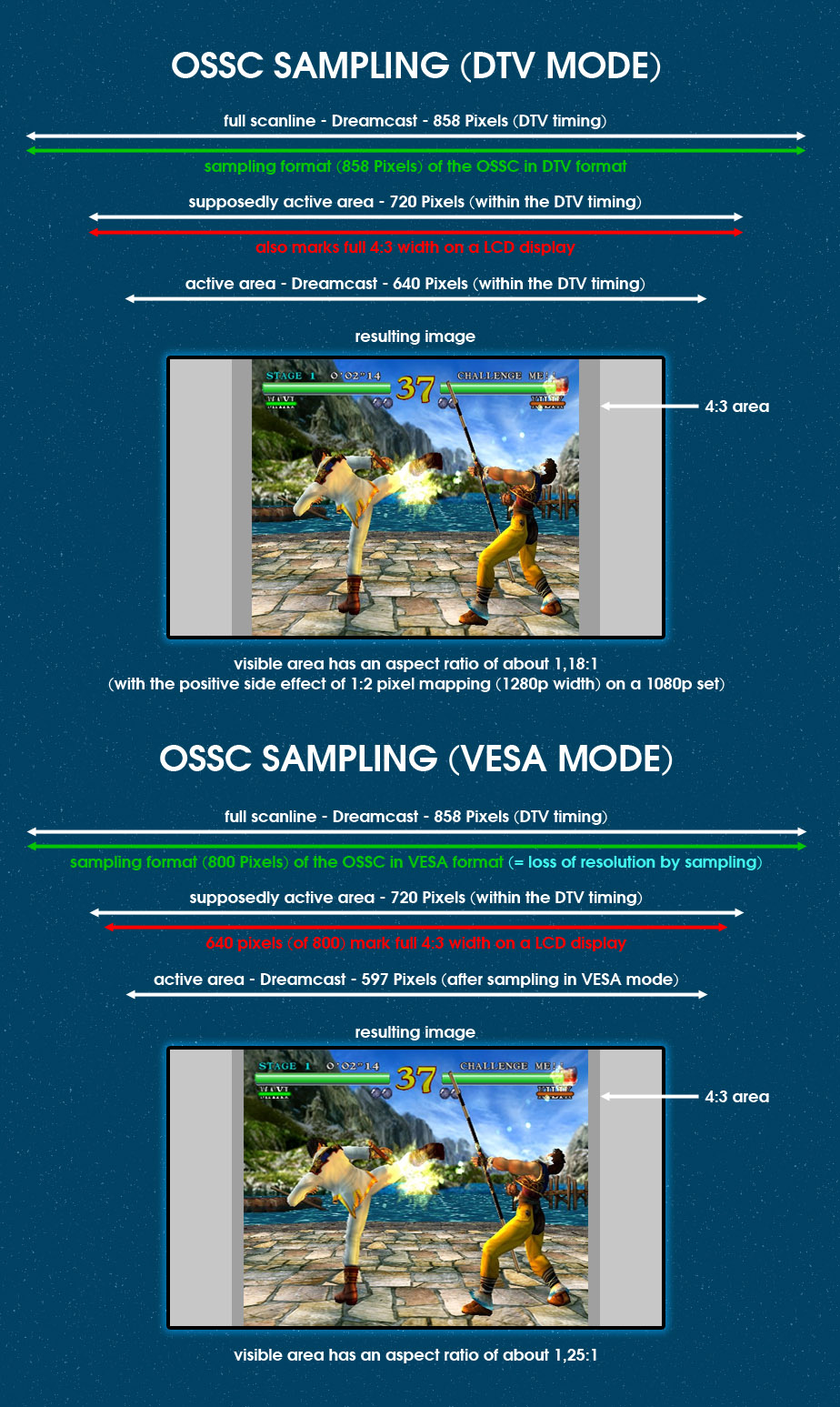
Neither modes give you the right aspect ratio (but that's Sega's fault, not the OSSC's).