The Good
-It captured everything I threw at it so far in terms of RGB video.
-It supports modern consoles with HDMI capture via adapter (no HDMI audio, its supported on "Pro" card only!). HDCP is enforced.
-It captures in full 8:8:8 RGB, no forced YUV conversions.
-This card is very tweakable, see below for the settings available in the driver.

Fine tuning of the ADC can be done here. Its a bit of an art to get some sources to cooperate, you'll likely need a test image outputted from your console/computer to dial in the PLL and sampling phase to get 1:1 capture. A 3rd party tool geared toward tweaking VGA mode capture can be downloaded here, it might come in handy for 480p consoles that don't have excessive over scan. Test patterns can be found there too.

The card supports mode and resolution switching mid-capture, and allows you to "lock" a set resolution in your capture application. Scaling to the capture resolution is available but likely involves a CPU hit.

By default, the card comes pre-programmed with several VESA standard video modes. That's great for VGA capture, but not so great for 240p/288p. Out of the box, it will usually detect those sources as interlaced. In addition, you can limit the modes the card can capture, or setup a list of custom modes.

Custom mode settings can be adjusted with every parameter imaginable. The settings used here are what I used to capture video from my Apple IIgs. If you are capturing 240p/288p or dealing with an arcade PCB with weird refresh rates, you will be visiting this dialog box often since those modes aren't programmed in by default. Even if you are slightly off on values, the card will sync and adjust the values automatically.

Some misc settings in the Advanced tab. You may need to adjust the horizontal or vertical sync levels if you get unstable video output or flagging.
The Bad
-The price, this card lists for almost $1000US. Deals can be had on ebay for a mere fraction of the price though.
-There is no 240p/480i mode switching like the OSSC has. If you set both a 240p custom mode and a 480i mode, the card will "favor" the 480i capture mode. If you are capturing games with frequent mode changes, you are going to have to manually unweave 480i video back to 240p, or capture at 240p and deal with the interlaced portions.
-Mode changes can be laggy depending on source.
Specs
From: https://www.epiphan.com/wp-content/uplo ... ochure.pdf
The onboard ADC is an Intersil ISL98001
85fps capture up to 1280x1024
60fps capture up to 1920x1200
20fps capture up to 2048x2048
Supports H+V sync, composite sync, and SoG
H-sync capture range: 15khz - 150khz
Drivers for Windows (DirectShow), MacOS X (Quicktime), and Linux (Video4Linux)
Card's onboard FPGA controller is vendor upgradable.
Samples
Note: I don't have access to any consoles at the moment, just computers that output 240p video.
Apple IIgs video capture: https://www.youtube.com/watch?v=gtXYOX0k6C0
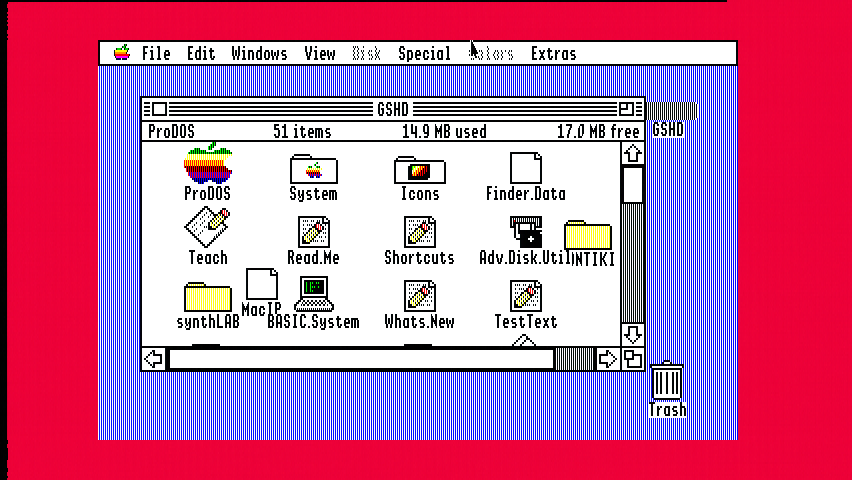
Below images are un-retouched with the exception of doubling the vertical size to (mostly) correct the aspect ratio.
Apple IIgs 640x200 mode (border set to red to show extent of overscan):
Apple IIgs 320x200 mode:

My verdict:
If you can find one cheap, pick it up! Unlike the Yuan cards, this card doesn't seem to be filled with annoying random bugs.

 Although i get lots of stuttering and such, but maybe i need to configure the capture software a bit more to solve it... if it is possible to solve that is?